Chapter 7: Retrieval Upgrade in Practice — Build a “Smarter” Document Understanding System Yourself!
This tutorial corresponds to the content of the Advanced 1 course and will take you through several methods of using LazyLLM to improve RAG recall. It is designed to help you understand RAG recall and explore the impact of different technical methods on the recall effect.
In this tutorial, we will first introduce how to evaluate the search component of RAG to help you understand how to measure the search capabilities of a RAG system. Subsequently, we will delve into the implementation of several strategies to improve the performance of the RAG system retrieval component and compare the corresponding effects. The first is to implement the query rewriting strategy based on LazyLLM. Then introduce the concept of Node Group in LazyLLM, learn to use LazyLLM's built-in node group and node group construction method, then introduce several ways to customize node groups, and finally implement a RAG system that uses multiple node groups for document recall by constructing a complex node group tree. Next, we will introduce the impact of retrieval strategies on the recall rate of retrieval components, how to use LazyLLM's Embedding model, how to use built-in similarity (Similarity), and how to use a combination of multiple retrieval strategies. Finally, we will introduce how to use LazyLLM-based similarity threshold filtering. After learning to use multiple retrieval strategies, introduce the LazyLLM reranking component (Reranker) and experience the impact of the two-stage recall and reranking algorithm on the recall context. Finally, we will implement Multi-Path Retrieval RAG based on LazyLLM and combine different strategies to improve the comprehensiveness and accuracy of recall.
By studying this tutorial, you will master how to use LazyLLM to optimize RAG recall, and understand the effects of different strategies in practical applications.
Environment preparation
If Python is installed on your computer, please install lazyllm and necessary dependency packages through the following command. For more detailed preparations for the LazyLLM environment, please refer to the corresponding content in Chapter 2: Get started with a minimum usable RAG system in 10 minutes.
Retrieve the evaluation indicators of the component
In a RAG system, the performance of the retrieval component directly affects the effectiveness of the generated model. In order to comprehensively evaluate the performance of the retrieval component, the following evaluation algorithms are usually used, including Context Recall and Context Relevance.
1. Context recall rate
Contextual recall measures whether the retrieval component is able to recall all key information relevant to the query from the knowledge base. The specific calculation method is as follows:
- Given a query q, manually annotate its relevant context set \(C\_{reference}\)
- The context collection returned by the retrieval component is \(C\_{retrieved}\)
- The context recall rate R is calculated as: $$ R = \frac{ |C_{\text{reference}} \cap C_{\text{retrieved}}| }{ |C_{\text{reference}}| } $$
The closer the value is to 1, the more comprehensive the relevant information recalled by the retrieval component is.
2. Context Relevance
Context Relevance is used to evaluate the proportion of sentences in the retrieved context that match the query semantics. The specific calculation method is as follows:
- Split and label the relevant context set \(C\_{reference}\) marked for query q according to sentence granularity, and obtain the sentence set \(S\_{reference}\) related to the query.
- Split the context collection \(C\_{retrieved}\) returned by the retrieval component according to sentence granularity to obtain \(S\_{retrieved}\)
- Context Relevance CR is calculated as:
The higher the value, the more semantically relevant the retrieved context is to the query.
3. Evaluation call example
LazyLLM provides calling interfaces for the above two evaluation methods. Users can obtain the specific values of these two evaluation results by passing in recalled documents and expected documents:
import lazyllm
from lazyllm.tools.eval import LLMContextRecall, NonLLMContextRecall, ContextRelevance

# The retrieval component requires preparing data that meets the following format requirements for evaluation.
data = [{'question': 'How many centimeters is the length of the baobab fruit in Africa? ',
# When using the LLM-based evaluation method, the answer is required to be the correct answer of the annotation
'answer': 'The fruit of the African baobab tree is about 15 to 20 centimeters long. ',
# context_retrieved is the document recalled by the recaller, input as a list by paragraph
'context_retrieved': ['The African baobab is a large deciduous tree of the genus Baobab in the family Malvaceae. It is native to tropical Africa. Its fruit is about 15 to 20 cm long. ',
'The calcium content is more than 50% higher than spinach and contains higher antioxidant ingredients. ',],
# context_reference is the marked paragraph that should be recalled
'context_reference': ['The African baobab is a large deciduous tree of the genus Baobab in the family Malvaceae. It is native to tropical Africa. Its fruit is about 15 to 20 cm long. ']
}]
# Return the hit rate of recalled documents. For example, the above data successfully recalled the marked paragraph, so the recall rate is 1.
m_recall = NonLLMContextRecall()
res = m_recall(data) # 1.0

# Return the Context Relevance score in the recalled document. For example, only one of the two sentences recalled by the above data is relevant.
m_cr = ContextRelevance()
res = m_cr(data) # 0.5

# Return the recall rate calculated based on LLM. LLM determines whether all relevant documents have been recalled based on answer and context_retrieved.
# Suitable for use without labeling. It consumes tokens. Please use it with caution according to your needs.
m_lcr = LLMContextRecall(lazyllm.OnlineChatModule())
res = m_lcr(data) # 1.0
According to the above several evaluation set calculation methods, we used the CMRC-2018 data set to calculate the above three evaluation indicators on the recalled documents of the most basic RAG retrieval component mentioned in Actual Combat 1, and obtained the results shown in Table 1 (top 1, top 3, and top 5 in the table represent the calculation of recall rate and Context Relevance on the first 1, 3, and 5 documents recalled):
Table 1: Comparison of results using different node groups for recall. (recall ↑ / context relevance ↑)
| Number of recalled nodes | top 1 | top 3 | top 5 |
|---|---|---|---|
| Context recall rate [recall]↑ | 0.43 | 0.47 | 0.48 |
| Context Relevance【context relevance】↑ | 0.50 | 0.20 | 0.12 |
It can be seen from Table 1 that the current RAG system simply implements the entire process, and the effect is relatively average. A low recall rate indicates that the system cannot retrieve useful passages for answers; a low context correlation indicates that the passages recalled by the system contain too much redundant information. As the top k value increases, the more redundant information there is, the less the gain for large models in answering questions.
Optimization strategy to improve indicators
In order to improve the indicators in the above table, users can choose to use a combination of the following strategies:
(1) Use query rewriting to improve recall rate: User queries may contain ambiguities and are not specific enough, so query rewriting can add relevant details and make more abstract questions more concrete. This strategy is suitable for situations where the field is highly specialized, because it can inject professional questions or rewording of professional terms in the relevant field into the query when rewriting the query.
(2) Retrieval strategy optimization—node group switching: Using an appropriate node group for recall can help improve both recall rate and Context Relevance indicators. The Context Relevance metric is calculated on recalled documents, so one situation that can be expected is that there is too much noise in the recalled documents. In response to this situation, using a reasonable blocking strategy to build new node groups and optimizing the content contained in each node around the same topic can help improve the Context Relevance index.
(3) Retrieval strategy optimization - retrieval method: The choice of retrieval method can be considered from multiple dimensions. For example, different document representation methods are used in different node groups (that is, whether to embed or not, which embedding model to use), and then different similarity calculation methods are used according to the document representation method. For example, cosine similarity is used for documents represented by vectors, and bm25 is used for documents stored in the original text. Further, similarity threshold filtering can be introduced to filter out documents with unqualified similarity among the top k documents to improve the context relevance index.
(4) Recall and reordering strategy: The recall and reordering strategy is a two-stage method. The first stage is to use a searcher to recall multiple targets. Finally, a fine ranking model is used to sort and filter all recalled paragraphs, and only the first k paragraphs are retained as the final recall results and input to the generation component. The recall and rearrangement strategy mainly improves the final sorting of documents, and combined with threshold filtering can achieve the effect of improving the recall rate of the retrieval component.
After learning the recall optimization strategies in the above dimensions, we can implement a multi-channel recall RAG. Specifically, we use multiple retrievers to recall documents from multiple different sources or different granularities. Finally, we use a fine ranking model to reorder all documents and select the k ones with the highest similarity as the final recall results.
1. Query rewriting strategy based on large model
Query rewriting refers to modifying or optimizing the query entered by the user to a certain extent to improve the relevance and accuracy of the search results. Since the user's query may be unclearly expressed, missing keywords, grammatical errors, or the query intention is unclear, directly using the original query for retrieval may lead to incomplete or irrelevant results. Therefore, through query rewriting, the query content can be adjusted to make it more consistent with the system's understanding ability and retrieval mechanism, thereby improving the recall rate. The figure below shows the RAG process using the query rewriting mechanism.
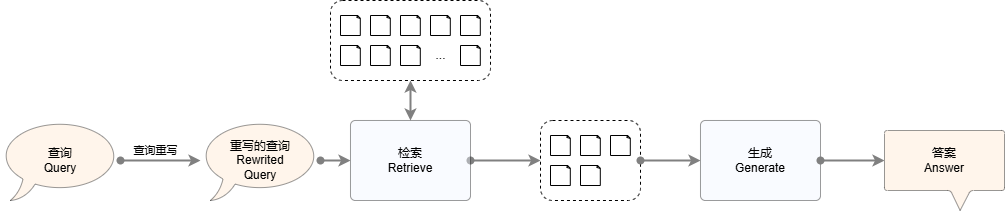
Figure 1: RAG system diagram using query rewriting mechanism
Specifically, query rewriting strategies can be subdivided into three categories: "query expansion", "sub-question query", and "multi-step query". The details are as follows:
1.1 Query expansion
User queries often lack information or are ambiguous, which affects the retrieval effect. Query expansion makes queries clearer and more specific through synonym supplementation, context completion, template conversion, etc., thus improving accuracy and recall.
# Query expansion
import lazyllm
from lazyllm import Document, ChatPrompter, Retriever

rewrite_prompt = "You are a query rewriting assistant, rewriting the user's query more clearly.\
Note that you don't need to answer the question, just rephrase the original question. \
Here is a simple example: \
Input: RAG\
Output: Tell me about RAG. \
                    \
The user input is: "

#prompt design
robot_prompt = "You are a friendly AI Q&A assistant who provides answers based on the given context and question.\
Answer the questions based on the following information:\
                {context_str} \n"

# Load the document library and define the large online model of the retriever,
documents = Document(dataset_path="/mnt/lustre/share_data/dist/cmrc2018/data_kb") # Please pass in the absolute path of the dataset in dataset_path
retriever = Retriever(doc=documents, group_name="CoarseChunk", similarity="bm25_chinese", topk=3) # Define the retrieval component
llm = lazyllm.OnlineChatModule(source='qwen', model='qwen-turbo') # Call the large model

llm.prompt(ChatPrompter(instruction=robot_prompt, extra_keys=['context_str']))
query = "What is MIT OpenCourseWare?"

query_rewriter = llm.share(ChatPrompter(instruction=rewrite_prompt))
query = query_rewriter(query)
print(f"Rewritten query:\n{query}")

doc_node_list = retriever(query=query)

# Compose the content in the query and recall nodes into a dict as the input of the large model
res = llm({"query": query, "context_str": "".join([node.get_content() for node in doc_node_list])})

print('\nAnswer: ', res)
1.2 Sub-question query
Breaking the main question into multiple sub-questions helps the system understand the problem from different perspectives and generate more comprehensive answers. Each sub-question is retrieved individually and the answers are combined at the end. It is suitable for abstract or compound queries, but you need to pay attention to the processing performance overhead. You can achieve simple query rewriting with the following code:
import lazyllm

llm = lazyllm.OnlineChatModule()
prompt = "You are a query rewriting assistant. If the user's query is abstract or general, break it down into specific questions from multiple perspectives.\
Note that you do not need to answer, you only need to split the sub-questions according to the literal meaning of the question, and the output should not exceed 3.\
Here is a simple example:\
Input: What is RAG? \
Output: What is the definition of RAG? \
In what field is RAG a term? \
What are the characteristics of RAG? "

query_rewriter = llm.prompt(lazyllm.ChatPrompter(instruction=prompt))
print(query_rewriter("What are some suggestions for healthy eating"))
The corresponding output should be roughly as follows (there will be certain differences depending on the model and parameters used):
1. What are the basic principles of healthy eating?
2. How to reasonably arrange three meals a day?
3. What food groups should be included in a healthy diet and in what proportions?
Applying the above query rewriting strategy to the most basic RAG in Practical Combat 1, you can get the following code, in which the highlighted part is the new code:
from lazyllm import TrainableModule, Document, ChatPrompter, Retriever, deploy

#prompt design
rewrite_prompt = "You are a query rewriting assistant, breaking down user queries into specific questions from multiple angles.\
Note that you do not need to answer the question, you only need to split the sub-questions according to the literal meaning of the question, and the output should not exceed 3 items.\
Here is a simple example:\
Input: What is RAG? \
Output: What is the definition of RAG? \
In what field is RAG a term? \
What are the characteristics of RAG? \
               \
The user input is: "
robot_prompt = 'You are a friendly AI Q&A assistant who provides answers based on the given context and question. \
Answer the questions based on the following information:\
                {context_str} \n '

# Load the document library and define the large online model of the retriever,
documents = Document(dataset_path="/path/to/your/document") # Please pass in the absolute path of the dataset in dataset_path
retriever = Retriever(doc=documents, group_name="CoarseChunk", similarity="bm25_chinese", topk=3) # Define the retrieval component
llm = TrainableModule('internlm2-chat-20b').deploy_method(deploy.Vllm).start() # Call the large model

query_rewriter = llm.share(ChatPrompter(instruction=rewrite_prompt)) #Define query rewrite llm
robot = llm.share(ChatPrompter(instruction=robot_prompt, extra_keys=['context_str'])) # Define question and answer llm

# Reasoning
query = "What is MIT OpenCourseWare?"
queries = query_rewriter(query) # Perform query rewriting
queries_list = queries.split('\n')
retrieved_docs = set()
for q in queries_list: # Retrieve each rewritten query
    doc_node_list = retriever(q)
    retrieved_docs.update(doc_node_list)

# Compose the content in the query and recall nodes into a dict as the input of the large model
res = robot({"query": query, "context_str": "\n".join([node.get_content() for node in retrieved_docs])})

# print results
print('\nRewritten query:', queries)
print('\nSystem answer: ', res)
1.3 Multi-step query
Break down complex problems into multiple consecutive steps, with each step relying on the answer of the previous step to advance. It is suitable for scenarios that require multiple rounds of reasoning, and can effectively improve the ability to deal with complex problems. The specific code is as follows:
import lazyllm
from lazyllm import Document, ChatPrompter, Retriever

#prompt design
rewrite_prompt = "You are a query rewriting assistant, rewriting the user's query more clearly.\
Note that you do not need to answer the question, just rephrase the original question.\
Here is a simple example:\
Input: RAG\
Output: Introduce RAG\
The user input is: "

judge_prompt = "You are a judgment assistant, used to judge whether an answer can solve the corresponding problem. If the answer can solve the problem, output True, otherwise output False.\
Note that your output can only be True or False. Do not take any other output. \
The current answer is {context_str} \n"

robot_prompt = 'You are a friendly AI Q&A assistant who provides answers based on the given context and question. \
Answer the questions based on the following information:\
                {context_str} \n '

# Load the document library and define the large online model of the retriever,
documents = Document(dataset_path="/mnt/lustre/share_data/dist/cmrc2018/data_kb")
retriever = Retriever(doc=documents, group_name="CoarseChunk", similarity="bm25_chinese", topk=3)
llm = lazyllm.OnlineChatModule(source='qwen', model='qwen-turbo')

# Rewrite query LLM
rewrite_robot = llm.share(ChatPrompter(instruction=rewrite_prompt))

# LLM that answers based on questions and query results
robot = llm.share(ChatPrompter(instruction=robot_prompt, extra_keys=['context_str']))

# LLM used to determine whether the current reply meets the query requirements
judge_robot = llm.share(ChatPrompter(instruction=judge_prompt, extra_keys=['context_str']))

# Reasoning
query = "What is MIT OpenCourseWare?"

LLM_JUDGE = False
while LLM_JUDGE is not True:
query_rewrite = rewrite_robot(query) # Perform query rewrite
print('\nRewritten query:', query_rewrite)

doc_node_list = retriever(query_rewrite) # Get the rewritten query results
    res = robot({"query": query_rewrite, "context_str": "\n".join([node.get_content() for node in doc_node_list])})

# Determine whether the current reply can meet the query requirements
    LLM_JUDGE = bool(judge_robot({"query": query, "context_str": res}))
print(f"\nLLM judgment result: {LLM_JUDGE}")

# print results
print('\nFinal reply: ', res)
2. Retrieval strategy optimization——Retriever
Retriever in LazyLLM satisfies:
Among them, Node Group represents the subset form of the original document divided according to certain rules. For example, multiple sub-segments can be generated through fixed-length segmentation, or the summary content of each segment can be obtained through summary extraction. Similarity is the standard used by Retriever to measure the relevance of nodes to user queries. Different methods are suitable for different document representations. For example, BM25 is suitable for statistics based on the original text, and Cosine is more suitable for vector expression. Index mainly affects the speed and underlying efficiency of retrieval, and will not be expanded upon here.
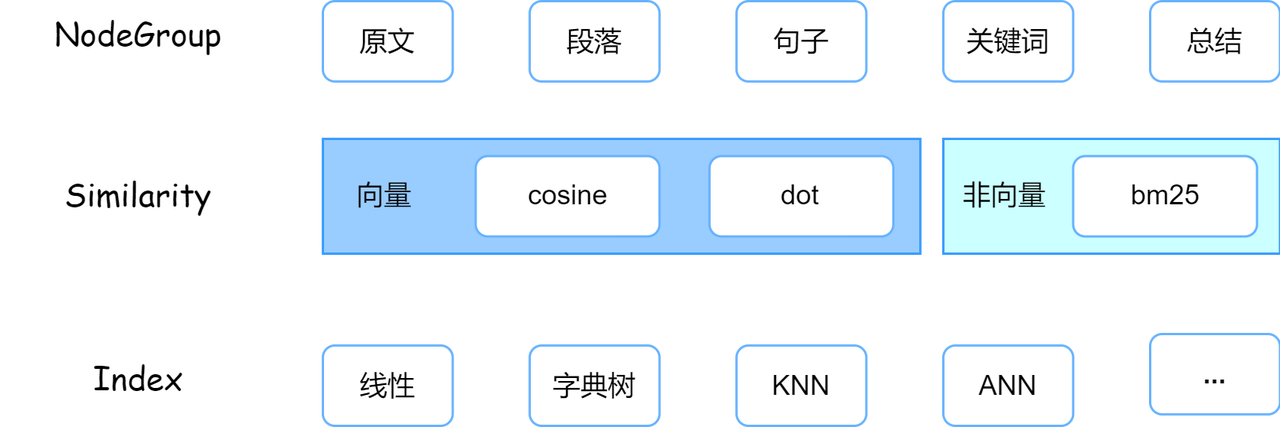
Node Group determines the smallest unit of retrieval, Similarity controls the relevance judgment method, and Index determines retrieval performance. The three work together to affect the final recall effect.
2.1 Node Group
The document parsing process of LazyLLM is as follows. First, the Loader will read the file from the file system. Specifically, the Loader will call the Reader of the corresponding file format to read. For example, txt files and docx files need to be read through different Readers. When reading the document, corresponding parsing (i.e., parsing) will be performed according to the document type. In this step, the complete document will be parsed according to specific rules to obtain a RAG-friendly format, such as html. Wait for the markup language to perform label cleaning to improve the effectiveness of the text content; finally, apply the same Node Transform to each node to construct a node group. Applying multiple rules can construct multiple node groups. Figure 2 shows the data link from LazyLLM reading files from the file system to finally constructing the node group.
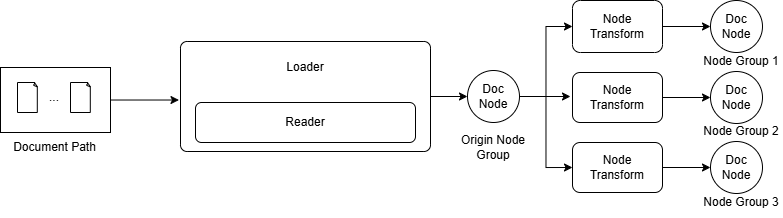
Figure 2: LazyLLM’s RAG document parsing and node group construction link
LazyLLM has built-in readers in multiple formats to support reading files in different formats. When using it, you only need to pass in the corresponding data path, and LazyLLM will select the corresponding Reader according to the file type to read and parse the file. Up to this point, the document still exists in the form of a long text, that is, the Origin Node Group in Figure 2. Each node stores the original text. After obtaining the Origin Node Group, you can parse each node through Node Transform to achieve mapping from one node to one (multiple) nodes, and obtain a new set of Node Group. Each node in the new Node Group stores a text fragment (or summary, etc.). In addition to the content of these paragraphs, each node also stores information such as the parent node, child nodes, and metadata corresponding to the document. This information can also be called important auxiliary information during retrieval. For detailed attributes and access methods, you can refer to the appendix.
Let’s take a look at an example to experience LazyLLM’s document reading and node parsing. Suppose there are 2 txt files, which store the following content:
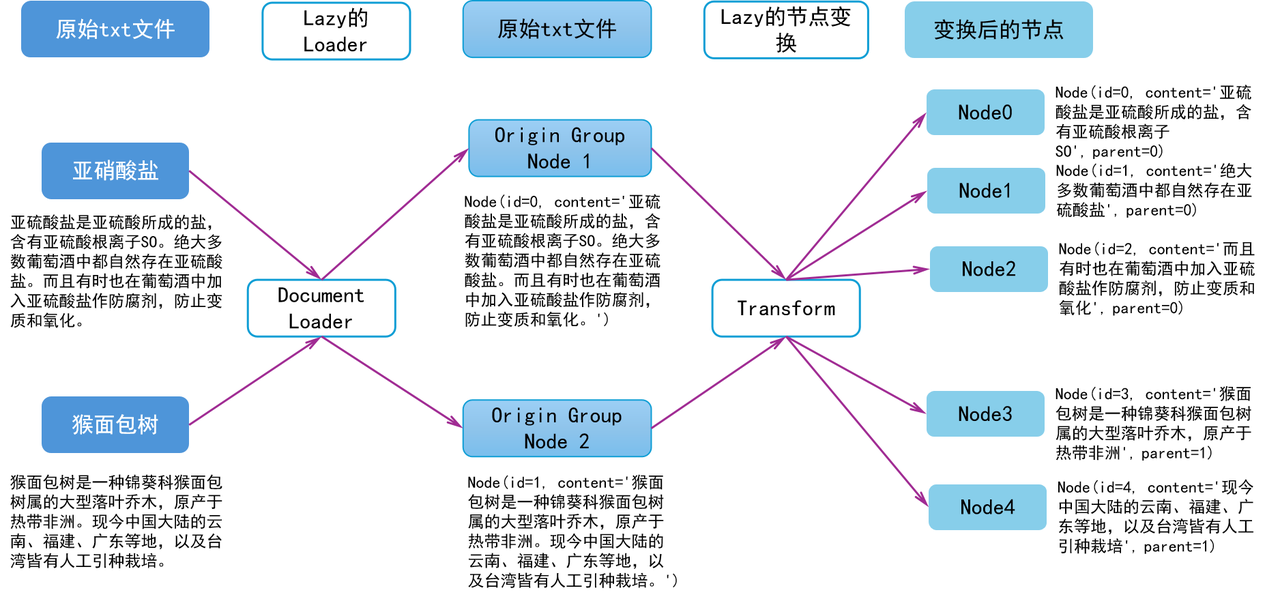
- Sulfite is a salt made of sulfurous acid and contains sulfite ion SO. Sulfites are naturally present in most wines. Sulfites are also sometimes added to wine as preservatives to prevent deterioration and oxidation.
- Baobab is a large deciduous tree of the genus Baobab in the family Malvaceae, native to tropical Africa. Today, artificial cultivation has been introduced and cultivated in Yunnan, Fujian, Guangdong and other places in mainland China, as well as in Taiwan.
After reading and parsing the file, there are two Nodes in the Origin Node Group, and the content is the content in the corresponding file. We assume that the ids are 1 and 2 respectively, and we should get two nodes as shown below (other attributes are ignored here, only id and content are retained for the convenience of explanation Node Transform):
Node(id=0, content='Sulfites are salts made of sulfurous acid and contain sulfite ions SO. Sulfites naturally exist in most wines. Sulfites are also sometimes added to wine as preservatives to prevent deterioration and oxidation.')
Node(id=1, content='Baobab is a large deciduous tree of the genus Baobab in the family Malvaceae, native to tropical Africa. It is now artificially introduced and cultivated in Yunnan, Fujian, Guangdong and other places in mainland China, as well as in Taiwan.')
Divide the above nodes into blocks with periods as separators, and name the new node group "block". Then the "block" node group contains the nodes as shown below, where parent stores the parent node of the current node, that is, which paragraph it comes from. Through this node relationship, the sentence can be retrieved and returned to the original text:
Node(id=0, content='Sulfite is a salt made of sulfurous acid and contains sulfite ion SO', parent=0)
Node(id=1, content='Sulfites naturally occur in most wines', parent=0)
Node(id=2, content='And sometimes sulfites are added to wine as preservatives to prevent deterioration and oxidation', parent=0)
Node(id=3, content='Baobab is a large deciduous tree of the genus Baobab in the family Malvaceae, native to tropical Africa', parent=1)
Node(id=4, content='Nowadays, artificial introduction and cultivation are practiced in Yunnan, Fujian, Guangdong and other places in mainland China, as well as in Taiwan', parent=1)
When using LazyLLM for recall, a group of nodes (according to the node group name) is selected to perform the retrieval action. During recall, if it is found that there are no corresponding nodes, corresponding nodes will be created according to the registered transformation rules. When recalling, only the given nodes will be recalled. From the recalled nodes, its associated ancestor nodes or descendant nodes can be found:
- For example, after recalling block-1 and block-3, we need to find the node corresponding to the original text (i.e. origin, parent node). It is known that block-1 corresponds to origin-0 and block-3 corresponds to origin-1, so the result obtained through
document.find('origin')([block-1, block-3])is [origin-0, origin-1]; - For example, origin-1 is recalled and if you want to find descendant nodes (i.e. block, child nodes), you will find all its associated nodes. It is known that origin-0 corresponds to block[0, 1, 2] and origin-1 corresponds to block[3, 4], so the result of
document.find('block')([origin-1])is [block-3, block-4].
Create a built-in rule node group
Long texts are not conducive to retrieval, so certain rules need to be used to construct node groups based on these long texts. LazyLLM creates a new node group through the Document.create_node_group() interface. Specifically, it implements the node group construction by passing in the following parameters:
- name (str, default: None): The name of the new node group
- transform (Callable): Node group parsing rules, function prototype is
(DocNode, group_name, **kwargs) -> List[DocNode]. LazyLLM has a built-in SentenceSplitter, and users can also pass in callable objects to implement custom conversion rules. - parent (str, default: LAZY_ROOT_NAME): Based on which node group to parse, by default it is constructed based on the full-text node group (i.e. origin mentioned above), the user can specify this parameter to achieve more efficient node group construction
- trans_node (bool, default: None) determines whether the input and output of transform are DocNode or str. The default is None. Can only be set to true if transform is Callable.
- num_workers (int, default: 0): The number of new threads used during Transform, the default is 0
- kwargs: Parameters related to specific implementation, which will be transparently passed to the transform function.
document.create_node_group registers the transformation rules from one group of Nodes to another group of Nodes, and the corresponding nodes will not be directly generated. We call this LazyInit. This feature is very important because we cannot guarantee that the process that instantiates Document and the process that provides Document query service are the same.
- All Nodes are created when they are used for the first time. Suppose we need to use count now. At this time, nodes named count have not been created. We will search the registry and learn that count is obtained by transforming sentence, so we search for sentence. If the sentence has been created, it can be used directly; otherwise we will look up the registry and learn that the sentence is transformed from the block, so we look for the block. And so on until a node that has been created is found, or the root node is reached.
- Each time it is created, all nodes with the same name of all documents managed under this document object will be created at once.
- If there is no root node, the original document will be read and parsed in memory through the loader.
- The content of Node may be a string, or it may be a byte-code after embedding, or it may be a user-defined data structure (if it cannot be recognized by similarity, an error will be reported during retrieval and recall).
In particular, in order to avoid duplication of work by users, LazyLLM has built-in some commonly used parsing rules as built-in NodeTransform. All documents can be directly seen and used, and users do not need to repeatedly define:
- SentenceSplitter: Input chunk_size and chunk_overlap parameters to achieve any fixed-length chunking
- LLMParser: Convert text through large models and extract keywords, summaries or question and answer pairs.
And LazyLLM provides three preset node groups:
- CoarseChunk: chunk size is 1024, overlap length is 100
- MediumChunk: Chunk size is 256, overlap length is 25
- FineChunk: Chunk size is 128, overlap length is 12
The following code demonstrates using the built-in SentenceSplitter to create a node group, and using a preset node group to retrieve:
from lazyllm import Document, Retriever, SentenceSplitter

docs = Document("/mnt/lustre/share_data/dist/cmrc2018/data_kb")

# Create a new node group using the built-in SentenceSplitter
# Here chunk_size and chunk_overlap will be transparently passed to SentenceSplitter
#The final output blocking rule is 512 in length and 64 in overlap.
docs.create_node_group(name='512Chunk', transform=SentenceSplitter, chunk_size=512, chunk_overlap=64)

# View the contents of the node group. Here we recall a node through a retriever and print its contents. All subsequent operations are implemented in this way.
group_names = ["CoarseChunk", "MediumChunk", "FineChunk", "512Chunk"]
for group_name in group_names:
    retriever = Retriever(docs, group_name=group_name, similarity="bm25_chinese", topk=1)
    node = retriever("What does sulfite do?")
    print(f"======= {group_name} =====")
    print(node[0].get_content())
Custom Transform function
When the built-in Node Transform does not meet the needs, users can still flexibly register new transform functions. We know that the transform received by create_node_group is a Callable object. The recommended form is:
- function
- Classes that define the __call__ method
- Anonymous function (lambda function)
When implementing the above rules, you can set the trans_node of the create_node_group interface to True to receive DocNode according to your own needs. The default is False. The following code defines several Node Transforms that can be passed in, all of which implement document segmentation based on periods:
from typing import List, Union
from lazyllm import Document, Retriever
from lazyllm.tools.rag.doc_node import DocNode

docs = Document("/path/to/your/documents")

# The first type: the function implements the block rule for strings directly
def split_by_sentence1(node: str, **kwargs) -> List[str]:
    """The function receives a string and returns a list of strings. It is called when the input is trans_node=False."""
    return node.split('。')
docs.create_node_group(name='block1', transform=split_by_sentence1)

# The second type: Function implementation obtains the text content corresponding to DocNode, divides it into blocks, and constructs DocNode
# Suitable for returning non-naive DocNode, for example, LazyLLM provides special DocNode such as ImageDocNode
def split_by_sentence2(node: DocNode, **kwargs) -> List[DocNode]:
    """The function receives DocNode and returns the DocNode list. It is called when the input is trans_node=False."""
    content = node.get_text()
    nodes = []
    for text in content.split('。'):
        nodes.append(DocNode(text=text))
    return nodes
docs.create_node_group(name='block2', transform=split_by_sentence2, trans_node=True)

# The third type: a class that implements the __call__ function
# The advantage is that one class can be used for multiple types of chunking. For example, this example can implement chunking based on multiple symbols by controlling the parameters during instantiation.
class SymbolSplitter:
    """Transform is passed in after instantiation. By default, a string is received. When trans_node is true, a DocNode is received."""
    def __init__(self, splitter="。", trans_node=False):
        self._splitter = splitter
        self._trans_node = trans_node

    def __call__(self, node: Union[str, DocNode]) -> List[Union[str, DocNode]]:
        if self._trans_node:
            return node.get_text().split(self._splitter)
        return node.split(self._splitter)

sentence_splitter_1 = SymbolSplitter()
docs.create_node_group(name='block3', transform=sentence_splitter_1)

# Specify the incoming DocNode
sentence_splitter_2 = SymbolSplitter(trans_node=True)
docs.create_node_group(name='block4', transform=sentence_splitter_2, trans_node=True)

# Specify the delimiter symbol as \n
paragraph_splitter = SymbolSplitter(splitter="\n")
docs.create_node_group(name='block5', transform=paragraph_splitter)

# The fourth method: directly pass in the lambda function, suitable for simple rule situations
docs.create_node_group(name='block6', transform=lambda b: b.split('。'))

# View the contents of the node group. Here we recall a node through a retriever and print its contents. All subsequent operations are implemented in this way.
for i in range(6):
    group_name = f'block{i+1}'
    retriever = Retriever(docs, group_name=group_name, similarity="bm25_chinese", topk=1)
    node = retriever("What does sulfite do?")
    print(f"======= {group_name} =====")
    print(node[0].get_content())
Large and small block strategy
LazyLLM also provides the following functionality: when a node is recalled, you can not only take out the content of the node, but also the parent node of the node. That is, recalling large chunks through small chunks. The specific code is as follows:
import lazyllm
from lazyllm import bind
from lazyllm import Document, Retriever, TrainableModule

llm = lazyllm.OnlineChatModule(source='qwen', model='qwen-turbo')
prompt = 'You are a friendly AI Q&A assistant who needs to provide answers based on the given context and question. \
Answer the questions based on the following information:\
          {context_str} \n '

robot = llm.prompt(lazyllm.ChatPrompter(instruction=prompt, extra_keys=['context_str']))

# Document loading
docs = Document("/mnt/lustre/share_data/dist/cmrc2018/data_kb")
docs.create_node_group(name='sentences', transform=(lambda d: d.split('\n') if d else ''), parent=Document.CoarseChunk)

# Define two different retrievers to retrieve the same node group using different similarity methods.
retriever = Retriever(docs, group_name="sentences", similarity="bm25_chinese", topk=3)

# Execute query
query = "Who participated in the 2008 Olympic Games?"

# Original node search results
doc_node_list = retriever(query=query)
doc_node_res = "".join([node.get_content() for node in doc_node_list])
print(f"Original node search results:\n{doc_node_res}")
print('='*100)

#Corresponding result of parent node
parent_list = [node.parent.get_text() for node in doc_node_list]
print(f"Parent node search results:\n{''.join(parent_list)}")
print('='*100)

# Combine the contents of the query and recall nodes into a dict as the input of the large model
res = robot({"query": query, "context_str": "".join([node_text for node_text in parent_list])})

print("System answer:\n", res)
Special node group
In addition to the above fixed-length chunking method, LazyLLM provides LLMParser to implement LLM-based parsing of documents, supporting three modes:
- Summary extraction (summary): Analyze the content of the text, extract the core information, and generate a concise summary that can represent the main idea of the full text to help users quickly obtain key information.
- Keyword extraction (keyword): Automatically identify the most representative keywords from the text paragraph for subsequent retrieval, classification or analysis.
- QA pair extraction: Automatically extract multiple question and answer pairs from the text paragraph, match questions similar to the user's query, and provide preset answers. These question-answer pairs can be used as references for question-answering systems, knowledge base construction, or generative AI components to improve the efficiency and accuracy of information acquisition.
import lazyllm

# Please throw the online model Api-key you want to use as an environment variable or change it to a local model before running the script.
llm = OnlineChatModule()

# LLMParser is LazyLLM's built-in class for constructing node groups based on LLM. It supports summary, keywords and qa.
summary_llm = LLMParser(llm, language="zh", task_type="summary") # Summary extraction LLM
keyword_llm = LLMParser(llm, language="zh", task_type="keywords") # Keyword extraction LLM
qapair_llm = LLMParser(llm, language="zh", task_type="qa") # Question and answer pair extraction LLM
# You can view the new node information through the code below
# nodes = qa_parser(DocNode(text=file_text))

# Use LLMParser to create a node group
docs = Document("/path/to/your/doc/")

docs.create_node_group(name='summary', transform=lambda d: summary_llm(d), trans_node=True)
docs.create_node_group(name='keyword', transform=lambda d: keyword_llm(d), trans_node=True)
docs.create_node_group(name='qapair', transform=lambda d: qapair_llm(d), trans_node=True)

# View the contents of the node group. Here we recall a node through a retriever and print its contents. All subsequent operations are implemented in this way.
group_names = ["CoarseChunk", "summary", "keyword", "qapair"]
for group_name in group_names:
    retriever = Retriever(docs, group_name=group_name, similarity="bm25_chinese", topk=1)
    node = retriever("What does sulfite do?")
    print(f"======= {group_name} =====")
    print(node[0].get_content())
Construct complex node group tree
I believe that readers have a certain understanding of Node Transform in LazyLLM through the above examples. Below we will define a Node Group that satisfies the following structure, and analyze the applicable task scenarios of different node groups by viewing the specific contents of these node group nodes. The different splitting granularities and rules corresponding to each node group reflect different aspects of the document. We can use these features on different occasions to better judge the relevance of the document and the query content entered by the user.
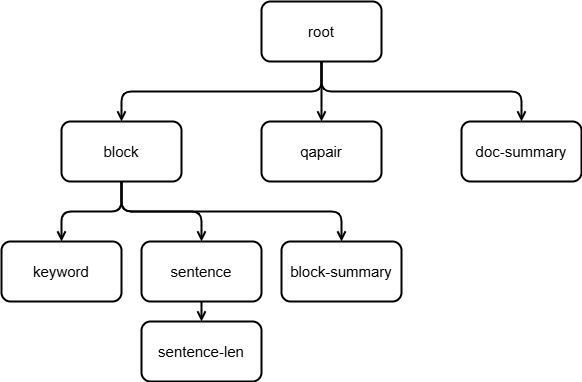
Figure 3 A complex node group tree
| Node group type | Features | Applicable scenarios |
|---|---|---|
| Coarse-grained node groups | Large paragraph or chapter-level splitting | - Broad query topics (such as overview Q&A) - Tasks that require contextual coherence (such as summary generation) |
| Fine-grained node groups | Sentence or phrase level splitting | - Accurate answer retrieval (such as fact-based question answering) - Semantic matching with high relevance requirements |
| Logical rule node group | Structural splitting by title, list, table, etc. | - Structured data query (such as parameter comparison, step instructions) - Multi-modal document processing |
from lazyllm import OnlineChatModule, Document, LLMParser

# Please throw the online model Api-key you want to use as an environment variable or change it to a local model before running the script.
llm = OnlineChatModule()

# LLMParser is LazyLLM's built-in class for constructing node groups based on LLM. It supports summary, keywords and qa.
summary_llm = LLMParser(llm, language="zh", task_type="summary") # Summary extraction LLM
keyword_llm = LLMParser(llm, language="zh", task_type="keywords") # Keyword extraction LLM
qapair_llm = LLMParser(llm, language="zh", task_type="qa") # Question and answer pair extraction LLM

docs = Document("/path/to/your/doc/")

# Use line breaks as separators to split all documents into paragraph blocks. Each block is a Node. These Nodes form a NodeGroup named "block".
docs.create_node_group(name='block', transform=lambda d: d.split('\n'))

# Use a large model that can extract question and answer pairs to use the summary of each document as a NodeGroup named "qapair", which contains question and answer pairs for the document.
docs.create_node_group(name='qapair', transform=lambda d: qapair_llm(d), trans_node=True)

# Use a large model that can extract summaries to use the summary of each document as a NodeGroup named "doc-summary", whose content is the summary of the entire document
docs.create_node_group(name='doc-summary', transform=lambda d: summary_llm(d), trans_node=True)

# On the basis of "block", some keywords are extracted from each paragraph through the keyword extraction large model. The keywords of each paragraph are Nodes, which together form the "keyword" NodeGroup.
docs.create_node_group(name='keyword', transform=lambda b: keyword_llm(b), parent='block', trans_node=True)

# Further convert on the basis of "block", using Chinese periods as separators to obtain sentences. Each sentence is a Node, which together constitute the NodeGroup of "sentence".
docs.create_node_group(name='sentence', transform=lambda d: d.split('。'), parent='block')

# On the basis of "block", use a large model that can extract summaries to process each Node, so as to obtain the Node of each paragraph summary to form "block-summary"
docs.create_node_group(name='block-summary', transform=lambda b: summary_llm(b), parent='block', trans_node=True)

# Based on "sentence", count the length of each sentence, and get a NodeGroup named "sentence-len" that contains the length of each sentence.
docs.create_node_group(name='sentence-len', transform=lambda s: len(s), parent='sentence')
We use the following code to verify the recalled content of different node groups on the CMRC data set:
from lazyllm import Retriever
# You need to change different group_name here to check the effect of the corresponding node group
retriever = Retriever(docs, group_name="CoarseChunk", similarity="bm25_chinese", topk=1)
node = retriever("Overview of the Chess Super Contest")
print("CoarseChunk node group:\n", node[0].get_content())
| Node Group | Node Information |
|---|---|
| 1024 fixed length node group | 5mil. Identification friend or foe, identification range 30km. The MPQ-78 comes in three types, an integrated single-car model (towed) similar to the Tianbing air defense system, or a separate model (loaded by two Humvees) with the radar and operating car separated. The MPQ-78 can guide and control 2 ground anti-cannons and 4 missile launchers/vehicles at a time, and can be connected to the Jieling air defense missile system (land-based Tianjian-1 missile) to enhance its system combat effectiveness. The China (Nanjing) Chess Super Tournament (Pearl Spring Super Tournament) was formerly known as the China (Nanjing) Chess Grandmaster Invitational Tournament. The first competition was held from December 11 to 22, 2008 at the Mingfa Pearl Spring Hotel in Pukou District, Nanjing. This competition is sponsored by the Nanjing Municipal People's Government and the Chess and Card Sports Management Center of the State Sports General Administration, hosted by the Pukou District People's Government and the Nanjing Sports Bureau, and co-organized by Kangyuan Pharmaceutical Co., Ltd., Yangtze Evening News, and Mundell International Entrepreneur University. Designated as a Level 21 event by FIDE, it is also the highest level chess competition held in Asia so far. The double round-robin format will consist of ten rounds, with the first five rounds taking place from December 11th to 15th, a break on the 16th, and the last five rounds taking place from December 17th to 21st. 90 minutes for each side, plus 30 seconds for each move. The total prize money is 250,000 euros, of which the winner is 80,000 euros, and the second to sixth place are 55,000 euros, 40,000 euros, 30,000 euros, 25,000 euros, and 20,000 euros. As a result, Topalov won the championship, Aronyan won the runner-up, and Bu Xiangzhi finished third. On February 1, 2009, it was accepted as a Grand Slam event and renamed China (Nanjing) Chess Super Competition. The second competition was held from September 27th to October 9th, 2009. "Kangyuan Pharmaceutical Cup" 2010 China (Nanjing) Chess Super Competition was held on October 19-30, 2010 Cheng Gongying, whose name is unknown, was born in Jincheng and was a trusted general of Han Sui, the hero of the late Eastern Han Dynasty. After Han Sui failed in the Battle of Tongguan, he fled to Huangzhong. His tribe was scattered, except for Cheng Gongying who followed him. Later Han Sui died and became a general of Cao Wei. In the last years of Han Ling Emperor Zhongping's reign, Cheng Gongying began to follow Han Sui and became his confidant. In the 16th year of Jian'an (211), Ma Chao and Han Sui rebelled against Cao Cao, but Han Sui was defeated in Huayin and fled to Huangzhong. His tribe was scattered, and only Cheng Gongying followed. At that time, Han Sui's son-in-law Yan Xing intended to kill Han Sui and surrender, so he attacked Han Sui at night, but failed. Han Sui was extremely frustrated and told Cheng Gongying that he planned to flee to Shu and seek refuge with Liu Bei. However, Cheng Gongying objected and believed that Han Sui should not abandon the base he had established for many years and seek refuge with others. He suggested that Han Sui seek refuge with the Qiang people and wait for an opportunity to make a comeback. |
| Paragraph Node Group | The China (Nanjing) Chess Super Tournament (Pearl Spring Super Tournament) was formerly known as the China (Nanjing) Chess Grandmaster Invitational Tournament. The first competition was held from December 11 to 22, 2008 at the Mingfa Pearl Spring Hotel in Pukou District, Nanjing. This competition is sponsored by the Nanjing Municipal People's Government and the Chess and Card Sports Management Center of the State Sports General Administration, hosted by the Pukou District People's Government and the Nanjing Sports Bureau, and co-organized by Kangyuan Pharmaceutical Co., Ltd., Yangtze Evening News, and Mundell International Entrepreneur University. Designated as a Level 21 event by FIDE, it is also the highest level chess competition held in Asia so far. The double round-robin format will consist of ten rounds, with the first five rounds taking place from December 11th to 15th, a break on the 16th, and the last five rounds taking place from December 17th to 21st. 90 minutes for each side, plus 30 seconds for each move. The total prize money is 250,000 euros, of which the winner is 80,000 euros, and the second to sixth place are 55,000 euros, 40,000 euros, 30,000 euros, 25,000 euros, and 20,000 euros. As a result, Topalov won the championship, Aronyan won the runner-up, and Bu Xiangzhi finished third. On February 1, 2009, it was accepted as a Grand Slam event and renamed China (Nanjing) Chess Super Competition. The second competition was held from September 27th to October 9th, 2009. "Kangyuan Pharmaceutical Cup" 2010 China (Nanjing) Chess Super Competition was held on October 19-30, 2010 |
| QA pair node group | query Which organization sponsors the China (Nanjing) Chess Super Tournament (Pearl Spring Super Tournament)? answer: Sponsored by the Nanjing Municipal People's Government and the Chess and Card Sports Management Center of the State Sports General Administration, organized by the Pukou District People's Government and the Nanjing Sports Bureau, and co-organized by Kangyuan Pharmaceutical Co., Ltd., Yangtze Evening News, and Mundell International Entrepreneur University |
| Document summary node group | Kengtung is a major town in Shan State, Myanmar. It has a long history. It was once the territory of Siam and is now a transportation hub for China, Laos, Myanmar and Thailand. The urban area covers an area of 3 square kilometers, has a population of about 60,000, and is culturally diverse. There are Buddhist temples and Christian churches. Kyaing Tong Degree College is located here, and it is also a gathering place for the Shan ethnic group. Historically, Kengtung was founded by the grandson of King Mengrai of the Chiang Mai dynasty and has gone through many wars and regime changes. "Gamera Big Monster Sky Showdown" is a 1995 Japanese monster movie and the ninth film in the Gamera series. Theodore Pontville is a French poet and writer, born in 1825. His works have an important influence in the literary world. Place Victory is located in Paris. There is an equestrian statue of Louis XIV in the center of the square and is surrounded by high-end neighborhoods. Yarrow is a perennial herb distributed in the northern hemisphere. Its roots and leaves can be used as medicine. The baobab tree is native to tropical Africa and its fruits, leaves and seeds have many uses. Lanomi Cromoviggiojo is a Dutch swimmer who has broken world records many times and won awards in international competitions. The CS/MPQ-78 radar is an air defense radar system for the Air Force of the Republic of China. The China (Nanjing) Chess Super Competition is one of the highest level chess competitions in Asia. Cheng Gongying was a general in the late Eastern Han Dynasty. He followed Han Sui and later surrendered to Cao Cao. He performed well in quelling the rebellion in Liangzhou and later died of illness. |
| Keyword node group | China (Nanjing) Chess Super Competition |
| Sentence node group | Admitted as a Grand Slam event on February 1, 2009 and renamed China (Nanjing) Chess Super Competition |
| Paragraph summary node group | Introduction to China (Nanjing) Chess Super Competition and past overview |
It can be seen from the above output that although the 1024 fixed-length node group can retain a long context, it contains content that is irrelevant to the query (for example, the chunks about the chess competition contain Cheng Gongying's relevant content), which affects the efficiency of subsequent models in extracting key information. In addition, fragmentation processing of fixed lengths may split relevant information, making the context incomplete (for example, MPQ-78 related content is divided into two different chunks). The information recalled by the paragraph node group has a clear structure and is directly related to the query topic, avoiding the interference of irrelevant content. However, when the content is distributed in multiple paragraphs, it may not cover all related topics. It is suitable for document retrieval tasks with clear paragraph structure and concentrated content distribution (technical documents, etc.).
The QA pair node group can directly match questions and efficiently obtain clear structured information. It is suitable for retrieval of structured information. However, it is limited to preset question and answer pairs and cannot cover all potential problems. The recall coverage may be insufficient. In practice, it is still necessary to combine other node groups to achieve a more comprehensive retrieval. The information of the document summary node group is highly condensed, which can quickly locate the core features of the paragraph and reduce the interference of irrelevant information. It is suitable for querying advanced concepts, but the detailed information is missing and cannot answer specific questions. It also depends on the quality of the summary. If the summary does not cover the key content, the recall effect may be affected. The keyword node group has high recall accuracy and can directly match core keywords to ensure topic relevance. It is suitable for fuzzy queries to ensure that relevant content will not be missed. However, the disadvantage is that contextual information is lost, causing the model to be unable to understand the logical relationship between keywords. It is suitable for scenarios where precise keywords are searched, and can also be used in combination with large models to extract keywords.
The sentence node group has the smallest granularity, the information is direct, and can be used for accurate retrieval. It is suitable for queries with strong factuality to avoid information redundancy. However, the disadvantage is that it is too fragmented and difficult to provide context. Multiple sentence combinations may be needed to answer a complete question, and other relevant information may be missed during recall. Usually a sentence in documents such as laws and regulations contains a very large amount of information, which is very suitable for retrieval using sentence node groups. The paragraph summary node group is suitable for high-level overview issues, but the detailed coverage is not comprehensive enough and relies on the summary algorithm. It can usually be used to recall long paragraphs (such as technical documents) with summaries. Methods to use summary or keyword node groups to recall their parent node groups:
from lazyllm import Retriever
# You need to change different group_name here to check the effect of the corresponding node group
retriever = Retriever(docs, group_name="block-summary", similarity="bm25_chinese", topk=1)
node = retriever("Overview of the Chess Super Contest")
print("CoarseChunk node group:\n", node[0].parent.get_content())
In practical applications, multiple node groups among the above-mentioned node groups are usually selected for hybrid retrieval, and post-processing such as splicing is performed after recalling multiple groups of information to obtain a more comprehensive and accurate context.
Using multi-node groups in RAG
The method of using node groups in the RAG system and recalling the corresponding node groups is as shown in the code below. The highlighted part is the new code compared with the simplest RAG. Modifying the corresponding creation method and retrieving the node group name can achieve the purpose of recalling different node groups.
import lazyllm

# Use online large model
# Please throw the corresponding manufacturer API-key as an environment variable before use.
llm = lazyllm.OnlineChatModule()

# Document loading
documents = lazyllm.Document(dataset_path="/mnt/lustre/share_data/dist/cmrc2018/data_kb")
documents.create_node_group(name='sentences', transform=lambda b: b.split('。'))
documents.create_node_group(name='block', transform=lambda b: b.split('\n'))

# Retrieve component definition
retriever1 = lazyllm.Retriever(doc=documents, group_name="block", similarity="bm25_chinese", topk=3)
retriever2 = lazyllm.Retriever(doc=documents, group_name="sentences", similarity="bm25_chinese", topk=3)

# prompt design
prompt = 'You are a friendly AI Q&A assistant who needs to provide answers based on the given context and question. \
Answer the questions based on the following information:\
          {context_str} \n '
robot = llm.prompt(lazyllm.ChatPrompter(instruction=prompt, extra_keys=['context_str']))

# Reasoning
query = "What does sulfite do?"
# Store all nodes recalled by the Retriever component into the list doc_node_list
doc_node_list1 = retriever1(query=query)
doc_node_list2 = retriever2(query=query)

# Combine the recall results from both retrievers into one list
doc_node_list = doc_node_list1 + doc_node_list2

# Combine the contents of the query and recall nodes into a dict as the input of the large model
res = robot({"query": query, "context_str": "".join([node.get_content() for node in doc_node_list])})

print("System answer:", res)
The impact of node groups on evaluation
The node group affects the final recalled contextual content. If it is too long, the redundant content may be more than the effective content. If it is too short, the query-related content may not be covered. Table 2 shows the content hit rate and context relevance metrics for recall using different node groups. Specifically, 1002 questions in CMRC-test are used to retrieve through the bm25 algorithm in multiple node groups, and finally the hit rate of the recall results top1, top3, and top5 documents of each node group (the context corresponding to the correct recall question) and the context relevance of the recalled documents are calculated. The higher the better for both indicators. Since there are many segmentation methods that cannot directly calculate the paragraph ID, the hit rate calculation method is that the edit distance between the recall paragraph and the reference paragraph (how many characters of string a can become b after being modified) is less than 0.5.
Table 2: Comparison of results using different node groups for recall. (recall ↑ / context relevance ↑)
| Node group type | top 1 | top 3 | top 5 |
|---|---|---|---|
| Fixed length (1024) node group | 0.43 / 0.50 | 0.47 / 0.20 | 0.48 / 0.12 |
| Passage recall by summary | 0.83 / 0.76 | 0.89 / 0.29 | 0.90 / 0.17 |
| Custom paragraph node group | 0.94 / 0.86 | 0.97 / 0.30 | 0.98 / 0.18 |
It can be seen from the above table that the recall effect of using the paragraph node group is the best in the current task, but the context correlation shows an obvious downward trend as the value of top k is higher. This is because Context Relevance calculates the proportion of sentences related to the query in the recalled documents. In the current task, the content of each paragraph is independent of each other, so when multiple paragraphs are recalled, the proportion of redundant content increases is in line with realistic expectations.
It should be noted that due to differences in the type and content of document libraries, the node groups applicable to different document libraries and different types of document content will be different. For example, for the CMRC document library constructed in this course, the content of each paragraph is independent of each other, so paragraph chunking helps to completely recall the context of the problem. For documents such as laws and regulations, where each sentence contains a large amount of information, and the content described by each sentence may be independent of each other, sentence node groups are a better choice. Therefore, which node group to use for retrieval and recall in a specific task needs to be selected by observing the characteristics of the document library and combining it with the actual recall performance.
2.2 Similarity
In a RAG system, the similarity calculation method is a core part of the retrieval phase, which determines the relevance between the query and the document, thereby affecting the quality of the final generated answer. The main similarity calculation methods include sparse vector method and dense vector method, as well as hybrid retrieval methods. LazyLLM natively supports cosine similarity and bm25 similarity. You only need to pass in the name of the corresponding method during retrieval to specify which similarity calculation method you want to use. If you need to customize the similarity function, please refer to the Optional 2 Custom Recall Strategy Related Components Tutorial.
The following section first introduces how to use Embedding in LazyLLM, because cosine retrieval requires embedding the document before it can be calculated. Then it introduces the use and simple comparison of document retrieval using LazyLLM's built-in cosine and bm25, then introduces the use of multiple embeddings for recall, and finally introduces the method of filtering out redundant irrelevant documents through similarity thresholds.
Use of Embedding
Embedding is a technology that maps documents into a high-dimensional vector that retains the semantics of the original text. Based on this high-dimensional vector, semantic retrieval can be efficiently performed. Currently, the BERT-based Embedding model is usually used to vectorize documents to obtain dense vector representations. LazyLLM supports calling online and offline Embedding models. The online model is called through OnlineEmbeddingModule, and the offline model is called through TrainableModule.
OnlineEmbeddingModule is used to manage and create online Embedding service modules currently on the market. The configurable parameters are:
- source (str) – Specifies the module type to be created, optionally openai/sensenova/glm/qwen/doubao
- embed_url (str) – Specifies the basic link of the platform to be accessed, the default is the official link
- embed_model_name (str) – Specifies the model to be accessed. The default value is text-embedding-ada-002(openai) / nova-embedding-stable(sensenova) / embedding-2(glm) / text-embedding-v1(qwen) / doubao-embedding-text-240715(doubao)
Configurable parameters to start local services using TrainableModule are: * base_model (str, default: '' ) – The name or path of the base model. If there is no model locally, it will try to download it. What you need to note here is that you need to pass in the absolute path of the model, or specify the model path as the environment variable LAZYLLM_MODEL_PATH and then pass in the model name here.
Currently, commonly used Embedding models are usually jina series or bge series models (such as bge-large-zh-v1.5, bge-m3, etc.). The specific model name can be retrieved at huggingface. The embedding model provided by the online embedding model needs to be searched in the model list of the specified manufacturer. If there are no specific requirements, you can directly use the default model provided by LazyLLM OnlineEmbeddingModule.
The following is sample code for using LazyLLM to call the online Embedding model and start and call the local service:
from lazyllm import OnlineEmbeddingModule, TrainableModule, deploy

# Throw your online model API key as an environment variable, taking sensenova as an example
#     export LAZYLLM_SENSENOVA_API_KEY=
#     export LAZYLLM_SENSENOVA_SECRET_KEY=
online_embed = OnlineEmbeddingModule("sensenova")

# Throw your local model address as an environment variable:
#     export LAZYLLM_MODEL_PATH=/path/to/your/models
offline_embed = TrainableModule('bge-large-zh-v1.5').start()
# Or use absolute path:
offline_embed = TrainableModule('/path/to/your/bge-large-zh-v1.5').start()

# Start the sparse embedding model, currently only bge-m3 is supported
offline_sparse_embed = TrainableModule('bge-m3').deploy_method(
            (deploy.AutoDeploy,
            {'embed_type': 'sparse'})).start()

print("online embed: ", online_embed("hello world"))
print("offline embed: ", offline_embed("hello world"))
print("offline sparse embed: ",  offline_sparse_embed("hello world"))
The output of the above code should be:
online embed: [0.0010528564, 0.0063285828, 0.0049476624, -0.012008667,..., -0.051696777]

offline embed: [-0.02584601193666458, -0.0014020242961123586,..., 0.016336631029844284]

offline sparse embed: {"33600": 0.22412918508052826, "31": 0.20403659343719482, "8999": 0.2736259400844574}
Note: It is normal for the Embedding generated by different models to be different.
If you deploy an online Embedding service, you can directly access the embedding service via the TrainableModule. The following is a sample code.
import os
import lazyllm

os.environ['LAZYLLM_OPENAI_API_KEY'] = 'empty'
lazyllm.config.refresh()

embedding = lazyllm.TrainableModule('bge-m3').deploy_method(lazyllm.deploy.auto, url='http://10.119.16.84:8000/v1/')
res = embedding(['你好', 'hello'], model='bge-m3')
print(res)
There is no need to manually traverse when using LazyLLM to embed documents. You only need to pass in the embedding model defined above when instantiating the Document object. It should be noted that LazyLLM will decide whether to embed the current node group according to whether the specified similarity is calculated on the embedding or directly on the original text when the specified node group is retrieved for the first time. The method of specifying Embedding for Document is as follows:
import lazyllm

#Define embedding model
online_embed = lazyllm.OnlineEmbeddingModule()

#Load document
documents = lazyllm.Document('/path/to/your/document', embed=online_embed)
Recall documents using similarity
After learning to specify the embedding model, we can perform document recall through vector similarity. LazyLLM natively supports cosine similarity for semantic retrieval. After specifying Embedding for the document, Retriever can pass in the parameter similarity="cosine". The values that can be passed in by LazyLLM.Retriever are: "cosine", "bm25" and "bm25_chinese", of which only "cosine" needs to specify Embedding for the document. It should be noted that even if Embedding is specified for the document, embedding calculations will not be performed when using the "bm25" and "bm25_chinese" similarities during retrieval. The following code shows an example of using native similarity for recall, and briefly compares the recall characteristics of cosine and bm25:
from lazyllm import Document, Retriever, TrainableModule

#Define embedding model
embed_model = TrainableModule("bge-large-zh-v1.5").start()

# Document loading
docs = Document("/path/to/your/document", embed=embed_model)
docs.create_node_group(name='block', transform=(lambda d: d.split('\n')))

# Define two different retrievers to retrieve the same node group using different similarity methods.
retriever1 = Retriever(docs, group_name="block", similarity="cosine", topk=3)
retriever2 = Retriever(docs, group_name="block", similarity="bm25_chinese", topk=3)

# Execute query
query = "Who participated in the 2008 Olympic Games?"
result1 = retriever1(query=query)
result2 = retriever2(query=query)

print("Cosine similarity recall results:")
print("\n\n".join([res.get_content() for res in result1]))
print("bm25 recall result:")
print("\n\n".join([res.get_content() for res in result2]))
The following are the recall results of the two. It can be seen that using different similarities has a certain impact on the recall results. Judging from the query characteristics, it contains two important topics: "2008" and "Olympic Games". The retrieval results of cosine similarity also include these two important topics. However, although every result of bm25 contains information about "Olympic Games", one of the results does not mention the 2008 Olympic Games. This is because the bm25 method divides the 2008 Olympic Games into two tokens after word segmentation, and does not regard them as a whole semantic information during calculation, so there is a problem that although the keywords are sufficient, the topic is not captured.
| Cosine similarity recall results | bm25 recall results | |
|---|---|---|
| 1 | ...The Chinese synchronized swimming team that participated in the 2008 Beijing Summer Olympics consisted of 15 people, including 9 athletes and 4 coaches... | ...Won the weightlifting gold medal twice in the 1996 and 2000 Summer Olympics, becoming the first person to win two consecutive weightlifting championships in the history of the Chinese Olympic Games...Participated in the 70kg weightlifting competition in the Atlanta Olympics...became a classic scene of the Olympic Games. After the Sydney Olympics... participating in the Olympics for the third time... |
| 2 | The men's 100-meter race at the 2008 Summer Olympics was held at the Beijing National Stadium on August 15 and 16, 2008... | On August 10, 2008, Tan Wangsong was in the men's football group match between the Chinese team and the Belgian team at the Beijing Olympics... |
| 3 | The Chinese canoeing team participating in the 2008 Beijing Summer Olympics has a total of 40 people, including 23 athletes, 17 officials and staff... | ...The Chinese synchronized swimming team participating in the 2008 Beijing Summer Olympics has a total of 15 people, including 9 athletes and 4 coaches... |
Multiple Embedding Recall
We can apply multiple Embeddings to the same document and use multiple retrievers to recall for better results. The following code shows how to use multiple Embedding methods in Document. Compared with using a single Embedding model, you only need to construct multiple models into a dictionary and pass them in.
from lazyllm import OnlineEmbeddingModule, TrainableModule, Document

online_embed = OnlineEmbeddingModule()
offline_embed = TrainableModule('bge-large-zh-v1.5').start()
embeds = {'vec1': online_embed, 'vec2': offline_embed}
doc = Document('/content/doc/', embed=embeds)
LazyLLM supports applying multiple Embeddings to the same document. At this time, we can improve the recall rate by performing multiple recalls on multiple Embeddings. LazyLLM uses multi-embedding recall as follows:
#Discuss the impact of different embeddings on recall rate
# Please throw your online embedded model api-key as an environment variable or use a local model

from lazyllm import Document, Retriever, TrainableModule

# Define multiple embedding models
bge_m3_embed = TrainableModule('bge-m3').start()
bge_large_embed = TrainableModule('bge-large-zh-v1.5').start()
embeds = {'vec1': bge_m3_embed, 'vec2': bge_large_embed}

# Document loading
docs = Document("/mnt/lustre/share_data/dist/cmrc2018/data_kb", embed=embeds)
docs.create_node_group(name='block', transform=(lambda d: d.split('\n')))

# Define two different retrievers to retrieve different embeddings of the same node group.
retriever1 = Retriever(docs, group_name="block", embed_keys=['vec1'], similarity="cosine", topk=3)
retriever2 = Retriever(docs, group_name="block", embed_keys=['vec2'], similarity="cosine", topk=3)

# Execute search
query = "Who participated in the 2008 Olympic Games?"
result1 = retriever1(query=query)
result2 = retriever2(query=query)

print("Using bge-m3 for cosine similarity recall results:")
print("\n\n".join([res.get_content() for res in result1]))
print("Using bge-large-zh-v1.5 for cosine similarity recall results:")
print("\n\n".join([res.get_content() for res in result2]))
This example shows how to use multiple embeddings to embed and retrieve the same document. The main difference from using a single embedding is that the embed parameter passed to the Document is a Python dictionary in the form of { embed_key: Callable }. During retrieval, an additional embed_keys parameter is passed in, which is a list of strings. Each string corresponds to the embedding space retrieved by the current retriever. For example, in the above example, if we compare vec1 and The similarity function and node group used by vec2 are consistent, and if there is no clear distinction between the results, just enter ['vec1', 'vec2'] directly. It should be noted that in this case, the output topk is not for each embed_key, but for both topk, deduplication is output.
retriever = Retriever(docs, group_name="block", embed_keys=['vec1', 'vec2'], similarity="cosine", topk=3)
Use similarity threshold filtering
The threshold filtering method can filter out nodes with too low similarity and improve the reliability of recalling documents. For example, when threshold filtering is not used, the system recalls 6 documents when topk=6, and the similarities are 0.9, 0.87, 0.6, 0.31, 0.23, 0.21. By observing the node content, we find that the following three documents are not directly related to the query. We can set the filtering threshold to 0.6. At this time, the recaller only returns nodes with a similarity greater than or equal to 0.6. The way to set the similarity threshold of the recaller in LazyLM is to pass in similarity_cut_off:
from lazyllm import Document, Retriever, OnlineEmbeddingModule, TrainableModule

#Define embedding model
online_embed = OnlineEmbeddingModule()

# Document loading
docs = Document("/content/doc/", embed=online_embed)
docs.create_node_group(name='block', transform=(lambda d: d.split('\n')))

# Define two different retrievers to compare the effect of using threshold filtering
retriever1 = Retriever(docs, group_name="block", similarity="cosine", topk=6)
retriever2 = Retriever(docs, group_name="block", similarity="cosine", similarity_cut_off=0.6, topk=6)

# Execute search
query = "Who were the athletes who participated in synchronized swimming in 2008?"
result1 = retriever1(query=query)
result2 = retriever2(query=query)

print("similarity_cut_off is not set:")
print("\n\n".join([res.get_content() for res in result1]))
print("Set similarity_cut_off=0.6:")
print("\n\n".join([res.get_content() for res in result2]))
By comparing the results of using the similarity filtering method in the above videos, it can be found that the use of similarity filtering effectively reduces the redundant context that is less relevant to the query in the recall results, which helps to improve the generation effect in the subsequent process.
The impact of similarity on evaluation
The following table shows a comparison of hit rates for recall of summary node groups and paragraph node groups using bm25 matching and cosine similarity. It is known that the content of the summary node group is a high-level summary of the original text. At this time, the content may not contain specific keywords. Therefore, using bm25 sparse retrieval based on keyword matching is not as effective as using semantic retrieval. The advantage of semantic retrieval is that it is good at discovering the semantic correlation between texts. Even if the wording used in the two texts is different, the corresponding paragraphs can be found. A comparison of the results of direct retrieval of paragraph node groups shows that when the content contains a large number of related keywords in the query, the retrieval method using bm25 is better than semantic retrieval.
Table: Comparison of recall rates (recall ↑) between BM25 and Cosine similarity when retrieving the same node group
| Search method | top 1 | top 3 | top 5 |
|---|---|---|---|
| Index paragraphs using abstracts [BM25] | 0.83 | 0.89 | 0.90 |
| Index paragraphs using abstracts [Cosine] | 0.89 | 0.93 | 0.94 |
| Direct search paragraph [BM25] | 0.94 | 0.97 | 0.98 |
| Directly search paragraph [Cosine] | 0.92 | 0.95 | 0.97 |
We can see the contribution of similarity filtering to the output of the retrieval component by calculating Context Relevance. Specifically, we calculate the ratio of answer-relevant sentences to all sentences in the recalled passage, examining the proportion of sentences in the context that are relevant to the current query. The following table shows the impact of whether to set threshold filtering on the results. It can be seen from the numerical point of view that using threshold filtering can greatly improve the context-related indicators, but it will reduce the recall rate to a certain extent. This is because when the recall threshold is increased, some correctly recalled segments with low scores will be filtered out.
Table: The impact of setting a similarity threshold or not on the results when directly retrieving passages using cosine similarity (recall / context relevance)
| Setting method | top 1 | top 3 | top 5 |
|---|---|---|---|
| Similarity filtering not set | 0.92/0.84 | 0.95/0.29 | 0.97/0.18 |
| Set the similarity threshold to 0.4 | 0.86/0.87 | 0.88/0.87 | 0.88/0.87 |
3. Recall reranking strategy——Reranker
The reranking model is usually applied in the second stage of the two-stage retrieval algorithm, corresponding to the Reranker component in LazyLLM. The recall and rearrangement strategy is widely used in tasks such as search engines, recommendation systems, and question and answer systems. Its basic idea is: after the initial retrieval, the retrieval results are re-ranked through an additional model to improve the final effect. The figure below compares the process of directly using the retriever to recall the top 3 documents and first recalling the top 5 documents through the retriever and then reordering them to return the top 3 documents. It can be seen that the retrieval process does not sort the documents, but only returns the top 5 documents that meet the requirements. Through the reordering process, it can be sorted more precisely and the sorted documents can be obtained, so that more important documents are higher in the returned list.
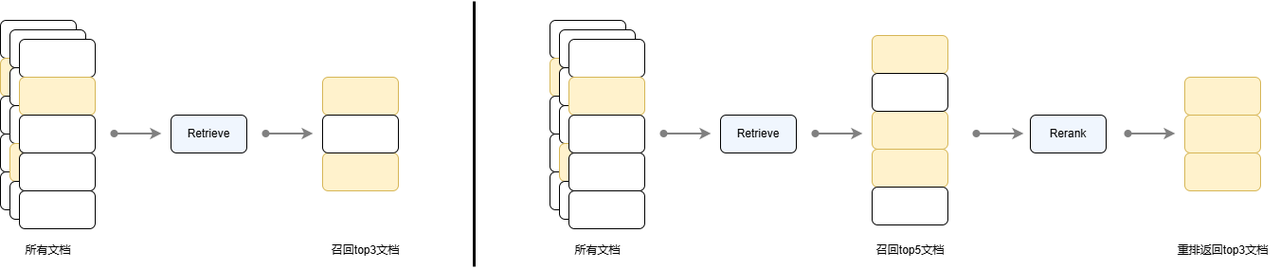
Figure 4 Comparison of single-round recall and recall rescheduling strategy processes
LazyLLM provides the Reranker component for reranking, and provides two ways to call online and offline reranking models. The online model is called through OnlineEmbeddingModule(type="rerank"), and the offline reranking model is still called through TrainableModule. Adjustable parameters when using Reranker are:
- name (str, default: 'ModuleReranker' ): Must be ModuleReranker when implementing reordering
- model (Union[Callable, str]): The specific model name or callable object that implements reordering
- Callable case:
- OnlineEmbeddingModule (type="rerank"): currently supports the online reranking model of qwen and glm, you need to specify apikey before use
- TrainableModule(model="str"): You need to pass in the local model name. The commonly used open source reordering model is the bge-reranker series.
- str case: model name, the same as the model parameter requirements corresponding to the above Callable case TrainableModule
- Callable case:
- topk (int): The final number of k nodes that need to be returned
- output_format (str, default: None): output format, default is None, optional values are 'content' and 'dict', where content corresponds to the output format as a string, and dict corresponds to a dictionary
- join (boolean, default: False): Whether to join the output k nodes. When the output format is content, if the value is set to True, a long string will be output. If set to False, a string list will be output, where each string corresponds to the text content of each node.
The currently commonly used open source reordering model is bge-reranker, which can start related services and call them through TrainableModule. Online model service providers qwen and glm provide reordering model services, which are called through OnlineEmbeddingModule (type="rerank").
from lazyllm import OnlineEmbeddingModule, TrainableModule
# If you want to use the online rearrangement model
# Currently LazyLLM supports qwen and glm online rearrangement models. Please specify the corresponding API key before use.
online_rerank = OnlineEmbeddingModule(type="rerank")
reranker = Reranker('ModuleReranker', model=online_rerank, topk=3)

# Start local reordering model
offline_rerank = TrainableModule('bge-reranker-large').start()
reranker = Reranker('ModuleReranker', model=offline_rerank, topk=3)
# Or directly pass in the model name to use local reordering model
reranker = Reranker('ModuleReranker', model='bge-reranker-large', topk=3)
Below we implement an example to extract the top 2 documents from the 6 results retrieved by cosine and bm25.
from lazyllm import Document, Retriever, Reranker, TrainableModule

# Define embedding model and reordering model
embedding_model = TrainableModule('bge-large-zh-v1.5').start()
offline_rerank = TrainableModule('bge-reranker-large').start()

docs = Document("/path/to/your/document", embed=embedding_model)
docs.create_node_group(name='block', transform=(lambda d: d.split('\n')))

# Define retriever
retriever = Retriever(docs, group_name="block", similarity="cosine", topk=3)

#Define reorderer
# Specify the output of reranker1 as a dictionary, including the content, embedding and metadata keywords
# reranker = Reranker('ModuleReranker', model=online_rerank, topk=3, output_format='dict')
# Specify the output of reranker2 as a string and perform concatenation. If concatenation is not performed, the output will be a string list.
reranker = Reranker('ModuleReranker', model=offline_rerank, topk=3, output_format='content', join=True)

# Perform inference
query = "What are the benefits of baobab tree?"
result1 = retriever(query=query)
result2 = reranker(result1, query=query)

print("Cosine similarity recall results:")
print("\n\n".join([res.get_content() for res in result1]))
print("Open source reranking model results:")
print(result2)
The following table is the recall results for the query "What are the effects of baobab trees?". Note that the order of the cosine similarity recall results (first column) does not contain similarity ranking information. It is usually returned according to its relative position within the node group. The results obtained by a reordering are shown in the second column. It can be seen that documents that are more similar to the query after reordering are ranked at a higher position.
| Cosine similarity recall results | Rearranged results | |
|---|---|---|
| 1 | False Pingpo (scientific name: ""), also known as Qijieguo, cockscomb bark, cockscomb wood, goat horn, Honglang umbrella, Sai Pingpo' and kapok, etc., is a semi-deciduous tree plant of the genus Pingpo in the family Sterculiaceae... | Baobab tree (scientific name:), also known as -{zh-hant: baobab tree; zh-hans: hozen tree; zh-tw: baobab tree}-, African baobab tree, acid gourd tree, monkey tree, traveler tree, dead mouse tree, is a large deciduous tree of the genus Baobab of the Malvaceae family, native to tropical Africa... |
| 2 | Yellow cicada (scientific name: ') is also known as hard-branched yellow cicada, oleander leaf yellow cicada, small flower yellow cicada, bush-standing yellow cicada and yellow orchid cicada. It is a plant of the family Apocynaceae... | Oleander (scientific name: ') is also known as hard-branched yellow cicada, oleander leaf cicada, small flower yellow cicada, clustered yellow cicada and yellow orchid cicada. It is a plant belonging to the family Apocynaceae... |
| 3 | Baobab tree (scientific name:), also known as -{zh-hant: baobab tree; zh-hans: hozen tree; zh-tw: baobab tree}-, African baobab tree, acid gourd tree, monkey tree, traveler tree, dead mouse tree, is a large deciduous tree of the genus Baobab of the Malvaceae family, native to tropical Africa... | False Ping Po (scientific name: " "), also known as Qijieguo, Cockscomb bark, Cockscomb wood, goat horn, Honglang umbrella, Sai Pingpo' and mountain kapok, etc., is a semi-deciduous tree plant of the genus Pingpo in the family Sterculiaceae... |
The following table is a comparison of the Mean Reciprocal Rank (MRR) of recalled documents when cosine similarity recall is performed on the CMRC data set with or without the reordering strategy enabled. MRR is used to evaluate the ranking quality of results returned by the retrieval component. The specific calculation method is as follows:
- For each query q, find the rank \(\text{rank}_i\) of the first relevant context in the returned results
- Calculate the reciprocal ranking \(\frac{1}{\text{rank}_i}\)
- MRR is the average of the reciprocal rankings of all queries:
The closer the value is to 1, the higher the ranking of relevant contexts returned by the retrieval component. What needs to be noted here is that without reordering, the reason why there is a significant decrease when top k increases from 1 to 5 is that the retriever does not sort the recalled paragraphs when returning them, but returns them in the relative order of the nodes in the node group. It can be seen that using the reordering strategy not only improves the recall rate, but also improves the MRR index, that is, the top 1 accuracy after reordering can reach 0.97.
Table: Impact of using reordering on recall results (MRR ↑)
| Method | top 1 (recall = 0.94) |
top 3 (recall = 0.97) |
top 5 (recall = 0.98) |
|---|---|---|---|
| Recall by paragraph | 0.9411 | 0.6132 | 0.4468 |
| Reorder after recall by paragraph | 0.9411 | 0.9704 | 0.9741 |
Comprehensive all optimized RAG implementations
Combining the above strategies, we can get a multi-channel recall RAG, which is a method of setting multiple retrievers to retrieve at different granularities or using different similarity calculation methods to recall documents, and then sorting the documents recalled by all retrievers to obtain the final context. The process is shown in the figure below. This is a relatively standard multi-channel retrieval RAG architecture, which has better retrieval results than simple RAG.
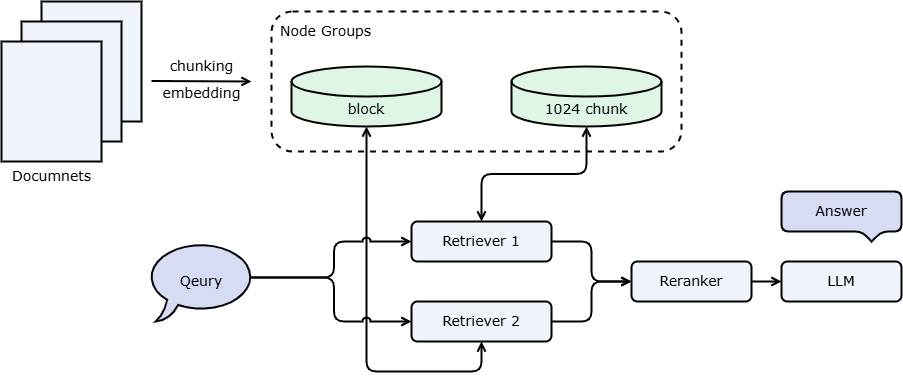
The LazyLLM implementation of the above RAG process is shown in the following code block:
import lazyllm

# Define embedding model and reordering model
# embedding_model = lazyllm.OnlineEmbeddingModule()
embedding_model = lazyllm.TrainableModule("bge-large-zh-v1.5").start()

# If you want to use the online rearrangement model
# Currently LazyLLM only supports qwen and glm online rearrangement models, please specify the corresponding API key.
# online_rerank = lazyllm.OnlineEmbeddingModule(type="rerank")
# Local reordering model
offline_rerank = lazyllm.TrainableModule('bge-reranker-large').start()

docs = lazyllm.Document("/mnt/lustre/share_data/dist/cmrc2018/data_kb", embed=embedding_model)
docs.create_node_group(name='block', transform=(lambda d: d.split('\n')))

# Define retriever
retriever1 = lazyllm.Retriever(docs, group_name="CoarseChunk", similarity="cosine", topk=3)
retriever2 = lazyllm.Retriever(docs, group_name="block", similarity="bm25_chinese", topk=3)

#Define reorderer
reranker = lazyllm.Reranker('ModuleReranker', model=offline_rerank, topk=3)

# Define large model
llm = lazyllm.TrainableModule('internlm2-chat-20b').deploy_method(lazyllm.deploy.Vllm).start()

# prompt design
prompt = 'You are a friendly AI Q&A assistant who needs to provide answers based on the given context and question. \
Answer the questions based on the following information:\
          {context_str} \n '
llm.prompt(lazyllm.ChatPrompter(instruction=prompt, extra_keys=['context_str']))

# Perform inference
query = "What events are there in 2008?"
result1 = retriever1(query=query)
result2 = retriever2(query=query)
result = reranker(result1+result2, query=query)

# Combine the contents of the query and recall nodes into a dict as the input of the large model
res = llm({"query": query, "context_str": "".join([node.get_content() for node in result])})

print(f'Answer: {res}')
There are many important events in 2008, here are some of them:
- **2008 Summer Olympics**: Held in Beijing, a total of 11,032 athletes from 204 countries and regions participated. There are 302 events in total, including track and field, swimming, basketball, football, table tennis, etc.
- **2008 NBA Finals**: The Boston Celtics faced the Los Angeles Lakers. The Celtics won 4-2 and won their 17th NBA championship.
- **2008 F1 World Championship**: Including multiple races, Lewis Hamilton finally won his first world championship.
...
The code to implement the above process based on LazyLLM data flow can be obtained as follows:
import lazyllm
from lazyllm import bind

docs = lazyllm.Document("/path/to/your/document", embed=lazyllm.OnlineEmbeddingModule())
docs.create_node_group(name='block', transform=(lambda d: d.split('\n')))
prompt = "You are a trivia assistant, please answer user questions through the given document."

with lazyllm.pipeline() as ppl:
    with lazyllm.parallel().sum as ppl.prl:
# CoarseChunk is the chunk name provided by LazyLLM with a size of 1024 by default.
        ppl.prl.retriever1 = lazyllm.Retriever(doc=docs, group_name="block", similarity="bm25_chinese", topk=3)
        ppl.prl.retriever2 = lazyllm.Retriever(doc=docs, group_name="block", similarity="cosine", topk=3)

    ppl.reranker = lazyllm.Reranker(name='ModuleReranker',model=lazyllm.OnlineEmbeddingModule(type="rerank"), topk=3) | bind(query=ppl.input)

    ppl.formatter = (
        lambda nodes, query: dict(
            context_str = "".join([node.get_content() for node in nodes]),
            query = query,
        )
    ) | bind(query=ppl.input)

    ppl.llm = lazyllm.OnlineChatModule().prompt(lazyllm.ChatPrompter(instruction=prompt, extra_keys=['context_str']))
query = ""
ppl(query)
Use LazyLLM WebModule to implement web page encapsulation and conduct questions and answers within the web page.
webpage = lazyllm.WebModule(ppl, port=23491).start().wait()

# If you are using a jupyter environment such as Colab, please use the following method:
# webpage = lazyllm.WebModule(ppl, port=23466).start()
# Use .stop() to stop the above application and release the port
# webpage.stop()
The following example adds a preset QA pair based on the above multi-channel recall. The preset QA pair is a special node group that stores a large number of pre-extracted questions and answers. These questions and answers are usually extracted by large models. LazyLLM has built-in preset QA pair extraction functions that can be used directly. In addition, QA's use of node groups is different from other node groups. Other node groups generally search directly on the content and return the corresponding content, but the retrieval of QA pairs is to calculate the similarity of Q (question) in the retrieval stage, and finally pass it to the large model together with the answer.
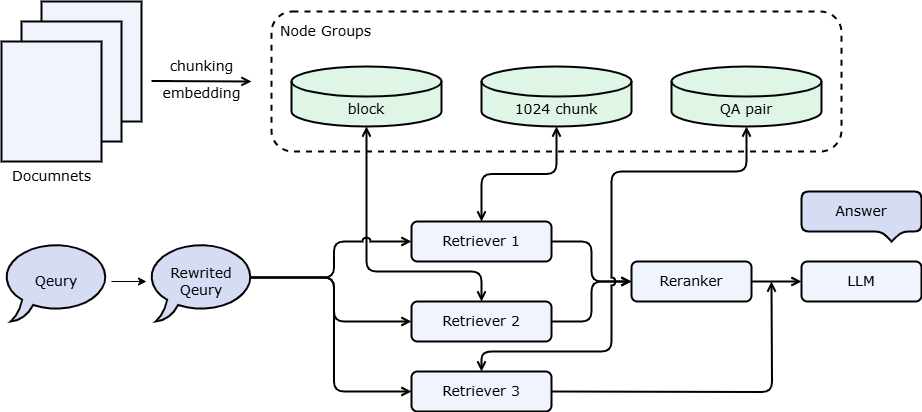
import lazyllm
from lazyllm import bind

rewriter_prompt = "You are a query rewriting assistant, responsible for template switching for user queries.\
Note that you don't need to answer, just rewrite the question to make it easier to search\
Here is a simple example:\
Input: What is RAG? \
Output: What is the definition of RAG? "
rag_prompt = 'You are a friendly AI Q&A assistant who provides answers based on the given context and question. \
Answer the questions based on the following information:\
                {context_str} \n '

# Define embedding model and reordering model
# online_embedding = lazyllm.OnlineEmbeddingModule()
embedding_model = lazyllm.TrainableModule("bge-large-zh-v1.5").start()

# If you want to use the online rearrangement model
# Currently LazyLLM only supports qwen and glm online rearrangement models, please specify the corresponding API key.
# online_rerank = lazyllm.OnlineEmbeddingModule(type="rerank")
# Local reordering model
offline_rerank = lazyllm.TrainableModule('bge-reranker-large').start()

llm = lazyllm.OnlineChatModule(model="qwen2", base_url="http://10.119.24.121:25120/v1/", stream=True) #Access the model service started by Vllm

qa_parser = lazyllm.LLMParser(llm, language="zh", task_type="qa")

docs = lazyllm.Document("/mnt/lustre/share_data/dist/cmrc2018/data_kb", embed=embedding_model)
docs.create_node_group(name='block', transform=(lambda d: d.split('\n')))
docs.create_node_group(name='qapair', transform=qa_parser)

def retrieve_and_rerank():
    with lazyllm.pipeline() as ppl:
# lazyllm.parallel Perform two retrieval operations in parallel
        with lazyllm.parallel().sum as ppl.prl:
# CoarseChunk is the chunk name provided by LazyLLM with a size of 1024 by default.
            ppl.prl.retriever1 = lazyllm.Retriever(doc=docs, group_name="CoarseChunk",similarity="cosine", topk=3)
            ppl.prl.retriever2 = lazyllm.Retriever(doc=docs, group_name="block", similarity="bm25_chinese", topk=3)
        ppl.reranker = lazyllm.Reranker("ModuleReranker", model=offline_rerank, topk=3) | bind(query=ppl.input)
    return ppl

with lazyllm.pipeline() as ppl:
# llm.share means reusing a large model. If this is set to promptrag_prompt, rewrite_prompt will be overwritten.
    ppl.query_rewriter = llm.share(lazyllm.ChatPrompter(instruction=rewriter_prompt))
    with lazyllm.parallel().sum as ppl.prl:
        ppl.prl.retrieve_rerank = retrieve_and_rerank()
# qa pair node group does not participate in reordering with other node groups
        ppl.prl.qa_retrieve = lazyllm.Retriever(doc=docs, group_name="qapair", similarity="cosine", topk=3)
    ppl.formatter = (
          lambda nodes, query: dict(
              context_str='\n'.join([node.get_content() for node in nodes]),
              query=query)
        ) | bind(query=ppl.input)
    ppl.llm = llm.share(lazyllm.ChatPrompter(instruction=rag_prompt, extra_keys=['context_str']))

lazyllm.WebModule(ppl, port=23491, stream=True).start().wait()
In practical applications, you can also use preset QA pairs in combination with front-end engineering to implement question recommendations. For example, when a user asks question A, the system finds question A' that is similar to A from the preset QA pairs and returns it to the user as a recommended question. When the user clicks on the corresponding question, the system directly returns the answer to the question without having to go through the generation process again. This not only improves the user's interactive experience, but also effectively reduces the computing burden of the system.
[Note] We strongly recommend that you use the preset QA pair strategy for debugging after learning Advanced 2 to use the vector database, because repeatedly restarting the system will consume a long time and token.
Appendix 1 Design of RAG in LazyLLM
Document parsing and construction
Document ---(loader)--->document----(parser)--->node
The most critical function is document.create_node_group(name, transform, parent), where name represents the name of the nodes obtained through the parser, and transform represents the conversion rule from parent to name. If not specified, the default is the root node (origin). Nodes with the same name (that is, obtained through the same conversion rule) are regarded as a group of nodes. An example is given below:
Assume that the original text has 2 sentences:
- Hello, I am an artificial intelligence robot developed by SenseTime. My name is LazyLLM. My mission is to help you build the most powerful large model application at the lowest cost. Now, let's get started.
- All components of parallel share inputs and merge the results for output. The definition method of parallel is similar to that of pipeline. You can also initialize its elements directly when defining parallel, or initialize its elements in the with block.
Then there are two Nodes in origin nodes, which are the two sentences above. We assume that the ids are 1 and 2 respectively. Only content and id are shown here. The data structure of None is only for illustration and not in its final form:
all_nodes['origin'] = [Node(id=0, content='Hello, I am an artificial intelligence robot developed by SenseTime. My name is LazyLLM. My mission is to help you build the most powerful large model application at the lowest cost. Now, let's get started.'), Node(id=1, content='All components of parallel share input and merge the results for output. The definition method and pipeline of parallel Similarly, you can also initialize its elements directly when defining parallel, or initialize its elements in the with block ')].
We define some parsers below
document.create_node_group('block', lambda x: '。'.split(x))
document.create_node_group('doc-summary', summary_llm) # Assume we have a large model to do summary
document.create_node_group('sentence', lambda x: ','.split(x), parent='block')
document.create_node_group('block-summary', summary_llm, parent='block')
document.create_node_group('label', label_llm, parent='block') # Assume we have a large model that can extract label
document.create_node_group('count', lambda x: len(x), parent='sentence')
From the above construction, we get a relationship tree, as shown in the figure below:
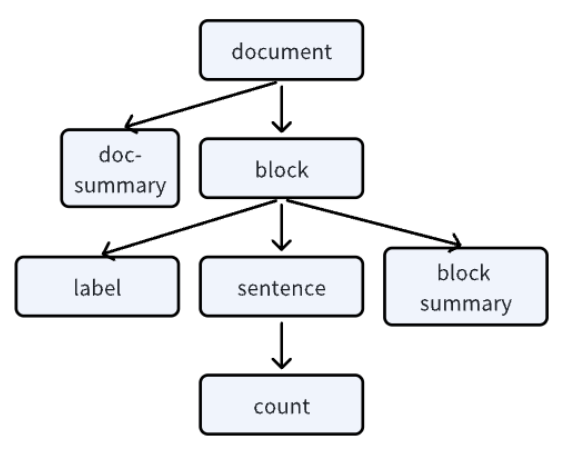
[Note]: Each document object will have a unique relationship tree, indicating the relationship between a group of nodes and a group of nodes.
all_nodes['block'] = [Node(id=0, content='Hello, I am an artificial intelligence robot developed by SenseTime, my name is LazyLLM', parent=0),
                        Node(id=1, content='My mission is to help you build the most powerful large model application at the lowest cost', parent=0),
                        Node(id=2, content='Now, let\'s get started', parent=0),
                        Node(id=3, content='All components of parallel share input and merge the results for output', parent=1),
                        Node(id=4, content='The definition method of parallel is similar to pipeline. You can also initialize its elements directly when defining parallel, or initialize its elements in the with block', parent=1)
                     ]
all_nodes['doc-summary'] = [Node(id=0, content='Introduction to LazyLLM', parent=0),
                            Node(id=1, content='The definition and use of parallel', parent=0), ]
[Note]: The transform rule of create_node_group is from one Node to one/more group Nodes, and will make all Nodes equal, and will eliminate Nodes with empty content.
all_nodes['sentence'] = [Node(id=0, content='Hello', parent=0),
                        Node(id=1, content='I am an artificial intelligence robot developed by SenseTime', parent=0),
                        Node(id=2, content='My name is LazyLLM', parent=0),
                        Node(id=3, content='My mission is to help you', parent=1),
                        Node(id=4, content='Use the lowest cost', parent=1),
                        Node(id=5, content='Build the most powerful large model application', parent=1),
                        Node(id=6, content='now', parent=2),
                        Node(id=7, content='Let\'s get started', parent=2),
                        Node(id=8, content='All components of parallel share input', parent=3),
                        Node(id=9, content='and merge the results and output', parent=3),
                        Node(id=10, content='The definition method of parallel is similar to pipeline', parent=4),
                        Node(id=11, content='You can also initialize its elements directly when defining parallel', parent=4),
                        Node(id=12, content='or initialize its elements in the with block', parent=4),
                        ]
all_nodes['block-summary'] = [Node(id=0, content='Who is LazyLLM', parent=0),
                            Node(id=1, content='What is the mission of LazyLLM', parent=1),
                            Node(id=2, content='start', parent=2),
                            Node(id=3, content='parallel process', parent=3),
                            Node(id=4, content='How parallel is defined', parent=4)
                             ]
all_nodes['label'] = [Node(id=0, content='SenseTime, Robot', parent=0),
                        Node(id=1, content='Large Model Application', parent=1),
                        Node(id=2, content='start', parent=2),
                        Node(id=3, content='shared input', parent=3),
                        Node(id=4, content='Initialization, with', parent=4),]
Count is also similar, so I won’t go into details here.
Document recall
Each time it is recalled, a set of nodes (based on name), a similarity calculation formula (bm25 / cosine), an indexing strategy (default/map/tree, etc.), and topk will be selected.
During recall, if it is found that there are no corresponding nodes, the corresponding nodes will be created according to the registered transformation rules (parser). In particular, if the similarity calculation formula indicates that embedding is needed, but we have not done embedding on the nodes, we will also do embedding on this group of nodes.
We allow users to register similarity in a certain way. When registering, they must specify whether it uses the original text or the embedding result.
[Note] Only the given nodes will be recalled during the recall, and its parent-child relationship will not be queried to find its associated nodes.
Unlike llamaindex, index here is just an indexing method and does not involve storage.
- When index is default, we will traverse all nodes under a group of nodes, calculate the similarity respectively, and then take topk;
- When index is map, we will look up the table from a hash-map and directly get all matching nodes. At this time, similarity and topk will be invalid.
[Note] This hash-map needs to be placed in the store to improve subsequent search efficiency.
Related node search
DocNode is the object used by LazyLLM to store document fragments. The recaller and reorderer return DocNode, so understanding the DocNode object has important practical significance. DocNode has the following public properties:
- text: original text
- embedding: vector representation corresponding to the original text
- parent: the parent node of the current node
- children: child nodes of the current node
- root_node: Origin ancestor node corresponding to the current node
- metadata: node metadata, including file path, file format and other information
- global_metadata: global metadata
- doc_path: source file path
According to the above information, each DocNode saves the corresponding original text fragment, embedded information and metadata. In addition, it also records its parent-child relationship in the entire node tree. From this, we can easily find other related nodes from one node. LazyLLM provides the document.find('Sentence')(nodes) interface to implement this function: find its associated ancestor nodes or descendant nodes from the given recalled nodes. Take block-1 and block-3 in the above example as an example:
(1) If we want to find the original text (origin, parent node), then block-1 corresponds to origin-0, block-3 corresponds to origin-1, so the result is [origin-0, origin-1]
(2) If we are looking for descendant nodes, we will find all its associated nodes. For example, we want to find sentences. block-1 corresponds to [3, 4, 5], block-3 corresponds to [8, 9], so the result is [sentence-3, sentence-4, sentence-5, sentence-8, sentence-9]
Appendix 2 Custom Transform
When doing a RAG application, the first thing you need to do is to parse the document, parse the entire document into fragments suitable for subsequent retrieval and recall processing, and then input it to LLM for generating answer responses. The default NodeTransform provided by LazyLLM is SentenceSplitter, which is used to parse documents into sentences for processing. If the SentenceSplitter provided by LazyLLM cannot meet the requirements, you can define your own Transform algorithm that meets the requirements. This Transform algorithm can be of function type or class type. We will explain them separately below.
Function-based customization
If our Transform algorithm is relatively simple, we can define a function with the following code:
def SentSplitter(text: str, splitter: str="\n"):
    if text== '':
        return ['']
    paragraphs = text.split(splitter)
    return [para for para in paragraphs]
The logic of this Transform function is relatively simple. The incoming parameter is a string, the delimiter is '\n', and then the split string is returned in the form of a string list. Then how do we use it? In fact, it is very simple to use. Just pass the custom SentSplitter above to the transform parameter when creating the node group in Document. The code is as follows:
import lazyllm
from lazyllm import Retriever
from lazyllm.tools.rag import Document, DocNode

def SentSplitter(text: str, splitter: str="\n"):
    if text == '':
        return ['']
    paragraphs = text.split(splitter)
    return [para for para in paragraphs]

prompt = 'You will play the role of an AI Q&A assistant and complete a dialogue task. In this task, you need to provide your answer based on the given context and question.'
documents = Document(dataset_path="rag_master", embed=lazyllm.OnlineEmbeddingModule(source="glm", embed_model_name="embedding-2"), manager=False)
documents.create_node_group(name="sentences", transform=SentSplitter)

ppl = Retriever(documents, group_name="sentences", similarity="cosine", topk=3)
print(ppl("What is the way of heaven"))
Here we take the Chinese Studies data set as an example. The download method of the data set is: [Dataset download method].
The resulting output is:
[<Node id=76bba733-552d-4d84-a065-c122220e8c5c>, <Node id=647792e4-f2b5-44e0-8ee9-0c397da7dd3e>, <Node id=d2acf2cd-add0-4085-9358-51d3c701c430>]
The result output is three Node nodes, as expected.
At this point, someone may ask, when I explained the custom Reader earlier, the return value was of the List[Node] type. So what if the type of the input parameter is Node? Or how do I know what type of parameters are passed into the function? The answer is actually very simple. The parameters of the custom Transform algorithm function can be specified by developers themselves, which is very flexible. Here’s a detailed explanation. If the defined function input parameter is of type str, then when passing the function into create_node_group when using it, you can only specify transform as SentSplitter, or when specifying transform, you can also explicitly specify trans_node as False. If the defined function input parameter is of type DocNode, then you need to specify transform as SentSplitter and trans_node as True at the same time when using it. The output parameters of the function can be of type List[str] or of type List[Node].
In order to understand this more clearly, we take the above code as an example to demonstrate. First, print the type of input parameters in SentSplitter. The code is as follows:
def SentSplitter(text: str, splitter: str="\n"):
    print(f"text: {type(text)}")
    if text == '':
        return ['']
    paragraphs = text.split(splitter)
    return [para for para in paragraphs]
Keep other codes unchanged, and then run the above code again. The result output is:
text: <class 'str'>
text: <class 'str'>
text: <class 'str'>
text: <class 'str'>
text: <class 'str'>
text: <class 'str'>
text: <class 'str'>
text: <class 'str'>
text: <class 'str'>
[<Node id=57d77052-6170-4f1c-af6b-9fad32483250>, <Node id=606c8ad2-cfae-4f6d-8730-3cf81f3d2df7>, <Node id=3e002fb9-b38f-4a92-91f1-f153b0d829a0>]
It turns out that the parameter type going into SentSplitter is a string. Next, let’s modify the value of trans_node in create_node_group to True and see the effect. The code is as follows:
prompt = 'You will play the role of an AI Q&A assistant and complete a dialogue task. In this task, you need to provide your answer based on the given context and question.'
documents = Document(dataset_path="rag_master", embed=lazyllm.OnlineEmbeddingModule(source="glm", embed_model_name="embedding-2"), manager=False)
documents.create_node_group(name="sentences", transform=SentSplitter, trans_node=True)

ppl = Retriever(documents, group_name="sentences", similarity="cosine", topk=3)
print(ppl("What is the way of heaven"))
The resulting output is:
Then an error occurred:
Because the parameter passed in is of type Node, the split function cannot be used directly. As expected.
Next we slightly modify SentSplitter so that its output type is List[Node] type. The code is as follows:
def SentSplitter(text: str, splitter: str="\n"):
    print(f"text: {type(text)}")
    if text == '':
        return ['']
    paragraphs = text.split(splitter)
    return [DocNode(content=para) for para in paragraphs if para]
Let's take the input parameter as str type and the output parameter as List[Node] type as an example. The result output is as follows:
text: <class 'str'>
text: <class 'str'>
text: <class 'str'>
text: <class 'str'>
text: <class 'str'>
text: <class 'str'>
text: <class 'str'>
text: <class 'str'>
text: <class 'str'>
[<Node id=5dc6d20c-f93c-4da8-8a8f-7f4bbb5efe6b>, <Node id=ef918c09-5e12-4b04-864f-9f2a13393ab8>, <Node id=1ba22c8a-f16a-4ef7-afe7-a8808a05d308>]
It can be seen that if the Transform algorithm is defined in the form of a function, then the input parameter of the function can be of str type or Node type, and the output parameter can be of List[str] type or Node type, which is very flexible.
Class-based customization
If the custom Transform algorithm is very complex, then a function cannot simply solve it. At this time, you can use class-based definition. The class defined first must inherit from the NodeTransform base class, and then override the transform method of the base class. It should be noted here that because it is inherited from the NodeTransform base class, the input parameter of the transform function can only be of the Node type, not the str type, but its output parameter can be of the List[str] type or the List[Node] type. Here we simply define a Transform algorithm with '\n\n' as the delimiter. The code is as follows:
from lazyllm.tools.rag import DocNode, NodeTransform
from typing import List

class ParagraphSplitter(NodeTransform):
    def __init__(self, splitter: str = r"\n\n", num_workers: int = 0):
        super(__class__, self).__init__(num_workers=num_workers)
        self.splitter = splitter

    def transform(self, node: DocNode, **kwargs) -> List[str]:
        return self.split_text(node.get_text())

    def split_text(self, text: str) -> List[str]:
        if text == '':
            return ['']
        paragraphs = text.split(self.splitter)
        return [para for para in paragraphs]
In the above code, the basic interface is transform, and the specific processing method is implemented in the split_text method.
Then we modify the code for registering Transform above. Just replace the parameter transform with ParagraphSplitter and leave trans_node unset. The code is as follows:
from lazyllm.tools.rag import Document
import lazyllm
from lazyllm import Retriever

prompt = 'You will play the role of an AI Q&A assistant and complete a dialogue task. In this task, you need to provide your answer based on the given context and question.'
documents = Document(dataset_path="rag_master", embed=lazyllm.OnlineEmbeddingModule(source="glm", embed_model_name="embedding-2"), manager=False)
documents.create_node_group(name="sentences", transform=ParagraphSplitter)

ppl = Retriever(documents, group_name="sentences", similarity="cosine", topk=3)
print(ppl("What is the way of heaven"))
The resulting output is:
[<Node id=ea8e0a58-8d9b-45ab-aefd-9f9b900b40a5>, <Node id=7c801606-40da-45a8-874d-c9892be3fbed>, <Node id=f73f95ac-a239-4bd9-b405-4b1763a170bf>]
The result output is three nodes, which is as expected.
Then we modify the parameter type of ParagraphSplitter. The code is as follows:
class ParagraphSplitter(NodeTransform):
    def __init__(self, splitter: str = r"\n\n", num_workers: int = 0):
        super(__class__, self).__init__(num_workers=num_workers)
        self.splitter = splitter

    def transform(self, node: DocNode, **kwargs) -> List[str]:
        return self.split_text(node.get_text())

    def split_text(self, text: str) -> List[str]:
        if text == '':
            return ['']
        paragraphs = text.split(self.splitter)
        return [DocNode(content=para) for para in paragraphs]
Then rerun the above code, the output is:
[<Node id=47e06bc6-52ed-411d-a7a1-4da345f32700>, <Node id=0fdc7cfb-e0c4-411a-945d-007fbf4e68f0>, <Node id=7593f017-e285-49d7-bbd5-2177e691919c>]
Therefore, the input parameter of the class-based Transform algorithm can only be of Node type, but the output parameter can be of List[str] type or List[Node] type.
Use custom Transform to build RAG applications
Here we will use the previous Transform defined based on class as an example to build a RAG dialogue robot of a Chinese classics master. The code is as follows:
import lazyllm
from lazyllm import pipeline, parallel, bind, Retriever, Reranker
from lazyllm.tools.rag import Document

prompt = 'You will play the role of an AI Q&A assistant and complete a dialogue task. In this task, you need to provide your answer based on the given context and question.'
documents = Document(dataset_path="rag_master", embed=lazyllm.TrainableModule("bge-large-zh-v1.5"), manager=False)
documents.create_node_group(name="paragraphs", transform=ParagraphSplitter)

with pipeline() as ppl:
    with parallel().sum as ppl.prl:
        prl.retriever1 = Retriever(documents, group_name="paragraphs", similarity="cosine", topk=3)
        prl.retriever2 = Retriever(documents, "CoarseChunk", "bm25_chinese", 0.003, topk=3)
    ppl.reranker = Reranker(name="ModuleReranker", model='bge-reranker-large', topk=1, output_format="content", join=True) | bind(query=ppl.input)
    ppl.formatter = (lambda nodes, query: dict(context_str=nodes, query=query)) | bind(query=ppl.input)
    ppl.llm = lazyllm.TrainableModule("internlm2_5-7b-chat").prompt(lazyllm.ChatPrompter(prompt, extra_keys=["context_str"]))

lazyllm.WebModule(ppl, port=23456).start().wait()
In the above implementation code, we use the local model to build a RAG-based conversation robot through the TrainableModule in Lazyllm. First define prompt and document. When creating node_group, you can configure the custom ParagraphSplitter through the parameter transform for subsequent document processing.
In the following code, the RAG processing flow is defined through pipeline. First, two Retrievers are defined to process documents. These two Retrievers perform parallel processing through parallel. Then define Reranker to reorder the retrieved documents. Next, the reordered documents and input query are formatted, and then sent to LLM, so that LLM can generate the ideal answer based on the retrieved documents. Finally, a WebModule is started based on the created pipeline. According to the corresponding IP and port after startup, it can be opened in the browser and used for experience.
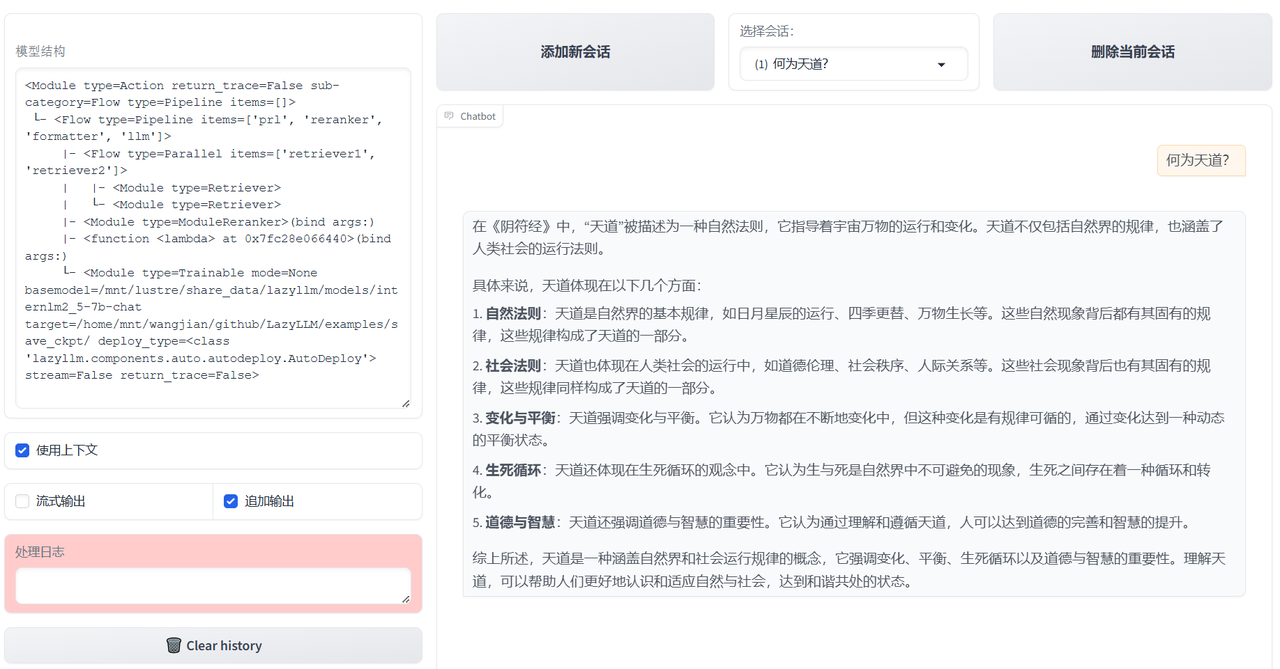
This is a sample screenshot of the user experience. Rag's document library contains some Chinese studies materials, including Doctrine of the Mean, Great Learning, Heart Sutra, Analects of Confucius, Tao Te Ching and Yin Fu Jing. The question asked is "What is TianDao?" The following reply is the result generated by LLM based on the documents retrieved by the customized Transform above.