🐱 LazyLLM Getting Started Guide
0. Table of Contents
- 1. Before You Start
- 2. Hello World with LazyLLM
- 3. Prompt Design: Keeping Model Output Controllable
- 4. Build a Minimal RAG System
- 5. How Does RAG Actually Run?
- 6. Use Pipelines to Organize LLM Flows
- 7. Use Agents for Non-Deterministic Tasks
- 8. Advanced Directions with LazyLLM
1. Before You Start
As large models keep getting stronger, more developers are trying to wire them into real systems. In practice the hard part is rarely "can we call a model"—it is how to orchestrate models, data, and control flow so the system is reliable and maintainable.
LazyLLM is designed around this question. The framework focuses on embedding LLM capabilities into application flows through an engineering-first mindset.
This tutorial takes a pragmatic walk-through of LazyLLM. By the end you will have run an end-to-end, executable LLM workflow.
1.1 Prerequisites
This tutorial targets readers with basic programming experience but not necessarily any familiarity with LLM systems.
Before starting you only need the following:
-
Able to read and write basic Python code
-
Comfortable with common dev tasks such as installing dependencies and running scripts
-
Understand the basic "input → processing → output" call pattern
No prior exposure to RAG or Agents is required.
1.2 What You Will Learn
After finishing this tutorial you will be able to build a minimal yet complete LLM application with LazyLLM and clearly understand how it runs, including how to:
-
Start and call an online LLM service
-
Improve output stability through prompt design plus output post-processing
-
Build and execute a minimal viable RAG pipeline
-
Understand the data flow inside RAG
-
Define tools and build a basic Agent example
-
Diagnose issues when behavior or outputs look off
1.3 Scope and Focus
To keep the onboarding experience practical, this tutorial emphasizes engineering practice and usage intuition. It does not dive into:
-
Low-level algorithms or math behind LLMs
-
Systematic comparisons of model architectures
-
Scheduling and planning algorithms for complex Agent systems
If you want to explore these topics, check the advanced docs after finishing this guide.
2. Hello World with LazyLLM
Before building complex flows we start with the simplest step: call an LLM once and get a response.
The goal for this chapter is simple yet crucial. If you can complete it smoothly, your environment and basic usage are correct, paving the way for later chapters.
2.1 Prepare the API Key
-
Runtime setup
Before applying for an API key, make sure LazyLLM is set up correctly: install dependencies and finish the basic configuration. This guarantees that the sample code will run without you having to chase environment issues.
Follow the official guide for detailed steps.
-
API key configuration
LazyLLM itself does not host models. Instead, it connects to online or local providers. To make the tutorial easy to follow, we use online models throughout. Therefore you need to prepare an API key for the provider you plan to call.
Check the docs for instructions on obtaining keys.
In this tutorial we use the
SenseNovaonline model. Configure the following environment variables locally:
Once the variables are set, LazyLLM automatically reads them at runtime.
Note
Environment variable names differ across providers. Always follow the platform you actually use. Later examples assume the
SenseNovanaming.
2.2 Build an LLM Module with LazyLLM
In LazyLLM, models usually live inside Module objects. A module receives input, calls the model, and returns a result.
The following snippet constructs an online model and sends a request:
import lazyllm

llm = lazyllm.OnlineChatModule(
        source="sensenova",
        model="SenseNova-V6-5-Pro"
    )
response = llm("Hi there, tell me a bit about yourself.")
print(response)
Key takeaways:
-
OnlineChatModulecreates an online chat LLM instance -
sourcespecifies the provider -
modelselects the exact model name
You can treat llm like a normal Python callable: pass input, get output.
2.3 Run the Simplest Conversation
After the code runs, you should see text returned by the model in your terminal. A sample output looks like this:
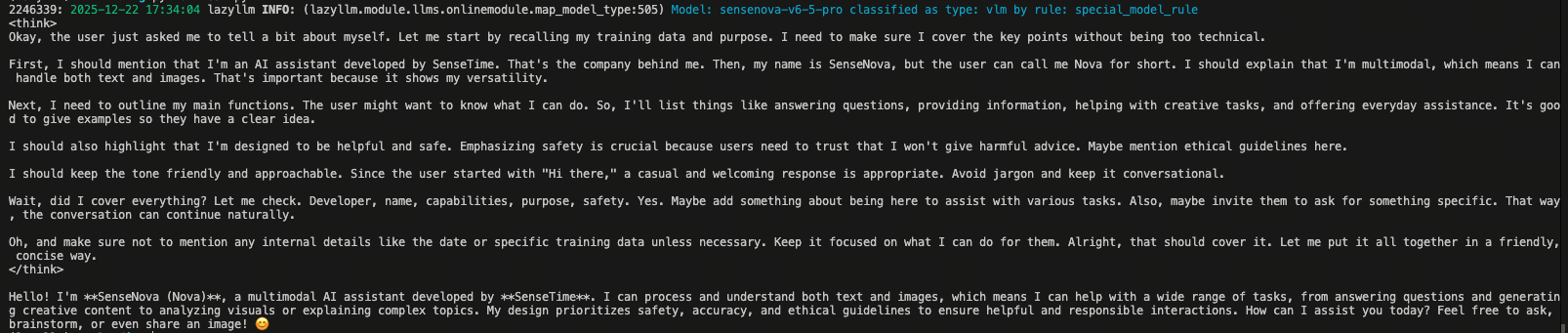
Even this tiny example shows several core LazyLLM concepts:
-
Models are wrapped as modules
-
Modules participate in the program by being called
-
Inputs and outputs are clear data objects
Later features—prompting, RAG, agents—are all about composing these modules.
2.4 Common Issues and Debugging Tips
If the sample fails, start by checking these areas.
2.4.1 API Key Misconfiguration
If the provider returns authentication errors, verify that:
-
The API key is set as an environment variable
-
The current process can read that variable
Print the values in Python to confirm:
    import os
    print(os.environ["LAZYLLM_SENSENOVA_API_KEY"])
    print(os.environ["LAZYLLM_SENSENOVA_SECRET_KEY"])
2.4.2 Wrong Model Name or Source
If the model is missing or inaccessible:
-
The
sourceparameter might be incorrect -
The
modelname might not match the provider
Always check the provider documentation for valid options.
2.4.3 Network or Service Issues
If the request times out or fails immediately, it could be network or provider downtime. Try:
-
Checking your network
-
Retrying later
-
Switching to another available provider
3. Prompt Design: Keeping Model Output Controllable
In the previous chapter we called the model and got a result. In real systems, simply "getting a response" is not enough. You must ensure the response meets expectations and can be processed reliably downstream.
Prompt design is the main lever for doing so.
3.1 What Prompts Do in LLM Systems
From a usage perspective, a prompt is how you describe a task to the model. It includes the user question plus instructions about output format, style, and constraints.
In an LLM system the prompt serves two key roles:
- Tells the model what to do
- Influences how it responds
A prompt is therefore not just natural-language input; it is part of the execution context.
3.2 Embrace the Non-Deterministic Nature of LLM Output
You will quickly notice that identical inputs can yield different outputs. This is an inherent property of LLMs, not a framework bug. For engineering systems, however, this variability can be problematic.
A Typical Failure in Production
Suppose we need structured data from a user utterance so the program can parse it later. We expect the output to look like this:
With a loose prompt the model might respond like:
3.3 Engineering Techniques to Constrain Output Structure
Prompting alone rarely guarantees machine-friendly output. When downstream code or storage expects stable structure, we need engineering tools to constrain the output.
LazyLLM offers multiple options. Here we use Formatter and Extractor to illustrate two strategies:
- Constrain generation so the output stays close to the target format
- Treat the task as structured extraction and return data directly
We use one simple example for comparison.
3.3.1 Task Description
Extract the user's name and age from natural language and return JSON.
Input text:
Target output:
3.3.2 Baseline Without Any Helper
First, only use a prompt.
import lazyllm

llm = lazyllm.OnlineChatModule(
    source="sensenova",
    model="SenseNova-V6-5-Pro",
)

PROMPT = """
You are an information extractor.
Extract the user's name and age from the 【input text】 and output JSON only—no explanations or extra text.

# Output format:
{{
  "name": "John Doe",
  "age": 0
}}

# Input text:
"""

llm_raw = llm.prompt(PROMPT)
result = llm_raw("Hi everyone, my name is Zhang San, I am 28, and I work in Shanghai.")
print(result)
The model may output valid JSON or sprinkle commentary or slightly off formats. In the screenshot below the model wrapped the JSON with reasoning steps: acceptable for humans, unstable for production.

3.3.3 Use a Formatter to Clean Up Output
The first engineering approach is to restrict the output format. LazyLLM provides formatters:
from lazyllm.components.formatter import JsonFormatter

llm_fmt = llm.prompt(PROMPT).formatter(JsonFormatter())

fmt_result = llm_fmt("Hi everyone, my name is Zhang San, I am 28, and I work in Shanghai.")
print(fmt_result)

A formatter usually yields cleaner output with fewer explanations. Keep in mind:
-
Formatters operate on the textual output
-
Schema compliance still depends on the model
3.3.4 Use an Extractor for Structured Outputs
Another approach is to model the task as extraction. LazyLLM offers extractors:
import json
from lazyllm.tools.tools import JsonExtractor

extractor = JsonExtractor(
    base_model=llm,
    schema='{"name": "", "age": 0}',
    field_descriptions={'name': 'name', 'age': 'age'}
)

ext_result = extractor("Zhang San's age is 20, and Li Si's age is 25.")
print(ext_result)
Result:

In this pattern the extractor:
- Invokes the base model
- Returns structured data matching the schema
- Produces Python objects you can consume directly
- Shines when the schema is fixed and fields are well defined
3.4 Common Issues and Debugging Tips
When using formatters or extractors, most pitfalls stem from task design. Here are typical scenarios.
3.4.1 Missing Fields or Empty Values
If extractor outputs miss fields or return nulls, the schema is often too complex for the model to fill reliably. Try:
-
Simplifying the schema to core fields first
-
Prioritizing information that is easy to spot in the text
-
Reintroducing other fields after the critical ones stabilize
3.4.2 Field Types Don’t Match
Common symptoms: numbers returned as strings, lists returned as scalars. This means the model is still "generating text" instead of strictly extracting. Consider:
-
Deciding whether typed data is truly needed
-
Using an extractor when it is
-
Resisting the urge to fix types purely through prompt tweaks
3.4.3 Overly Long Inputs Cause Failures
When the input contains too much information or multiple goals, extraction becomes unstable. In this case:
-
Avoid overloading one task with many objectives
-
Narrow down the text you feed into the extractor
-
Run structured extraction on the trimmed content
4. Build a Minimal RAG System
The previous chapter focused on making outputs controllable. Now consider a new problem: what if the model does not know the answer? This is the challenge RAG (Retrieval-Augmented Generation) addresses.
4.1 Why RAG Matters
An LLM’s knowledge comes from its training data. It cannot access external sources during inference. This means LLMs are great at reasoning over what they already know, but bad at "looking up" new information.
In production, this limitation shows up when:
-
Questions rely on private or internal documents
-
Questions fall outside the training data
-
Answers must come from specific materials instead of free-form text
Even a strong model will fail if it lacks the relevant context. The issue is not that it "cannot answer" but that it cannot see the needed information.
A natural solution is to first retrieve relevant content and then provide it to the model. RAG implements this idea. Rather than making models memorize everything, RAG inserts a retrieval step so the model can reference external knowledge during generation.
Conceptually, the flow has three steps:
- Convert the question into a representation suitable for retrieval
- Retrieve relevant content from the knowledge base
- Feed the retrieved context to the model when generating the answer
This way, generation builds on controlled, updatable external information instead of only the model’s parameters.
4.2 Build a Minimal RAG Flow with LazyLLM
LazyLLM typically organizes RAG as a pipeline—a sequential processing flow. Let’s build the smallest runnable example.
4.2.1 Prepare Documents and the Model
Assume we have a directory of text files serving as the knowledge base.
import lazyllm

# Load documents
documents = lazyllm.Document(
    dataset_path="./docs"
)

# Build the model
prompt = ('You will play the role of an AI Q&A assistant and complete a dialogue task. '
        'In this task, you need to provide your answer based on the given context and question.')
llm = lazyllm.OnlineChatModule(
    source="sensenova",
    model="SenseNova-V6-5-Pro",
)

# Attach the prompt
llm.prompt(lazyllm.ChatPrompter(instruction=prompt, extra_keys=['context_str']))
Here:
Documentloads and manages the raw files- The model remains an independent module
Tip:
Regarding the usage of the extra_keys field, please refer to the detailed API documentation for more information.
4.2.2 Build the Retriever
Next we need a retriever instance to find relevant content per question.
This retriever serves as the retrieval module in the subsequent pipeline. It is initialized with a set of parameters and encapsulates the complete logic of “input a question → return relevant content.”
In practice, you only need to pass the user’s question as input, and it will return a set of text segments most relevant to that question. The exact input and output formats are introduced in Section 5.2.2. .
For a detailed explanation of the retriever parameters, you can refer to the documentation if you are interested.
4.2.3 Chain the RAG Flow with a Pipeline
Now wire the modules with a pipeline:
from lazyllm import bind

with lazyllm.pipeline() as rag_ppl:
    rag_ppl.retriever = retriever
    rag_ppl.formatter = (lambda nodes, query: dict(context_str='\n\n'.join([n.get_content() for n in nodes]), query=query)) | bind(query=rag_ppl.input)
    rag_ppl.llm = llm
The flow now looks like this:
- The question enters the retriever
- The formatter packages intermediate data for the model
- The model consumes the formatted payload
The pipeline executes modules in order of definition.
4.2.4 Run the RAG Example
If everything works, the response is grounded in the retrieved documents instead of being hallucinated:
Night-blooming jasmine (Cestrum nocturnum) is a perennial vine in the Solanaceae family, also called night jessamine. Key traits:

1. **Morphology**
Slender hairy branches, opposite broad-ovate or cordate leaves, yellow-green trumpets that release strong fragrance at night, typically blooming in summer and autumn.

2. **Distribution and usage**
Native to South China, now cultivated widely as an ornamental. Flowers and shoots can be eaten as wild greens; traditional medicine uses it for eye conditions.

3. **Cautions**
Night fragrance contains alkaloids that may cause dizziness or allergies; sap is mildly toxic.

Summary: a plant valued for ornamental, edible, and medicinal uses, but handle with care.
4.3 Common Issues and Debugging Tips
When first wiring RAG, most errors come from data prep or module wiring.
4.3.1 Empty or Tiny Retrieval Results
Possible reasons:
- Documents were not loaded (ensure
dataset_pathpoints to a folder) - Content is too sparse or fragmented
- Retrieval parameters are too strict
Verify document loading first, then adjust retriever settings.
4.3.2 Irrelevant Retrieval Results
Causes include:
- Poor document chunking strategy
- Retrieval method not suited to the text type
topktoo small
Test the retriever alone to inspect its outputs.
4.3.3 Model Ignores Retrieved Content
If answers look hallucinated, the issue is usually the flow:
- Retrieved content never reached the model
- The prompt did not instruct the model to use the context
Inspect intermediate data between modules.
5. How Does RAG Actually Run?
We just executed a minimal RAG system. In real work you will soon ask: how do retrieval results feed into generation, and where do things break when quality drops? To answer that, examine what happens during a single RAG request.
5.1 End-to-End Flow
From LazyLLM’s viewpoint, a RAG system is not a black box; it is multiple modules collaborating sequentially. The canonical flow:
- Receive a user question
- Retrieve relevant documents
- Pass retrieved content as context to the model
- Model generates the answer based on that context
Pipelines make each step’s input and output explicit.
5.2 Module Collaboration and Data Flow
Walk through a complete example to see how a request moves through the system.
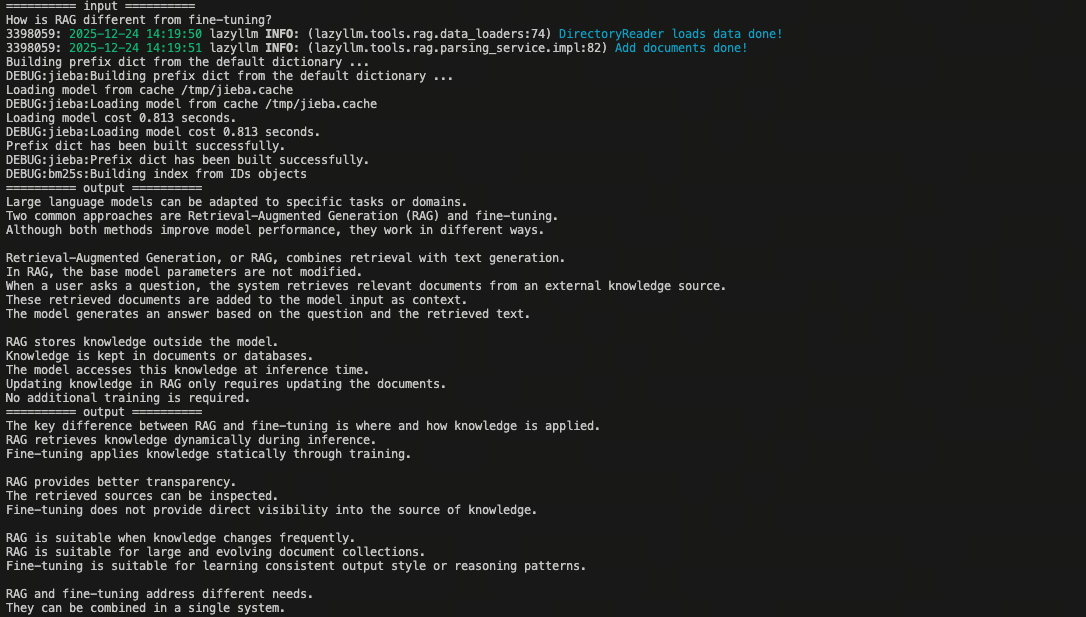
5.2.1 Retriever: Search
The retriever takes the question (or its vector) and returns relevant chunks:
query = "How is RAG different from fine-tuning?"
print(f"========== input ==========\n{query}")
retrieved_docs = retriever(query)
for doc in retrieved_docs:
    print(f"========== output ==========\n{doc.text}")
The output result:
5.2.2 Reranker: Optional Reordering
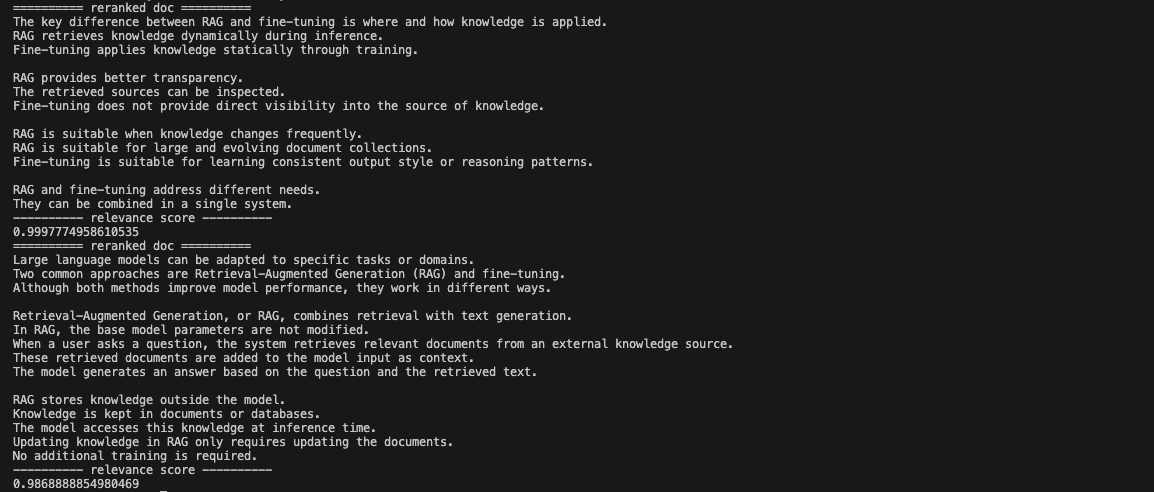
The reranker re-scores candidate texts relative to the question. It does not create new text; it reorders existing ones.
reranker = Reranker('ModuleReranker', model='bge-reranker-large', topk=2)
reranked_docs = reranker(retrieved_docs)
for doc in reranked_docs:
    print(f"========== reranked doc ==========\n{doc.text}")
    print(f"---------- relevance score ----------\n{doc.relevance_score}")
The rerank result is as below. The document which is more relevant to the user query has higher rank and relevance score.
Rerankers are optional. Without one you can pass retrieved_docs straight to the LLM.
5.2.3 LLM: Generation
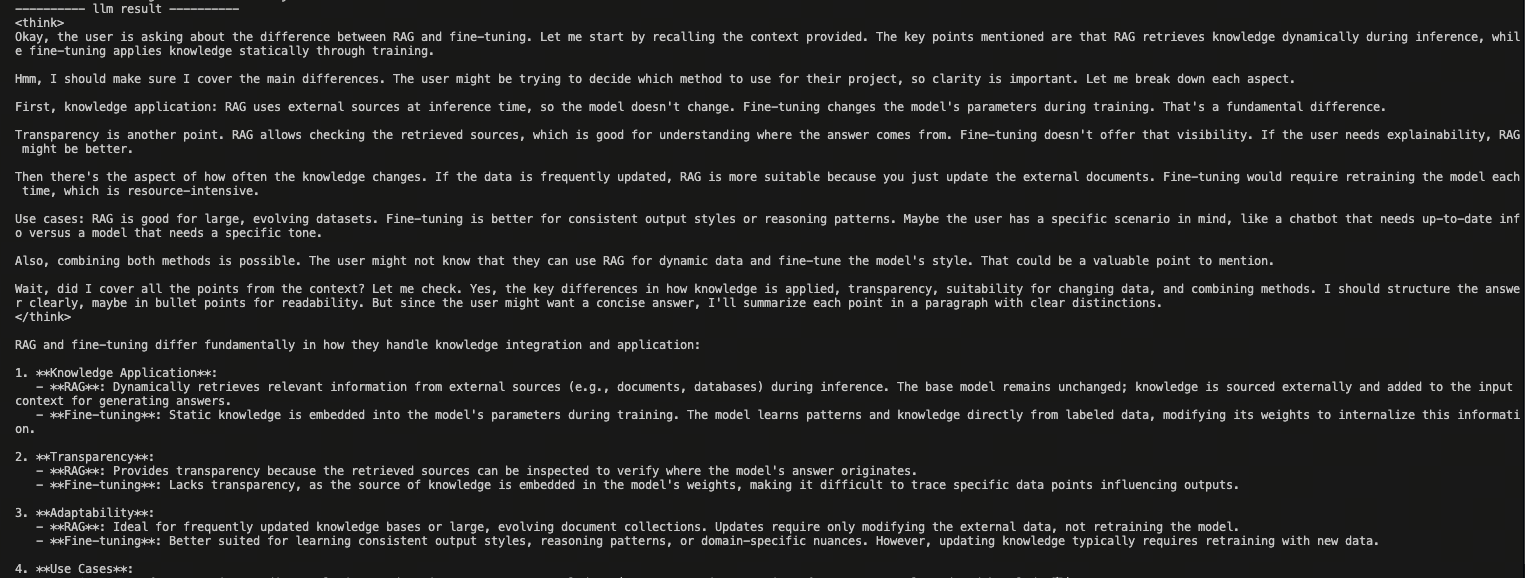
At this stage the LLM takes the original prompt plus context and produces the answer:
rerank_contexts = [doc.text for doc in reranked_docs]
context_str = "\n-------------------\n".join(rerank_contexts)
res = llm({"query": query, "context_str": context_str})
print(f'---------- llm result ----------')
print(res)
6. Use Pipelines to Organize LLM Flows
Once you chain retrieval, formatting, and model calls together, the code can quickly become messy. The real challenge is not writing each step, but keeping the whole flow readable and adaptable. LazyLLM solves this with pipelines.
6.1 Core Idea
A pipeline simply:
Strings a set of interdependent steps into a well-defined execution order.
Each step focuses on three things:
- What it receives
- What it outputs
- How it passes data onward
The goal is not fancy syntax—it is about making the flow self-explanatory and easy to adjust.
6.2 Express RAG with a Pipeline
What matters in RAG is the execution order, not any single module. Pipelines make that order explicit:
with lazyllm.pipeline() as rag_ppl:
    rag_ppl.retriever = retriever
    rag_ppl.formatter = (lambda nodes, query: dict(context_str=nodes, query=query)) | bind(query=rag_ppl.input)
    rag_ppl.llm = llm
Reading top to bottom:
- Input hits the retriever
- Results are reformatted for the model
- The model produces the answer
The pipeline’s only job is to spell out the order. The flow stays the same, but the code becomes clearer and easier to maintain.
6.3 Engineering Value
Pipeline value is less about specific APIs and more about making flows comprehensible and stable:
- The flow structure is explicit, so complex logic no longer hides in glue code.
- Debugging gets cheaper—you can inspect each step’s output in order.
- Modifying the flow becomes controlled: insert, swap, or reorder modules without wrecking the structure.
In short, pipelines surface the flow that was previously implicit, making development, debugging, and iteration easier.
For deeper dives into pipelines, see the advanced guide.
7. Use Agents for Non-Deterministic Tasks
Earlier we used pipelines to define clear, stable flows like RAG. But not every task fits a predefined order. When the system must decide next steps dynamically based on intermediate results, you need an agent.
7.1 Why Agents?
Pipelines work when every step and order can be determined at coding time. Real scenarios often require decisions such as whether to continue, retry, or call additional capabilities based on current results. Hardcoding such logic makes the code complex quickly. The issue is not with pipelines; the flow itself is not fixed.
Agents solve this by letting the model decide the next action at runtime. Instead of coding all transitions manually, you let the agent observe the state and choose what to do next.
Put simply:
Use pipelines when the flow is predetermined.
Use agents when the flow must be decided on the fly.
7.2 Role of Tools in Agent Decisions
In an agent system, tools are not fixed steps. They are capabilities the model may or may not call based on need. Rather than telling the code "call this function now," you expose a toolbox and let the model choose.
Tools are therefore the action space of an agent.
7.3 Define a Tool for Agent Use
Keep each tool focused and bounded so the model can understand it. A minimal tool example:
from lazyllm.tools import fc_register

@fc_register("tool")
def multiply_tool(a: int, b: int) -> int:
    """
    Docstring for multiply_tool

    :param a: Description
    :type a: int
    :param b: Description
    :type b: int
    :return: Description
    :rtype: int
    """
    return a * b
@fc_register("tool")
def add_tool(a: int, b: int):
    """
    Docstring for add_tool

    :param a: Description
    :type a: int
    :param b: Description
    :type b: int
    """
    return a + b
7.4 Invoke a Custom Tool from an Agent
After exposing tools, the agent decides whether to call them. Execution paths become model-driven instead of hardcoded. When asked "What is 12*36? Show the steps," the agent will call multiply_tool and add_tool on its own.
from lazyllm.tools import ReactAgent

tools = ["multiply_tool", "add_tool"]
llm = lazyllm.OnlineChatModule(source="sensenova", model="DeepSeek-V3")
agent = ReactAgent(llm, tools)
query = "What is 20+(2*4)? Calculate step by step."
res = agent(query)
print(res)

7.5 When to Use Agents
Agents are useful when:
- The flow cannot be fully predetermined
- Next steps depend on intermediate results
- Multiple capabilities must be orchestrated dynamically
If the flow is stable, pipelines stay simpler and more reliable. Greater agent freedom demands tighter design and guardrails.
For more agent details see the advanced guide.
8. Advanced Directions with LazyLLM
You have now completed the LazyLLM onboarding path: you can call models, organize flows, build RAG systems, and understand agent use cases. From here, different projects branch out in different directions. Below are common next steps—pick the ones relevant to you.
-
Deepen prompt design and output controls
Downstream systems demand stable, controllable outputs.
👉 Docs -
Optimize retrieval quality in RAG
Bottlenecks usually lie in retrieval and reranking: chunking, strategy, parameter tuning.
👉 Docs -
Fine-tune models for your domain
When general models underperform in-domain, fine-tune LLMs or embedding models to align with your data.
👉 Docs -
Accelerate execution with caching, async, and efficient engines
High-throughput scenarios benefit from caching, async pipelines, and fast vector stores.
👉 Docs -
Multimodal RAG
Handle images, PDFs, audio, or video with multimodal retrieval-and-generation.
👉 Docs -
Agentic RAG
For multi-step reasoning and iterative retrieval, pair RAG with agents for decision-making powers.
👉 Docs