Multi-modal Output Agent: Image & Text
This project demonstrates how to use LazyLLM to build a multi-modal agent that leverages tools which do not directly produce text.
By the end of this section, you will learn the following key features of LazyLLM
- How to combine TrainableModule to invoke models of different modalities.
- How to use ReactAgent to automatically select and invoke tools to accomplish complex tasks.
Design Approach
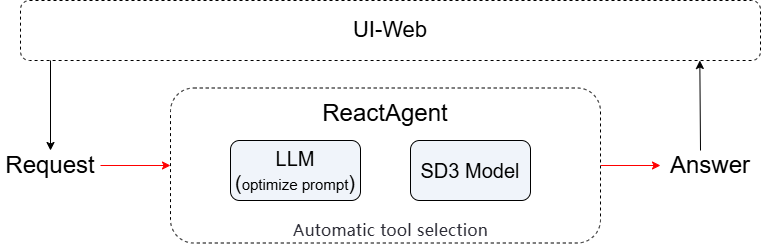
To achieve high-quality image generation, we propose a dual-toolchain collaborative mechanism combining prompt optimization and image generation.
The first tool translates and rewrites the user’s natural language input into a well-structured, SD3-compliant English prompt tailored for Stable Diffusion 3 Medium. The second tool takes this optimized prompt and invokes the SD3 model to generate the corresponding image. The entire workflow is orchestrated autonomously by a ReAct Agent, which plans and executes the multi-step process.
Integrating these components, our system is designed as follows:
User request → sent to an LLM-based prompt refinement tool to generate a standardized English prompt → optimized prompt passed to the SD3 image generation tool → ReAct Agent automatically schedules and coordinates the two-step pipeline → final image (or its path) is returned to the client.
Code Implementation
Project Dependencies
Make sure you have installed the following dependencies:
Feature Overview
- Translates and refines user input, then calls the SD3 model to generate a corresponding image.
- Tool selection and execution are automatically handled by
ReactAgent.
Step-by-step Guide
Step 1: Initialize the Image Generation Model
Globally cache the SD3 model (to avoid reloading repeatedly)
Step 2: Optimize User Input and Construct a Prompt
@fc_register("tool")
def optimize_prompt(query: str) -> str:
    """
    Translate input to English if needed, then optimize it into a high-quality,
    detailed English prompt specifically for Stable Diffusion 3 Medium (SD3-Medium).

    Args:
        query (str): User's input
    """
    system_prompt = (
        "You are an expert prompt engineer for Stable Diffusion 3 Medium (SD3-Medium). "
        "The user may give input in any language. First, translate it accurately into English if needed. "
        "Then, rewrite it as a single, fluent, natural-language English sentence or paragraph that describes the desired image in rich detail. "
        "Include: main subject, artistic style, lighting, composition, color palette, mood, and key visual elements. "
        "DO NOT use comma-separated tags, keywords, or phrases like 'masterpiece', '4k', 'best quality'. "
        "DO NOT add any prefixes, explanations, or markdown. Output ONLY the final prompt as plain text."
    )

    full_prompt = f"{system_prompt}\n\nUser input: {query}"
    llm1 = lazyllm.OnlineChatModule()
    result = llm1(full_prompt)
    return result
Step 3: Generate Image Using Stable Diffusion
@fc_register("tool")
def generate_image(context: str) -> str:
    """
    Generate an image using Stable Diffusion 3 Medium based on an English prompt.
    Args:
        context (str): A detailed, natural-language English prompt optimized for SD3-Medium, describing the image to generate.
    """
    global _sd3_model
    if _sd3_model is None:
        _sd3_model = lazyllm.TrainableModule("stable-diffusion-3-medium").start()
    return _sd3_model(context)
Step 4: Use the Agent
Explicitly register tools and build the agent using ReactAgent
llm = lazyllm.TrainableModule("Qwen3-32B").start()
tools = ["optimize_prompt",  "generate_image"]
agent = lazyllm.ReactAgent(llm=llm, tools=tools)
print(agent("画个猫"))
View full code
Click to expand full code
import lazyllm
from lazyllm import fc_register
# Globally cache the SD3 model (to avoid reloading repeatedly)
_sd3_model = None

@fc_register("tool")
def generate_image(context: str) -> str:
    """
    Generate an image using Stable Diffusion 3 Medium based on an English prompt.
    Args:
        context (str): A detailed, natural-language English prompt optimized for SD3-Medium, describing the image to generate.
    """
    global _sd3_model
    if _sd3_model is None:
        _sd3_model = lazyllm.TrainableModule("stable-diffusion-3-medium").start()
    return _sd3_model(context)
@fc_register("tool")
def optimize_prompt(query: str) -> str:
    """
    Translate input to English if needed, then optimize it into a high-quality,
    detailed English prompt specifically for Stable Diffusion 3 Medium (SD3-Medium).

    Args:
        query (str): User's input
    """
    system_prompt = (
        "You are an expert prompt engineer for Stable Diffusion 3 Medium (SD3-Medium). "
        "The user may give input in any language. First, translate it accurately into English if needed. "
        "Then, rewrite it as a single, fluent, natural-language English sentence or paragraph that describes the desired image in rich detail. "
        "Include: main subject, artistic style, lighting, composition, color palette, mood, and key visual elements. "
        "DO NOT use comma-separated tags, keywords, or phrases like 'masterpiece', '4k', 'best quality'. "
        "DO NOT add any prefixes, explanations, or markdown. Output ONLY the final prompt as plain text."
    )
    # Use OnlineChatModule and enforce plain-text output
    full_prompt = f"{system_prompt}\n\nUser input: {query}"
    llm1 = lazyllm.OnlineChatModule()
    result = llm1(full_prompt)
    print(result)
    return result

llm = lazyllm.TrainableModule("Qwen3-32B").start()
tools = ["optimize_prompt",  "generate_image"]
agent = lazyllm.ReactAgent(llm=llm, tools=tools)
print(agent("画个猫"))
Example Output
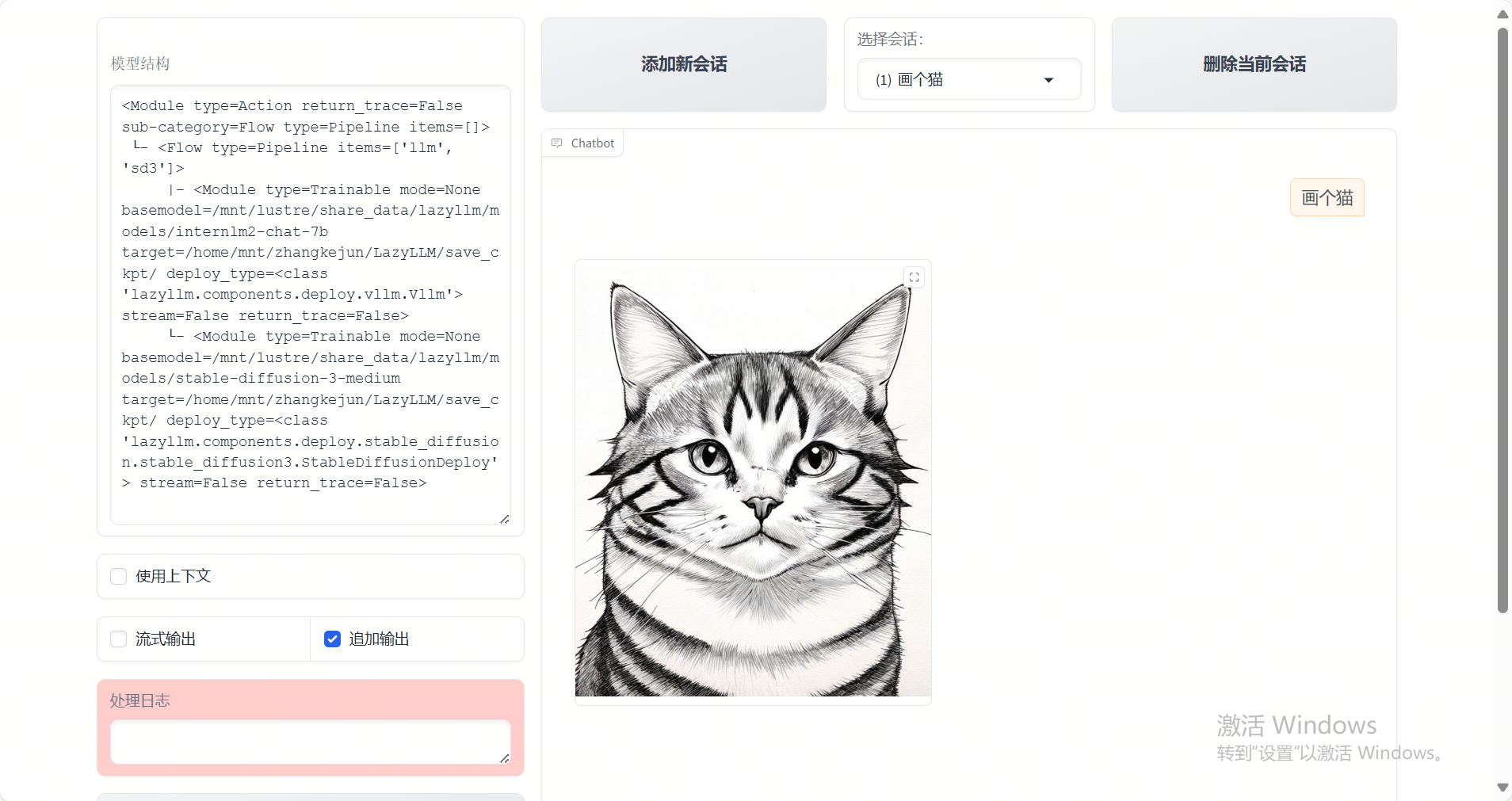
Example Output
This project demonstrates how to build a multi-modal output agent using LazyLLM. Feel free to extend your toolset and create even more powerful AI assistants!