Chapter 5: Building Custom Reader Components — Easily Parse HTML, PDF, and Other Complex Document Formats
In Part 1 of this tutorial series, we introduced the three key stages of RAG: retrieval, augmentation, and generation. Before these steps, however, we also need document reading and parsing, preprocessing, index construction, and storage optimization. In this chapter, we focus on the document-reading stage and show how to extend it by creating custom Reader components that support additional data formats.
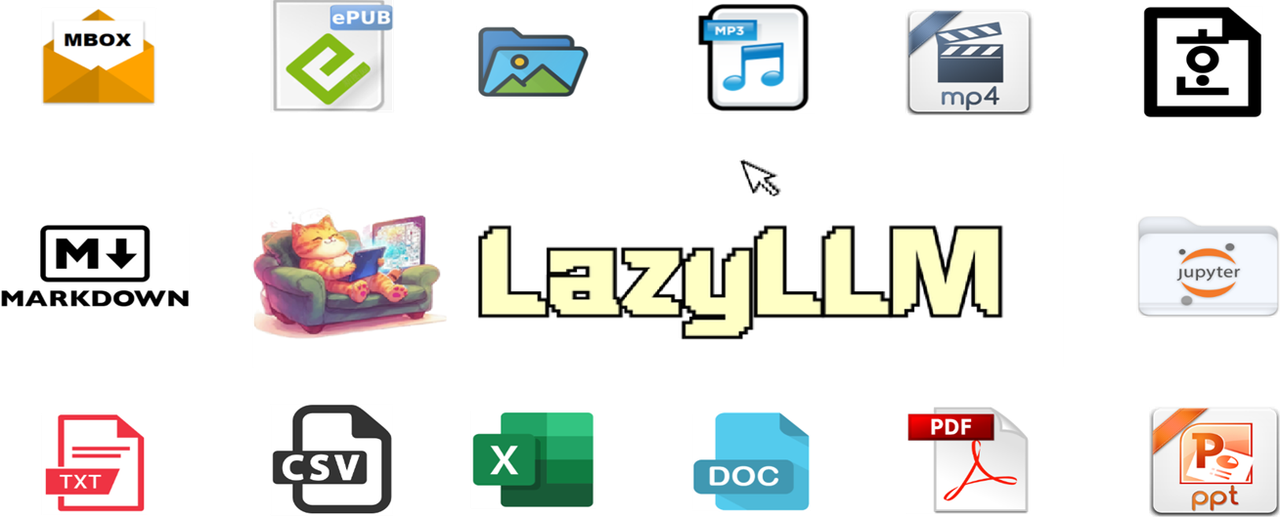
Because RAG retrieves information from a large and diverse document collection, and these documents can come in many formats, a Reader is required to properly process the documents retrieved during the retrieval stage. This ensures that high-quality answers can be generated in the later steps. LazyLLM currently provides built-in Reader support for a variety of formats, including PDF, DOC, HWP, PPT, IPYNB, EPUB, Markdown, MBOX, CSV, Excel, image files, MP3, and MP4. If your required format is not supported—or if the output of the default Reader does not meet your needs—you can implement a custom Reader.
This chapter describes how to build and use a custom Reader component in LazyLLM. After completing this tutorial, you will understand how to extend LazyLLM with your own Reader and use it to build a simple RAG application.
Environment Setup
If Python is already installed, run the commands below to install lazyllm plus the required dependencies. For full environment details see Chapter 2: Build a Minimal RAG in 10 Minutes.
Overview of Reader Module
Basic functionality of a Reader
We have already introduced the basic RAG workflow earlier, and in this section we focus on the role and usage of the Reader module. As mentioned before, when a query arrives, it is first processed by the Retriever, which returns relevant text chunks. But this raises an important question: Where do these text chunks come from?
This is where the Reader module comes into play. The Retriever must search for information in a knowledge base, but the content of that knowledge base can take many forms—structured, semi-structured, or completely unstructured. To decouple the retrieval logic from the underlying storage format, we rely on the Reader.
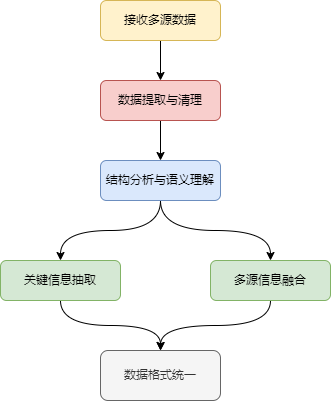
The purpose of the Reader is to ingest knowledge stored in various formats and convert it into a unified, retrieval-friendly representation. It ensures that regardless of how the original data is stored, the Retriever receives a consistent format that it can index, search, and process effectively.
How to use the Reader
We’ll walk through Reader usage with the cmrc2018 knowledge base sample file part_1.txt. The contents look like this:
Import the necessary modules. Because the reader is invoked inside Document, we start by importing Document.
Next, create a Document instance for that document.
Call the reader via the Document instance and pass in the file path above.
The reader loads data through load_data, so call it explicitly here.
Note: the
input_fileslist must contain absolute or relative paths. Ordinarily users never pass file paths—theDocumentclass usesdataset_pathplus theLAZYLLM_DATA_PATHenvironment variable to locate the corpus internally—but for demonstration we pass an explicit list.
Output:
You can see that the output of the Reader module is a list, where each element is a Node object. The id values differ each time because each ID is uniquely generated, which is expected behavior.
So, what exactly is a Node?
A Node typically contains the parsed text, its embedding representation, metadata, and sometimes relationships with other Nodes. In other words, a Node is a container that wraps the content extracted by the Reader so that the downstream retrieval module can process it in a consistent way.
Since a Node encapsulates the information parsed by the Reader, let's take a closer look at the text content stored inside a Node:
Output:
Limitations of Reader
Based on the discussion above, we now understand the role of the Reader module. Since the Reader is responsible for parsing content from the knowledge base, a natural question is: What document formats does LazyLLM support?
Currently, the built-in Readers in LazyLLM support the following formats: PDF, DOC, HWP, PPT, IPYNB, EPUB, Markdown, MBOX, CSV, Excel, image files, MP3, and MP4. But what if your knowledge base contains file types that LazyLLM does not support out of the box? Does that mean you cannot use LazyLLM? The answer is no.
If your documents are in formats not supported by the default Readers, or if the default Reader output does not meet your requirements, you can implement a custom Reader tailored to your needs and plug it into LazyLLM.
In this tutorial, we assume that the knowledge base contains documents in HTML format. We use a web page as an example. The page content is shown below:
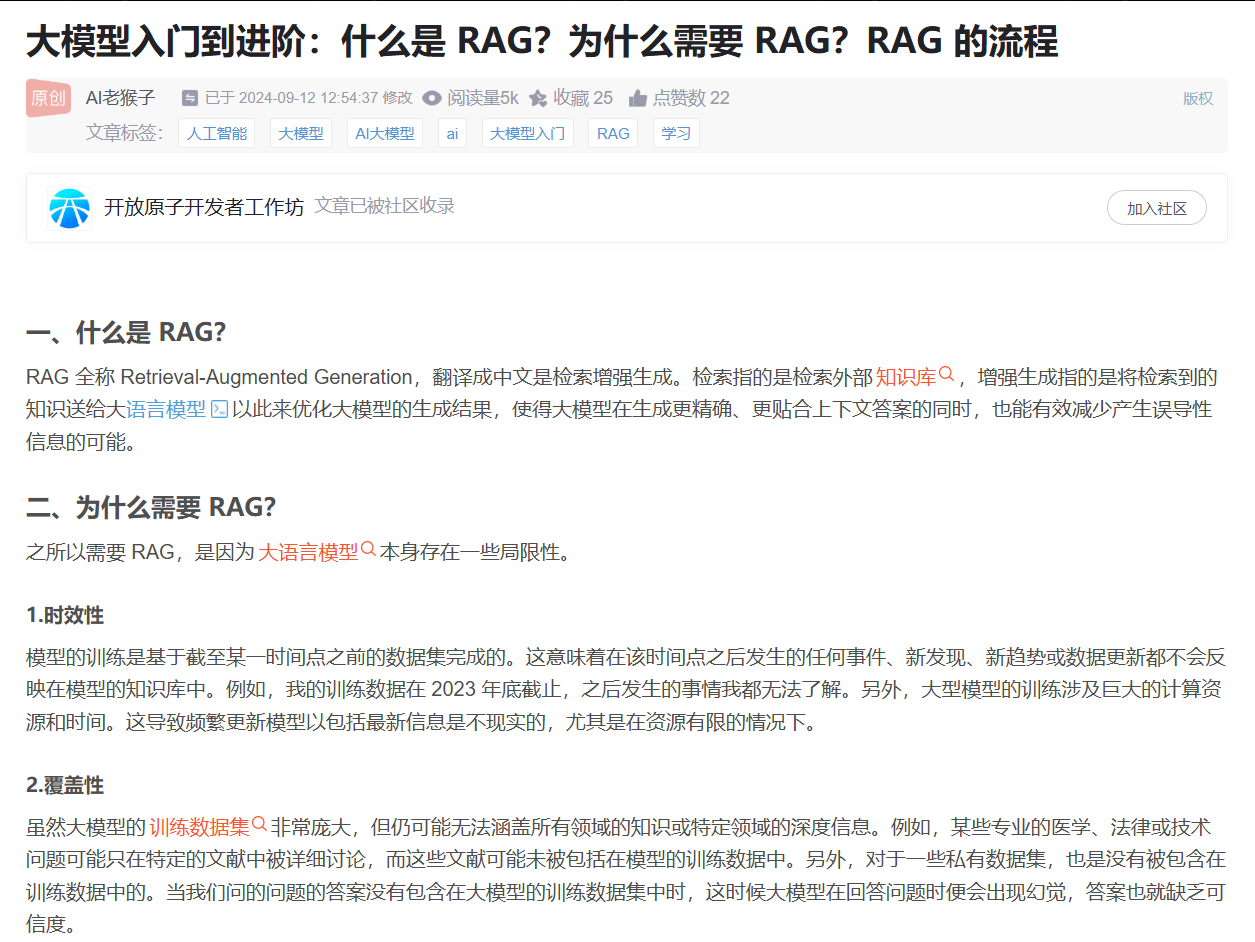
First, we need to save the current web page data as an HTML file. You can do this manually or via code. The following code demonstrates how to save the web page content to an HTML file.
import requests

# Target webpage URL
url = "https://blog.csdn.net/star_nwe/article/details/141174167"
headers = {
    "User-Agent": "Mozilla/5.0 (Windows NT 10.0; Win64; x64) \
AppleWebKit/537.36 (KHTML, like Gecko) Chrome/131.0.0.0 Safari/537.36"
}
response = requests.get(url, headers=headers)
if response.status_code == 200:
    with open("webPage.html", "w", encoding='utf-8') as file:
        file.write(response.text)
    print("Webpage downloaded successfully!")
else:
    print(f"Failed to download webpage. Status code: {response.status_code}")
Running that script saves webPage.html in the current directory. Let’s inspect how the default Reader handles it.
from lazyllm.tools.rag import Document

doc = Document(dataset_path="your_doc_path")

data = doc._impl._reader.load_data(input_files=["webPage.html"])
print(f"data: {data}")
print(f"text: {data[0].text}")
The output is still a list of nodes:
Next, let’s inspect the text extracted inside the Node. We can see that the result differs significantly from our expectation: instead of only containing the visible text from the webpage, it also includes various HTML tags from the source file.
However, what we want is for the Reader to extract only the human-readable text, not the raw HTML markup. Below is a snippet of the extracted content:
text:
<!DOCTYPE html>
<html lang="zh-CN">

<head>
    <meta charset="utf-8">
    <link rel="canonical" href="https://blog.csdn.net/star_nwe/article/details/141174167"/>
    <meta http-equiv="content-type" content="text/html; charset=utf-8">
    <meta name="renderer" content="webkit"/>
    <meta name="force-rendering" content="webkit"/>
    <meta http-equiv="X-UA-Compatible" content="IE=edge,chrome=1"/>
    <meta name="viewport" content="width=device-width, initial-scale=1.0, minimum-scale=1.0, maximum-scale=1.0, user-scalable=no">
    <meta name="report" content='{"pid": "blog", "spm":"1001.2101"}'>
    <meta name="referrer" content="always">
    <meta http-equiv="Cache-Control" content="no-siteapp" /><link rel="alternate" media="handheld" href="#" />
    <meta name="shenma-site-verification" content="5a59773ab8077d4a62bf469ab966a63b_1497598848">
    <meta name="applicable-device" content="pc">
    <link  href="https://g.csdnimg.cn/static/logo/favicon32.ico"  rel="shortcut icon" type="image/x-icon" />
    <title>大模型入门到进阶:什么是 RAG?为什么需要 RAG?RAG 的流程-CSDN博客</title>
    <script>
      (function(){
        var el = document.createElement("script");
        el.src = "https://s3a.pstatp.com/toutiao/push.js?1abfa13dfe74d72d41d83c86d240de427e7cac50c51ead53b2e79d40c7952a23ed7716d05b4a0f683a653eab3e214672511de2457e74e99286eb2c33f4428830";
        el.id = "ttzz";
        var s = document.getElementsByTagName("script")[0];
        s.parentNode.insertBefore(el, s);
      })(window)
    </script>
Custom Reader for HTML
Define an HTML parsing function
Since the default reader can’t strip tags properly, we’ll build our own. HTML parsing needs lxml or similar, so install it first:
Now define the reader. Use BeautifulSoup to parse the HTML and feed the clean text into DocNode. Return a list for compatibility with LazyLLM’s downstream expectations.
from lazyllm.tools.rag import DocNode
from bs4 import BeautifulSoup

def processHtml(file, extra_info=None):
    text = ''
    with open(file, 'r', encoding='utf-8') as f:
        data = f.read()
        soup = BeautifulSoup(data, 'lxml')
        for element in soup.stripped_strings:
            text += element + '\n'
    node = DocNode(text=text, metadata=extra_info or {})
    return [node]
We extract the visible text via BeautifulSoup, wrap it in DocNode, and return [node]:
Register the function
With the parser defined, register it so LazyLLM can call it. Each reader is keyed by a glob pattern. You can register via the Document class or via a specific document instance.
Call add_reader with two arguments:
- A glob pattern describing which files this reader handles.
- The callable itself.
The first argument is a string pattern such as "*.html" (all .html files in the current folder) or "aaa/bbb/*.html" (only those under aaa/bbb).
Results
Now that we have implemented a custom Reader and registered it with the Document instance, let’s see how to use it and what the output looks like.
We can combine the code from above into a single example as follows:
from lazyllm.tools.rag import Document

doc = Document(dataset_path="your_doc_path")
doc.add_reader("*.html", processHtml)
data = doc._impl._reader.load_data(input_files=["webPage.html"])
print(f"data: {data}")
print(f"text: {data[0].text}")
Compared with the default run, the only change is that we registered the HTML reader before loading data:
First, we can see that the Reader still outputs a list, and each element in that list is a Node. This behavior remains unchanged, which is exactly what we expect.
Next, let’s take a look at a portion of the text stored inside one of the Nodes:
text: 大模型入门到进阶:什么是 RAG?为什么需要 RAG?RAG 的流程-CSDN博客
大模型入门到进阶:什么是 RAG?为什么需要 RAG?RAG 的流程
置顶
大模型微调部署
已于 2024-09-12 12:54:37 修改
阅读量2.1w
收藏
74
点赞数
                            34
文章标签:
人工智能
大模型
AI大模型
ai
大模型入门
RAG
学习
于 2024-08-14 09:49:08 首次发布
版权声明:本文为博主原创文章,遵循
CC 4.0 BY-SA
版权协议,转载请附上原文出处链接和本声明。
...
From the results above, we can see that our custom Reader successfully parses HTML documents as expected. The extracted text no longer contains HTML tags, which confirms that the Reader is producing the clean, readable content we intended.
Build a RAG App on HTML
So far, we have focused on how to define a custom Reader that meets specific requirements. Next, we will use the HTML Reader we just implemented to build a simple RAG application and see how well the custom Reader works in practice.
We will first use the default Reader to process HTML documents and observe the RAG performance. As an example, we will use a model from the Zhipu (智谱) platform. To start, we define an appropriate prompt:
prompt = 'You will play the role of an AI Q&A assistant and complete a dialogue task. In this task, you need to provide your answer based on the given context and question.'
Then we define a Document object to manage the knowledge base.
import os
import lazyllm
from lazyllm.tools.rag import Document
from lazyllm import SentenceSplitter

documents = Document(dataset_path=os.path.join(os.getcwd(), "rag_data"), embed=lazyllm.OnlineEmbeddingModule(source="glm", embed_model_name="embedding-2"), manager=False)
documents.create_node_group(name="sentences", transform=SentenceSplitter, chunk_size=1024, chunk_overlap=100)
Here, os.path.join(os.getcwd(), "rag_data") is used to specify the path to the data that will be used as the knowledge base. This must be an absolute path. The dataset in this directory contains the following HTML documents: hongkong.html, housing.html, national_health_insurance_administration.html, rag.html, taiwan.html.
Next, we define how to process these documents. In this example, we split the documents into chunks at the sentence level.
With that in place, we can now define the RAG processing pipeline.
import lazyllm
from lazyllm import pipeline, parallel, Retriever, Reranker, bind

with pipeline() as ppl:
    with parallel().sum as ppl.prl:
        prl.retriever1 = Retriever(documents, group_name="sentences", similarity="cosine", topk=3)
        prl.retriever2 = Retriever(documents, "CoarseChunk", "bm25_chinese", 0.003, topk=3)
    ppl.reranker = Reranker("ModuleReranker", model=lazyllm.OnlineEmbeddingModule(type="rerank", source="glm", embed_model_name="rerank"), topk=1, output_format='content', join=True) | bind(query=ppl.input)
    ppl.formatter = (lambda nodes, query: dict(context_str=nodes, query=query)) | bind(query=ppl.input)
    ppl.llm = lazyllm.OnlineChatModule(source='glm', model="glm-4", stream=False).prompt(lazyllm.ChatPrompter(prompt, extra_keys=["context_str"]))
First, we define two retrievers: one that uses cosine similarity to retrieve relevant documents, and another that uses BM25. We then define a reranker, which is responsible for post-processing and reordering the retrieved nodes (documents). The reranker configuration includes name and kwargs.
name specifies the type of reranker used during post-processing and re-ranking. The default is ModuleReranker. Currently supported types are ModuleReranker and KeywordFilter.
ModuleReranker creates a SentenceTransformerRerank reranker with the specified model and top_n parameters.
KeywordFilter creates a KeywordNodePostprocessor with required and excluded keywords, and filters nodes based on the presence or absence of those keywords.
kwargs contains additional keyword arguments passed to the reranker instance to control how the retrieved documents are re-ranked.
Next, we define a formatter to process the relationship between the retrieved nodes and the query. After that, we configure an LLM to consume the retrieved document content and generate the final answer. Finally, we call ppl with the input query to complete the end-to-end workflow of a web-based knowledge RAG chatbot.
We use the article shown below as an example for our query:
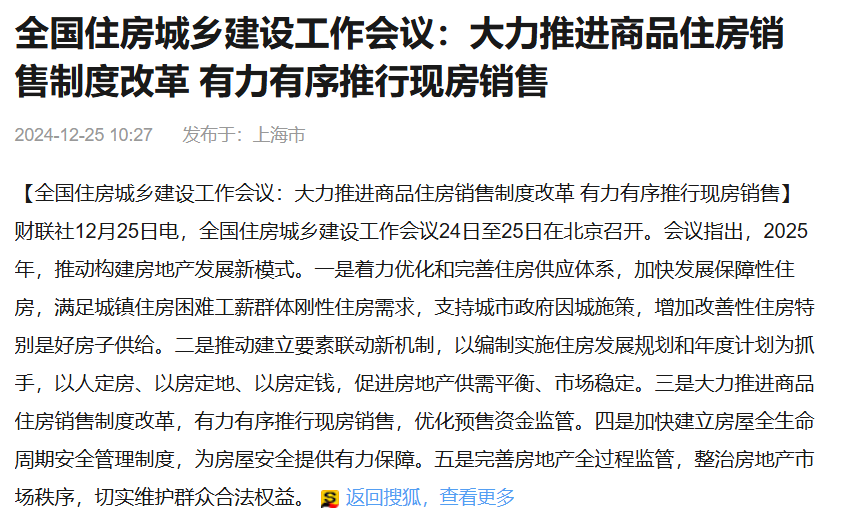
The request code is as follows:
print(ppl("What were the key takeaways from the national housing and urban-rural development conference?"))
The output is:
The main points of the National Housing and Urban-Rural Development Conference include the following:

1. The conference proposed that in 2025, efforts will be made to promote a new development model for the real estate sector.

2. Focus on optimizing and improving the housing supply system, accelerating the development of subsidized housing, and meeting the rigid housing needs of low- and middle-income urban residents facing housing difficulties.

3. Support city governments in adopting city-specific policies and increasing the supply of improved housing, especially high-quality homes.

4. Promote the establishment of a new mechanism for coordinated resource allocation. By implementing housing development plans and annual plans, ensure that housing follows people’s needs, land use follows housing plans, and funding follows housing development—ultimately promoting supply–demand balance and market stability.

5. Strongly advance the reform of commercial housing sales systems, promote the transition to selling completed housing units (rather than pre-sales), and improve the supervision of pre-sale funds.

6. Accelerate the establishment of a whole-life-cycle housing safety management system to provide strong assurance for building safety.

These measures aim to address current real estate market issues, such as supply–demand imbalance and market fluctuations, and to promote the stable and healthy development of the real estate sector.
Next, we plug in the custom Reader for HTML that we defined earlier and see how it performs:
documents = Document(dataset_path=os.path.join(os.getcwd(), "rag_data"), embed=lazyllm.OnlineEmbeddingModule(source="glm", embed_model_name="embedding-2"), manager=False)
documents.add_reader("*.html", processHtml)
documents.create_node_group(name="sentences", transform=SentenceSplitter, chunk_size=1024, chunk_overlap=100)
with pipeline() as ppl:
    with parallel().sum as ppl.prl:
        prl.retriever1 = Retriever(documents, group_name="sentences", similarity="cosine", topk=3)
        prl.retriever2 = Retriever(documents, "CoarseChunk", "bm25_chinese", 0.003, topk=3)
    ppl.reranker = Reranker("ModuleReranker", model=lazyllm.OnlineEmbeddingModule(type="rerank", source="glm", embed_model_name="rerank"), topk=1, output_format='content', join=True) | bind(query=ppl.input)
    ppl.formatter = (lambda nodes, query: dict(context_str=nodes, query=query)) | bind(query=ppl.input)
    ppl.llm = lazyllm.OnlineChatModule(source='glm', model="glm-4", stream=False).prompt(lazyllm.ChatPrompter(prompt, extra_keys=["context_str"]))
The output is:
The National Housing and Urban-Rural Development Conference mainly focused on advancing reforms and development in the real estate market. Based on the provided text, the key points of the conference include:

1. **Optimizing the housing supply system**: Accelerate the development of subsidized housing to meet the rigid housing needs of urban residents facing difficulties. Support local governments in formulating city-specific policies to increase the supply of improved housing, especially high-quality residential units.

2. **Establishing a new mechanism for coordinated resource allocation**: Use housing development plans and annual plans to link population, housing, and land supply, thereby promoting a better balance between supply and demand in the real estate market and enhancing overall market stability.

3. **Reforming the commercial housing sales system**: Strongly promote reforms to the commercial housing sales system, gradually transition to selling completed units, and optimize the supervision of pre-sale funds to reduce market risks and better protect consumer rights.

4. **Building a whole-life-cycle housing safety management system**: Strengthen safety management across the entire lifecycle of housing—from construction to use—to ensure building safety.

5. **Improving full-process regulation of the real estate sector**: Implement regulation across the entire real estate process to standardize market order, crack down on illegal activities, and protect the legitimate rights and interests of the public.

These measures aim to promote a new development model for the real estate sector, ensure the stable and healthy operation of the real estate market, and better meet the housing needs of the population.
By comparing the outputs from the two approaches, we can see that using the custom Reader produces a noticeably better result. The generated answer aligns more closely with the original text and provides a more accurate summary.
Note: Since online models may generate slightly different outputs each time, the results will not always match the examples shown above. However, repeated testing demonstrates that the custom Reader consistently performs better than the default Reader. Therefore, designing an appropriate Reader tailored to your data format can significantly improve the quality of a RAG system.
Deep Dive: Multi-level Reader Registration
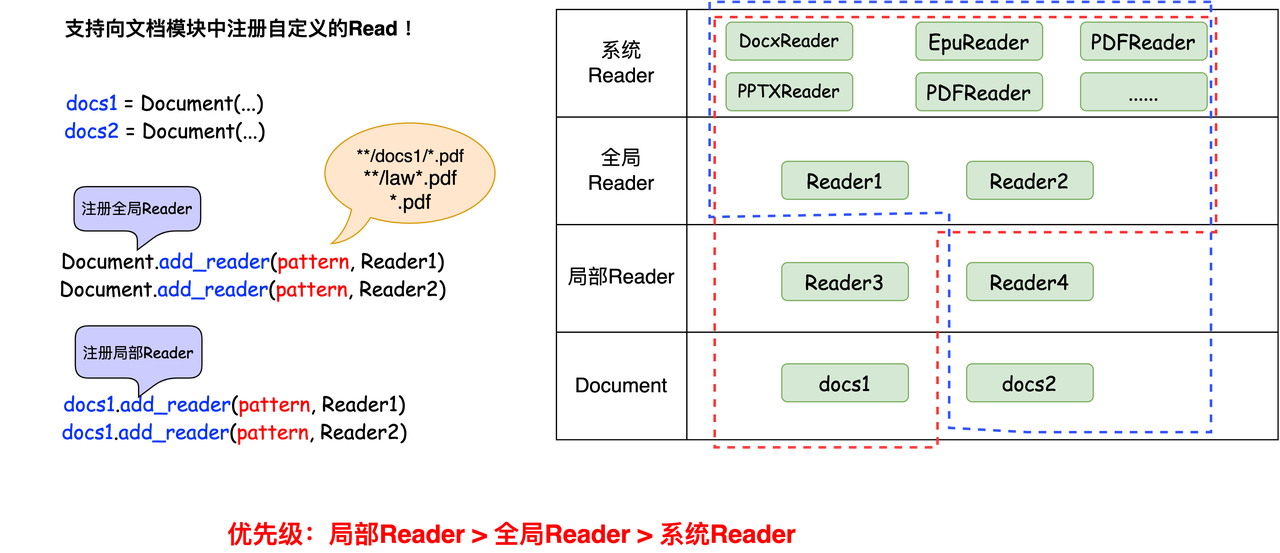
Earlier, we introduced how to register a Reader without going into much detail. In this section, we provide a deeper explanation.
A Reader is registered using a key–value mapping:
-
The key specifies what type of data the Reader can process. This can be:
-
A specific filename
-
A file pattern
-
A directory pattern
-
Or a wildcard path that matches a class of files
-
For example:
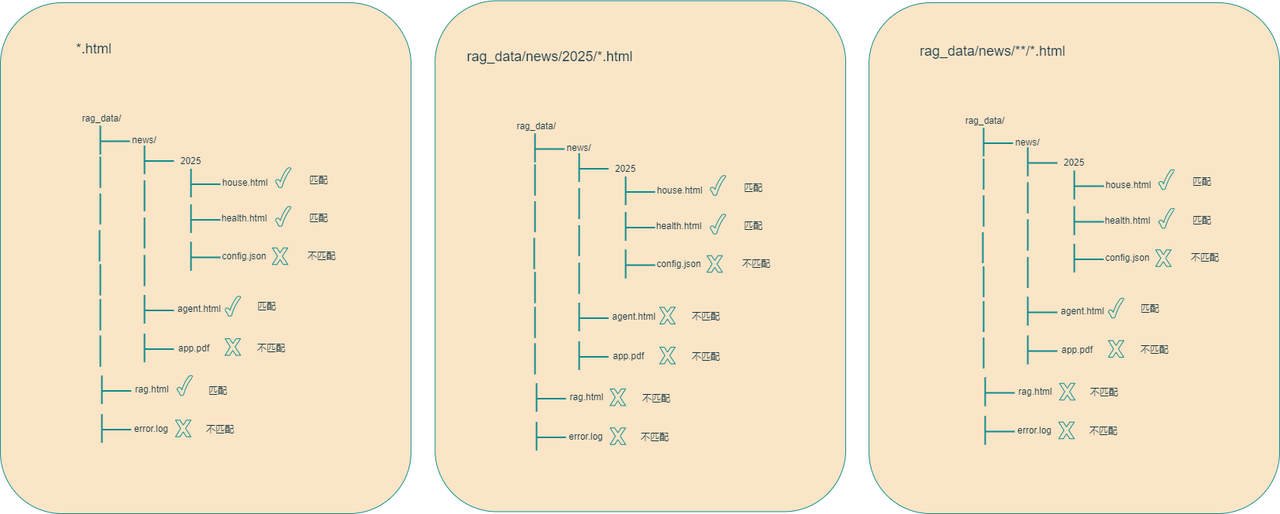
- "*.html" means the Reader can process any file ending with .html.

- "aaa/bbb/*.html" means it can process all .html files under the directory aaa/bbb.

- "aaa/bbb/**/*.html" means it can process .html files inside all subdirectories of aaa/bbb.
- The value is the Reader class responsible for handling the matched files.
Registration Mechanisms
LazyLLM supports two types of Reader registration:
- Class-level registration (global) Registering a Reader on the Document class makes it available to all Document instances.
- Instance-level registration (local) Registering a Reader on a specific Document instance makes it available only to that single instance. This is the method we demonstrated earlier.
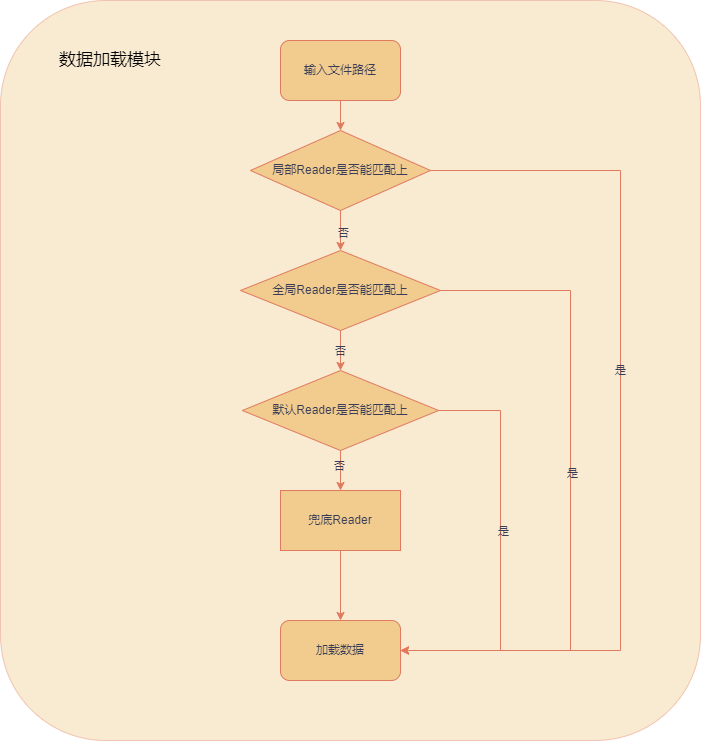
Because both class-level and instance-level Readers may exist at the same time, LazyLLM defines the following priority order (from highest to lowest):
- Reader registered on a specific Document instance
- Reader registered on the Document class
- Default Readers built into LazyLLM
When multiple Readers match the same file pattern, the one with higher priority overrides the lower-priority ones.
Global Reader Registration
The method for registering a global Reader is as follows:
from lazyllm.tools.rag import Document
from lazyllm.tools.rag.readers import MineruPDFReader

# Register global Readers
Document.register_global_reader("*.html", processHtml)
Document.register_global_reader("aa/*.html", HtmlReader)
Document.register_global_reader(
    "aa/**/*.html",
    MineruPDFReader(url="http://127.0.0.1:8888")  # Replace with your running MinerU service URL
)
Class-based Readers
However, when a Reader needs to maintain state across multiple calls (for example, caches, counters, or connection pools), or when it requires complex initialization (such as creating database connections or loading models), a simple function-based implementation is no longer sufficient. The same applies when the parsing logic is complex and needs to be split into multiple methods. In these cases, it is better to define the Reader as a class.
Since Reader has multiple subclasses for different use cases, a class-based design also makes it easier to extend and implement different types of parsers.
Define the class
Here we use an image summarization example to illustrate this. This Reader depends on the torch, transformers, sentencepiece, and Pillow libraries. If these libraries are not already installed in your environment, you need to install them first. The installation commands are as follows:
Next, we define the custom Reader we need. Because this Reader has to load a model, we place the model loading logic inside the class initializer. This way, the model is loaded only once and can be reused across multiple calls, instead of being reloaded every time. In this scenario, a simple function-based Reader is clearly not appropriate.
from lazyllm.tools.rag.readers import ReaderBase
from lazyllm.tools.rag.readers.readerBase import infer_torch_device
from lazyllm.tools.rag import DocNode
from pathlib import Path
from typing import Optional, Dict, List
from PIL import Image
from transformers import BlipForConditionalGeneration, BlipProcessor
import torch

class ImageDescriptionReader(ReaderBase):
    def __init__(self, parser_config: Optional[Dict] = None, prompt: Optional[str] = None) -> None:
        super().__init__()
        if parser_config is None:

            device = infer_torch_device()
            dtype = torch.float16 if torch.cuda.is_available() else torch.float32
            processor = BlipProcessor.from_pretrained("Salesforce/blip-image-captioning-large")
            model = BlipForConditionalGeneration.from_pretrained("Salesforce/blip-image-captioning-large", torch_dtype=dtype)
            parser_config = {"processor": processor, "model": model, "device": device, "dtype": dtype}
        self._parser_config = parser_config
        self._prompt = prompt

    def _load_data(self, file: Path, extra_info: Optional[Dict] = None) -> List[DocNode]:
        image = Image.open(file)
        if image.mode != "RGB":
            image = image.convert("RGB")

        model = self._parser_config['model']
        processor = self._parser_config["processor"]

        device = self._parser_config["device"]
        dtype = self._parser_config["dtype"]
        model.to(device)

        inputs = processor(image, self._prompt, return_tensors="pt").to(device, dtype)

        out = model.generate(**inputs)
        text_str = processor.decode(out[0], skip_special_tokens=True)
        return [DocNode(text=text_str, metadata=extra_info or {})]
First, we need to import the ReaderBase class. Any custom Reader should inherit from this base class and override the _load_data method. More complex logic can be implemented in additional member methods inside the class.
Note: The
_load_datamethod defined inside the class is not the same as theload_datamethod you call when using a Reader.Inside the class,
_load_datais the method that each Reader subclass overrides from ReaderBase.In contrast, the
load_datamethod you call on a Reader instance is a higher-level interface that iterates over a list of files and calls_load_datainternally to parse them.
Register the class
Earlier, we introduced function-based Reader registration. Class-based Reader registration works the same way: you register it using the add_reader method of the Document class.
The first argument is still the pattern string that specifies which files the Reader applies to. The second argument is the custom Reader class, which must be a callable object.
from lazyllm.tools.rag import Document
doc = Document(dataset_path="your_doc_path")
doc.add_reader("*.jpg", ImageDescriptionReader)
doc.add_reader("*.png", ImageDescriptionReader)
doc.add_reader("*.jpeg", ImageDescriptionReader)
From the code, we can see that the only difference from function-based Reader registration is that the class name is used instead of the function name.
Results
Now that we have defined the class-based Reader and registered it with the Document instance, we can test it using the image of LazyLLM-logo.png from the LazyLLMLazyLLM repository
. The image looks like this:


from lazyllm.tools.rag import Document

doc = Document(dataset_path="your_doc_path")
doc.add_reader("*.png", ImageDescriptionReader)
data = doc._impl._reader.load_data(input_files=["cmrc2018_path/LazyLLM-logo.png"])
print(f"data: {data}")
print(f"text: {data[0].text}")
First, the Reader output is still a list, and each element is a Node, which is exactly what we expect.
The text content inside the Node is the generated image caption, and it also matches our expectations:
Build a More Advanced PDF Reader
Limitations of the current Reader
Earlier, we used HTML documents as an example to show how to define a custom Reader, how to register it, and how to use it. The Reader we built there was relatively simple. In this section, we describe how to implement a more complex and practical Reader.
In everyday work, we often deal with documents in PDF format. PDF files usually store unstructured data, and we typically rely on open source tools to parse them. Here, we use the report 《平安证券-珀莱雅.pdf》 as an example. In LazyLLM, the default PDFReader uses the pypdf package to parse PDF files.
We first examine the parsing quality of the default PDFReader in LazyLLM. The parsing code is available here: GitHub link 🔗
from lazyllm.tools.rag import Document

doc = Document(dataset_path="your_doc_path")
data = doc._impl._reader.load_data(input_files=["Ping_An_Securities-Proya.pdf"])
print(f"data: {data}")
print(f"text: {data[0].text}")
Note: The PDF file must be stored in the current working directory. If it is not, you need to provide either a relative path or an absolute path to the file.
data: [<Node id=b21463fd-b2f8-49b8-a582-04eda7a8e302>, <Node id=60f7824d-d181-4a40-942e-b8031cc99c99>, <Node id=b1a52046-483a-43da-b6de-07591fdfcf74>, <Node id=8a625cfb-397d-4799-a33a-9c5439a53dac>]
The default PDF reader still returns a list of Node objects—one per page in the document above. The node text (shown partially below) mixes tables, headings, and paragraph content, demonstrating why we need a higher-fidelity parser:
We can see that the text from the first and second pages of the report has been extracted. However, there are still some issues. Because the original PDF mixes text and tables, the default Reader produces a messy output and cannot preserve the semantic continuity of the content.
As a result, the extracted text is not structurally coherent, and the integrity of the information is clearly not satisfactory.
Introduce a higher-performance open-source tool
To address the issues mentioned above, we can integrate more capable open-source tools that deliver higher-quality results. In this section, we use MinerU as an example.
LazyLLM already includes a dedicated integration module for MinerU, so you can plug it in without writing any custom code. At the moment, we provide a one-click MinerU server along with a matching PDF client.
The workflow is straightforward: start the MinerU parsing service locally, then use MineruPDFReader to access the parsed document content.
• Start the MinerU service
Before getting started, make sure you have installed all required MinerU dependencies:
Tip: To keep results stable we pin MinerU at version 2.5.4. Hardware requirements are listed in the MinerU documentation. After the environment is ready, start the service with:
lazyllm deploy mineru [--port <port>] [--cache_dir <cache_dir>] [--image_save_dir <image_save_dir>] [--model_source <model_source>]
Parameter reference
| Parameter | Description | Default |
|---|---|---|
--port |
Port exposed by the service | auto-assigned |
--cache_dir |
Directory for caching parsed documents (avoids re-processing the same PDF) | None |
--image_save_dir |
Directory for extracted images | None |
--model_source |
Model source (huggingface or modelscope) |
huggingface |
Run
lazyllm deploy mineruwithout arguments to use the defaults. Specify directories if you want persistent caches or image dumps.
Next, integrate MineruPDFReader:
from lazyllm.tools.rag import Document
from lazyllm.tools.rag.readers import MineruPDFReader

doc = Document(dataset_path="your_doc_path")
# Register the PDF parser (replace URL with your MinerU service)
doc.add_reader("*.pdf", MineruPDFReader(url="http://127.0.0.1:8888"))
data = doc._impl._reader.load_data(input_files=["Ping_An_Securities-Proya.pdf"])
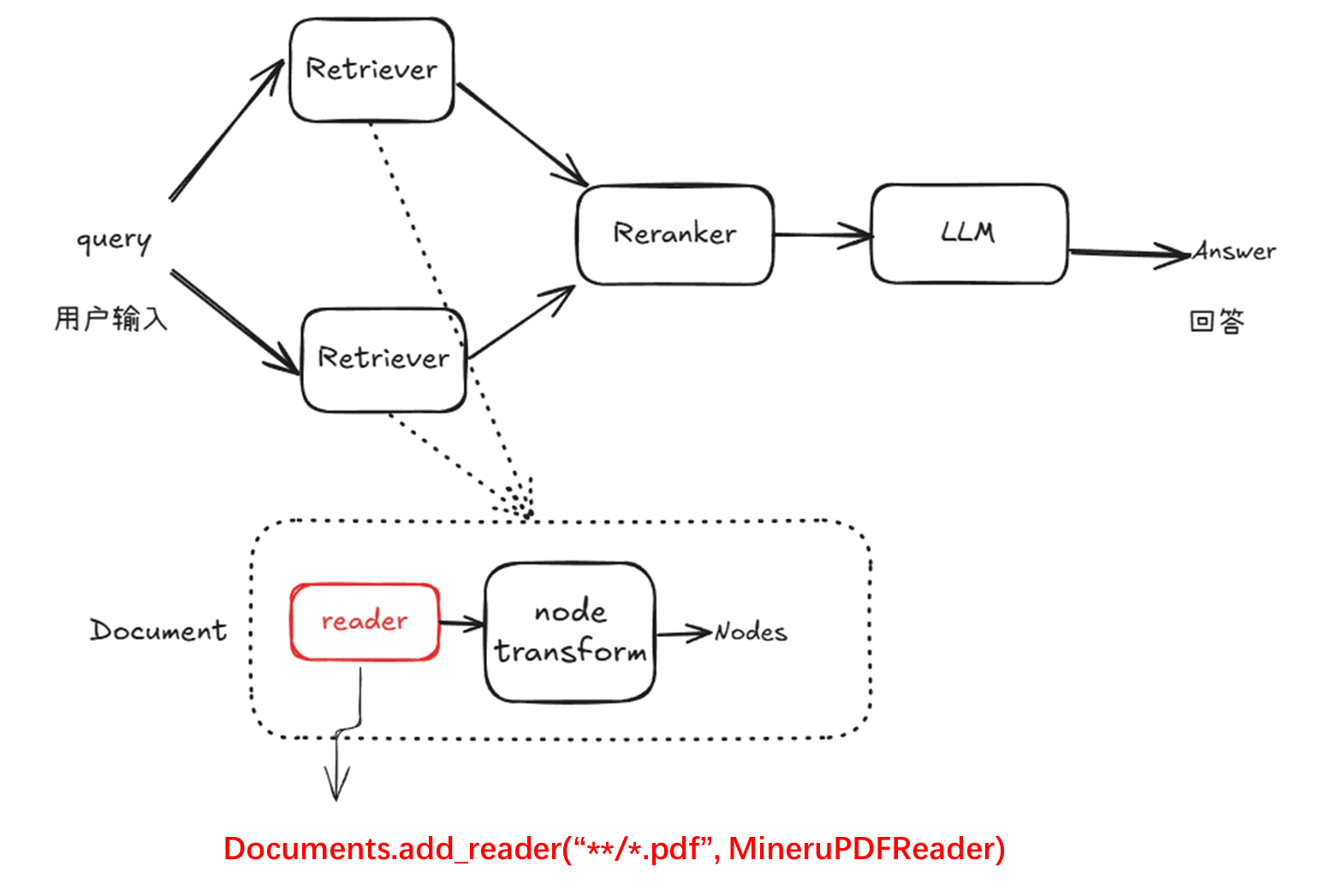
The diagram below illustrates the role of MineruPDFReader in the RAG pipeline and how it is integrated. After receiving a user query, the system performs multi-retriever recall to obtain candidate nodes, then reranks them before sending the results to the language model to generate the final answer.
Each retriever can be bound to multiple documents, and a custom parser only needs to be registered in the pipeline using
documents.add_reader("**/*.pdf", MineruPDFReader).
In addition, you may choose to start a local MinerU service and register this service within the Document class.
from lazyllm.tools.rag.readers import MineruPDFReader

documents = Document(dataset_path="your_doc_path")
# Register the PDF parser (replace URL with your MinerU service)
documents.add_reader("*.pdf", MineruPDFReader(url="http://127.0.0.1:8989"))
data = documents._impl._reader.load_data(input_files=["Ping_An_Securities-Proya.pdf"])
For a document like the one shown below—spanning multiple pages and containing mixed text and tables—let’s compare the parsing results of the default parser and MinerU.
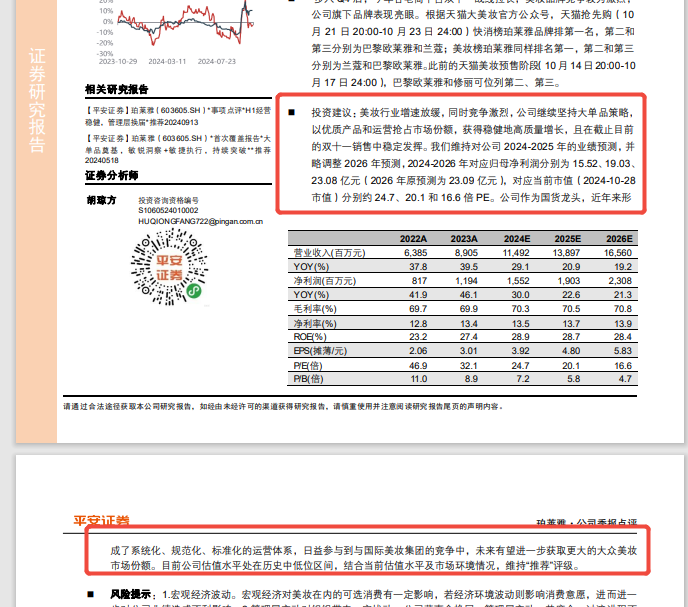
Default parser result:
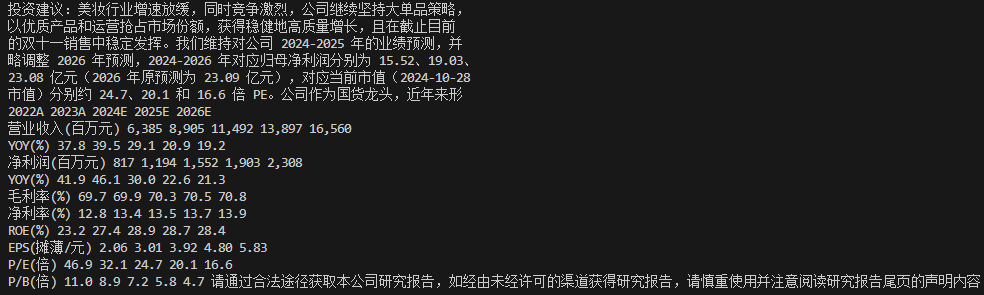
MinerU parser result:

From the results, the MinerU-based parser can automatically restore cross-page structures, extract tables separately, and accurately reconstruct their layout. In contrast, the default parser only performs plain text extraction; tables and text are mixed together, table structures cannot be restored, and distracting footer information is not removed.
In addition to preserving the structure and formatting of the original document and automatically removing headers, footers, footnotes, and page numbers, the MinerU-based parser can also extract image and other multimodal content, which is not shown here.
Note: Because MinerU performs OCR using a model, the entire process can be relatively slow. To speed it up, you will need to deploy the model on a GPU.
At this point, we have completed all steps involved in customizing a Reader.