Intelligent Code Agent
In this section, we will implement an intelligent agent capable of automatically generating and executing Python code. Users only need to describe a task in natural language, for example:
“Draw a line chart of Beijing’s temperature changes over the past month.”
The system will automatically generate a valid Python function, execute it, and return the result (such as an image path or a computed value).
Through this section, you will learn the following key points of LazyLLM
- How to write a registerable function tool (Function Tool);
- How to use CodeGenerator to automatically generate code;
- How to use compile_func to compile and execute code;
- How to call tools through [FunctionCallAgent][lazyllm.tools.FunctionCallAgent];
- How to deploy an interactive web interface with WebModule.
Design Overview
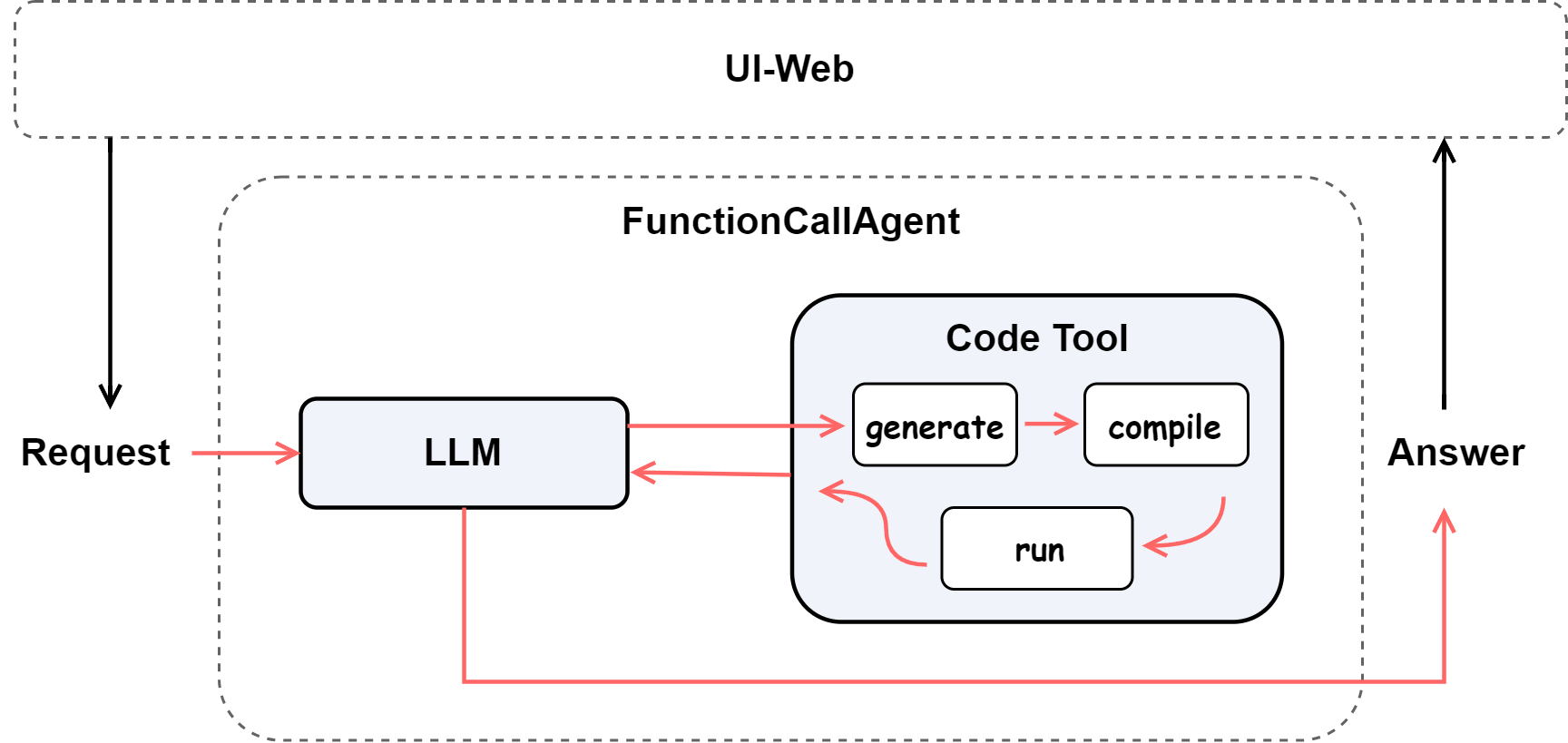
Our goal is to build an intelligent code agent that can understand natural language requests and produce executable results.
When the user inputs a natural language instruction (e.g., “Write a function to compute the greatest common divisor of two numbers”), the system should:
- Understand the intent — Determine whether the task involves plotting, computation, or data processing.
- Generate code — Use the LLM to create Python code containing only a single function.
- Safely execute — Dynamically compile and execute the generated function while blocking unsafe modules.
- Return results — Return an image path for visualization tasks or numerical results for computational ones.
To achieve this, we adopt the following architecture design:
Environment Setup
Install dependencies
Before using, please install the required library:
Import required modules
from lazyllm.common.utils import compile_func
from lazyllm import OnlineChatModule, WebModule
from lazyllm.tools import CodeGenerator, FunctionCallAgent, fc_register
Environment variables
Since this workflow relies on an online LLM, you need to set your API key (for example, Qwen):
❗ Note: Please refer to the official documentation for instructions on obtaining your platform API key.
Code Implementation
Registering the code generation tool
First, we define and register a tool function generate_code_from_query,
which takes a natural language request and automatically generates, compiles, and executes Python code.
@fc_register('tool')
def generate_code_from_query(query: str) -> str:
    '''
    Generate and execute Python code to fulfill a user's natural language request.

    This tool uses an LLM to generate a single-function Python script based on the user's query.
    The generated function is safely compiled and executed, and the final result
    (e.g., an image path or computed value) is returned.

    Args:
        query (str): The user's natural language instruction,
                     for example: "Draw a temperature change chart of Beijing in the past month".

    Returns:
        str: The execution result of the generated function (e.g., image path or computed value).
    '''
    prompt = '''
    Please generate Python code that defines a single function to fulfill the user's request.

    Requirements:
    1. The following modules are strictly forbidden: requests, os, sys, subprocess, socket, http, urllib, pickle, etc.
    2. Only safe libraries such as matplotlib, datetime, random, and math may be used.
    3. If the task involves web requests or APIs, use random or fixed simulated data instead.
    4. The function must have a clear return value, returning the final result (such as an image path or a computed value).
    5. For visualization tasks, do not use Chinese characters (titles, axes, and labels must be in English).
       Save the image to the path `/home/mnt/WorkDir/images`
       and ensure the return value is the complete image file path.
    6. No example function calls or print statements are allowed in the code.
    '''
    gen = CodeGenerator(llm, prompt)
    code = gen(query)

    compiled_func = compile_func(code)

    try:
        result = compiled_func()
    except Exception as e:
        result = f'Error during code execution: {e}'

    return result
Assembling the intelligent agent
After defining the tool, we use FunctionCallAgent to integrate it and deploy an interactive web interface via WebModule.
llm = OnlineChatModule()
agent = FunctionCallAgent(llm, tools=['generate_code_from_query'])
WebModule(agent, port=12345, title='Code Agent', static_paths='/home/mnt/WorkDir/images').start().wait()
Parameter explanation:
port: Specifies the web access port (accessible athttp://127.0.0.1:12345).title: Defines the title shown at the top of the web page.static_paths: Directory containing static resources that can be directly accessed from the frontend.
Note: For more details on parameters, refer to the official API documentation.
After executing .start().wait(), the service will start and display a local access address (e.g., http://127.0.0.1:12345). Open this address in your browser to input natural language requests — the system will automatically generate, execute, and display the results (such as generated images).
Full Code
The complete code is shown below:
Click to expand full code
from lazyllm.common.utils import compile_func
from lazyllm import OnlineChatModule, WebModule
from lazyllm.tools import CodeGenerator, FunctionCallAgent, fc_register

@fc_register('tool')
def generate_code_from_query(query: str) -> str:
    '''
    Generate and execute Python code to fulfill a user's natural language request.

    This tool uses an LLM to generate a single-function Python script based on the user's query.
    The generated function is safely compiled and executed, and the final result
    (e.g., an image path or computed value) is returned.

    Args:
        query (str): The user's natural language instruction,
                     for example: "Draw a temperature change chart of Beijing in the past month".

    Returns:
        str: The execution result of the generated function (e.g., image path or computed value).
    '''
    prompt = '''
    Please generate Python code that defines a single function to fulfill the user's request.

    Requirements:
    1. The following modules are strictly forbidden: requests, os, sys, subprocess, socket, http, urllib, pickle, etc.
    2. Only safe libraries such as matplotlib, datetime, random, and math may be used.
    3. If the task involves web requests or APIs, use random or fixed simulated data instead.
    4. The function must have a clear return value, returning the final result (such as an image path or a computed value).
    5. For visualization tasks, do not use Chinese characters (titles, axes, and labels must be in English).
       Save the image to the path `/home/mnt/WorkDir/images`
       and ensure the return value is the complete image file path.
    6. No example function calls or print statements are allowed in the code.
    '''
    gen = CodeGenerator(llm, prompt)
    code = gen(query)

    compiled_func = compile_func(code)

    try:
        result = compiled_func()
    except Exception as e:
        result = f'Error during code execution: {e}'

    return result

llm = OnlineChatModule()
agent = FunctionCallAgent(llm, tools=['generate_code_from_query'])
WebModule(agent, port=12347, title='Code Agent', static_paths='/home/mnt/WorkDir/images').start().wait()
Demonstration
Example input:
Result preview:
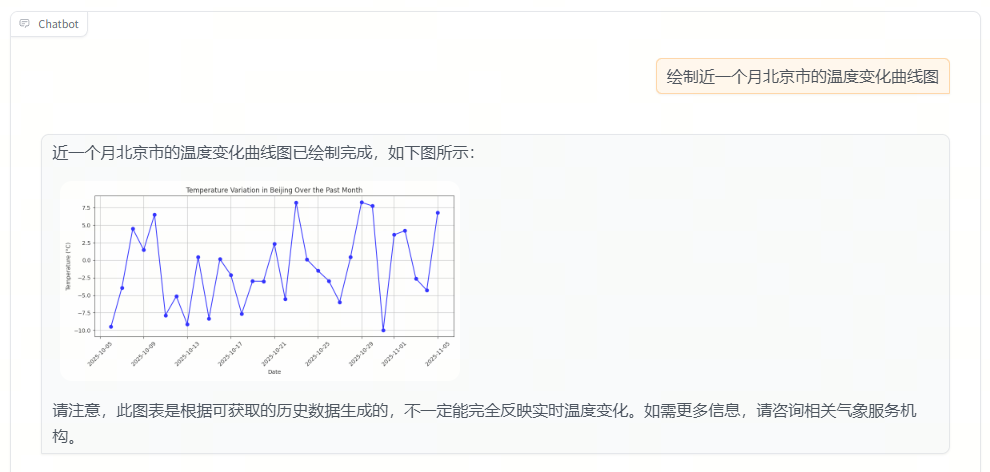
Example input:
Result preview:
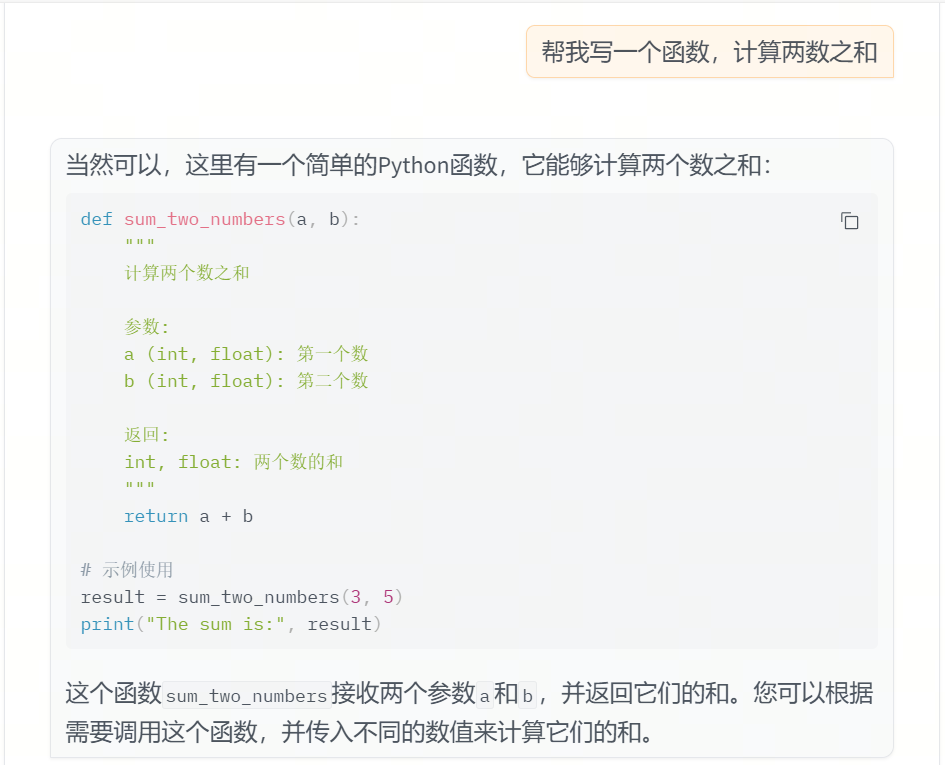
Summary
In this section, we built an intelligent agent that supports the full workflow of “Natural Language → Code Generation → Execution → Result Display.”
Key takeaways include:
- Using
CodeGeneratorto automatically produce safe function code; - Dynamically compiling and executing the function via
compile_func; - Managing tool invocation with
FunctionCallAgent; - Providing a browser-accessible interface with
WebModule.
This design demonstrates LazyLLM’s flexibility in intelligent code generation and secure execution scenarios. It also lays the foundation for future extensions such as multi-tool collaboration, task intent recognition, and result visualization.