Chapter 14: Practical Session - Building a RAG System That Supports Complex Academic Paper Question Answering
In the previous lessons, we learned about RAG and how to customize the Reader component and process images and tabular data in RAG tasks. This section will build on this basis and use the knowledge learned previously to build a paper-based question and answer system.
In the era of information explosion, the number of scientific research papers has increased dramatically, and researchers face many challenges when reviewing literature. The content of the paper is highly specialized and logically complex, and it is difficult to accurately extract core information using traditional keyword search methods, resulting in high costs for obtaining effective content. In order to solve this problem, RAG technology is widely used. RAG not only combines retrieval capabilities to accurately retrieve relevant papers, but also combines the generation capabilities of large language models (LLM) to intelligently analyze questions and provide in-depth and clear answers, helping researchers to efficiently understand the content of papers and improve scientific research efficiency.
This tutorial mainly introduces how to use LazyLLM to build a RAG-based paper question and answer system. In order to implement this system, we need to prepare and connect to RAG a parser that is convenient for processing papers and a data memory that stores parsing results and vectorization results. Let's get started!
Traditional RAG paper system
Environment preparation
If Python is installed on your computer, please install lazyllm and necessary dependency packages through the following command. For more detailed preparations about the LazyLLM environment, please refer to the corresponding content in "Basics 1-Practical Combat: The Most Basic RAG".
Design plan
Overall architecture
In order to facilitate us to review papers or quickly understand the core content of related papers, we can use RAG to design a paper question and answer system. We use the Retrieve-and-rerank architecture for this question and answer system to ensure the accuracy of the retrieval content and the rationality of the generated results.
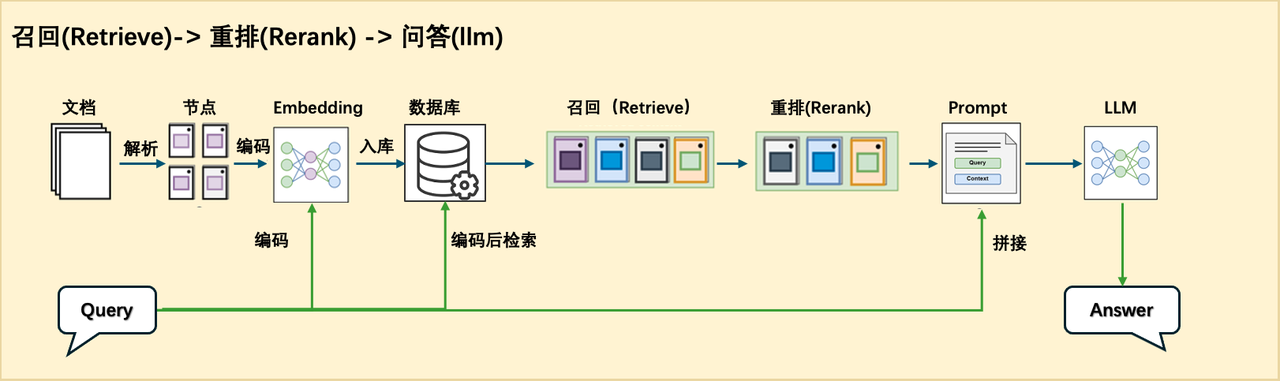
In this framework, all papers that need to be processed are first preprocessed and divided into chunks, and then the corresponding text and corresponding embedding are stored in the database through the embedding model. This step belongs to the offline part. After this step of processing is completed, online processing can be performed. When the question query arrives, it first passes through the embedding model to generate the corresponding embedding vector, and then uses this query and the corresponding embedding to retrieve the relevant text segments in the database for subsequent processing. This step is a rough screening, as long as relevant text segments are retrieved, so there can be keyword-based retrieval or semantic-based retrieval methods. In order to make the relevant context passed to the large model more accurate, we also need to refine the retrieved text segments, that is, Rerank. Rerank can compare the text segments retrieved under multiple retrieval strategies in a unified space, and then return the K ones with the highest similarity, and then splice them together with the previous query to generate the final result for the large model.
Plan process
In summary, the steps required to complete this system include:
Step 1: Data preparation
Step 2: Data processing and component construction
Step 3: Application process orchestration
Step 4: Code debugging
Step 5: Effect verification
Step six: Check whether the experience effect meets the requirements. If not, return to step three for iterative optimization.
Implementation plan
Data preparation
First we need to prepare the data to build the knowledge base. Here we use the first 100 papers in the Papers-2024.md file in the arxivQA data set. We need to download these papers locally and save them to the ".lazyllm/rag_for_qa/rag_master" directory in the home directory. We can add another article "DeepSeek-R1: Incentivizing Reasoning Capability in LLMs via Reinforcement Learning" to it.
Component construction
In LazyLLM, we can directly use the Document parser class specially designed to extract specific content. Currently, the built-in Document of LazyLLM can support the extraction of common rich text content such as DOCX, PDF, PPT, EXCEL and so on. Next we will use LazyLLM together to build our document parsing process:
1. Document parser
We first need to create a basic document parser using the Document class of LazyLLM (code GitHub link):
import os
import atexit
import lazyllm

class TmpDir:
    def __init__(self):
        self.root_dir = os.path.expanduser(os.path.join(lazyllm.config['home'], 'rag_for_qa'))
        self.rag_dir = os.path.join(self.root_dir, "rag_master")
        os.makedirs(self.rag_dir, exist_ok=True)
        self.store_file = os.path.join(self.root_dir, "milvus.db")
        self.image_path = "/home/workspace/LazyRAG-Enterprise/images"

tmp_dir = TmpDir()
documents = lazyllm.Document(dataset_path=tmp_dir.rag_dir)
documents.create_node_group(name="block", transform=lambda s: s.split("\n") if s else '')
The above code uses the Document class of the LazyLLM framework to create a basic document parser and defines a TmpDir class to manage the local data storage path. Key features include:
Create and manage data storage directories:
- Define the data storage path through the
TmpDirclass, including RAG related directories and database storage file paths. - Make sure the storage directory exists (create it if not).
Use lazyllm.Document Manage document data:
- Pass the
rag_masterdirectory asdataset_pathto theDocumentclass for loading document data usingLazyLLMbuilt-in document parser. - Define the
create_node_groupmethod, using"\n"as the text segmentation identifier to split the document into multiple nodes.
2. Create a retriever
Based on document parsing, we can build a Retriever to efficiently find relevant information from the parsed text data. By adjusting the data processing and warehousing methods, we can observe the impact of these changes on the search results.
Now, let’s build a simple document retriever using the Retriever class from the LazyLLM framework:
retriever = lazyllm.Retriever(documents, group_name="block", similarity="bm25", topk=3, output_format='content')
The above code uses the Retriever class of the LazyLLM framework to create a simple retriever, in which we pass the previously defined document parser as a parameter into the retriever, select the "block" group of the parser, use the BM25 algorithm to find the 3 most matching paragraphs, and return the text content.
The BM25 (Best Matching 25) algorithm we mentioned in this searcher is a Term Frequency (TF)-Inverse Document Frequency (IDF) sorting algorithm used for text retrieval, and is the abbreviation of Okapi BM25. It is widely used in search engines, information retrieval (IR) and natural language processing (NLP) to measure the relevance of documents to queries.
Now we call the retriever once to see the retrieval effect of the current document parsing method:
print(retriever('Abstract' of deepseek-r1 related papers))
>> ['page_label: 1\n\nresearch@deepseek.com', 'page_label: 13\n\nClaude-3.5- GPT-4o DeepSeek OpenAI OpenAI DeepSeek', 'page_label: 1\n\nDeepSeek-AI']
The relevance of current search results is low. The main problem is that the chunks are too small, resulting in information fragmentation, and BM25 relies on keyword matching, which makes it difficult to accurately capture semantic associations. The content of the returned fragment is too short and fails to directly hit the Abstract related information, which affects the query effect.
In order to improve recall quality, we need to optimize the chunking strategy to ensure that each text block contains more complete semantic information, and combine it with vectorized retrieval to improve the accuracy of semantic matching.
In the next section, we will optimize the chunking method through custom parser and introduce vectorized retrieval to achieve more efficient semantic search.
3.Definition PDF Reader
Since papers are saved in PDF format and usually have complex layout and rich charts, we recommend using high-performance PDF parsing tools to ensure the integrity of extracted semantic information.
We specially provide dedicated access components for the industry's leading PDF document parsing tool——MinerU, which can be smoothly integrated without additional customization.
Currently, the MinerU server (server) and supporting PDF client are provided with one click. The usage process is as follows: first start the MinerU parsing service locally, and then access the MineruPDFReader to obtain the parsed document content.
Tips: Before starting, please make sure you have installed MinerU dependencies (lazyllm install mineru can be installed with one click). To ensure stable analysis results, the current MinerU version is fixed at 2.5.4. For the resources required to run the service, please refer to the official documentation of MinerU.
After the environment is prepared, use the following command to deploy the service with one click:
lazyllm deploy mineru [--port <port>] [--cache_dir <cache_dir>] [--image_save_dir <image_save_dir>] [--model_source <model_source>]
** Parameter description **
| Parameters | Description | Default value |
|---|---|---|
--port |
Service port number | Randomly assigned |
--cache_dir |
Document parsing cache directory (the same document does not need to be parsed repeatedly after setting) | None |
--image_save_dir |
Image output directory (the image extracted from the document will be saved after setting) | None |
--model_source |
Model source (optional: huggingface or modelscope) |
huggingface |
After starting the MinerU parsing service locally, we only need to register the parser for PDF file parsing for the documents object to achieve MinerU access:
from lazyllm.tools.rag.readers import MineruPDFReader

# Register PDF parser, replace url with the started MinerU service address
documents.add_reader("*.pdf", MineruPDFReader(url="http://127.0.0.1:8888"))
tmp_dir = TmpDir()
documents = lazyllm.Document(dataset_path=tmp_dir.rag_dir)

# Register PDF parser, replace url with the started MinerU service address
documents.add_reader("**/*.pdf", MineruPDFReader(url="http://127.0.0.1:8888"))
documents.create_node_group(name="block", transform=lambda s: s.split("\n") if s else '')

retriever = lazyllm.Retriever(documents, group_name="block", similarity="bm25", topk=3, output_format='content')

print(retriever('Abstract of deepseek-r1 related papers'))


>>["title: DeepSeek-R1: Incentivizing Reasoning Capability in LLMs via Reinforcement Learning\ntype: text\nbbox: [264, 179, 330, 192]\nlines: [{'bbox': [264, 179, 331, 194], 'content': 'DeepSeek-AI', 'type': 'text', 'page': 0}]\npage: 0\n\nDeepSeek-AI", "title: Abstract\ntype: text\nbbox: [69, 287, 527, 430]\nlines: [{'bbox': [69, 287, 527, 303], 'content': 'We introduce our first-generation reasoning models, DeepSeek-R1-Zero and DeepSeek-R1.', 'type': 'text', 'page': 0}, {'bbox': [70, 302, 526, 317], 'content': 'DeepSeek-R1-Zero, a model trained via large-scale reinforcement learning (RL) without super-', 'type': 'text', 'page': 0}, {'bbox': [69, 317, 526, 331], 'content': 'vised fine-tuning (SFT) as a preliminary step, demonstrates remarkable reasoning capabilities.', 'type': 'text', 'page': 0}, {'bbox': [68, 329, 526, 347], 'content': 'Through RL, DeepSeek-R1-Zero naturally emerges with numerous powerful and intriguing', 'type': 'text', 'page': 0}, {'bbox': [68, 344, 527, 362], 'content': 'reasoning behaviors. However, it encounters challenges such as poor readability, and language', 'type': 'text', 'page': 0}, {'bbox': [69, 359, 526, 375], 'content': 'mixing. To address these issues and further enhance reasoning performance, we introduce', 'type': 'text', 'page': 0}, {'bbox': [70, 375, 527, 389], 'content': 'DeepSeek-R1, which incorporates multi-stage training and cold-start data before RL. DeepSeek-', 'type': 'text', 'page': 0}, {'bbox': [68, 388, 526, 404], 'content': 'R1 achieves performance comparable to OpenAI-o1-1217 on reasoning tasks. To support the', 'type': 'text', 'page': 0}, {'bbox': [69, 403, 526, 417], 'content': 'research community, we open-source DeepSeek-R1-Zero, DeepSeek-R1, and six dense models', 'type': 'text', 'page': 0}, {'bbox': [70, 418, 474, 431], 'content': '(1.5B, 7B, 8B, 14B, 32B, 70B) distilled from DeepSeek-R1 based on Qwen and Llama.', 'type': 'text', 'page': 0}]\npage: 0\n\nWe introduce our first-generation reasoning models, DeepSeek-R1-Zero and DeepSeek-R1. DeepSeek-R1-Zero, a model trained via large-scale reinforcement learning (RL) without supervised fine-tuning (SFT) as a preliminary step, demonstrates remarkable reasoning capabilities. Through RL, DeepSeek-R1-Zero naturally emerges with numerous powerful and intriguing reasoning behaviors. However, it encounters challenges such as poor readability, and language mixing. To address these issues and further enhance reasoning performance, we introduce DeepSeek-R1, which incorporates multi-stage training and cold-start data before RL. DeepSeekR1 achieves performance comparable to OpenAI-o1-1217 on reasoning tasks. To support the research community, we open-source DeepSeek-R1-Zero, DeepSeek-R1, and six dense models (1.5B, 7B, 8B, 14B, 32B, 70B) distilled from DeepSeek-R1 based on Qwen and Llama.", "title: DeepSeek-R1: Incentivizing Reasoning Capability in LLMs via Reinforcement Learning\ntype: text\nbbox: [236, 203, 358, 215]\nlines: [{'bbox': [236, 205, 358, 216], 'content': 'research@deepseek.com', 'type': 'text', 'page': 0}]\npage: 0\n\nresearch@deepseek.com"]
By comparing with the results before adding the custom parser, although the current chunking quality has been improved and the integrity of the text blocks is better than before, the recall effect is still limited because the retrieval still relies on BM25 for keyword matching. BM25 cannot understand the semantics and only performs matching based on word frequency. As a result, the returned content still contains irrelevant information such as table of contents and acknowledgments, and cannot accurately find Abstract.
Next, we will introduce vectorized retrieval to improve semantic matching capabilities to achieve more accurate content search.
4. Vectorized retrieval
4.1 Configure data storage
LazyLLM provides the function of configurable storage and indexing backend. Milvus can be called as an online service through the configured URL. It also supports the use of local temporary files to quickly build storage modules. Here we choose to use milvus in the form of local temporary files to store data.
import lazyllm
from lazyllm.tools.rag import DocField, DataType

import os
import atexit

class TmpDir:
    def __init__(self):
        self.root_dir = os.path.expanduser(os.path.join(lazyllm.config['home'], 'rag_for_qa'))
        self.rag_dir = os.path.join(self.root_dir, "rag_master")
        os.makedirs(self.rag_dir, exist_ok=True)
        self.store_file = os.path.join(self.root_dir, "milvus.db")
        self.image_path = "Stored Images Path"
        atexit.register(self.cleanup)

    def cleanup(self):
        if os.path.isfile(self.store_file):
            os.remove(self.store_file)
        for filename in os.listdir(self.image_path):
            filepath = os.path.join(self.image_path, filename)
            if os.path.isfile(filepath):
                os.remove(filepath)

tmp_dir = TmpDir()

# local storage
milvus_store_conf = {
    "type": "milvus",
    "kwargs": {
        'uri': tmp_dir.store_file,
        'index_kwargs': {
            'index_type': 'HNSW',
            'metric_type': "COSINE",
        }
    },
}

# Online Services
# milvus_store_conf = {
#     "type": "milvus",
#     "kwargs": {
#         'uri': "http://your-milvus-server",
#         'index_kwargs': {
#             'index_type': 'HNSW',
#             'metric_type': "COSINE",
#         }
#     },
# }

doc_fields = {
    'comment': DocField(data_type=DataType.VARCHAR, max_size=65535, default_value=' '),
    'signature': DocField(data_type=DataType.VARCHAR, max_size=32, default_value=' '),
}
In the above code, a temporary directory is first defined to store data and database files. It defines a cleanup function, which is used to clean up database files and image files after the program ends, and uses atexit (the main function of this module is to register callback functions, which will be called when the Python interpreter is about to exit normally) to register the custom cleanup function. Then the milvus configuration file is defined, mainly including type, uri, index type and strategy. There are two ways of using milvus. One is to use temporary files, that is, the uri in the milvus configuration file in the above code is specified as the path of local data. The other way is to use the existing milvus service. We only need to assign the url of the milvus service to the uri in the milvus configuration file. Finally, the properties of the data are defined.
4.2 Configure text embedding
LazyLLM provides model inference services. We can use TrainableModule to directly start the Embedding model as a service and automatically connect it to our document parser.
Next, we connect the previously prepared milvus and Embedding to the document parser and check the effect (GitHub link):
documents = lazyllm.Document(dataset_path=tmp_dir.rag_dir,
                             embed=embed.start(),
                             manager=True,
                             store_conf=milvus_store_conf,
                             doc_fields=doc_fields
                             )

documents.add_reader("**/*.pdf", MineruPDFReader(url="http://127.0.0.1:8888"))
documents.create_node_group(name="block", transform=lambda s: s.split("\n") if s else '')

retriever = lazyllm.Retriever(documents, group_name="block", topk=3, output_format='content')

print(retriever('Abstract of deepseek-r1 related papers'))
# >>> ["page: 0\ntitle: DeepSeek-R1: Incentivizing Reasoning Capability in LLMs via Reinforcement Learning\nbbox: [264, 179, 330, 192]\ntype: text\nlines: [{'bbox': [264, 179, 331, 194], 'content': 'DeepSeek-AI', 'type': 'text', 'page': 0}]\n\nDeepSeek-AI", "page: 0\ntitle: Abstract\nbbox: [69, 287, 527, 430]\ntype: text\nlines: [{'bbox': [69, 287, 527, 303], 'content': 'We introduce our first-generation reasoning models, DeepSeek-R1-Zero and DeepSeek-R1.', 'type': 'text', 'page': 0}, {'bbox': [70, 302, 526, 317], 'content': 'DeepSeek-R1-Zero, a model trained via large-scale reinforcement learning (RL) without super-', 'type': 'text', 'page': 0}, {'bbox': [69, 317, 526, 331], 'content': 'vised fine-tuning (SFT) as a preliminary step, demonstrates remarkable reasoning capabilities.', 'type': 'text', 'page': 0}, {'bbox': [68, 329, 526, 347], 'content': 'Through RL, DeepSeek-R1-Zero naturally emerges with numerous powerful and intriguing', 'type': 'text', 'page': 0}, {'bbox': [68, 344, 527, 362], 'content': 'reasoning behaviors. However, it encounters challenges such as poor readability, and language', 'type': 'text', 'page': 0}, {'bbox': [69, 359, 526, 375], 'content': 'mixing. To address these issues and further enhance reasoning performance, we introduce', 'type': 'text', 'page': 0}, {'bbox': [70, 375, 527, 389], 'content': 'DeepSeek-R1, which incorporates multi-stage training and cold-start data before RL. DeepSeek-', 'type': 'text', 'page': 0}, {'bbox': [68, 388, 526, 404], 'content': 'R1 achieves performance comparable to OpenAI-o1-1217 on reasoning tasks. To support the', 'type': 'text', 'page': 0}, {'bbox': [69, 403, 526, 417], 'content': 'research community, we open-source DeepSeek-R1-Zero, DeepSeek-R1, and six dense models', 'type': 'text', 'page': 0}, {'bbox': [70, 418, 474, 431], 'content': '(1.5B, 7B, 8B, 14B, 32B, 70B) distilled from DeepSeek-R1 based on Qwen and Llama.', 'type': 'text', 'page': 0}]\n\nWe introduce our first-generation reasoning models, DeepSeek-R1-Zero and DeepSeek-R1. DeepSeek-R1-Zero, a model trained via large-scale reinforcement learning (RL) without supervised fine-tuning (SFT) as a preliminary step, demonstrates remarkable reasoning capabilities. Through RL, DeepSeek-R1-Zero naturally emerges with numerous powerful and intriguing reasoning behaviors. However, it encounters challenges such as poor readability, and language mixing. To address these issues and further enhance reasoning performance, we introduce DeepSeek-R1, which incorporates multi-stage training and cold-start data before RL. DeepSeekR1 achieves performance comparable to OpenAI-o1-1217 on reasoning tasks. To support the research community, we open-source DeepSeek-R1-Zero, DeepSeek-R1, and six dense models (1.5B, 7B, 8B, 14B, 32B, 70B) distilled from DeepSeek-R1 based on Qwen and Llama.", "page: 1\ntitle: Abstract\nbbox: [83, 197, 511, 224]\ntype: text\nlines: [{'bbox': [84, 198, 510, 214], 'content': 'Table 2 | Comparison of DeepSeek-R1-Zero and OpenAI o1 models on reasoning-related', 'type': 'text', 'page': 1}, {'bbox': [265, 212, 330, 226], 'content': 'benchmarks.', 'type': 'text', 'page': 1}]\n\nTable 2 | Comparison of DeepSeek-R1-Zero and OpenAI o1 models on reasoning-related benchmarks."]
Judging from the results, the current searcher has been able to successfully return the abstract content of the paper related to the query and extract the correct Abstract paragraph. Next, in order to further improve the accuracy and ranking quality of the results, you can consider introducing a reranking module (Reranker). This module can reorder results based on the document's relevance or other criteria, ensuring that the most relevant documents appear first. This not only improves the user experience, but also enhances the accuracy of the model in ranking search results.
5. Create a reranker
In the RAG architecture, Retriever is first used to quickly retrieve candidate documents, and then Reranker is used for refined sorting. This design can improve the relevance and sorting accuracy of the results while ensuring retrieval efficiency. Reranker can deeply understand and optimize the results retrieved by Retriever, which is a key step to improve the overall performance of the system.
LazyLLM provides the Reranker component. We can easily start Reranker as a service just like starting other model services.
reranker = lazyllm.Reranker(name='ModuleReranker',
                            model="bge-reranker-large",
                            topk=1,
                            output_format='content',
                            join=True).start()
By introducing the bge-reranker-large model as Reranker, the accuracy of document retrieval and sorting can be further improved. This is very important to improve the accuracy of the system, especially in complex query tasks. This process combines fast retrieval with sophisticated reordering to ensure users get the most relevant and useful results.
Now we will also connect Reranker to the retrieval process, and use Reranker to secondary sort the nodes retrieved by Retriever after retrieval (GitHub link)
...
query = "Abstract of deepseek-r1 related papers"
retriever = lazyllm.Retriever(documents, group_name="block", topk=3)
ret_nodes = retriever(query)
reranker = lazyllm.Reranker(name='ModuleReranker',
                            model="/mnt/lustre/share_data/lazyllm/models/bge-reranker-large",
                            topk=1,
                            output_format='content',
                            join=True).start()

context = reranker(nodes=ret_nodes ,query=query)
print(context)

>> '''type: text
page: 0
bbox: [69, 287, 527, 430]
title: Abstract
lines: [{'bbox': [69, 287, 527, 303], 'content': 'We introduce our first-generation reasoning models, DeepSeek-R1-Zero and DeepSeek-R1.', 'type': 'text', 'page': 0}, {'bbox': [70, 302, 526, 317], 'content': 'DeepSeek-R1-Zero, a model trained via large-scale reinforcement learning (RL) without super-', 'type': 'text', 'page': 0}, {'bbox': [69, 317, 526, 331], 'content': 'vised fine-tuning (SFT) as a preliminary step, demonstrates remarkable reasoning capabilities.', 'type': 'text', 'page': 0}, {'bbox': [68, 329, 526, 347], 'content': 'Through RL, DeepSeek-R1-Zero naturally emerges with numerous powerful and intriguing', 'type': 'text', 'page': 0}, {'bbox': [68, 344, 527, 362], 'content': 'reasoning behaviors. However, it encounters challenges such as poor readability, and language', 'type': 'text', 'page': 0}, {'bbox': [69, 359, 526, 375], 'content': 'mixing. To address these issues and further enhance reasoning performance, we introduce', 'type': 'text', 'page': 0}, {'bbox': [70, 375, 527, 389], 'content': 'DeepSeek-R1, which incorporates multi-stage training and cold-start data before RL. DeepSeek-', 'type': 'text', 'page': 0}, {'bbox': [68, 388, 526, 404], 'content': 'R1 achieves performance comparable to OpenAI-o1-1217 on reasoning tasks. To support the', 'type': 'text', 'page': 0}, {'bbox': [69, 403, 526, 417], 'content': 'research community, we open-source DeepSeek-R1-Zero, DeepSeek-R1, and six dense models', 'type': 'text', 'page': 0}, {'bbox': [70, 418, 474, 431], 'content': '(1.5B, 7B, 8B, 14B, 32B, 70B) distilled from DeepSeek-R1 based on Qwen and Llama.', 'type': 'text', 'page': 0}]'''
After we gave the nodes retrieved by Retriever and query to Reranker and asked Reranker to return only the most relevant paragraph, we successfully obtained the correct Abstract paragraph.
6. Configure large model
At this point, we have completed the analysis of the data base, storage and recall of relevant paragraphs. With the efficient retrieval of Retriever, we can accurately extract content that is highly relevant to the query from the massive document library, and further optimize the sorting through Reranker to ensure that the most relevant paragraphs are at the forefront, thereby improving the quality of retrieval and the accuracy of results.
Next, we will enter the last step of RAG (Retrieval-Augmented Generation) - Generation. At this stage, we will pass the recalled and rearranged paragraphs together with the user's query to the large language model (LLM), so that it can conduct in-depth understanding and comprehensive analysis based on the provided information, and finally generate accurate and coherent answers.
LazyLLM provides efficient model inference services and supports two forms: local model inference and online model service, which are configured through TrainableModule and OnlineChatModule respectively.
...
prompt = 'You will play the role of an AI Q&A assistant and complete a dialogue task.'\
    ' In this task, you need to provide your answer based on the given context and question.'\
    ' If an image can better convey the information being expressed, please include the image reference'\
    ' in the text in Markdown format. Keep the image path in its original format.'

# Use local model and generate inference service
llm = lazyllm.TrainableModule('internlm2-chat-7b').start()

# Use online model inference service
# llm = lazyllm.OnlineChatModule(api_key="", source="")

# Use lazyllm.ChatPrompter to configure the model inference dialog template
llm = llm.prompt(lazyllm.ChatPrompter(instruction=prompt, extra_keys=['context_str']))

print(llm({"context_str": context, "query":query}))
In the above code, we define and start an LLM service and configure the inference template using lazyllm.ChatPrompter. At this point, we have completed the configuration of the LLM service and combined it with Retriever + Reranker to completely build a simple RAG to achieve an efficient retrieval-enhanced question and answer process.
Build knowledge base
Through the understanding of each module component above, we need to first use the above Mineru-based Reader module, document parser, document retriever, database configuration and vectorization module to build a knowledge base. The code is as follows (GitHub link):
import os
import lazyllm
from lazyllm.tools.rag import DocField, DataType
from lazyllm.tools.rag.readers import MineruPDFReader
def get_cache_path():
return os.path.join(lazyllm.config['home'], 'rag_for_qa')
def get_image_path():
return os.path.join(get_cache_path(), "images")
class TmpDir:
def __init__(self):
self.root_dir = os.path.expanduser(os.path.join(lazyllm.config['home'], 'rag_for_qa'))
self.rag_dir = os.path.join(self.root_dir, "rag_master")
os.makedirs(self.rag_dir, exist_ok=True)
self.store_file = os.path.join(self.root_dir, "milvus.db")
self.image_path = get_image_path()
# atexit.register(self.cleanup)
def cleanup(self):
if os.path.isfile(self.store_file):
os.remove(self.store_file)
for filename in os.listdir(self.image_path):
filepath = os.path.join(self.image_path, filename)
if os.path.isfile(filepath):
os.remove(filepath)
tmp_dir = TmpDir()
# local storage
milvus_store_conf = {
"type": "milvus",
"kwargs": {
'uri': tmp_dir.store_file,
'index_kwargs': {
'index_type': 'HNSW',
'metric_type': "COSINE",
}
},
}
# Online Services
# milvus_store_conf = {
# "type": "milvus",
# "kwargs": {
# 'uri': "http://your-milvus-server",
# 'index_kwargs': {
# 'index_type': 'HNSW',
# 'metric_type': "COSINE",
# }
# },
# }
doc_fields = {
'comment': DocField(data_type=DataType.VARCHAR, max_size=65535, default_value=' '),
'signature': DocField(data_type=DataType.VARCHAR, max_size=32, default_value=' '),
}
if __name__ == "__main__":
prompt = 'You will play the role of an AI Q&A assistant and complete a dialogue task.'\
' In this task, you need to provide your answer based on the given context and question.'\
' If an image can better present the information being expressed, please include the image reference'\
' in the text in Markdown format. The markdown format of the image must be as follows:'\
' '
documents = lazyllm.Document(dataset_path=tmp_dir.rag_dir,
embed=lazyllm.TrainableModule("bge-large-zh-v1.5").start(),
manager=False,
store_conf=milvus_store_conf,
doc_fields=doc_fields)
documents.add_reader("*.pdf", MineruPDFReader(url="http://127.0.0.1:8888")) # The url needs to be replaced with the started MinerU service address
documents.create_node_group(name="block", transform=lambda s: s.split("\n") if s else '')
retriever = lazyllm.Retriever(doc=documents, group_name="block", topk=3)
retriever("What is machine learning")
Here we choose to use the milvus database using a temporary configuration file. Here we need to configure the path of the knowledge base document used and the storage path of the constructed database. It should be noted here that when defining the temporary configuration file, you need to comment out the line of code atexit.register(self.cleanup), because our purpose is to process the data offline and then put it into the database for online use, so we hope to retain the database and image files after running the code. So the cleanup function can no longer be configured here. As for why we need to define the Retriever object at the end and call the retriever, it is because the operation of building the knowledge base in LazyLLM is lazy loading and needs to be loaded before retrieval. Therefore, when building the knowledge base offline, you need to call the Retriever object retrieval to trigger it. Of course, if there are few documents, you can also load them directly when starting the service.
Orchestration Application
We have defined the Reader and storage configuration above, and now we can build the RAG workflow (GitHub link).
import lazyllm

prompt = 'You will play the role of an AI Q&A assistant and complete a dialogue task.'\
    ' In this task, you need to provide your answer based on the given context and question.'\
    ' If an image can better convey the information being expressed, please include the image reference'\
    ' in the text in Markdown format. Keep the image path in its original format.'

documents = lazyllm.Document(dataset_path=tmp_dir.rag_dir,
                             embed=lazyllm.TrainableModule("bge-large-zh-v1.5"),
                             manager=True,
                             store_conf=milvus_store_conf,
                             doc_fields=doc_fields)

documents.add_reader("*.pdf", MineruPDFReader(url="http://127.0.0.1:8888")) # The url needs to be replaced with the started MinerU service address
documents.create_node_group(name="block", transform=lambda s: s.split("\n") if s else '')

with lazyllm.pipeline() as ppl:
    ppl.retriever = lazyllm.Retriever(doc=documents, group_name="block", topk=3)
    ppl.reranker = lazyllm.Reranker(name='ModuleReranker',
                                    model="bge-reranker-large",
                                    topk=1,
                                    output_format='content',
                                    join=True) | bind(query=ppl.input)

    ppl.formatter = (
        lambda nodes, query: dict(context_str=nodes, query=query)
    ) | bind(query=ppl.input)

    ppl.llm = lazyllm.TrainableModule('internlm2-chat-7b').prompt(
        lazyllm.ChatPrompter(instruction=prompt, extra_keys=['context_str']))

lazyllm.WebModule(ppl, port=23456, static_paths="Stored Images Path").start().wait()
In the above code, we first define prompt and documents. When defining documents, we specify the data set directory and embedding model, as well as the storage configuration and field attributes used to manage the database. Then the custom Reader class is registered through the documents object, and then the name and conversion rules for creating the node group are defined.
The next step is to set up the workflow. In the pipeline, Retriever, Reranker, formatter and LLM are defined in sequence, which are used to retrieve recall-related documents, reorder the recalled document information, format the reordered node and query, and finally input the retrieved content to LLM to generate the corresponding answer reply. Finally, the pipeline built above is started as a web service through the WebModule module. It should be noted here that when starting the WebModule, you need to pass in the saving path of the image, so that the directory can be set as a static directory, and Gradio can directly access the image files in this directory. When the web service is started successfully, we can use it in the browser based on the generated IP and port.
Effect display
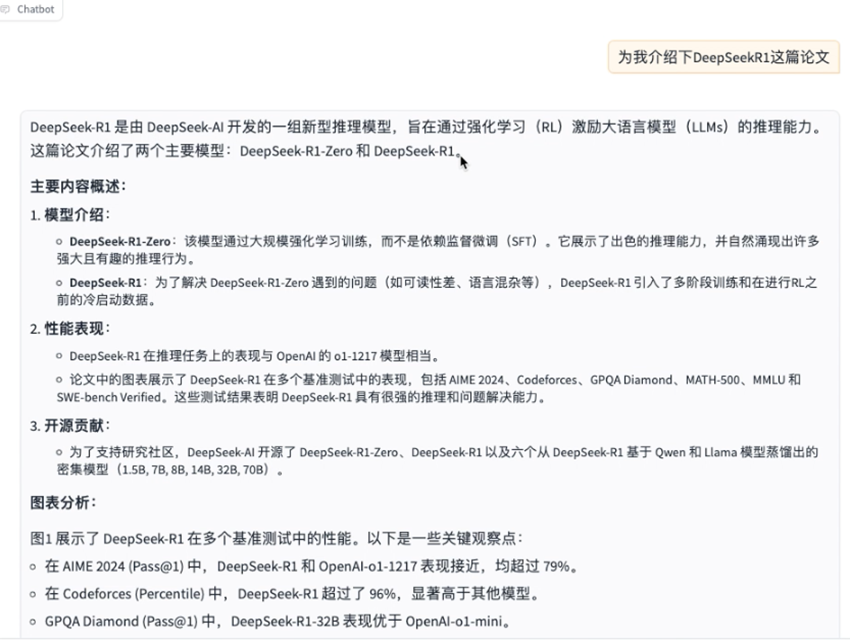
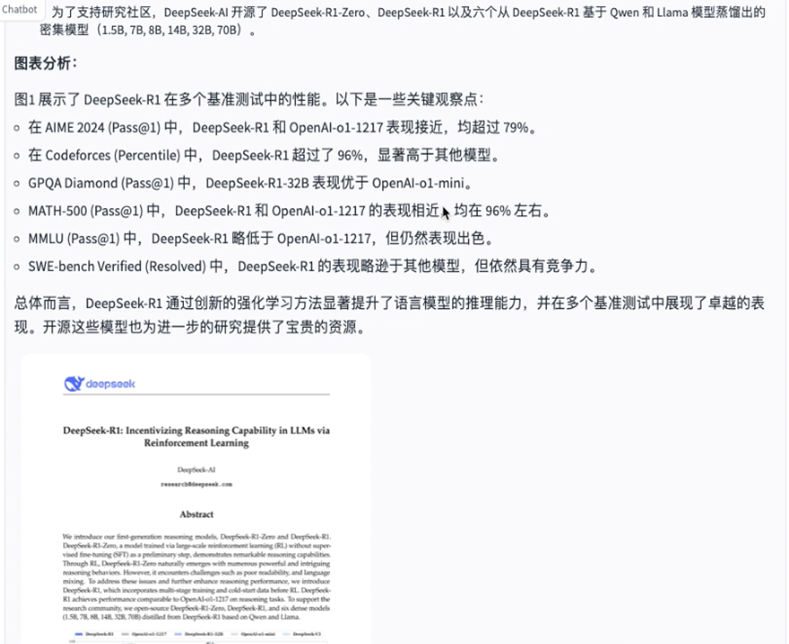
In the example shown in the figure below, the user asks the system about the relevant content of the paper "DeepSeek-R1: Incentivizing Reasoning Capability in LLMs via Reinforcement Learning". The system first retrieves the relevant paragraphs and generates accurate answers based on its content. At the same time, the system can also intelligently extract chart information in the paper, retrieve and display it, so that users can not only obtain text analysis, but also visually view key data and experimental results in the paper.
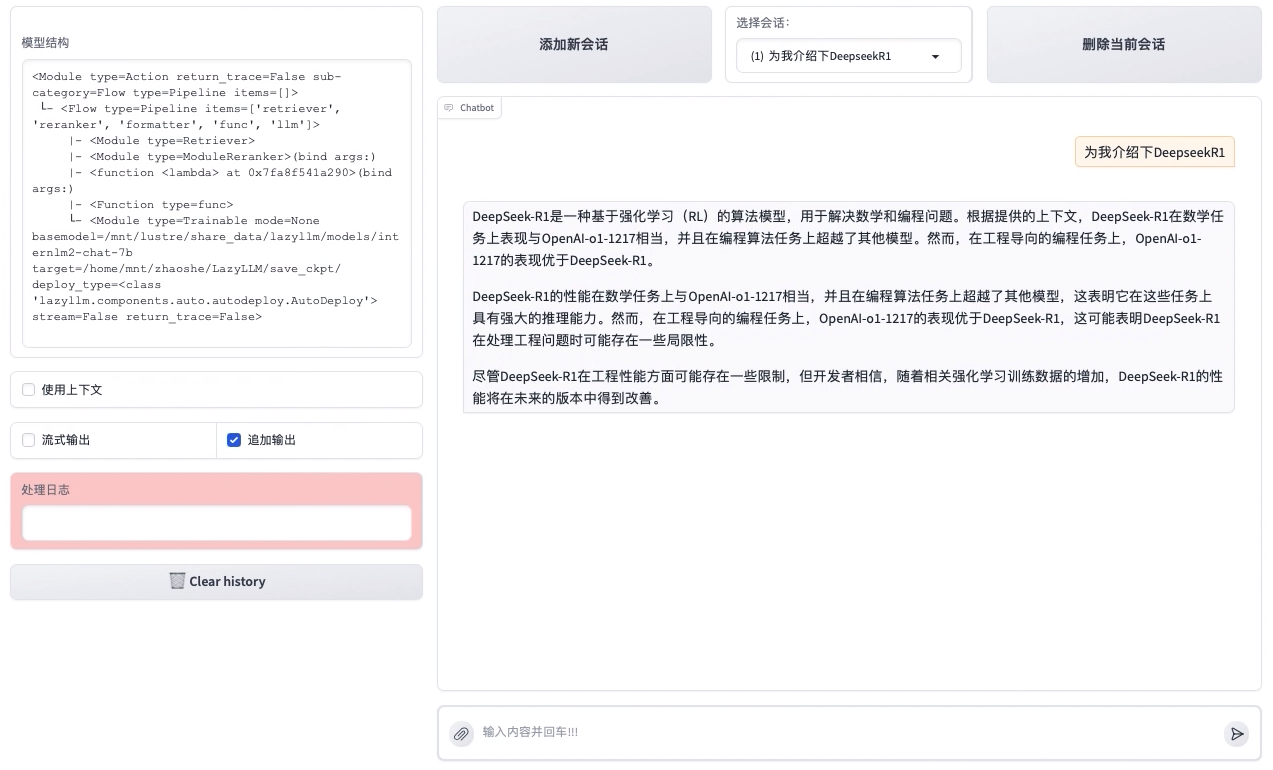 Through this system, researchers can efficiently obtain paper information without reading the entire paper word for word, which greatly improves the convenience and efficiency of scientific research work.
The paper system of naive multimodal RAG
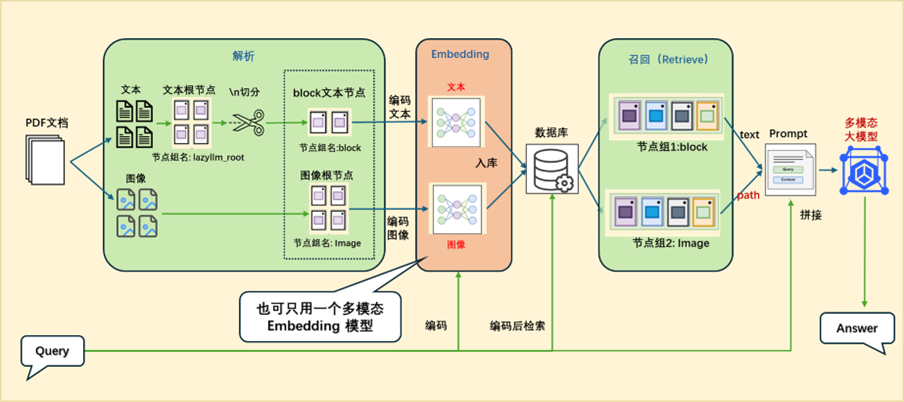
multimodal embedding
Option 1
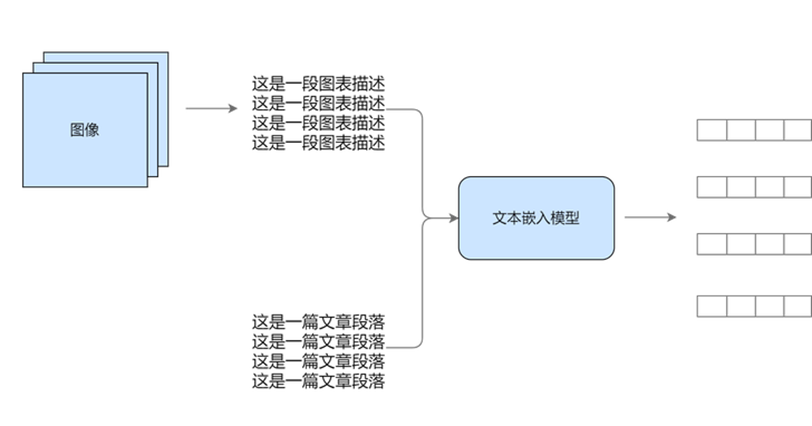
Unify to text modal and then vector embedding
Option 2
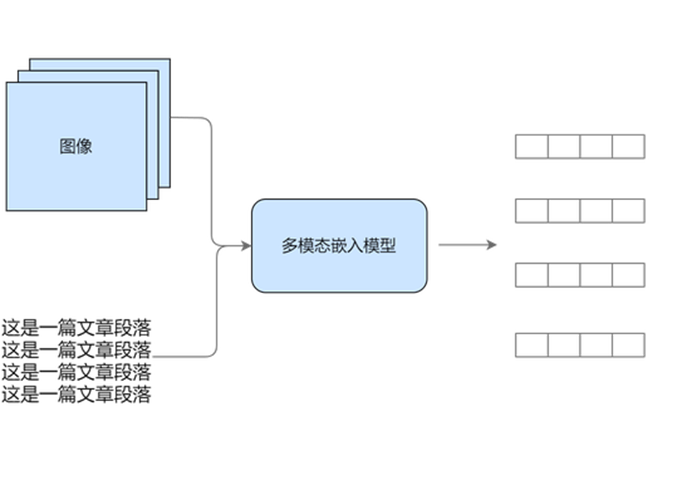
Unifying to vector space: mapping with multimodal models
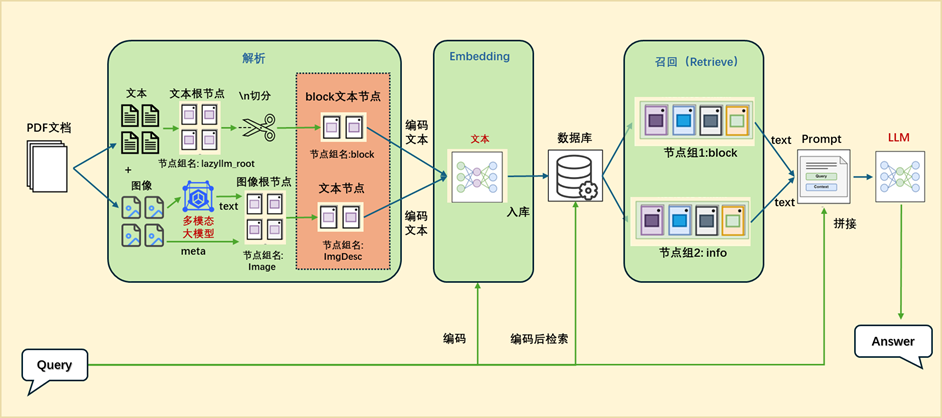
Option 1: Unify to text mode
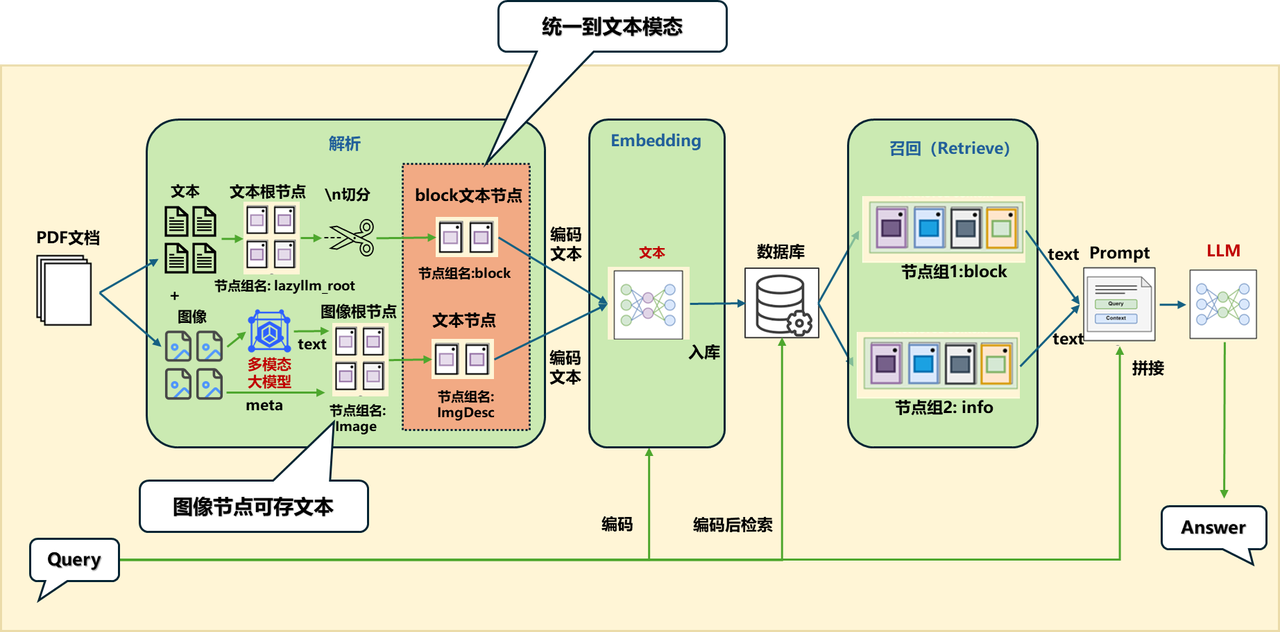
If you generate descriptions for images and build ImageDocNode nodes separately during the parsing process, you can pass in a post-processing function in the original MineruPDFReader component (note that the input and output of the post-processing function should be List[DocNode]):
vlm = lazyllm.TrainableModule('internvl-chat-v1-5').start() # Initialize a large multi-modal model
def build_image_docnode(nodes):
    img_nodes = []
    for node in nodes:
        if node.metadata.get("type", None) == "image" and node.metadata.get("image_path", None):
        img_desc = vlm(formatted_query(node.image_path)) #Use VLM to parse the image content to generate a text description of the image
        img_nodes.append(ImageDocNode(text=img_desc, image_path=node.metadata.get("image_path"), global_metadata=node.metadata)) # Build ImageDocNode node
    return nodes + img_nodes


documents.add_reader("*.pdf", MineruPDFReader(url="http://127.0.0.1:8888", post_func=build_image_docnode)) # Pass in your post-processing function here
Application Orchestration Implementation
documents = lazyllm.Document(
    dataset_path=tmp_dir.rag_dir,
    embed=lazyllm.TrainableModule("bge-m3"),
    manager=False)
documents.add_reader("*.pdf", MineruPDFReader(url="http://127.0.0.1:8888", post_func=build_image_docnode)) # The url needs to be replaced with the started MinerU service address
documents.create_node_group(name="block", transform=lambda s: s.split("\n") if s else '')
with lazyllm.pipeline() as ppl:
    with lazyllm.parallel().sum as ppl.prl:
        ppl.prl.retriever1 = lazyllm.Retriever(documents, group_name="block", similarity="cosine", topk=1)
        ppl.prl.retriever2 = lazyllm.Retriever(documents, lazyllm.Document.ImgDesc, similarity="cosine", topk=1)
    ppl.prompt = build_vlm_prompt | bind(_0, ppl.input)
    ppl.vlm = lazyllm.OnlineChatModule()
lazyllm.WebModule(ppl, port=range(23468, 23470), static_paths=get_image_path()).start().wait()
[Result display]
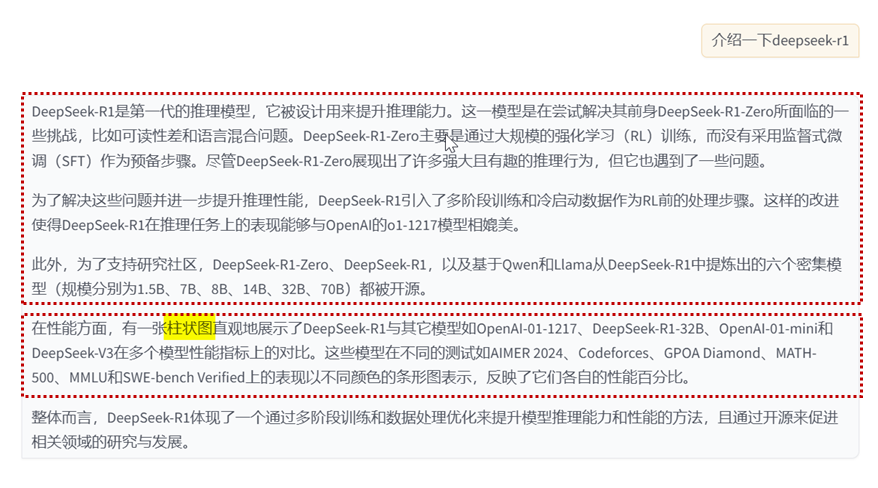
Block node group recall content:
We introduce our frst-generation reasoning models, DeepSeek-R1-Zero and DeepSeek-R1. DeepSeek-R1-Zero, a model trained via large-scale reinforcement learning (RL) without supervised fne-tuning (SFT) as a preliminary step, demonstrates remarkable reasoning capabilities. Through RL, DeepSeek-R1-Zero naturally emerges with numerous powerful and intriguing reasoning behaviors. However, it encounters challenges such as poor readability, and language mixing. To address these issues and further enhance reasoning performance, we introduce DeepSeek-R1, which incorporates multi-stage training and cold-start data before RL. DeepSeekR1 achieves performance comparable to OpenAI-o1-1217 on reasoning tasks. To support the research community, we open-source DeepSeek-R1-Zero, DeepSeek-R1, and six dense models (1.5B, 7B, 8B, 14B, 32B, 70B) distilled from DeepSeek-R1 based on Qwen and Llama.
Info node group recall content:
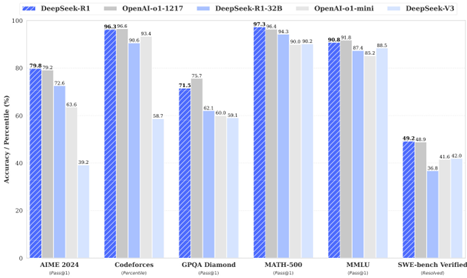
This image is a histogram titled "DeepSeek-R1 OpenAI-01-1217 DeepSeek-R1-32B OpenAI-01-mini DeepSeek-V3". The chart shows performance percentages for six different models, each represented by a different colored bar.
From left to right, the first column of bars represents the "AIMER 2024" model, the second column represents the "Codeforces" model, the third column represents the "GPOA Diamond" model, the fourth column represents the "MATH-500" model, the fifth column represents the "MMLU" model, and the last column represents the "SWE-bench Verified" model.
Each group of bars has five bars, with colors of blue, gray, orange, yellow and purple, corresponding to different performance indicators.
Below the chart, there are five percentage values corresponding to the performance indicators of each model. The values are arranged from left to right, corresponding to the color of the bars.
The entire chart has a white background, and the color of the bar chart contrasts with the background, making it easy to distinguish.
Option 2: Unify to vector space
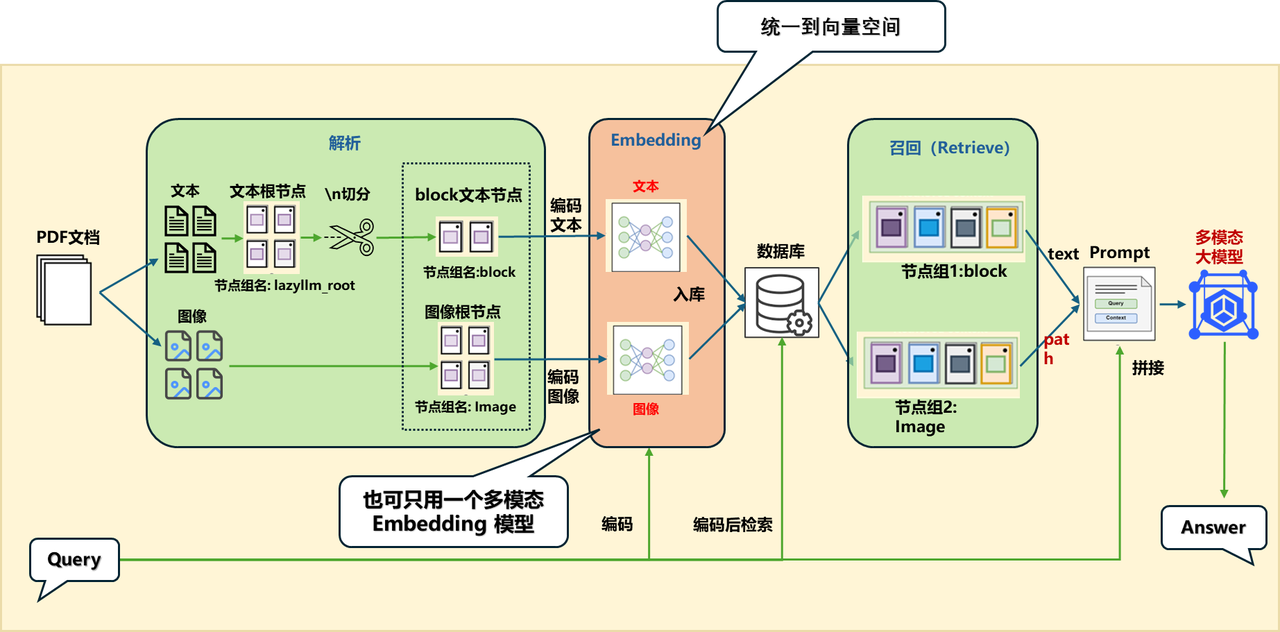
Unified to vector space, two options:
Solution A: Different modes use corresponding embedding:
- Text: Embedding with text

- Image: Embedding with image
Solution B: Use multimodal embedding:
- Both images and texts use the same embedding
Solution A is used here to demonstrate the use of multiple embeddings.
Application Orchestration Implementation
embed_multimodal = lazyllm.TrainableModule("colqwen2-v0.1")
embed_text = lazyllm.OnlineEmbeddingModule(
    source='qwen', embed_model_name='text-embedding-v1')
embeds = {'vec1': embed_text, 'vec2': embed_multimodal}
documents = lazyllm.Document(
    dataset_path=tmp_dir.rag_dir, embed=embeds, manager=False)
documents.add_reader("*.pdf", MineruPDFReader(url="http://127.0.0.1:8888", post_func=build_image_docnode))
documents.create_node_group(name="block", transform=lambda s: s.split("\n") if s else '')
with lazyllm.pipeline() as ppl:
    with lazyllm.parallel().sum as ppl.prl:
        ppl.prl.retriever1 = lazyllm.Retriever(documents, group_name="block", embed_keys=['vec1'], similarity="cosine", topk=1)
        ppl.prl.retriever2 = lazyllm.Retriever(documents, group_name="Image", embed_keys=['vec2'], similarity="maxsim", topk=2)
    ppl.prompt = build_vlm_prompt | bind(_0, ppl.input)
    ppl.vlm = lazyllm.OnlineChatModule(source="sensenova", model="SenseNova-V6-Turbo").prompt(lazyllm.ChatPrompter(gen_prompt))
lazyllm.WebModule(ppl, port=range(23468, 23470), static_paths=get_image_path()).start().wait()
[Result display]
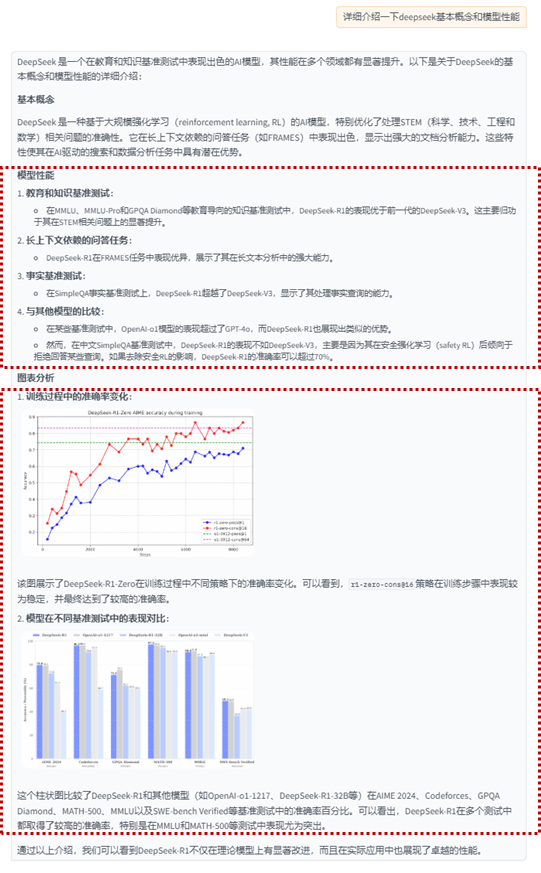
Block node group recall content:
For education-oriented knowledge benchmarks such as MMLU, MMLU-Pro, and GPQA Diamond, DeepSeek-R1 demonstrates superior performance compared to DeepSeek-V3. This improvement is primarily attributed to enhanced accuracy in STEM-related questions, where significant gains are achieved through large-scale reinforcement learning. Additionally, DeepSeek-R1 excels on FRAMES, a long-context-dependent QA task, showcasing its strong document analysis capabilities. This highlights the potential of reasoning models in AI-driven search and data analysis tasks. On the factual benchmark SimpleQA, DeepSeek-R1 outperforms DeepSeek-V3, demonstrating its capability in handling fact-based queries. A similar trend is observed where OpenAI-o1 surpasses GPT-4o on this benchmark. However, DeepSeek-R1 performs worse than DeepSeek-V3 on the Chinese SimpleQA benchmark, primarily due to its tendency to refuse answering certain queries after safety RL. Without safety RL, DeepSeek-R1 could achieve an accuracy of over 70%.
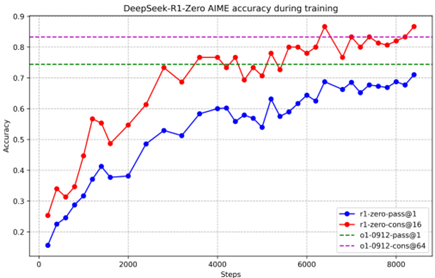
Image node group recall content:
/home/mnt/sunxiaoye/.lazyllm/rag_for_qa/images/c357bd57757e4c544fdda3ad32066e64c5d01bb8540066f1a722c8872d664183.jpg
/home/mnt/sunxiaoye/.lazyllm/rag_for_qa/images/2c6271b8cecc68d5b3c22e552f407a5e97d34030f91e15452c595bc8a76e291c.jpg
Effect Optimization of Paper System
Improvement plan
For the above paper Q&A assistant, we can also optimize it from the following perspectives:
-
Optimization 0. Multi-channel recall Problem: Due to the complex structures and different information densities of different types of documents, a single recall strategy is often difficult to adapt to all scenarios. Solution: Parallel Multiple Recall
-
Optimization 1. Text QA summary extraction Issue: Recalled documents often contain a lot of redundant information, and passing it directly to LLM may affect the quality of the generation, resulting in less precise or focused answers. Solution: Use LLM to process the parsed passages in advance, let LLM automatically generate summary titles and related questions, and construct high-quality question and answer pairs (QA Pairs) and document summaries (Summary).
-
Optimization 2. Image QA pair extraction Issue: Text-only answers sometimes don't solve users' questions well, and many diagrams are clearer than text. Solution:
- Use a large multi-modal model to analyze the image content and generate a text description of the image;
- Store image text description, path and other information in
ImageDocNode; - Use Lazyllm's
LLM_Parseto generate QA pairs based on the text description of the image.
-
Optimization 3. Convert PDF to simple image Problem: PDF parsing is too complex and the code function design is cumbersome. Solution:
- Convert PDF directly to images;
- Vectorize it using a multi-modal embedding model specifically designed for mixed graphics and text formats;
- Send the image matching the query and the query itself to the multi-modal large model to answer.
Optimization 1: + Text QA pair & Summary extraction solution
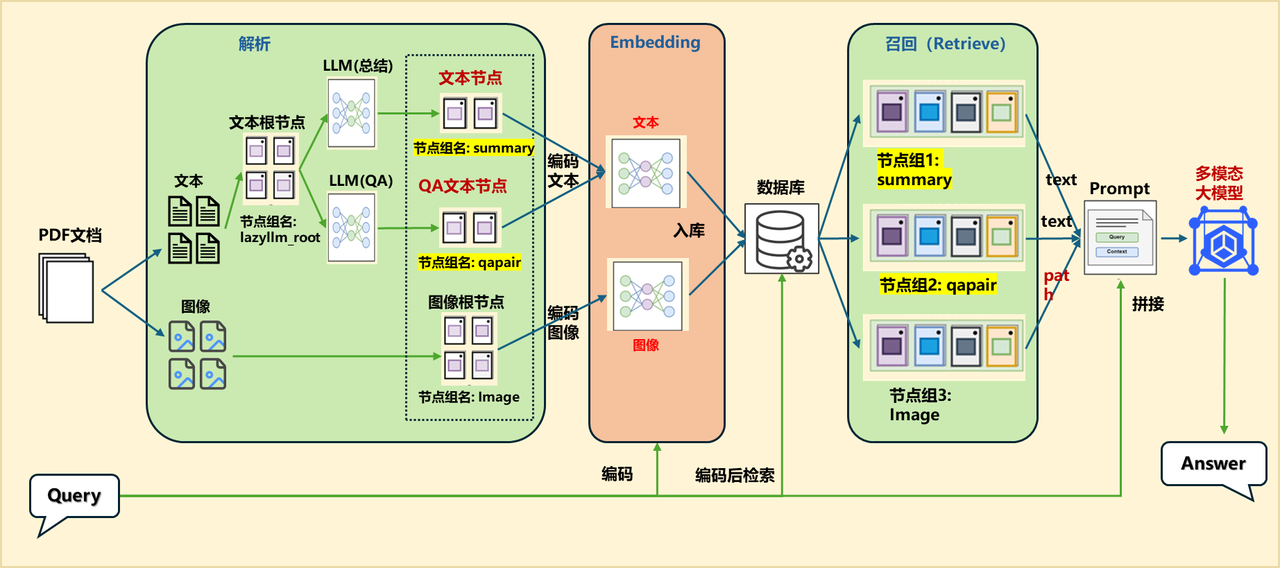
【Application Orchestration】
embed_mltimodal = lazyllm.TrainableModule("colqwen2-v0.1")
embed_text = lazyllm.TrainableModule("bge-m3")
embeds = {'vec1': embed_text, 'vec2': embed_mltimodal}
qapair_llm = lazyllm.LLMParser(lazyllm.OnlineChatModule(stream=False), language="zh", task_type="qa")
summary_llm = lazyllm.LLMParser(lazyllm.OnlineChatModule(stream=False), language="zh", task_type="summary")
documents = lazyllm.Document(dataset_path=tmp_dir.rag_dir, embed=embeds, manager=False)
documents.add_reader("*.pdf", MineruPDFReader(url="http://127.0.0.1:8888")) # The url needs to be replaced with the started MinerU service address
documents.create_node_group(name="summary", transform=lambda d: summary_llm(d), trans_node=True)
documents.create_node_group(name='qapair', transform=lambda d: qapair_llm(d), trans_node=True)
with lazyllm.pipeline() as ppl:
    with lazyllm.parallel().sum as ppl.prl:
        ppl.prl.retriever1 = lazyllm.Retriever(documents, group_name="qapair", embed_keys=['vec1'], similarity="cosine", topk=1)
        ppl.prl.retriever2 = lazyllm.Retriever(documents, group_name="summary", embed_keys=['vec1'], similarity="cosine", topk=1)
        ppl.prl.retriever3 = lazyllm.Retriever(documents, group_name="Image", embed_keys=['vec2'], similarity="maxsim", topk=2)
    ppl.prompt = build_vlm_prompt | bind(_0, ppl.input)
    ppl.vlm = lazyllm.OnlineChatModule(source="sensenova", model="SenseNova-V6-Turbo").prompt(lazyllm.ChatPrompter(gen_prompt))
lazyllm.WebModule(ppl, port=range(23468, 23470), static_paths=get_image_path()).start().wait()
[Result display]
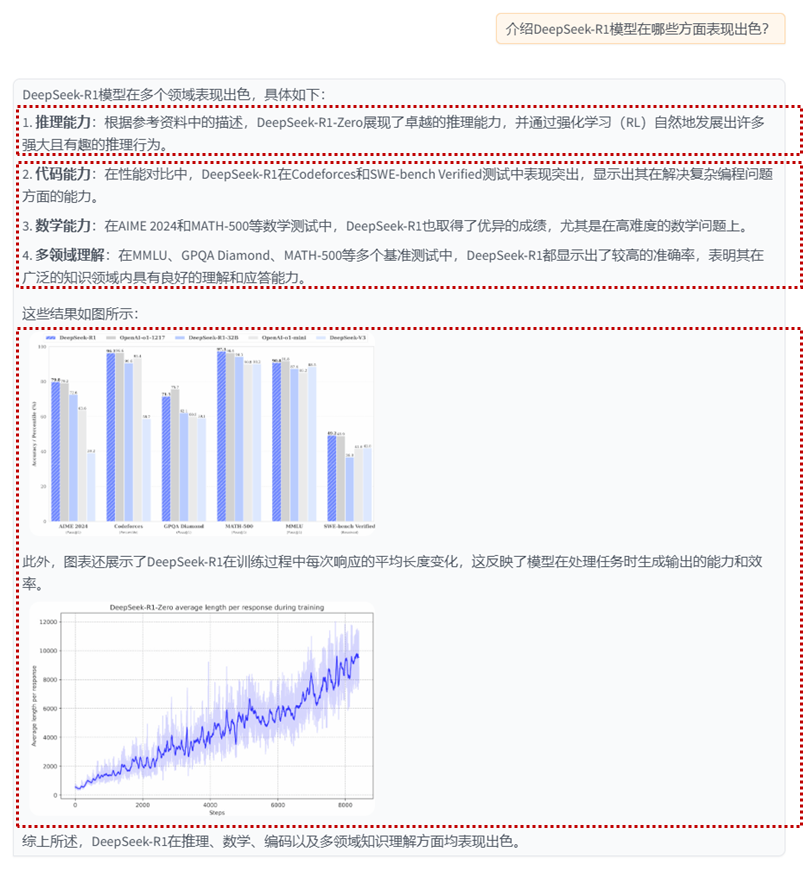
qapair node group recall content:
query:
What capabilities does DeepSeek-R1-Zero demonstrate?
answer
DeepSeek-R1-Zero demonstrates remarkable reasoning capabilities and naturally emerges with numerous powerful and intriguing reasoning behaviors through RL.
Summary node group recall content:
Performance comparison table summary:
- Performance of different models in multiple benchmark tests, including English comprehension tests such as MMLU, MMLU-Redux, MMLU-Pro, DROP, IF-Eval, GPQA Diamond, SimpleQA, FRAMES, AlpacaEval2.0, ArenaHard, etc., as well as code ability tests such as LiveCodeBench, Codeforces, SWE Verified, Aider-Polyglot, and mathematical ability tests such as AIME, MATH-500, CNMO, etc.
- Claude-3.5-Sonnet-1022 0513, GPT-4o DeepSeek V3, OpenAI OpenAI 01-mini o1-1217, DeepSeek R1 and other models have their own advantages and disadvantages in different tests. For example, DeepSeek R1 performs well in most tests, especially in Codeforces and Aider-Polyglot.
- Differences in indicators such as architecture, activation parameters, total parameters, and MMLU (Pass@1) of each model.
- In Chinese evaluation, the performance of each model on C-Eval and C-SimpleQA.
Image node group recall content:
/path/to/images/2c6271b8cecc68d5b3c22e552f407a5e97d34030f91e15452c595bc8a76e291c.jpg
/path/to/ images/b671779ae926ef62c9a0136380a1116f31136c3fd1ed3fedc0e3e05b90925c20.jpg
Optimization 2: + Picture QA pair plan
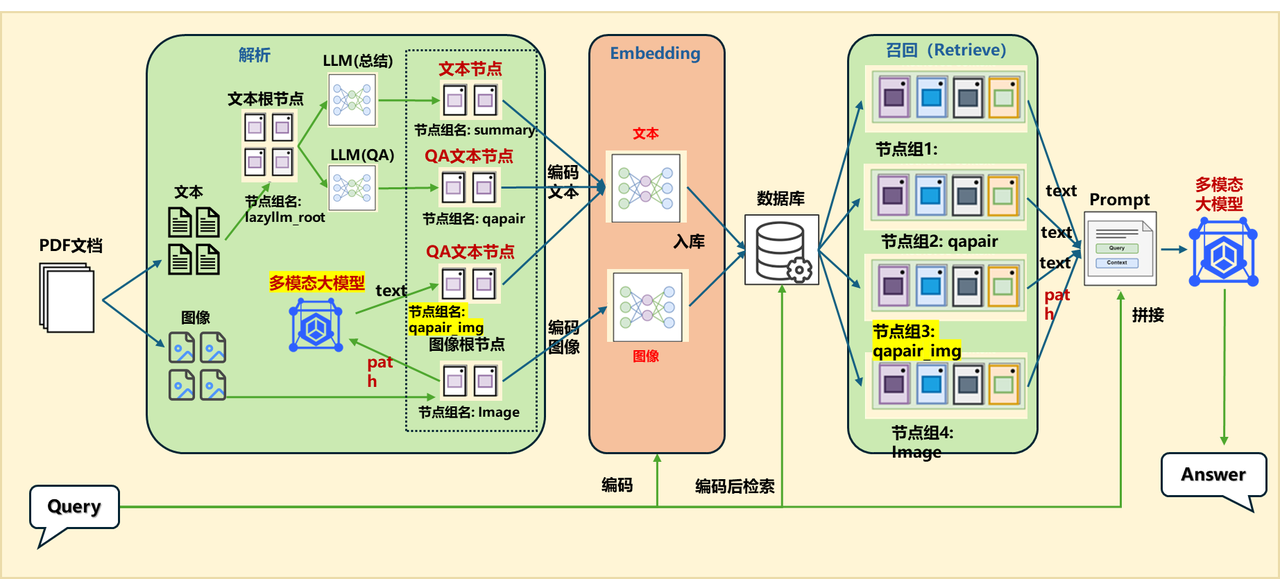
【Application Orchestration】
embed_mltimodal = lazyllm.TrainableModule("colqwen2-v0.1")
embed_text = lazyllm.TrainableModule("bge-m3")
embeds = {'vec1': embed_text, 'vec2': embed_mltimodal}
qapair_llm = lazyllm.LLMParser(lazyllm.OnlineChatModule(stream=False), language="zh", task_type="qa")
qapair_img_llm = lazyllm.LLMParser(
    lazyllm.OnlineChatModule(source="sensenova", model="SenseNova-V6-Turbo"), language="zh", task_type="qa_img")
summary_llm = lazyllm.LLMParser(lazyllm.OnlineChatModule(stream=False), language="zh", task_type="summary")
documents = lazyllm.Document(dataset_path=tmp_dir.rag_dir, embed=embeds, manager=False)
documents.add_reader("*.pdf", MineruPDFReader(url="http://127.0.0.1:888"))
documents.create_node_group(name="summary", transform=lambda d: summary_llm(d), trans_node=True)
documents.create_node_group(name='qapair', transform=lambda d: qapair_llm(d), trans_node=True)
documents.create_node_group(name='qapair_img', transform=lambda d: qapair_img_llm(d), trans_node=True, parent='Image')
with lazyllm.pipeline() as ppl:
    with lazyllm.parallel().sum as ppl.prl:
        ppl.prl.retriever1 = lazyllm.Retriever(documents, group_name="summary", embed_keys=['vec1'], similarity="cosine", topk=1)
        ppl.prl.retriever2 = lazyllm.Retriever(documents, group_name="Image", embed_keys=['vec2'], similarity="maxsim", topk=2)
        ppl.prl.retriever3 = lazyllm.Retriever(documents, group_name="qapair", embed_keys=['vec1'], similarity="cosine", topk=1)
        ppl.prl.retriever4 = lazyllm.Retriever(documents, group_name="qapair_img", embed_keys=['vec1'], similarity="cosine", topk=1)
    ppl.prompt = build_vlm_prompt | bind(_0, ppl.input)
    ppl.vlm = lazyllm.OnlineChatModule(source="sensenova", model="SenseNova-V6-Turbo").prompt(lazyllm.ChatPrompter(gen_prompt))
lazyllm.WebModule(ppl, port=range(23468, 23470), static_paths=get_image_path()).start().wait()
[Result display]
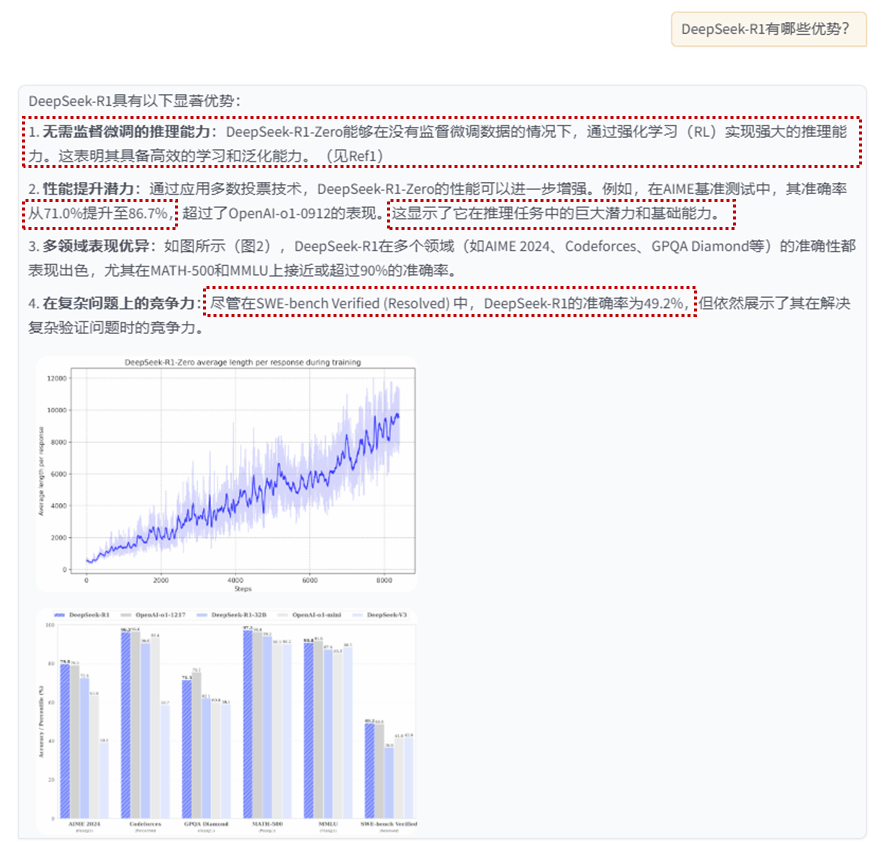
qapair node group recall content:
query:
What does the performance of DeepSeek-R1-Zero show?
answer
The performance of DeepSeek-R1-Zero highlights its strong basic capabilities and potential for further improvement in inference tasks.
Summary node group recall content:
DeepSeek-R1-Zero achieves powerful inference capabilities without supervised fine-tuning and demonstrates efficient learning and generalization capabilities by using only reinforcement learning. Applying majority voting can further improve its performance. For example, in the AIME benchmark, its performance increased from 71.0% to 86.7%, surpassing OpenAI-o1-0912. This shows that DeepSeek-R1-Zero has strong basic capabilities and has the potential to achieve more progress in inference tasks.
qapair_img node group recall content:
Image node group recall content:
/path/to/images/b671779ae926ef62c9a0136380a1116f31136c3fd1ed3fedc0e3e05b90925c20.jpg
(2) /path/to/images/2c6271b8cecc68d5b3c22e552f407a5e97d34030f91e15452c595bc8a76e291c.jpg
Optimization 2: + Image QA pair (variant) solution
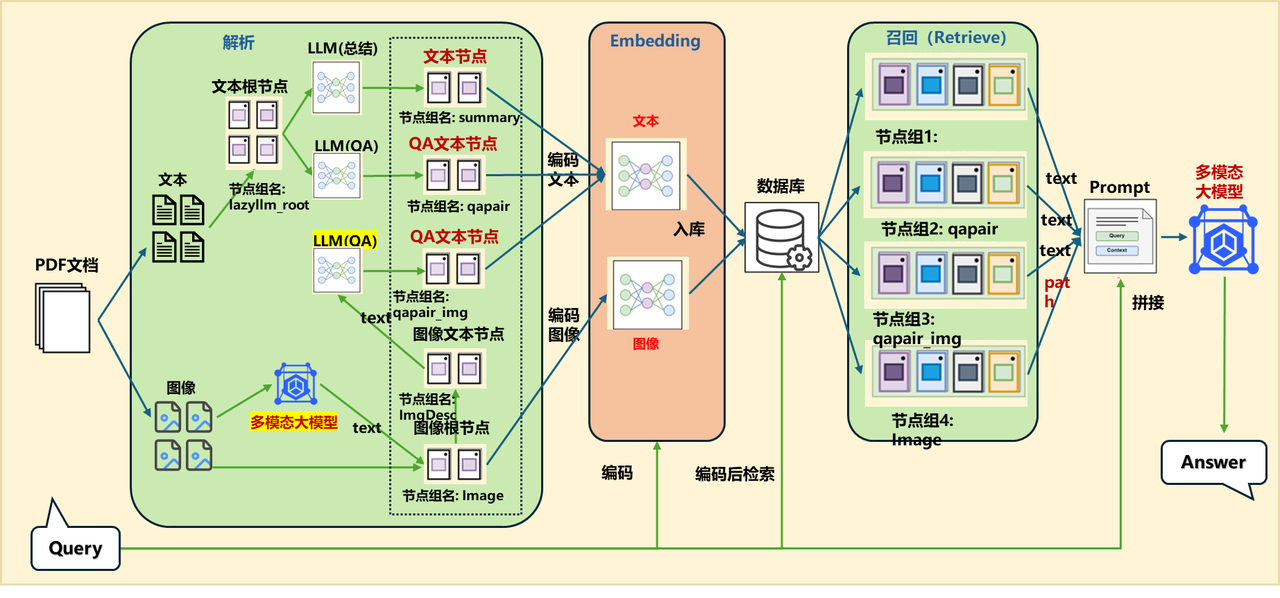
[Application Orchestration (Variant)]
embed_mltimodal = lazyllm.TrainableModule("colqwen2-v0.1")
embed_text = lazyllm.TrainableModule("bge-m3")
embeds = {'vec1': embed_text, 'vec2': embed_mltimodal}
qapair_llm = lazyllm.LLMParser(lazyllm.OnlineChatModule(stream=False), language="zh", task_type="qa")
summary_llm = lazyllm.LLMParser(lazyllm.OnlineChatModule(stream=False), language="zh", task_type="summary")
documents = lazyllm.Document(dataset_path=tmp_dir.rag_dir, embed=embeds, manager=False)
documents.add_reader("*.pdf", MineruPDFReader(url="http://127.0.0.1:8888")) # The url needs to be replaced with the started MinerU service address
documents.create_node_group(name="summary", transform=lambda d: summary_llm(d), trans_node=True)
documents.create_node_group(name='qapair', transform=lambda d: qapair_llm(d), trans_node=True)
documents.create_node_group(name='qapair_img', transform=lambda d: qapair_llm(d), trans_node=True, parent='ImgDesc')
with lazyllm.pipeline() as ppl:
    with lazyllm.parallel().sum as ppl.prl:
        ppl.prl.retriever1 = lazyllm.Retriever(documents, group_name="summary", embed_keys=['vec1'], similarity="cosine", topk=1)
        ppl.prl.retriever2 = lazyllm.Retriever(documents, group_name="Image", embed_keys=['vec2'], similarity="maxsim", topk=2)
        ppl.prl.retriever3 = lazyllm.Retriever(documents, group_name="qapair", embed_keys=['vec1'], similarity="cosine", topk=1)
        ppl.prl.retriever4 = lazyllm.Retriever(documents, group_name="qapair_img", embed_keys=['vec1'], similarity="cosine", topk=1)
    ppl.prompt = build_vlm_prompt | bind(_0, ppl.input)
    ppl.vlm = lazyllm.OnlineChatModule(source="sensenova", model="SenseNova-V6-Turbo").prompt(lazyllm.ChatPrompter(gen_prompt))
lazyllm.WebModule(ppl, port=range(23468, 23470), static_paths=get_image_path()).start().wait()
[Effect display 1]
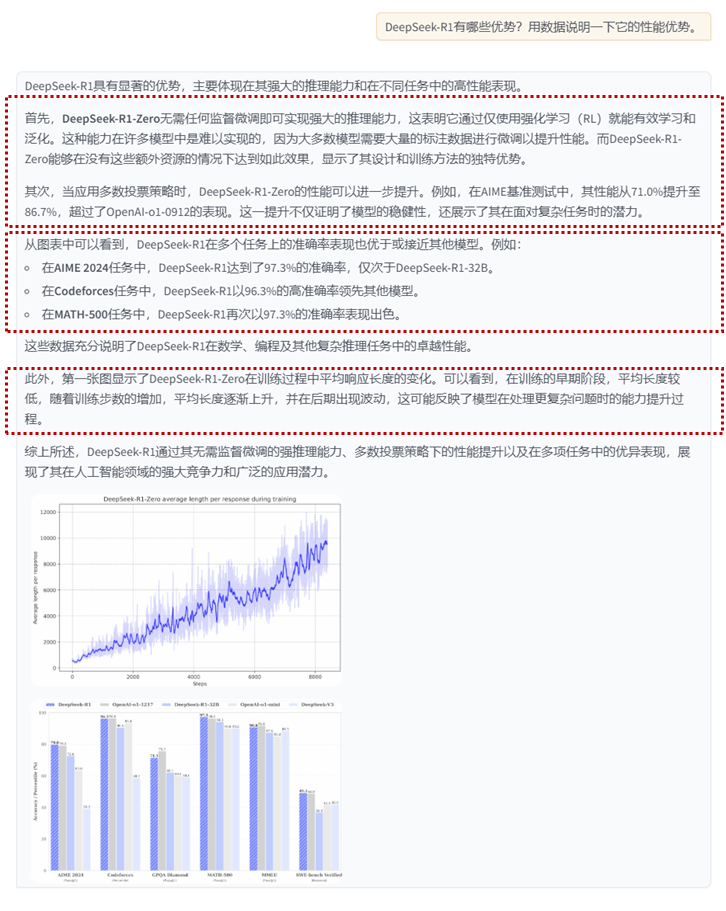
qapair node group recall content:
query:
What does the performance of DeepSeek-R1-Zero show?
answer
The performance of DeepSeek-R1-Zero highlights its strong basic capabilities and potential for further development in inference tasks.
Summary node group recall content:
DeepSeek-R1-Zero achieves strong inference capabilities without supervised fine-tuning, showing its effective learning and generalization capabilities by using only reinforcement learning. Using majority voting can further improve its performance. For example, in the AIME benchmark, the performance increased from 71.0% to 86.7%, surpassing OpenAI-o1-0912. Its competitive performance demonstrates strong fundamental capabilities and potential for further development in reasoning tasks.
qapair_img node group recall content:
query:
Graph showing how the average length of DeepSeek-R1-Zero changes during training?
answer
In the early stages of training, the average length is relatively low, and as the number of steps increases, the average length gradually increases and fluctuates in the later stages.
Image node group recall content:
/path/to/images/b671779ae926ef62c9a0136380a1116f31136c3fd1ed3fedc0e3e05b90925c20.jpg
/path/to/images/2c6271b8cecc68d5b3c22e552f407a5e97d34030f91e15452c595bc8a76e291c.jpg
[Effect Display 2—Image QA Details Display]
Original image parsed from PDF
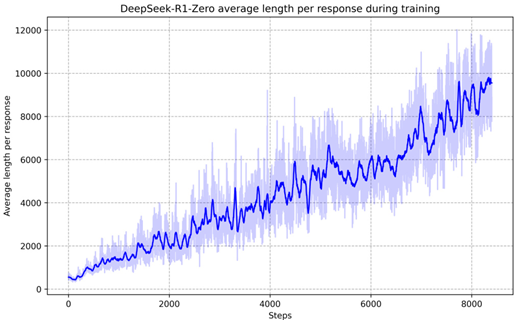
Multimodal large model generation description
This image shows a graph showing the trend of the average length of DeepSeek-R1-Zero as the number of steps increases during training. The blue line in the graph represents the average length, while the light blue shaded area may represent the uncertainty or error range in the training process.
In the chart, the x-axis represents the number of steps, from 0 to approximately 8,000, while the y-axis represents the average length, from 0 to approximately 12,000. The chart shows that in the early stages of training, the average length is relatively low, gradually rises as the number of steps increases, and fluctuates in the later stages. The lines and shaded areas in the chart show changes during training and may reflect the complexity and uncertainty DeepSeek-R1-Zero encountered while processing the data or task.
Please note that since the specific units of the x-axis and y-axis are not clearly marked in the chart, the above description is based on the visual presentation of the chart and does not provide specific numerical information.
LLM is used to generate QA pairs for the generated descriptions
Q: This picture shows a chart. What does it show?
A: This image shows a chart that shows the trend of the average length of DeepSeek-R1-Zero as the number of steps increases during training.

Q: What does the blue line in the chart represent?
A: The blue line in the chart represents the average length.

Q: What might the light blue shaded area in the chart mean?
A: The light blue shaded area may represent uncertainty or error bounds in the training process.

Q: What do the x-axis and y-axis of the chart represent?
A: The x-axis represents the number of steps, from 0 to approximately 8,000, while the y-axis represents the average length, from 0 to approximately 12,000.
·
Q: The graph shows how the average length of DeepSeek-R1-Zero changes during training?
A: In the early stages of training, the average length is relatively low. As the number of steps increases, the average length gradually increases and fluctuates in the later stages.

Q: What might the lines and shaded areas in the chart reflect?
A: The lines and shaded areas may reflect the complexity and uncertainty DeepSeek-R1-Zero encounters when processing the data or task.

Q: Is specific numerical information provided in the description?
A: No, no specific numerical information is provided in the description, it is only based on the visual presentation of the chart.
Final question and answer result
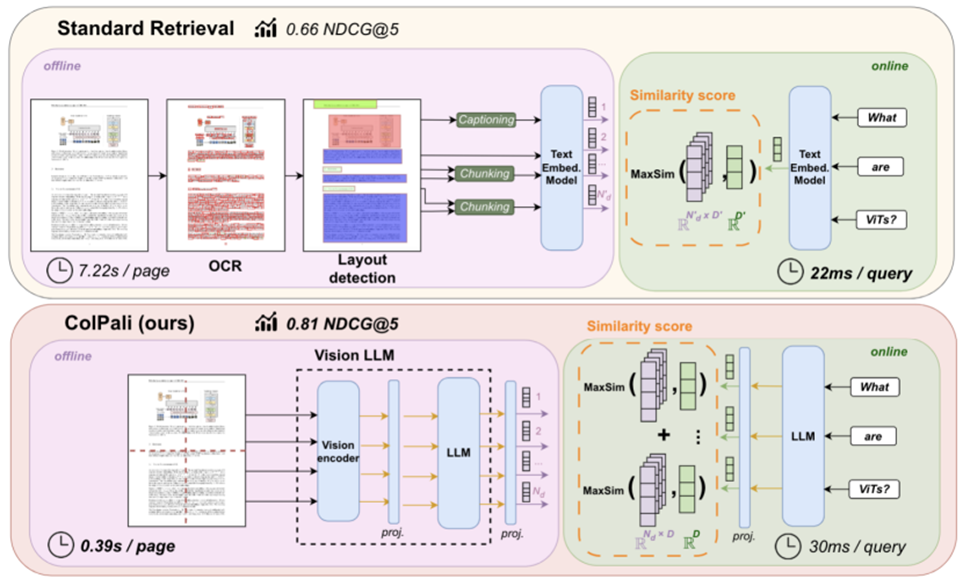
Optimization 3: PDF to image conversion simplified
- Traditional method: Structured document parsing → Image & text are processed separately
- New direction: treat full-page documents as images and encode them directly using multi-modal embedding models
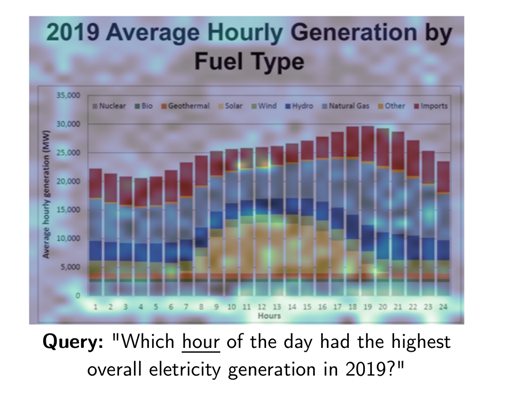
For each item in the user's query, ColPali identifies the most relevant region of the document image (the highlighted region) and calculates a match score between the query and the page. Here it shows that "hour" is highly correlated with "Hours" in the image and its time.
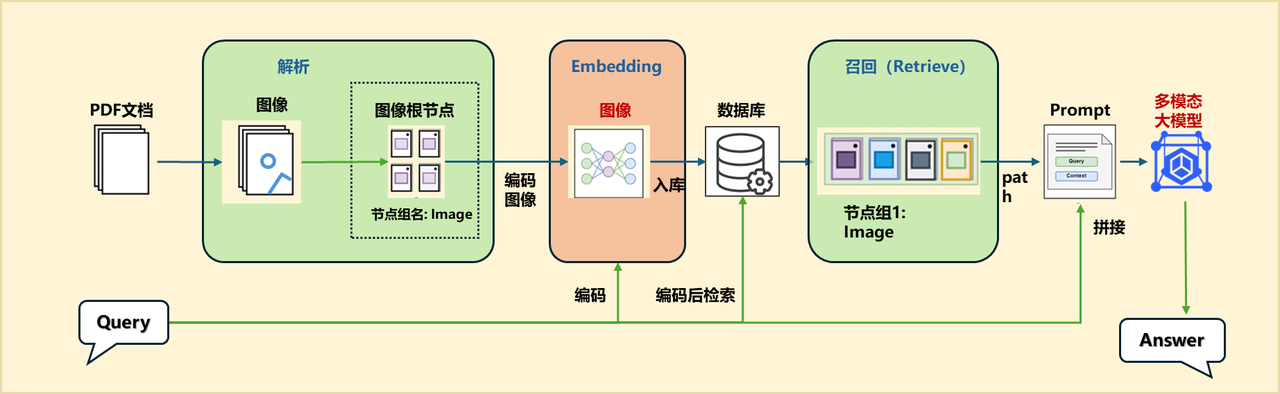
Optimization 3: Convert PDF to image and simplify complexities LazyLLM solution
 Code implementation - PDF to image conversion
In the previous solution, in the text parsing stage, we used the method of first parsing the text and then constructing nodes, and the process was relatively complicated. Here the PDF is parsed directly into images. Provided for use in subsequent multi-modal large models (Code GitHub link).
# PDF to image reader implementation class
class Pdf2ImageReader(ReaderBase):
    def __init__(self, image_save_path="pdf_image_path"):
        super().__init__(); self.image_save_path = image_save_path
    if not os.path.exists(self.image_save_path): os.makedirs(self.image_save_path)

# Core methods for loading and converting PDF files
    def _load_data(self, file: Path, extra_info=None) -> List[ImageDocNode]:
        if not isinstance(file, Path): file = Path(file)
        docs = fitz.open(file); file_path = []
        for page_num in range(docs.page_count):
            metadata = extra_info or {}; metadata["file_name"] = file.name; metadata["file_split"] = page_num
        page = docs.load_page(page_num); pix = page.get_pixmap(dpi=300)
        img = Image.frombytes("RGB", [pix.width, pix.height], pix.samples)
        save_path = f"{self.image_save_path}/{file.name[:-4]}_{page_num}.jpg"
        img.save(save_path); file_path.append(ImageDocNode(image_path=save_path, global_metadata=metadata))
        return file_path
Through the above code, you can obtain the image PIL object through ImageDocNode.get_content(), and you can also obtain the corresponding storage path through ImageDocNode.image_path to facilitate further operations.
Optimize the similarity calculation method——MaxSim similarity calculation method
The MaxSim function is a similarity calculation method based on delayed interaction. It calculates the pairwise similarity of the vectors of each Token of the query and document, and tracks the maximum score of each pair to determine the overall similarity.
Core Principle:
- Delayed interaction mechanism: not directly calculating global similarity, but aggregating after token-by-token interaction
- Maximum matching strategy: Each query token looks for the maximum response value in the document
Below is the score calculation function of the MaxSim function. We only need to implement the similarity calculation function and register it. The specific formula of MaxSim is as follows:
-
\[E_q is the embedding matrix of query q, each row is a vector of tokens. \]
-
\[E_d is the embedding matrix of document d, where each row is a vector of tokens (or image patches). \]
-
\[Calculate E_{q_i} \cdot E_{d_j}^T (i.e. dot product), and then take the maximum value of j to get the maximum matching score of each query token in the document. \]
-
\[Finally, the maximum matching scores of all query tokens are summed to obtain the overall similarity score S_q,d. \]
Next, we use a simple example to illustrate the calculation process of the MaxSim function.
Suppose we have a query q and a document d, and their embedding matrices are as follows:
-
\[ query has 2 tokens, so \lvert E_q \rvert = 2. \]
Calculation steps
Step 1: Through dot product operation (corresponding elements are multiplied and then summed):
• M11 = 0.5×0.1+(−0.2)×0.4=0.05−0.08=−0.03
• M12 = 0.5×(−0.3)+(−0.2)×0.6=−0.15−0.12=−0.27
• M13 = 0.5×0.7+(−0.2)×(−0.5)=0.35+0.10=0.45
• M21 = 0.3×0.1+0.8×0.4=0.03+0.32=0.35
• M22 = 0.3×(−0.3)+0.8×0.6=−0.09+0.48=0.39
• M23 = 0.3×0.7+0.8×(−0.5)=0.21−0.40=−0.19
Step 2: Take the maximum value of each row:
Maximum value in the first row: max(−0.03,−0.27,0.45)=0.45
Maximum value in the second row: max(0.35,0.39,−0.19)=0.39
Step 3: Global summation Final similarity: S(q,d)=0.45+0.39=0.84
result
- The final similarity score for query q and document d is 0.84.
Summarize
Through this example, we can see the calculation process of MaxSim:
- For each query token, calculate its dot product (similarity) with all tokens in the document.
- For each query token, find the maximum similarity between it and the document token.
- Add the maximum similarities of all query tokens to obtain the final similarity score.
where S is the final similarity score between query q and document d, Eq represents the embedding of query q, and Edi represents the embedding of the i-th image patch. The following is the code implementation of the MaxSim function (GitHub link):
import torch

@lazyllm.tools.rag.register_similarity(mode='embedding', batch=True)
def maxsim(query, nodes, **kwargs):
    batch_size = 128
    scores_list = []
    query = torch.Tensor([query for i in range(len(nodes))])
    nodes_embed = torch.Tensor(nodes)
    for i in range(0, len(query), batch_size):
        scores_batch = []
        query_batch = torch.nn.utils.rnn.pad_sequence(query[i : i + batch_size], batch_first=True, padding_value=0)
        for j in range(0, len(nodes_embed), batch_size):
            nodes_batch = torch.nn.utils.rnn.pad_sequence(nodes_embed[j : j + batch_size], batch_first=True, padding_value=0)
            scores_batch.append(torch.einsum("bnd,csd->bcns", query_batch, nodes_batch).max(dim=3)[0].sum(dim=2))
        scores_batch = torch.cat(scores_batch, dim=1).cpu()
        scores_list.append(scores_batch)
    scores = scores_list[0][0].tolist()
    return scores
【Application Orchestration】
# Define a function that converts image paths to markdown format
def format_markdown_image(text):
json_part = text[text.index("{"):]; data = json.loads(json_part)
image_paths = data.get("files", []); return f'\n\n'
# Initialize the document processing module and add a PDF reader
image_file_path = "/content/images"
documents = lazyllm.Document(dataset_path="/content/doc",
embed=lazyllm.TrainableModule("colqwen2-v0.1"))
documents.add_reader("*.pdf", Pdf2ImageReader(image_file_path))
# Build image retrieval and processing pipeline
with pipeline() as ppl:
ppl.retriever = Retriever(doc=documents, group_name="Image", similarity="maxsim", topk=1)
ppl.formatter1 = lambda nodes : [node.image_path for node in nodes]
ppl.formatter2 = encode_query_with_filepaths | bind(ppl.input, _0)
with parallel().sum as ppl.prl:
ppl.prl.vlm = lazyllm.OnlineChatModule(source="sensenova", model="SenseChat-Vision")
ppl.prl.post_action = format_markdown_image# Start Web service
lazyllm.WebModule(ppl, static_paths=image_file_path).start().wait()
[Effect display]
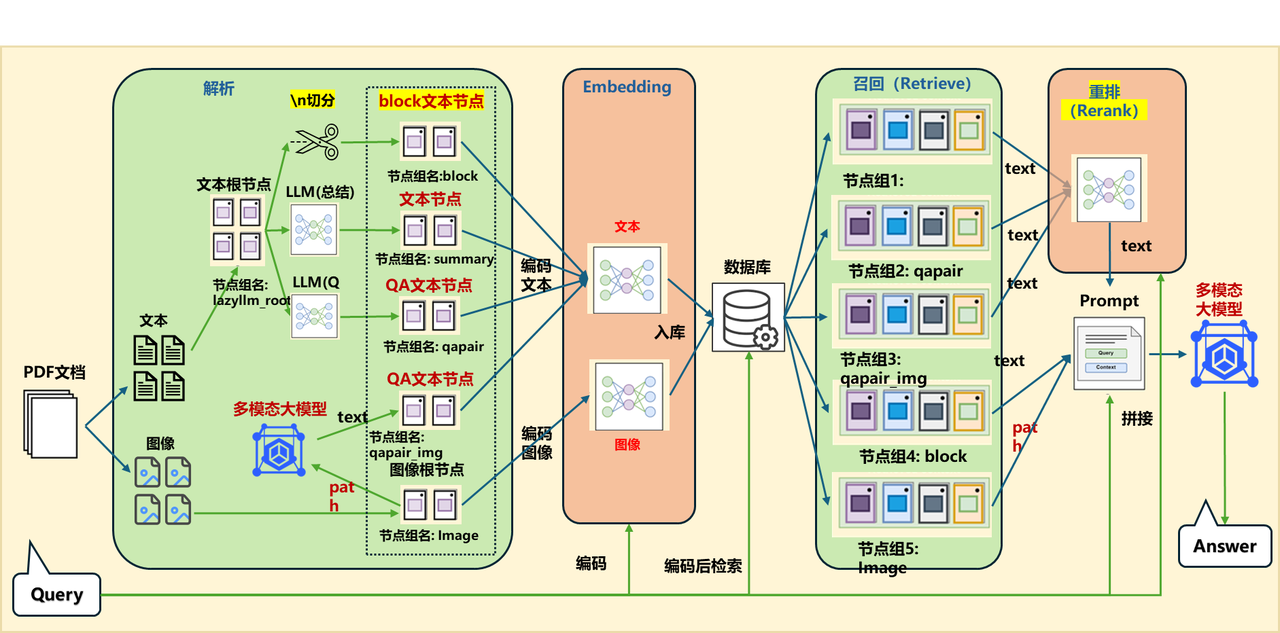
Thesis system comprehensive plan
【Application Orchestration】
embed_mltimodal = lazyllm.TrainableModule("colqwen2-v0.1")
embed_text = lazyllm.TrainableModule("bge-m3")
embeds = {'vec1': embed_text, 'vec2': embed_mltimodal}
qapair_llm = lazyllm.LLMParser(lazyllm.OnlineChatModule(stream=False), language="zh", task_type="qa")
qapair_img_llm = lazyllm.LLMParser(
    lazyllm.OnlineChatModule(source="sensenova", model="SenseNova-V6-Turbo"), language="zh", task_type="qa_img")
summary_llm = lazyllm.LLMParser(lazyllm.OnlineChatModule(stream=False), language="zh", task_type="summary")
documents = lazyllm.Document(dataset_path=tmp_dir.rag_dir, embed=embeds, manager=False)
documents.add_reader("*.pdf", MineruPDFReader(url="http://127.0.0.1:8888"))
documents.create_node_group(name="block", transform=lambda s: s.split("\n") if s else '')
documents.create_node_group(name="summary", transform=lambda d: summary_llm(d), trans_node=True)
documents.create_node_group(name='qapair', transform=lambda d: qapair_llm(d), trans_node=True)
documents.create_node_group(name='qapair_img', transform=lambda d: qapair_img_llm(d), trans_node=True, parent='Image')
with lazyllm.pipeline() as ppl:
    with lazyllm.parallel().sum as ppl.mix:
        with lazyllm.pipeline() as ppl.mix.rank:
            with lazyllm.parallel().sum as ppl.mix.rank.short:
                ppl.mix.rank.short.retriever1 = lazyllm.Retriever(documents, group_name="summary", embed_keys=['vec1'], similarity="cosine", topk=4)
                ppl.mix.rank.short.retriever2 = lazyllm.Retriever(documents, group_name="qapair", embed_keys=['vec1'], similarity="cosine", topk=4)
                ppl.mix.rank.short.retriever3 = lazyllm.Retriever(documents, group_name="qapair_img", embed_keys=['vec1'], similarity="cosine", topk=4)
            ppl.mix.rank.reranker = lazyllm.Reranker("ModuleReranker", model="bge-reranker-large", topk=3) | bind(query=ppl.mix.rank.input)
        ppl.mix.retriever4 = lazyllm.Retriever(documents, group_name="block", embed_keys=['vec1'], similarity="cosine", topk=2)
        ppl.mix.retriever5 = lazyllm.Retriever(documents, group_name="Image", embed_keys=['vec2'], similarity="maxsim", topk=2)
    ppl.prompt = build_vlm_prompt | bind(_0, ppl.input)
    ppl.vlm = lazyllm.OnlineChatModule(source="sensenova", model="SenseNova-V6-Turbo").prompt(lazyllm.ChatPrompter(gen_prompt))
lazyllm.WebModule(ppl, port=range(23468, 23470), static_paths=get_image_path()).start().wait()
[Effect display]
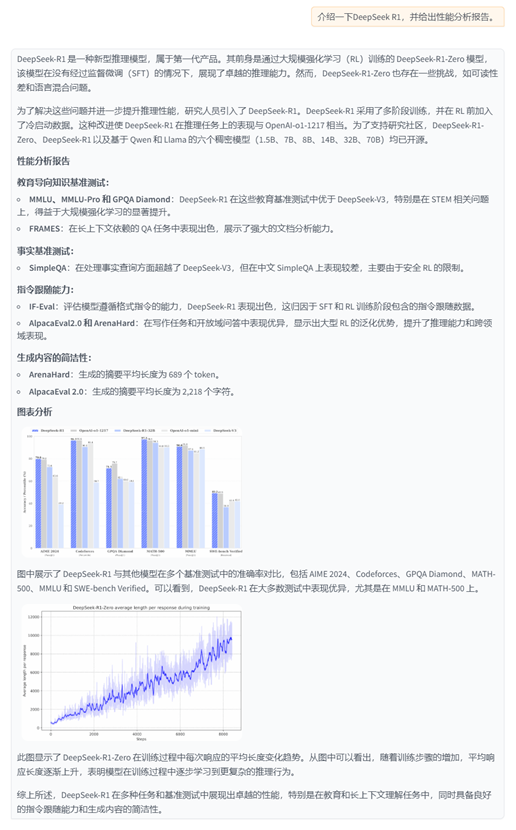
Recall content:
Content 1: DeepSeek-R1 outperforms DeepSeek-V3 on education benchmarks and long-context QA, excelling in STEM and factual queries via reinforcement learning. However, it underperforms on Chinese SimpleQA due to safety RL restrictions.

Content 2: DeepSeek-R1 performs well on IF-Eval, AlpacaEval2.0 and ArenaHard, thanks to the instruction following data included in SFT and RL training. It is superior to DeepSeek-V3, demonstrating the generalization advantages of large-scale RL, improving reasoning capabilities and cross-domain performance. The generated summary length averages 689 tokens (ArenaHard) and 2218 characters (AlpacaEval2.0), demonstrating its brevity.

Content 3: Performance comparison of each model in various benchmark tests, including MMLU, Codeforces, AIME, etc., showing the differentiated performance of different models in areas such as English, code, and mathematics.

Content 4: We introduce our frst-generation reasoning models, DeepSeek-R1-Zero and DeepSeek-R1. DeepSeek-R1-Zero, a model trained via large-scale reinforcement learning (RL) without supervised fne-tuning (SFT) as a preliminary step, demonstrates remarkable reasoning capabilities. Through RL, DeepSeek-R1-Zero naturally emerges with numerous powerful and intriguing reasoning behaviors. However, it encounters challenges such as poor readability, and language mixing. To address address these issues and further enhance reasoning performance, we introduce DeepSeek-R1, which incorporates multi-stage training and cold-start data before RL. DeepSeekR1 achieves performance comparable to OpenAI-o1-1217 on reasoning tasks. To support the research community, we open-source DeepSeek-R1-Zero, DeepSeek-R1, and six dense models (1.5B, 7B, 8B, 14B, 32B, 70B) distilled from DeepSeek-R1 based on Qwen and Llama.

Content 5: | | Benchmark (Metric) | Claude-3.5- Sonnet-1022 0513 | GPT-4o DeepSeek V3 | | OpenAI OpenAI 01-mini o1-1217 | DeepSeek R1 |
Image node group recall content:
/path/to/images/2c6271b8cecc68d5b3c22e552f407a5e97d34030f91e15452c595bc8a76e291c.jpg
/path/to/images/b671779ae926ef62c9a0136380a1116f31136c3fd1ed3fedc0e3e05b90925c20.jpg
Summary and expansion
In this course, we explore in detail how to use RAG (Retrieval-Augmented Generation) technology to build a paper-based question and answer system. By combining retrieval capabilities and large language model generation capabilities, the system can help researchers efficiently extract core information from massive papers, greatly improving the efficiency of scientific research work. The following is a summary and expansion of this section:
1. System Architecture and Process
- Data preparation: We used the papers in the arxivQA data set and parsed the papers through a custom PDF parser (based on mineru) to extract text, pictures, tables and other content.
- Data processing and component construction: Through the LazyLLM framework, we built core components such as document parser, retriever, reranker (Reranker) and large model (LLM), gradually realizing a complete process from document parsing to question and answer generation.
- Effect Display and Optimization: By introducing vectorized retrieval and rearranger, the system can more accurately retrieve the paper paragraphs related to the query, and combine it with large models to generate clear and accurate answers. We also further improved the recall quality and generation effect of the system through optimization strategies such as QA text pair extraction and multi-path recall.
2. Key technical points
- Customized PDF parser: Through the mineru tool, we have achieved in-depth analysis of PDF documents, which can extract structured information such as text, pictures, and tables, and store it as DocNode objects to facilitate subsequent retrieval and processing.
- Vectorized retrieval and rearrangement: We use the BGE model for text embedding and combine it with the Milvus database for vectorized retrieval. By introducing a reranker, the system can refine the search results to ensure that the most relevant content is ranked at the top.
- Multi-modal integration: In advanced optimization, we explored how to integrate multi-modal large models (such as visual models) into the RAG system to further improve the system's ability to understand non-text information such as charts.
3. Optimization Strategy
- Multi-channel recall: Through the parallel multi-channel recall strategy, the system can combine multiple retrieval methods (such as keyword-based sparse retrieval and semantic-based dense retrieval) to improve the comprehensiveness and robustness of recall.
- QA text pair extraction: By generating high-quality question and answer pairs (QA Pairs) through LLM, the system can more accurately match user queries during the recall phase, improving the relevance and accuracy of generated results.
- Multimodal collaborative processing: By integrating multimodal large models, the system can better process the chart information in the paper and provide more comprehensive question and answer services.
- Convert PDF to image and simplify it: Use a multi-modal embedding model specifically for mixed image and text formats to vectorize PDF documents converted into images, eliminating the need for complex parsing and processing logic on PDF documents, greatly simplifying development work.
4. Future expansion direction
- Multi-language support: The current system is mainly for Chinese and English papers, and can be expanded to support paper analysis and Q&A in more languages in the future.
- More complex document structure processing: With the diversification of paper structures, the system can further optimize its processing capabilities for complex documents (such as multi-level titles, cross-references, etc.).
- Real-time update and incremental learning: In order to cope with the rapid changes in the scientific research field, the system can introduce a real-time update mechanism to support the rapid analysis of new papers and incremental updates of the knowledge base.
- User Personalized Recommendation: By analyzing the user's query history and research interests, the system can provide personalized paper recommendations and Q&A services to further enhance the user experience.
5. Summary
Through the study of this course, we not only mastered how to use RAG technology to build an efficient paper question and answer system, but also gained an in-depth understanding of how to improve the recall quality and generation effect of the system through optimization strategies. In the future, with the further development of multi-modal technology, incremental learning and other technologies, the application prospects of RAG systems in the field of scientific research will be even broader.
I hope that the content of this section can help everyone better understand and apply RAG technology. I hope that you can use these technologies to improve work efficiency and achieve more research results in future scientific research work!