Google Search
This tutorial introduces how to use LazyLLM’s built-in GoogleSearch tool to implement a complete workflow for automated web search and content extraction.
Final result: by inputting a query term (e.g., “Yuanmingyuan”), the system automatically calls the Google Search API to retrieve webpages and extracts their main text content into a structured table.
In this section, you will learn the following key points about LazyLLM:
- How to use GoogleSearch to call the Google Custom Search API;
- How to use
BeautifulSoupto extract webpage text; - How to build an automated pipeline for web search and content extraction.
Design Concept
Our goal is to build an intelligent information collection tool that can automatically perform web search and text extraction.
When a user inputs a query (e.g., “Yuanmingyuan”), the system performs the following steps:
- Search Stage — Call the
GoogleSearchtool to retrieve related webpages via the Google Custom Search API; - Parsing Stage — Extract webpage titles and URLs from the search results and convert them into structured data;
- Crawling Stage — Visit each URL, fetch the webpage text, and remove irrelevant elements like scripts and styles to produce clean text output.
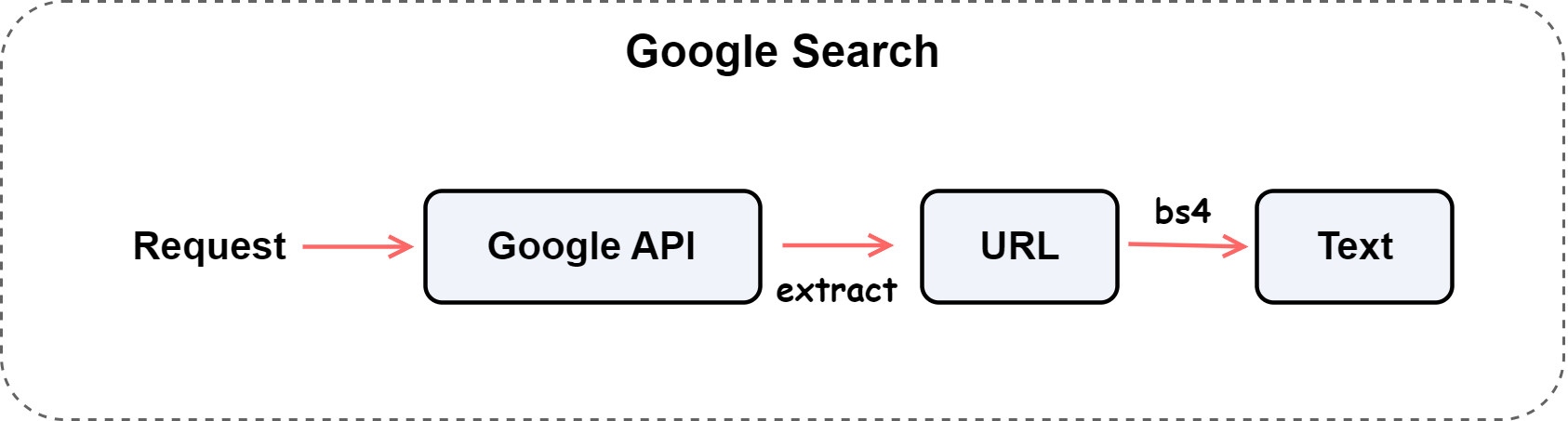
To achieve this, the system adopts a three-level architecture of “Search → Parse → Crawl,” realizing automatic conversion from query keywords to structured textual data.
The overall process is shown below:
Environment Setup
Install Dependencies
Before starting, install the required libraries:
Prepare API Key
The GoogleSearch tool depends on the Google Custom Search API. You can obtain your API Key and Search Engine ID from Google Developers.
Set them as follows:
Import Dependencies
import requests
import pandas as pd
from bs4 import BeautifulSoup
from lazyllm.tools.tools import GoogleSearch
Code Implementation
Extracting Search Results
Define the extract_search_results function to extract titles and links from the API response.
def extract_search_results(response_dict):
    items = response_dict.get('items', [])
    results = [
        {'title': item.get('title', ''), 'url': item.get('link', '')}
        for item in items
    ]
    return pd.DataFrame(results)
The output is a pandas.DataFrame containing two columns:
title: Webpage titleurl: Webpage link
Fetching Webpage Content
Use requests and BeautifulSoup to fetch and clean webpage text.
def fetch_web_content(url: str) -> str:
    try:
        headers = {'User-Agent': 'Mozilla/******'}
        response = requests.get(url, headers=headers, timeout=10)
        response.raise_for_status()

        soup = BeautifulSoup(response.text, 'html.parser')

        # Remove scripts and styles
        for tag in soup(['script', 'style', 'noscript']):
            tag.decompose()

        # Extract main text
        text = soup.get_text(separator='\n', strip=True)
        lines = [line for line in text.splitlines() if line.strip()]
        content = '\n'.join(lines)

        return content

    except Exception as e:
        return f'[ERROR] {e}'
Implementation Details:
- Use
requests.get()to fetch the webpage; - Parse HTML with
BeautifulSoup; - Remove
<script>,<style>, and other irrelevant tags; - Clean up blank lines and return the main text.
This function retrieves the main text content of a given URL.
It fetches the webpage source code, parses it with BeautifulSoup, removes non-text elements, and returns well-formatted plain text.
If any exception occurs, it returns an error message.
Main Program Logic
Assemble the full process:
if __name__ == '__main__':
    search = GoogleSearch(custom_search_api_key=api_key, search_engine_id=engine_id)
    result = search('Yuanmingyuan')

    df = extract_search_results(result)
    df['content'] = df['url'].apply(fetch_web_content)
    print(df.head())
First, the built-in GoogleSearch tool calls the API to search for the keyword “Yuanmingyuan.”
Then, extract_search_results extracts result links, and fetch_web_content retrieves and parses webpage text content.
Full Code
The complete code is shown below:
Click to expand full code
import pandas as pd
import requests
from bs4 import BeautifulSoup
from lazyllm.tools.tools import GoogleSearch

api_key = 'AI******'
engine_id = 'a3******'

def extract_search_results(response_dict):
    items = response_dict.get('items', [])
    results = [
        {'title': item.get('title', ''), 'url': item.get('link', '')}
        for item in items
    ]
    return pd.DataFrame(results)

def fetch_web_content(url: str) -> str:
    '''
    Fetch webpage content and extract main text body from a given URL.

    Args:
        url (str): The target webpage URL.

    Returns:
        str: Extracted text content (first 5000 characters) or an error message.
    '''
    try:
        headers = {
            'User-Agent': 'Mozilla/******'
        }
        response = requests.get(url, headers=headers, timeout=10)
        response.raise_for_status()

        soup = BeautifulSoup(response.text, 'html.parser')

        # Remove unnecessary elements
        for tag in soup(['script', 'style', 'noscript']):
            tag.decompose()

        # Extract main text
        text = soup.get_text(separator='\n', strip=True)
        lines = [line for line in text.splitlines() if line.strip()]
        content = '\n'.join(lines)

        return content

    except Exception as e:
        return f'[ERROR] {e}'

if __name__ == '__main__':
    search = GoogleSearch(custom_search_api_key=api_key, search_engine_id=engine_id)
    result = search('Yuanmingyuan')

    df = extract_search_results(result)
    df['content'] = df['url'].apply(fetch_web_content)
    print(df.head())
Execution Result
After running the script, the terminal displays the first five search results:

Summary
In this section, we built a complete “keyword → search → content extraction” web information collection system.
The key ideas include:
- Using LazyLLM’s
GoogleSearchfor automated searching; - Using
BeautifulSoupto clean webpage text; - Using
pandasto organize structured results.
This workflow demonstrates LazyLLM’s practicality and scalability in information retrieval and web content extraction tasks. Future enhancements could include multi-source search, webpage summarization, or knowledge base construction.