LazyLLM Registration Mechanism
1. Design Background: Why LazyLLM Needs a Registration Mechanism
LazyLLM's positioning requires it to be a highly extensible framework. As the system evolves, multiple categories of extensible components have gradually formed inside the framework, for example:
- Flow and Node for orchestration
- Various composable Tools
- Models and services from different sources and capabilities (e.g., Online Modules)
- Launcher components for startup and runtime
These components share several notable characteristics by design:
First, there are many components and the count keeps growing. LazyLLM is not a closed system; both the framework itself and third-party developers continuously introduce new implementations. If every new component required changes to a centralized registry, the maintenance cost would grow rapidly.
Second, a unified, stable access entry is required. From the user's perspective, components should be accessed as lazyllm.xxx.yyy, without relying on specific module paths or file structure. This access pattern must remain stable even after implementation changes or refactors.
Third, the extension threshold must be low. Ideally, developers only need to "add a class" to integrate new capabilities into LazyLLM, without understanding or modifying complex registration procedures.
Against this background, LazyLLM introduced and systematized the inheritance-as-registration mechanism to unify "component discovery, capability grouping, and access entry generation."
2. Design Approach: Principles of the LazyLLM Registration Mechanism
The LazyLLM registration mechanism unifies management of extensible components across the framework and generates stable, predictable access entries. It runs through multiple subsystems of LazyLLM and serves as a foundational architectural design.
Registration logic executes automatically at component definition time. By parsing class inheritance relationships and naming conventions, the system organizes components into a hierarchical capability structure and exposes them through a unified calling interface.
2.1 Core Design Principles
The design philosophy of the LazyLLM registration mechanism can be summarized in one sentence:
Make "writing a class / function" itself complete registration.
Around this goal, LazyLLM follows several explicit design principles.
-
Inheritance determines which group path an implementation class should be registered under, not just for sharing implementation logic
In LazyLLM, inheriting a Base class does not merely "reuse parent logic"; it explicitly declares which capability system the class belongs to.
-
Avoid explicit, centralized registration calls
The framework deliberately avoids explicit APIs like registry.register(...). Registration should happen at class definition time, not be manually triggered by developers.
-
Support hierarchical capability organization
The registration mechanism natively supports multi-level capability structures like group.subgroup.xxx, rather than flattening all implementations into a single level.
-
Expose a unified, callable entry to end users
The final result of registration is not a "class list" or "mapping table," but a call experience like:
Under these principles, the registration mechanism is not a single utility class, but a structured system.
2.2 Three-Layer Architecture Overview
From the perspective of implementation and responsibility separation, the LazyLLM registration system has three layers:
-
LazyDict: the presentation layer of registration results
Solves "how users access and call after registration."
-
LazyLLMRegisterMetaClass: the core control layer of registration logic
Decides "whether a class is registered at definition time, where it is registered, and how it is exposed."
-
Register decorator: the adaptation layer from functions to classes
Unifies "function-form capabilities" into the class-based registration system.
Each layer has clear responsibilities, but only through collaboration do they form the final effect seen in LazyLLM.
2.3 LazyDict: How Registration Results Are Used
LazyDict is the user-facing access layer of the registration mechanism. All groups and implementations generated through the registration mechanism are ultimately exposed as LazyDict instances.
From the usage perspective, LazyDict is a registration container that supports multiple access semantics. Its design goal is: Provide unified, tolerant, and readable access without exposing internal registry structure.
2.3.1 Dot Access via Attributes
LazyDict supports attribute access as a replacement for dict indexing:
Equivalent to:
This behavior keeps access consistent and makes registration results feel more like module attributes.
2.3.2 Case-Insensitive Key Matching
When accessing registration results, LazyDict is case-insensitive and supports automatic matching of common naming variants.
For example, the following accesses are semantically equivalent:
This mechanism reduces reliance on exact key spelling and improves interaction and debugging experience. The normalized key used at registration time remains the internal unique identifier and is unaffected by access form.
2.3.3 Class Name and Suffix Omission Rules
For implementation classes ending with capability suffixes (such as OpenAIEmbed), LazyDict allows omitting the capability suffix and using only the class name prefix.
For example:
Can be abbreviated as:
This rule applies only at the access layer and does not affect registration keys or class definitions.
2.3.4 Dynamic Default Key (default)
LazyDict supports setting a dynamic default key for the current group to specify which implementation should be selected when the key is omitted.
Example:
After setting the default key, LazyDict will prioritize that entry in scenarios that require a default implementation (e.g., lazyllm.<group>(...)). The default key only affects resolution during access and invocation; it does not change actual registration entries.
2.3.5 Functional Calls and Default Implementations
When a group contains only one implementation or a default implementation is explicitly set, LazyDict allows direct functional calls on the group:
Equivalent to calling the default implementation under that group:
Default implementation is maintained at runtime by the group registration container and is decoupled from specific implementation classes.
2.3.6 LazyDict Responsibility Boundaries
It is important to clarify that LazyDict does not participate in registration decisions and does not determine implementation ownership. Its responsibilities are limited to:
- Serving as the registration container for a Base class
- Mapping between registration results and access behavior
Internally, LazyDict can be abstracted as:
It is then directly bound to lazyllm.<group> as the unified access entry for that group.
2.4 LazyLLMRegisterMetaClass: The Core Mechanism for Class Registration
LazyLLM's class registration behavior is controlled by a unified metaclass mechanism. All classes participating in registration are processed by this metaclass at definition time, which determines whether they enter the registry, which capability group they belong to, and whether to expose an access entry.
This design binds registration behavior to the class lifecycle, rather than relying on explicit registration calls. Developers only need to express semantics via inheritance relationships and naming conventions; the framework completes the registration process automatically.
Within the overall architecture, LazyLLMRegisterMetaClass is responsible for:
- Parsing a class's inheritance structure to determine its group path and access entry
- Organizing registrable implementation classes into corresponding capability groups
- Producing necessary registration metadata for unified access entries
Rules for registration decisions, grouping logic, and boundary behaviors are explained in the next chapter.
2.5 Register Decorator: Unified Entry for Function Registration
LazyLLM's registration system is built around "classes," but in practice some capabilities are better expressed as functions. To unify these two development styles, LazyLLM provides the Register decorator, which integrates function-form capabilities into the same registration mechanism.
The Register decorator:
- Constructs an equivalent, registrable class representation for a function
- Enables function capabilities to reuse metaclass-based registration flow
- Ensures consistency between functions and classes in registration results and access methods
Through this adaptation layer, LazyLLM realizes a registration model where classes and functions enter in parallel and are managed uniformly. The specific behavior and rules for function registration are explained in later chapters with examples.
3. Detailed Analysis of the LazyLLM Registration Mechanism
This chapter describes key rules and behaviors in the LazyLLM registration mechanism, focusing on capability grouping definitions, registration decision conditions, registration key generation rules, and access/value conventions for registration results. These rules apply to all component types in LazyLLM and serve as the framework-level constraints on registration behavior.
The following sections expand on these rules.
3.1 Rules for Defining Capability Groups
LazyLLM defines capability groups through Base classes. A capability group is the foundational structure in the registration mechanism, used to organize all implementations under the same capability.
A group Base class must satisfy the following naming convention:
Example:
# Define group: embed
# Naming form: LazyLLM + Embed + Base
class LazyLLMEmbedBase(metaclass=LazyLLMRegisterMetaClass):
    pass

# After importing/loading this module, the framework produces the corresponding entry (illustrative):
# lazyllm.embed  -> LazyDict(...)
When the registration system detects a class name that matches the pattern above, it treats it as a group definition class and performs the following:
-
Create a registration container (LazyDict) for the group
For example, definingLazyLLMEmbedBasecreates aLazyDictinstance to store Embed implementations. -
Bind the registration container to the
lazyllm.<group>namespace
For example, theLazyDictabove is directly bound aslazyllm.embed, serving as the unified access entry for that group. -
Record the group's path information in the registration system (supports hierarchical structures)
For example, in multi-level structures it can form group paths likelazyllm.tool.search. -
Write the group's registration container into the global registry
All implementation classes inheriting fromLazyLLMEmbedBasewill be registered into thisLazyDict.
In this way, LazyLLM binds "capability group" definition to class structure rather than explicit configuration. Group creation order follows module load order, and once created, a group can be reused by subsequent implementation classes.
3.2 Registration Decision and the disable Mechanism
Not all classes participating in the inheritance structure should be registered as externally accessible implementations. LazyLLM performs registration decisions at class definition time to distinguish:
- Structural classes: used to organize inheritance or reuse shared logic
- Implementation classes: should be registered into a group and exposed for access
For classes that should explicitly skip registration, LazyLLM provides the disable mechanism.
Example:
# Intermediate base class used only to reuse HTTP request logic
class _EmbedHTTPMixin(metaclass=LazyLLMRegisterMetaClass):
    __lazyllm_registry_disable__ = True

    def _request(self, payload: dict):
        ...
When the registration system detects a disable marker in a class, it performs the following:
-
Skip the registration process for the class
For example,_EmbedHTTPMixinwill not appear in lazyllm.embed. -
Do not write the class into the group's registration container
It will not exist as alazyllm.<group>.<key>accessible object. -
Do not affect inheritance or reuse
Concrete Embed implementations can still inherit the mixin as an internal detail.
The disable mechanism clearly separates the "internal structural layer" from the "external API layer," preventing intermediate abstract classes from polluting the group namespace.
3.3 Registration Key Generation and Control
Once a class is determined to be a registrable implementation, the registration system generates a group-level registration key to form the final access path:
Key generation follows these rules:
-
By default, derive and normalize from the class name
For example, derive openai from OpenAIEmbed. -
Registration keys must be unique within the same group
Different implementation classes cannot map to the same key. -
Allow explicit registration keys via class attributes
For external renaming or backward compatibility.
Example:
class OpenAIEmbed(LazyLLMEmbedBase):
    __lazyllm_registry_key__ = "openai"

    def __init__(self, api_key: str, model: str):
        ...
In this example:
-
openai is the external access key
The access path islazyllm.embed.openai. -
Class name and access key are decoupled
The class remains named OpenAIEmbed, while the external API uses openai. -
Inheritance and internal logic are unaffected
The registration key is only for the access layer and does not participate in capability or inheritance decisions.
By separating "class name" and "access key," LazyLLM supports adjusting implementation structure or naming without breaking user code.
3.4 Access and Retrieval Rules for Registration Results
After registration, each group and its implementations are exposed through a unified namespace.
The registration container for a group is lazyllm.<group>, whose type is LazyDict.
Access and retrieval follow these conventions:
-
Group names and registration keys are case-insensitive
For example,lazyllm.embed.openaiandlazyllm.Embed.OpenAIare semantically equivalent. -
The implementation class name can be used as an access alias
For example,OpenAIEmbedcan be accessed by class name. -
When a default or unique implementation exists, the group can be called directly
Omit the key and calllazyllm.<group>(...).
Example:
import lazyllm

# Access by registration key
embed1 = lazyllm.embed.openai(...)
# Access by class name alias
embed2 = lazyllm.embed.OpenAIEmbed(...)
# Direct group call (when a default or single implementation exists)
embed3 = lazyllm.embed(...)
The three access forms above may point to the same implementation; the exact retrieval behavior is unified by LazyDict.
Users do not need to understand the registry's internal storage structure and can simply follow the unified access conventions.
3.5 Hierarchical Grouping and Path Resolution
In the current implementation, LazyLLM includes multi-level capability groups to organize different types of components and capabilities. These groups are automatically established at load time via Base class inheritance and are mounted to corresponding paths as LazyDict instances.
Typical group structures include:
-
lazyllm.online
Online model and service group, used to organize Online capabilities. The group and its subgroup structure will be explained in later sections with the Online module. -
lazyllm.toolTool capability group, used to organize tool components that can be called by models or flows. -
lazyllm.flowFlow and orchestration group, used to organize flow nodes and control structures. -
lazyllm.launcherStartup and runtime group, used to organize runtime entrypoints and execution control components.
These groups together form LazyLLM's current main capability hierarchy. As modules are introduced and extended, groups and subgroups will gradually expand while keeping unified registration rules.
Under this structure:
- Each group level corresponds to a registration container (
LazyDict) - Group paths are exposed via dot notation
- Access resolution proceeds through outer groups to inner groups, finally locating the implementation
For example, the access path:
Corresponds to the structure:
- online: top-level group
- chat: subgroup under online
- glm: implementation key under chat
Hierarchical grouping expresses capability semantics, enabling clear capability organization while maintaining a unified access pattern.
4. Application of the Registration Mechanism in Online Modules
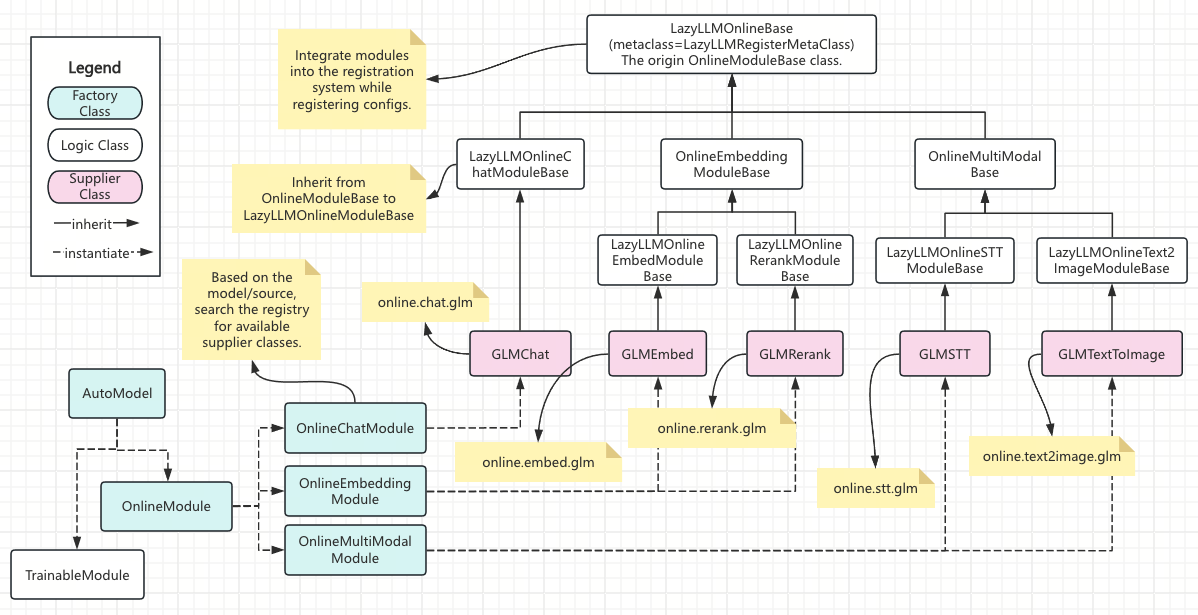
Online Modules are a subsystem in LazyLLM where the registration mechanism is fully applied and clearly layered. Their design goal is not to provide a single capability wrapper, but to build an online service system that is grouped by capability, extensible by supplier, and uniformly schedulable.
From the overall structure, Online Modules consist of three layers, which are shown top to bottom in the figure and connected by inheritance and the registration mechanism.
4.1 Overall Structure of Online Modules
4.1.1 Registration Entry Layer: LazyLLMOnlineBase
At the top of the figure is LazyLLMOnlineBase.
This class is the unified entry Base for all Online modules and connects to LazyLLM's registration system via LazyLLMRegisterMetaClass.
This layer is responsible for:
- Bringing Online modules into LazyLLM's registration system as a whole
- Defining the top-level group
lazyllm.online - Completing Online-related configuration registration and integration at module load time
In other words: As long as a class ultimately inherits from LazyLLMOnlineBase, it has the prerequisite to be recognized as part of Online modules by LazyLLM.
4.1.2 Capability Layer: Online Bases by Capability Type
Below LazyLLMOnlineBase, Online modules are first divided by capability type, corresponding to the second and third layers of Base classes in the figure, for example:
LazyLLMOnlineChatModuleBaseOnlineEmbeddingModuleBaseLazyLLMOnlineRerankModuleBaseLazyLLMOnlineSTTModuleBase
These Base classes:
- Define specific capability groups (such as
online.chat,online.embed,online.stt, etc.) - Constrain the interfaces and behaviors that implementations under the capability should satisfy
- Provide stable inheritance anchors for subsequent supplier implementations
At the registration level, this layer directly corresponds to capability group (group) formation.
4.1.3 Supplier Implementation Layer: Concrete Online Service Implementations
Below the capability Base classes are concrete supplier implementation classes, such as:
GLMChatGLMEmbedGLMRerankGLMSTTGLMTextToImage
This layer has the following characteristics:
- Each class corresponds to a real, usable online service implementation
- Class names serve both as "implementation identifiers" and as the source of registration keys
- By inheriting the capability Base, they are automatically registered into the corresponding capability group
For example:
GLMChat->lazyllm.online.chat.glmGLMEmbed->lazyllm.online.embed.glmGLMSTT->lazyllm.online.stt.glm
These mappings are fully automatic and independent of the implementation class's file path.
4.2 Usage and Access Patterns for Online Modules
After the registration mechanism completes capability grouping and implementation attachment for Online modules, all Online capabilities are exposed through a unified namespace.
Users and higher-level scheduling logic do not directly depend on specific implementation classes; they instantiate and call via the access entry provided by lazyllm.online.
4.2.1 Direct Access by Capability and Supplier
The most direct way to use Online modules is to access the implementation via capability group + supplier key.
For example:
import lazyllm

chat = lazyllm.online.chat.glm(...)
embed = lazyllm.online.embed.glm(...)
stt = lazyllm.online.stt.glm(...)
In the examples above:
onlineis the top-level group for Online moduleschat / embed / sttare capability typesglmis a supplier implementation under that capability
These access paths are generated automatically by the registration mechanism and do not depend on module path or file structure.
4.2.2 Access via Class Name Alias
In addition to registration keys, Online modules support access by implementation class name as an alias. This is generated automatically at registration time to improve readability and debugging.
For example:
Class-name access is semantically equivalent to key-based access and points to the same implementation class. In practice, the key form is recommended as the stable interface, while the class-name form is more suitable for development and debugging.
4.2.3 Default Implementations and Direct Capability Calls
For some capability groups, if only one implementation exists or a default is explicitly set, Online modules allow omitting the supplier key and calling the capability group directly.
Example:
This call resolves to the default implementation under that capability group.
Whether this form is allowed and how the default implementation is chosen are managed uniformly by the group registration container (LazyDict).
4.3 Configuration and Extension Rules for Online Modules
Online modules automatically generate and manage a set of common configuration keys during registration to unify initialization and invocation across suppliers and capability types. This section explains how these configuration keys are organized and the customization rules to follow when extending Online capabilities or suppliers.
4.3.1 Organization of Common Configuration Keys
Online module configuration is divided into two categories by scope: supplier-level configuration and capability-level configuration. Both are declared automatically at class load time by the registration mechanism and are integrated into LazyLLM's configuration system.
-
Supplier-level configuration
Describes capability-agnostic information, most commonly authentication and access details, for example:These configurations are created when any Online implementation class for a supplier is first registered, and they are shared across all capabilities of that supplier.
-
Capability-level configuration
Describes capability-specific parameters, usually related to model names or behavior, for example:Capability-level configuration is generated only when the corresponding capability exists and does not affect other capabilities of the same supplier.
This layered approach prevents configuration interference across capabilities while keeping naming conventions consistent.
4.3.2 Conventions for Using Configuration in Implementation Classes
Online implementation classes generally do not need to declare configuration keys explicitly; instead they read required values at initialization according to convention. Recommended practice:
- Centralize configuration reads in init
- Clearly distinguish supplier-level and capability-level configuration usage
- Avoid configuration declaration logic coupled to the registration mechanism in implementation classes
Example (illustrative):
class MyProviderChat(OnlineChatModuleBase):
    def __init__(self, api_key: str = None, model: str = None, **kw):
        self.api_key = api_key or lazyllm.config.get("myprovider_api_key")
        self.model = model or lazyllm.config.get("myprovider_chat_model_name")
By following this convention, implementation classes can achieve consistent configuration behavior without caring about configuration sources.
4.3.3 How to Extend Online Capabilities
Online module extension takes the form of adding new capability implementation classes. Whether adding a supplier for a capability or extending multiple capabilities for the same supplier, the core principle is the same: determine registration paths through inheritance, and generate access entries via naming and registration mechanisms.
Extending a Single Capability
In the most common scenario, a supplier implements only one Online capability. In this case, simply inherit the Online Base class for that capability and implement the specific logic.
Example:
class MyProviderChat(OnlineChatModuleBase):
    def __init__(self, api_key: str, base_url: str = "..."):
        ...
After loading, the implementation class is automatically registered to the corresponding capability group and generates a stable access path, for example:
No explicit registration or additional configuration declaration is required.
Organizing Multi-Capability Suppliers
When the same supplier needs to support multiple Online capabilities, it is recommended to reuse shared logic through a supplier-private base class, rather than duplicating code in capability classes.
Recommended structure:
class _MyProviderBase:
    def __init__(self, api_key: str, base_url: str):
        self.api_key = api_key
        self.base_url = base_url

class MyProviderChat(OnlineChatModuleBase, _MyProviderBase):
    ...

class MyProviderSTT(LazyLLMOnlineSTTModuleBase, _MyProviderBase):
    ...
Under this organization:
- Each capability implementation registers to its corresponding group
- Shared logic is centralized in the supplier-private base class
- Access paths and configuration rules remain consistent across capabilities
Automatic Initialization of Inheritance and Configuration Keys
In Online modules, inheritance not only triggers implementation registration, but also automatically initializes related configuration keys. When an implementation class is registered, the framework generates and integrates configuration keys based on supplier and capability type, for example:
{supplier}_api_key{supplier}_model_name{supplier}_{capability}_model_name
Implementation classes typically only need to read these configuration keys during initialization, without explicit declaration or registration.