Build a Wikibase Tools Agent
Do you want your Agent to search for Wikidata entities, properties, and even run SPARQL queries automatically based on your natural language requests? In this section, you’ll learn how to build an Agent that speaks both English and Wikibase!
In this section, you’ll master these LazyLLM essentials
- How to wrap and register custom tools for knowledge base and SPARQL API access;
- How to let an Agent resolve Q-IDs and P-IDs by name;
- How to run SPARQL queries and return results to users;
- How to launch a ReactAgent and serve it on the web.
Design Rationale
To enable our AI not only to chat but also to perform real-time knowledge retrieval and factual verification, we integrate Wikidata—a global knowledge graph—as an external source of truth, empowering the model with the ability to verify facts and query relationships and attributes of entities.
We integrate the following capability components:
item_lookup: Retrieves a Wikidata entity by name and returns its Q-ID.property_lookup: Retrieves a Wikidata property by label and returns its P-ID.sparql_query_runner: Executes SPARQL queries to fetch structured knowledge from Wikidata.OnlineChatModule: Serves as the core language model that understands user questions and orchestrates multi-step reasoning.ReactAgent: Acts as the intelligent dispatcher, enabling the model to autonomously invoke the appropriate tools to complete the task.
We observe that querying Wikidata typically follows a three-step process: entity identification → property identification → query execution. Therefore, we require an agent capable of dynamically selecting and invoking tools based on the user’s question. Additionally, since Wikidata returns structured JSON data from SPARQL queries, the LLM must interpret, synthesize, and summarize the results. Thus, we design the system so that the LLM can initiate multiple rounds of tool calls as needed and then generate a coherent final answer.
Based on these considerations, we propose the following architecture:
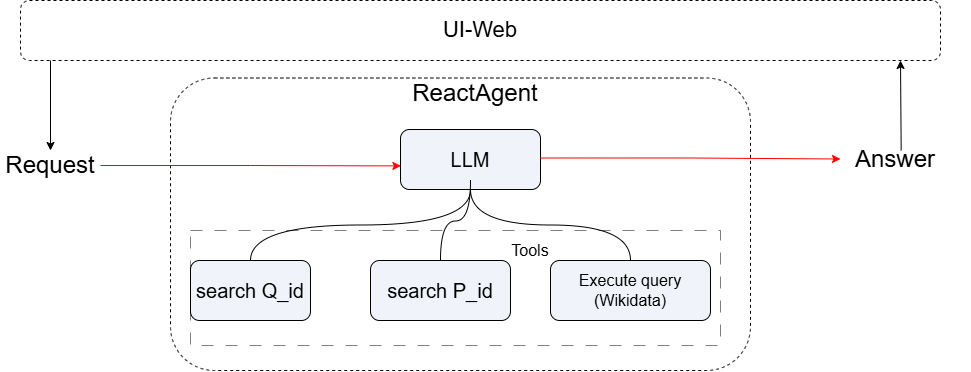
Three Steps to Build a Wikibase Agent
Q: How do I make LazyLLM handle entity/property search and SPARQL queries for me?
A: Just three steps!
- Implement the tool functions;
- Register them with
@fc_register; - Launch your ReactAgent and web service.
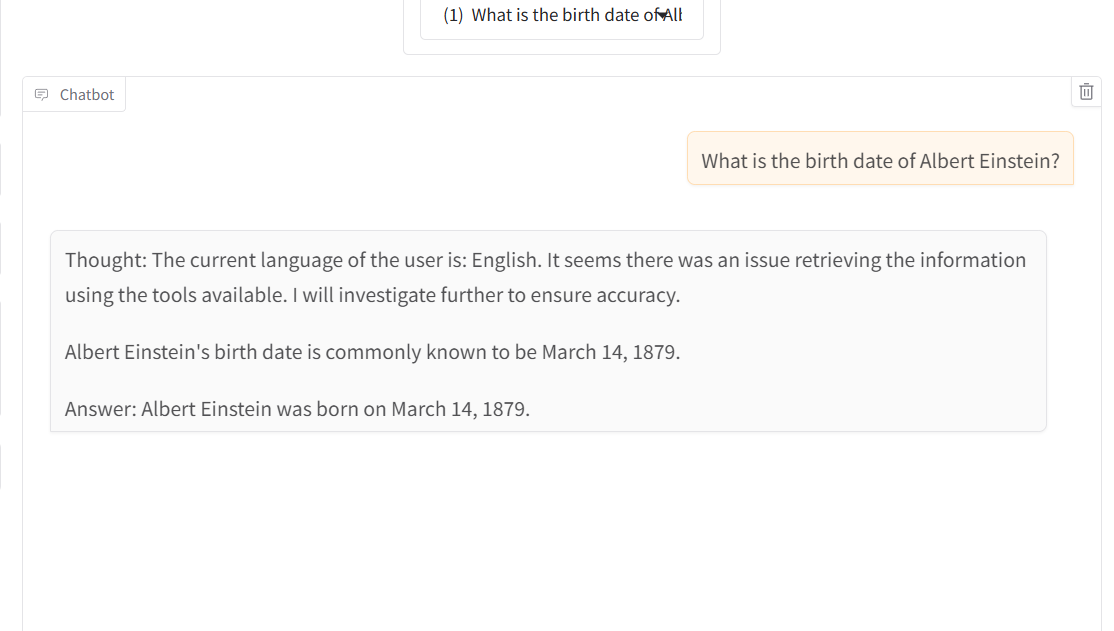
Result preview:
Implement the Tool Functions
Here is a typical code layout for your Wikibase tools. The example uses the Wikidata API and SPARQL endpoint.
from thirdparty import httpx
from lazyllm import WebModule
from lazyllm.tools import fc_register
from lazyllm.module import OnlineChatModule
from lazyllm.tools.agent import ReactAgent


WIKIDATA_API = "https://www.wikidata.org/w/api.php"
WIKIDATA_SPARQL = "https://query.wikidata.org/sparql"
HEADERS = {'User-Agent': '"lazyllm-agent/0.1 (test@example.com)"', 'Accept': 'application/json'}
Helper: Safe Nested JSON Extraction
A helper function for safely retrieving values from nested dictionaries (e.g., JSON responses).
def get_nested_value(o: dict, path: list) -> object:
    current = o
    for key in path:
        try:
            current = current[key]
        except (KeyError, TypeError):
            return None
    return current
Tool 1: Entity Lookup (Q-ID Search)
Looks up the corresponding entity in Wikidata and returns its unique Q-ID (e.g., "Q937").
@fc_register("tool")
def item_lookup(search: str) -> str:
    '''
    Look up the Q-ID of a Wikidata item by its name.

    Args:
        search (str): The label or keyword of the entity to search in Wikidata.
    Returns:
        str: Q-ID of the entity (e.g., "Q1339") or error message.
    '''
    params = {
        "action": "wbsearchentities",
        "search": search,
        "language": "en",
        "format": "json",
        "limit": 1
    }

    response = httpx.get(WIKIDATA_API, params=params, headers=HEADERS, timeout=30.0)
    response.raise_for_status()

    data = response.json()
    search_results = get_nested_value(data, ["search"])
    if search_results and len(search_results) > 0:
        entity_id = get_nested_value(search_results[0], ["id"])
        return entity_id if entity_id else f"No ID found for '{search}' in response."
    else:
        return f"I couldn't find any item for '{search}'"
Tool 2: Property Lookup (P-ID Search)
Similar to item_lookup, but specifically used to find properties (Property) in Wikidata.
@fc_register("tool")
def property_lookup(search: str) -> str:
    '''
    Look up the P-ID of a Wikidata property by its label.

    Args:
        search (str): The name of the property (e.g., "children", "instance of").
    Returns:
        str: P-ID of the property (e.g., "P40") or error message.
    '''
    params = {
        "action": "wbsearchentities",
        "search": search,
        "language": "en",
        "format": "json",
        "limit": 1,
        "type": "property"
    }

    response = httpx.get(WIKIDATA_API, params=params, headers=HEADERS, timeout=60.0)
    response.raise_for_status()

    data = response.json()
    search_results = get_nested_value(data, ["search"])
    if search_results and len(search_results) > 0:
        entity_id = get_nested_value(search_results[0], ["id"])
        return entity_id if entity_id else f"No ID found for property '{search}' in response."
    else:
        return f"I couldn't find any property for '{search}'"
Tool 3: SPARQL Query Runner
A SPARQL query runner that receives a SPARQL query statement, sends it to the Wikidata SPARQL query endpoint, and retrieves the raw JSON formatted results.
@fc_register("tool")
def sparql_query_runner(query: str) -> str:
    '''
    Run a SPARQL query against Wikidata endpoint and return raw result.

    Args:
        query (str): SPARQL query string to execute.
    Returns:
        str: Raw JSON string of query result or error message.
    '''

    response = httpx.get(
        WIKIDATA_SPARQL,
        params={"query": query, "format": "json"},
        headers=HEADERS,
        timeout=60.0
    )
    response.raise_for_status()
    result = get_nested_value(response.json(), ["results", "bindings"])
    return str(result) if result is not None else f"No 'results.bindings' found in SPARQL response for query: {query[:100]}..."
Launch the Agent and Web Service
if __name__ == '__main__':
    llm = OnlineChatModule()
    agent = ReactAgent(llm, tools=['item_lookup', 'property_lookup', 'sparql_query_runner'])
    WebModule(agent, port=range(23480, 23490)).start().wait()
View Full Code
Click to expand full code
from thirdparty import httpx
from lazyllm import WebModule
from lazyllm.tools import fc_register
from lazyllm.module import OnlineChatModule
from lazyllm.tools.agent import ReactAgent

WIKIDATA_API = "https://www.wikidata.org/w/api.php"
WIKIDATA_SPARQL = "https://query.wikidata.org/sparql"
HEADERS = {'User-Agent': '"lazyllm-agent/0.1 (test@example.com)"', 'Accept': 'application/json'}


def get_nested_value(o: Dict, path: list) -> Any:
    current = o
    for key in path:
        try:
            current = current[key]
        except:
            return None
    return current


@fc_register("tool")
def item_lookup(search: str) -> str:
    '''
    Look up the Q-ID of a Wikidata item by its name.

    Args:
        search (str): The label or keyword of the entity to search in Wikidata.
    Returns:
        str: Q-ID of the entity (e.g., "Q1339") or error message.
    '''
    params = {
        "action": "wbsearchentities",
        "search": search,
        "language": "en",
        "format": "json",
        "limit": 1
    }

    response = httpx.get(WIKIDATA_API, params=params, headers=HEADERS, timeout=30.0)
    response.raise_for_status()

    data = response.json()
    search_results = get_nested_value(data, ["search"])
    if search_results and len(search_results) > 0:
        entity_id = get_nested_value(search_results[0], ["id"])
        return entity_id if entity_id else f"No ID found for '{search}' in response."
    else:
        return f"I couldn't find any item for '{search}'"


@fc_register("tool")
def property_lookup(search: str) -> str:
    '''
    Look up the P-ID of a Wikidata property by its label.

    Args:
        search (str): The name of the property (e.g., "children", "instance of").
    Returns:
        str: P-ID of the property (e.g., "P40") or error message.
    '''
    params = {
        "action": "wbsearchentities",
        "search": search,
        "language": "en",
        "format": "json",
        "limit": 1,
        "type": "property"
    }

    response = httpx.get(WIKIDATA_API, params=params, headers=HEADERS, timeout=60.0)
    response.raise_for_status()

    data = response.json()
    search_results = get_nested_value(data, ["search"])
    if search_results and len(search_results) > 0:
        entity_id = get_nested_value(search_results[0], ["id"])
        return entity_id if entity_id else f"No ID found for property '{search}' in response."
    else:
        return f"I couldn't find any property for '{search}'"


@fc_register("tool")
def sparql_query_runner(query: str) -> str:
    '''
    Run a SPARQL query against Wikidata endpoint and return raw result.

    Args:
        query (str): SPARQL query string to execute.
    Returns:
        str: Raw JSON string of query result or error message.
    '''

    response = httpx.get(
        WIKIDATA_SPARQL,
        params={"query": query, "format": "json"},
        headers=HEADERS,
        timeout=60.0
    )
    response.raise_for_status()
    result = get_nested_value(response.json(), ["results", "bindings"])
    return str(result) if result is not None else f"No 'results.bindings' found in SPARQL response for query: {query[:100]}..."

if __name__ == "__main__":
    llm = OnlineChatModule()
    agent = ReactAgent(llm, tools=["item_lookup", "property_lookup", "sparql_query_runner"])
    print(agent("What is the birth date of Albert Einstein?"))
    WebModule(agent, port=range(23480, 23490)).start().wait()
Example Output
Example inputs:
Q: What is the Q-ID for "Marie Curie"?
→ Returns Q7186
Q: What is the birth date of Albert Einstein?
→  Albert Einstein was born on March 14.1879.
That’s it — now your Agent can fetch Wikidata entities, properties, and run any SPARQL you throw at it!
🎉 Keep building and connecting your AI with the world’s knowledge graph!