Chapter 19: Advanced RAG — Knowledge-Graph-Based RAG
Transition
Knowledge graphs, as the representative form of structured knowledge, are profoundly changing the way we access and use information. In this article we start from the fundamentals and first explain what a knowledge graph really is—how it organizes massive volumes of information in entity–relation–attribute form so machines can understand connections in the same way humans do.
Next we examine how knowledge graphs are applied in search engines, and how they helped Google move from simple keyword matching to semantic understanding so that search becomes smarter and more precise.
In today’s era of large language models, combining knowledge graphs with RAG (Retrieval-Augmented Generation) further unlocks the value of structured knowledge. We will take a close look at how knowledge graphs optimize the retrieval process in RAG—they deliver more precise context chunks and also strengthen semantic coherence through explicit entity relationships.
To make this integration easier to grasp, we will then introduce two open-source implementations of knowledge-graph-based RAG—GraphRAG and LightRAG—and break down their design ideas and key techniques.
Finally, we will use hands-on practice and two case studies to show how knowledge graphs noticeably improve the accuracy of RAG systems.
Background
RAG (Retrieval Augmented Generation) is one of the hottest topics in generative AI since large language models emerged. It combines retrieval and generation so that an external knowledge base can enhance the outputs of an LLM. The core idea is:
-
Retrieve first: locate information snippets related to the question from an external knowledge base such as a document store or database.
-
Generate afterward: feed the retrieved snippets as context into the large language model so it can produce more accurate and trustworthy answers.
A typical RAG system can be improved along two main directions: optimizing the retrieval stage and optimizing the generation stage. Knowledge-graph-based RAG focuses on improving retrieval.
In the traditional or so-called naive RAG workflow, content from a private knowledge base is chunked, vectorized, and indexed. When a user submits a query, the system searches the vector index, retrieves relevant text chunks, and passes them to the LLM as context for answer generation. The retrieved content is usually isolated text blocks without structural links. When a task requires reasoning across documents or paragraphs, the retrieved chunks often lack logical or semantic coherence, which leads to inaccurate or incomplete responses. Naive RAG also lacks structural awareness, making it hard to detect relationships between documents. Combined with noisy or missing retrieval results, critical information may be omitted or repeated. These limitations severely affect performance on complex question answering, logical reasoning, and multi-hop retrieval tasks.
To overcome the fragmented recall of naive RAG, knowledge-graph-based RAG (also known as knowledge-enabled RAG or knowledge-graph-guided RAG) introduces a structured semantic network—namely the knowledge graph—at the knowledge modeling layer. It explicitly models semantic associations through entity–relation–attribute triples so the system can clearly capture the semantic paths between pieces of knowledge. With structure-aware retrieval or path traversal on the graph, the system can recall information that is semantically relevant and logically coherent with the user’s query, which significantly improves accuracy and interpretability. Knowledge graphs also align entities across documents, reinforce thematic clustering, and support complex reasoning, making them ideal for multi-hop QA and high-level logical reasoning tasks.
Knowledge Graphs: A “Knowledge Network” That Helps Machines Understand the World
A graph is a data structure made up of nodes (or vertices) and the edges between them. It can represent a wide variety of relationships. For example, Figure 1 can be read as a subway map in which each vertex is a station and each edge indicates connectivity between stations. It can also represent the friend relationships in a social network application, where each node is a user and every edge indicates that two users are friends.
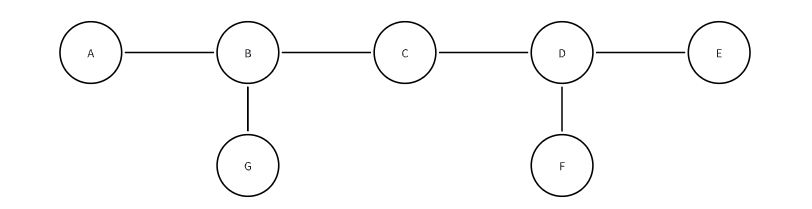
Figure 1. Graph structure
A knowledge graph (KG) represents knowledge in a graph structure. It consists of entities (nodes) and relations (edges) and converts information into a structured form so that machines can understand, reason over, and query it.
A knowledge graph is usually composed of triples. Each triple contains one entity, a relation, and another entity associated with it. The structure is (Entity 1) —[Relation]→ (Entity 2). For example, “Archimedes” is an entity, “discovered” is a relation, and “the principle of buoyancy” is another entity. Using this form, a knowledge graph represents knowledge as a network, which makes storage, querying, and reasoning easier.
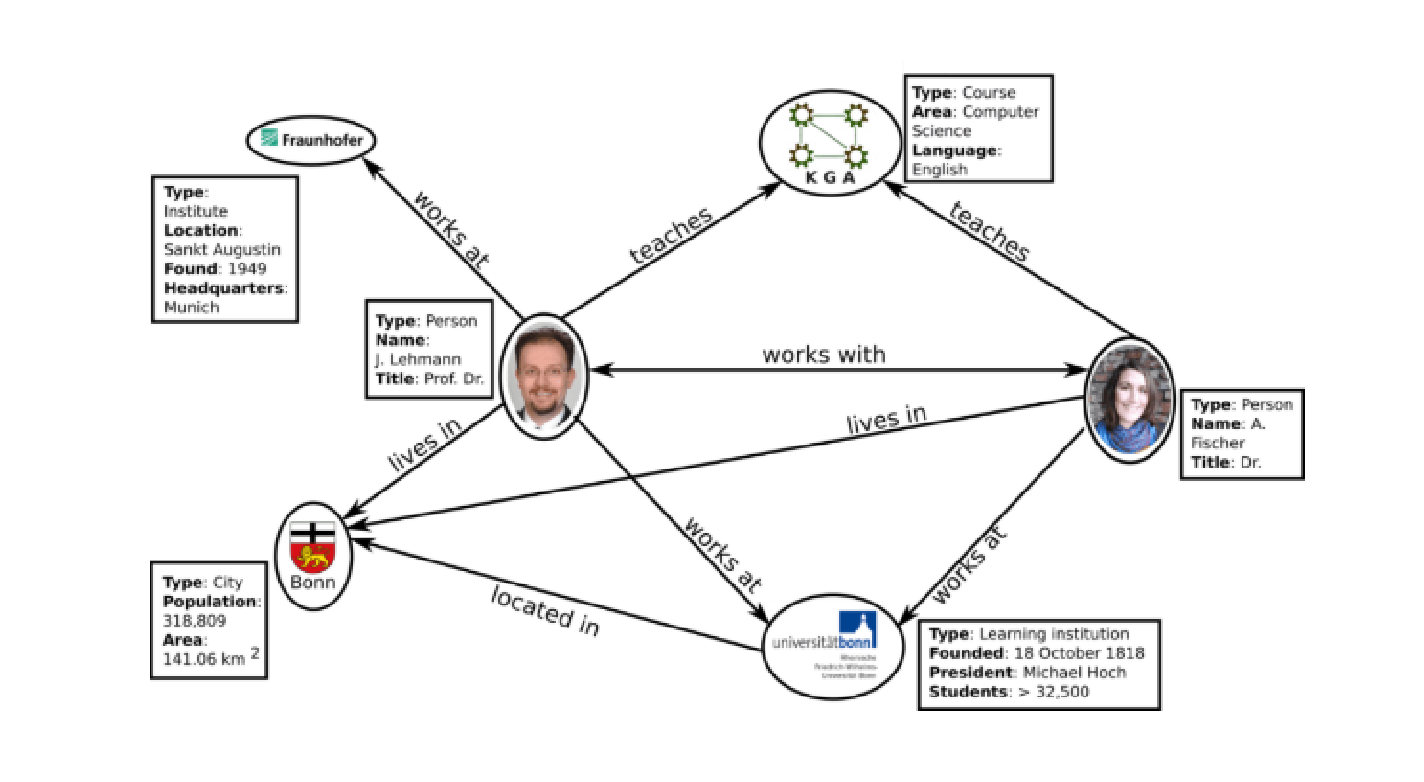
Figure 2. Example knowledge graph (source: web)
A knowledge graph consists of three key parts—entities, relationships, and attributes:
- Entity: The basic unit of a knowledge graph that represents real-world items, concepts, or events. In Figure 2 each person, city, or course is an entity.
- Relationship: The way entities are connected, typically represented by edges. In Figure 2 the relationship between the man and Bonn is “lives in,” meaning he lives in Bonn City.
- Attribute: Additional information attached to entities or relationships. For example, Bonn City in Figure 2 has the attributes “Type,” “Population,” and “Area.”
A knowledge graph organizes scattered information into a structured graph that clearly shows how entities relate to each other. In healthcare, for instance, a knowledge graph can connect diseases, symptoms, and treatment plans. Each edge links different entities, which allows complex, multi-level, multi-hop reasoning. Unlike traditional table-based databases, a knowledge graph naturally represents complex associations. It not only stores the links between entities but can also label the type and direction of each relation so computers can distinguish among them. Because a knowledge graph can be continuously expanded, adding more data and knowledge enables the graph to grow and represent richer information, making it suitable for modeling massive knowledge bases.
Building a Knowledge Graph from Documents
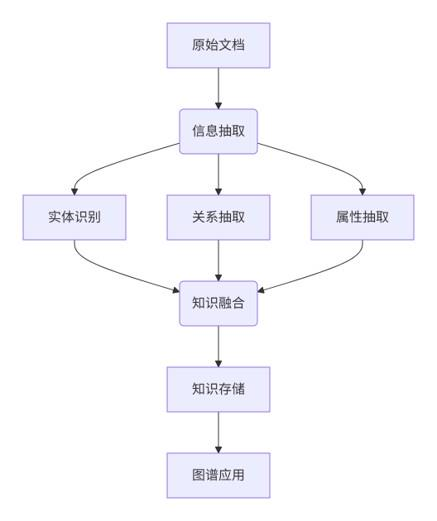
Constructing a knowledge graph from documents usually involves several steps. First, document parsing converts unstructured formats such as PDF, Word, or webpages into clean text. Then information extraction identifies entities, relations, and attributes in the text to produce initial structured triples. Next, knowledge fusion merges duplicate entities and resolves ambiguities or conflicts. The processed triples are stored in a graph database for efficient querying and analysis. Finally, the knowledge graph can power practical applications such as visualization, intelligent question answering, and enterprise decision support.
From Search to Q&A: How Knowledge Graphs Upgrade Search Engines
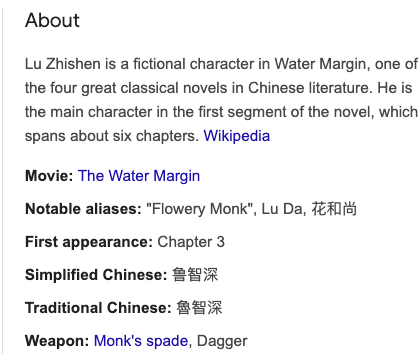
Google first introduced knowledge graphs to search engines in 2012 in the article Introducing the Knowledge Graph: things, not strings. The post highlighted three main improvements to search:
1.Find the right thing
Understanding the entities behind strings.
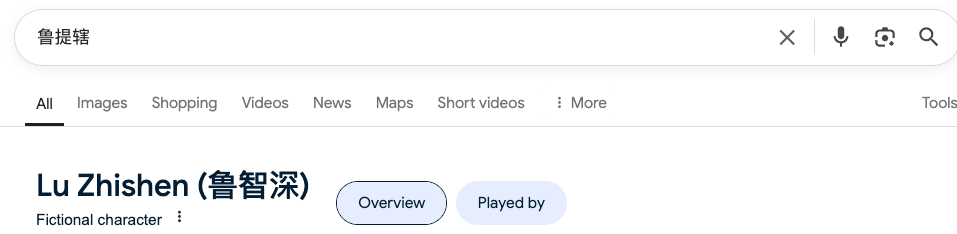
2.Get the best summary
Summarizing related content around a topic rather than simply returning the original passages where keywords appear.
3.Go deeper and broader
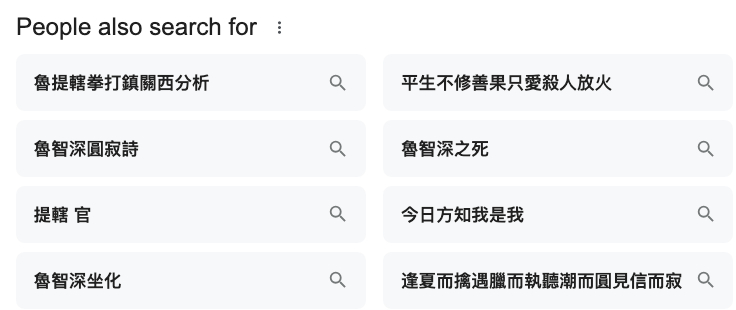
Expanding recall in both depth and breadth, for example by recommending related questions.
Knowledge Graphs as the “Intelligent Add-on” for RAG
How RAG Systems Build Knowledge Graphs
A knowledge-graph-based RAG system must first construct the graph from existing structured data (databases, RDF stores, Neo4j, etc.) and unstructured data (text).
Structured data already contains explicit entities and relations, while unstructured data such as text requires extracting key entities (people, places, dates, and so on) and their relationships (e.g., “founded,” “located in”).
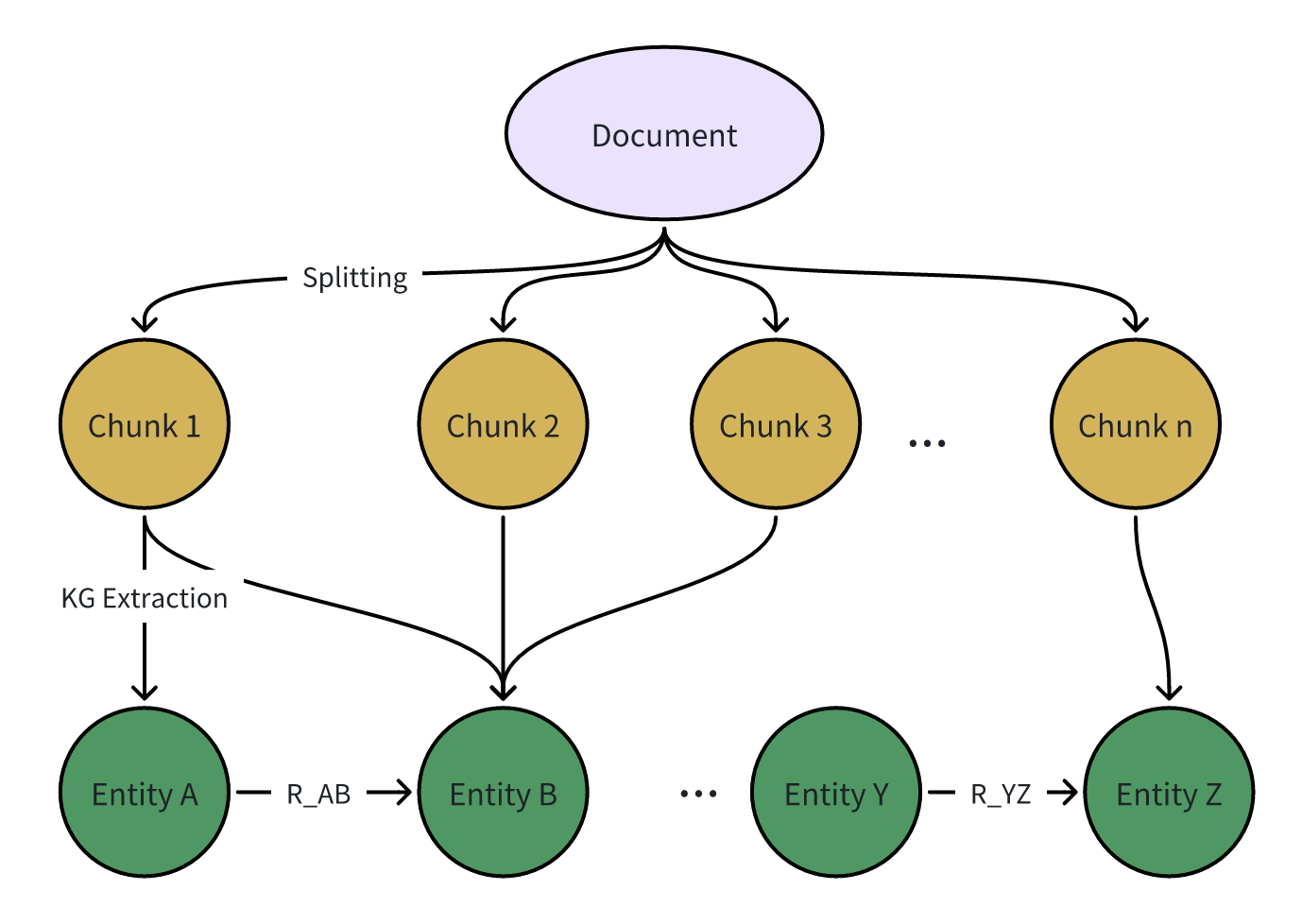
When building a knowledge graph from unstructured text, you can use NLP techniques such as named-entity recognition (NER) and relation extraction, or rely on an LLM to extract the information directly. Most modern pipelines ask an LLM to extract entities and relations from documents and then construct the graph, as shown below:
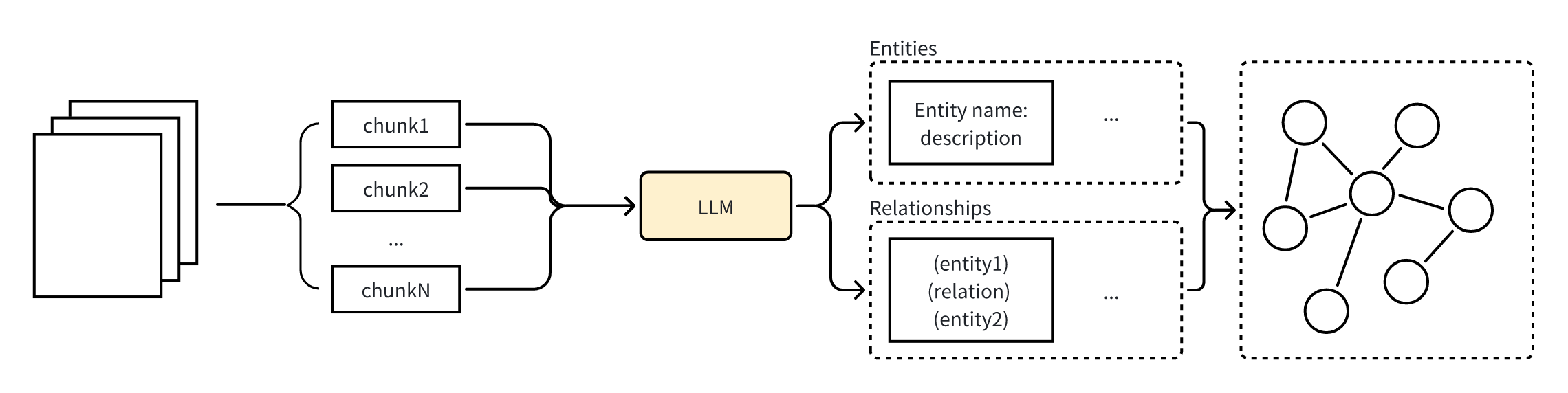
Figure 4. Workflow for constructing a knowledge graph with a large model
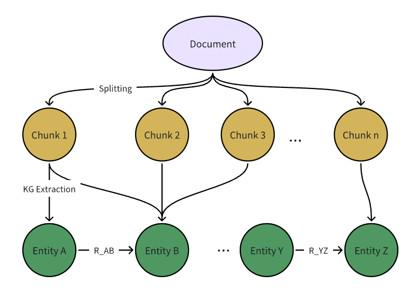
The pipeline begins by chunking the text, which is identical to the chunking step in a basic RAG system. Chunk granularity must strike a balance between recall and precision. Microsoft’s GraphRAG work points out that longer chunks reduce recall and hurt the quality of the graph index. Although large chunks reduce the number of LLM calls, the limited context window increases the risk of missing information, which ultimately lowers recall.
After chunking, you prompt the LLM to extract graph elements (nodes, edges, covariates) from each chunk. This can be done in two prompts: (1) identify all entities in the text, including their names, types, and descriptions; (2) identify the relationships between related entities, including the source, target, and relation description. In practice you can customize prompts for the target domain—for science, medicine, law, and so on—with domain-specific examples to improve extraction quality.
Finally, merge the entities and relations that appear in different documents or chunks so duplicated knowledge is unified.
Example: Building a Knowledge Graph from a Text Snippet
Original text:
Lanterns blazed while incense curled upward. Song Jiang stood at the center to swear his oath, mourning beneath Yongjin Gate while Dai Zong remained at his side. A monk first rang his bell and chanted, summoning Zhang Shun's soul and inviting it to descend upon the spirit banner; afterward Dai Zong read the funeral oration aloud. Song Jiang poured the wine libation with his own hands, lifted his face toward the eastern capital, and cried bitterly. In mid-wail, shouts erupted beneath the bridge and drums thundered from both the southern and northern hills as two detachments charged in to seize Song Jiang. Truly: "Kindness repaid can turn West Lake into a battlefield for loyal retainers." Truly: "Strike down several southern generals and churn West Lake into waves a myriad fathoms high." How Song Jiang and Dai Zong met the enemy must wait for the next chapter. In this encounter three officers fell—Hao Siwen, Xu Ning, and Zhang Shun—while the court sent back one man to their ranks: An Daoquan.

Chapter 155 — Zhejiang's Qiantang West Lake is indeed a place of natural splendor, with luminous mountains and crystal-clear water. It is worthy of an imperial capital, famed for its prosperity since ancient times. Just as Song Jiang and Dai Zong were burning paper offerings for Zhang Shun on Xiling Bridge, Fang Tianding learned of it and dispatched ten lieutenants in two columns to capture Song Jiang. The southern ridge was manned by Wu Zhi, Zhao Yi, Chao Zhong, Yuan Xing, and Su Jing; the northern ridge by Wen Kerang, Cui Yu, Lian Ming, Mao Di, and Tang Fengshi. Each route fielded five officers with three thousand troops. Near midnight both gates opened and the soldiers poured out from north and south. Song Jiang and Dai Zong had only begun their libations when a roar burst forth beneath the bridge. Fan Rui and Ma Lin hid with five thousand men on the left, Shi Xiu with another five thousand on the right. Seeing flames ahead, every ambush raised its own signal fires. The troops split and struck the enemy forces on both hills. Realizing they had been anticipated, the southern troops hurried back but were chased on both flanks. When Wen Kerang withdrew with four generals to recross the river, he collided with Ruan Xiao'er, Ruan Xiaowu, and Meng Kang leading five thousand men down from Mount Baoshuta; they severed the retreat, captured Mao Di alive, and speared Tang Fengshi to death. Wu Zhi on the southern ridge likewise turned back, only to slam into Li Kui, Bao Xu, Xiang Chong, and Li Gun at Dingxiang Bridge with five hundred infantry. The two shield bearers charged headlong, whirling their rattan shields while their flying knives flashed, cutting down Yuan Xing on the spot. Bao Xu hacked apart Su Jing, Li Kui split Zhao Yi with his axe, and the victors returned to the command tent. "By arranging my stratagem this way," Song Jiang told the strategist, "we already have the heads of four of their officers and Mao Di alive. We will deliver him to Commander Zhang for execution." Yet he still had no news from Dongsong Pass or Deqing, so he sent Dai Zong to scout and urge a report. Several days later Dai Zong returned, bowed to the vanguard, and said, "Lu the Vanguard has already crossed Dongsong Pass and will arrive soon." Song Jiang, half anxious and half relieved, asked, "How did the army fare?" Dai Zong replied, "I know every detail of the fighting and I have the official dispatch. Marshal, please set your mind at ease." "Surely I have not lost more brothers?" Song Jiang pressed. "Speak honestly." Dai Zong answered, "When Lu the Vanguard marched to seize Dongsong Pass, mountains towered on both sides with only a single road between them and the fort atop the ridge. A lofty tree beside the pass, dozens of spans tall, could observe every approach, and the slopes were thick with pines. Three rebel generals guarded the gate: Wu Sheng in command, with Jiang Yin second and Wei Heng third. At first Lin Chong fought them daily at the foot of the pass and wounded Jiang Yin with his serpent spear. Wu Sheng dared not descend and stayed on the walls. Later Li Tianrun led four officers—Li Tianyou, Zhang Jian, Zhang Tao, and Yao Yi—to reinforce the pass. The next day the battle flared again. Among the rebels Li Tianyou rode out first to duel Lu Fang; after fifty or sixty bouts Lu Fang killed him with a single thrust. The enemy retreated behind the gate and refused to come down. Lu the Vanguard waited several days below the pass. Seeing how treacherous the mountains were, he sent Ou Peng, Deng Fei, Li Zhong, and Zhou Tong up to scout. He never expected Li Tianrun to charge down seeking revenge for his brother, leading the rebels in a sudden assault. His very first stroke beheaded Zhou Tong, and Li Zhong fled wounded. Had reinforcements arrived any later, all would have been lost—but the remaining three officers were rescued in time."
This passage describes the battle of Dongsong Pass during the Fang La campaign. It has two challenges:
- Entity ambiguity: “Lu the Vanguard” actually refers to Lu Junyi, which the snippet does not state explicitly.
- The passage contains many characters and does not focus on a single protagonist.
LightRAG uses an LLM to extract entities and relations. The data structures for chunks, entities, and relations in LightRAG look like this:
@dataclass
class GraphChunkNode:
    chunk_id: str
    content: str
    chunk_order_index: int
    full_doc_id: str
    tokens: int

@dataclass
class GraphEntityNode:
    entity_name: str
    entity_type: str
    description: str
    source_chunk_ids: list[int] = field(default_factory=list)

@dataclass
class GraphRelationNode:
    src_id: str
    tgt_id: str
    weight: float
    keywords: str
    description: str
    source_chunk_ids: list[int] = field(default_factory=list)
LLM extraction results:
All right, I'll add the entities and relationships that were missed in the previous extraction.

("entity"<|>"Fan Rui"<|>"person"<|>"Fan Rui served in Song Jiang's army as part of the ambush and helped attack the southern troops.")
...
("entity"<|>"Lin Chong"<|>"person"<|>"Lin Chong fought at Dongsong Pass as part of Song Jiang's army and crossed spears with Jiang Yin.")##
("entity"<|>"Lu Fang"<|>"person"<|>"Lu Fang fought for Song Jiang at Dongsong Pass and killed Li Tianyou.")
...
("entity"<|>"Lu the Vanguard"<|>"person"<|>"Lu the Vanguard led the army to seize Dongsong Pass and battled fiercely against the defenders.")##
...
("relationship"<|>"Lu the Vanguard"<|>"Capture of Dongsong Pass"<|>"Lu the Vanguard commanded the troops that captured Dongsong Pass and defeated Wu Sheng and the other gatekeepers."<|>"battle,victory"<|>10)##
("relationship"<|>"Lin Chong"<|>"Capture of Dongsong Pass"<|>"Lin Chong performed brilliantly in the fight for Dongsong Pass and seriously injured Jiang Yin."<|>"battle,victory"<|>8)
...
("content_keywords"<|>"battle,ambush,victory,defense,attack,clash,fortress assault
")<|COMPLETE|>
As you can see, each character is extracted as a separate entity or relation entry.
"entity": "Lu the Vanguard",
"type": "person",
"description": "Lu the Vanguard led the army to capture Dongsong Pass and fought fiercely against the defenders.",
"organization": "Song Jiang's forces",
"skills": ["...", "..."]
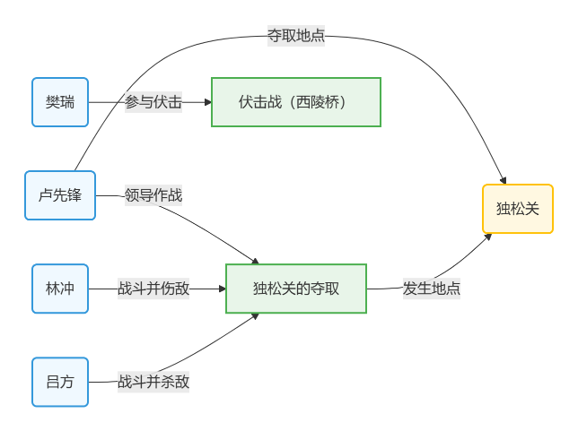
The "relationship" format is “relationship <|> entity 1 <|> entity 2 <|> description of the relation.”
This can be abstracted as ("Entity A", "Relation", "Entity B"), and each triple defines part of the knowledge-graph structure.
Node (entity) + Edge (relation)
For example: "relationship" <|> "Lu the Vanguard" <|> "Capture of Dongsong Pass" <|> "Lu the Vanguard led the army to seize Dongsong Pass..."
From this single line we can connect the entity “Lu the Vanguard” with the entity “Capture of Dongsong Pass.” Disambiguation of “Lu the Vanguard” relies on extractions from other chunks that link the references together.
<node id=""Lu the Vanguard"">
<data key="d0">"PERSON"</data>
<data key="d1">"Lu the Vanguard played a commanding role in the campaign, directing the assaults and rewarding the troops afterward."<SEP>"Lu the Vanguard served as the battlefield commander, making key decisions and issuing orders."<SEP>"Lu the Vanguard led the front-line strike force that broke through Jining and defeated Sun An."<SEP>"Lu the Vanguard was the Song commander who captured Yuling Pass and secured a critical victory."<SEP>"Lu the Vanguard was one of Song Jiang's lieutenants, received Sun An, and sent him to Huguan to gather intelligence."<SEP>"Lu the Vanguard was dispatched by Song Jiang to attack Huzhou."<SEP>"Lu the Vanguard served as the commander stationed in Jinning, the target of Dai Zong's scouting mission."<SEP>"Lu the Vanguard, one of the heroes of Liangshan Marsh, was besieged by General He."<SEP>"Lu the Vanguard was a key strategist in this battle, responsible for devising plans and directing the fighting."<SEP>"Lu the Vanguard led the army to capture Dongsong Pass and fought fiercely there."</data>
<data key="d2">chunk-70d484f8faf2a52a92c82011634f06dc<SEP>chunk-52ed314b18da8a382391ebd05c40a624<SEP>chunk-e054d9d89262c9af698db2a0121d5acc<SEP>chunk-09a8db8ba347c7b7bc0176d4525c0cf2<SEP>chunk-f7436d476ba11775cbffaaaec7258ed9<SEP>chunk-fe76f7b689672053ec6306a05f0cdd0b<SEP>chunk-0626d86fb637457aed588a314f92803a<SEP>chunk-5dccdbae178f7538ee5e466f932be0dc<SEP>chunk-71fb5004c46bc9c5d7428068a57a02e0<SEP>chunk-75d67bf231332d5355799af8db0ae8e3</data>
</node>
<!-- "Deputy Vanguard" is an isolated entity with no connections in the final knowledge graph -->
<node id=""Deputy Vanguard"">
<data key="d0">"ROLE"</data>
<data key="d1">"The Deputy Vanguard refers to the position held by Lu Junyi, ranked directly below Song Jiang and entrusted with equally critical campaigns."<SEP>"It is the role Lu Junyi assumed when coordinating operations alongside Song Jiang."</data>
<data key="d2">chunk-8be99d60dd263a48610af8a66041938b<SEP>chunk-06d94d584d8549b7f59105730610e475</data>
</node>
<node id=""Lu Junyi"">
<data key="d0">"PERSON"</data>
<data key="d1">Lu Junyi, nicknamed the Jade Qilin, was an elder and wealthy patron from Daming Prefecture celebrated for his mastery of the staff. On Liangshan Marsh he ranked alongside Song Jiang and often served as vanguard. He once held off four foreign generals single-handedly and beheaded Yelü Zonglin, and he took part in numerous expeditions against cities such as Jizhou and Tanzhou. After being appointed Deputy Vanguard, Lu Junyi led armies to attack Xuanzhou, Huzhou, and other key targets while carrying out Song Jiang's orders. During the pacification campaigns, he displayed both bravery and exceptional command skill. As Song Jiang's chief lieutenant, he commanded the central army, discussed strategy with the other heroes, and personally led charges to smash enemy lines. Beyond combat, he helped Song Jiang negotiate the imperial amnesty and fought back Liao incursions. He led troops across Yuling Pass, stormed Shezhou, and demonstrated his leadership even when setbacks struck. Though he endured defeats in several campaigns, he remained one of Liangshan's principal commanders, sharing the burden of directing the army and ultimately helping Liangshan submit to the court. Lu Junyi was ennobled, served as Deputy Commander of the imperial forces and as Deputy Vanguard of the pacification campaign, took part in multiple expeditions, and eventually died after falling into the Huai River, adding another tragic turn to the story.</data>
</node>
<edge source=""the Emperor"" target=""Lu Junyi"">
<data key="d3">9.0</data>
<data key="d4">"The Emperor appointed Lu Junyi as the Deputy Vanguard."</data>
<data key="d5">"appointment,trust"</data>
<data key="d6">chunk-06d94d584d8549b7f59105730610e475</data>
</edge>
<edge source=""Lu Junyi"" target=""Lu the Vanguard"">
<data key="d3">8.0</data>
<data key="d4">"Lu Junyi, acting as Lu the Vanguard, led the troops to attack Yutian County."</data>
<data key="d5">"command,strategic advance"</data>
<data key="d6">chunk-a7949e3833d3220bc3a90adf93e855f8</data>
</edge>
How RAG Uses a Knowledge Graph for Retrieval
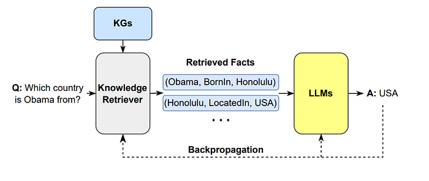
The goal of knowledge-graph retrieval is to return the entities, relations, or paths that match a user query so the answer can be precise. Because queries are usually textual, we first parse the query and extract the relevant entities and relations. For example, when the user asks “What did Newton discover?”, we detect the entity “Newton” and the relation “discovered,” then look for the corresponding relation in the graph. In practice, the query is translated into a set of paths or subgraph matches. The system searches for nodes and edges that match the entities and relations in the query to obtain the related subgraph. For more complex queries we may need to perform path search, starting from one entity and walking along relation edges to find additional entities. For instance, to answer “What is the relationship between Einstein and Newton?”, the system starts from “Einstein” and “Newton” and traverses relations such as “influenced” or “inherited” to find their connection. The process is illustrated in Figure 3.
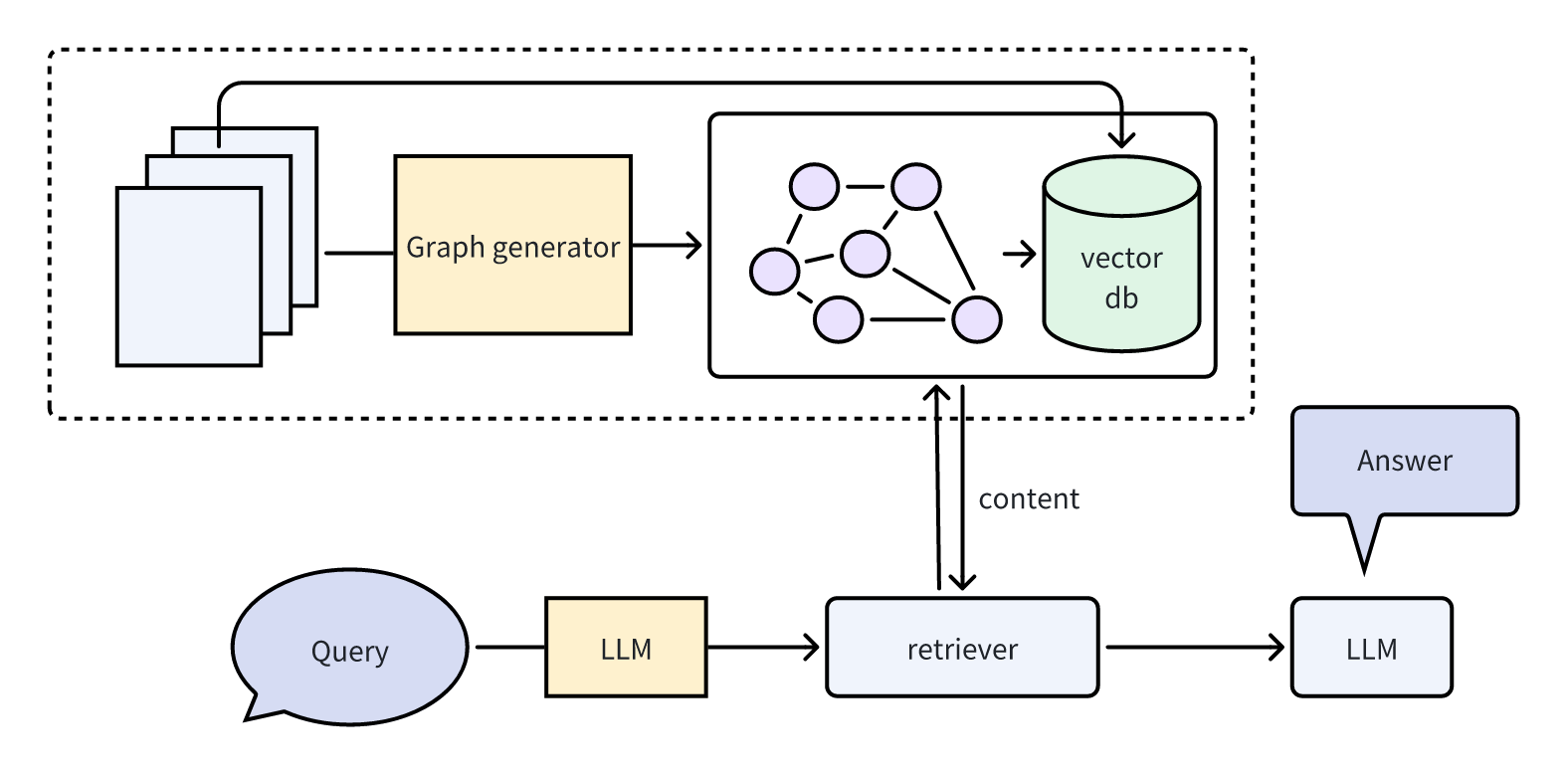
Figure 3. Knowledge-Graph-Based RAG workflow example
A knowledge-graph-enhanced RAG system answers questions in three steps. Retrieval: given a user question, it pulls relevant entities, relations, and source passages from the knowledge graph. Augmentation: the structured results are combined into additional context and fed to the model along with the query to enhance understanding and reasoning. Generation: the LLM produces the final answer, which is the same as in a naive RAG pipeline.
Advantages of Knowledge-Graph-Enhanced RAG
Improve interpretability and reasoning capability
A knowledge graph is structured by design, making it ideal for organizing scattered unstructured information. Retrieval becomes more controllable and easier to explain.
Highly scalable with low update cost
The graph can be updated dynamically without retraining the language model.
Dynamic knowledge fusion
The graph acts as a dynamic database that an LLM can access to query the latest relevant information. Integration with the LLM happens at the architectural level so the model’s tokens can deeply interact with graph entities.
Open-Source Implementations: GraphRAG and LightRAG
Two well-known open-source approaches implement Knowledge-Graph-Based RAG: GraphRAG and LightRAG.
GraphRAG
GraphRAG builds a knowledge graph and hierarchical community structure to aggregate local information into a global understanding. Its key strengths are: using an LLM to extract entities, relations, and factual statements from documents and build a knowledge graph that captures semantic associations; running hierarchical community detection to split the graph into tightly connected communities and recursively generate summaries from local to global views; and employing a MapReduce-style answer-generation strategy that processes community summaries in parallel before aggregating them into comprehensive responses.
GraphRAG Workflow
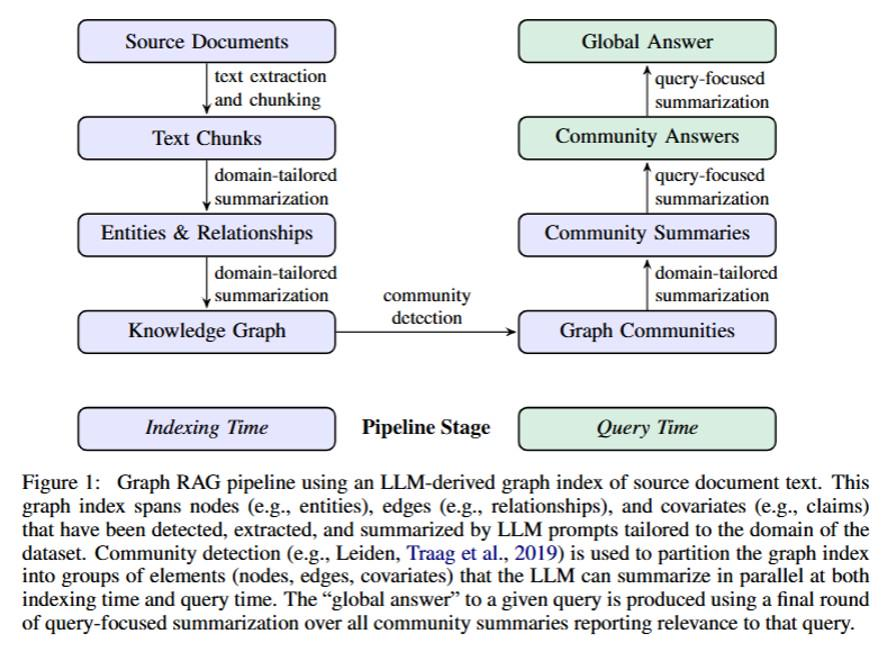
GraphRAG generates global answers from documents through the following pipeline: split documents into text chunks and use an LLM to extract entities, relations, and factual statements; build a knowledge graph from these extractions, converting entities and relations into nodes and edges, merging duplicates, and producing node descriptions while assigning edge weights based on relation frequency; run the Leiden algorithm to recursively partition the graph into nested communities, each representing a semantic topic so that a hierarchical structure from local to global emerges; generate community summaries by ranking entities in leaf communities by importance and aggregating their entities, relations, and statements, while higher-level communities recursively combine subcommunity summaries to balance detail with global context; finally, when answering a query, each community summary independently produces a partial answer, irrelevant content is filtered by scoring, and the high-scoring answers are aggregated into a comprehensive final response.
Microsoft’s GraphRAG introduces the community concept on top of the knowledge graph.
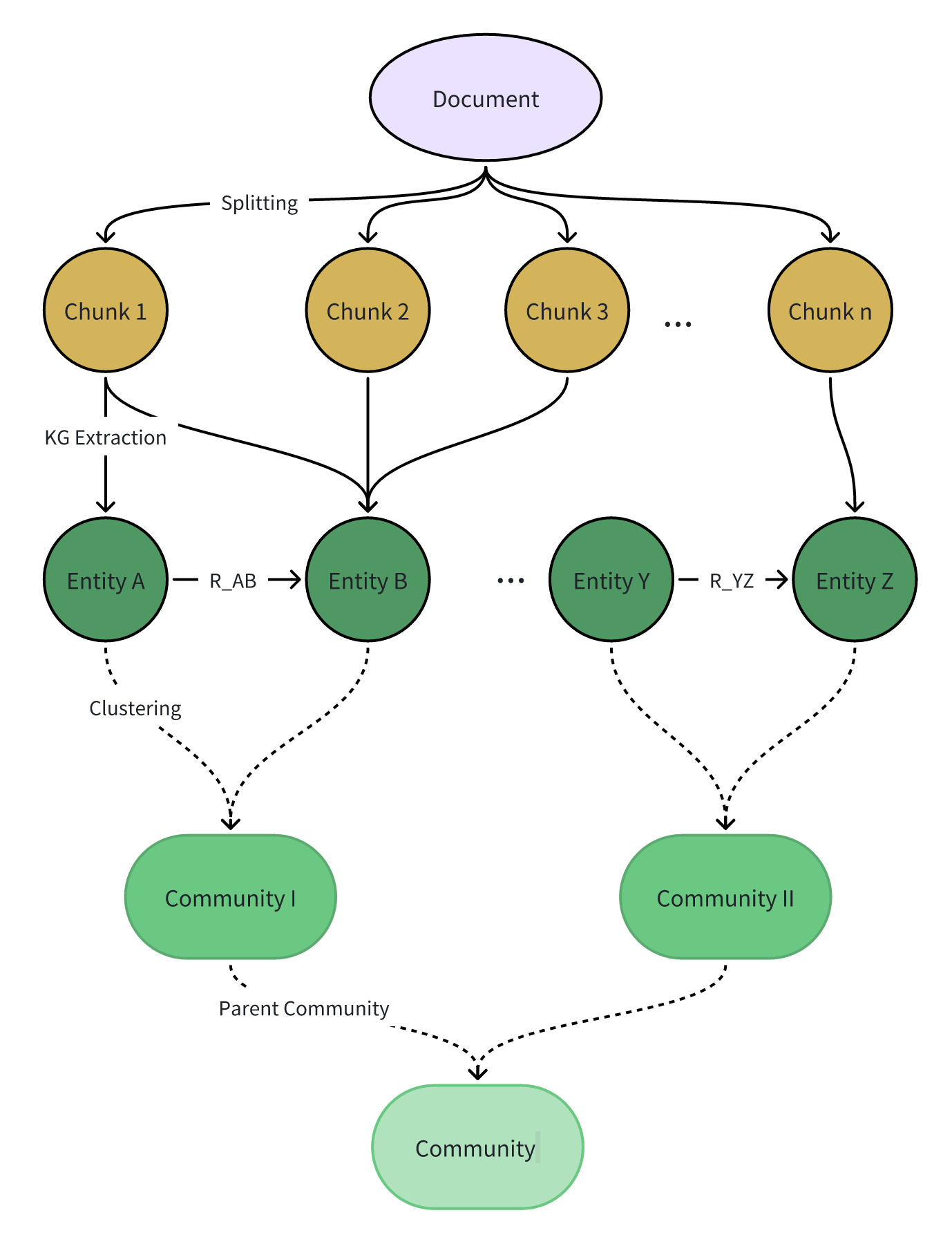
In GraphRAG a community is a higher-level structure that groups related entities. Each community contains the following fields:
ID: Unique identifier of the community. Level: Hierarchical level (0, 1, 2, ...). Entity IDs: List of entity IDs contained in the community. Relation IDs: List of relation IDs contained in the community. Text Block IDs: List of text block IDs contained in the community. Description: Description of the community. Summary: Summary of the community.
After building the knowledge graph, GraphRAG generates community summaries. This strategy lets the system focus on the communities most relevant to the query instead of searching the entire graph. Because the summaries capture the global structure and semantics, even without running a query users can browse different community levels to understand the corpus.
Community summarization has two steps:
- Community detection: apply a graph algorithm to obtain highly connected clusters of entities.
- Summary extraction: use an LLM to summarize the entities and relations in each community.
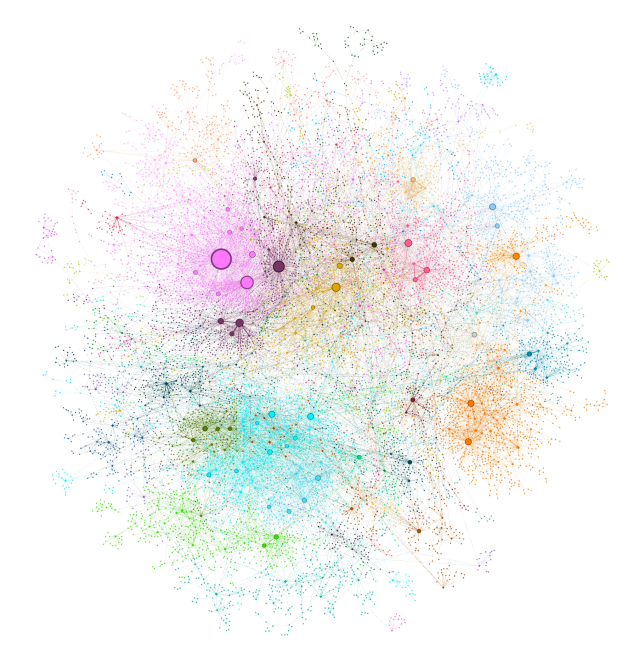
Figure 5. Community clustering result of Microsoft GraphRAG
Figure 5 shows the visualization after Microsoft GraphRAG performs community clustering. Different colors represent different communities, and each community has its own summary. When retrieving over such a knowledge graph you can directly match entities, use reasoning, or leverage the hierarchical organization. Microsoft GraphRAG proposes three retrieval modes for its hierarchy:
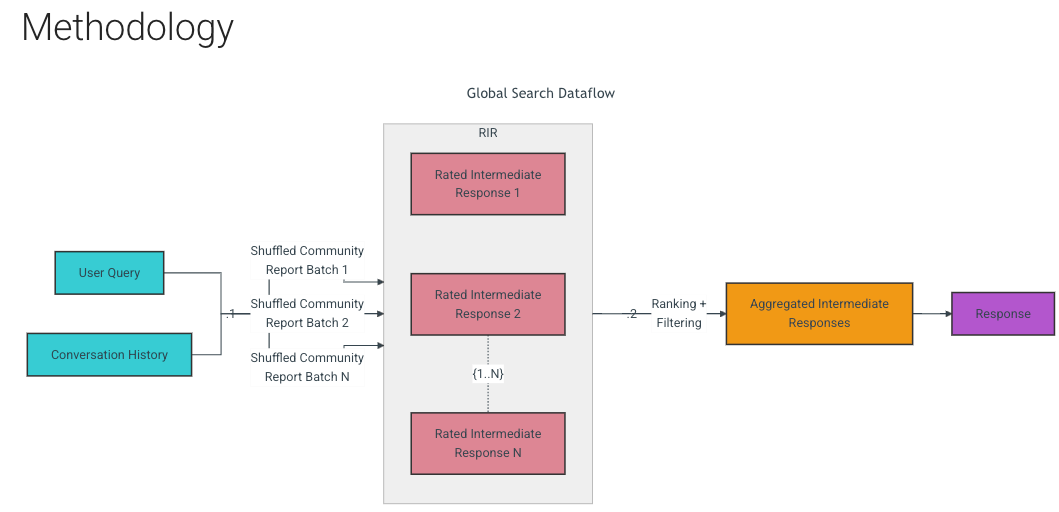
Global Search: uses a MapReduce strategy to search all AI-generated community summaries and produce an answer. This method consumes more resources but typically yields better answers for questions that require an overall understanding of the dataset (e.g., “What is the most valuable use of the herbs mentioned in these notes?”). Given a user query, the approach feeds the community summaries from a selected level into the LLM as context. In the map phase, each summary is split into fixed-size fragments and each fragment generates an intermediate response with bullet points and importance scores. In the reduce phase, the most important points are selected and aggregated to form the context for the final answer. The quality of global search depends on the chosen community level: lower levels provide more detailed reports and deeper responses but require more time and computation because of the larger number of reports.
Global search is best for questions that ask for a full summary, such as “Please summarize what this article is about.”
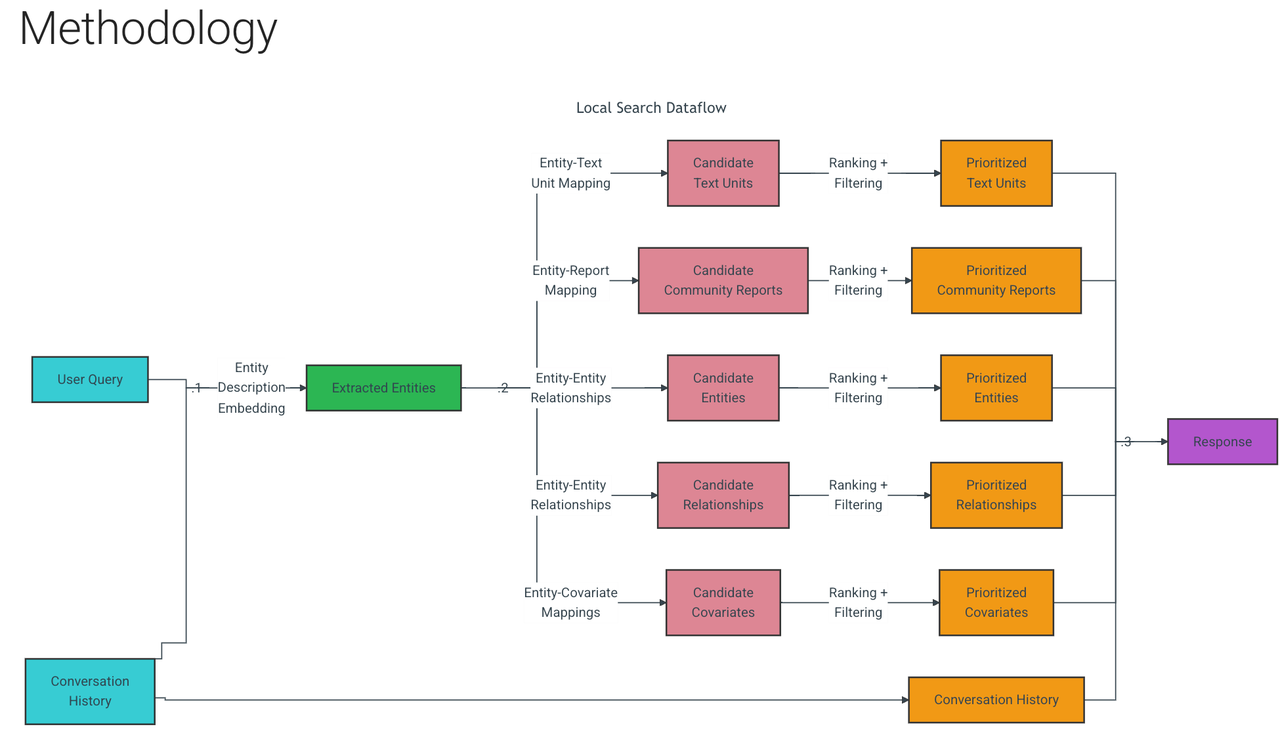
Local Search: combines the knowledge graph with snippets from the original documents to answer questions, especially when the query targets a specific entity, e.g., “What therapeutic effects does chamomile have?” With a user query, the system identifies a set of entities in the knowledge graph that are semantically related to the question. These entities act as entry points to pull additional details—linked entities, relations, covariates, and community summaries. The method also extracts text fragments from the source documents that mention those entities. All candidate data sources are prioritized and filtered so they fit into a single context window of predefined size for answer generation.
Local search is therefore suited to entity-focused questions, such as “What benefits does chamomile offer?”
DRIFT Search (Dynamic Reasoning and Inference with Flexible Traversal) combines global and local search in three steps:
- Community report retrieval: compare the user query with the top-K most relevant community summaries to produce broad preliminary answers and follow-up questions.
- Relevant data extraction: refine the query with local search to create additional intermediate answers and follow-up questions, guiding the engine toward richer context.
- Relevance ranking: rank the related nodes by relevance and feed the ordered documents to the LLM as context for the final response.
Light RAG
LightRAG’s knowledge graph is a straightforward combination of chunks plus entities/relations.
Microsoft GraphRAG excels at answering global or high-level concept queries. It scales well and its graph index provides better context comprehension and explainability. However, it runs slowly, depends on numerous LLM API calls, can hit rate limits, and is expensive. For example, indexing a 32K-word book with GPT-4o can cost 6–7 USD. Adding new data requires rebuilding the entire knowledge graph, which is inefficient, and the lack of deduplication can introduce redundant nodes and noise.
In the Legal dataset (94 articles, about 5 million tokens—roughly five copies of Water Margin), GraphRAG produced 1,399 communities. Each community summary averaged 5,000 tokens, while 610 level-2 communities averaged about 1,000 tokens each. The table below compares the LLM token usage for building the knowledge graph and running a single query. C_Max is the per-request token limit. T_extract is the token cost of extracting entities and relations; C_extract is the number of API calls for extraction.
Note: GraphRAG supports incremental indexing starting from v0.4.0.
| Stage | Approach | Token Consumption | # API Calls |
|---|---|---|---|
| Query recall | GraphRAG | 610 * 1000 | 610 * 1000 / C_Max |
| LightRAG | < 100 | 1 | |
| Indexing 5M tokens | GraphRAG | 1399 * 5000 + T_extract | 1399 + C_extract |
| LightRAG | T_extract | C_extract |
LightRAG is a lightweight knowledge-graph RAG. It skips hierarchical community clustering and directly builds a knowledge graph, enabling incremental updates without re-extracting entities and relations for previously ingested data. Because it uses a non-hierarchical graph structure, it also adopts a new retrieval strategy: dual-level retrieval with low-level searches for specific entities and high-level searches for broader topics. This design retrieves relevant entities and relations effectively without community clustering, improving coverage and contextual relevance.
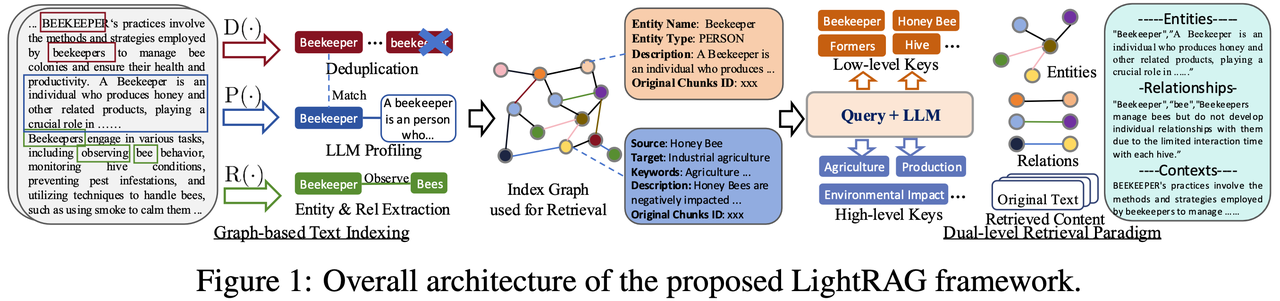
Figure 6. Overview of LightRAG (source: LightRAG paper)
Specifically, LightRAG extracts entities and relations from documents, deduplicates them, and then builds the graph index. The resulting knowledge graph (center of Figure 6) stores each node as an entity name, type, description, and original chunk ID, while each relation records the source, target, keywords, description, and originating chunk IDs. When a query arrives, the LLM extracts keywords at two levels: specific keywords that focus on concrete entities (names, types, etc.) and abstract keywords that capture higher-level topics or domains. The graph is searched with the specific keywords to perform low-level retrieval of related entities and concepts, and with the abstract keywords to perform high-level retrieval of broader themes or trends. The LLM then receives the relevant entities, relations, and source passages as context to answer the question. When new data is added, only the new nodes and edges need to be inserted without rebuilding the entire index, which greatly reduces computation.
LightRAG’s high-level and low-level retrieval target different layers of information:
Low-Level Retrieval focuses on specific entities and their attributes to provide precise information about particular nodes or edges. When a query is issued, the system gathers detailed attributes and relations for those nodes so the LLM can use them as context. In Figure 6, low-level keywords such as “beekeeper” or “hive” are concrete terms; searching the graph with these terms returns the corresponding entity names or attributes, giving the LLM fine-grained details.
High-Level Retrieval targets macro topics and overall trends. It aggregates information across multiple connected entities and relations to provide a holistic view. The system filters entities related to the theme and aggregates multi-dimensional relations among them to create contextual data. In Figure 6, keywords such as “agriculture” and “production” are abstract concepts that require combining entities and relations—or even reasoning—before producing a complete answer. Compared with low-level retrieval, the high-level approach supplies thematic content to the LLM.
High Level Retrieval Example
Example Query: “What are Lin Chong’s major accomplishments?”
- Step 1: Extract
hl_keywords
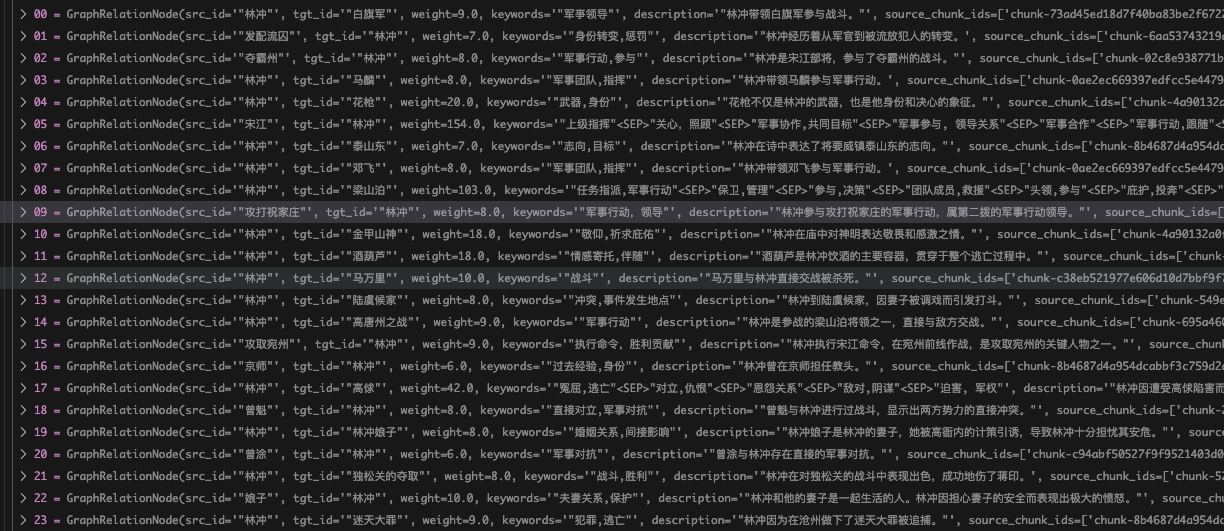
- Step 2: Retrieve relevant relations from the vector store (top-k = 60).
-
Step 3: Expand candidate relations into candidate entities.
-
Follow the recall order of the relations, fetch the source and target entities, deduplicate them, and trim according to
max_token.
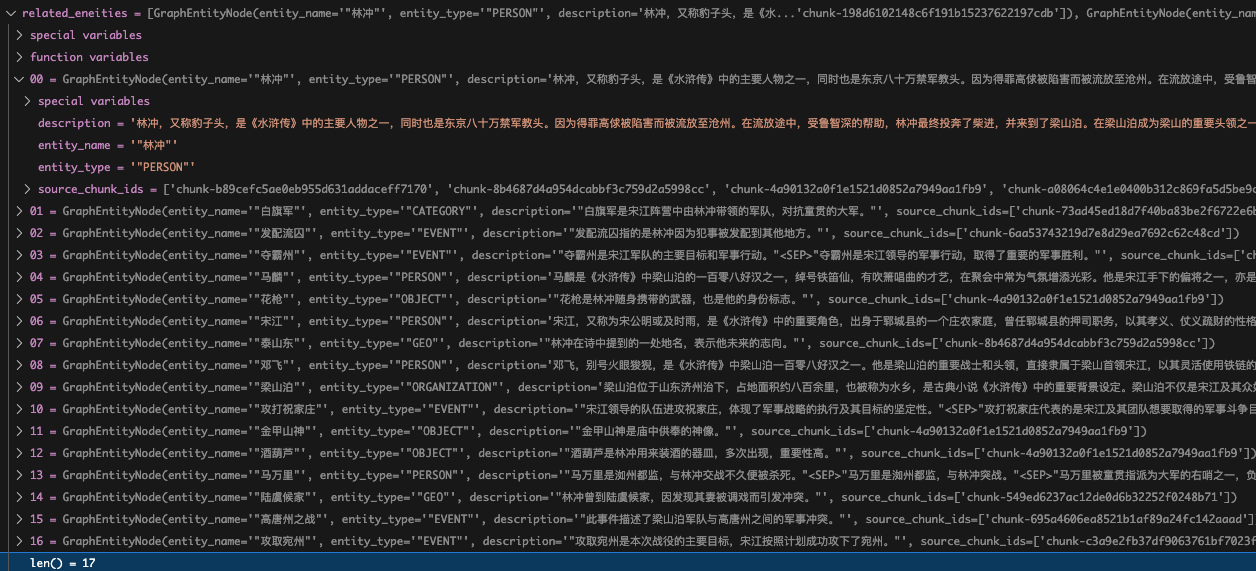
-
Step 4: Expand candidate relations into candidate chunks.
-
Follow the recall order of the relations, fetch the corresponding chunk IDs, deduplicate them, and trim according to
max_token. -
Step 5: Concatenate the retrieved entities (name, type, description), relations (source name, target name, keywords, description), and chunks (content) into a
context_stras the knowledge retrieved by RAG. -
Step 6: The LLM generates the response.
1. Identity shift: Lin Chong was originally an instructor for the imperial guards in Tokyo. After offending Gao Qiu he was framed and exiled to Cangzhou. During exile he was helped by Lu Zhishen, later found shelter with Chai Jin, and eventually joined Liangshan.

2. Joining Liangshan: Persecuted by Gao Qiu, Lin Chong fled the capital and sought refuge with Chai Jin. He then went to Liangshan, became one of its key leaders, and helped depose the original chief Wang Lun so Chao Gai could take command.

3. Military actions:
   - Served as the second-wave commander during the assault on Zhu Family Village.
   - Fought directly with the enemy in the Gaotangzhou campaign.
   - Followed Song Jiang’s orders to fight on the Wan prefecture front, playing a crucial role in its capture.
   - Took part in repelling the Liao reinforcements.
   - Excelled in the battle of Dongsong Pass and seriously wounded Jiang Yin.

4. Personal bravery:
   - Demonstrated courage and loyalty in many major battles, dueling commanders such as Guan Sheng, Wang Huan, and the He armies with impressive results.
   - Joined missions including searching for Lu Junyi, escorting Grand Marshal Su to deliver the imperial edict to Liao, and planning attacks against the Liao forces.

5. Illness and recovery: Later in life Lin Chong suffered paralysis and recuperated at Liuhe Temple.

6. Loyalty and influence: Despite doubts when the court offered amnesty, Lin Chong’s contributions to Liangshan and his standing among the heroes were irreplaceable. His bravery and loyalty make him one of the legends in *Water Margin*.

These deeds trace Lin Chong’s journey from imperial instructor to a key leader of Liangshan and highlight his valor in numerous battles.
Compared with GraphRAG, LightRAG greatly improves query efficiency and reduces computational cost. Directly constructing the knowledge graph and supporting incremental updates resolves GraphRAG’s speed and data-refresh issues. The dual-level retrieval strategy efficiently finds relevant entities and relations without hierarchical clustering, which boosts contextual coverage and accuracy. These strengths make LightRAG a more efficient, flexible, and cost-effective solution.
Limitations:
- Building the knowledge graph requires high-quality extraction. In practice, cloud-hosted models often perform better than local open-source models, which increases cost. (In this section the knowledge base was created with Qwen2.5-32B and responses were generated with the hosted Qwen2.5-Max model.)
- In both LightRAG and GraphRAG, chunks are merged into entity and relation lists. Relations (edges) usually have fewer duplicates, but entities such as novel characters appear frequently and therefore accumulate many chunks. During low-level retrieval when the system expands an entity to its related chunks, it cannot fine-tune the ranking inside the entity. For example, the entity “Lin Chong” is linked to more than 140 chunks. After entity retrieval there is no way to re-rank those chunks, so the
MAX_TOKENlimit may keep less relevant chunks while truncating truly relevant ones.
Decision Tree: Which RAG Variant Does Your Problem Need?
Vector retrieval and graph retrieval each have their strengths and apply to different tasks. Naive RAG relies on vector retrieval, which quickly matches relevant text chunks and excels at processing large volumes of unstructured text to extract key information.
When a task involves complex entity relations and multi-level context, graph retrieval shows its value. By constructing a knowledge graph, GraphRAG can understand the relationships among entities during a query, deliver richer and more accurate context, and ensure the results are complete and coherent.
Some RAG systems therefore combine both retrieval modes. Hybrid retrieval leverages the efficiency of vector search for simple queries and the semantic depth of graph search for complex, multi-hop questions. Choosing the right method for the task significantly improves QA performance and result quality.
Hands-on Practice and Case Studies: How Knowledge-Graph RAG Handles Complex Queries
Note: Naive RAG walkthroughs are covered in Chapters 2–7, so they are not repeated here.
LightRAG Walkthrough
Configuration
-
Dataset:
shuihuzhuan_utf8.txt(~912K tokens)
-
Chunking and retrieval:
- Naive RAG: chunk size 1200 tokens, top_k = 10
- LightRAG: chunk size 1200 tokens, relation/entity top_k = 60
Building a Knowledge Graph with LightRAG
Step 0: Environment setup
- vLLM
- LightRAG
- infinity
- LazyLLM
-
Clone https://github.com/HKUDS/LightRAG and install it:
pip install "lightrag-hku[api]" -
Download the corpus
shuihuzhuan.txt, convert it to UTF-8, and place it under a folder such asnovel/shuihu.txt. -
Create a directory to store the knowledge graph output.
Step 1: Use vLLM, Ollama, or a similar tool to deploy an OpenAI-compatible LLM service.
Note: Because the novel is long, we tried several hosted models and kept hitting “content safety” limits even with different corpora. A locally hosted LLM is therefore required.
Download the model (Qwen 2.5-32B-Instruct), preferably from ModelScope:
python -m vllm.entrypoints.openai.api_server --model /mnt/lustre/share_data/lazyllm/models/Qwen2.5-32B-Instruct/ --served-model-name qwen2 --max_model_len 16144 --host 0.0.0.0 --port 12345
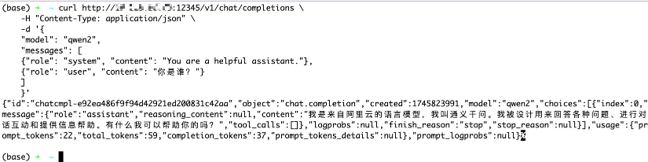
Deploy an embedding service or use an existing OpenAI-compatible embedding endpoint.
- Download the model
bge-large-zh-v1.5, preferably from ModelScope.
infinity_emb v2 --model-id "/mnt/lustre/share_data/lazyllm/models/bge-large-zh-v1.5" --port 19001 --served-model-name bge-large
Test the service:
Note: For vLLM the OpenAI-compatible
base_urlishttp://{ip}:{port}. When testing with curl, usehttp://{ip}:{port}/embeddings.
curl --location 'http://127.0.0.1:19001/embeddings' --header "Authorization: Bearer TEST" \
--header 'Content-Type: application/json' --data '{
        "model": "bge-large",
        "input": "Knowledge-graph-based RAG system",
        "dimension": "1024",
        "encoding_format": "float"
}'
Step 2: Update the LLM and embedding configuration in examples/lightrag_openai_compatible_demo.py.
Configure the model, base_url, and api_key parameters in llm_model_func and embedding_func.
-
Set the filename to process and the directory where the knowledge graph will be stored.
WORKING_DIR: folder where the graph files are written.PATH_TO_TXT: the novel Water Margin to parse (make sure it is UTF-8).
-
Update the LLM configuration.
base_url→http://{ip}:{port}/v1model_name→ the Qwen2 model configured in vLLM
-
Update the embedding configuration.
base_url→http://{ip}:{port}model_name→ thebge-largemodel configured in Infinity
Step 3: Adjust the main function in examples/lightrag_openai_compatible_demo.py.
Set WORKING_DIR (where the graph is stored) and PATH_TO_TXT (the text file). GitHub code link
async def main():
    WORKING_DIR = "****"
    PATH_TO_TXT = "shuihu.txt"
    try:
        embedding_dimension = await get_embedding_dim()
        print(f"Detected embedding dimension: {embedding_dimension}")

        rag = LightRAG(
            working_dir=WORKING_DIR,
            llm_model_func=llm_model_func,
            embedding_func=EmbeddingFunc(
                embedding_dim=embedding_dimension,
                max_token_size=8192,
                func=embedding_func,
            ),
        )
        with open(PATH_TO_TXT, "r", encoding="utf-8") as f:
            await rag.ainsert(f.read())
    except Exception as e:
        print(f"An error occurred: {e}")
Step 4: Run the demo and verify that graph_chunk_entity_relation.graphml is generated in WORKING_DIR. A file of roughly 5 MB indicates success.
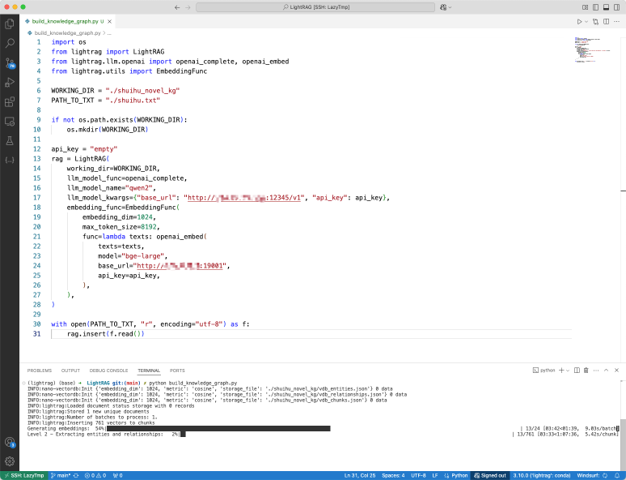
LightRAG Knowledge-Graph QA
async def initialize_rag():
    rag = LightRAG(
        working_dir=WORKING_DIR,
        embedding_func=EmbeddingFunc(
                        embedding_dim=1024,
                        max_token_size=8192,
                        func=lambda texts: openai_embed(
                            texts=texts,model="bge-large",
                            base_url="http://127.0.0.1:19001",
                            api_key=api_key,)
                    ),
        llm_model_func=openai_complete,
        llm_model_name="qwen2",
        llm_model_kwargs={"base_url":"http://0.0.0.0:12345/v1",
                                         "api_key":api_key},
    )
    await rag.initialize_storages()
    await initialize_pipeline_status()
    return rag
async def main():
    try:
        rag = await initialize_rag()
        with open(PATH_TO_TXT, "r", encoding="utf-8") as f:
            content = f.read()
        await rag.ainsert(content)
        mode = "hybrid"
        print(await rag.aquery("Who did Lu Zhishen fight?", param=QueryParam(mode=mode)))
    except Exception as e:
        print(f"An error occurred: {e}")
    finally:
        if rag:
            await rag.finalize_storages()
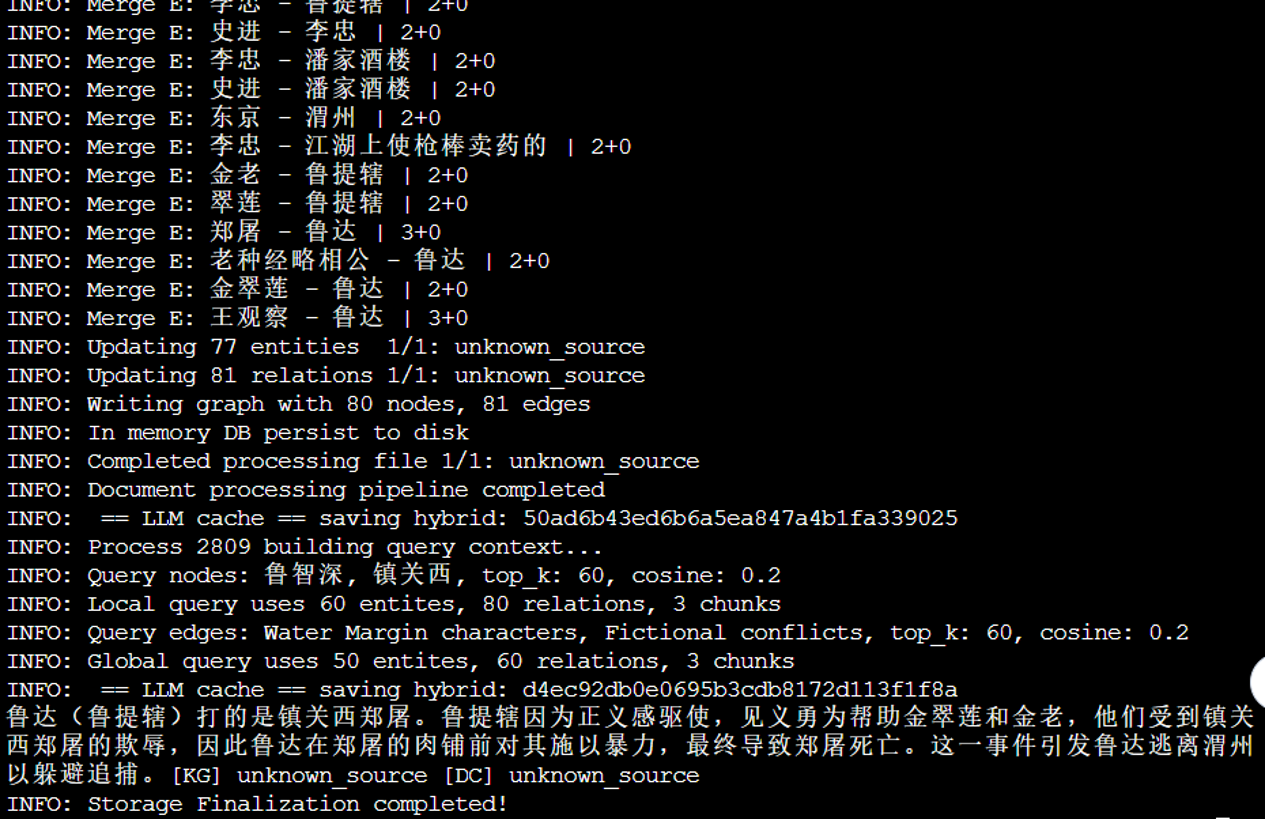
Case Analysis
Case 1: Entity-Oriented Queries
Background: Lu Da is his personal name, Lu Tiexu is his official title, and Lu Zhishen is the Dharma name he adopts after becoming a monk on Mount Wutai. In the first six chapters only “Lu Da” or “Lu Tiexu” appear. As the story progresses, “Lu Zhishen” becomes dominant and in the final 80 chapters he is always called Lu Zhishen.
Case1-1
| Query | How did Lu Tiexu die? |
|---|---|
| Naive RAG | The retrieved passages do not directly describe Lu Tiexu’s (Lu Zhishen’s) death. They focus on his early heroic deeds, the incident where he killed the butcher in the restaurant, his escape, and later adventures. None of these cover how he dies. In the full story of Water Margin, Lu Zhishen passes away after the Fang La campaign. He hears the tides at Qiantang, realizes his time has come, bathes, puts on clean robes, writes a gatha, and peacefully enters nirvana at Liuhe Temple—details that were not present in the retrieved chunks. |
| LightRAG | According to the retrieved knowledge, Lu Tiexu (later known as the monk Lu Zhishen) has no violent death. Instead, he attains nirvana at Liuhe Temple in Hangzhou. He completes the transition from warrior to monk and leaves the mortal world voluntarily rather than dying in battle. The summary explains that he fought bravely, followed a path of spiritual awakening, and ultimately sat in meditation until he passed away. |
| Analysis | Naive RAG primarily recalls passages from before Chapter 82 when the name “Lu Tiexu” appears frequently. |
Case 1-2
The behavior in Case 2 is similar to Case 1.
| Query |
|---|
| How did Lu Da die? |
Case 1-3
| Query | How did Lu Zhishen die? |
|---|---|
| Naive RAG | The retrieved text describes how Lu Zhishen heard the tides of the Qiantang River, remembered his master’s prophecy, washed, donned clean robes, wrote a gatha, and calmly entered nirvana in the Dharma hall. |
| LightRAG | Same as Naive RAG. |
Case 2: Summary Queries
Background: Lin Chong appears across many chapters. Before he joins Liangshan he is a central figure, but afterward he is mentioned more sporadically.
Case 2-1
| Query | What are Lin Chong’s major accomplishments? |
|---|---|
| Naive RAG | Summarizes the episodes before he joins Liangshan: being framed by Gao Qiu, sentenced to exile, the ambush in Wild Boar Forest, guarding the temple and stable, the fire plot, and his revenge. Because of token limits, later accomplishments are missing even though the answer is rich in detail for the early chapters. |
| LightRAG | Provides a higher-level overview similar to the bullet list above (identity shift, joining Liangshan, key military campaigns, personal bravery, illness, loyalty). It covers his full story arc but offers fewer details. |
| Analysis | Naive RAG focuses on passages where “Lin Chong” is concentrated, so coverage is narrow but detailed. LightRAG retrieves a broader range of entities and relations, yielding a concise but comprehensive answer. |
Case 2-2
| Query | Whom did Chai Jin help? |
|---|---|
| Naive RAG | Mentions Song Jiang, Lin Chong, and Lu Junyi based on the retrieved passages: sheltering Song Jiang after he killed Yan Poxi, disguising Lin Chong as a hunter to pass through Cangzhou, and bribing Cai Fu to save Lu Junyi. |
| LightRAG | Lists a wider set of people: Song Jiang, Wu Song, Lin Chong, Zhu Tong, Chai’s uncle, Li Kui, Yan Qing, Lu Junyi, Xiao Rang, etc., along with the context in which Chai Jin assisted them. |
| Analysis | Naive RAG recalls only the sections where Chai Jin is heavily featured, so coverage is limited but detailed. LightRAG has broader coverage, though some relations (e.g., helping Zhu Tong or Yan Qing) may be loosely defined. |
CASE 2-3
| Query | Whom did Wu Song help? |
|---|---|
| Naive RAG | Retrieved text only shows that Wu Song helped Shi En take back the tavern in Happy Forest. |
| LightRAG | Summarizes multiple people Wu Song helped: Shi En, Kong Liang, Zhang Qing and Sun Erniang, Song Jiang, neighbors, and others. |
| Analysis | The Naive RAG answer benefits from LLM hallucination because the retrieved text did not contain the “Happy Forest” episode. LightRAG offers broader coverage, though some inferred relationships (e.g., helping Shi En’s father) may be debatable. |
Integrating LightRAG with LazyLLM
Overall workflow:
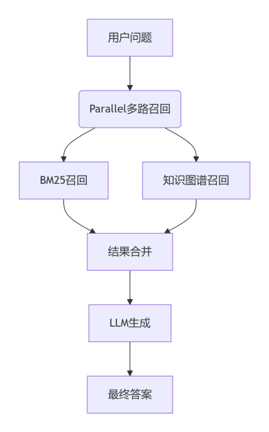
Configure the LightRAG knowledge-graph directory working_dir, the text path txt_path, and the LazyLLM dataset directory dataset_path.
import os
import asyncio
import lazyllm
from lazyllm import pipeline, parallel, bind, Retriever
from lightrag import LightRAG, QueryParam
from lightrag.kg.shared_storage import initialize_pipeline_status
from lightrag.utils import setup_logger, EmbeddingFunc
from lightrag.llm.openai import openai_complete, openai_embed

class LightRAGRetriever:
    def __init__(self, working_dir, txt_path, mode="hybrid"):
        self.working_dir = working_dir
        self.txt_path = txt_path
        self.mode = mode
        self.api_key = "empty"
        self.rag = None
        self.loop = asyncio.new_event_loop()
        setup_logger("lightrag", level="INFO")

        if not os.path.exists(working_dir):
            os.makedirs(working_dir)

        self.loop.run_until_complete(self.initialize_rag())

    async def initialize_rag(self):
        self.rag = LightRAG(
            working_dir=self.working_dir,
            embedding_func=EmbeddingFunc(
                embedding_dim=1024,
                max_token_size=8192,
                func=lambda texts: openai_embed(
                    texts=texts,
                    model="bge-large",
                    base_url="http://0.0.0.0:19001",
                    api_key=self.api_key,
                )
            ),
            llm_model_func=openai_complete,
            llm_model_name="qwen2",
            llm_model_kwargs={"base_url": "http://0.0.0.0:12345/v1", "api_key": self.api_key},
        )
        await self.rag.initialize_storages()
        await initialize_pipeline_status()

        with open(self.txt_path, "r", encoding="utf-8") as f:
            content = f.read()
        await self.rag.ainsert(content)

    def __call__(self, query):
        return self.loop.run_until_complete(
            self.rag.aquery(
                query,
                param=QueryParam(mode=self.mode, top_k=3, only_need_context=True)
            )
        )

    def close(self):
        if self.rag:
            try:
                self.loop.run_until_complete(self.rag.finalize_storages())
            except Exception as e:
                print(f"Error while shutting down LightRAG: {e}")
            finally:
                self.loop.close()
                self.rag = None

def main():
    kg_retriever = None
    try:
        documents = lazyllm.Document(dataset_path="****")
        prompt = ('Please answer the question based on the information provided.')

        print("Initializing the knowledge-graph retriever...")
        kg_retriever = LightRAGRetriever(
            working_dir="****",
            txt_path="****"
        )
        print("Knowledge-graph retriever initialized!")

        bm25_retriever = lazyllm.Retriever(
            doc=documents,
            group_name="CoarseChunk",
            similarity="bm25_chinese",
            topk=3
        )

        def bm25_pipeline(query):
            nodes = bm25_retriever(query)
            return "".join([node.get_content() for node in nodes])

        def context_combiner(*args):
            bm25_result = args[0]
            kg_result = args[1]
            return (
                f"Knowledge-graph recall:\n{kg_result}"
                f"BM25 recall:\n{bm25_result}\n\n"
            )

        with lazyllm.pipeline() as ppl:
            with parallel() as ppl.multi_retrieval:
                ppl.multi_retrieval.bm25 = bm25_pipeline
                ppl.multi_retrieval.kg = kg_retriever
            ppl.context_combiner = context_combiner
            ppl.formatter = (lambda nodes, query: dict(context_str=nodes, query=query)) | bind(query=ppl.input)
            ppl.llm = (
                lazyllm.OnlineChatModule().prompt(
                    lazyllm.ChatPrompter(
                        instruction=prompt,
                        extra_keys=['context_str']
                    )
                )
            )

        lazyllm.WebModule(ppl, port=23466).start().wait()

    except Exception as e:
        print(f"\nAn error occurred during processing: {e}")
        import traceback
        traceback.print_exc()

if __name__ == "__main__":
    main()
Naive RAG retrieval result:
Another punch crashed into Zheng the Butcher's temple, as if an entire Buddhist ceremony erupted at once with bells, cymbals, and gongs. When Lu Da looked down he saw Zheng sprawled on the ground, breathing out but no longer breathing in. The prefectural constable feigned, "So you want to play dead? I'll hit you again," and Zheng's face began to change color. Lu Da thought, "I only meant to thrash him, yet three punches actually killed him. I'll be hauled into court and no one will bring me meals in jail. I'd better slip away." He strode off at once, pointing back at the corpse: "Keep pretending, I'll deal with you slowly." Still cursing, he marched away with great strides. None of the neighbors or Zheng's servants dared block him. Once back at his quarters, Lu Da hastily gathered his fine clothes and silver, abandoned the old rags, grabbed a staff as tall as his brow, and bolted out the south gate like a puff of smoke.

At Zheng's house everyone tried to revive him for half a day but he died. The neighbors filed a complaint with the prefect. The upright prefect ascended the hall, read the petition, and said, "Lu Da is a constable from the Imperial Guard; I dare not seize him without reporting it." He rode to the Guard Command, dismounted, and sent the gate soldiers to announce him. When he was escorted inside and the formalities were done, the commandant asked, "What brings you here?" The prefect replied, "Constable Lu Da has beaten the market butcher Zheng to death without cause. I dare not arrest him without informing you." The commandant was startled. "Lu Da may be skilled, but his temper is coarse. Since he has caused a death, he must be questioned." He told the prefect, "Lu Da once served my late father. Because I lacked able men I transferred him here as a constable. Since he has committed murder, arrest him and interrogate him according to the law. Once the confession is secured and the sentence decided, notify my father as well; if he needs this man later at the frontier, it would look bad." "I will investigate," the prefect answered, "and report the matter to your noble father before sentencing." He took his leave, returned to the prefecture, sat in the hall, and immediately ordered the constables to draw up the warrants for Lu Da's arrest.

Warden Wang received the writ, gathered more than twenty officers, and marched straight to Lu Da's lodgings. The landlord said, "He just left carrying some bundles and a short staff. I thought he had official business, so I dared not ask." Hearing this, Warden Wang opened the room and found only old clothes and bedding. He took the landlord to search in every direction, from south of the city to the north, but Lu Da was nowhere to be found. He arrested two neighbors along with the landlord and reported back, "Lu Da fled in fear of punishment. We do not know where he went, but we have the landlord and his neighbors." The prefect jailed them and summoned Zheng's neighbors for questioning, ordering the coroner to prepare.

Meanwhile Lu Da saw a crowd jammed around a notice at the crossroads and joined them. Unable to read, he listened while the others recited: "By order of the Taoyuan Command, pursuant to the Weizhou writ, seize Lu Da, the constable of the Imperial Guard, for killing the butcher Zheng. Anyone who shelters him will share his crime; anyone who captures him or informs on him will receive a bounty of one thousand strings of cash." Just then someone shouted behind him, "Brother Zhang, why are you here?" and seized him around the waist, pulling him away from the crossroads. If that person had not acted in time, Lu Da would soon have been shaven, stripped of his beard, forced to change his name, and driven mad like a raging arhat. Only such force could "clear the perilous road with a monk's staff and strike down injustice with a precept blade." Who grabbed Lu Da? That will be revealed in the next installment.

Elsewhere, a woman wiped her tears, bowed deeply three times, and the old man beside her did the same. Lu Da asked, "Where are you from, and why are you crying?" The woman replied, "Sir, please allow me to explain. I am from the Eastern Capital. I traveled here to Weizhou with my parents to seek relatives, but they moved to Nanjing. My mother died of illness in the inn, leaving only my father and me to suffer in this strange place. A rich man here named Zheng, called Zheng the Guardian of the Pass, saw me and hired a broker to force me to become his concubine. He wrote a contract for three thousand strings—money in name only—to take control of my body. Before three months passed, his fierce wife beat me and drove me out, forbidding us to live together. The innkeeper was ordered to collect the original three thousand strings. My father is timid, he cannot argue with them, and Zheng is powerful. We never received a single coin from him, so how could we repay it now? With no choice, my father taught me a few songs when I was young, so I came to this wine shop to perform for tips. Whatever I earn each day, I hand over most of it and keep only a little for our meals. Business has been slow these past two days, so I'm behind on payment and fear his insults when he comes to collect. Thinking of all our hardships with nowhere to turn, we wept. We did not mean to offend you—please forgive us." Lu Da asked, "What is your name? Where are you lodging? Where does this Zheng live?" The old man replied, "My surname is Jin; this is my daughter Cuilian. Zheng lives under Scholar's Bridge selling pork; they call him Zheng the Guardian. We are staying at the Lu family inn inside the east gate." Lu Da snorted, "So the great 'Master' Zheng is merely a pig butcher! That scoundrel clings to my commander's banner as a provisioner and dares bully honest folk. You two stay here—I'll go kill him and be right back." Li Zhong and Shi Jin grabbed him and urged, "Brother, calm down. We'll deal with it tomorrow." After much persuading he relented.

Lu Da said, "Old man, come here! I'll give you some traveling money so you can return to the Eastern Capital." The father and daughter cried, "If we could go home, it would be as though we were born anew—to have parents twice over! But the innkeeper won't let us leave; Master Zheng ordered him to collect the money." Lu Da replied, "That's no problem. I have a way."
LightRAG retrieval (entities):
-----Entities(KG)-----```json[{"id": "1", "entity": "Jin Cuilian", "type": "person", "description": "Jin Cuilian is Old Man Jin's daughter and suffers under Zheng the Butcher.<SEP>She is the young woman Lu Da vows to help, likely deceived or abused by Zheng.", "rank": 3, "created_at": "2025-06-10 00:06:37", "file_path": "unknown_source"}, {"id": "2", "entity": "Lu Da", "type": "person", "description": "Lu Da is a fearsome officer who helps Old Man Jin escape from Zheng the Butcher.<SEP>He serves as a constable under the Commandant, famed for his rough temper and martial skill, and goes on the run after killing Zheng.<SEP>Also called Constable Lu, he once met Shi Jin in a teahouse and promised to help find Shi Jin's master.<SEP>Lu Da, better known as Lu Zhishen, becomes a wanted man after killing Zheng and is a central figure in the tale.", "rank": 18, "created_at": "2025-06-10 00:06:37", "file_path": "unknown_source"}, {"id": "3", "entity": "Two Constables", "type": "person", "description": "Two officers from the yamen ordered to arrest Shi Jin and his companions.", "rank": 2, "created_at": "2025-06-10 00:06:37", "file_path": "unknown_source"}, {"id": "4", "entity": "Shi Jin", "type": "person", "description": "Shi Jin, also called Hero Shi, acts alongside Constable Lu and trained under the tiger-fighter Li Zhong.<SEP>He is a righteous hero who protected Zhu Wu and his brothers from government persecution, then left home to search for his master.<SEP>Shi Jin refused to become a bandit, left Mount Shaohua, and sought his teacher Wang the Instructor.<SEP>He drank with Constable Lu and contributed money to aid Jin Cuilian and her father.", "rank": 17, "created_at": "2025-06-10 00:06:37", "file_path": "unknown_source"}, {"id": "5", "entity": "Yang Chun", "type": "person", "description": "Yang Chun, one of Shi Jin's comrades, helped protect Zhu Wu's group and resist the officials.", "rank": 1, "created_at": "2025-06-10 00:06:37", "file_path": "unknown_source"}, {"id": "6", "entity": "Event: Lu Da Repays the Rent", "type": "event", "description": "Lu Da offered to pay Zheng the Butcher so Old Man Jin could go free.", "rank": 0, "created_at": "2025-06-10 00:06:37", "file_path": "unknown_source"}, {"id": "7", "entity": "Yanmenguan in Daizhou", "type": "geo", "description": "A city Lu Da passed through while fleeing capture.", "rank": 1, "created_at": "2025-06-10 00:06:37", "file_path": "unknown_source"}, {"id": "8", "entity": "Wanted Bulletin", "type": "event", "description": "The prefectural notice posted in Yanmenguan County offering a reward for Lu Da's arrest.", "rank": 2, "created_at": "2025-06-10 00:06:37", "file_path": "unknown_source"}]
LightRAG retrieval (relations):
-----Relationships(KG)-----```json[{"id": "1", "entity1": "Jin Cuilian", "entity2": "Lu Da", "description": "Lu Da took action to rescue Jin Cuilian and her father from Zheng the Butcher.<SEP>He cited Jin Cuilian as the victim of Zheng's deception.", "keywords": "protection,loyalty,rescue", "weight": 14.0, "rank": 21, "created_at": "2025-06-10 00:06:37", "file_path": "unknown_source"}, {"id": "2", "entity1": "Two Constables", "entity2": "Shi Jin", "description": "Two constables represented the government in the attempt to arrest Shi Jin, clashing with him and his allies.", "keywords": "confrontation,arrest", "weight": 9.0, "rank": 19, "created_at": "2025-06-10 00:06:37", "file_path": "unknown_source"}, {"id": "3", "entity1": "Shi Jin", "entity2": "Yang Chun", "description": "Shi Jin and Yang Chun fought side by side to oppose the officials and protect their mountain stronghold.", "keywords": "cooperation,alliance", "weight": 8.0, "rank": 18, "created_at": "2025-06-10 00:06:37", "file_path": "unknown_source"}, {"id": "4", "entity1": "Wanted Bulletin", "entity2": "Lu Da", "description": "The public notice called on people to help capture Constable Lu.", "keywords": "law,manhunt", "weight": 9.0, "rank": 20, "created_at": "2025-06-10 00:06:37", "file_path": "unknown_source"}, {"id": "5", "entity1": "Yanmenguan in Daizhou", "entity2": "Lu Da", "description": "Lu Da passed through Yanmenguan County while on the run.", "keywords": "flight,waypoint", "weight": 9.0, "rank": 19, "created_at": "2025-06-10 00:06:37", "file_path": "unknown_source"}, {"id": "6", "entity1": "Wanted Bulletin", "entity2": "Prefectural Yamen", "description": "The prefectural yamen issued the wanted notice for Lu Da.", "keywords": "public notice", "weight": 7.0, "rank": 4, "created_at": "2025-06-10 00:06:37", "file_path": "unknown_source"}]```
LightRAG retrieval (document chunks):
-----Document Chunks(DC)-----```json[{"id": "1", "content": "Lu Da stepped in close, braced his foot on Zheng the Butcher's chest, and raised a fist as big as a vinegar bowl. He barked, 'I joined Commandant Zhang and earned the title of Guardian of Five Routes in the northwest—that name suits me. You're just a knife-wielding pork butcher, no better than a cur, yet you dare to call yourself Guardian of the Pass? How dare you coerce Jin Cuilian?' With one punch he smashed Zheng's nose, sending blood spurting and twisting it to one side until it looked like a leaking pickle jar with salty, sour, and spicy brine pouring out. Zheng collapsed and dropped his dagger, whimpering, 'Good hit!' Lu Da cursed, 'You wretch, still talking back?' Another blow split the skin beside the eye, squeezed out the eyeball like a bolt of cloth, streaked red, black, and purple. The onlookers feared Lu Da and did not dare intervene.

Zheng begged for mercy. Lu Da shouted, 'Bah! You're a ruined lout. If you had the spine to fight to the end I might spare you, but the moment you plead, I refuse.' He drove another punch into Zheng's temple, as if bells, cymbals, and gongs all rang at once. Zheng lay motionless, breathing out but not in. 'Playing dead, are you? I'll hit you again.' Zheng's face began to change color.

Lu Da thought, 'I only meant to beat him soundly, yet three punches have truly killed him. I'll have to face trial and no one will bring me meals. I'd better leave now.' He strode off, pointed at the corpse, and said, 'Keep pretending and I'll settle the score later.' Still cursing, he marched away while Zheng's household and the neighbors did not dare stop him. Back at his lodging he hastily packed clothing and silver, discarded the heavy old garments, grabbed a brow-high staff, and shot out the south gate.

Zheng's family tried in vain to revive him and reported the death to the prefect. The prefect read the complaint and said, 'Lu Da is a constable of the Imperial Guard; I cannot arrest him without approval.' He rode to the Guard Command, paid his respects, and reported, 'Constable Lu Da has beaten the market butcher Zheng to death.' The commandant was shocked. 'Lu Da may be brave but his temper is coarse. Since he has caused a death, question him at once.' He explained that Lu Da once served his late father, but now the law had to run its course, though the elder commandant should be informed before sentencing. The prefect agreed, returned to his office, and issued warrants for Lu Da's arrest.

Warden Wang led more than twenty officers to Lu Da's quarters. The landlord said, 'He just left with some bundles and a staff. I assumed he was on duty.' They opened the room and found only old clothes and bedding. Warden Wang took the landlord to search the whole city but could not find Lu Da, so he arrested the landlord and two neighbors and presented them at the prefecture. The prefect jailed them, summoned Zheng's neighbors, and ordered the coroner to prepare.

Later, Lu Da spotted people crowding around a notice at the crossroads. He could not read, so he listened as others recited: 'By order of the Taoyuan Command and the Weizhou writ, seize Constable Lu Da for beating Zheng the Butcher to death. Anyone who shelters him shares his guilt; anyone who captures or reports him will receive one thousand strings of cash.' As he listened, someone shouted, 'Brother Zhang, why are you here?' grabbed him around the waist, and dragged him away. Had that person not seen him, Lu Da would soon have been shaved, stripped of his beard, forced to change his name, and hounded like a wrathful arhat, until only a monk's staff could open the dangerous road and a precept blade strike down injustice.

A woman, wiping her tears, bowed three times, and the old man with her did the same. 'Where are you from and why are you crying?' Lu Da asked. 'Sir, let me explain,' the woman replied. 'We are from the Eastern Capital. My parents and I traveled to Weizhou to seek relatives, but they moved to Nanjing. My mother died of illness at the inn, leaving only my father and me to suffer here. A wealthy man named Zheng the Guardian saw me and forced a broker to make me his concubine. He wrote a contract for three thousand strings—money only on paper—to take me away. Before three months passed, his harsh wife beat me out of the house. The innkeeper now demands the full three thousand strings. My father is meek and cannot argue, and Zheng wields great power. We never received a single coin, so how can we repay it? My father taught me a few tunes when I was young, so I now sing at this tavern. Whatever I earn each day, I hand most of it over and keep a little for us to live on. Business has been slow these days, so I'm behind on the payments and fear his humiliation when he comes to collect. Thinking of our misery, we had no one else to tell, so we cried. Please forgive the offense.'

'What's your surname? Where do you stay? Where does this Zheng live?' Lu Da asked. 'My surname is Jin and this is my daughter Cuilian,' the old man answered. 'Zheng lives under Scholar's Bridge selling pork; they call him the Guardian of the Pass. We lodge at the Lu family inn inside the east gate.' 'Bah!' Lu Da exclaimed. 'So the so-called master is just a pig butcher! He clings to my commander's banner as a provisioner and yet bullies the innocent. You two stay here; I'll go kill him and return.' Li Zhong and Shi Jin grabbed him, urging him to wait until morning. After repeated persuasion he calmed down.

Lu Da then said, 'Old man, come here. I'll give you travel money so you can return to the capital.' 'If we could go home, it would be as though we had been reborn,' the father and daughter cried. 'But the innkeeper won't let us leave, because Zheng ordered him to collect the money.' 'That's no problem,' Lu Da replied. 'I have my own plan.'", "file_path": "unknown_source"}]
RAG multi-path recall merged information sent to the LLM:
{'messages': [{'role': 'system', 'content': 'You are an AI assistant, developed by SenseTime.
Please answer the question based on the information provided.
Here are some extra messages you can refer to:

### context_str:
Knowledge-graph recall:
-----Entities(KG)-----

```json
[{"id": "1", "entity": "Jin Cuilian", "type": "person", "description": "Jin Cuilian is Old Man Jin's daughter and suffers under Zheng the Butcher.<SEP>She is the young woman Lu Da vows to help, likely deceived or abused by Zheng.", "rank": 3, "created_at": "2025-06-10 00:06:37", "file_path": "unknown_source"}, {"id": "2", "entity": "Lu Da", "type": "person", "description": "Lu Da is a fearsome officer who helps Old Man Jin escape from Zheng the Butcher.<SEP>He serves as a constable under the Commandant, famed for his rough temper and martial skill, and goes on the run after killing Zheng.<SEP>Also called Constable Lu, he once met Shi Jin in a teahouse and promised to help find Shi Jin's master.<SEP>Lu Da, better known as Lu Zhishen, becomes a wanted man after killing Zheng and is a central figure in the tale.", "rank": 18, "created_at": "2025-06-10 00:06:37", "file_path": "unknown_source"}, {"id": "3", "entity": "Two Constables", "type": "person", "description": "Two officers from the yamen ordered to arrest Shi Jin and his companions.", "rank": 2, "created_at": "2025-06-10 00:06:37", "file_path": "unknown_source"}, ......]
-----Relationships(KG)-----
[{"id": "1", "entity1": "Jin Cuilian", "entity2": "Lu Da", "description": "Lu Da took action to rescue Jin Cuilian and her father from Zheng the Butcher.<SEP>He cited Jin Cuilian as the victim of Zheng's deception.", "keywords": "protection,loyalty,rescue", "weight": 14.0, "rank": 21, "created_at": "2025-06-10 00:06:37", "file_path": "unknown_source"}......]
-----Document Chunks(DC)-----
[{"id": "1", "content": "Lu Da stepped in close, braced his foot on Zheng the Butcher's chest, and raised a fist as big as a vinegar bowl...", "file_path": "unknown_source"}]
BM25 recall:
'Another punch crashed into Zheng the Butcher's temple, as if an entire Buddhist ceremony erupted at once with bells, cymbals, and gongs. ...'}, {'role': 'user', 'content': 'Who was killed by Lu Zhishen?'}], 'model': 'SenseChat-5', 'stream': True}
References
Microsoft Graph RAG: https://www.microsoft.com/en-us/research/project/graphrag/
LightRAG: https://arxiv.org/pdf/2410.05779