AI Coding with LazyLLM
0. Document Description
Table of Contents
- 1. Introduction
- 2. Installing OpenCode
- 3. Installing LazyLLM
- 4. Installing LazyLLM-Skill
- 5. Basic Usage of OpenCode+LazyLLM-Skill
- 6. Quick AI Application Development
- 7. Common Questions and Troubleshooting
- 8. Conclusion
Tutorial Objectives
This tutorial aims to help readers use OpenCode and LazyLLM-Skill to quickly build runnable AI applications and AI Agent projects without writing a single line of business code.
Through this tutorial, you will learn:
-
How to install and use OpenCode as an AI development entry point
-
How to install and enable LazyLLM-Skill
-
How to describe requirements in natural language and let OpenCode automatically generate project code based on LazyLLM
Target Audience
This tutorial is suitable for the following types of readers:
-
Beginners who want to try AI application development but are not familiar with complex frameworks and engineering details
-
Developers with some programming experience who want to quickly validate ideas and build prototypes
-
Engineers focusing on Agent, RAG, AI Workflow, and other directions who want to understand low-barrier implementation paths
-
Tech enthusiasts who want to experience the new development approach of AI programming assistant + Skill
No background in large model underlying principles or complex algorithms is required. As long as you have basic computer skills and can follow the tutorial steps, you can complete all content.
1. Introduction
Truly deployable AI applications go far beyond simply calling model interfaces. From data preparation, model fine-tuning, RAG knowledge base construction, to Agent orchestration, each step involves complex engineering challenges.
LazyLLM is a one-stop development framework for production-grade AI applications, covering the complete chain of model fine-tuning training, workflow orchestration, RAG, Agent, and more. Its core design philosophy is declarative development—using concise code to describe complex workflows, allowing engineers to focus on business logic rather than infrastructure.
To enable zero-foundation users to quickly deploy AI applications, you can combine OpenCode and lazyllm-skill to achieve natural language development. It encapsulates most of LazyLLM's capabilities as ready-to-use Skill modules (such as document Q&A, code assistant, search Agent, etc.), supporting one-click installation for most AI programming assistants. Users only need to focus on their business logic without worrying about underlying details like model loading and vector databases, building complex applications like building blocks.
Now let's start by installing OpenCode and LazyLLM-Skill, quickly get started with LazyLLM development, and implement your first AI application.
2. Installing OpenCode
Here we introduce the installation steps for OpenCode on Windows and Mac/Linux.
2.1 Windows Installation
- Windows installation requires Node.js
Node.js installation process:
- Open browser and visit https://nodejs.org/
- Click "LTS" version to download (recommended long-term support version)
- Double-click the .msi file after download is complete
- Complete the installation following the wizard, keep default settings
- Verify Node.js process: After installation is complete, open PowerShell or CMD and enter the following commands. If version numbers are displayed, installation was successful:
- Install OpenCode Open PowerShell or CMD (PowerShell is recommended for stronger functionality), run the following command. This command will download and install the latest version of OpenCode from the npm official repository:
2.2 Mac / Linux Installation
Open terminal or enter the following command in terminal to install directly:
2.3 Verify Installation
After installation is complete, enter the following command to check if installation was successful:
If a version number is displayed, installation was successful.
3. Installing LazyLLM
After the AI programming assistant is ready, next deploy the LazyLLM framework itself. LazyLLM is developed based on Python, and installation and environment configuration can be completed with a single command.
3.1 Installing Python
LazyLLM requires Python version 3.10 or higher. If your environment already has a Python version that meets the requirements, you can skip this step.
-
Windows installation
You can download from the official website or download directly from the Microsoft Store.
-
MacOS installation
Enter the following command in the command line to complete installation:
After Python is ready, it is recommended to create an independent virtual environment to avoid dependency conflicts.
3.2 Creating Virtual Environment
Virtual environments can isolate project dependencies, ensuring LazyLLM's runtime environment is clean and controllable. Create a virtual environment named lazyllm-venv
Activate this virtual environment
After the environment is activated, you can install LazyLLM and its dependencies in the isolated space.
3.3 Installing LazyLLM
Enter the virtual environment and use pip to install the LazyLLM core library with one click.
For other installation methods, you can refer to the development environment setup section in LazyLLM Installation. After installation is complete, you also need to configure the model service provider's API Key to call the underlying large model capabilities.
For API Key application and configuration, you can refer to the API Key section in API Configuration.
4. Installing LazyLLM-Skill
Here we use the OpenCode programming assistant installed above as an example to demonstrate how to install LazyLLM-Skill with one click.
-
4.1 Global Installation
Global installation of LazyLLM-Skill allows OpenCode to use this Skill in all projects. The command is as follows:

-
4.2 Project-level Installation
If you only want to use LazyLLM-Skill in a specific project, you can execute the following command in the project directory to install:

-
4.3 AI Programming Assistants Supported by LazyLLM-Skill
Currently, LazyLLM-Skill not only supports OpenCode but also supports one-click installation for most mainstream AI programming assistants on the market.
Programming Assistant Name Claude Code OpenCode Codex Gemini Qwen Copilot Cursor Qoder Zencoder Clawdbot Code claude opencode codex gemini qwen copilot cursor qoder zencoder clawdbot Simply replace
opencodein the installation command with the corresponding programming assistant code.
5. Basic Usage
Now we can start using OpenCode and LazyLLM-Skill to develop our own AI applications. First, let's introduce the basic usage of OpenCode.
5.1 Using OpenCode
-
Start OpenCode Enter the following command to start OpenCode:
Wait for OpenCode to finish starting, and the OpenCode interface will be displayed in the terminal.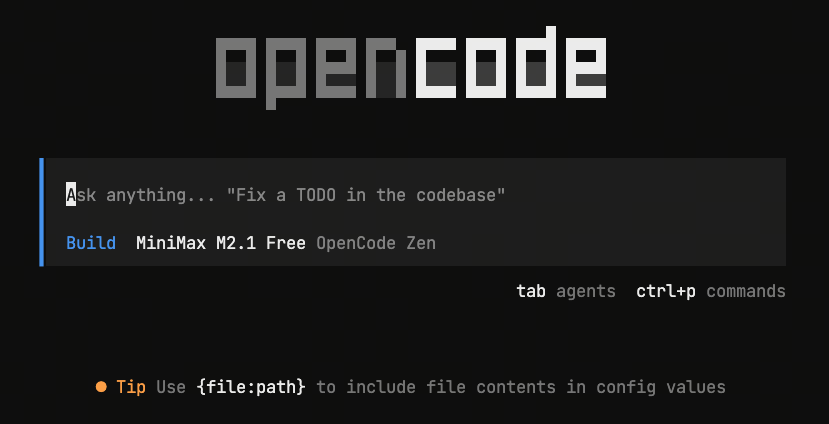
-
OpenCode Related Commands Press
Ctrl + Pto view all OpenCode commands.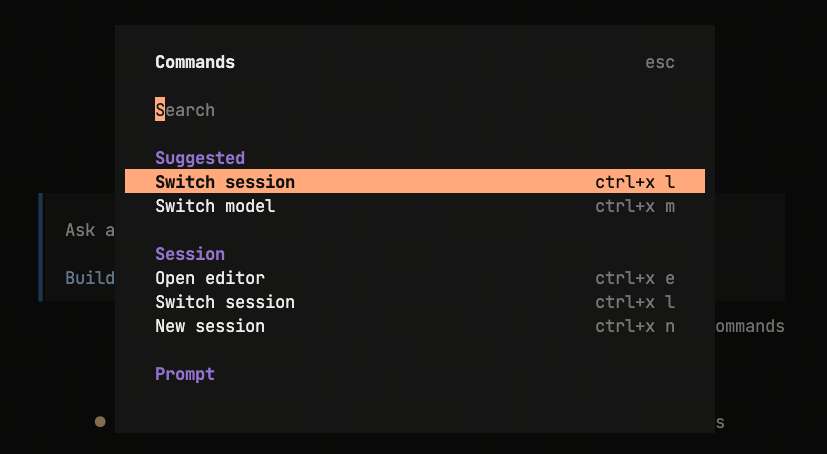 Main commands used:
/models: Switch models/sessions: Switch different sessions/new: Create new session/connect: Connect to custom model provider
-
Basic Operations
- build mode:
Enter your task requirements in the OpenCode interface and press the
Enterkey. The generated code will be saved in the current folder, and users can modify it as needed. - plan mode
Enter your question in the OpenCode interface and press the
Enterkey. OpenCode will generate a task plan based on the question, and users can develop according to the plan.
- build mode:
Enter your task requirements in the OpenCode interface and press the
5.2 Core Principles for Using LazyLLM-Skill
-
Install LazyLLM-Skill Ensure that LazyLLM-Skill has been installed. For specific installation methods, please refer to Installing LazyLLM-Skill.
-
Configure Model Service Provider's API Key Ensure that the model service provider's API Key has been configured. For specific configuration methods, please refer to the API Key section in API Configuration.
-
Input Requirements When entering your task requirements in the OpenCode interface, you must include the lazyllm or LazyLLM field, otherwise OpenCode will not call LazyLLM-Skill. Examples: *
Please implement a simple RAG program using LazyLLM*Use LazyLLM to implement a code Agent, and use gradio to implement web frontend interaction. After users input requirements, corresponding code is generated and can be downloaded for use
5.3 Quick AI Application Development
We use OpenCode+LazyLLM-Skill to implement a paper assistant. After users upload papers, the assistant extracts relevant information from the papers and answers based on user-input questions.
Start OpenCode and enter Use LazyLLM to implement a paper assistant, requiring users to be able to upload papers, and the assistant extracts relevant information from the papers and answers based on user-input questions in the dialog box, then press the Enter key.
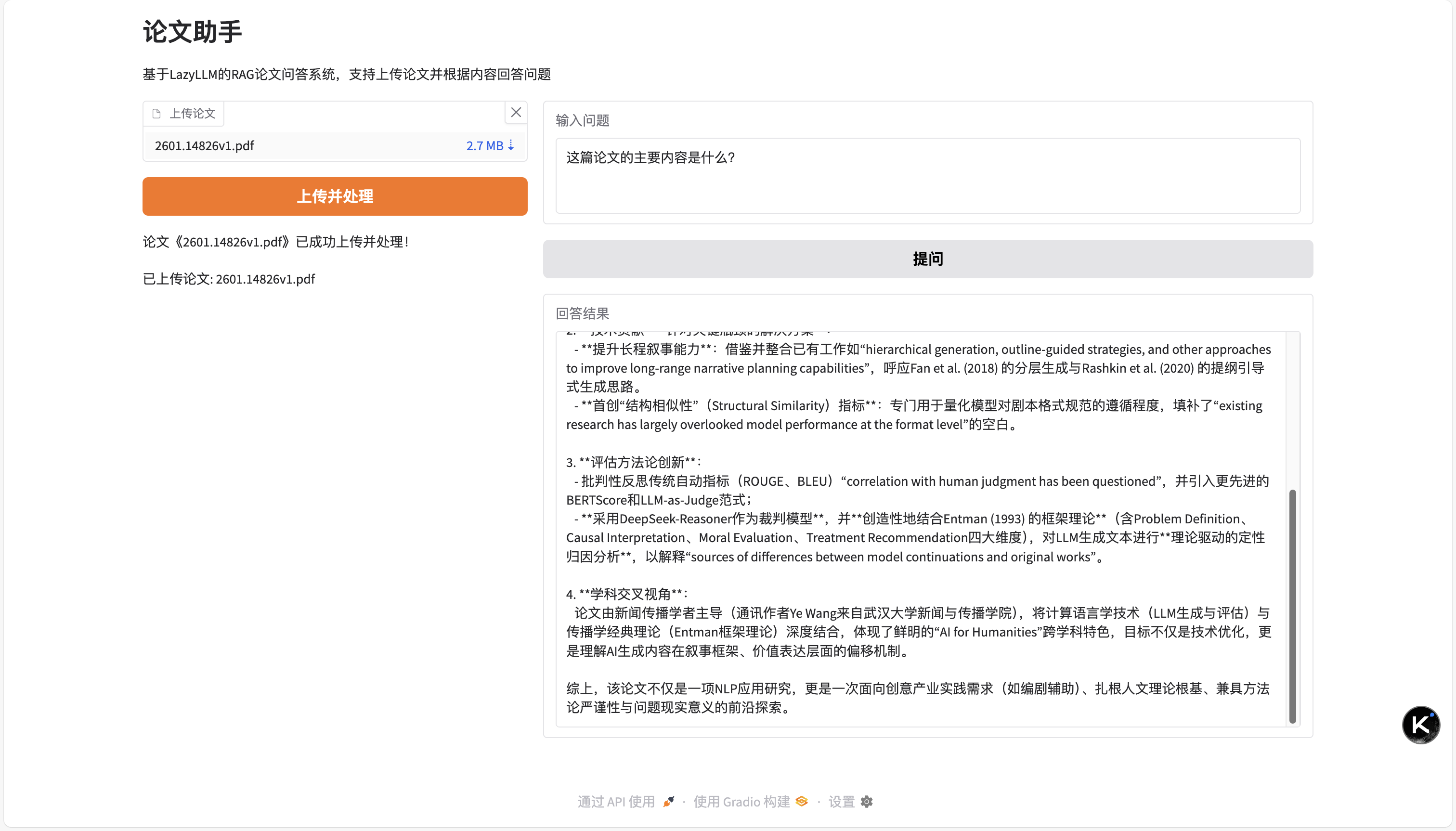
OpenCode will generate a RAG program with a web interface as follows based on the requirements, and users can modify it as needed.
# -*- coding: utf-8 -*-
"""
Paper Assistant - RAG Paper Q&A System Based on LazyLLM
Support uploading papers and extracting relevant information from papers to answer user questions
"""

import os
import tempfile
import lazyllm
from lazyllm.tools.rag import SentenceSplitter

class PaperAssistant:
    def __init__(self, embed_model=None, llm_model=None):
        """
        Initialize paper assistant

        Args:
            embed_model: Embedding model, defaults to online Embedding
            llm_model: Large language model, defaults to online Chat model
        """
        self.embed_model = embed_model or lazyllm.OnlineEmbeddingModule()
        self.llm_model = llm_model or lazyllm.OnlineChatModule()
        self.documents = None
        self.retriever = None
        self.reranker = None
        self.rag_func = None
        self.paper_dir = tempfile.mkdtemp()

        self._setup_prompt()

    def _setup_prompt(self):
        """Set up prompt"""
        self.prompt = """You are a professional paper assistant, responsible for answering user questions based on paper content.

Task requirements:
1. Carefully read and understand the user's question
2. Find relevant information from the provided paper context
3. Provide accurate and detailed answers based on paper content
4. If the question is not explicitly mentioned in the paper, please state this clearly

Paper context:
{context_str}

User question: {query}

Please answer the user's question based on the above paper content. If you need to quote specific content from the paper, please use quotation marks."""

    def upload_paper(self, file_path):
        """
        Upload and process paper

        Args:
            file_path: Paper file path (supports PDF, Markdown, TXT and other formats)
        """
        if not os.path.exists(file_path):
            raise FileNotFoundError(f"File does not exist: {file_path}")

        file_name = os.path.basename(file_path)
        dest_path = os.path.join(self.paper_dir, file_name)

        with open(file_path, 'rb') as src_file:
            with open(dest_path, 'wb') as dst_file:
                dst_file.write(src_file.read())

        self.documents = lazyllm.Document(
            dataset_path=self.paper_dir,
            embed=self.embed_model,
            manager=False
        )

        self.documents.create_node_group(
            name="sentences",
            transform=SentenceSplitter(chunk_size=1024, chunk_overlap=100)
        )

        self.retriever = lazyllm.Retriever(
            doc=self.documents,
            group_name="sentences",
            similarity="cosine",
            topk=5
        )

        self.reranker = lazyllm.Reranker(
            name='ModuleReranker',
            model=lazyllm.OnlineEmbeddingModule(type="rerank"),
            topk=3
        )

        self._build_rag_func()
        return f"Paper '{file_name}' has been successfully uploaded and processed!"

    def _build_rag_func(self):
        """Build RAG processing function"""
        llm = self.llm_model
        prompt = self.prompt
        llm.prompt(lazyllm.ChatPrompter(instruction=prompt, extra_keys=['context_str']))

        def rag_func(query):
            nodes = self.retriever(query=query)
            if self.reranker:
                nodes = self.reranker(nodes=nodes, query=query)
            context_str = "".join([node.get_content() for node in nodes])
            return llm({"query": query, "context_str": context_str})

        self.rag_func = rag_func

    def ask(self, question):
        """
        Ask a question

        Args:
            question: User question

        Returns:
            str: Answer based on paper content
        """
        if not self.documents:
            return "Please upload a paper file first!"

        if not self.rag_func:
            return "System is initializing, please try again later!"

        try:
            result = self.rag_func(question)
            return result
        except Exception as e:
            return f"Error processing question: {str(e)}"

    def get_paper_info(self):
        """Get information about uploaded papers"""
        if not self.documents:
            return "No papers uploaded yet"
        files = os.listdir(self.paper_dir)
        return f"Uploaded papers: {', '.join(files)}"

def create_web_interface():
    """Create web interface"""
    import gradio as gr

    assistant = PaperAssistant()

    def upload_file(file):
        try:
            result = assistant.upload_paper(file.name)
            info = assistant.get_paper_info()
            return result, info
        except Exception as e:
            return f"Upload failed: {str(e)}", "Upload failed"

    def answer_question(question):
        if not question.strip():
            return "Please enter a question!"
        response = assistant.ask(question)
        return response

    with gr.Blocks(title="Paper Assistant") as demo:
        gr.Markdown("# Paper Assistant")
        gr.Markdown("RAG paper Q&A system based on LazyLLM, supports uploading papers and answering questions based on content")

        with gr.Row():
            with gr.Column(scale=1):
                file_input = gr.File(
                    label="Upload Paper",
                    file_types=[".pdf", ".md", ".txt"],
                    type="filepath"
                )
                upload_btn = gr.Button("Upload and Process", variant="primary")
                upload_status = gr.Markdown("")
                paper_info = gr.Markdown("")

            with gr.Column(scale=2):
                question_input = gr.Textbox(
                    label="Enter Question",
                    placeholder="For example: What is the main contribution of this paper?",
                    lines=3
                )
                submit_btn = gr.Button("Ask", variant="secondary")
                answer_output = gr.Textbox(
                    label="Answer Result",
                    placeholder="Answer will be displayed here...",
                    lines=10
                )

        upload_btn.click(
            fn=upload_file,
            inputs=file_input,
            outputs=[upload_status, paper_info]
        )

        submit_btn.click(
            fn=answer_question,
            inputs=question_input,
            outputs=answer_output
        )

    return demo

def run_command_line():
    """Command line interaction mode"""
    print("=" * 60)
    print("Paper Assistant - RAG Paper Q&A System Based on LazyLLM")
    print("=" * 60)

    assistant = PaperAssistant()

    while True:
        print("\nPlease select an operation:")
        print("1. Upload paper")
        print("2. Ask question")
        print("3. View uploaded papers")
        print("4. Exit")

        choice = input("Please enter an option (1-4): ").strip()

        if choice == "1":
            file_path = input("Please enter paper file path: ").strip()
            try:
                result = assistant.upload_paper(file_path)
                print(f"\n{result}")
            except Exception as e:
                print(f"\nUpload failed: {str(e)}")

        elif choice == "2":
            if not assistant.documents:
                print("\nPlease upload a paper first!")
                continue

            question = input("Please enter question: ").strip()
            if question:
                print("\nAnalyzing paper...")
                answer = assistant.ask(question)
                print(f"\nAnswer:\n{answer}")

        elif choice == "3":
            print(f"\n{assistant.get_paper_info()}")

        elif choice == "4":
            print("\nThank you for using Paper Assistant, goodbye!")
            break

        else:
            print("\nInvalid option, please select again!")

if __name__ == "__main__":
    import sys

    if len(sys.argv) > 1 and sys.argv[1] == "--web":
        print("Starting web interface...")
        demo = create_web_interface()
        demo.launch(server_name="0.0.0.0", server_port=7860)
    else:
        run_command_line()
After starting the program, we get the following Web interface. After uploading papers, the assistant will process the paper content and answer questions accordingly.
6. Example Applications
6.1 Example 1: Generate a Simple RAG Program
prompt:
Use lazyllm to implement a simple RAG in the ./LazyLLM/example1.py file, with knowledge base documents in ./LazyLLM/docs
import lazyllm

documents = lazyllm.Document(
    dataset_path="./LazyLLM/docs",
    embed=lazyllm.OnlineEmbeddingModule(),
    manager=False
)

retriever = lazyllm.Retriever(
    doc=documents,
    group_name="CoarseChunk",
    similarity="bm25_chinese",
    topk=3
)

llm = lazyllm.OnlineChatModule()
prompt = 'Answer the question based on the context:'
llm.prompt(lazyllm.ChatPrompter(instruction=prompt, extra_keys=['context_str']))

if __name__ == '__main__':
    query = "What is LazyLLM?"
    doc_node_list = retriever(query=query)
    res = llm({
        "query": query,
        "context_str": "".join([node.get_content() for node in doc_node_list]),
    })
    print(f"Question: {query}")
    print(f"Answer: {res}")
6.2 Example 2: RAG Program with Custom Splitting Strategy
prompt:
Use lazyllm to implement a RAG in the ./LazyLLM/example2.py file, requiring splitting by the character '。', with a split length not exceeding 512, using cosine similarity, and with a recall count not exceeding two. I should be able to interact from the command line, and the knowledge base documents are in ./LazyLLM/docs
import lazyllm

# 1. Create document object and load knowledge base
documents = lazyllm.Document(
    dataset_path="./LazyLLM/docs",
    embed=lazyllm.OnlineEmbeddingModule(),
    manager=False
)

# 2. Create custom chunk node group, split by '。', chunk size no more than 512
documents.create_node_group(
    name="sentence_chunk",
    transform=lambda s: [chunk for chunk in s.split('。') if chunk],
    chunk_size=512
)

# 3. Create retriever, use cosine similarity, topk no more than 2
retriever = lazyllm.Retriever(
    doc=documents,
    group_name="sentence_chunk",
    similarity="cosine",
    topk=2
)

# 4. Create large language model
llm = lazyllm.OnlineChatModule()
prompt = 'Answer the question based on the context:'
llm.prompt(lazyllm.ChatPrompter(instruction=prompt, extra_keys=['context_str']))

# 5. Command-line interaction
if __name__ == '__main__':
    print("=== RAG Q&A System ===")
    print("Enter a question to query, type 'quit' or 'exit' to exit")
    print("-" * 30)

    while True:
        query = input("\nPlease enter a question: ").strip()

        if query.lower() in ['quit', 'exit', 'q']:
            print("Goodbye!")
            break

        if not query:
            print("Question cannot be empty, please re-enter")
            continue

        # Execute retrieval
        doc_node_list = retriever(query=query)

        # Generate answer
        res = llm({
            "query": query,
            "context_str": "".join([node.get_content() for node in doc_node_list]),
        })

        print(f"\nAnswer: {res}")
        print("-" * 30)
6.3 Example 3: RAG Program with Custom Storage Backend
prompt:
Implement a RAG function using lazyllm in ./LazyLLM/example3.py, requiring chroma as the storage backend, HNSW for indexing, known document content is mostly JSON, select an appropriate splitter, require reranking, finally output only one retrieval result, and answer questions based on the retrieval result, I can interact from the command line, reference document path: ./LazyLLM/docs
import lazyllm
from lazyllm.tools.rag import JSONSplitter

# 1. Configure Chroma storage backend + HNSW index
store_conf = {
    'segment_store': {
        'type': 'map',
        'kwargs': {
            'uri': './segment_store.db',
        },
    },
    'vector_store': {
        'type': 'chroma',
        'kwargs': {
            'dir': './chroma_db',
            'index_kwargs': {
                'hnsw': {
                    'space': 'cosine',
                    'ef_construction': 200,
                }
            }
        },
    },
}

# 2. Create document object, load knowledge base
documents = lazyllm.Document(
    dataset_path="./LazyLLM/docs",
    embed=lazyllm.OnlineEmbeddingModule(),
    store_conf=store_conf,
    manager=False
)

# 3. Create JSON split node group
documents.create_node_group(
    name="json_chunk",
    transform=JSONSplitter(chunk_size=512, chunk_overlap=50)
)

# 4. Create retriever
retriever = lazyllm.Retriever(
    doc=documents,
    group_name="json_chunk",
    similarity="cosine",
    topk=5
)

# 5. Create reranker, keep only the most relevant result
reranker = lazyllm.Reranker(
    name='ModuleReranker',
    model=lazyllm.OnlineEmbeddingModule(type="rerank"),
    topk=1
)

# 6. Create large language model
llm = lazyllm.OnlineChatModule()
prompt = 'Answer the question based on the context. If the context is insufficient to answer the question, please state that it cannot be answered:'
llm.prompt(lazyllm.ChatPrompter(instruction=prompt, extra_keys=['context_str']))

# 7. Command line interaction
if __name__ == '__main__':
    print("=== RAG Q&A System (Chroma + HNSW + JSON Split + Reranking) ===")
    print("Enter a question to query, enter 'quit' or 'exit' to exit")
    print("-" * 50)

    while True:
        query = input("\nPlease enter a question: ").strip()

        if query.lower() in ['quit', 'exit', 'q']:
            print("Goodbye!")
            break

        if not query:
            print("Question cannot be empty, please re-enter")
            continue

        # Execute retrieval
        doc_node_list = retriever(query=query)

        if not doc_node_list:
            print("\nNo relevant documents retrieved")
            continue

        # Execute reranking, keep only the most relevant result
        reranked_nodes = reranker(nodes=doc_node_list, query=query)

        if not reranked_nodes:
            print("\nNo valid results after reranking")
            continue

        # Get retrieved document content
        context_str = reranked_nodes[0].get_content()

        print(f"\nRetrieved document fragment: {context_str[:200]}...")
        print("-" * 50)

        # Generate answer
        res = llm({
            "query": query,
            "context_str": context_str,
        })

        print(f"\nAnswer: {res}")
        print("-" * 50)
6.4 Example 4: RAG Program with Complex Flow and Configuration
prompt:
Implement a complex RAG using lazyllm in file ./LazyLLM/example4.py, requiring three knowledge bases, using memory storage, chroma storage, and mixed memory and chroma storage respectively; each knowledge base retrieves one, then use reranking, finally output only one result to the large language model. I can interact from the command line, all knowledge base documents use /./LazyLLM/docs.
import lazyllm

# ==================== Configure storage backends for three knowledge bases ====================

# 1. Memory storage configuration (MapStore)
memory_store_conf = {
    'type': 'map',
    'kwargs': {
        'uri': './memory_segment.db',
    }
}

# 2. Chroma storage configuration + HNSW index
chroma_store_conf = {
    'segment_store': {
        'type': 'map',
        'kwargs': {
            'uri': './chroma_segment.db',
        },
    },
    'vector_store': {
        'type': 'chroma',
        'kwargs': {
            'dir': './chroma_vector_db',
            'index_kwargs': {
                'hnsw': {
                    'space': 'cosine',
                    'ef_construction': 200,
                }
            }
        },
    },
}

# 3. Hybrid storage configuration (memory + Chroma)
hybrid_store_conf = {
    'segment_store': {
        'type': 'map',
        'kwargs': {
            'uri': './hybrid_segment.db',
        },
    },
    'vector_store': {
        'type': 'chroma',
        'kwargs': {
            'dir': './hybrid_chroma_db',
            'index_kwargs': {
                'hnsw': {
                    'space': 'cosine',
                    'ef_construction': 200,
                }
            }
        },
    },
}

# ==================== Create three knowledge bases ====================

# Use the same embedding model
embed_model = lazyllm.OnlineEmbeddingModule()

# Knowledge base 1: Memory storage
doc_memory = lazyllm.Document(
    dataset_path="./LazyLLM/docs",
    embed=embed_model,
    store_conf=memory_store_conf,
    manager=False
)

# Knowledge base 2: Chroma storage
doc_chroma = lazyllm.Document(
    dataset_path="./LazyLLM/docs",
    embed=embed_model,
    store_conf=chroma_store_conf,
    manager=False
)

# Knowledge base 3: Hybrid storage (memory + Chroma)
doc_hybrid = lazyllm.Document(
    dataset_path="./LazyLLM/docs",
    embed=embed_model,
    store_conf=hybrid_store_conf,
    manager=False
)

# ==================== Create three retrievers (each retrieves 1) ====================

retriever_memory = lazyllm.Retriever(
    doc=doc_memory,
    group_name="CoarseChunk",
    similarity="cosine",
    topk=1
)

retriever_chroma = lazyllm.Retriever(
    doc=doc_chroma,
    group_name="CoarseChunk",
    similarity="cosine",
    topk=1
)

retriever_hybrid = lazyllm.Retriever(
    doc=doc_hybrid,
    group_name="CoarseChunk",
    similarity="cosine",
    topk=1
)

# ==================== Create reranker (keep only the most relevant one) ====================

reranker = lazyllm.Reranker(
    name='ModuleReranker',
    model=lazyllm.OnlineEmbeddingModule(type="rerank"),
    topk=1
)

# ==================== Create large language model ====================

llm = lazyllm.OnlineChatModule()
prompt = 'Answer the question based on the context. If the context is insufficient to answer the question, please state that it cannot be answered:'
llm.prompt(lazyllm.ChatPrompter(instruction=prompt, extra_keys=['context_str']))

# ==================== Command line interaction ====================

if __name__ == '__main__':
    print("=== Complex RAG Q&A System (Three Knowledge Bases + Reranking) ===")
    print("Storage backends: Memory Storage | Chroma Storage | Hybrid Storage (Memory + Chroma)")
    print("Enter a question to query, enter 'quit' or 'exit' to exit")
    print("-" * 60)

    while True:
        query = input("\nPlease enter a question: ").strip()

        if query.lower() in ['quit', 'exit', 'q']:
            print("Goodbye!")
            break

        if not query:
            print("Question cannot be empty, please re-enter")
            continue

        print("\nRetrieving from three knowledge bases...")

        # Retrieve from three knowledge bases respectively, each retrieves 1 result
        result_memory = retriever_memory(query=query)
        result_chroma = retriever_chroma(query=query)
        result_hybrid = retriever_hybrid(query=query)

        # Merge all retrieval results
        all_results = []
        if result_memory:
            all_results.extend(result_memory)
            print(f"✓ Memory storage: Retrieved {len(result_memory)} result(s)")
        else:
            print("✗ Memory storage: No results")

        if result_chroma:
            all_results.extend(result_chroma)
            print(f"✓ Chroma storage: Retrieved {len(result_chroma)} result(s)")
        else:
            print("✗ Chroma storage: No results")

        if result_hybrid:
            all_results.extend(result_hybrid)
            print(f"✓ Hybrid storage: Retrieved {len(result_hybrid)} result(s)")
        else:
            print("✗ Hybrid storage: No results")

        if not all_results:
            print("\nNo relevant documents retrieved from any knowledge base")
            continue

        print(f"\nTotal retrieved {len(all_results)} result(s), performing reranking...")

        # Execute reranking, keep only the most relevant result
        reranked_nodes = reranker(nodes=all_results, query=query)

        if not reranked_nodes:
            print("\nNo valid results after reranking")
            continue

        # Get the most relevant document content
        best_result = reranked_nodes[0]
        context_str = best_result.get_content()

        print(f"\nBest retrieval result (from reranking): {context_str[:150]}...")
        print("-" * 60)

        # Generate answer
        res = llm({
            "query": query,
            "context_str": context_str,
        })

        print(f"\nAnswer: {res}")
        print("-" * 60)
6.5 Example 5: RAG Program with Web Interface Interaction
prompt:
Help me implement a complex RAG application using lazyllm in ./LazyLLM/example5.py, requiring three knowledge bases, using memory storage, chroma vector storage, and hybrid storage respectively, each retrieves one result, use reranking to retrieve one result, require a web interface for interaction. All knowledge base documents use ./LazyLLM/docs
"""
Complex RAG Application Example - Using three knowledge bases and reranking
- Knowledge base 1: Memory storage (MapStore)
- Knowledge base 2: Chroma vector storage
- Knowledge base 3: Hybrid storage (MapStore + Chroma)
- Use reranking to optimize results
- Web interface interaction
"""

import lazyllm
from lazyllm import bind

# ==================== Configuration ====================
# Document path
DATASET_PATH = "./LazyLLM/docs"

# Storage path configuration
MEMORY_STORE_PATH = "./LazyLLM/stores/memory"
CHROMA_STORE_PATH = "./LazyLLM/stores/chroma"
HYBRID_STORE_PATH = "./LazyLLM/stores/hybrid"

# Embedding model (use online embedding model, can also use local model)
EMBED_MODEL = lazyllm.OnlineEmbeddingModule()

# Reranking model
RERANK_MODEL = lazyllm.OnlineEmbeddingModule(type="rerank")

# Large language model
LLM_MODEL = lazyllm.OnlineChatModule()

# ==================== Storage configuration ====================
# 1. Memory storage configuration (only use MapStore)
memory_store_conf = {
    'segment_store': {
        'type': 'map',
        'kwargs': {
            'uri': f'{MEMORY_STORE_PATH}/segments.db',
        },
    },
}

# 2. Chroma vector storage configuration
chroma_store_conf = {
    'type': 'chroma',
    'kwargs': {
        'dir': f'{CHROMA_STORE_PATH}/vectors',
        'index_kwargs': {
            'hnsw': {
                'space': 'cosine',
                'ef_construction': 200,
            }
        }
    },
}

# 3. Hybrid storage configuration (MapStore + Chroma)
hybrid_store_conf = {
    'segment_store': {
        'type': 'map',
        'kwargs': {
            'uri': f'{HYBRID_STORE_PATH}/segments.db',
        },
    },
    'vector_store': {
        'type': 'chroma',
        'kwargs': {
            'dir': f'{HYBRID_STORE_PATH}/vectors',
            'index_kwargs': {
                'hnsw': {
                    'space': 'cosine',
                    'ef_construction': 200,
                }
            }
        },
    },
}

# ==================== Create knowledge bases ====================
print("Initializing three knowledge bases...")

# Knowledge base 1: Memory storage (use MapStore)
doc_memory = lazyllm.Document(
    dataset_path=DATASET_PATH,
    embed=EMBED_MODEL,
    store_conf=memory_store_conf,
    manager=False
)

# Knowledge base 2: Chroma vector storage
doc_chroma = lazyllm.Document(
    dataset_path=DATASET_PATH,
    embed=EMBED_MODEL,
    store_conf=chroma_store_conf,
    manager=False
)

# Knowledge base 3: Hybrid storage
doc_hybrid = lazyllm.Document(
    dataset_path=DATASET_PATH,
    embed=EMBED_MODEL,
    store_conf=hybrid_store_conf,
    manager=False
)

# Create node groups - sentence-level splitting
def split_sentences(text):
    return text.split('。')

# Create sentence-level node groups for each knowledge base
doc_memory.create_node_group(name="sentences", transform=split_sentences)
doc_chroma.create_node_group(name="sentences", transform=split_sentences)
doc_hybrid.create_node_group(name="sentences", transform=split_sentences)

print("Knowledge base initialization completed!")

# ==================== Build RAG pipeline ====================
prompt_template = '''You are a professional AI assistant. Please answer the question based on the following context.

Context information:
{context_str}

User question: {query}

Please provide an accurate and concise answer based on the context. If the context does not contain relevant information, please state clearly.'''

with lazyllm.pipeline() as ppl:
    # Parallel retrieval - retrieve 1 result from each of the three knowledge bases
    with lazyllm.parallel().sum as ppl.prl:
        # Retriever 1: Memory storage + BM25
        ppl.prl.retriever_memory = lazyllm.Retriever(
            doc=doc_memory,
            group_name="CoarseChunk",
            similarity="bm25_chinese",
            topk=1
        )

        # Retriever 2: Chroma vector storage + cosine similarity
        ppl.prl.retriever_chroma = lazyllm.Retriever(
            doc=doc_chroma,
            group_name="CoarseChunk",
            similarity="cosine",
            topk=1
        )

        # Retriever 3: Hybrid storage + sentence-level BM25
        ppl.prl.retriever_hybrid = lazyllm.Retriever(
            doc=doc_hybrid,
            group_name="sentences",
            similarity="bm25_chinese",
            topk=1
        )

    # Reranking - select the most relevant 1 from 3 results
    ppl.reranker = lazyllm.Reranker(
        name='ModuleReranker',
        model=RERANK_MODEL,
        topk=1
    ) | bind(query=ppl.input)

    # Format context
    ppl.formatter = (
        lambda nodes, query: dict(
            context_str="".join([node.get_content() for node in nodes]),
            query=query,
        )
    ) | bind(query=ppl.input)

    # Large language model generates answer
    ppl.llm = LLM_MODEL.prompt(
        lazyllm.ChatPrompter(
            instruction=prompt_template,
            extra_keys=['context_str']
        )
    )

# Create ActionModule
rag_module = lazyllm.ActionModule(ppl)

# ==================== Web interface ====================
print("Starting web service...")

# Create web interface
web_module = lazyllm.WebModule(
    rag_module,
    port=8080,
    title="Complex RAG Q&A System"
)

# Start service
web_module.start()

print(f"\n{'='*60}")
print("RAG Web service has started!")
print(f"Access URL: http://localhost:8080")
print(f"{'='*60}")
print("\nSystem features:")
print("1. Memory storage knowledge base - use BM25 retrieval")
print("2. Chroma vector storage knowledge base - use cosine similarity retrieval")
print("3. Hybrid storage knowledge base - use sentence-level BM25 retrieval")
print("4. Reranking optimization - select the most relevant from three results")
print("\nPress Ctrl+C to stop the service")

# Keep program running
try:
    import time
    while True:
        time.sleep(1)
except KeyboardInterrupt:
    print("\nStopping service...")
    web_module.stop()
    print("Service stopped")
6.6 Example 6: Generate a Code Agent
prompt:
"""
Code Agent Example
Use lazyllm to implement an intelligent agent capable of executing code, searching code, and reading/writing files
"""

import lazyllm
from lazyllm.tools import fc_register, ReactAgent
import subprocess
import os

@fc_register("tool")
def execute_python(code: str) -> str:
    """
    Execute Python code and return the result.

    Args:
        code (str): Python code string to execute

    Returns:
        str: Code execution result or error message
    """
    try:
        # Use subprocess to execute code, increase security
        result = subprocess.run(
            ['python', '-c', code],
            capture_output=True,
            text=True,
            timeout=30
        )
        if result.returncode == 0:
            return f"Execution successful:\n{result.stdout}"
        else:
            return f"Execution error:\n{result.stderr}"
    except subprocess.TimeoutExpired:
        return "Execution timeout (exceeded 30 seconds)"
    except Exception as e:
        return f"Execution exception: {str(e)}"


@fc_register("tool")
def search_code(query: str, path: str = ".") -> str:
    """
    Search for code files containing keywords in the specified directory.

    Args:
        query (str): Search keyword
        path (str): Search path, default is current directory

    Returns:
        str: List of matching files
    """
    try:
        matches = []
        for root, dirs, files in os.walk(path):
            # Skip hidden directories and common non-code directories
            dirs[:] = [d for d in dirs if not d.startswith('.') and d not in ['node_modules', '__pycache__', 'venv', '.git']]

            for file in files:
                if file.endswith(('.py', '.js', '.ts', '.java', '.cpp', '.c', '.h', '.go', '.rs', '.md')):
                    file_path = os.path.join(root, file)
                    try:
                        with open(file_path, 'r', encoding='utf-8', errors='ignore') as f:
                            content = f.read()
                            if query in content:
                                matches.append(file_path)
                    except:
                        continue

        if matches:
            return f"Found {len(matches)} matching file(s):\n" + "\n".join(matches[:10])  # Return at most 10
        else:
            return f"No files containing '{query}' found"
    except Exception as e:
        return f"Search error: {str(e)}"


@fc_register("tool")
def read_file(file_path: str) -> str:
    """
    Read the content of the specified file.

    Args:
        file_path (str): File path

    Returns:
        str: File content or error message
    """
    try:
        if not os.path.exists(file_path):
            return f"File does not exist: {file_path}"

        with open(file_path, 'r', encoding='utf-8', errors='ignore') as f:
            content = f.read()
            # Limit returned content length
            if len(content) > 5000:
                content = content[:5000] + "\n... (content truncated, total {} characters)".format(len(content))
            return content
    except Exception as e:
        return f"Read error: {str(e)}"


@fc_register("tool")
def write_file(file_path: str, content: str) -> str:
    """
    Write content to the specified file.

    Args:
        file_path (str): File path
        content (str): Content to write

    Returns:
        str: Operation result
    """
    try:
        # Ensure directory exists
        directory = os.path.dirname(file_path)
        if directory and not os.path.exists(directory):
            os.makedirs(directory)

        with open(file_path, 'w', encoding='utf-8') as f:
            f.write(content)
        return f"Successfully wrote to file: {file_path}"
    except Exception as e:
        return f"Write error: {str(e)}"


@fc_register("tool")
def list_files(path: str = ".") -> str:
    """
    List files and folders in the specified directory.

    Args:
        path (str): Directory path, default is current directory

    Returns:
        str: File list
    """
    try:
        if not os.path.exists(path):
            return f"Path does not exist: {path}"

        items = os.listdir(path)
        files = []
        dirs = []

        for item in items:
            item_path = os.path.join(path, item)
            if os.path.isdir(item_path):
                dirs.append(f"[DIR] {item}")
            else:
                files.append(f"[FILE] {item}")

        result = []
        if dirs:
            result.append("Folders:")
            result.extend(dirs)
        if files:
            result.append("\nFiles:")
            result.extend(files)

        return "\n".join(result) if result else "Directory is empty"
    except Exception as e:
        return f"List error: {str(e)}"


# Define available tool list
tools = [
    "execute_python",    # Execute Python code
    "search_code",       # Search code
    "read_file",         # Read file
    "write_file",        # Write file
    "list_files"         # List files
]

# Create LLM model
# Use online model (need to configure API Key)
# llm = lazyllm.OnlineChatModule(source="openai", model="gpt-4")
# Or use other online models
llm = lazyllm.OnlineChatModule(source="deepseek", model="deepseek-chat")

# Or use local model (need to deploy in advance)
# llm = lazyllm.TrainableModule("internlm2-chat-20b").deploy_method(lazyllm.deploy.vllm).start()

# Create ReactAgent
agent = ReactAgent(
    llm=llm,
    tools=tools,
    max_retries=5,
    return_trace=True  # Return detailed execution trace for debugging
)


if __name__ == "__main__":
    # Example queries
    queries = [
        "Calculate the square root of 123",
        "List all files in the current directory",
        "Search for code files containing 'ReactAgent'",
    ]

    print("=" * 60)
    print("Code Agent Example")
    print("=" * 60)

    for query in queries:
        print(f"\nUser: {query}")
        print("-" * 40)

        try:
            result = agent(query)
            print(f"Agent: {result}")
        except Exception as e:
            print(f"Error: {str(e)}")

        print("=" * 60)

    # Interactive mode
    print("\nEnter interactive mode (enter 'exit' to quit):")
    while True:
        user_input = input("\nUser: ").strip()
        if user_input.lower() in ['exit', 'quit', '退出']:
            print("Goodbye!")
            break

        if not user_input:
            continue

        try:
            result = agent(user_input)
            print(f"Agent: {result}")
        except Exception as e:
            print(f"Error: {str(e)}")
6.7 Example 7: Generate a Simple AI Programming Assistant Agent
prompt:
Implement a code agent using lazyllm in ./LazyLLM/example7.py, supporting reading files, writing code, executing and verifying code, with context management and command line interaction capabilities, supporting model switching. Knowledge base documents are in ./LazyLLM/docs
"""
Code Agent Example - Supports reading files, writing code, executing and verifying code
With context management and command line interaction capabilities, supporting model switching
"""

import os
import sys
import json
import subprocess
import lazyllm
from lazyllm.tools import fc_register, FunctionCallAgent
from lazyllm import OnlineChatModule

# ==================== Tool function definitions ====================

@fc_register('tool')
def read_file(file_path: str) -> str:
    """
    Read the content of the specified file.

    Args:
        file_path (str): Absolute or relative path to the file

    Returns:
        str: File content, returns error message if file does not exist
    """
    try:
        with open(file_path, 'r', encoding='utf-8') as f:
            content = f.read()
        return f"File content:\n```\n{content}\n```"
    except FileNotFoundError:
        return f"Error: File '{file_path}' does not exist"
    except Exception as e:
        return f"Error: Exception occurred while reading file: {str(e)}"

@fc_register('tool')
def write_file(file_path: str, content: str) -> str:
    """
    Write content to the specified file. If the file exists, it will overwrite the original content.

    Args:
        file_path (str): Absolute or relative path to the file
        content (str): Content to write to the file

    Returns:
        str: Operation result information
    """
    try:
        # Ensure directory exists
        directory = os.path.dirname(file_path)
        if directory and not os.path.exists(directory):
            os.makedirs(directory)

        with open(file_path, 'w', encoding='utf-8') as f:
            f.write(content)
        return f"Success: Content has been written to file '{file_path}'"
    except Exception as e:
        return f"Error: Exception occurred while writing file: {str(e)}"

@fc_register('tool')
def execute_code(code: str, language: str = "python") -> str:
    """
    Execute the specified code and return the execution result. Supports Python and Bash scripts.

    Args:
        code (str): Code to execute
        language (str): Programming language, optional "python" or "bash", default is "python"

    Returns:
        str: Code execution result, including standard output, standard error, and return code
    """
    try:
        if language.lower() == "python":
            # Execute Python code
            result = subprocess.run(
                [sys.executable, "-c", code],
                capture_output=True,
                text=True,
                timeout=30
            )
        elif language.lower() == "bash":
            # Execute Bash script
            result = subprocess.run(
                code,
                shell=True,
                capture_output=True,
                text=True,
                timeout=30
            )
        else:
            return f"Error: Unsupported language '{language}', currently only supports python and bash"

        output = []
        if result.stdout:
            output.append(f"Standard output:\n{result.stdout}")
        if result.stderr:
            output.append(f"Standard error:\n{result.stderr}")
        output.append(f"Return code: {result.returncode}")

        return "\n".join(output)
    except subprocess.TimeoutExpired:
        return "Error: Code execution timeout (exceeded 30 seconds)"
    except Exception as e:
        return f"Error: Exception occurred while executing code: {str(e)}"

@fc_register('tool')
def list_files(directory: str = ".") -> str:
    """
    List files and subdirectories in the specified directory.

    Args:
        directory (str): Directory path, default is current directory

    Returns:
        str: Directory content list
    """
    try:
        items = os.listdir(directory)
        files = []
        dirs = []

        for item in items:
            full_path = os.path.join(directory, item)
            if os.path.isdir(full_path):
                dirs.append(f"[DIR] {item}")
            else:
                files.append(f"[FILE] {item}")

        result = []
        if dirs:
            result.append("Directories:")
            result.extend(sorted(dirs))
        if files:
            result.append("\nFiles:")
            result.extend(sorted(files))

        return "\n".join(result) if result else "Directory is empty"
    except Exception as e:
        return f"Error: Unable to list directory contents: {str(e)}"


# ==================== Model management class ====================

class ModelManager:
    """Model manager, supports switching between different online models"""

    # Supported model configurations
    SUPPORTED_MODELS = {
        "deepseek": {"source": "deepseek", "model": "deepseek-chat"},
        "openai": {"source": "openai", "model": "gpt-4"},
        "glm": {"source": "glm", "model": "glm-4"},
        "sensenova": {"source": "sensenova", "model": "SenseChat"},
        "kimi": {"source": "kimi", "model": "moonshot-v1-8k"},
    }

    def __init__(self, default_model: str = "deepseek"):
        self.current_model_name = default_model
        self.current_llm = self._create_llm(default_model)
        self.chat_history = []

    def _create_llm(self, model_name: str):
        """Create LLM instance for the specified model"""
        if model_name not in self.SUPPORTED_MODELS:
            raise ValueError(f"Unsupported model: {model_name}")

        config = self.SUPPORTED_MODELS[model_name]
        model = config.get("model")
        if model is None:
            model = ""
        return OnlineChatModule(source=config["source"], model=model)

    def switch_model(self, model_name: str) -> str:
        """Switch to the specified model"""
        try:
            if model_name not in self.SUPPORTED_MODELS:
                available = ", ".join(self.SUPPORTED_MODELS.keys())
                return f"Error: Unsupported model '{model_name}'. Available models: {available}"

            self.current_llm = self._create_llm(model_name)
            self.current_model_name = model_name
            # Clear history when switching models
            self.chat_history = []
            return f"Successfully switched to model: {model_name}"
        except Exception as e:
            return f"Failed to switch model: {str(e)}"

    def get_current_model(self):
        """Get current model instance"""
        return self.current_llm

    def get_model_name(self) -> str:
        """Get current model name"""
        return self.current_model_name

    def add_to_history(self, query: str, response: str):
        """Add conversation to history"""
        self.chat_history.append([query, response])

    def get_history(self):
        """Get conversation history"""
        return self.chat_history

    def clear_history(self):
        """Clear conversation history"""
        self.chat_history = []
        return "Conversation history has been cleared"


# ==================== Code Agent class ====================

class CodeAgent:
    """Code Agent, supports file operations, code execution and interaction"""

    def __init__(self, model_manager: ModelManager):
        self.model_manager = model_manager
        self.tools = ["read_file", "write_file", "execute_code", "list_files"]
        self.agent = None
        self._create_agent()

    def _create_agent(self):
        """Create FunctionCallAgent instance"""
        llm = self.model_manager.get_current_model()
        self.agent = FunctionCallAgent(llm, tools=self.tools)

    def process_query(self, query: str) -> str:
        """Process user query"""
        # If model has been switched, recreate agent
        if self.agent is None:
            self._create_agent()

        if self.agent is None:
            return "Error: Agent initialization failed"

        # Execute query
        response = self.agent(query)

        # Add to history
        self.model_manager.add_to_history(query, response)

        return response

    def on_model_switched(self):
        """Callback after model switch"""
        self._create_agent()


# ==================== Command line interaction interface ====================

class InteractiveCLI:
    """Interactive command line interface"""

    def __init__(self):
        self.model_manager = ModelManager()
        self.code_agent = CodeAgent(self.model_manager)
        self.running = True

    def print_help(self):
        """Print help information"""
        help_text = """
╔══════════════════════════════════════════════════════════════╗
║                    Code Agent Interactive Console              ║
╠══════════════════════════════════════════════════════════════╣
║  Commands:                                                    ║
║    /help              - Display this help information        ║
║    /models            - List available models                 ║
║    /switch <model>     - Switch to specified model            ║
║    /model             - Display current model                 ║
║    /history           - Display conversation history           ║
║    /clear             - Clear conversation history             ║
║    /exit or /quit     - Exit program                         ║
╠══════════════════════════════════════════════════════════════╣
║  Available Tools:                                             ║
║    • read_file   - Read file content                         ║
║    • write_file  - Write file content                        ║
║    • execute_code- Execute code (Python/Bash)                 ║
║    • list_files  - List directory contents                    ║
╠══════════════════════════════════════════════════════════════╣
║  Tips:                                                        ║
║    Enter questions or commands directly to interact with Agent ║
║    Supports multi-turn conversations, Agent remembers context ║
╚══════════════════════════════════════════════════════════════╝
        """
        print(help_text)

    def list_models(self):
        """List available models"""
        print("\nAvailable models:")
        for name, config in ModelManager.SUPPORTED_MODELS.items():
            current = " (current)" if name == self.model_manager.get_model_name() else ""
            print(f"  • {name}: {config['source']} - {config['model']}{current}")
        print()

    def switch_model(self, model_name: str):
        """Switch model"""
        result = self.model_manager.switch_model(model_name)
        print(result)
        if "Success" in result or "Successfully" in result:
            self.code_agent.on_model_switched()

    def show_current_model(self):
        """Display current model"""
        print(f"\nCurrent model: {self.model_manager.get_model_name()}")
        config = ModelManager.SUPPORTED_MODELS.get(self.model_manager.get_model_name())
        if config:
            print(f"  Source: {config['source']}")
            print(f"  Model: {config['model']}")
        print()

    def show_history(self):
        """Display conversation history"""
        history = self.model_manager.get_history()
        if not history:
            print("\nNo conversation history yet\n")
            return

        print("\n" + "="*60)
        print("Conversation history:")
        print("="*60)
        for i, (query, response) in enumerate(history, 1):
            print(f"\n[{i}] User: {query}")
            print(f"[{i}] Agent: {response[:200]}{'...' if len(response) > 200 else ''}")
        print("\n" + "="*60 + "\n")

    def clear_history(self):
        """Clear conversation history"""
        result = self.model_manager.clear_history()
        print(result)

    def process_command(self, command: str) -> bool:
        """Process command, return whether to continue running"""
        command = command.strip()

        if not command:
            return True

        # Check if it's a command
        if command.startswith("/"):
            parts = command[1:].split(maxsplit=1)
            cmd = parts[0].lower()
            arg = parts[1] if len(parts) > 1 else ""

            if cmd in ["exit", "quit"]:
                print("Goodbye!")
                return False
            elif cmd == "help":
                self.print_help()
            elif cmd == "models":
                self.list_models()
            elif cmd == "switch":
                if arg:
                    self.switch_model(arg.strip())
                else:
                    print("Please specify model name, for example: /switch deepseek")
            elif cmd == "model":
                self.show_current_model()
            elif cmd == "history":
                self.show_history()
            elif cmd == "clear":
                self.clear_history()
            else:
                print(f"Unknown command: /{cmd}, enter /help for help")
        else:
            # Normal query, hand over to Agent
            print("\nAgent thinking...")
            try:
                response = self.code_agent.process_query(command)
                print(f"\nAgent: {response}\n")
            except Exception as e:
                print(f"\nError: {str(e)}\n")

        return True

    def run(self):
        """Run interactive CLI"""
        self.print_help()

        while self.running:
            try:
                # Display prompt
                prompt = f"[{self.model_manager.get_model_name()}] > "
                user_input = input(prompt).strip()

                self.running = self.process_command(user_input)

            except KeyboardInterrupt:
                print("\n\nInterrupt detected, exiting program...")
                break
            except EOFError:
                print("\nGoodbye!")
                break
            except Exception as e:
                print(f"\nError occurred: {str(e)}\n")


# ==================== Main program entry ====================

def main():
    """Main function"""
    print("\nInitializing Code Agent...")

    # Check environment variables
    required_env_vars = [
        "LAZYLLM_DEEPSEEK_API_KEY",
        "LAZYLLM_OPENAI_API_KEY",
        "LAZYLLM_GLM_API_KEY",
        "LAZYLLM_SENSENOVA_API_KEY",
        "LAZYLLM_KIMI_API_KEY"
    ]

    missing_vars = []
    for var in required_env_vars:
        if not os.environ.get(var):
            missing_vars.append(var)

    if missing_vars:
        print("\nWarning: The following environment variables are not set, which may affect model calls:")
        for var in missing_vars:
            print(f"  - {var}")
        print("\nPlease set the corresponding API keys to use online models.\n")

    # Start interactive CLI
    cli = InteractiveCLI()
    cli.run()

if __name__ == "__main__":
    main()
6.8 Example 8: Generate a Multi-Agent Dialogue System
prompt:
Implement a multi-agent dialogue system using lazyllm in file ./LazyLLM/example8.py, enabling different roles to interact in a hierarchical and natural manner under specific topics. Require introducing a director in the system to control speaking order and dialogue termination logic, while other dialogueagents participate as controlled roles. The director decides who speaks and judges whether to end the dialogue. I can provide the discussion topic from the command line, during which the system outputs the discussion content of each agent in each round, and finally outputs the result to me.
"""
Multi-Agent Dialogue System
- Director: Controls speaking order and dialogue termination
- DialogueAgents: Participants with different roles
"""

import lazyllm
from lazyllm import loop, pipeline, parallel, bind
import sys


class DialogueAgent:
    """Dialogue agent base class"""

    def __init__(self, name, role_description, llm):
        self.name = name
        self.role_description = role_description
        self.llm = llm
        self.history = []

    def __call__(self, context):
        """Participate in dialogue"""
        # Build prompt, including role setting and context
        prompt = f"""You are {self.name}. {self.role_description}

Current discussion topic context:
{context}

Please express your opinion based on your role and the above context (within 100 words):"""

        response = self.llm(prompt)
        self.history.append({"role": "assistant", "content": response})
        return f"{self.name}: {response}"


class Director:
    """Director agent, controls dialogue flow"""

    def __init__(self, llm, agents, max_rounds=5):
        self.llm = llm
        self.agents = agents
        self.max_rounds = max_rounds
        self.current_round = 0
        self.conversation_history = []

    def decide_next_speaker(self, topic, history_text):
        """Decide the next speaker"""
        prompt = f"""You are the dialogue director, responsible for controlling the flow of multi-agent dialogue.

Discussion topic: {topic}

Current dialogue history:
{history_text}

Available participants:
{chr(10).join([f'- {agent.name}: {agent.role_description[:30]}...' for agent in self.agents])}

Based on the above information, please decide which agent should speak next. Only return the agent name, do not explain.
If the dialogue should end, please return "END".

Decision:"""

        decision = self.llm(prompt).strip()
        return decision

    def should_end_conversation(self, topic, history_text):
        """Judge whether the dialogue should end"""
        prompt = f"""You are the dialogue director, responsible for judging whether the discussion should end.

Discussion topic: {topic}

Current dialogue history:
{history_text}

Please judge whether the discussion has been sufficient, whether a consensus has been reached or it has naturally ended.
If it should end, return "YES"; if it should continue, return "NO".

Judgment:"""

        result = self.llm(prompt).strip().upper()
        return "YES" in result

    def generate_summary(self, topic, history_text):
        """Generate dialogue summary"""
        prompt = f"""Please summarize the following discussion:

Discussion topic: {topic}

Dialogue record:
{history_text}

Please summarize the main points and conclusions:"""

        return self.llm(prompt)


def create_multi_agent_system(topic):
    """Create multi-agent dialogue system"""

    # Create shared LLM
    llm = lazyllm.OnlineChatModule()

    # Create dialogue agents with different roles
    agents = [
        DialogueAgent(
            name="Technical Expert",
            role_description="You are a technical expert, focusing on technical feasibility, implementation difficulty, and innovation. You tend to analyze problems from a technical perspective.",
            llm=llm
        ),
        DialogueAgent(
            name="Product Manager",
            role_description="You are a product manager, focusing on user needs, market value, and commercial feasibility. You tend to analyze problems from a user and business perspective.",
            llm=llm
        ),
        DialogueAgent(
            name="Risk Consultant",
            role_description="You are a risk consultant, focusing on potential risks, compliance, and security. You tend to analyze problems from a risk control perspective.",
            llm=llm
        ),
    ]

    # Create director agent
    director = Director(llm, agents, max_rounds=5)

    # Initialize dialogue history
    conversation_history = [f"Discussion topic: {topic}"]
    print(f"\n{'='*60}")
    print(f"Starting discussion topic: {topic}")
    print(f"{'='*60}\n")

    # First round: each agent speaks in turn
    round_num = 1
    while round_num <= director.max_rounds:
        print(f"\n{'='*60}")
        print(f"Round {round_num} Discussion")
        print(f"{'='*60}")

        round_history = []

        # Each agent speaks
        for agent in agents:
            context = "\n".join(conversation_history)
            response = agent(context)
            round_history.append(response)
            conversation_history.append(response)
            print(f"\n{response}")

        # Director judges whether to end
        history_text = "\n".join(conversation_history)
        if director.should_end_conversation(topic, history_text):
            print(f"\n{'='*60}")
            print("Director: Discussion is sufficient, preparing to end")
            print(f"{'='*60}")
            break

        round_num += 1

    # Generate summary
    print(f"\n{'='*60}")
    print("Final Summary")
    print(f"{'='*60}\n")
    summary = director.generate_summary(topic, "\n".join(conversation_history))
    print(summary)

    return summary


def main():
    """Main function"""
    # Get topic from command line
    if len(sys.argv) > 1:
        topic = " ".join(sys.argv[1:])
    else:
        topic = input("Please enter discussion topic: ")

    if not topic.strip():
        print("Error: Topic cannot be empty")
        sys.exit(1)

    # Run multi-agent dialogue system
    create_multi_agent_system(topic)


if __name__ == "__main__":
    main()
6.9 Example 9: Generate a Format Conversion Agent
prompt:
Implement a format conversion agent using lazyllm in ./LazyLLM/example10.py, specifically converting Word documents to LaTeX documents, and saving them in the same directory. To solve the problem of ultra-long files, split the document and use RAG for storage, requiring parallel execution, and finally concatenate. After conversion is complete, users can ask questions based on the file content. After executing the file, users input the file path from the command line, and after execution is complete, users can ask questions from the command line. Require showing current conversion progress
"""
Word to LaTeX Format Conversion Agent
Supports ultra-long document splitting, parallel conversion, RAG storage and Q&A functionality
"""
import os
import sys
import lazyllm
from lazyllm import bind, pipeline, parallel, warp
from lazyllm.tools import ReactAgent
from tqdm import tqdm
import tempfile
import shutil
# Set API key (please configure according to actual situation)
# os.environ['LAZYLLM_API_KEY'] = 'your-api-key'
class WordToLatexConverter:
"""Word document to LaTeX converter"""
def __init__(self, chunk_size=2000, overlap=200):
"""
Initialize converter
Args:
chunk_size: Size of each document chunk (number of characters)
overlap: Number of overlapping characters between document chunks
"""
self.chunk_size = chunk_size
self.overlap = overlap
self.documents = None
self.retriever = None
self.llm = None
self.converted_chunks = []
self.progress_bar = None
# Initialize LLM model
self._init_llm()
def _init_llm(self):
"""Initialize large language model"""
# Use online model, supports multiple model sources
try:
self.llm = lazyllm.OnlineChatModule(source='deepseek', model='deepseek-chat')
except:
# If deepseek is not available, try other models
try:
self.llm = lazyllm.OnlineChatModule()
except:
print("Warning: Unable to initialize online model, please configure API key")
self.llm = None
def read_word_document(self, file_path):
"""
Read Word document content
Args:
file_path: Word document path
Returns:
str: Document text content
"""
try:
# Use python-docx to read Word document
import docx
doc = docx.Document(file_path)
# Extract all paragraph text
full_text = []
for para in doc.paragraphs:
if para.text.strip():
full_text.append(para.text)
# Extract table content
for table in doc.tables:
for row in table.rows:
row_text = []
for cell in row.cells:
if cell.text.strip():
row_text.append(cell.text.strip())
if row_text:
full_text.append(' | '.join(row_text))
content = '\n\n'.join(full_text)
print(f"✓ Successfully read document: {file_path}")
print(f" Document total length: {len(content)} characters")
return content
except ImportError:
print("Error: Please install python-docx library first: pip install python-docx")
sys.exit(1)
except Exception as e:
print(f"Error: Failed to read Word document: {e}")
sys.exit(1)
def split_document(self, content):
"""
Split document into multiple chunks
Args:
content: Document content
Returns:
list: List of document chunks
"""
chunks = []
start = 0
content_length = len(content)
while start < content_length:
# Calculate end position of current chunk
end = min(start + self.chunk_size, content_length)
# If not the last chunk, try to cut at paragraph boundary
if end < content_length:
# Find nearest paragraph end marker (newline)
paragraph_end = content.rfind('\n\n', start, end)
if paragraph_end == -1:
paragraph_end = content.rfind('\n', start, end)
if paragraph_end != -1 and paragraph_end > start:
end = paragraph_end
# Extract current chunk
chunk = content[start:end].strip()
if chunk:
chunks.append({
'index': len(chunks),
'content': chunk,
'start': start,
'end': end
})
# Move start position (considering overlap)
start = end - self.overlap if end < content_length else content_length
print(f"✓ Document splitting completed: {len(chunks)} chunks in total")
return chunks
def create_rag_storage(self, chunks, file_dir):
"""
Create RAG storage
Args:
chunks: List of document chunks
file_dir: Directory where the file is located
"""
# Create temporary directory to store document chunks
temp_dir = tempfile.mkdtemp(prefix='word_chunks_')
try:
# Save each chunk as a separate text file
for chunk in chunks:
chunk_file = os.path.join(temp_dir, f"chunk_{chunk['index']:04d}.txt")
with open(chunk_file, 'w', encoding='utf-8') as f:
f.write(chunk['content'])
# Create Document object
self.documents = lazyllm.Document(
dataset_path=temp_dir,
embed=lazyllm.OnlineEmbeddingModule(),
manager=False
)
# Create fine-grained node group
self.documents.create_node_group(
name="chunks",
transform=lambda s: [s] # Each file as a node
)
# Create retriever
self.retriever = lazyllm.Retriever(
doc=self.documents,
group_name="chunks",
similarity="bm25_chinese",
topk=min(5, len(chunks))
)
print(f"✓ RAG storage creation completed")
except Exception as e:
print(f"Warning: RAG storage creation failed: {e}")
self.documents = None
self.retriever = None
return temp_dir
def convert_chunk_to_latex(self, chunk_data):
"""
Convert single document chunk to LaTeX format
Args:
chunk_data: Data dictionary containing index and content
Returns:
dict: Result containing index and LaTeX content
"""
index = chunk_data['index']
content = chunk_data['content']
# Build conversion prompt
prompt = f"""Please convert the following Word document content to LaTeX format.
Requirements:
1. Maintain original paragraph structure and hierarchy
2. Convert headings to appropriate LaTeX section commands (\\section, \\subsection, etc.)
3. Convert lists to itemize or enumerate environments
4. Maintain table structure (if any)
5. Handle special characters to ensure LaTeX compatibility
6. Only output LaTeX code, do not output any explanations
Original content:
{content}
LaTeX code:"""
try:
if self.llm:
# Use LLM for conversion
latex_content = self.llm(prompt)
else:
# If no LLM, perform basic conversion
latex_content = self._basic_convert_to_latex(content)
# Update progress
if self.progress_bar:
self.progress_bar.update(1)
return {
'index': index,
'latex': latex_content,
'success': True
}
except Exception as e:
print(f"\nWarning: Chunk {index} conversion failed: {e}")
if self.progress_bar:
self.progress_bar.update(1)
return {
'index': index,
'latex': f"% Chunk {index} conversion failed\n% Original content: {content[:100]}...",
'success': False
}
def _basic_convert_to_latex(self, content):
"""
Basic LaTeX conversion (without using LLM)
Args:
content: Text content
Returns:
str: LaTeX code
"""
lines = content.split('\n')
latex_lines = []
in_list = False
list_type = None
for line in lines:
line = line.strip()
if not line:
if in_list:
latex_lines.append(f'\\end{{{list_type}}}')
in_list = False
list_type = None
latex_lines.append('')
continue
# Detect headings (simple heuristic rules)
if line.endswith(':') or line.endswith(':'):
if in_list:
latex_lines.append(f'\\end{{{list_type}}}')
in_list = False
latex_lines.append(f'\\subsection{{{line[:-1]}}}')
# Detect list items
elif line.startswith(('•', '-', '*', '·')):
if not in_list or list_type != 'itemize':
if in_list:
latex_lines.append(f'\\end{{{list_type}}}')
latex_lines.append('\\begin{itemize}')
in_list = True
list_type = 'itemize'
item_text = line[1:].strip()
latex_lines.append(f' \\item {item_text}')
# Detect numbered lists
elif line[0].isdigit() and line[1:3] in ['. ', '、', '.']:
if not in_list or list_type != 'enumerate':
if in_list:
latex_lines.append(f'\\end{{{list_type}}}')
latex_lines.append('\\begin{enumerate}')
in_list = True
list_type = 'enumerate'
item_text = line[3:].strip() if line[1] == '.' else line[2:].strip()
latex_lines.append(f' \\item {item_text}')
else:
if in_list:
latex_lines.append(f'\\end{{{list_type}}}')
in_list = False
list_type = None
# Escape special characters
line = self._escape_latex(line)
latex_lines.append(line)
if in_list:
latex_lines.append(f'\\end{{{list_type}}}')
return '\n'.join(latex_lines)
def _escape_latex(self, text):
"""Escape LaTeX special characters"""
special_chars = {
'\\': '\\textbackslash{}',
'{': '\\{',
'}': '\\}',
'$': '\\$',
'&': '\\&',
'#': '\\#',
'^': '\\textasciicircum{}',
'_': '\\_',
'~': '\\textasciitilde{}',
'%': '\\%',
}
for char, replacement in special_chars.items():
text = text.replace(char, replacement)
return text
def parallel_convert(self, chunks):
"""
Parallel convert all document chunks
Args:
chunks: List of document chunks
Returns:
list: List of converted LaTeX chunks
"""
print(f"\nStarting parallel conversion of {len(chunks)} document chunks...")
# Create progress bar
self.progress_bar = tqdm(total=len(chunks), desc="Conversion progress", unit="chunks")
# Use Warp for parallel conversion
with warp() as converter:
converter.convert = self.convert_chunk_to_latex
# Execute parallel conversion
results = converter(chunks)
# Close progress bar
self.progress_bar.close()
self.progress_bar = None
# Sort results by index
sorted_results = sorted(results, key=lambda x: x['index'])
# Count successful conversions
success_count = sum(1 for r in sorted_results if r['success'])
print(f"✓ Conversion completed: {success_count}/{len(chunks)} chunks successful")
return sorted_results
def merge_latex(self, results, title="Converted Document"):
"""
Merge all LaTeX fragments
Args:
results: List of converted results
title: Document title
Returns:
str: Complete LaTeX document
"""
# Build LaTeX document header
header = r"""\documentclass[12pt,a4paper]{article}
\usepackage[UTF8]{ctex}
\usepackage{geometry}
\usepackage{hyperref}
\usepackage{listings}
\usepackage{xcolor}
\geometry{margin=2.5cm}
\title{""" + title + r"""}
\date{\today}
\begin{document}
\maketitle
"""
# Merge all fragments
body_parts = []
for result in results:
latex_content = result['latex']
body_parts.append(latex_content)
body_parts.append('\n\n% --- Chunk separator ---\n\n')
# Document footer
footer = r"""
\end{document}
"""
full_latex = header + '\n'.join(body_parts) + footer
return full_latex
def save_latex(self, latex_content, output_path):
"""
Save LaTeX file
Args:
latex_content: LaTeX content
output_path: Output file path
"""
try:
with open(output_path, 'w', encoding='utf-8') as f:
f.write(latex_content)
print(f"✓ LaTeX file saved: {output_path}")
except Exception as e:
print(f"Error: Failed to save file: {e}")
sys.exit(1)
def convert(self, file_path):
"""
Execute complete conversion process
Args:
file_path: Word document path
Returns:
str: Output LaTeX file path
"""
print(f"\n{'='*60}")
print(f"Word to LaTeX Converter")
print(f"{'='*60}\n")
# Check file
if not os.path.exists(file_path):
print(f"Error: File does not exist: {file_path}")
sys.exit(1)
if not file_path.endswith(('.docx', '.doc')):
print(f"Error: Unsupported file format, please use .docx or .doc file")
sys.exit(1)
# Get file information
file_dir = os.path.dirname(os.path.abspath(file_path))
file_name = os.path.splitext(os.path.basename(file_path))[0]
output_path = os.path.join(file_dir, f"{file_name}.tex")
print(f"Input file: {file_path}")
print(f"Output file: {output_path}\n")
# Step 1: Read Word document
print("Step 1/5: Reading Word document...")
content = self.read_word_document(file_path)
# Step 2: Split document
print("\nStep 2/5: Splitting document...")
chunks = self.split_document(content)
# Step 3: Create RAG storage
print("\nStep 3/5: Creating RAG storage...")
temp_dir = self.create_rag_storage(chunks, file_dir)
# Step 4: Parallel conversion
print("\nStep 4/5: Parallel conversion to LaTeX...")
results = self.parallel_convert(chunks)
self.converted_chunks = results
# Step 5: Merge and save
print("\nStep 5/5: Merging and saving LaTeX file...")
latex_content = self.merge_latex(results, title=file_name)
self.save_latex(latex_content, output_path)
# Clean up temporary directory
if temp_dir and os.path.exists(temp_dir):
shutil.rmtree(temp_dir)
print(f"\n{'='*60}")
print(f"Conversion completed!")
print(f"{'='*60}\n")
return output_path
def answer_question(self, question):
"""
Answer questions based on converted document content
Args:
question: User question
Returns:
str: Answer content
"""
if not self.converted_chunks:
return "Error: No documents have been converted yet, please perform conversion operation first."
print(f"\nRetrieving relevant content...")
# If RAG retriever exists, use RAG retrieval
if self.retriever:
try:
doc_nodes = self.retriever(query=question)
context = "".join([node.get_content() for node in doc_nodes])
except:
# If RAG retrieval fails, use simple keyword matching
context = self._simple_search(question)
else:
# Use simple keyword matching
context = self._simple_search(question)
# Build Q&A prompt
prompt = f"""Answer the question based on the following document content.
Document content:
{context}
Question: {question}
Please provide an accurate and concise answer based on the document content. If there is no relevant information in the document, please state clearly."""
try:
if self.llm:
answer = self.llm(prompt)
return answer
else:
return "Error: LLM model not initialized, unable to answer questions."
except Exception as e:
return f"Error: Failed to answer question: {e}"
def _simple_search(self, question):
"""
Simple keyword search
Args:
question: Question
Returns:
str: Relevant content
"""
# Extract keywords (simple implementation: take first 5 words from question)
keywords = question.split()[:5]
matched_contents = []
for chunk in self.converted_chunks:
content = chunk.get('latex', '')
# Check if contains keywords
score = sum(1 for kw in keywords if kw in content)
if score > 0:
matched_contents.append((score, content))
# Sort by match score
matched_contents.sort(key=lambda x: x[0], reverse=True)
# Return top 3 most relevant contents
top_contents = [content for _, content in matched_contents[:3]]
return '\n\n'.join(top_contents) if top_contents else "No relevant content found"
def main():
"""Main function"""
print("\n" + "="*60)
print("Word to LaTeX Format Conversion Agent")
print("="*60)
print("\nFunction description:")
print("1. Convert Word documents (.docx/.doc) to LaTeX format")
print("2. Support ultra-long document splitting and parallel conversion")
print("3. Use RAG technology to store document content")
print("4. Support Q&A based on document content after conversion")
print("\n" + "="*60 + "\n")
# Create converter instance
converter = WordToLatexConverter(chunk_size=2000, overlap=200)
# Get file path
while True:
file_path = input("Please enter Word document path (or enter 'quit' to exit): ").strip()
if file_path.lower() == 'quit':
print("\nThank you for using, goodbye!")
sys.exit(0)
if not file_path:
print("Error: Please enter a valid file path")
continue
# Execute conversion
try:
output_path = converter.convert(file_path)
break
except Exception as e:
print(f"\nConversion failed: {e}")
retry = input("Retry? (y/n): ").strip().lower()
if retry != 'y':
sys.exit(1)
# Q&A loop
print("\n" + "="*60)
print("Conversion completed! You can now ask questions based on document content")
print("Tip: Enter 'quit' to exit Q&A mode")
print("="*60 + "\n")
while True:
question = input("Question: ").strip()
if question.lower() == 'quit':
print("\nThank you for using, goodbye!")
break
if not question:
continue
# Answer question
answer = converter.answer_question(question)
print(f"\nAnswer: {answer}\n")
if __name__ == '__main__':
main()
6.10 Example 10: Generate an Intelligent Assistant Based on LazyLLM
prompt:
Implement a hotspot analysis agent using lazyllm in file ./LazyLLM/example10.py, requiring the use of lazyllm's search tools, and capable of implementing filtering and analysis of hotspot content that users currently care about, filtering out irrelevant or even fake content, if the content is deemed insufficient, multi-round search and analysis can be performed, finally giving a markdown report and saving it locally. Users input hotspots of interest from the command line
"""
Hotspot Analysis Agent
Use LazyLLM to implement hotspot content filtering and analysis Agent
Supports multi-round search, content filtering, authenticity verification, and Markdown report generation
"""

import os
import sys
import json
import re
from datetime import datetime
from typing import List, Dict, Any
import lazyllm
from lazyllm.tools import ReactAgent, fc_register
from lazyllm.tools.tools import GoogleSearch


# ==================== Global configuration ====================
# Search API configuration (please configure according to actual situation)
# AIzaSyB4uJIll7SdEV_3Qn9P4um35c5bXh1RGkE
# b440acebc11254cb0
GOOGLE_API_KEY = os.environ.get('GOOGLE_API_KEY', '')
GOOGLE_CX = os.environ.get('GOOGLE_CX', '')

# Global variables to store search results and analysis data
_search_results_cache = []
_analysis_results = []
_current_topic = ""


# ==================== Tool functions ====================

@fc_register('tool')
def search_hot_topics(topic: str, max_results: int = 10) -> str:
    """
    Search for latest content related to specified hotspot topic.

    Args:
        topic (str): Hotspot topic keywords
        max_results (int): Maximum number of results to return, default 10

    Returns:
        str: Search result in JSON format string
    """
    global _search_results_cache, _current_topic

    try:
        # Use Google search (requires API key configuration)
        # If not configured, use simulated data for demonstration
        if 'GOOGLE_API_KEY' in globals() and GOOGLE_API_KEY:
            searcher = GoogleSearch(
                custom_search_api_key=GOOGLE_API_KEY,
                search_engine_id=GOOGLE_CX
            )
            results = searcher(query=topic)
        else:
            # Simulate search results (please configure Google API when using in practice)
            results = _simulate_search(topic)

        # Cache search results
        _search_results_cache.extend(results)
        _current_topic = topic

        # Format search results
        formatted_results = []
        for idx, item in enumerate(results, 1):
            formatted_results.append({
                'id': idx,
                'title': item.get('title', 'No title'),
                'link': item.get('link', ''),
                'snippet': item.get('snippet', ''),
                'source': item.get('source', 'Unknown source'),
                'timestamp': item.get('timestamp', datetime.now().isoformat())
            })

        return json.dumps(formatted_results, ensure_ascii=False, indent=2)

    except Exception as e:
        return f"Search failed: {str(e)}"


def _simulate_search(topic: str, max_results: int) -> List[Dict]:
    """
    Helper function to simulate search results (for demonstration)
    """
    # Generate simulated search results
    simulated_results = []
    sources = ['News websites', 'Social media', 'Forums', 'Blogs', 'Video platforms']

    for i in range(min(max_results, 10)):
        simulated_results.append({
            'title': f'{topic} - Related content {i+1}',
            'link': f'https://example.com/article/{i+1}',
            'snippet': f'This is the {i+1}th search result summary about {topic}. Contains key information and discussion points on this topic...',
            'source': sources[i % len(sources)],
            'timestamp': datetime.now().isoformat()
        })

    return simulated_results


@fc_register('tool')
def filter_relevant_content(topic: str, content_list: str) -> str:
    """
    Filter content highly relevant to hotspot topic, filtering out irrelevant or off-topic information.

    Args:
        topic (str): Hotspot topic keywords
        content_list (str): Content list string in JSON format

    Returns:
        str: Filtered relevant content in JSON format string
    """
    try:
        contents = json.loads(content_list)
        relevant_items = []

        # Define relevance keywords (based on topic expansion)
        topic_keywords = topic.lower().split()

        for item in contents:
            title = item.get('title', '').lower()
            snippet = item.get('snippet', '').lower()

            # Calculate relevance score
            relevance_score = 0
            for keyword in topic_keywords:
                if keyword in title:
                    relevance_score += 3
                if keyword in snippet:
                    relevance_score += 1

            # Set relevance threshold
            if relevance_score >= 2:
                item['relevance_score'] = relevance_score
                item['is_relevant'] = True
                relevant_items.append(item)
            else:
                item['is_relevant'] = False
                item['relevance_score'] = relevance_score

        # Sort by relevance score
        relevant_items.sort(key=lambda x: x['relevance_score'], reverse=True)

        return json.dumps({
            'filtered_count': len(relevant_items),
            'total_count': len(contents),
            'relevant_items': relevant_items[:10]  # Return top 10 most relevant
        }, ensure_ascii=False, indent=2)

    except Exception as e:
        return f"Content filtering failed: {str(e)}"


@fc_register('tool')
def verify_content_authenticity(content_list: str) -> str:
    """
    Verify content authenticity and credibility, identify possible false information.

    Args:
        content_list (str): Content list string in JSON format

    Returns:
        str: Verified content in JSON format string, including credibility score
    """
    try:
        contents = json.loads(content_list)
        verified_items = []

        # Credibility assessment criteria
        high_credibility_sources = ['Official media', 'Government websites', 'Well-known news agencies', 'Authoritative blogs']
        low_credibility_indicators = ['Rumor', 'False', 'Scam', 'Untrue', 'Fake']

        for item in contents.get('relevant_items', []):
            credibility_score = 5  # Base credibility score (full score 10)

            # Evaluate based on source
            source = item.get('source', 'Unknown')
            if any(high in source for high in high_credibility_sources):
                credibility_score += 3
            elif source in ['Social media', 'Forums']:
                credibility_score -= 1

            # Check for suspicious keywords in content
            content_text = f"{item.get('title', '')} {item.get('snippet', '')}".lower()
            for indicator in low_credibility_indicators:
                if indicator in content_text:
                    credibility_score -= 2

            # Ensure score is within reasonable range
            credibility_score = max(1, min(10, credibility_score))

            item['credibility_score'] = credibility_score
            item['is_credible'] = credibility_score >= 6
            verified_items.append(item)

        # Separate high and low credibility content
        high_credibility = [item for item in verified_items if item.get('is_credible', False)]
        low_credibility = [item for item in verified_items if not item.get('is_credible', False)]

        return json.dumps({
            'high_credibility_count': len(high_credibility),
            'low_credibility_count': len(low_credibility),
            'high_credibility_items': high_credibility,
            'low_credibility_items': low_credibility
        }, ensure_ascii=False, indent=2)

    except Exception as e:
        return f"Authenticity verification failed: {str(e)}"


@fc_register('tool')
def analyze_content_trends(content_list: str) -> str:
    """
    Analyze trends, key viewpoints, and development trends of hotspot content.

    Args:
        content_list (str): Content list string in JSON format

    Returns:
        str: Trend analysis result in JSON format string
    """
    try:
        contents = json.loads(content_list)
        items = contents.get('high_credibility_items', [])

        if not items:
            return json.dumps({'error': 'Insufficient content for analysis'}, ensure_ascii=False)

        # Extract key viewpoints (based on content summary)
        key_points = []
        sentiment_indicators = {
            'positive': ['Support', 'Agree', 'Positive', 'Favorable', 'Success', 'Breakthrough'],
            'negative': ['Oppose', 'Criticism', 'Negative', 'Problem', 'Risk', 'Crisis'],
            'neutral': ['Report', 'Analysis', 'Point out', 'Indicate', 'Believe']
        }

        sentiment_count = {'positive': 0, 'negative': 0, 'neutral': 0}

        for item in items:
            snippet = item.get('snippet', '')
            title = item.get('title', '')

            # Extract key sentences as viewpoints
            sentences = re.split(r'[。!?]', snippet)
            for sent in sentences[:2]:  # Take first 2 sentences
                if len(sent) > 10:
                    key_points.append(sent.strip())

            # Sentiment analysis
            text = (title + snippet).lower()
            for sentiment, keywords in sentiment_indicators.items():
                for keyword in keywords:
                    if keyword in text:
                        sentiment_count[sentiment] += 1
                        break

        # Determine overall sentiment tendency
        total = sum(sentiment_count.values())
        if total > 0:
            sentiment_distribution = {
                k: round(v/total*100, 1) for k, v in sentiment_count.items()
            }
            dominant_sentiment = max(sentiment_count.items(), key=lambda x: x[1])[0]
        else:
            sentiment_distribution = {'positive': 0, 'negative': 0, 'neutral': 100}
            dominant_sentiment = 'neutral'

        # Statistics of source distribution
        source_distribution = {}
        for item in items:
            source = item.get('source', 'Unknown')
            source_distribution[source] = source_distribution.get(source, 0) + 1

        analysis_result = {
            'total_analyzed': len(items),
            'key_points': list(set(key_points))[:10],  # Deduplicate and limit quantity
            'sentiment_analysis': {
                'dominant_sentiment': dominant_sentiment,
                'distribution': sentiment_distribution
            },
            'source_distribution': source_distribution,
            'avg_credibility': round(
                sum(item.get('credibility_score', 5) for item in items) / len(items), 1
            ) if items else 0
        }

        return json.dumps(analysis_result, ensure_ascii=False, indent=2)

    except Exception as e:
        return f"Trend analysis failed: {str(e)}"


@fc_register('tool')
def check_need_more_search(analysis_result: str) -> str:
    """
    Check whether further search is needed to obtain more sufficient information.

    Args:
        analysis_result (str): Current analysis result in JSON format string

    Returns:
        str: JSON format string, including judgment on whether more search is needed and suggestions
    """
    try:
        analysis = json.loads(analysis_result)

        total_analyzed = analysis.get('total_analyzed', 0)
        key_points = analysis.get('key_points', [])
        avg_credibility = analysis.get('avg_credibility', 0)

        # Determine if more search is needed
        need_more_search = False
        reasons = []
        suggested_queries = []

        if total_analyzed < 5:
            need_more_search = True
            reasons.append("Insufficient analyzed content, need to obtain more sources")
            suggested_queries.append(f"{_current_topic} latest news")

        if len(key_points) < 3:
            need_more_search = True
            reasons.append("Insufficient key viewpoints, need in-depth mining")
            suggested_queries.append(f"{_current_topic} in-depth analysis")

        if avg_credibility < 7:
            need_more_search = True
            reasons.append("Overall credibility is low, need to find more authoritative sources")
            suggested_queries.append(f"{_current_topic} official release")

        result = {
            'need_more_search': need_more_search,
            'reasons': reasons,
            'suggested_queries': suggested_queries,
            'current_stats': {
                'total_analyzed': total_analyzed,
                'key_points_count': len(key_points),
                'avg_credibility': avg_credibility
            }
        }

        return json.dumps(result, ensure_ascii=False, indent=2)

    except Exception as e:
        return f"Check failed: {str(e)}"


@fc_register('tool')
def generate_markdown_report(topic: str, analysis_data: str, output_path: str) -> str:
    """
    Generate hotspot analysis report in Markdown format and save locally.

    Args:
        topic (str): Hotspot topic
        analysis_data (str): Analysis data in JSON format string
        output_path (str): Report save path

    Returns:
        str: Save result information
    """
    try:
        data = json.loads(analysis_data)

        # Build Markdown report
        report = f"""# Hotspot Analysis Report: {topic}

**Generation Time**: {datetime.now().strftime('%Y year %m month %d day %H:%M:%S')}
**Analysis Source**: Multi-source information aggregation analysis

---

## 📊 Executive Summary

### Overall Assessment
- **Analyzed Content Count**: {data.get('total_analyzed', 0)} items
- **Average Credibility**: {data.get('avg_credibility', 0)}/10
- **Dominant Sentiment Tendency**: {data.get('sentiment_analysis', {}).get('dominant_sentiment', 'neutral')}

### Sentiment Distribution
"""

        # Add sentiment distribution
        sentiment_dist = data.get('sentiment_analysis', {}).get('distribution', {})
        for sentiment, percentage in sentiment_dist.items():
            emoji = {'positive': '😊', 'negative': '😟', 'neutral': '😐'}.get(sentiment, '➖')
            report += f"- {emoji} **{sentiment}**: {percentage}%\n"

        # Add key viewpoints
        report += f"""

## 💡 Key Viewpoints

"""
        key_points = data.get('key_points', [])
        if key_points:
            for idx, point in enumerate(key_points, 1):
                report += f"{idx}. {point}\n\n"
        else:
            report += "No clear key viewpoints extracted.\n\n"

        # Add source distribution
        report += """## 📰 Information Source Distribution

"""
        source_dist = data.get('source_distribution', {})
        if source_dist:
            for source, count in sorted(source_dist.items(), key=lambda x: x[1], reverse=True):
                report += f"- **{source}**: {count} items\n"
        else:
            report += "No source distribution data.\n"

        # Add credibility analysis
        report += f"""

## ✅ Credibility Assessment

- **Overall Credibility Score**: {data.get('avg_credibility', 0)}/10
- **Assessment Criteria**:
  - 8-10 points: Highly credible, authoritative sources
  - 6-7 points: Relatively credible, needs cross-verification
  - 4-5 points: Average credibility, treat with caution
  - 1-3 points: Low credibility, suggest finding more authoritative sources

## 📝 Analysis Conclusion

Based on analysis of {data.get('total_analyzed', 0)} relevant information, regarding **{topic}** hotspot content:

1. **Content Quality**: Average credibility is {data.get('avg_credibility', 0)}/10
2. **Public Opinion Tendency**: Overall presents {data.get('sentiment_analysis', {}).get('dominant_sentiment', 'neutral')} sentiment
3. **Information Sources**: Mainly from {', '.join(list(source_dist.keys())[:3]) if source_dist else 'multiple channels'}

## ⚠️ Disclaimer

This report is automatically generated based on public information, for reference only:
- Analysis results do not represent any official stance
- Suggest cross-verification with more authoritative sources
- For important decisions, please consult professionals

---

*Report automatically generated by LazyLLM Hotspot Analysis Agent*
"""

        # Save report
        with open(output_path, 'w', encoding='utf-8') as f:
            f.write(report)

        return f"Report successfully saved to: {output_path}"

    except Exception as e:
        return f"Report generation failed: {str(e)}"


@fc_register('tool')
def get_report_path(topic: str) -> str:
    """
    Generate report save path based on hotspot topic.

    Args:
        topic (str): Hotspot topic

    Returns:
        str: Report file path
    """
    # Clean special characters in topic
    clean_topic = re.sub(r'[^\w\s-]', '', topic).strip().replace(' ', '_')
    timestamp = datetime.now().strftime('%Y%m%d_%H%M%S')
    filename = f"hotspot_analysis_{clean_topic}_{timestamp}.md"

    # Use current directory
    return os.path.join(os.getcwd(), filename)


# ==================== Agent creation ====================

def create_hotspot_analysis_agent():
    """
    Create hotspot analysis Agent
    """
    # Use online model
    try:
        llm = lazyllm.OnlineChatModule(
            source='deepseek',
            model='deepseek-chat',
            stream=False
        )
    except:
        # If deepseek is not available, try default model
        try:
            llm = lazyllm.OnlineChatModule()
        except:
            print("Warning: Unable to initialize online model, please configure API key")
            return None

    # Set system prompt
    instruction = """You are a professional news hotspot analysis assistant, responsible for helping users filter and analyze hotspot content.

Your core responsibilities:
1. **Multi-round search**: Conduct multi-round searches based on hotspot topics users care about, ensuring sufficient information
2. **Content filtering**: Filter content highly relevant to topics from search results
3. **Authenticity verification**: Evaluate content credibility, filter false and untrue information
4. **In-depth analysis**: Analyze hotspot trends, key viewpoints, sentiment tendencies, and source distribution
5. **Report generation**: Generate structured Markdown analysis reports

Workflow:
1. Receive hotspot topic input by user
2. Execute first round of search to obtain relevant information
3. Filter relevant content and verify authenticity
4. Conduct trend analysis
5. Evaluate if more search is needed
6. If more search needed, execute supplementary search and re-analyze
7. Generate final Markdown report and save

Notes:
- Prioritize high-credibility information sources (official media, authoritative websites)
- Maintain cautious attitude toward social media and forum content
- Ensure reports are objective and neutral, avoid subjective bias
- Clearly label uncertain or information requiring verification"""

    llm.prompt(lazyllm.ChatPrompter(instruction=instruction))

    # Create ReactAgent, using all tools
    tools = [
        'search_hot_topics',
        'filter_relevant_content',
        'verify_content_authenticity',
        'analyze_content_trends',
        'check_need_more_search',
        'generate_markdown_report',
        'get_report_path'
    ]

    agent = ReactAgent(
        llm,
        tools=tools,
        max_retries=5,
        return_trace=True
    )

    return agent


# ==================== Main function ====================

def analyze_hotspot(topic: str, agent: ReactAgent) -> tuple:
    """
    Execute complete hotspot analysis process

    Args:
        topic (str): Hotspot topic
        agent (ReactAgent): Analysis Agent

    Returns:
        tuple: (Analysis result, report path)
    """
    print(f"\n{'='*60}")
    print(f"Starting hotspot analysis: {topic}")
    print(f"{'='*60}\n")

    # Get report save path
    report_path = get_report_path(topic)

    # Build task instruction
    task = f"""Please conduct comprehensive analysis on hotspot topic "{topic}" and generate a report.

Please execute according to the following steps:

**Step 1: Initial Search**
Use search_hot_topics tool to search for content related to "{topic}", obtain 10 results.

**Step 2: Content Filtering**
Use filter_relevant_content tool to filter content relevant to the topic.

**Step 3: Authenticity Verification**
Use verify_content_authenticity tool to verify authenticity of filtered content.

**Step 4: Trend Analysis**
Use analyze_content_trends tool to analyze trends and key viewpoints of content.

**Step 5: Evaluate if More Search Needed**
Use check_need_more_search tool to determine if further search is needed.

**Step 6: Multi-round Search (if needed)**
If Step 5 determines more search is needed, please:
- Execute supplementary search based on suggested query terms
- Re-execute filtering, verification, and analysis steps
- Merge all analysis results

**Step 7: Generate Report**
Use generate_markdown_report tool to generate Markdown report, save to: {report_path}

**Requirements**:
1. Ensure sufficient information is obtained (at least 5 high-credibility content items)
2. Strictly filter irrelevant and false content
3. Analysis should be comprehensive, including sentiment tendencies, source distribution, etc.
4. Report should be clearly structured and detailed
5. Finally return report save path and analysis summary"""

    print("Executing analysis, please wait...\n")

    # Execute analysis
    result = agent(task)

    print(f"\n{'='*60}")
    print("Analysis completed!")
    print(f"{'='*60}\n")

    return result, report_path


def main():
    """
    Main function: Process command line input and execute hotspot analysis
    """
    print("\n" + "="*60)
    print("Hotspot Analysis Agent")
    print("="*60)
    print("\nFunction description:")
    print("1. Analyze hotspot topics of interest to users")
    print("2. Multi-round search to obtain relevant information")
    print("3. Intelligent filtering and authenticity verification")
    print("4. In-depth analysis of trends and viewpoints")
    print("5. Generate Markdown format analysis report")
    print("\nTip: Enter 'quit' to exit the program")
    print("="*60 + "\n")

    # Create Agent
    agent = create_hotspot_analysis_agent()
    if not agent:
        print("Error: Unable to create analysis Agent, please check model configuration")
        sys.exit(1)

    while True:
        # Get user input
        topic = input("Please enter the hotspot topic you care about: ").strip()

        # Check exit command
        if topic.lower() == 'quit':
            print("\nThank you for using, goodbye!")
            break

        # Check empty input
        if not topic:
            print("Error: Please enter a valid topic\n")
            continue

        # Execute analysis
        try:
            result, report_path = analyze_hotspot(topic, agent)

            # Display results
            print("Analysis results:")
            print("-" * 60)
            print(result)
            print("-" * 60)
            print(f"\n📄 Detailed report saved to: {report_path}")
            print("\n" + "="*60 + "\n")

        except Exception as e:
            print(f"\nError: An error occurred during analysis: {e}")
            print("Please check network connection and API configuration, then try again.\n")


if __name__ == '__main__':
    main()
6.11 Example 11: Writing a Fine-tuning and Inference Script
prompt:
Use lazyllm in the file ./LazyLLM/example11.py to implement a script that completes data loading to fine-tuning inference in one click.
"""
LazyLLM One-click Example from Data Loading to Fine-tuning Inference

This script demonstrates how to use LazyLLM to implement a complete large model fine-tuning process:
1. Data preparation - Prepare training data
2. Model fine-tuning - Use LLaMA-Factory for LoRA fine-tuning
3. Model deployment - Automatically deploy the fine-tuned model
4. Inference testing - Use the fine-tuned model for inference

Author: LazyLLM Team
Date: 2026-02-03
"""

import os
import json
import platform
import lazyllm
from lazyllm import finetune, deploy, launchers


# ============================================
# Configuration Parameters
# ============================================

# Model configuration
BASE_MODEL = "qwen2-1.5b"  # Base model, can be HuggingFace model name or local path
TARGET_PATH = "./output/finetuned_model"  # Save path for fine-tuned model

# Data configuration
TRAIN_DATA_PATH = "./data/train.json"  # Training data path
EVAL_DATA_PATH = "./data/eval.json"    # Evaluation data path (optional)
DATASET_DIR = "./data"                 # Dataset directory

# Fine-tuning configuration
LEARNING_RATE = 1e-4          # Learning rate
NUM_EPOCHS = 3.0              # Number of training epochs
BATCH_SIZE = 1                # Batch size per device
GRADIENT_ACCUMULATION = 8      # Gradient accumulation steps
CUTOFF_LEN = 2048             # Maximum sequence length
LORA_R = 8                    # LoRA rank
LORA_ALPHA = 32               # LoRA alpha
SAVE_STEPS = 100              # Save every N steps
EVAL_STEPS = 50               # Evaluate every N steps

# Detect system environment
IS_MAC = platform.system() == "Darwin"
HAS_GPU = os.system("nvidia-smi > /dev/null 2>&1") == 0 if not IS_MAC else False

# ============================================
# Step 1: Prepare Sample Data
# ============================================

def prepare_sample_data():
    """
    Create sample training data for demonstrating the fine-tuning process
    Data format follows Alpaca format: instruction, input, output
    """
    # Create data directory
    os.makedirs(DATASET_DIR, exist_ok=True)

    # Sample training data: Technical Q&A pairs
    train_data = [
        {
            "instruction": "Explain what machine learning is",
            "input": "",
            "output": "Machine learning is an artificial intelligence method that enables computers to automatically learn and improve through data and algorithms without explicit programming."
        },
        {
            "instruction": "Describe the basic principles of deep learning",
            "input": "",
            "output": "Deep learning is based on artificial neural networks and learns hierarchical feature representations of data through multiple layers of nonlinear transformations."
        },
        {
            "instruction": "What is the Transformer architecture",
            "input": "",
            "output": "Transformer is a neural network architecture based on self-attention mechanism, used for processing sequence data, widely applied in NLP tasks."
        },
        {
            "instruction": "Explain the LoRA fine-tuning method",
            "input": "",
            "output": "LoRA (Low-Rank Adaptation) is a parameter-efficient fine-tuning method that fine-tunes pre-trained models through low-rank matrices, significantly reducing training parameters."
        },
        {
            "instruction": "What is natural language processing",
            "input": "",
            "output": "Natural Language Processing (NLP) is a branch of artificial intelligence that focuses on the interaction and understanding between computers and human language."
        },
        {
            "instruction": "Explain the backpropagation algorithm in neural networks",
            "input": "",
            "output": "Backpropagation is an algorithm for training neural networks that updates weights layer by layer from the output layer to the input layer by computing the gradient of the loss function with respect to parameters."
        },
        {
            "instruction": "What is attention mechanism",
            "input": "",
            "output": "Attention mechanism allows the model to dynamically focus on different parts when processing input, assigning higher weights to important features."
        },
        {
            "instruction": "Describe the advantages of pre-trained language models",
            "input": "",
            "output": "Pre-trained language models can learn rich language representations through pre-training on large-scale corpora and quickly adapt to downstream tasks."
        }
    ]

    # Sample evaluation data
    eval_data = [
        {
            "instruction": "Explain the basic concepts of reinforcement learning",
            "input": "",
            "output": "Reinforcement learning is a machine learning method where agents learn optimal behavior strategies by interacting with the environment based on reward signals."
        },
        {
            "instruction": "What is computer vision",
            "input": "",
            "output": "Computer vision is a technology that enables computers to understand and analyze visual information, including tasks such as image recognition and object detection."
        }
    ]

    # Save training data
    with open(TRAIN_DATA_PATH, 'w', encoding='utf-8') as f:
        json.dump(train_data, f, ensure_ascii=False, indent=2)

    # Save evaluation data
    with open(EVAL_DATA_PATH, 'w', encoding='utf-8') as f:
        json.dump(eval_data, f, ensure_ascii=False, indent=2)

    # Create dataset_info.json (required by LLaMA-Factory)
    dataset_info = {
        "tech_qa": {
            "file_name": "train.json",
            "columns": {
                "prompt": "instruction",
                "query": "input",
                "response": "output"
            }
        }
    }

    with open(os.path.join(DATASET_DIR, "dataset_info.json"), 'w', encoding='utf-8') as f:
        json.dump(dataset_info, f, ensure_ascii=False, indent=2)

    print(f"✓ Data preparation completed")
    print(f"  - Training data: {TRAIN_DATA_PATH} ({len(train_data)} items)")
    print(f"  - Evaluation data: {EVAL_DATA_PATH} ({len(eval_data)} items)")
    print(f"  - Dataset info: {os.path.join(DATASET_DIR, 'dataset_info.json')}")

    return train_data, eval_data


# ============================================
# Step 2: Configure and Execute Fine-tuning
# ============================================

def setup_finetune_model():
    """
    Configure fine-tuning model
    Use TrainableModule unified interface to manage fine-tuning and deployment
    """
    print("\n" + "="*50)
    print("Configuring fine-tuning model")
    print("="*50)

    # Method 1: Use AutoFinetune (automatically select fine-tuning method)
    # model = lazyllm.TrainableModule(BASE_MODEL, target_path=TARGET_PATH) \
    #     .finetune_method(finetune.auto) \
    #     .trainset(TRAIN_DATA_PATH) \
    #     .mode('finetune')

    # Method 2: Use LLaMA-Factory for fine-tuning (recommended)
    model = lazyllm.TrainableModule(BASE_MODEL, target_path=TARGET_PATH) \
        .mode('finetune') \
        .trainset(TRAIN_DATA_PATH) \
        .finetune_method((
            finetune.llamafactory,
            {
                # Basic training parameters
                'learning_rate': LEARNING_RATE,
                'num_train_epochs': NUM_EPOCHS,
                'per_device_train_batch_size': BATCH_SIZE,
                'gradient_accumulation_steps': GRADIENT_ACCUMULATION,
                'cutoff_len': CUTOFF_LEN,
                'lora_r': LORA_R,
                'lora_alpha': LORA_ALPHA,
                'save_steps': SAVE_STEPS,
                'eval_steps': EVAL_STEPS,
                'val_size': 0.1,  # 10% data for validation

                # Template and dataset configuration
                'template': 'alpaca',  # Use Alpaca template
                'dataset_dir': DATASET_DIR,
                'dataset': 'tech_qa',  # Dataset name

                # Optimization configuration
                'warmup_ratio': 0.1,
                'lr_scheduler_type': 'cosine',
                'fp16': True,

                # Logging configuration
                'logging_steps': 10,
                'plot_loss': True,
                'overwrite_output_dir': True,

                # Launcher configuration (adjust according to actual environment)
                # 'launcher': launchers.remote(ngpus=1),  # Remote cluster
                # 'launcher': launchers.sco(ngpus=1),     # SCO platform
            }
        ))

    # Set evaluation dataset (optional)
    # model.evalset(EVAL_DATA_PATH)

    print(f"✓ Fine-tuning configuration completed")
    print(f"  - Base model: {BASE_MODEL}")
    print(f"  - Target path: {TARGET_PATH}")
    print(f"  - Training data: {TRAIN_DATA_PATH}")
    print(f"  - Learning rate: {LEARNING_RATE}")
    print(f"  - Training epochs: {NUM_EPOCHS}")
    print(f"  - LoRA rank: {LORA_R}")

    return model


# ============================================
# Step 3: Configure Model Deployment
# ============================================

def setup_deploy_model(model):
    """
    Configure model deployment method
    Select appropriate deployment method based on system environment
    """
    print("\n" + "="*50)
    print("Configuring model deployment")
    print("="*50)

    transformers_available = False
    try:
        from lazyllm.thirdparty import transformers
        transformers_available = True
    except ImportError:
        pass

    if IS_MAC or not HAS_GPU:
        if transformers_available:
            print("Detected Mac/Apple Silicon or CPU environment, will use transformers library for inference")
            print("  - Note: After fine-tuning is complete, will directly use transformers to load the model for inference")
            model._use_transformers_directly = True
            model.deploy_method(deploy.dummy)
        else:
            print("Error: transformers library not installed, need to install the following dependencies:")
            print("  pip install transformers torch peft accelerate")
            raise ImportError("transformers library not installed")
    elif HAS_GPU:
        print("Detected NVIDIA GPU, using VLLM deployment")
        model._use_transformers_directly = False
        model.deploy_method(deploy.vllm)

    print(f"✓ Deployment configuration completed")

    return model


def run_finetune_and_deploy(model):
    """
    Only execute fine-tuning, skip deployment
    Inference will be performed directly using transformers
    """
    print("\n" + "="*50)
    print("Starting fine-tuning process")
    print("="*50)
    print("Process: Data loading -> Model fine-tuning\n")

    try:
        print("Starting fine-tuning (this may take some time)...")
        model.update()

        import os
        finetuned_path = None
        target_merge = os.path.join(TARGET_PATH, 'lazyllm_merge')
        if os.path.exists(target_merge):
            for root, dirs, files in os.walk(target_merge):
                for f in files:
                    if f.endswith(('.bin', '.safetensors', '.pt')):
                        finetuned_path = root
                        break
                if finetuned_path:
                    break

        if finetuned_path:
            model._finetuned_model_path = finetuned_path
        else:
            model._finetuned_model_path = BASE_MODEL

        print("\n" + "="*50)
        print("✓ Fine-tuning completed!")
        print("="*50)
        print(f"Model saved to: {model._finetuned_model_path}")
        return True

    except Exception as e:
        print(f"\n✗ An error occurred during execution: {e}")
        print("Please check:")
        print("  - Whether data format is correct")
        print("  - Whether model path is valid")
        print("  - Whether GPU resources are sufficient")
        import traceback
        traceback.print_exc()
        return False


def test_inference(model):
    """
    Perform inference testing using the fine-tuned model
    """
    print("\n" + "="*50)
    print("Inference Testing")
    print("="*50)

    test_queries = [
        "What is machine learning?",
        "Explain the basic principles of deep learning",
        "What are the characteristics of Transformer architecture?",
    ]

    print("\nTest questions:")
    for i, query in enumerate(test_queries, 1):
        print(f"\n{i}. {query}")

        try:
            alpaca_prompt = f"""Below is an instruction that describes a task. Write a response that appropriately completes the request.

### Instruction:
{query}

### Response:"""

            if hasattr(model, '_use_transformers_directly') and model._use_transformers_directly:
                response = inference_with_transformers(model, alpaca_prompt)
            else:
                response = model(alpaca_prompt)
            print(f"   Answer: {response}")

        except Exception as e:
            print(f"   Inference error: {e}")
            if "transformers" in str(e):
                print("   Tip: Please install transformers library: pip install transformers torch peft accelerate")

    print("\n" + "="*50)


def inference_with_transformers(model, prompt):
    """
    Use transformers library for CPU/MPS inference
    """
    import torch
    from lazyllm.thirdparty import AutoTokenizer, AutoModelForCausalLM

    if hasattr(model, '_finetuned_model_path') and model._finetuned_model_path:
        model_path = model._finetuned_model_path
    else:
        model_path = BASE_MODEL

    print(f"   Loading model: {model_path}")

    try:
        tokenizer = AutoTokenizer.from_pretrained(model_path, trust_remote_code=True)
        model_hf = AutoModelForCausalLM.from_pretrained(
            model_path,
            torch_dtype=torch.float32,
            device_map="auto",
            trust_remote_code=True
        )

        inputs = tokenizer(prompt, return_tensors="pt")
        device = next(model_hf.parameters()).device
        inputs = {k: v.to(device) for k, v in inputs.items()}

        with torch.no_grad():
            outputs = model_hf.generate(
                **inputs,
                max_new_tokens=512,
                temperature=0.7,
                do_sample=True,
                pad_token_id=tokenizer.eos_token_id
            )

        response = tokenizer.decode(outputs[0], skip_special_tokens=True)
        return response.split("### Response:")[-1].strip()

    except Exception as e:
        raise RuntimeError(f"transformers inference failed: {e}")


# ============================================
# Main Function
# ============================================

def main():
    """
    Main function: Execute complete one-click fine-tuning inference process
    """
    print("\n" + "="*60)
    print(" LazyLLM One-click Fine-tuning Inference Script")
    print("="*60)
    print("\nThis script will demonstrate:")
    print("  1. Prepare training data")
    print("  2. Configure model fine-tuning")
    print("  3. Configure model deployment")
    print("  4. Execute fine-tuning process")
    print("  5. Perform inference testing")
    print("\n" + "="*60 + "\n")

    # Step 1: Prepare data
    prepare_sample_data()

    # Step 2: Configure fine-tuning
    model = setup_finetune_model()

    # Step 3: Configure deployment
    model = setup_deploy_model(model)

    # Step 4: Execute fine-tuning and deployment
    success = run_finetune_and_deploy(model)

    if success:
        # Step 5: Inference testing
        test_inference(model)

    print("\n" + "="*60)
    print("Script execution completed!")
    print("="*60)

    # Keep model service running (optional)
    # print("\nPress Ctrl+C to stop model service...")
    # try:
    #     while True:
    #         pass
    # except KeyboardInterrupt:
    #     print("\nStopping service...")


if __name__ == "__main__":
    main()
6.12 Example 12: Generating Complex Application 1
prompt:
You are a senior AI Agent architect + Python full-stack engineer.

Please generate a complete runnable Python Agent project for me, project name is:

"Future Will Simulator"

This is an Agent application that is [completely offline, requires no internet tools] except for calling online large model APIs, used to allow users to have conversations with their "future self" and gradually generate a structured "future will".

--------------------------------------------------
I. Overall Goals

Build a system with the following characteristics:

1. After startup, continuous interaction is available in the command line
2. Internally adopts an Agent + Skill architecture
3. All capability modules exist in the form of Skills
4. The Agent is only responsible for task orchestration and state management
5. Supports long-term memory
6. Ultimately can generate a text-based "future will"

--------------------------------------------------
II. Overall Architecture Requirements

Adopt a three-layer structure:

Presentation layer (CLI or Web)
Agent orchestration layer
Skill capability layer

Structure diagram:

User
 ↓
Agent Controller
 ↓
Skills
 ↓
Memory

--------------------------------------------------
III. Required Skill List

1. PersonaManager (Persona Management)
   - Create future persona
   - Maintain age, tone, values, memories, etc.

2. DialogueStateTracker (Dialogue Stage Management)
   - Stages include:
     - relationship
     - values
     - regrets
     - future_simulation
     - will_generation

3. ValueExtractor (Value Information Extraction)
   - Extract from user text:
     - value
     - regret
     - fear
     - pride

4. MemoryStore (Long-term Memory)
   - Categorize and store all extracted results

5. FutureSimulator (Future Simulation)
   - Rule-driven simulation based on memory

6. WillGenerator (Will Generation)

--------------------------------------------------
IV. Skill Coding Specification

Each Skill:

- Independent Python file
- Inherits from a unified Skill base class
- Provides method run(self, data: dict) -> dict

--------------------------------------------------
V. Agent Responsibilities

The Agent only does three things:

1. Receive user input
2. Call appropriate Skills
3. Maintain memory and stage

The Agent does not directly write business logic.

--------------------------------------------------
VI. Project Structure Requirements

future_will_simulator/
 ├─ app.py                # Entry point
 ├─ agent.py              # Agent Controller
 ├─ memory.py             # Memory class
 ├─ skills/
 │   ├─ base.py
 │   ├─ persona.py
 │   ├─ dialog_state.py
 │   ├─ value_extractor.py
 │   ├─ memory_store.py
 │   ├─ future_simulator.py
 │   └─ will_generator.py

--------------------------------------------------
VII. Implementation Requirements

1. All code in Python 3
2. No dependency on network APIs
3. Directly runnable
4. Provide complete code
5. Each file must include comments
6. Provide running examples

--------------------------------------------------
VIII. Interaction Example

> I regret not caring about my health
> noted

> Family is very important
> noted

> generate
(Output will text)

--------------------------------------------------
IX. Output Format Requirements

1. First provide overall design description
2. Then provide directory structure
3. Then output complete code file by file
4. Finally provide running method

--------------------------------------------------
X. Style Requirements

- Engineering-documentation style
- Minimal verbosity
- Copy-paste usable
- Do not omit code
- Do not use placeholders

--------------------------------------------------

Now please strictly follow the above requirements and use LazyLLM capabilities to generate the entire project in folder ./LazyLLM/example12.
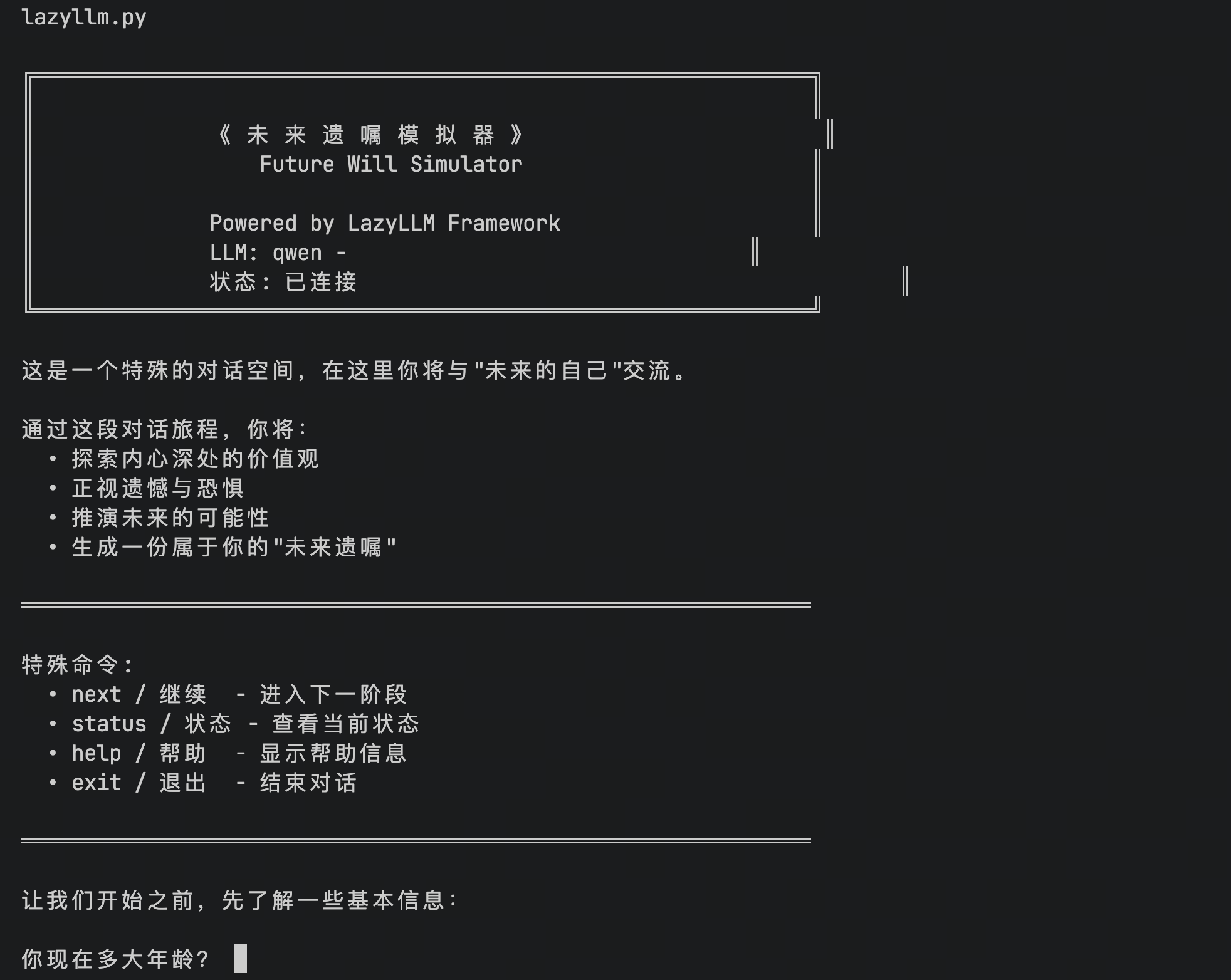
6.13 Example 13: Generate Complex Application 2
prompt:
You are an AI system architect proficient in the LazyLLM framework.

Please use LazyLLM’s Flow, Agent, Skill, Document, Retriever, and other capabilities
to design and generate a complete, runnable project:

Project Name:
"Intelligent Tender Compliance Review and Risk Explanation System"

-------------------------------------------------
I. Project Objectives

Input:
- Tender documents (PDF/TXT/Markdown)
- Bid proposals (PDF/TXT/Markdown)

Output:
- Structured compliance review report (JSON + Markdown)

-------------------------------------------------
II. System Capabilities

The system needs to accomplish:

1. Document parsing
2. Clause segmentation
3. Build a regulation knowledge base (RAG)
4. Build a historical case knowledge base (RAG)
5. Clause-by-clause compliance validation
6. Risk grading
7. Evidence citation output
8. Final report generation

-------------------------------------------------
III. Mandatory LazyLLM Features

- Use Document + Retriever to build at least two RAG knowledge bases
- Use Flow to orchestrate the complete pipeline
- Define at least 5 Skills
- Define at least 3 Agents
- Agents are responsible only for task decision-making
- Skills are responsible only for atomic capabilities

-------------------------------------------------
IV. System Architecture

MasterAgent
 ↓
ComplianceFlow
 ├─ FileLoaderSkill
 ├─ ClauseSplitSkill
 ├─ RegulationRAGAgent
 ├─ CaseRAGAgent
 ├─ ComplianceJudgeAgent
 ├─ RiskScoreAgent
 └─ ReportWriterSkill

-------------------------------------------------
V. Skill Design

1. FileLoaderSkill
   - Read files
   - Output plain text

2. ClauseSplitSkill
   - Split text into a list of clauses

3. ReportWriterSkill
   - Generate Markdown + JSON reports

-------------------------------------------------
VI. Agent Design

1. RegulationRAGAgent
   - Retrieve from regulation knowledge base

2. CaseRAGAgent
   - Retrieve from case knowledge base

3. ComplianceJudgeAgent
   - Determine compliance based on regulations + cases + clauses

4. RiskScoreAgent
   - Output risk level: Low / Medium / High

-------------------------------------------------
VII. Flow Design

In Flow, follow this order:

FileLoaderSkill
→ ClauseSplitSkill
→ Parallel:
   - RegulationRAGAgent
   - CaseRAGAgent
→ ComplianceJudgeAgent
→ RiskScoreAgent
→ ReportWriterSkill

-------------------------------------------------
VIII. Project Structure

bidding_compliance_agent/
 ├─ app.py
 ├─ flow.py
 ├─ agents/
 ├─ skills/
 ├─ rag/
 ├─ data/
 └─ README.md

-------------------------------------------------
IX. Implementation Requirements

- Use LazyLLM API
- Provide complete code
- Runnable
- Include sample data
- Include running instructions

-------------------------------------------------
X. Output Order

1. System description
2. Architecture diagram (ASCII)
3. Directory structure
4. File-by-file code
5. How to run

Now start generating the entire project.
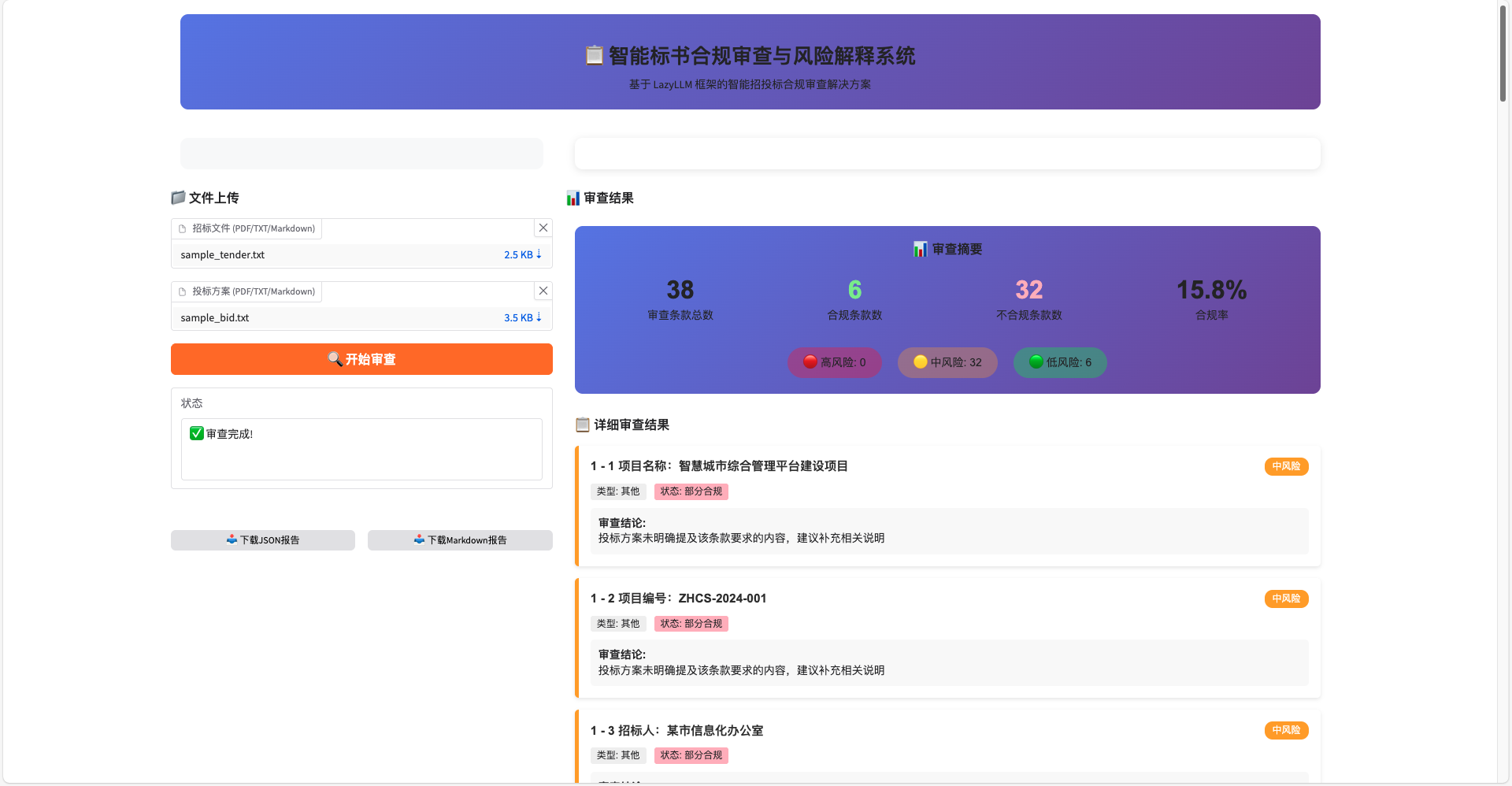
6.14 Example 14: Generate Complex Application 4
prompt:
Paper Assistant Multi-Agent System - Complete LazyLLM Implementation

Project Overview
Use the LazyLLM framework to implement a complete paper assistant multi-agent system, including a Web interface, document RAG system, multi-role discussion agents, arXiv paper crawling tools, and database management tools.

Technology Stack
- Framework: LazyLLM
- Database: ChromaDB (vector database)
- Embedding Model: Online embedding services (e.g., Zhipu / Baidu / Alibaba)
- LLM: Qwen3-32B or an equivalent-capability model
- Web Framework: LazyLLM built-in WebModule

Core Module Requirements

1. Document RAG System

**Document Processing Pipeline:**
- Use lazyllm.Document to load documents
- Splitting strategy: use RecursiveCharacterTextSplitter
  - Chunk size: 512 tokens
  - Chunk overlap: 50 tokens
  - Support Chinese sentence boundary splitting
- Vectorization: use cosine similarity
- Database: ChromaDB local storage, path ./chroma_db

**Specific Configuration:**
documents = lazyllm.Document(
    dataset_path="/path/to/docs",
    embed=lazyllm.OnlineEmbeddingModule(),
    manager=False
)
# Create Node Group for retrieval
documents.create_node_group(
    name="paper_chunks",
    transform=lambda s: recursive_split(s, chunk_size=512, overlap=50)
)

Retriever configuration:
retriever = lazyllm.Retriever(
    doc=documents,
    group_name="paper_chunks",
    similarity="cosine",
    topk=5
)

2. Web Interface

Functional Requirements:
- Use WebModule to start the Web interface
- Left sidebar: document upload area
- Main area: chat interface
- Top: display current database status

Layout:
┌─────────────────────────────────────┐
│  📁 Upload Documents │  💬 Chat Area │
│                     │               │
│  [Select File]      │  User: xxx    │
│  [Start Processing] │  ───────────  │
│                     │  Assistant: xxx│
│  ───────────────    │               │
│  📚 Database Status │  [Input] [Send]│
│  Docs: 0            │               │
│  Groups: -          └────────────────┘
└─────────────────────────────────────┘

3. Multi-Role Discussion Agent System

Role Design (4 Agents):

1. Academic Advisor Agent
   - Role: Senior Professor
   - Expertise: Research direction guidance, methodological advice
   - Tone: Rigorous, heuristic

2. Technical Expert Agent
   - Role: Algorithm Engineer
   - Expertise: Code implementation, technical details, experiment design
   - Tone: Direct, practical

3. Critic Agent
   - Role: Peer Reviewer
   - Expertise: Identify issues, limitation analysis, improvement suggestions
   - Tone: Sharp but constructive

4. Surveyor Agent
   - Role: Domain Expert
   - Expertise: Related work comparison, trend analysis, innovation point identification
   - Tone: Macroscopic, associative thinking

Discussion Mechanism:
- Use Pipeline to orchestrate the multi-agent discussion flow
- Each Agent sees previous conversation history and preceding Agents’ viewpoints
- Finally, a Coordinator Agent synthesizes all viewpoints and gives the final answer

Context Management:
- Use ConversationManager to maintain multi-turn conversation history
- Keep the most recent 10 rounds as context
- Persist key information (e.g., paper topic, user research direction)

4. Arxiv Paper Crawling Tool

Implementation Requirements:

1. MCPClient Connection:
from lazyllm.tools import MCPClient, fc_register
arxiv_client = MCPClient(
    command_or_url="https://dashscope.aliyuncs.com/api/v1/mcps/arxiv_paper/sse",
    headers={"Authorization": f"Bearer {bailian_api_key}"},
    timeout=10
)
mcp_tools = arxiv_client.get_tools()

2. Custom Download Tool:
import re, os, json, time
from pathlib import Path
from urllib.parse import urlparse
import requests
from lazyllm.tools import fc_register

ARXIV_ABS_RE = re.compile(r"https?://arxiv\.org/abs/([0-9]+\.[0-9]+)(v[0-9]+)?/?$")
ARXIV_PDF_RE = re.compile(r"https?://arxiv\.org/pdf/([0-9]+\.[0-9]+)(v[0-9]+)?(\.pdf)?/?$")

@fc_register("tool")
def download_arxiv_papers(urls: list[str]):
    """
    Download papers from arXiv and save as PDF.

    Args:
        urls (list[str]): List of arxiv paper URLs
                         e.g., ["https://arxiv.org/abs/2503.23278"]

    Returns:
        str: JSON string with download status and file paths
    """
    # Implement PDF download logic
    # 1. Normalize URLs (convert abs to pdf)
    # 2. Download PDFs to ./papers/ directory
    # 3. Return list of file paths
    pass

3. ArxivAgent:
arxiv_agent = ReactAgent(
    llm=llm.share(),
    prompt="""
    [Role] You are a paper retrieval and download expert

    [Tasks]
    1. Search for relevant papers based on user needs
    2. If a paper is valuable, call download_arxiv_papers tool to download
    3. Provide recommendation reasons and reading suggestions

    [Notes]
    - Ensure URLs are correct PDF links before downloading
    - Download at most 3 papers at a time
    - Update database status after download
    """,
    tools=['download_arxiv_papers'] + mcp_tools,
    stream=True
)

4. Ingestion Workflow:
- After download, automatically call the document processing pipeline
- Add PDFs into ChromaDB vector database
- Update database status display in Web interface

5. Database Management Tools

Functional Design:

1. Natural Language Query Tools:

@fc_register("tool")
def query_database_info():
    """
    Get current database statistics and paper groups.

    Returns:
        str: JSON with document count, groups, and metadata
    """
    # Return database statistics
    pass

@fc_register("tool")
def group_papers_by_topic(topic: str, keywords: list[str]):
    """
    Group papers by topic using keywords.

    Args:
        topic (str): Group name/topic
        keywords (list[str]): Keywords to identify papers for this group

    Returns:
        str: Grouping result with affected paper count
    """
    # Group existing papers based on keywords
    pass

@fc_register("tool")
def search_papers(query: str, topk: int = 5):
    """
    Search papers in database using semantic search.

    Args:
        query (str): Search query
        topk (int): Number of results to return

    Returns:
        str: List of matching papers with relevance scores
    """
    # Use vector retrieval to search papers
    pass

2. DBManagerAgent:

db_agent = ReactAgent(
    llm=llm.share(),
    prompt="""
    [Role] You are a paper database management assistant

    [Capabilities]
    - Query database status (document count, groups)
    - Group papers by topic
    - Search specific papers

    [Rules]
    - When users describe needs in natural language, choose appropriate tools
    - Require users to provide clear topics and keywords when grouping
    - Report results after operations
    """,
    tools=['query_database_info', 'group_papers_by_topic', 'search_papers']
)

6. Main System Architecture

Overall Flow:

User Input
    ↓
Intent Classification Agent (decide: chit-chat / paper discussion / arxiv search / database management)
    ↓
    ├─→ Chit-chat → General Chat Agent
    ├─→ Paper Discussion → Multi-role Discussion Agent System
    ├─→ arxiv Search → ArxivAgent → Auto Ingestion
    └─→ Database Management → DBManagerAgent
    ↓
Web Interface Output

Main Agent Configuration:

main_agent = ReactAgent(
    llm=llm.share(),
    prompt="""
    [Role] Paper Assistant System Main Controller

    [Task] Analyze user intent and route to appropriate subsystem

    [Routing Rules]
    - Ask about paper content, discuss research direction → Multi-role Discussion Agent
    - Request search or download papers → ArxivAgent
    - Database-related operations (query, grouping, management) → DBManagerAgent
    - Others → General Chat

    [Tools]
    You can use the following tools to route requests:
    - multi_role_discussion: start multi-role discussion
    - arxiv_search: search and download papers
    - db_management: database management operations
    """,
    tools=['multi_role_discussion', 'arxiv_search', 'db_management']
)

Project File Structure

paper_assistant/
├── main.py                 # Main entry, Web service
├── config.py               # Configuration (API keys, etc.)
├── agents/
│   ├── __init__.py
│   ├── main_router.py      # Main routing Agent
│   ├── discussion.py       # Multi-role discussion Agent system
│   ├── arxiv_agent.py      # Arxiv crawling Agent
│   └── db_manager.py       # Database management Agent
├── tools/
│   ├── __init__.py
│   ├── arxiv_downloader.py # Arxiv download tool
│   └── db_tools.py         # Database management tools
├── rag/
│   ├── __init__.py
│   ├── document.py         # Document processing
│   └── retriever.py        # Retriever configuration
├── utils/
│   ├── __init__.py
│   └── helpers.py          # Helper functions
├── papers/                 # Downloaded paper storage
├── chroma_db/              # Vector database directory
└── requirements.txt

Dependency Requirements

requirements.txt:
lazyllm
chromadb
requests

Key Implementation Notes

1. All configuration must be read from environment variables; do not hardcode API keys
2. Use LazyLLM bind mechanism to pass contextual information
3. Automatically trigger vectorization after document upload
4. Multi-role discussion uses parallel + sum mode to generate viewpoints in parallel
5. All tools must be registered using @fc_register decorator
6. Error handling: each Agent should be wrapped with try-catch and provide friendly error messages
7. Streaming output: configure WebModule with stream=True
8. Context persistence: use local JSON files to store conversation history

Generation Requirements

Please generate complete, runnable Python code including implementations for all modules. The code should follow LazyLLM best practices, include appropriate error handling and comments, and ensure all Agents and tools can be correctly registered and invoked. Implement in folder ./LazyLLM/example14
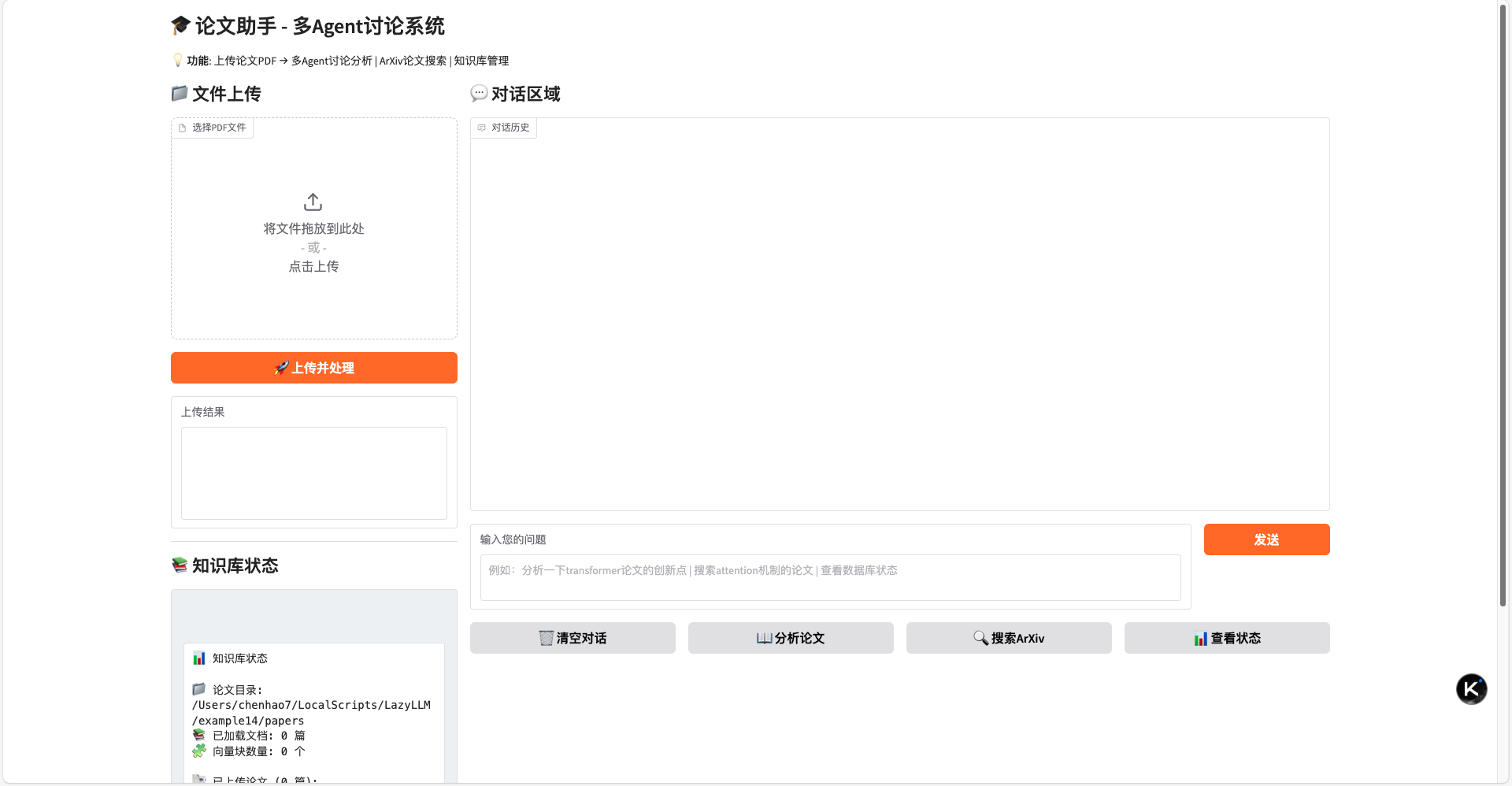
6.15 Example 15: Generate Complex Application 4
prompt:
You are an AI system architect and Python engineering expert proficient in the LazyLLM framework.

Please design and generate a complete, runnable Web project based on LazyLLM’s Flow, Agent, Skill, Document, Retriever, and multimodal capabilities:

Project Name:

"Multimodal Document Recognition and Retrieval System"

I. Project Objectives

Users upload document images (ID cards, passports, etc.) through a Web page:

The system can:

Automatically recognize document type
Extract key information from images
Store original images + structured information into a multimodal RAG knowledge base
Support retrieval by document information and recall original document images

II. Input and Output

Input

Single document image (jpg/png)

Output

Structured document information JSON, for example:

{
  "doc_type": "ID Card",
  "name": "Zhang San",
  "id_number": "xxxxxxxxxxxxxxxxxx",
  "gender": "Male",
  "birth_date": "1995-02-01",
  "nationality": "China"
}

Also return the unique ID of this document in the system.

III. Core System Capabilities

The system needs to implement the following capabilities:

Image upload
Multimodal document type recognition
OCR + semantic information extraction
Structured field normalization
Multimodal vectorized storage (text + image)
Conditional retrieval (by name / document number / document type, etc.)
Return original images and information of matched documents

IV. Mandatory LazyLLM Features

Use Document + Retriever to build multimodal RAG
Use Flow to connect the complete processing pipeline
Define at least 5 Skills
Define at least 3 Agents
Agents are responsible for decision-making and orchestration
Skills are responsible for atomic capabilities

V. System Architecture

WebUI
  |
  v
MainAgent
  |
  v
IDCardFlow
 ├─ ImageUploadSkill
 ├─ DocTypeDetectSkill
 ├─ OCRSkill
 ├─ InfoExtractSkill
 ├─ NormalizeSkill
 ├─ StoreToRAGAgent
 └─ QueryRAGAgent

VI. Skill Design

ImageUploadSkill
- Save image locally
- Return path

DocTypeDetectSkill
- Identify document type (ID card / passport / others)

OCRSkill
- Extract text from image

InfoExtractSkill
- Convert OCR text into structured fields

NormalizeSkill
- Field normalization, completion, and validation

VII. Agent Design

StoreToRAGAgent
- Responsible for writing data into multimodal RAG

QueryRAGAgent
- Responsible for retrieval

MainAgent
- Decide whether the current action is “store” or “query”

VIII. Flow Design

Upload & Store Flow
ImageUploadSkill
→ DocTypeDetectSkill
→ OCRSkill
→ InfoExtractSkill
→ NormalizeSkill
→ StoreToRAGAgent

Query Flow
QueryRAGAgent
→ Return matched document image + information

IX. RAG Design

Use LazyLLM Document to build a multimodal dataset

Each record contains:

{
  "text": "Name: Zhang San ID: xxxx Type: ID Card",
  "image_path": "/data/img/xxx.jpg",
  "metadata": {...}
}

Use Retriever to support TopK similarity search

X. Web Frontend Requirements

Use FastAPI + simple HTML or Gradio

Page features:

Upload documents
Display recognition results
Input query conditions
Display retrieval results (image + information)

XI. Project Structure

id_doc_system/
 ├─ app.py
 ├─ flow.py
 ├─ agents/
 │   ├─ main_agent.py
 │   ├─ store_agent.py
 │   └─ query_agent.py
 ├─ skills/
 │   ├─ upload.py
 │   ├─ doc_type.py
 │   ├─ ocr.py
 │   ├─ extract.py
 │   └─ normalize.py
 ├─ rag/
 │   └─ dataset/
 ├─ web/
 │   └─ ui.py
 └─ README.md

XII. Implementation Requirements

Use LazyLLM API
Provide complete code
Runnable
Include installation instructions
Include startup instructions

XIII. Output Order

System description
Architecture diagram (ASCII)
Directory structure
Complete code for each file
Running steps

Now start generating the entire project.
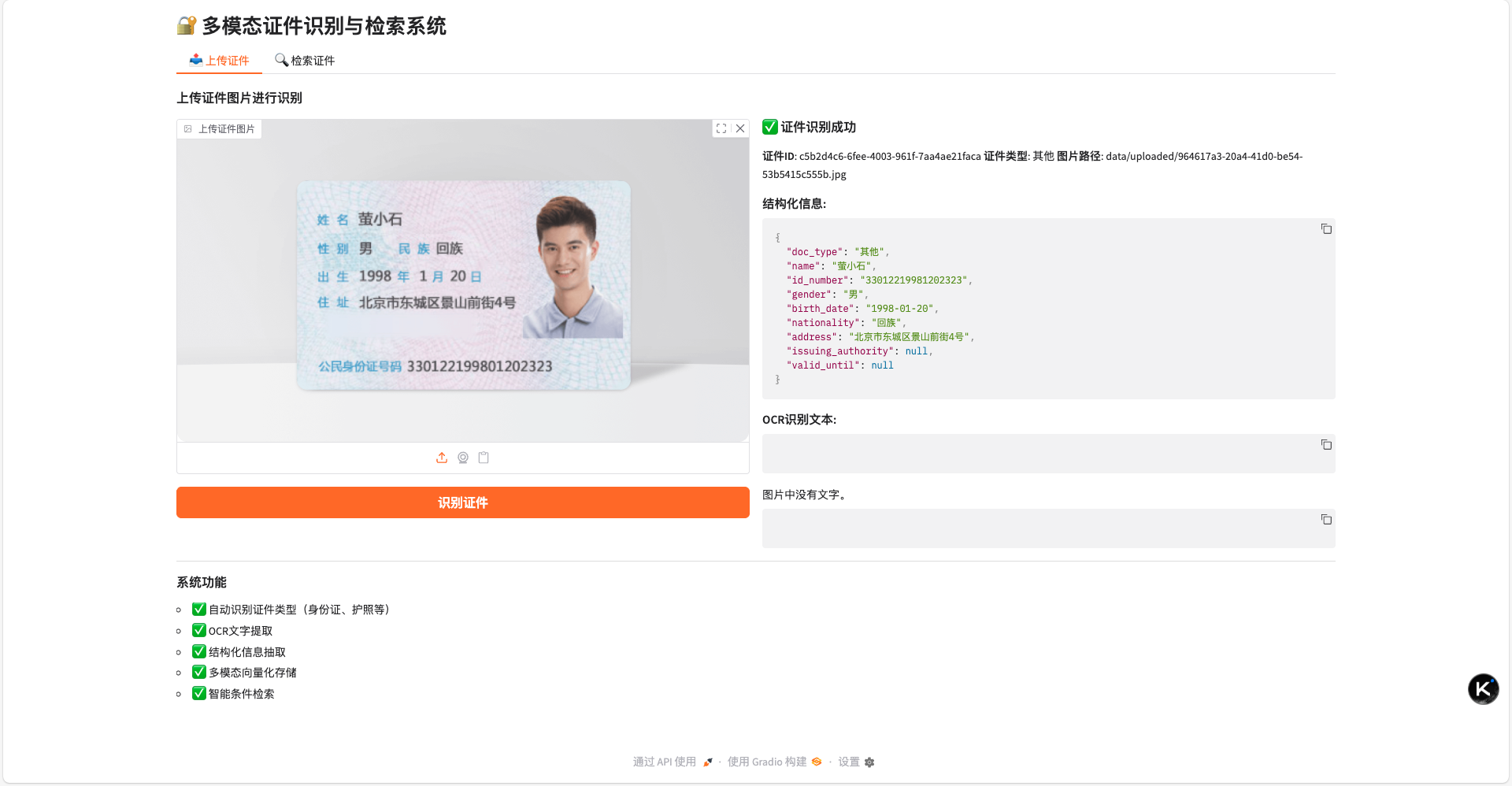
7. Tips and Troubleshooting
-
Explicitly declare "Implemented using LazyLLM"
In the requirement description, you must explicitly state: "Implemented using lazyllm"
Recommended phrasing: "Implemented using lazyllm in xxx.py…"
or: "Please implement using LazyLLM’s Flow, Agent, Skill, Document, Retriever…"Otherwise, the model may generate a custom framework that cannot run.
-
Provide "Structure" first, then "Function"
Instead of describing the requirement in a single sentence, it is better to:
- First state the project goal
- Then break down system modules
- Finally describe the output formatThe clearer the structure, the more stable the generation quality.
-
Prioritize generating a "Minimal Runnable Version"
First generation: "Please generate a minimal runnable version (MVP) first"
After it works, then add requirements:
- Add functionality
- Add Agents
- Add front-end and back-endTrying to implement too many complex features at once has lower success rate.
-
Ask the model to "modify based on existing code"
When adjusting features: "Based on the current project, only modify xxx.py to implement the following functionality…"
This avoids the model rewriting the entire project and drifting the structure.
-
Fix project directory
If the generated structure is messy, specify:
The model can more easily maintain consistent structure across the project.
-
Code cannot run, missing modules
Troubleshooting steps:
- Check the error message
- Paste the error as-is to OpenCodeExample:
8. Conclusion
At this point, you have completed the entire process from setting up the environment, installing LazyLLM-Skill, to generating and running a LazyLLM project in OpenCode.
You will find that the real challenge is never “writing a few lines of code”, but organizing models, RAG, and Agents into a runnable system.
LazyLLM is precisely addressing this challenge.
It abstracts the most commonly used and core capabilities in AI application development into unified interfaces, allowing you to focus on business logic and product ideas rather than low-level assembly.
Whether you want to build personal tools, automated workflows, or full AI application systems, you can start experimenting with LazyLLM.
Starting with the first small runnable project, you will quickly build a holistic understanding of AI application engineering.
Welcome to the LazyLLM community, and let’s turn ideas into truly usable AI applications together.