LazyLLM Tracing System
1. What Observability Means and Why It Matters
When building and deploying LLM applications, the system often behaves like a black box, which makes development and troubleshooting significantly harder. The core purpose of observability is to collect real runtime signals so developers can continuously understand the internal state and execution logic of the system.
In simpler applications, debugging often focuses only on the input and output of a single function. LazyLLM, however, usually operates in much more complex interactive scenarios, where isolated event records are no longer enough to reconstruct the full execution path of a request. For that reason, LazyLLM introduces an observability system that builds a unified, structured, and deeply analyzable execution view for every real request.
1.1 Problems the Observability System Solves
For LLM applications, the real challenge is usually not whether the pipeline can run end to end, but why the answer is wrong, why the response is slow, or why a prompt update causes overall quality to regress. The core value of observability is to turn these troubleshooting tasks from experience-driven guesswork into a standard process that is traceable, comparable, and measurable.
The LazyLLM observability system is mainly designed to solve the following problems:
- Single-case diagnosis and decomposition for complex execution paths (for example, RAG or Agent workflows)
When the final output is not what you expect, you need to identify the real source of the problem. In a RAG flow such as Retriever -> Reranker -> LLM, the observability system can break the result apart and help determine whether the failure comes from poor recall or from the model not using the retrieved context correctly. In an Agent workflow, observability links together model output, tool calls, and state updates, helping pinpoint whether the issue is a faulty decision, an incorrect tool call, or an ineffective loop.
- Precise performance bottleneck identification
A slow request may come from model inference, retrieval latency, or even a control-flow node that expands unexpectedly. A node-level latency waterfall breaks down "the whole request is slow" into "which exact layer is slow", making bottlenecks much easier to identify.
- Batch aggregation and macro-pattern analysis
Once the system reaches real production scenarios, observability can aggregate online data by dimensions such as session and user. That lets developers go beyond single-request debugging and analyze whether a group of requests shares the same failure mode or frequent error path.
- Version comparison and experiment regression analysis
After a flow update, prompt optimization, or model replacement, the full execution evidence collected by the observability system can support replay and comparison across versions, helping quantify the real impact of the change.
1.2 What Data the System Captures
To support the diagnosis capabilities above, the LazyLLM observability system records execution facts that are strongly related to path analysis. The emphasis is on structure and consistent semantics, rather than indiscriminately copying everything and introducing noisy data. The system focuses on the following categories:
- Request context and trace structure
The system records global context such as trace_id, session_id, and request_tags to bind together cross-component behavior within the same request. It also records every node the request passes through, along with nested parent-child relationships, to build the full trace topology.
- I/O and execution status
The system records the actual input each node receives and the actual output it produces. Whether full payload content is retained depends on the runtime tracing configuration. The execution status of each node, including success, failure, and exception stack information, is also recorded to preserve the full troubleshooting path.
- Semantic labels and extended configuration
To make the observability result more than just a raw event log, the system assigns each node a unified semantic role such as llm, retriever, rerank, tool, or agent. It also records key configuration attributes such as model name, Top-K recall count, rerank scores, or control-flow decisions, so upper-layer systems can interpret the node in business terms.
- Usage and performance data
The system records the elapsed time of each node, along with typical LLM resource usage such as prompt_tokens and completion_tokens. These metrics become the foundation for later throughput analysis and cost accounting.
1.3 Why Use Tracing
Common observability approaches include logging, metrics, and tracing. Although all three support monitoring and diagnosis, they observe the system from fundamentally different angles and solve different classes of problems:
- Logging focuses on discrete local events
Logging is highly granular and immediate. It is usually used to answer questions such as whether the code reached a certain line, whether a branch was taken, or what exception was raised. Logs are independent text events and are useful for local debugging, but they easily lose context in multi-component systems.
- Metrics focus on aggregated trends
Metrics are cheap to store and easy to visualize. They are usually used to answer questions such as the current QPS, whether P99 latency has increased sharply, or how quickly token usage is growing. Metrics are good at detecting anomalies and regressions at the system level, but they cannot directly tell you which exact request failed or which step caused the problem.
- Tracing focuses on a unified request view
In a complex system like LazyLLM, tracing is the only mechanism that can reconstruct the full execution logic. Its core value is that it answers questions such as which nodes a request went through, how those nodes relate to each other, and which layer ultimately determined the result.
When debugging, logs only tell you what events occurred, and metrics only tell you how the system is behaving overall. That is why LazyLLM uses tracing as the core backbone of its observability system. Once tracing is in place, local logs such as a tool-node error and key metrics such as latency or token usage for an LLM call can all be attached to a structured request path, producing a complete request view.
2. Using the LazyLLM Observability System
LazyLLM observability is not tied to a single backend. The target for trace data is determined by the specific backend configuration. Through a unified backend abstraction and interface contract, developers can connect observability data to different storage or analysis systems without modifying the core business code, allowing the observability system to adapt flexibly to different infrastructure environments.
2.1 Prerequisites
This section uses Langfuse as the observability backend example to describe the complete setup flow. Start by preparing a Langfuse project:
- Open the official Langfuse getting-started guide: https://langfuse.com/docs/observability/get-started
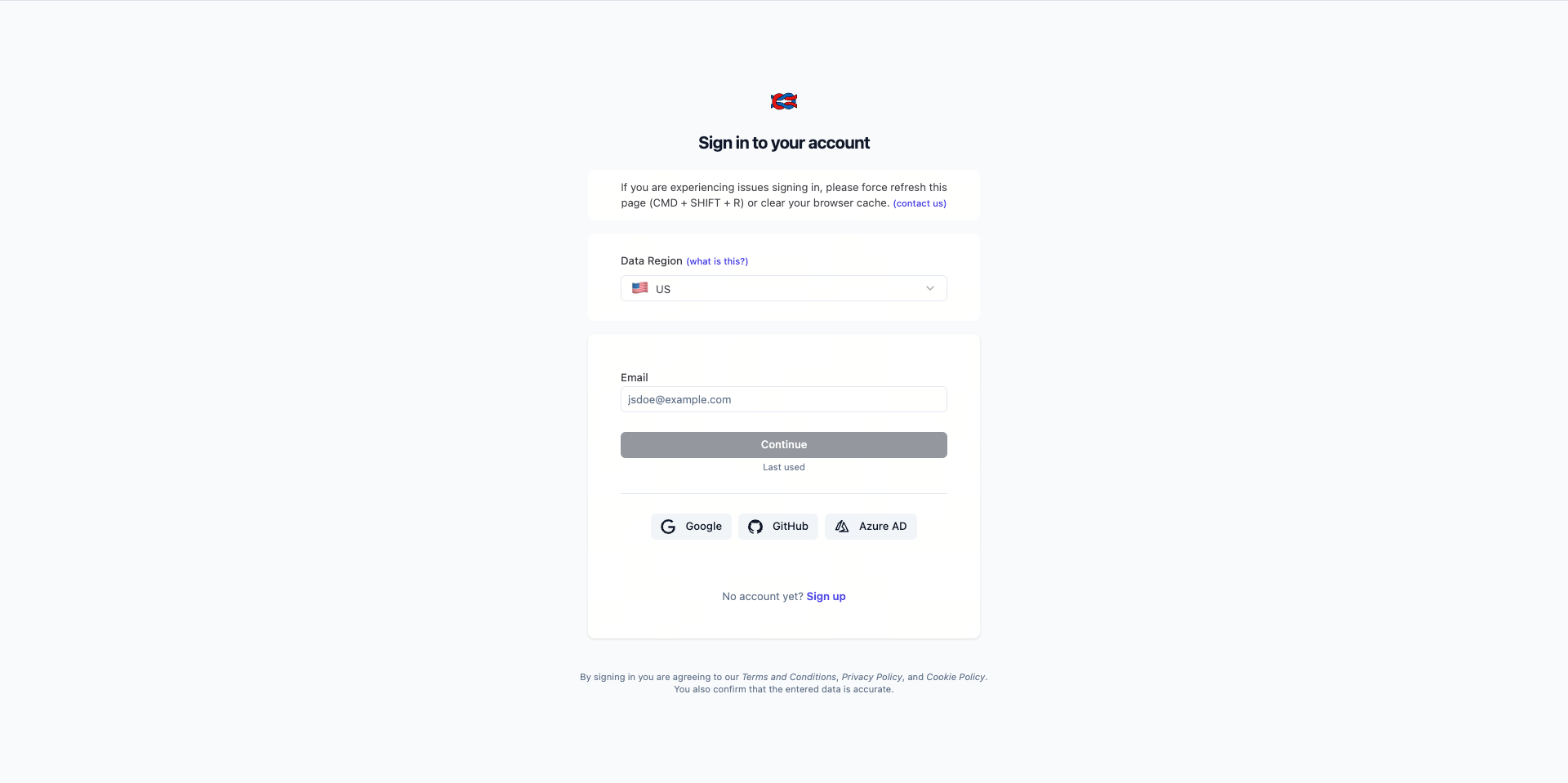
- Sign in to Langfuse or create an account, then create a project.
- Open the project settings page and create or view the API key for that project.
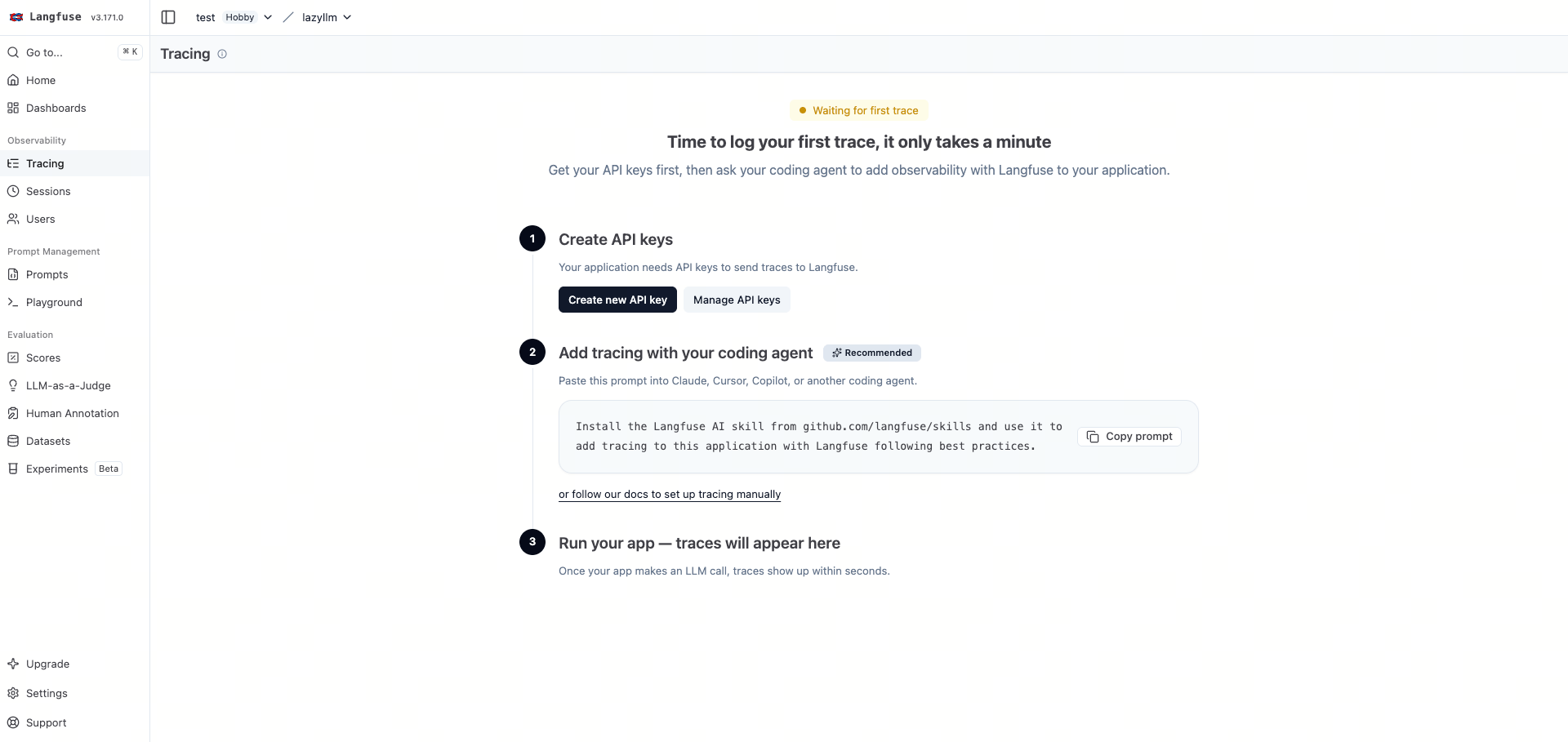 You can also refer to the official Langfuse FAQ for the API key location:
https://langfuse.com/faq/all/where-are-langfuse-api-keys
You can also refer to the official Langfuse FAQ for the API key location:
https://langfuse.com/faq/all/where-are-langfuse-api-keys
Collect the following three values:
LANGFUSE_BASE_URLLANGFUSE_PUBLIC_KEYLANGFUSE_SECRET_KEY
If you use Langfuse Cloud, the common LANGFUSE_BASE_URL values are:
# EU region
export LANGFUSE_BASE_URL="https://cloud.langfuse.com"

# US region
# export LANGFUSE_BASE_URL="https://us.cloud.langfuse.com"
Install the required tracing dependencies locally:
# Install LazyLLM itself, plus Langfuse and OpenTelemetry dependencies
pip install lazyllm \
  langfuse \
  opentelemetry-api \
  opentelemetry-sdk \
  opentelemetry-exporter-otlp-proto-http
Then configure the LazyLLM tracing runtime:
# Langfuse project credentials
export LANGFUSE_PUBLIC_KEY="pk-lf-..."
export LANGFUSE_SECRET_KEY="sk-lf-..."

# Default LazyLLM tracing switches
export LAZYLLM_TRACE_ENABLED="ON"
export LAZYLLM_TRACE_BACKEND="langfuse"
export LAZYLLM_TRACE_CONTENT_ENABLED="ON"
Where:
LAZYLLM_TRACE_ENABLED: whether tracing is enabled by defaultLAZYLLM_TRACE_BACKEND: which observability backend to useLAZYLLM_TRACE_CONTENT_ENABLED: whether input/output payloads are retained by default
2.2 Default Observability Behavior in LazyLLM
If your code already uses LazyLLM to orchestrate business logic, then after the backend is configured, for example with Langfuse, simply running the existing workflow is enough to generate a new trace. No extra tracing setup is required.
2.2.1 RAG Example
The following example keeps the core RAG structure: Document -> Retriever -> formatter -> LLM -> Pipeline.
The example is based on: https://docs.lazyllm.ai/en/stable/Learn/learn/#4-build-a-minimal-rag-system
import lazyllm
from lazyllm import bind

# The document store builds the retrievable knowledge source
documents = lazyllm.Document(dataset_path="./docs")

prompt = "Answer the question correctly using the provided knowledge."
llm = lazyllm.OnlineChatModule(
    source="sensenova",
    model="SenseNova-V6-5-Pro",
)
# The LLM receives context_str to consume retrieved context
llm.prompt(lazyllm.ChatPrompter(instruction=prompt, extra_keys=['context_str']))

# The Retriever recalls candidate chunks from the document store
retriever = lazyllm.Retriever(
    doc=documents,
    group_name="CoarseChunk",
    similarity="bm25_chinese",
    topk=3,
)

with lazyllm.pipeline() as rag_ppl:
    rag_ppl.retriever = retriever
    # The formatter reshapes retrieved nodes into the prompt input fields
    rag_ppl.formatter = (
        lambda nodes, query: dict(
            context_str='\n\n'.join([n.get_content() for n in nodes]),
            query=query,
        )
    ) | bind(query=rag_ppl.input)
    rag_ppl.llm = llm

question = "What is night-blooming jasmine?"
answer = rag_ppl(question)
print(answer)
After running this code, first confirm locally that the flow succeeded, then check Langfuse to verify that the trace path has been generated.
Example terminal output:
QUESTION: What is night-blooming jasmine?
ANSWER: Based on the provided information, **night-blooming jasmine** is a common ornamental plant known for its flowers that release a strong fragrance at night. Depending on the classification system, it may refer to species like *Cestrum nocturnum* or *Telosma cordata*. It is typically grown as a garden plant, can be climbing or shrub-like, and has heart-shaped or oval leaves. Its flowers are usually pale yellow-green or white and grow in clusters. It is not edible and may cause discomfort if exposed excessively in enclosed indoor spaces.
Example Langfuse result:
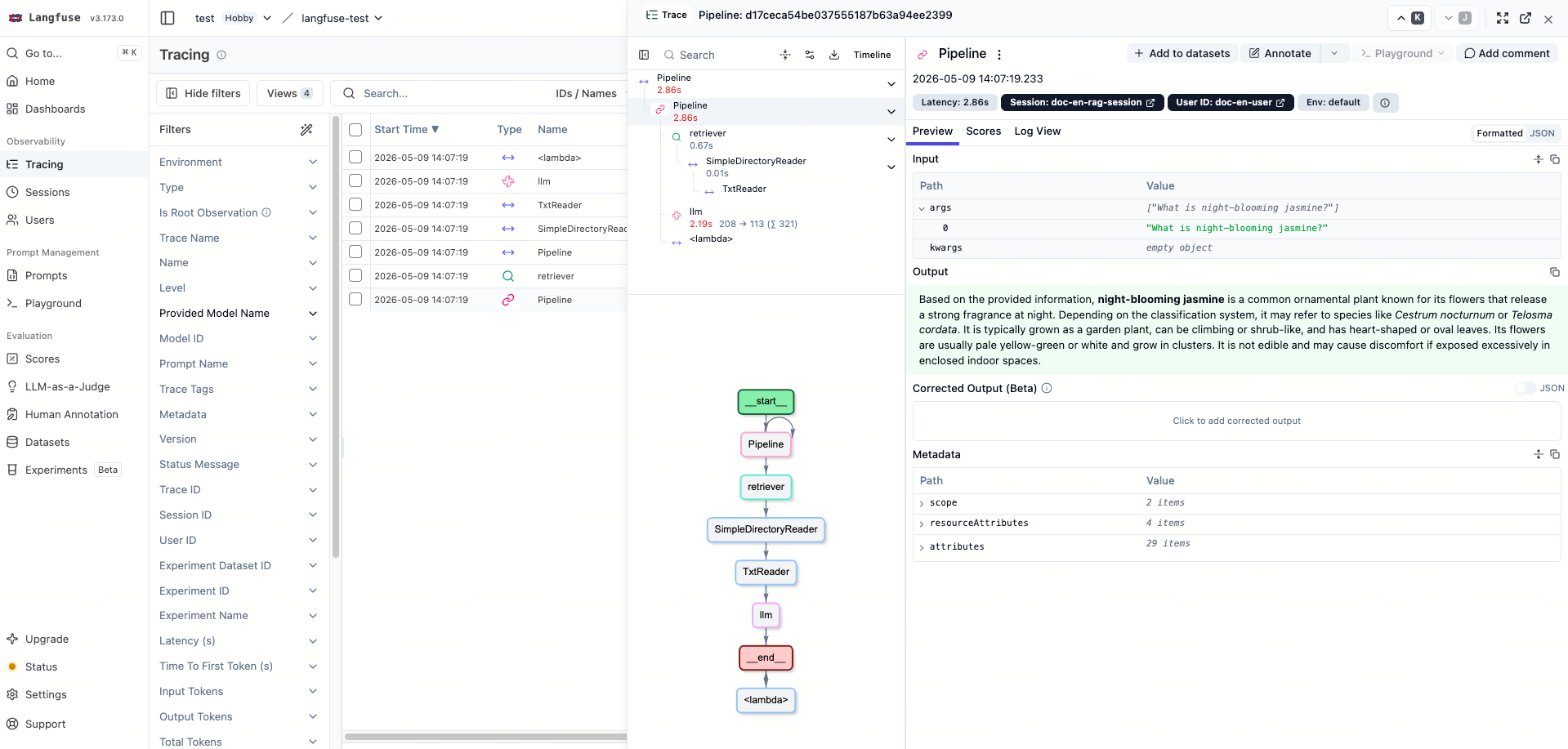
- The trace name is
Pipeline - Key nodes include
Pipeline,retriever,llm,<lambda>, and the document-reading nodeTxtReader - The
llmnode has observation typeGENERATION, and the model name isSenseNova-V6-5-Pro - The
retrievernode has observation typeRETRIEVER
For details on how to read the page fields and the path structure, see 2.6 Reading the Langfuse UI.
2.3 Add Context Manually with set_trace_context(...)
set_trace_context(...) lets you write request context before the actual LazyLLM workflow runs. By itself, it does not actively create a trace, nor does it create an observation node on its own. It must still be followed by a real LazyLLM call. In other words, this is a request-level control API for adding or updating request metadata without changing the call structure.
2.3.1 When to Use It
Use this approach when traces are already being generated correctly, but you need to add or override information for the current request. Typical cases include:
- identifying which session the request belongs to
- identifying which user sent the request
- tagging the request with a scenario such as
rag,agent, ordemo - continuing an existing trace
- temporarily overriding capture behavior for the request
- keeping the original business call unchanged
2.3.2 Example
from lazyllm import LazyTraceContext, set_trace_context

# Reuse rag_ppl and question from Section 2.2.1
set_trace_context(
    LazyTraceContext(
        session_id="demo-session",
        user_id="demo-user",
        request_tags=["rag", "context-demo"],
    )
)

answer = rag_ppl(question)
print(answer)
In this example, the business call itself does not change. The only difference is that you set LazyTraceContext first, and then execute the original rag_ppl(question).
One important detail:
If you call set_trace_context(...) without executing a real LazyLLM workflow afterward, no new trace is created automatically. This API is fundamentally for request-level context control. It can be used together with the default observability behavior, and it can also be combined with explicit entry control later. When used together with enable_trace(...), the tracing parameters passed to enable_trace(...) take precedence.
2.4 Declare a Trace Entry Manually with enable_trace(...)
enable_trace(...) explicitly establishes a tracing entry for a call before that call runs. Unlike set_trace_context(...), it does more than add request metadata. It directly controls how the call enters tracing. This makes it a call-entry control API, useful when you need a clear entry boundary or want to set tracing metadata centrally at the entry point.
There are two cases to distinguish:
- If the target is a LazyLLM workflow object such as a
Flow, or a LazyLLM functional component such as aModule,enable_trace(...)prepares the context first and then lets the framework's default tracing hooks create the downstream nodes. - If
enable_trace(...)wraps a plain Pythoncallabledirectly, and there is no active parent node and no explicittrace_id/parent_span_id, it creates a root span for that call. If the callable is already running inside a LazyLLM workflow step, or explicit parent-chain information is provided, it is attached as a child node within the overall trace.
2.4.1 Use as a Wrapper
For enabling tracing on a specific call, a wrapper is the most direct approach.
from lazyllm import enable_trace

# Reuse rag_ppl and question from Section 2.2.1
answer = enable_trace(
    rag_ppl,
    question,
    session_id="demo-session",
    user_id="demo-user",
    request_tags=["rag", "wrapper-demo"],
)

print(answer)
Important detail:
Tracing-specific parameters in enable_trace(...), such as session_id and request_tags, are consumed by the tracing logic first. They are not forwarded again to the downstream business function.
2.4.2 Use as a Decorator
When a function acts as a reusable entry point, a decorator is usually the more natural form.
from lazyllm import enable_trace

# Reuse rag_ppl from Section 2.2.1
@enable_trace(session_id="demo-session", request_tags=["rag", "decorator-demo"])
def run_once(question):
    return rag_ppl(question)

answer = run_once(question)
print(answer)
This form has several characteristics:
- The tracing entry is bound directly to the function definition
- It fits service entry points, unified API wrappers, and long-lived entry boundaries
- Compared with a wrapper, it is better suited to repeated calls through the same entry
2.4.3 When to Use It
enable_trace(...) is best when you want to establish a clear observability entry for a specific call. Typical cases include:
- a script contains multiple steps, but tracing should begin only from one function
- a service has a unified request handler that should serve as the stable trace entry
- you need to set
session_id,user_id,request_tags, and similar data centrally at the entry point - a plain Python function is outside the default LazyLLM workflow but should still be traced
- the current call needs to continue an upstream trace explicitly
- you need a clearly defined entry for testing, debugging, or one-off checks
2.5 Common Fields and Capture Controls
LazyLLM collects all request-level tracing information in LazyTraceContext.
Some fields control capture scope, while others identify request ownership and path continuation.
2.5.1 Global Capture Switches
Global switches define the default observability behavior.
| Config | Purpose | Common examples |
|---|---|---|
LAZYLLM_TRACE_ENABLED |
Whether tracing is enabled by default | "ON" |
LAZYLLM_TRACE_CONTENT_ENABLED |
Whether input/output payloads are retained by default | "ON" / "OFF" |
LAZYLLM_TRACE_BACKEND |
Which observability backend is currently in use | "langfuse" |
2.5.2 Request-Level Capture Controls
When the default configuration is already in effect, but one request needs to override it temporarily, you can use set_trace_context(...) to set the following control fields:
| Field | Purpose | Common examples | Typical configuration method |
|---|---|---|---|
enabled |
Explicitly control whether tracing is enabled for the current request | True / False |
set_trace_context(...) |
sampled |
Control whether the current request participates in sampling/export | True / False |
set_trace_context(...) |
debug_capture_payload |
Force whether input/output payloads should be recorded | True / False |
set_trace_context(...) |
module_trace |
Disable capture for selected modules at runtime | {"by_name": {"llm": False}} |
set_trace_context(...), enable_trace(...) |
Example 1: Disable input/output payload capture for one request
from lazyllm import LazyTraceContext, set_trace_context

# Reuse rag_ppl and question from Section 2.2.1
set_trace_context(
    LazyTraceContext(
        debug_capture_payload=False,
    )
)

answer = rag_ppl(question)
print(answer)
This request still generates a trace, but it no longer retains the full input/output payload by default.
Example 2: Temporarily disable capture for a certain type of module
from lazyllm import LazyTraceContext, set_trace_context

# Reuse rag_ppl and question from Section 2.2.1
set_trace_context(
    LazyTraceContext(
        module_trace={"by_name": {"llm": False}},
    )
)

answer = rag_ppl(question)
print(answer)
In this request, the llm module is excluded from tracing, while other nodes that are enabled by default continue to be recorded.
Rules of use:
- If you need to change the default behavior for the whole process, prefer the environment-variable configuration in
2.1 - If you only want to affect one request, prefer
set_trace_context(...) - If you only want to make the entry boundary explicit, use
enable_trace(...)and do not treat it as a capture-configuration API
2.5.3 Request Context Fields
These fields are mainly used for request ownership, filtering/grouping, and path continuation:
| Field | Purpose | Common examples | Typical configuration method |
|---|---|---|---|
session_id |
Identify a session or a group of related requests | "chat-session-001" |
set_trace_context(...), enable_trace(...) |
user_id |
Identify which user the request belongs to | "user-42" |
set_trace_context(...), enable_trace(...) |
request_tags |
Tag the request for filtering, grouping, and comparison | ["rag", "ab-test"] |
set_trace_context(...), enable_trace(...) |
trace_id |
Continue an existing trace | "trace-abc123" |
set_trace_context(...), enable_trace(...) |
parent_span_id |
Attach the current call under a specific parent node | "span-root-001" |
set_trace_context(...), enable_trace(...) |
2.6 Reading the Langfuse UI
After tracing is enabled, you can inspect the result on the Langfuse Tracing page. Langfuse records a full request as a Trace, and each step within that request as an Observation. Session groups multiple traces from the same session, and Scores is used for evaluation results or human feedback.
2.6.1 Page Layout
The Langfuse Tracing page typically has three parts:
- Navigation area: enter modules such as
Tracing,Sessions, andScores - Main view: display the
Tracelist, or show the path tree and timeline for a singleTrace - Detail panel: display the details of the currently selected
TraceorObservation
A practical reading order is: first locate the target Trace, then inspect the path structure, and finally read the selected node details.
2.6.2 Trace List Page
The Trace list page is mainly used to filter and locate target requests. It typically provides search, time-range filtering, and attribute filters. Common information includes:
- Name or title: identify the business entry or workflow type
- Time: confirm whether this is the target request
- Status: quickly spot failed or abnormal requests
Latency: identify slow requestsCost/Token usage: identify expensive requestsSession/User/Tags/Environment/Release: group and compare requests by session, user, version, environment, or business tag
2.6.3 Trace Detail Page
After opening a single Trace, the page usually has two core areas:
- Path structure area: shows the execution structure of the request. The root node represents the full
Trace, and child nodes represent individualObservationobjects. Common types includeGENERATION,RETRIEVER,TOOL, and standardSPANobservations - Node detail area: shows
input,output,metadata,usage,scores, and similar fields for the selected node. Some pages support aFormatted/JSONswitch for different debugging scenarios
Trace-level summary information usually appears at the top of the page or above the detail panel. Common fields include:
Trace ID: used to locate the same request across systemsSession/User: used to confirm request ownershipTags/Environment/Release: used for filtering and comparison across versions, environments, and business scenariosLatency/Cost/Token usage: used for performance and cost analysis
2.6.4 Recommended Reading Order
- On the
Tracelist page, locate the target request by time, tag, session, or user - Open the
Traceand read the summary first to confirm status, latency, cost, environment, and version - Then inspect the path structure, prioritizing failed nodes, slowest nodes, and key model nodes
- Finally, read the selected node's
input,output,metadata, andusageto confirm where the issue occurred - If you need cross-request analysis, return to the list page and compare similar requests, same-version requests, or other traces in the same session
3. Design and Key Implementation of the LazyLLM Observability System
Chapter 3 explains the LazyLLM observability system from both the layered design and the key implementation perspective.
3.1 Overall Architecture and Core Objects
3.1.1 Layered Overview
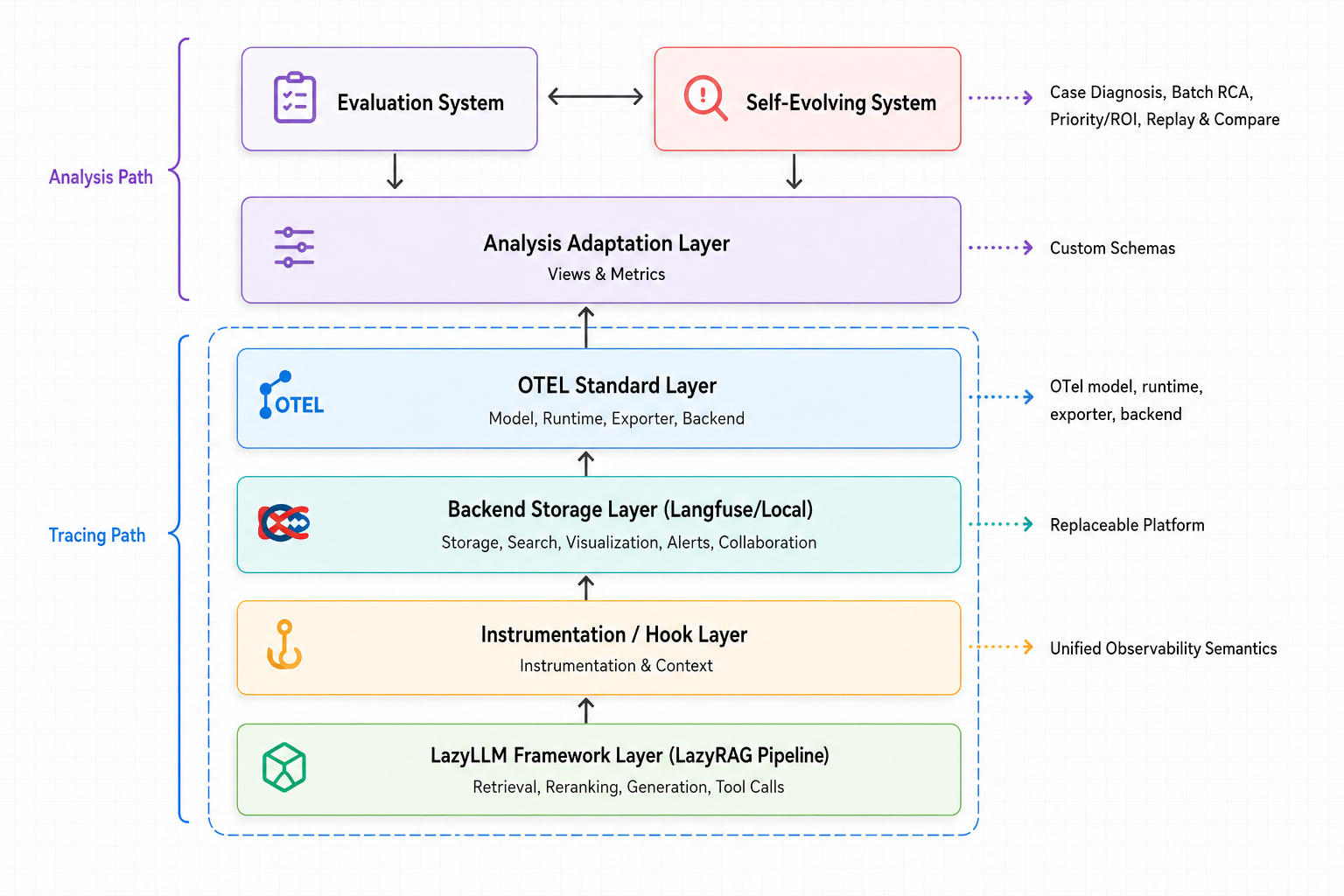
The upper half of the diagram shows the analysis path. The analysis adaptation layer reads trace data from the Tracing Backend and transforms it into data structures that upper-layer systems such as the evaluation system and the self-evolving system can consume directly. The sections below focus on the collection path, so the analysis adaptation layer is treated mainly as a system boundary.
The lower half of the diagram shows the trace collection path. The LazyLLM runtime layer produces the real execution process, the Instrumentation / Hook Adaptation Layer converts runtime events into unified observability semantics, the OTEL standard layer manages span lifecycle, parent-child relationships, and context propagation, and the Tracing Backend is responsible for storage, retrieval, and presentation.
Based on the diagram above, the responsibilities of each layer can be summarized as follows:
| Layer | Main responsibility | Key code |
|---|---|---|
| LazyLLM runtime layer | Execute Flow, Module, and callable objects and form the real business call path |
lazyllm/flow/flow.py, lazyllm/module/module.py |
| Instrumentation adaptation layer | Decide default attachment behavior, capture strategy, semantic enrichment, and structured output attributes | lazyllm/hook.py, lazyllm/tracing/collect/hook.py, lazyllm/tracing/collect/trace_config.py, lazyllm/tracing/collect/output_attrs.py |
| OTEL standard layer | Manage span lifecycle, context propagation, parent-child relationships, and request-level aggregate state |
lazyllm/tracing/collect/runtime.py, lazyllm/tracing/collect/context.py, lazyllm/tracing/collect/span.py |
| Tracing backend layer | Build the exporter and send OTel spans to backend storage | lazyllm/tracing/backends/langfuse/* |
| Analysis adaptation layer | Read data from the Tracing Backend and transform it into structures for upper-layer analysis systems | - |
3.1.2 Core Objects
Internally, the observability system has to manage propagation state, node description state, and request aggregation state at the same time. LazyLLM does not force all of them into a single object. Instead, it separates them into three core object types that work together: a lightweight request context, node-level objects, and a request-level aggregate object.
The following code snippets keep only the key fields needed to understand the model. They are simplified sketches, not complete source definitions. For the full implementation, see lazyllm/tracing/collect/context.py and lazyllm/tracing/collect/span.py.
# Simplified sketch: lightweight context carries request-level tracing data
@dataclass
class LazyTraceContext:
    enabled: Optional[bool] = None
    trace_id: Optional[str] = None
    parent_span_id: Optional[str] = None
    session_id: Optional[str] = None
    user_id: Optional[str] = None
    request_tags: List[str] = field(default_factory=list)
    module_trace: Optional[Dict[str, Any]] = None
    sampled: Optional[bool] = None
    debug_capture_payload: Optional[bool] = None
# Simplified sketch: node snapshot describes one observation
@dataclass
class LazySpan:
    name: str = ''
    span_kind: str = ''
    semantic_type: Optional[str] = None
    trace_id: Optional[str] = None
    span_id: Optional[str] = None
    parent_span_id: Optional[str] = None
    input: Optional[Any] = None
    output: Optional[Any] = None
    status: str = 'ok'
    error: Optional[Exception] = None
    config: Dict[str, Any] = field(default_factory=dict)
    output_attrs: Dict[str, Any] = field(default_factory=dict)
    usage: Optional[Dict[str, Any]] = None
# Simplified sketch: request-level aggregate object maintains trace-wide state
@dataclass
class LazyTrace:
    trace_id: str
    root_span_id: Optional[str] = None
    session_id: Optional[str] = None
    user_id: Optional[str] = None
    request_tags: List[str] = field(default_factory=list)
    start_time: float = field(default_factory=time.time)
    end_time: Optional[float] = None
    is_reconstructed: bool = False
    status: str = 'ok'
    metadata: Dict[str, Any] = field(default_factory=dict)
LazyTraceContextcarries the lightweight request-level context and mainly solves propagationLazySpandescribes the runtime snapshot of a single observation node, especially its I/O, status, and attached attributesLazyTracemaintains request-level aggregate state and mainly handles trace-wide statistics and final status updates
3.2 The LazyLLM Runtime Layer
3.2.1 How Requests Enter the Unified Execution Path
The runtime layer has to answer one question: how can tracing be attached reliably to the real execution path without changing existing business call patterns? LazyLLM does not solve this by introducing a separate observability entry mechanism. Instead, it reuses the unified call skeleton that already exists. Both Flow and Module, for example, route their execution through execution_with_hooks(...), so tracing can attach naturally to the existing execution framework.
class LazyLLMFlowsBase(FlowBase, metaclass=LazyLLMRegisterMetaClass):
    def __init__(...):
        ...
        # Attach the default hook set during Flow initialization
        self._hooks = []
        register_hooks(self, resolve_builtin_hooks(self))

    # The unified Flow call entry attaches hooks and call-stack state here
    @execution_with_hooks
    def __call__(self, ...):
        # stack_enter lets the runtime observe the current Flow nesting level
        with globals.stack_enter(self.identities):
            output = self._run(...)
        return self._post_process(output)
# Module reuses execution_with_hooks as well, delegating real execution to _call_impl
def __call__(self, ...):
    return execution_with_hooks(self, ...)(self._call_impl)(...)
These two code blocks reflect the same design. On one side, a Flow resolves and attaches default hooks during initialization. On the other side, both Flow and Module route real calls through execution_with_hooks(...). As a result, the default observability behavior does not depend on a new business API. It attaches directly to the existing execution path in the runtime layer.
3.3 The Instrumentation Adaptation Layer
3.3.1 Default Attachment: Hook Selection and Registration
The first question this layer has to answer is which objects should be observed by default. If tracing decisions were scattered across individual business classes, the attachment scope would be difficult to maintain. LazyLLM centralizes this logic into built-in hook providers and decides whether to attach LazyTracingHook during object construction.
# Built-in provider registry
_builtin_hook_providers = []

def resolve_builtin_hooks(...):
    hooks = []
    for provider in _builtin_hook_providers:
        hooks.extend(provider(obj) or [])
    return hooks

def register_hooks(...):
    ...
# The tracing provider only decides whether the current object enters tracing by default
def resolve_tracing_hooks(...):
    if not config['trace_enabled']:
        return []

    subject = _unwrap_trace_subject(obj)
    if hasattr(subject, '_module_id') and not resolve_default_module_trace(...):
        return []

    return [LazyTracingHook]

register_builtin_hook_provider(resolve_tracing_hooks)
These blocks split the work into two layers. resolve_builtin_hooks(...) aggregates the decisions made by all providers, while resolve_tracing_hooks(...) answers only whether the current object should enter tracing by default. The core purpose of default attachment is to bind observability behavior to later calls at object-construction time.
3.3.2 Node Observation: LazyTracingHook
The key question here is how an ordinary call is organized into the full lifecycle of an observation. LazyLLM separates generic scheduling from tracing semantics. hook_execution(...) provides the common hook-dispatch skeleton, while LazyTracingHook implements tracing-specific behavior.
# Generic hook dispatcher: organize success, error, and finalization branches uniformly
@contextmanager
def hook_execution(obj, ...):
    hook_objs = tuple(prepare_hooks(obj, ...))

    def hooked_call(fn, ...):
        try:
            result = fn(...)
        except Exception as e:
            run_hooks(hook_objs, 'on_error', e)
            raise
        else:
            run_hooks(hook_objs, 'post_hook', result)
            return result

    try:
        yield hooked_call
    finally:
        # finalize always runs, whether the call succeeds or fails
        run_hooks(hook_objs, 'finalize')
# Tracing hook: create the handle before the call, write back after the call, then finish uniformly
class LazyTracingHook(LazyLLMHook):
    def pre_hook(...):
        trace_cfg = globals.get('trace', {})
        if trace_cfg.get('enabled') is False or trace_cfg.get('sampled') is False:
            return
        self._span = start_span(self._trace_target(), ...)
        if self._span:
            install_post_process_probe(self._obj)

    def post_hook(...):
        if not self._span:
            return
        set_span_output(self._span, ...)
        ...
        set_span_attributes(self._span, ...)

    def on_error(...):
        if self._span:
            set_span_error(self._span, ...)

    def finalize(...):
        remove_post_process_probe(self._obj)
        if self._span:
            finish_span(self._span)
hook_execution(...) is responsible for generic scheduling, while LazyTracingHook is responsible for tracing-specific orchestration. pre_hook(...) decides whether observation should begin and creates the node handle when needed. post_hook(...) writes back output, usage, and structured attributes on the success path. on_error(...) records errors on the exception path. finalize(...) always runs the end-of-node processing. For retriever and reranker nodes, some key results only appear during post-processing, so a probe must be installed in advance to capture them.
3.3.3 Capture Control Strategy
Capture control has to satisfy two goals at once: the system should be observable by default, but it should also be possible to control capture scope, cost, and exposure of sensitive information. LazyLLM solves this with three layers of control: global defaults, module-level rules, and request-level overrides. This allows stable default behavior without extra intervention, while still letting one request temporarily narrow or alter the capture scope.
# Default rules define process-wide capture behavior and module-level auto-attachment scope
config.add('trace_enabled', bool, True, 'TRACE_ENABLED')
config.add('trace_content_enabled', bool, True, 'TRACE_CONTENT_ENABLED')

DEFAULT_MODULE_TRACE_CONFIG = {
    'default': True,
    'by_name': {'retriever': True, 'reranker': True, 'llm': True},
    'by_class': {'OnlineModule': True},
}

def resolve_default_module_trace(...):
    ...

def resolve_runtime_module_trace_disabled(...):
    ...
# Check whether tracing is allowed before creating the node; decide on payload retention afterward
def pre_hook(self, ...):
    trace_cfg = globals.get('trace', {})
    trace_enabled = trace_cfg.get('enabled')
    if trace_enabled is None:
        trace_enabled = config['trace_enabled']
    if not trace_enabled or trace_cfg.get('sampled') is False:
        return

    if hasattr(t, '_module_id') and resolve_runtime_module_trace_disabled(...):
        return

def _capture_payload_enabled(...):
    if ctx.debug_capture_payload is not None:
        return bool(ctx.debug_capture_payload)
    return bool(config['trace_content_enabled'])
These two blocks imply a fixed order of evaluation. First, decide whether the request is allowed to create nodes at all. Second, decide whether the current module may be recorded. Third, decide whether input/output payloads should be retained. Separating "whether a trace exists" from "whether payloads are retained" matters because the first controls observability itself, while the second controls granularity, cost, and sensitivity.
3.3.4 Configuration, Semantics, and Structured Enrichment
If an observation records only input/output, downstream analysis still has no clear view of the business role the node plays. That is why the instrumentation adaptation layer also enriches each node with LazyLLM-specific semantics. LazyLLM currently performs three kinds of enrichment:
- Configuration enrichment: model, similarity method, Top-K, control-flow structure, and so on
- Semantic enrichment:
llm,retriever,rerank,tool, and similar roles - Output-attribute enrichment: retrieval scores, rerank scores, branch-hit information, and actual loop iteration counts
# This block enriches node attributes with component config and semantic type
def collect_trace_config(...):
    cfg = _collect_private_trace_config(target)

    if _looks_like_online_module(target):
        cfg.update(_collect_llm_trace_config(target, ...))
    elif _looks_like_retriever(target):
        cfg.update(_collect_retriever_trace_config(target))
    elif _looks_like_reranker(target):
        cfg.update(_collect_reranker_trace_config(target))
    elif _is_flow_target(target):
        cfg.update(_collect_flow_trace_config(target))

    return normalize_trace_entity_config(cfg)

def resolve_semantic_type_for_target(...):
    if span_kind == 'flow':
        return SemanticType.WORKFLOW_CONTROL
    ...
This code is the entry point for configuration and semantic enrichment. Different target types receive different component-level configuration fields and are further mapped to a unified semantic type. Output-attribute enrichment then adds structured results such as retriever scores, reranker scores, branch-hit information, and loop counts. As a result, later analysis sees not just what code executed, but what business action the node actually performed.
3.4 The OTEL Standard Layer
3.4.1 Lightweight Context and Runtime State
The first question for the OTEL standard layer is which state should propagate across calls, which state should represent the current request, and which state must follow the runtime call stack. LazyLLM separates lightweight context, request-level aggregate state, and the active span explicitly:
globals['trace']stores only lightweight, serializable tracing information- The current active trace is stored in the
_current_traceContextVar - The current active span is maintained by the OTel active context and is not stored in
globals
# globals['trace'] stores only lightweight tracing information that can be propagated
class Globals(metaclass=SingletonABCMeta):
    __global_attrs__ = ThreadSafeDict(trace={})

    def __init__(self):
        self.__sid = contextvars.ContextVar('local_var')
# _current_trace holds the request-level aggregate state for the current context
_current_trace: contextvars.ContextVar[Optional[LazyTrace]] = contextvars.ContextVar(
    '_lazyllm_current_trace', default=None
)

def get_trace_context() -> LazyTraceContext:
    return LazyTraceContext.from_dict(llm_globals.get('trace', {}))
These two blocks illustrate the division of responsibilities across the three kinds of state. globals['trace'] holds the lightweight, propagatable request-level state. _current_trace holds the aggregate state of the current request. The active span itself continues to be managed by the OTel context and follows the call stack.
3.4.2 Node Lifecycle
This section answers how a LazyLLM observation node is converted into a standard OTel span. LazyLLM splits that process into two phases, creation and finalization, handled by start_span(...) and finish_span(...).
def start_span(self, ...):
    ctx = get_trace_context()
    if not self._trace_enabled(ctx) or not self._ensure_runtime():
        return None

    parent_context = None
    # Reuse the current active span first so existing parent-child relationships stay intact
    if self._trace_api.get_current_span().get_span_context().is_valid:
        parent_context = opentelemetry.trace.set_span_in_context(...)
    elif ctx.trace_id and ctx.parent_span_id:
        # If no active span exists, rebuild the parent relationship from the lightweight context
        parent_context = opentelemetry.trace.set_span_in_context(...)

    ...
    otel_span = self._tracer.start_as_current_span(span_name, context=parent_context).__enter__()
    # Once the new span exists, write its identifiers back into the lightweight context
    ctx.trace_id = ...
    ctx.parent_span_id = ...
    set_trace_context(ctx)
def finish_span(...):
    otel_span = span._otel_span
    # Write standard attributes first, then handle exceptions and close the handle uniformly
    for k, v in self._backend.map_attributes(self._build_otel_attributes(span, trace=_current_trace.get())).items():
        otel_span.set_attribute(k, v)

    ...
    if span.error:
        # Exceptions must also be recorded on the underlying span
        otel_span.record_exception(span.error)

    span._otel_span_cm.__exit__(None, None, None)
These two blocks represent the two core responsibilities of the OTEL layer. start_span(...) does more than create a span. It also determines the parent relationship and writes the new identifiers back into the lightweight context. finish_span(...) does more than close the span. It also normalizes node attributes, applies backend mapping, and propagates exception information. In other words, this layer translates LazyLLM node semantics into a standardized span lifecycle.
3.4.3 Explicit Entry: enable_trace(...)
The default hook mechanism solves attachment for nodes inside the workflow, but the entry boundary still needs separate control. That is exactly why enable_trace(...) exists. It explicitly prepares a tracing context for one call, rather than replacing the default node-observation mechanism. For LazyLLM components, it still relies on the default attachment flow. For plain Python callables, it adds an entry span when needed.
# Prepare the explicit entry context first, then decide whether a plain callable needs an entry span
def _run_with_trace(func, ...):
    old_ctx = get_trace_context()
    new_ctx_data = old_ctx.to_dict()
    # Copy the old context first, then override the fields needed for this entry
    new_ctx_data.update({
        'trace_id': ...,
        'parent_span_id': ...,
        'request_tags': ...,
        'module_trace': ...,
        'enabled': True,
    })
    set_trace_context(LazyTraceContext.from_dict(new_ctx_data))
    try:
        # LazyLLM components continue through default hooks; only plain callables may need an extra entry span
        is_lazyllm_component = hasattr(func, '_module_id') or hasattr(func, '_flow_id')
        span = None if is_lazyllm_component else start_span(func, ...)
        ...
    finally:
        set_trace_context(old_ctx)
The logic is different for the two target categories. For LazyLLM components, enable_trace(...) only prepares entry context, and downstream nodes are still created by the default hooks. For plain Python callable objects, it may add an entry span explicitly. So this capability solves entry-boundary control rather than introducing a second tracing mechanism.
3.4.4 Concurrency and Context Propagation
In concurrent scenarios, the OTEL standard layer has to ensure that when one logical request enters a new execution unit, newly created spans can still continue the original trace correctly. LazyLLM does not rely on a single propagation mechanism across all executors. Instead, it combines ContextVar propagation with recoverable session-level state propagation:
- Thread-based paths that must preserve the
ContextVarchain usecopy_context().run(...). This allows the OTel active context,_current_trace, and otherContextVar-based tracing state to enter the worker together. - Thread wrappers that only need to preserve the session identifier explicitly rebind
sid. These paths allowlazyllm.globals/lazyllm.localsto access the correct session data, but they do not automatically copy the fullContextVarstate. - Cross-process paths cannot carry live span objects or
ContextVarstate directly, so they pass a serializable snapshot ofglobals._dataasglobal_data.globals['trace']is the most important tracing field in that snapshot, but not the only one. - On the worker side,
_init_sid(sid)and_update(global_data)restore context. Later,start_span(...)readstrace_idandparent_span_idfromglobals['trace'], reconstructs the parentSpanContextwhen needed, and continues the trace instead of trying to reuse a live span instance from the parent process.
@staticmethod
def _worker(...):
    lazyllm.globals._init_sid(sid)
    if ...:
        # The process path must restore the session-level snapshot passed from the parent process
        lazyllm.globals._update(...)
    ...
    return func(*args, **kw)

def _parallel_execute_concurrent(...):
    ...
    # The thread path copies ContextVar state directly so context enters the worker together
    futures.append(e.submit(worker_call) if self._multiprocessing else e.submit(copy_context().run, worker_call))

# Graph scheduling is also a thread path, so copying ContextVar state is enough
future = executor.submit(copy_context().run, partial(self.compute_node, globals._sid, node, ...))
This code corresponds to two different execution paths. The thread path copies ContextVar state directly, so the OTel active context and _current_trace move into the worker together. The process path restores session-level state from a serializable snapshot and then reconstructs the parent chain using trace_id / parent_span_id. In short, ContextVar carries active tracing state, while globals carries recoverable session-level state. They serve different roles in different executors.
3.4.5 Request-Level Aggregate State
Parent-child relationships between nodes describe the call structure, but they are not enough to represent the aggregate state of the entire request. The OTEL standard layer therefore also needs a request-level object that maintains overall state, and that is the role of LazyTrace. _current_trace binds this aggregate state to the current context.
active_trace = _current_trace.get()
if active_trace is None or active_trace.trace_id != trace_id_hex or not active_trace.is_active:
    # Only the first active span creates the request-level aggregate object
    new_trace = LazyTrace(
        trace_id=trace_id_hex,
        root_span_id=span_id_hex if is_root_span else None,
        ...
        is_reconstructed=is_reconstructed,
    )
    # Bind the new trace to the current context so later nodes can continue registering into it
    _current_trace.set(new_trace)
    active_trace = new_trace

...
# Record the current span into the request-level aggregate state
active_trace._record_span_start(lazy_span)
This code shows how LazyTrace is created and registered. The first active span triggers creation of the request-level aggregate object, and later nodes continue to register into the existing LazyTrace. The runtime then updates request-wide state as nodes finish. LazyTrace therefore provides a request-level state view, not a duplicate of the node-level state.
3.5 The Tracing Backend Layer
The Backend layer receives standardized spans and writes them to a concrete observability backend. LazyLLM does not make business flows, hook logic, or OTel lifecycle management depend on a specific storage target. Instead, it uses the Tracing Backend layer to handle backend integration in one place. This layer sits after the OTEL standard layer and isolates storage-target differences, so the upper layers only need to produce unified observability data.
With this abstraction, observability data can be written to Langfuse, local JSONL files, or other storage, analysis, and observability platforms. New backends should reuse the same layer interface instead of changing the upstream collection flow. Backend differences are limited to the write channel and attribute adaptation.
3.5.1 Backend Layer Capabilities
The TracingBackend base class exposes two core capabilities:
class TracingBackend(ABC):
    name = ''

    # Build the write channel and decide where spans are delivered
    @abstractmethod
    def build_exporter(self):
        pass

    # Adapt attributes for the target backend without changing the shared OTel flow
    @abstractmethod
    def map_attributes(self, otel_attrs: Dict[str, Any]) -> Dict[str, Any]:
        pass
build_exporter(...) constructs the data write channel. For example, the Langfuse backend uses an OTLP exporter to send spans to Langfuse, while the local backend uses a file exporter to write spans to JSONL.
map_attributes(...) handles backend-specific attribute adaptation. LazyLLM first generates unified OTel attributes, and then the backend adds the fields required by the target system. Langfuse maps part of the generic attributes to langfuse.* fields. The local backend keeps the original OTel attributes as they are, so no extra mapping is needed.
3.5.2 Backend Layer Implementation
Concrete backends enter the unified loading path through their name, module path, and class name. The runtime retrieves a backend instance from configuration and does not depend on any specific backend class directly.
# Different backends enter the loading flow through one registry
_TRACE_BACKEND_SPECS = (
    ('langfuse', '.langfuse.backend', 'LangfuseBackend'),
    ('local', '.local.backend', 'LocalBackend'),
)

_CONSUME_BACKEND_SPECS = (
    ('langfuse', '.langfuse', 'LangfuseConsumeBackend'),
    ('local', '.local.backend', 'LocalConsumeBackend'),
)
Tracing backends are responsible for writing observability data, while consume backends are responsible for reading existing observability data in the analysis path. For example, after a local backend writes spans to JSONL, the consume side can reconstruct those JSONL spans into a unified RawTracePayload for downstream analysis systems.
Runtime usage of the backend stays stable:
# The backend builds the exporter, and the runtime installs it onto the provider
backend = self._get_backend()
exporter = backend.build_exporter()
resource = Resource.create({'service.name': 'lazyllm'})
provider = TracerProvider(resource=resource)
provider.add_span_processor(BatchSpanProcessor(exporter))
trace_api.set_tracer_provider(provider)

...

# Write shared LazyLLM attributes first, then add backend-specific attributes
for k, v in otel_attrs.items():
    otel_span.set_attribute(k, v)

for k, v in self._backend.map_attributes(otel_attrs).items():
    otel_span.set_attribute(k, v)
The Backend layer does not change span creation, progression, or completion. It only provides the exporter during runtime initialization and supplements backend-specific attributes before a span closes. Because the extension points are concentrated in the write channel and attribute adaptation, LazyLLM can support Langfuse, local JSONL, and other backends through the same observability flow.