Adaptive Tool-Calling Intelligent Agent
This project demonstrates how to use LazyLLM to build an intelligent agent that automatically selects and invokes the most relevant tool functions based on natural language queries.
In this section, you will learn the following key points of LazyLLM
- How to filter suitable tools using similarity between the query and function docstrings.
- How to use ToolManager to retrieve registered tools' names and descriptions.
- How to leverage TrainableModule for vector embeddings and cosine similarity computation.
- How to utilize ReactAgent to automatically choose and invoke tools to solve complex tasks.
Design Approach
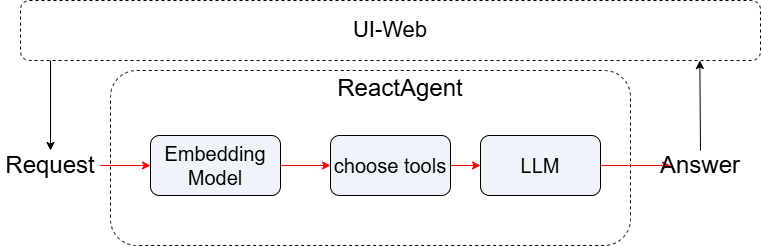
To enable intelligent tool invocation and multi-step reasoning, we propose a collaborative mechanism combining semantic filtering with a ReAct Agent.
In the first stage, an embedding model computes the semantic similarity between the user's query and available tool descriptions, dynamically selecting the most relevant tools. In the second stage, a ReAct Agent orchestrates the LLM to invoke the selected tools, performing step-by-step computation or decomposing complex tasks as needed. The final execution results are then returned to the user.
Integrating these ideas, our system is designed as follows:
User request → received by LLM → passed to embedding model (e.g., BGE-M3) to match high-relevance tools → relevant tools identified via text similarity → ReAct Agent (LLM + toolchain) activated to execute multi-step reasoning → consolidated results returned to the client.
Implementation
Dependencies
Make sure you've installed the following:
pip install lazyllm
````

Import required packages:

```python
import json
import numpy as np
from lazyllm import OnlineChatModule, TrainableModule
from lazyllm.tools import fc_register, ToolManager, ReactAgent
Features Overview
- Automatically filters tool functions most relevant to a user query via vector similarity.
- Uses docstrings to judge tool relevance.
- Matching tools are automatically executed by
ReactAgent.
Step-by-Step Guide
Step 1: Similarity Computation
Define the cosine similarity and embedding-based similarity function using bge-m3:
def cosine(x, y):
    """Calculate cosine similarity between two vectors"""
    product = np.dot(x, y)
    norm = np.linalg.norm(x) * np.linalg.norm(y)
    return product / norm if norm != 0 else 0.0
def calculate_similarity(query, docstring, embed=None):
    """Embed query and docstring, then compute similarity"""
    if embed is None:
        embed = TrainableModule('bge-m3').start()

    embs = json.loads(embed([query, docstring]))
    return cosine(embs[0], embs[1])
Parameters:
query: User input in natural language.docstring: Tool function description.embed: ATrainableModulefor text embedding (reusable to avoid reinitialization).
Step 2: Tool Registration
Use @fc_register("tool") to register functions with docstrings, which will be used later for similarity-based matching and agent tool invocation:
@fc_register("tool")
def multiply(a: int, b: int) -> int:
    '''
    Multiply two integers.

    Args:
        a (int): The first number.
        b (int): The second number.

    Returns:
        int: The product of a and b.
    '''
    return a * b
@fc_register("tool")
def add(a: int, b: int) -> int:
    '''
    Add two integers.

    Args:
        a (int): The first number.
        b (int): The second number.

    Returns:
        int: The sum of a and b.
    '''
    return a + b
@fc_register("tool")
def generate_random_animal_name():
    '''
    Generates a random fictional animal name by combining a color and an animal.

    Args:
        None

    Returns:
        str: A fictional animal name like "Blue Lizard" or "Golden Ferret".
    '''
    import random

    colors = ['Crimson', 'Azure', 'Golden', 'Emerald', 'Ivory']
    animals = ['Owl', 'Ferret', 'Lizard', 'Panther', 'Koala']
    return f"{random.choice(colors)} {random.choice(animals)}"
Step 3: Retrieve Tool Descriptions
Use ToolManager to get the tool-to-description mapping:
manager = ToolManager(tools=["add", "multiply", "generate_random_animal_name"])

tool_doc_map = {
    tool.name: tool.description.strip() if tool.description else ""
    for tool in manager.all_tools
}
Step 4: Filter Tools by Similarity
Define a filter function to select tools with similarity above a threshold:
def filter_tools_by_similarity(query, embed, threshold=0.4):
    selected = []
    for name, doc in tool_doc_map.items():
        score = calculate_similarity(query, doc, embed)
        print(f"[DEBUG] Tool: {name} | Similarity: {score:.3f}")
        if score >= threshold:
            selected.append(name)
    return selected
Example output:
Parameters:
threshold: The minimum similarity score for a tool to be considered.- Returns: A list of matching tool names.
Step 5: Build and Run Agent
Combine the LLM and filtered tools to perform reasoning:
if __name__ == "__main__":
    embed = TrainableModule('bge-m3').start()
    llm = OnlineChatModule(source="sensenova", model="DeepSeek-V3")

    query = "What is 20+(2*4)? Calculate step by step."
    tools = filter_tools_by_similarity(query, embed)

    if tools:
        agent = ReactAgent(llm, tools)
        res = agent(query)
    else:
        res = llm(query)

    print(res)
Note: If no matching tool is found, it falls back to the LLM for a direct answer.
View Full Code
Click to expand full code
import json
import numpy as np
from lazyllm import OnlineChatModule,TrainableModule
from lazyllm.tools import fc_register, ToolManager, ReactAgent

def cosine(x, y):
    """Calculate cosine similarity between two vectors"""
    product = np.dot(x, y)
    norm = np.linalg.norm(x) * np.linalg.norm(y)
    return product / norm if norm != 0 else 0.0
def calculate_similarity(query, docstring, embed=None):
    """Embed query and docstring, then compute similarity"""
    if embed is None:
        embed = TrainableModule('bge-m3').start()

    embs = json.loads(embed([query, docstring]))
    return cosine(embs[0], embs[1])
@fc_register("tool")
def multiply(a: int, b: int) -> int:
    '''
    Multiply two integers.

    Args:
        a (int): The first number.
        b (int): The second number.

    Returns:
        int: The product of a and b.
    '''
    return a * b
@fc_register("tool")
def add(a: int, b: int) -> int:
    '''
    Add two integers.

    Args:
        a (int): The first number.
        b (int): The second number.

    Returns:
        int: The sum of a and b.
    '''
    return a + b
@fc_register("tool")
def generate_random_animal_name():
    '''
    Generates a random fictional animal name by combining a color and an animal.

    Args:
        None

    Returns:
        str: A fictional animal name like "Blue Lizard" or "Golden Ferret".
    '''
    import random

    colors = ['Crimson', 'Azure', 'Golden', 'Emerald', 'Ivory']
    animals = ['Owl', 'Ferret', 'Lizard', 'Panther', 'Koala']
    return f"{random.choice(colors)} {random.choice(animals)}"
manager = ToolManager(tools=["add", "multiply"])

tool_doc_map = {
    tool.name: tool.description.strip() if tool.description else ""
    for tool in manager.all_tools
}
def filter_tools_by_similarity(query, embed, threshold=0.4):
    selected = []
    for name, doc in tool_doc_map.items():
        score = calculate_similarity(query, doc, embed)
        print(f"[DEBUG] Tool: {name} | Similarity: {score:.3f}")
        if score >= threshold:
            selected.append(name)
    return selected
if __name__ == "__main__":
    embed = TrainableModule('bge-m3').start()
    llm = OnlineChatModule(source="sensenova", model="DeepSeek-V3")

    query = "What is 20+(2*4)? Calculate step by step."
    tools = filter_tools_by_similarity(query, embed)

    if tools:
        agent = ReactAgent(llm, tools)
        res = agent(query)
    else:
        res = llm(query)

    print(res)
Example Output
Input:
Output:
Thought: The current language of the user is: English. I need to calculate the expression step by step.

Answer:
Let's calculate \(20 + (2 \times 4)\) step by step:
1. First, perform the multiplication inside the parentheses: \(2 \times 4 = 8\).
2. Then, add the result to 20: \(20 + 8 = 28\).

So, the final answer is **28**.
Debug logs:
[DEBUG] Tool: add | Similarity: 0.478
[DEBUG] Tool: multiply | Similarity: 0.453
[DEBUG] Tool: generate_random_animal_name | Similarity: 0.361
The agent used the first two relevant tools to complete the answer.
Tips
- You can register more tool functions. Just make sure they have meaningful docstrings.
- You can replace
bge-m3with your own embedding model. - Adjust the
thresholdto control tool selection sensitivity.
Conclusion
This project showcases how to build an adaptive, tool-calling agent using LazyLLM. It supports scenarios like automatic calculation, QA systems, and RAG-based reasoning. Feel free to extend your toolset and build a more powerful AI assistant.