Chapter 16: Create a RAG system for paper Q&A with macro Q&A and chart generation functions
In the previous course, we used the RAG knowledge we learned to build a paper-based question and answer system. However, when there are a large number of papers, for some statistical information, such as the number of papers in a certain direction, the number of papers in a certain conference, etc., it is impossible to retrieve this information only through traditional RAG. In this regard, this chapter will briefly review the previous content, and then upgrade it to complete an intelligent question and answer system that integrates statistical analysis and knowledge question and answer functions.
1. Review of the previous section
In order to better understand the contents of this chapter, we first briefly review the key contents of the first two chapters.
Chapter 14 introduces the construction process of the paper question and answer system, explains the core components in turn, such as parser, retriever, reranker, etc., and shows how to gradually build a complete RAG system. At the same time, we also discussed some advanced techniques to improve the performance and flexibility of the system.
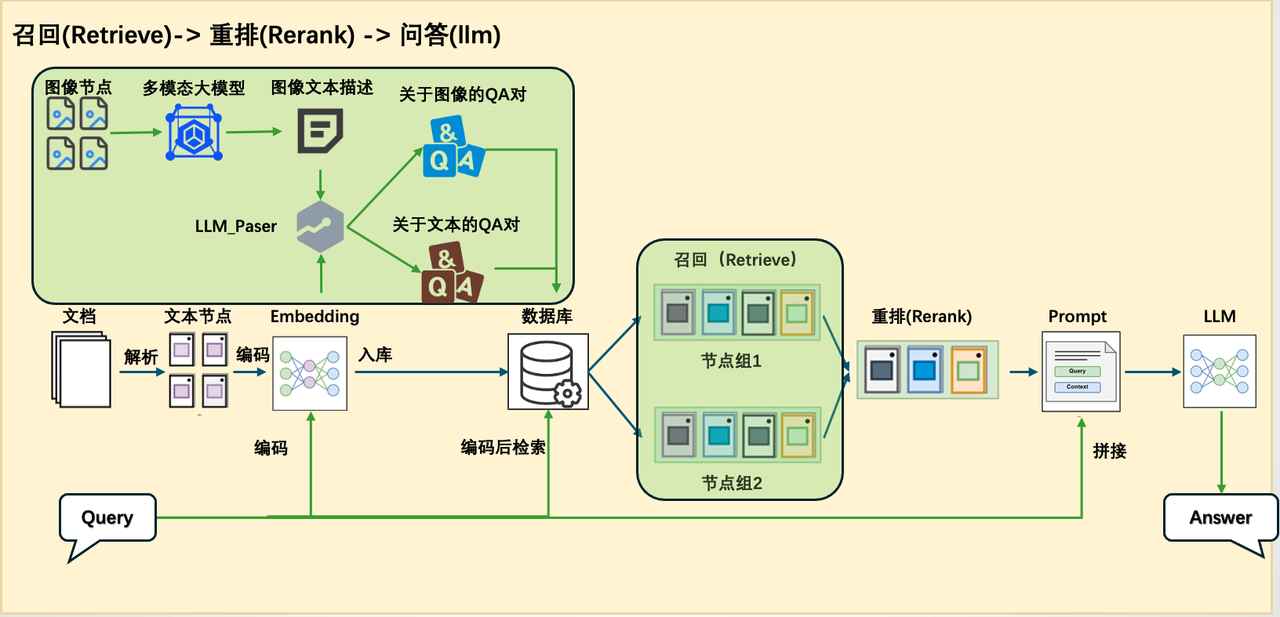
However, this system still belongs to the traditional RAG architecture. In Chapter 15, we further pointed out the limitations of traditional RAG in dealing with statistical problems and proposed solutions, such as combining SQL database, Text2SQL technology and sql_tool tool. However, the previous chapter only proposed a theoretical scheme and has not yet given a complete practical example.
Therefore, this chapter will build on this basis and combine it with actual cases to build a more complete and practical statistical question and answer system to further expand RAG's capabilities in structured data processing.
2. Overview of this section
In this chapter, we will further expand its functions based on the existing paper question and answer system, so that the system can not only perform knowledge question and answer, but also have the ability to handle statistical analysis tasks. To this end, we need to adjust the traditional RAG architecture to enhance its adaptability in statistical scenarios.
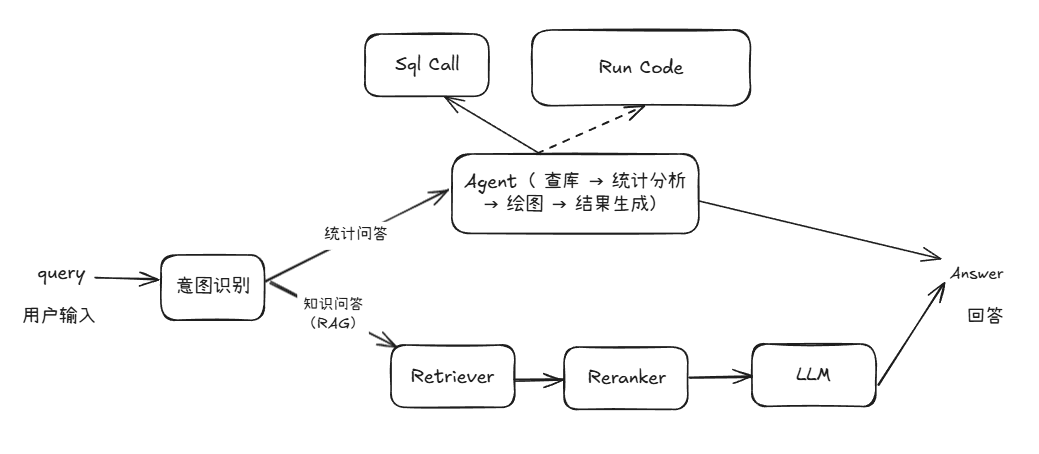
Since there are significant differences in the processing logic and the types of information they rely on between knowledge question and answer and statistical question and answer, it is difficult in practice to use a unified pipeline to meet both needs. Therefore, we added a new pipeline specifically for processing statistical tasks based on the original RAG pipeline to realize the change in system structure from [Figure 1] to [Figure 2].
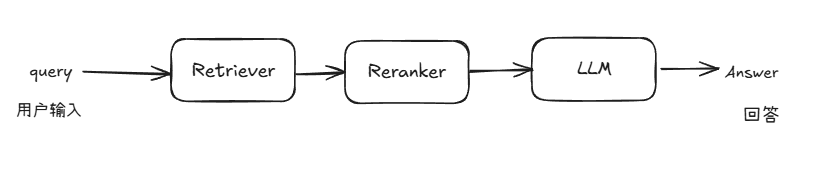
Figure 1 System architecture diagram of the original paper
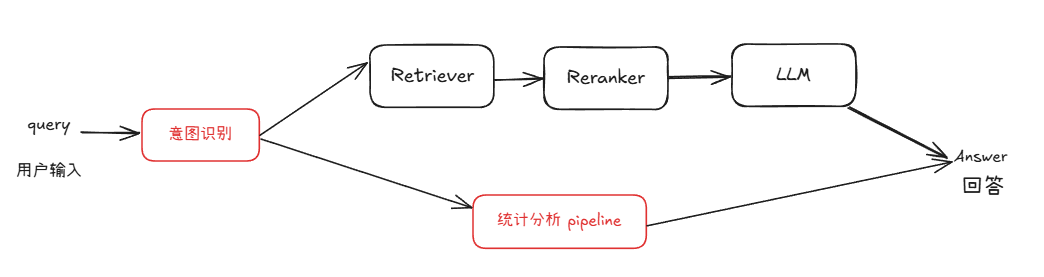
Figure 2 Architecture diagram of a question and answer system with statistical capabilities
On the basis of reusing existing modules, we have added a new statistical analysis pipeline for database query, statistical analysis and chart generation. This pipeline runs in parallel with the RAG pipeline and is uniformly scheduled through an intent recognition module. This module is responsible for determining whether the user query belongs to knowledge question and answer or statistical analysis, thereby guiding the request into the appropriate processing flow.
In order to realize this enhanced system, we also need to introduce several key technical modules. Next, these new modules and their functions in the system will be introduced one by one after completing the data preparation.
3. Data preparation
Here we take the ArXivQA data set as an example, and extract the first 100 papers from Papers-2024.md for demonstration. Before executing the code, you need to download Papers-2024.md, which can be downloaded offline or with the following command. This file contains paper information and download links.
We need to prepare data from two aspects:
-
Knowledge Base (download the paper file to the specified directory), used for knowledge Q&A;
-
Database (the table that constructs the paper information is stored in the local database), used for statistical question and answer, paper information such as title, author, etc.
The following script can simultaneously download a paper to a specified folder and build a database of paper information.
import re
import requests
import time
import json
from tqdm import tqdm
from bs4 import BeautifulSoup

#Function to download files
def spider(url, save_dir='./rag_data/papers'):
    response = requests.get(url)

    # Check if the request is successful
    res = {}
    if response.status_code == 200:
        # Parse web page content
        soup = BeautifulSoup(response.text, 'html.parser')
        elements = soup.find_all(class_='title mathjax')
        for ele in elements:
            res['title'] = ele.get_text().replace("Title:", '')
        elements = soup.find_all(class_='authors')
        authors = []
        for ele in elements:
            links = ele.find_all('a')
            for link in links:
                authors.append(link.get_text())
        res['author'] = ';'.join(authors)
        elements = soup.find_all(class_='tablecell subjects')
        for ele in elements:
            res['subject'] = ele.get_text()

        # Save paper
        file_path = os.path.join(save_dir, res['title'] + '.pdf')
        with open(file_path, 'wb') as f:
            f.write(response.content)
        print(f"Saved PDF to {file_path}")
        return res

    else:
        print(f"Webpage loading failed, status code: {response.status_code}")


def get_information():
    with open('2024.md')as f:
        texts = f.readlines()[2:102]

    reses = []
    for text in tqdm(texts):
        abs_url = re.findall(r'\[.*?\]\((https?://arxiv.*?)\)', text)
        if len(abs_url) > 0:
            res = spider(abs_url[0])
            reses.append(res)
            time.sleep(5)

    with open('test.txt', 'w')as f:
        json.dump({"data": reses}, f)
The above is a script to obtain document information, which is responsible for parsing the data in 2024.md, taking 100 articles as an example, and then parsing the corresponding URLs, and then obtaining the information of the paper title, author, and topic corresponding to each URL, and recording it.
import sqlite3
import json


def write_into_table():
    with open('test.txt', 'r')as f:
        data = json.load(f)

    data = data['data']

    # Connect to the SQLite database (if the database does not exist, it will be created)
    conn = sqlite3.connect('papers.db')
    cursor = conn.cursor()

    #Create table
    cursor.execute('''
    CREATE TABLE IF NOT EXISTS papers (
        id INTEGER PRIMARY KEY AUTOINCREMENT,
        title TEXT,
        author TEXT,
        subject TEXT
    )
    ''')

    #Insert data
    for paper in data:
        cursor.execute('''
        INSERT INTO papers (title, author, subject)
        VALUES (?, ?, ?)
        ''', (paper['title'], paper['author'], paper['subject']))

    # Submit and close the connection
    conn.commit()
    conn.close()
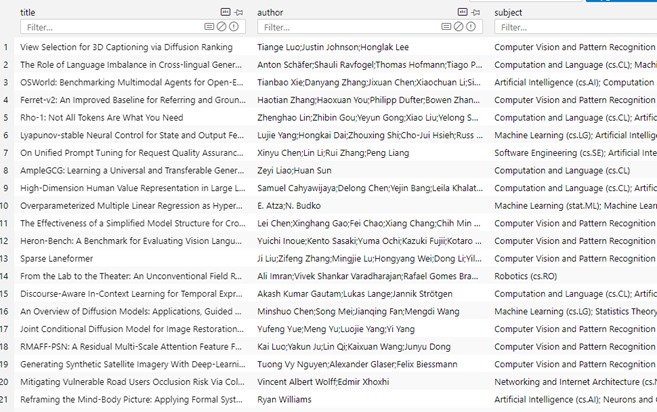
The above code creates the corresponding database information based on the obtained information, and writes the record information for SQL Call query. Now that we have completed the data preparation, we have obtained the downloaded paper in the fixed directory:
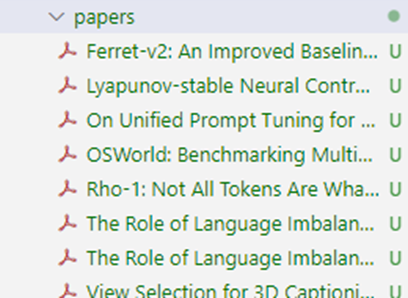
and the database file papers.db.
4. Detailed explanation of dependent modules
In order to build a question and answer system that supports statistical analysis, we need to master the principles and implementation methods of several core modules, including intent recognition, SQL calling, statistical analysis, and chart generation.
1. Intent recognition
The first is the intent recognition module. The main responsibility of this module is to analyze the user's input content and determine whether the intention is traditional knowledge Q&A or statistical Q&A involving structured data processing.
LazyLLM has a built-in IntentClassifier class for analyzing intentions. The details are as follows:
IntentClassifier is a language model-based intent recognizer that identifies predefined intents based on user-provided input text and conversation context, and ensures accurate recognition of intents through pre- and post-processing steps.
For IntentClassifier we provide the following parameters:
- llm: Language model object used for intent recognition, OnlineChatModule or TrainableModule type
- intent_list (list): A list of strings containing all possible intentions. Can contain Chinese or English intent.
- prompt (str): prompt word appended by the user.
- constrain (str): User-attached constraints.
- examples (list[list]): Additional examples in the format
[[query, intent], [query, intent], ...]. - return_trace (bool, optional): If set to True, the results will be recorded in trace. Default is False.
ch_prompt_classifier_template = """
## role: intent classifier
You are an intent classification engine responsible for analyzing user input text and determining unique intent categories based on conversational information. {user_prompt}

## limit:
You only need to reply the name of the intent, no additional fields are output, and no translation is required. {user_constrains}

## Notice:
{attention}

## Text format
The input text is in JSON format, the content in "human_input" is the user's original input, and "intent_list" is a list of all intent names.

## Example
User: {{"human_input": "How will the weather be in Beijing tomorrow?", "intent_list": ["View weather", "Search engine search", "View monitoring", "Weekly report summary", "Chat"]}}
Assistant: Check the weather
{user_examples}

## Historical Dialogue
The chat history between the human and the assistant is stored in the <histories></histories> XML tag below.
<histories>
{history_info}
</histories>

Enter the text as follows:
"""  # noqa E501
Within IntentClassifier, the template shown above is built-in, which is used to pass the above parameters into the large model. The call to IntentClassifier is very simple. Here are two complete call examples Code Github link🔗:
import lazyllm
from lazyllm.tools import IntentClassifier

classifier_llm = lazyllm.OnlineChatModule()
chatflow_intent_list = ["Translation Service", "Weather Inquiry", "Content Recommendation", "Financial Quotation Inquiry"]
classifier = IntentClassifier(classifier_llm, intent_list=chatflow_intent_list)

while True:
    query = input("Enter your question:\n")
    print(f"\nThe recognized intent is:\n {classifier(query)}\n" + "-"*40)

#What’s the weather like today ➔ Weather query
# How is the A-share market? ➔ Financial market inquiry
# Recommend a science fiction movie to me ➔ Content recommendation
# Help me translate this paper into Chinese ➔ Translation Service
Intent recognition-advanced usage
Through the with syntax, the intent recognition module can directly follow specific instructions.
base = TrainableModule('internlm2-chat-7b')
with IntentClassifier(base) as ic:
    ic.case['Chat', base]
    ic.case['Voice Recognition', TrainableModule('SenseVoiceSmall')]
    ic.case['Picture Q&A', TrainableModule('Mini-InternVL-Chat-2B-V1-5').deploy_method(deploy.LMDeploy)]
    ic.case['Paint', pipeline(base.share().prompt(painter_prompt),
        TrainableModule('stable-diffusion-3-medium'))]
    ic.case['Generate music', pipeline(base.share().prompt(musician_prompt), TrainableModule('musicgen-small'))]
    ic.case['Text to speech', TrainableModule('ChatTTS')]
    WebModule(ic, history=[base], audio=True, port=8847).start().wait()
• There are three usage methods: case[a, b], case[a: b] and case[a::b]. You can choose to use any of the three according to your personal habits. There is no difference between them:
with IntentClassifier(base) as ic:
    ic.case['Chat', base]
    ic.case['Voice Recognition': TrainableModule('SenseVoiceSmall')]
    ic.case['Picture Q&A'::TrainableModule('Mini-InternVL-Chat-2B-V1-5').deploy_method(deploy.LMDeploy)]
2. Sql Manager
Next, we solve the first link in the statistical Q&A process: database query and data acquisition.
In the previous learning content, although we used SQLite as an example to explain the basic usage process of the database, in a real production environment, the types of databases used are far more than SQLite. Common relational databases also include MySQL, PostgreSQL, SQL Server, Oracle, etc. In the cloud, database services such as Alibaba Cloud RDS, Tencent Cloud CynosDB, and AWS RDS are also widely used.
In order to easily connect and operate different types of databases, we can use the very popular ORM framework in Python - SQLAlchemy. SQLAlchemy provides a unified database operation interface, supporting not only local databases, but also various mainstream cloud databases, which greatly improves the flexibility and scalability of database interaction. The following is the code to connect local and remote databases through SQLAlchemy.
from sqlalchemy import create_engine

#Create a SQLite local database connection
engine = create_engine('sqlite:///local_database.db')
#Create a remote MySQL database connection
# Format: mysql+pymysql://username:password@server address:port/database name
engine = create_engine('mysql+pymysql://user:password@host:3306/database_name')

# Test connection
with engine.connect() as connection:
    result = connection.execute("SELECT 1")
    print(result.fetchone())
In the lazyllm framework, this function is also encapsulated and the built-in SQLManager module is provided. Through SQLManager, users can easily connect to local or cloud databases, call SQL queries uniformly, and perform SQL-call related operations without having to worry about the complex details of the underlying connection. Just specify the database address, account password and other information in the configuration, and you can start the database interaction capability with one click, laying a solid foundation for subsequent structured Q&A. Code Blocks GitHub link 🔗
from lazyllm.tools import SqlManager

# Connect to local database
sql_manager = SqlManager("sqlite", None, None, None, None, db_name="papers.db",   tables_info_dict=table_info)
# Connect to remote database
# sql_manager = SqlManager(type="PostgreSQL", user="", password="", host="",port="", name="",)

# Query the number of all papers
res = sql_manager.execute_query("select count(*) as total_papser from papers;")
>>> [{"total_papser": 100}]

# Query the titles of papers with LLM
res = sql_manager.execute_query("select title from papers where title like '%LLM%'")
>>> [{"title": "AmpleGCG: Learning a Universal and Transferable Generative Model of Adversarial Suffixes for Jailbreaking Both Open and Closed LLMs"}, {"title": "Learning to Localize Objects Improves Spatial Reasoning in Visual-LLMs"}, {"title": "LLMs in Biomedicine: A study on clinical Named Entity Recognition"}, {"title": "VLLMs Provide Better Context for Emotion Understanding Through Common Sense Reasoning"}]
Note that the db_name parameter needs to be passed in the path to the constructed database file, and the tables_info_dict parameter needs to be passed in the database basic information dictionary (table name, column name, etc.). We take the paper database as an example. The basic information is defined as follows.
table_info = {
    "tables": [{
        "name": "papers",
        "comment": "paper data",
        "columns": [
            {
                "name": "id",
                "data_type": "Integer",
                "comment": "serial number",
                "is_primary_key": True,
            },
            {"name": "title", "data_type": "String", "comment": "title"},
            {"name": "author", "data_type": "String", "comment": "author"},
            {"name": "subject", "data_type": "String", "comment": "field"},
        ],
    }]
}
3. Sql Call
The SQL Call module relies on Sql Manager, which can generate SQL query statements that meet semantic intent based on user questions and connect to the back-end database to obtain original data. This module is not only the entrance to statistical analysis, but also the key to ensuring the accuracy of the results.
Let’s first take a look at the contents of the database file papers.db that we have constructed during the data preparation stage. There is only one table in the database, containing the title, author and subject information of the article:
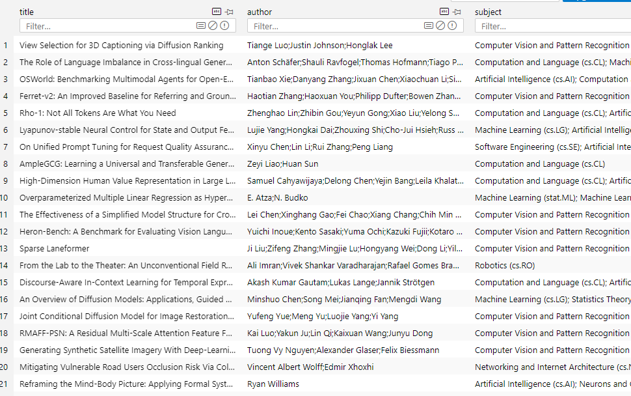
Next start defining sql call:
- Create sql_manager by specifying the database name and data table information, and instantiate a large model to implement text2sql.
- Pass both in to build a SQL Call workflow
This workflow supports converting natural language queries into SQL statements and executing the queries, ultimately returning results. Code GitHub link🔗
from lazyllm.tools import SqlManager, SqlCall

sql_manager = SqlManager("sqlite", None, None, None, None, db_name="papers.db",   tables_info_dict=table_info)
sql_llm = lazyllm.OnlineChatModule()
sql_call = SqlCall(sql_llm, sql_manager,
  use_llm_for_sql_result=False)

query = "How many articles are there in the library?"
print(sql_call(query))
>>> [{"total_papers": 200}]
while True:
  query = input("Please enter your question:")
    print("answer:")
    print(sql_call(query))
# How many papers are there in the library?
#What are the three most subjects in the library?
# Query the database and return the results of thesis topics whose subject contains Computer Vision
4. Statistical analysis agent
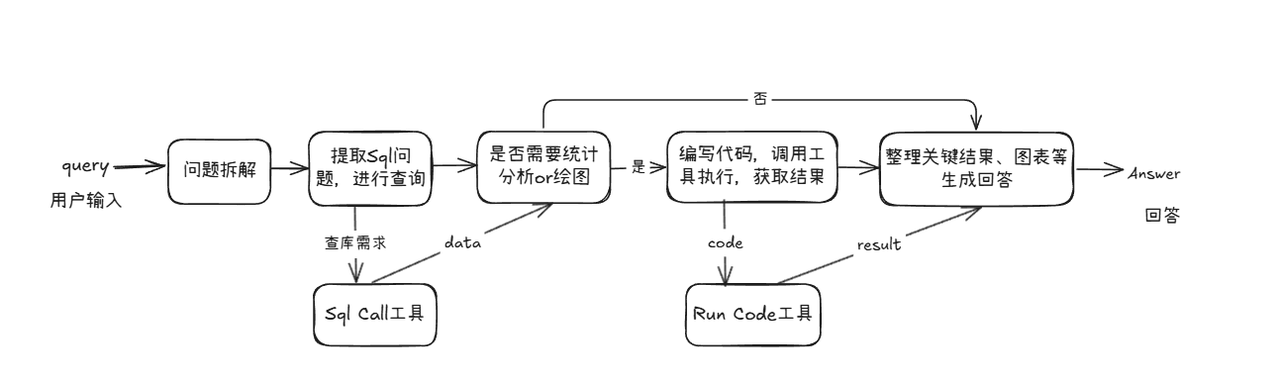
After the problem of obtaining data is solved, we will enter the core process of statistical analysis. This module implements the entire statistical analysis pipeline based on sql call. It can be regarded as an intelligent agent oriented to statistical tasks. It can automatically complete the complete closed-loop process of database query → data analysis → chart generation → result summary according to user questions. Provide users with answers with pictures and text.
(1) Code writing
We first define two tools (Tools) for SQL query and code execution, and provide them to the Agent as optional tools to support it in completing database queries and statistical analysis during task execution.
- The
run_sql_querymethod is encapsulated based on the SQL Call workflow built in the previous section. The Agent can call this method after parsing the SQL-related requirements from the user query to obtain structured query results. - The
run_codemethod is used to receive and execute the statistical analysis code generated by the large model. This method will return key results or error information to provide feedback basis for the next decision and action of the large model.
These two tools work together to enable Agent to dynamically complete the entire process from data acquisition to analysis and execution.
@fc_register("tool")
def run_sql_query(query):
    """
    Automatically generates and executes an SQL query based on a natural language request.

    Given a natural language query describing a data retrieval task, this function generates the corresponding SQL
    statement, executes it against the database, and returns the result.

    Args:
        query (str): A natural language description of the desired database query.

    Returns:
        list[dict]: A list of records returned from the SQL query, where each record is represented as a dictionary.
    """
    sql_manager = SqlManager("sqlite", None, None, None, None, db_name="papers.db", tables_info_dict=table_info)
    sql_llm = lazyllm.OnlineChatModule(source="sensenova")
    sql_call = SqlCall(sql_llm, sql_manager, use_llm_for_sql_result=False)
    return sql_call(query)


@fc_register("tool")
def run_code(code: str):
    """
    Run the given code in a separate thread and return the result.

    Args:
        code (str): code to run.
    Returns:
        dict: {
            "text": str,
            "error": str or None,
        }
    """
    result = {
        "text": "",
        "error": None,
    }

    def code_thread():
        nonlocal result
        stdout = io.StringIO()
        try:
            with contextlib.redirect_stdout(stdout):
                exec_globals = {}
                exec(code, exec_globals)
        except Exception:
            result["error"] = traceback.format_exc()
        result["text"] = stdout.getvalue()

    thread = threading.Thread(target=code_thread)
    thread.start()
    thread.join(timeout=10)

    if thread.is_alive():
        result["error"] = "Execution timed out."
        thread.join()

    return result
Attention! When writing a function, be sure to add a comment below the function in the following format:
def myfunction(arg1: str, arg2: Dict[str, Any], arg3: Literal["aaa", "bbb", "ccc"]="aaa"):
       '''
       Function description ...

       Args:
              arg1 (str): arg1 description.
              arg2 (Dict[str, Any]): arg2 description
              arg3 (Literal["aaa", "bbb", "ccc"]): arg3 description
       '''
When the large model calls this function, the description of the function and the expression of the parameters will be used to determine when to call and pass in the parameters.
Next we implement the agent definition. Here we use lazyllm's built-in ReactAgent tool and pass the two tools defined previously into the tools parameter to realize automatic invocation of the model.
ReactAgent follows the process of
Thought->Action->Observation->Thought...->Finishto display the steps to solve user problems step by step through LLM and tool calls, and finally outputs the final answer.
from lazyllm.tools.agent import ReactAgent

agent = ReactAgent(
        llm=lazyllm.OnlineChatModule(stream=False),
        tools=['run_code', 'run_sql_query'],
        return_trace=True,
        max_retries=3,
    )
Then based on the above agent, we define prompt and build a SQL question and answer process that supports statistical questions:
sql_prompt = """
You are a senior data scientist who needs to perform the necessary statistical analysis and drawing based on given questions to answer statistical questions raised by users.
Your workflow would look like this:
1. Understand the problem and conduct data query
- Disassemble the part of the problem that needs to be queried in the database, and call the corresponding tools to obtain data.
2. Determine whether answers to statistical questions can be obtained directly from the data
- If the data can directly answer the statistical question, output the results directly and draw charts if necessary.
- If it is not enough to answer, perform necessary data analysis first and then draw graphs if necessary.
3. Implement data analysis and graphing by writing code, executing it, and obtaining results.
- Write complete executable Python code, including all necessary imports, data loading, analysis logic, drawing code, and result output.
- Perform data analysis using common data science toolkits such as pandas, numpy, scikit-learn, etc.
- Use visualization tools (such as matplotlib, seaborn) for charting.
4. Image saving
- All generated images must be saved to the following path:
{image_path}
- After successful saving, use the following format to display the image in the final answer (Answer part) (image_name is the saved file name, image_path is the full path):

5. Error handling
- If the code execution fails, please automatically modify the code according to the error message and re-execute it until it succeeds.
question:
{query}
"""
with pipeline() as sql_ppl:
sql_ppl.formarter = lambda query: sql_prompt.format(query=query, image_path=IMAGE_PATH)
sql_ppl.agent = ReactAgent(
llm=lazyllm.OnlineChatModule(stream=False),
tools=['run_code', 'run_sql_query'],
return_trace=True,
max_retries=3,
)
sql_ppl.clean_output = lazyllm.ifs(lambda x: "Answer:" in x, lambda x: x.split("Answer:")[-1], lambda x:x)
if __name__ == '__main__':
lazyllm.WebModule(sql_ppl, port=23456, static_paths=image_save_path).start().wait()
(2) Result display
Let us sort out the complete execution process of the code based on a simple example query:
5. Construct a paper question and answer system that supports statistical analysis
After mastering the key technologies on which the system relies, we can begin to build a practical system to support the integration of statistical analysis and knowledge question and answer capabilities.
The architecture of the entire system is as follows:
[Code implementation]
Let’s take a look at how to use the structure given above to build a complete multi-functional Q&A workflow. The overall idea is as follows:
We first define two sub-workflows respectively:
chat_ppl: used to handle general question and answer tasks based on RAG (Retrieval-Augmented Generation);sql_ppl: used to handle SQL question and answer tasks related to statistical analysis.
Subsequently, an intent recognition module was introduced into the main workflow to parse the user's query intention, and accordingly select the appropriate path for processing in the two sub-workflows of chat_ppl and sql_ppl. Through such a structural design, the system can automatically match appropriate workflows according to the type of user questions, and achieve unified scheduling and processing of natural language question answering and statistical analysis tasks.
** Note that in lines 9 and 10, we import the rag pipeline introduced in Chapter 14 (build_paper_rag()) and the sql defined above through module import. pipeline (build_statistical_agent()), no repeated coding here. **
import lazyllm
from lazyllm import OnlineChatModule, pipeline, _0
from lazyllm.tools import IntentClassifier

from statistical_agent import build_statistical_agent
from paper_rag import build_paper_rag

# Build rag workflow and statistical analysis workflow
rag_ppl = build_paper_rag()
sql_ppl = build_statistical_agent()

# Build a main workflow with knowledge Q&A and statistical Q&A capabilities
def build_paper_assistant():
    llm = OnlineChatModule(source='qwen', stream=False)
    intent_list = [
        "Essay Questions and Answers",
        "Statistics Q&A",
    ]

    with pipeline() as ppl:
        ppl.classifier = IntentClassifier(llm, intent_list=intent_list)
        with lazyllm.switch(judge_on_full_input=False).bind(_0, ppl.input) as ppl.sw:
            ppl.sw.case[intent_list[0], rag_ppl]
            ppl.sw.case[intent_list[1], sql_ppl]

    return ppl

if __name__ == "__main__":
    main_ppl = build_paper_assistant()
    lazyllm.WebModule(main_ppl, port=23459, static_paths="./images").start().wait()
Then we can start the workflow. We use WebModule to start the service, and create the workflow defined above into a web service through WebModule. It should be noted here that when starting WebModule, you need to pass in the saving path of the image, so that the directory can be set as a static directory, and Gradio can directly access the image files in this directory. When the web service is started successfully, we can experience using it in the browser based on the IP and port after startup.
[Effect display]
Simple statistical questions (no drawing required)
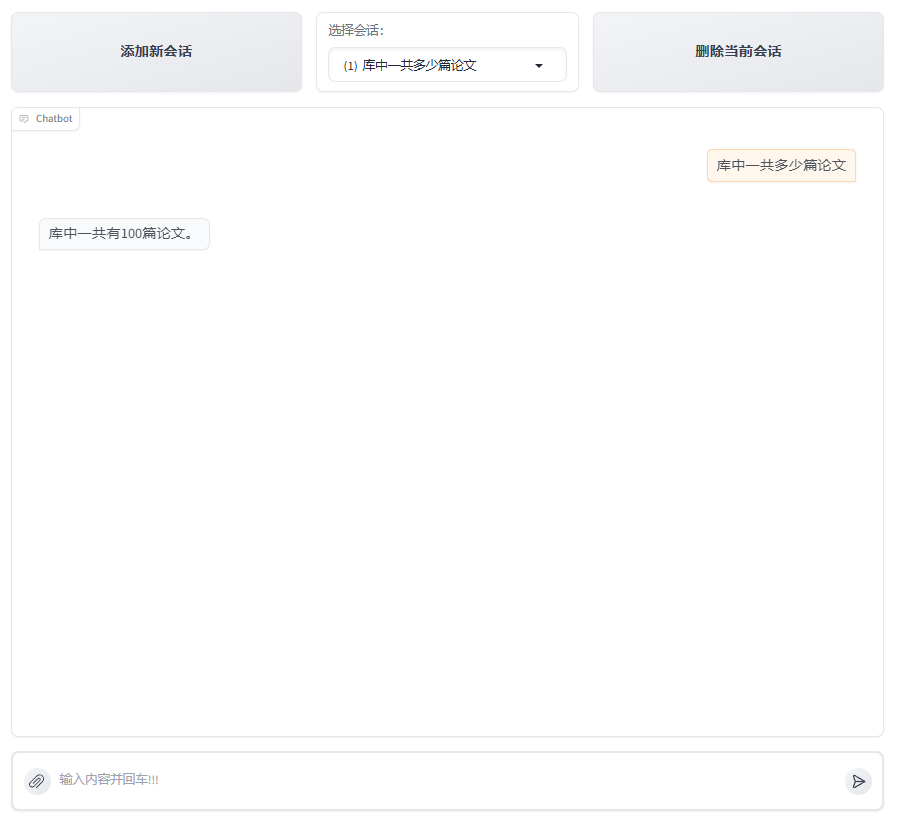
Processing process analysis:
-
The user enters query "How many papers are there in the library"
-
Large model extraction data query question "How many papers are there in the library?" Call
SqlCall:
input:
"How many papers are there in the library?"

text2sql:
select count(*) as total_papser from papers;

output:
[{"total_papers": 100}]
- The model determines that the result can answer the query question, and directly outputs the answer "There are a total of 100 papers in the library."
[Attachment: Execution log]

Simple statistical questions (requires drawing)
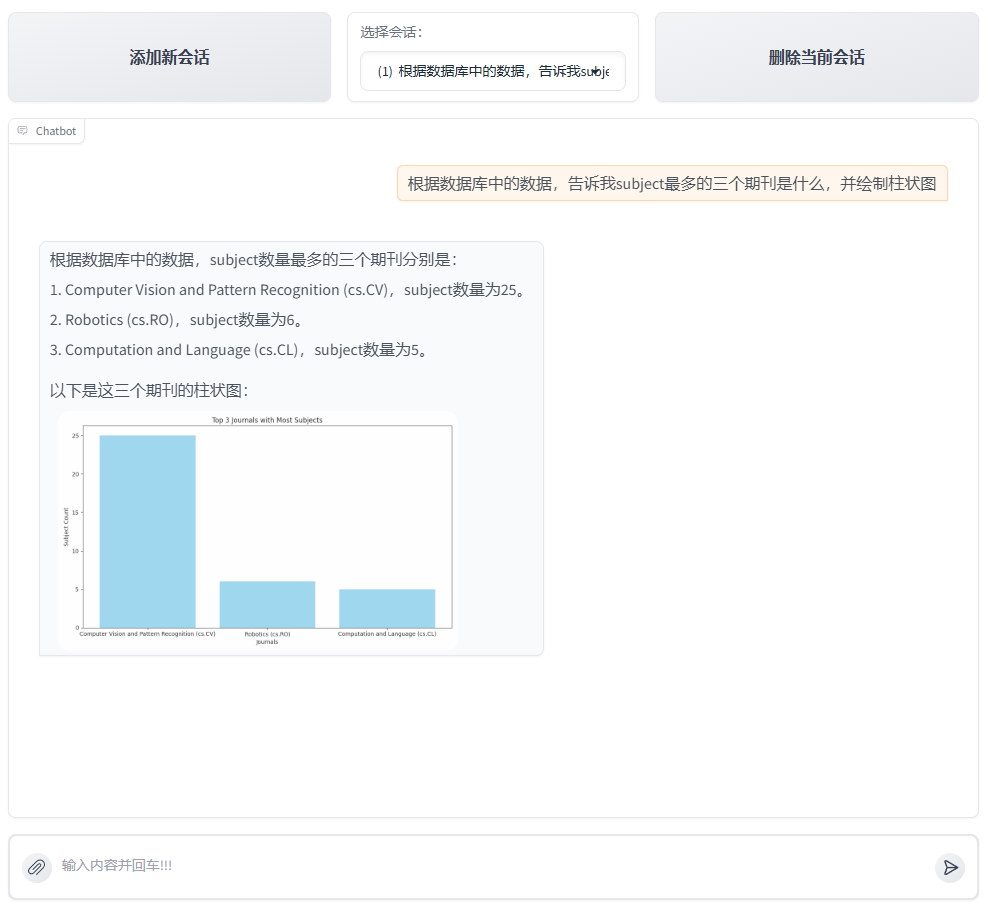
-
The user enters query "Based on the data in the database, tell me what the three most subjects are and draw a histogram"
-
The large model will analyze the incoming
queryand determine that the run_sql_query tool needs to be called to obtain data. It will call the built-in Sql scheduling toolSqlCalloflazyllm, which can automatically execute the corresponding sql query statement and obtain the corresponding results from the database. The results are as follows.
input:
"Find the three most numerous subjects in the database and their quantities"

text2sql:
select subject, count(*) as count
from papsers
group by count desc
limit 3;

output:
[{"subject": "\nComputer Vision and Pattern Recognition (cs.CV)", "count": 25}, {"subject": "\nRobotics (cs.RO)", "count": 6}, {"subject": "\nComputation and Language (cs.CL)", "count": 5}]
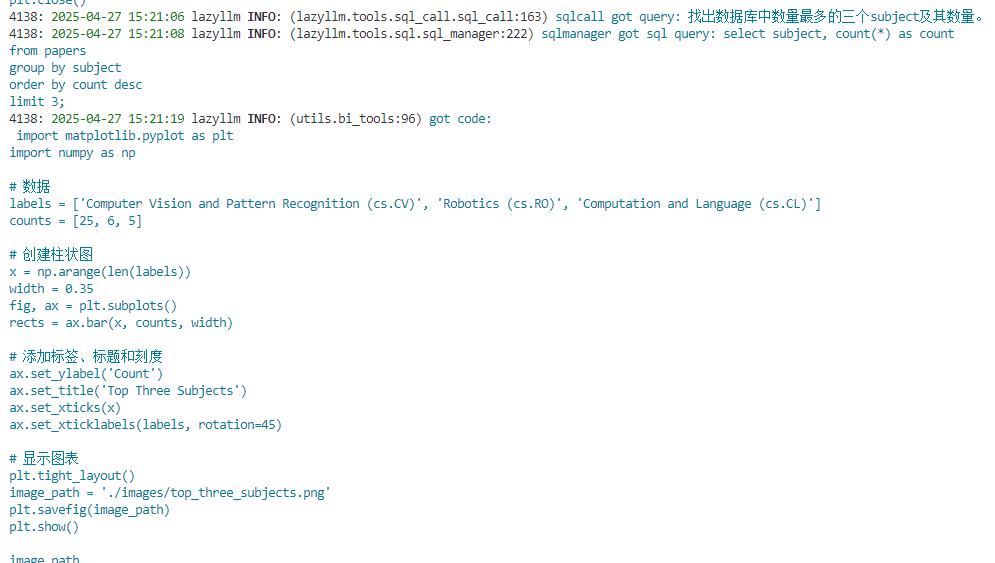
- The model determines that the result can already answer the question of query, and no further statistical analysis is required. However, the query contains drawing requirements, so it writes python code only for drawing and calls the run_code tool for execution. The following is the code written for the large model.
import matplotlib.pyplot as plt
import numpy as np

# data
labels = ['Computer Vision and Pattern Recognition (cs.CV)', 'Robotics (cs.RO)', 'Computation and Language (cs.CL)']
counts = [25, 6, 5]

#Create a histogram
x = np.arange(len(labels))
width = 0.35
fig, ax = plt.subplots()
rects = ax.bar(x, counts, width)

# Add labels, titles and ticks
ax.set_ylabel('Count')
ax.set_title('Top Three Subjects')
ax.set_xticks(x)
ax.set_xticklabels(labels, rotation=45)

# show chart
plt.tight_layout()
image_path = './images/top_three_subjects.png'
plt.savefig(image_path)
- After the drawing is completed, the large model will generate a final answer with pictures and text for the user based on the picture path and integrating the previous results.
[Attachment: Execution log]
Complex statistical problems (requires drawing)
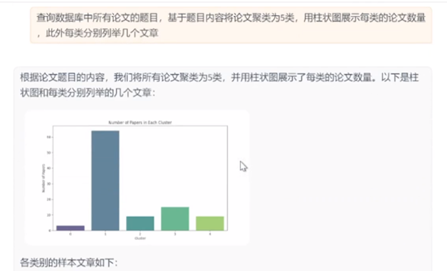
Processing process analysis:
-
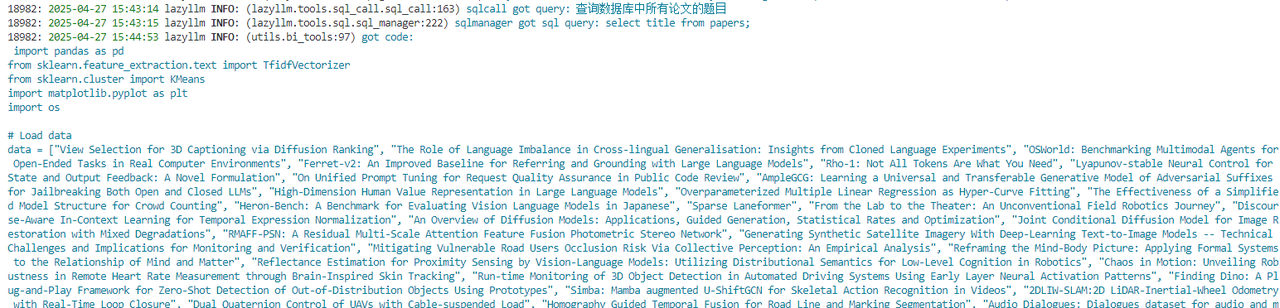
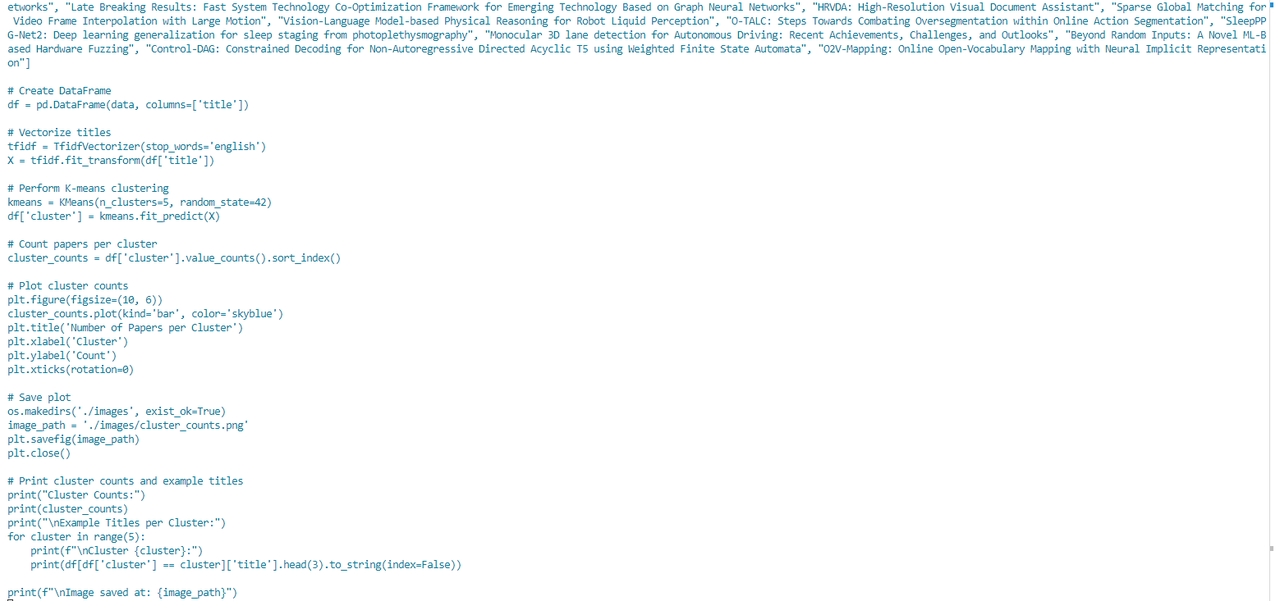
The user inputs query "Query the titles of all papers in the database, cluster the papers into 5 categories based on the title content, list several articles in each category, and use a bar chart to display the number of papers in each category"
-
Large model extraction data query question "How many papers are there in the library?" Call
SqlCall:
input:
"Query all paper titles in the database"

text2sql:
select title from papers;

output:
["View Selection for 3D Captioning via Diffusion Ranking", "The Role of Language Imbalance in Cross-lingual Generalisation: Insights from Cloned Language Experiments", "OSWorld: Benchmarking Multimodal Agents for Open-Ended Tasks in Real Computer Environments", "Ferret-v2: An Improved Baseline for Referring and Grounding with Large Language Models", "Rho-1: Not All Tokens Are What You Need", "Lyapunov-stable Neural Control for State and Output Feedback: A Novel Formulation", "On Unified Prompt Tuning for Request Quality Assurance in Public Code Review", "AmpleGCG: Learning a Universal and Transferable Generative Model of Adversarial Suffixes for Jailbreaking Both Open and Closed LLMs", "High-Dimension Human Value Representation in Large Language Models", "Overparameterized Multiple Linear Regression as Hyper-Curve Fitting", ...]
- The model writing program further performs statistical analysis tasks and calls the
run codetool for execution.
import pandas as pd
from sklearn.feature_extraction.text import TfidfVectorizer
from sklearn.cluster import KMeans
import matplotlib.pyplot as plt
import os

# Load data
data = ["View Selection for 3D Captioning via Diffusion Ranking", "The Role of Language Imbalance in Cross-lingual Generalisation: Insights from Cloned Language Experiments", "OSWorld: Benchmarking Multimodal Agents for Open-Ended Tasks in Real Computer Environments", "Ferret-v2: An Improved Baseline for Referring and Grounding with Large Language Models", "Rho-1: Not All Tokens Are What You Need", "Lyapunov-stable Neural Control for State and Out..."]
# Create DataFrame
df = pd.DataFrame(data, columns=['title'])

# Vectorize titles
tfidf = TfidfVectorizer(stop_words='english')
X = tfidf.fit_transform(df['title'])

# Perform K-means clustering
kmeans = KMeans(n_clusters=5, random_state=42)
df['cluster'] = kmeans.fit_predict(X)

# Count papers per cluster
cluster_counts = df['cluster'].value_counts().sort_index()

# Plot cluster counts
plt.figure(figsize=(10, 6))
cluster_counts.plot(kind='bar', color='skyblue')
plt.title('Number of Papers per Cluster')
plt.xlabel('Cluster')
plt.ylabel('Count')
plt.xticks(rotation=0)

# Save plot
os.makedirs('./images', exist_ok=True)
image_path = './images/cluster_counts.png'
plt.savefig(image_path)
plt.close()

# Print cluster counts and example titles
print("Cluster Counts:")
print(cluster_counts)
print("\nExample Titles per Cluster:")
for cluster in range(5):
    print(f"\nCluster {cluster}:")
    print(df[df['cluster'] == cluster]['title'].head(3).to_string(index=False))

print(f"\nImage saved at: {image_path}")
- After execution, the large model receives the image path and the results of each category, and generates answers with pictures and texts for the user.
[Attachment: Operation log]
Q&A
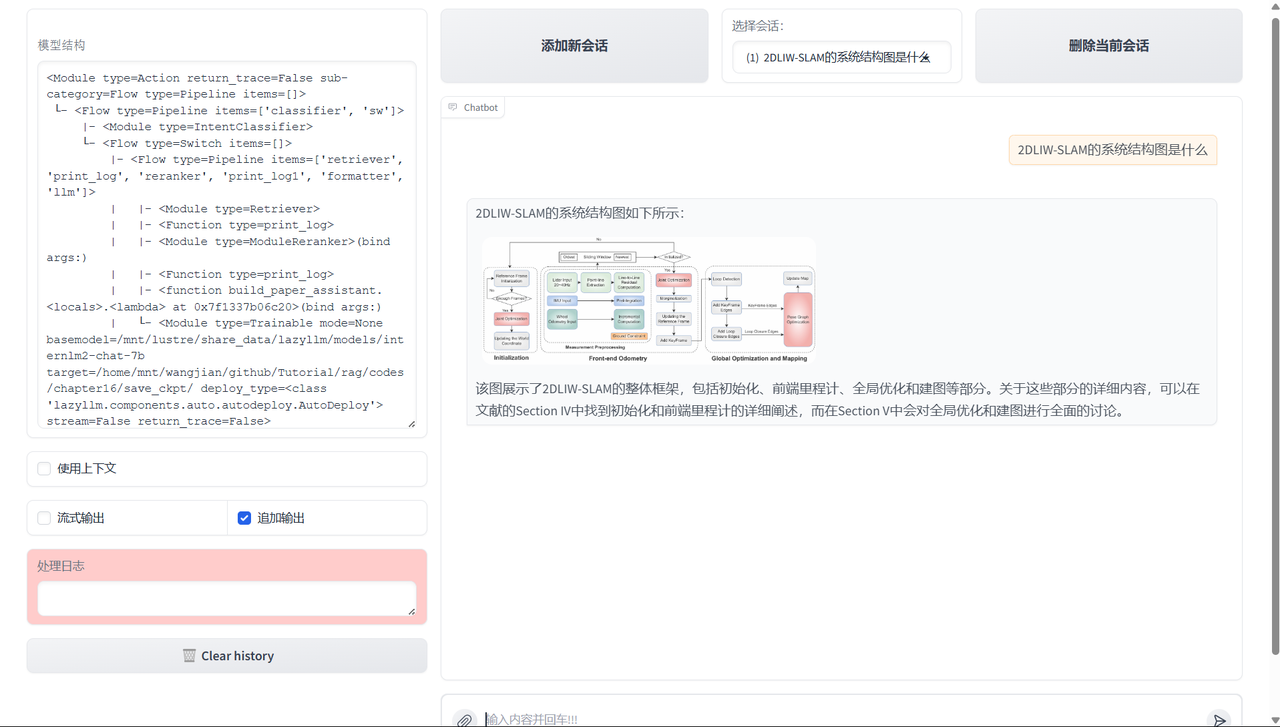
So far, we have built an intelligent question and answer system that has both knowledge base question answering and statistical analysis capabilities. The system not only supports users to ask semantic questions around the document content, but can also perform statistical analysis and chart drawing on the structured information in the database, thereby supporting global data observation needs.
6. RAG paper system comprehensive multi-modal solution
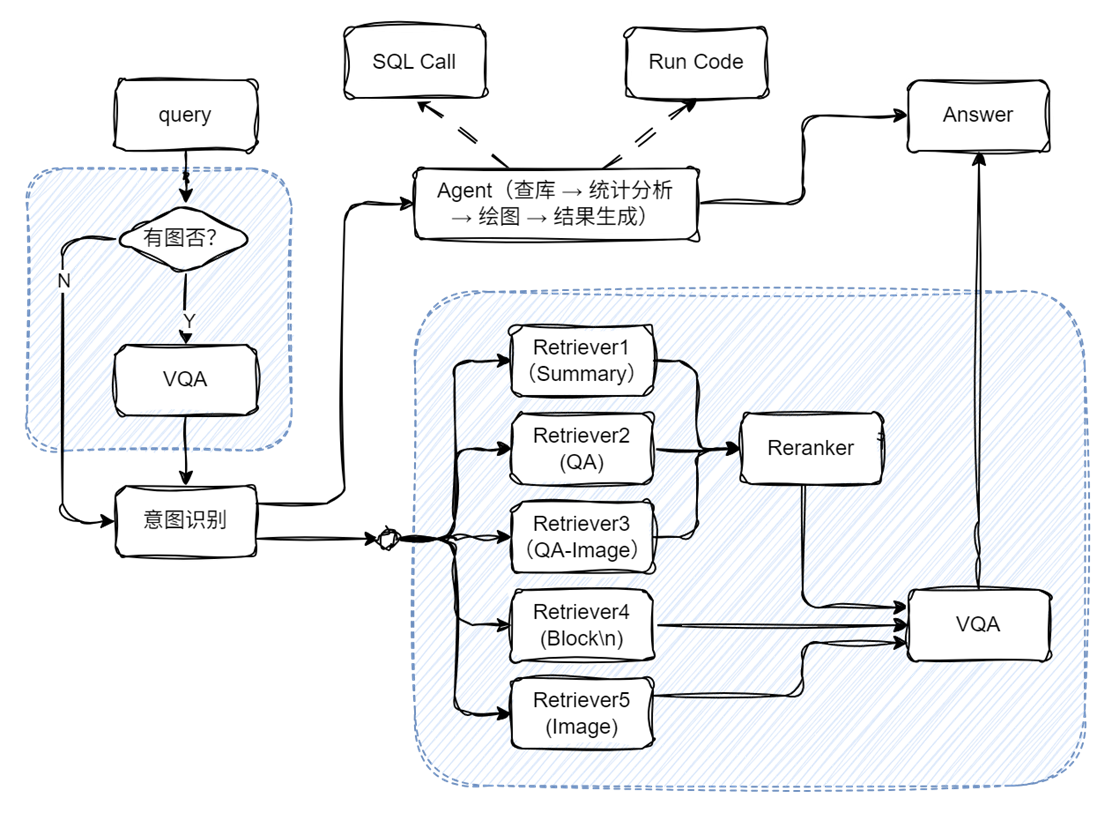
Main code implementation:
# Build rag workflow and statistical analysis workflow
rag_ppl = build_paper_rag()
sql_ppl = build_statistical_agent()

# Build a main workflow with knowledge Q&A and statistical Q&A capabilities
def build_paper_assistant():
    llm = OnlineChatModule(source='qwen', stream=False)
    vqa = lazyllm.OnlineChatModule(source="sensenova",\
        model="SenseNova-V6-Turbo").prompt(lazyllm.ChatPrompter(gen_prompt))

    with pipeline() as ppl:
        ppl.ifvqa = lazyllm.ifs(
            lambda x: x.startswith('<lazyllm-query>'),
            lambda x: vqa(x), lambda x:x)
        with IntentClassifier(llm) as ppl.ic:
            ppl.ic.case["Paper Q&A", rag_ppl]
            ppl.ic.case["Statistics Q&A", sql_ppl]

    return ppl

if __name__ == "__main__":
    main_ppl = build_paper_assistant()
    lazyllm.WebModule(main_ppl, port=23459, static_paths="./images", encode_files=True).start().wait()
[Effect display]
Further reading: Building a database from a knowledge base
Code implementation:
import lazyllm
from lazyllm.tools import SqlManager

#Create SQL manager
sql_manager = SqlManager(db_type="SQLite", user=None,
   password=None, host=None, port=None, db_name="doc.db")
#Create knowledge base
documents = lazyllm.Document(dataset_path='/path/to/kb', create_ui=False)
# Configure extraction fields
refined_schema = [
    {"key": "document_title", "desc": "The title of the paper.", "type": "text"},
    {"key": "author_name", "desc": "The names of the author of the paper.", "type": "text"},
    {"key": "keywords", "desc": "Key terms or themes discussed in the paer.", "type": "text"},
    {"key": "content_summary", "desc": "A brief summary of the paper's main content", "type": "text"},
]
# Connect the knowledge base to SQL and set the fields to be extracted
documents.connect_sql_manager(
    sql_manager=sql_manager,
    schma=refined_schema,
    force_refresh=True,
)
# Start extracting the knowledge base into the data set
documents.update_database(llm=lazyllm.OnlineChatModule(source="qwen"))
# Display the extracted content:
str_result = sql_manager.execute_query(f"select * from {documents._doc_to_db_processor.doc_table_name}")
print(f"str_result: {str_result}")
[Effect display]
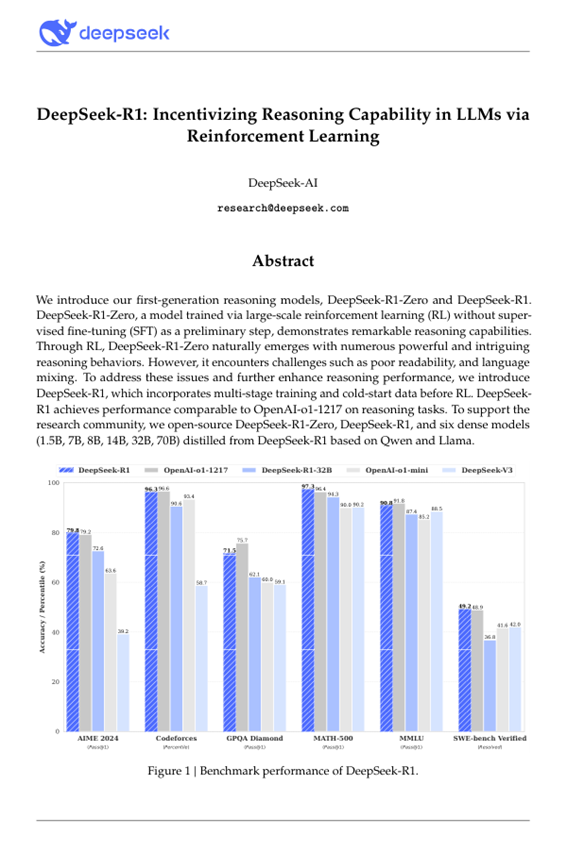
[
    {
        "lazyllm_uuid": "2c42c181-bc26-43ca-a822-505b22f5d19e",
        "lazyllm_created_at": "2025-05-16 19:10:12.014368",
        "lazyllm_doc_path": "/path/to/pdfs/DeepSeek_R1.pdf",
        "document_title": "DeepSeek-R1: Incentivizing Reasoning Capability in LLMs via Reinforcement Learning",
        "author_name": "DeepSeek-AI",
        "keywords": "DeepSeek-R1-Zero, DeepSeek-R1, reinforcement learning, reasoning models, multi-stage training, open-source, dense models, distilled models, Qwen, Llama",
        "content_summary": "The paper introduces the first-generation reasoning models, DeepSeek-R1-Zero and DeepSeek-R1. DeepSeek-R1-Zero is trained using large-scale reinforcement learning without supervised fine-tuning and demonstrates strong reasoning capabilities but faces challenges such as poor readability and language mixing. To improve upon this, DeepSeek-R1 incorporates multi-stage training and cold-start data before reinforcement learning, achieving performance comparable to OpenAI-o1-1217 on reasoning tasks. The research community is supported by the open-sourcing of DeepSeek-R1-Zero, DeepSeek-R1, and six dense models distilled from DeepSeek-R1 based on Qwen and Llama."
    }
]