SQL Query-Based Intelligent Agent
This project demonstrates how to use LazyLLM to build a general-purpose SQL query agent that can automatically execute database queries based on natural language questions and return results.
In this section, you will learn the following key points of LazyLLM
- How to initialize a SQLite database and insert sample data.
- How to register an SQL query tool using @fc_register.
- How to use SqlManager and
SqlCallto execute SQL queries. - How to combine ReactAgent to build an interactive intelligent query agent.
Design Concept
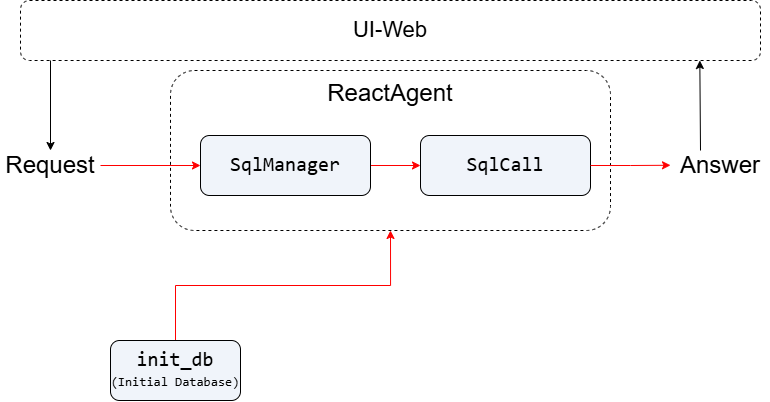
A natural language query-based e-commerce database Q&A system. The system automatically converts natural language questions into SQL queries and executes them to retrieve results.
First, initialize the SQLite database. Then, construct the SqlManager and SqlCall components, binding the LLM with the database structure information (TABLE_INFO) to enable the LLM to understand the schema and generate accurate SQL queries. Next, create a ReactAgent agent, register the query_db tool, which receives the user’s natural language query, invokes the LLM via SqlCall to generate SQL, executes the query, and returns the result.
Implementation
Project Dependencies
Make sure you have installed the following dependency:
pip install lazyllm
````

Import the required packages:

```python
import os
import sqlite3
from lazyllm import OnlineChatModule
from lazyllm.tools import fc_register, SqlManager, SqlCall, ReactAgent
Features Overview
- Automatically initialize a sample database
ecommerce.dband create theorderstable. - Register an SQL query tool
query_dbthat supports natural language queries. - Use
ReactAgentfor looped interactive queries and intelligent SQL tool invocation.
Step-by-Step Guide
Step 1: Initialize the Database
Define the database name, table structure, and sample data.
TABLE_INFO: Defines the structure of the orders table, including seven fields—order ID, product ID, category, price, quantity, cost price, and order date—with order ID as the primary key and clearly specified data types.
SAMPLE_DATA: Provides real-world sample records for the orders table, covering three product categories—smartphones, laptops, and TVs—with concrete values and date examples.
DB_NAME = 'ecommerce.db'

TABLE_INFO = {
    'tables': [{
        'name': 'orders',
        'comment': 'Order data',
        'columns': [
            {'name': 'order_id', 'data_type': 'Integer', 'comment': 'Order ID', 'is_primary_key': True},
            ...
        ]
    }]
}

SAMPLE_DATA = {
    'orders': [
        [1, 101, 'Smartphone', 1000, 2, 600, '2025-01-01'],
        ...
    ]
}
Create a sample database initialization function init_db that initializes an SQLite database table named orders and inserts predefined sample order data. If the database file already exists, skip the creation to avoid duplicate operations and ensure data safety.
def init_db(db_name: str = DB_NAME, data: dict = SAMPLE_DATA) -> None:
        '''
    Initialize the SQLite database.

    This function creates a database with a single table 'orders',
    and populates it with predefined sample data. If the database already exists,
    no changes are made.
    '''
    if os.path.exists(db_name):
        return

    conn = sqlite3.connect(db_name)
    cursor = conn.cursor()

    cursor.execute('''
    CREATE TABLE IF NOT EXISTS orders (
        order_id INT PRIMARY KEY,
        product_id INT,
        product_category TEXT,
        product_price DECIMAL(10, 2),
        quantity INT,
        cost_price DECIMAL(10, 2),
        order_date DATE
    )
    ''')

    sample_orders = data.get('orders', [])
    if sample_orders:
        cursor.executemany('''
        INSERT INTO orders (order_id, product_id, product_category, product_price, quantity, cost_price, order_date)
        VALUES (?, ?, ?, ?, ?, ?, ?)
        ''', sample_orders)

    conn.commit()
    conn.close()
Step 2: Register the SQL Query Tool
Use @fc_register("tool") to register the query_db tool, enabling natural language to SQL queries:
sql_llm = OnlineChatModule()

@fc_register('tool')
def query_db(user_query: str, db_name: str = DB_NAME, tables_info: dict = TABLE_INFO) -> str:
    '''
    General SQL Query Tool for any database and tables.

    Args:
        user_query (str): User's natural language query.
        db_name (str, optional): SQLite database file. Defaults to DB_NAME.
        tables_info (dict, optional): Table structure info. Defaults to TABLE_INFO.

    Returns:
        str: SQL query result.
    '''
    sql_manager = SqlManager(
        'sqlite', None, None, None, None,
        db_name=db_name, tables_info_dict=tables_info
    )
    sql_call = SqlCall(sql_llm, sql_manager, use_llm_for_sql_result=False)

    return sql_call(user_query)
-
Notes:
SqlManagermanages database and table info. For remote databases like PostgreSQL/MySQL, you need to fill inuser,password,host, andport. Here we use a local database, soNoneis sufficient.SqlCallexecutes the user query.use_llm_for_sql_result=Falsemeans the raw SQL execution result is returned without further LLM processing.
Step 3: Build ReactAgent and Loop Interaction
Use ReactAgent to invoke the llm and tools we have defined.
llm = OnlineChatModule()
tools = ['query_db']

if __name__ == '__main__':
    init_db(DB_NAME, SAMPLE_DATA)

    while True:
        user_input = 'Show the total profit for each product category, sorted from highest to lowest.'
        agent = ReactAgent(llm, tools)
        answer = agent(user_input)
        print('Answer:\n', answer)
        break
View full code
Click to expand full code
import os
import sqlite3
from lazyllm import OnlineChatModule
from lazyllm.tools import fc_register, SqlManager, SqlCall, ReactAgent

DB_NAME = 'ecommerce.db'

TABLE_INFO = {
    'tables': [{
        'name': 'orders',
        'comment': 'Order data',
        'columns': [
            {'name': 'order_id', 'data_type': 'Integer', 'comment': 'Order ID', 'is_primary_key': True},
            {'name': 'product_id', 'data_type': 'Integer', 'comment': 'Product ID'},
            {'name': 'product_category', 'data_type': 'String', 'comment': 'Product category'},
            {'name': 'product_price', 'data_type': 'Decimal', 'comment': 'Product price'},
            {'name': 'quantity', 'data_type': 'Integer', 'comment': 'Quantity purchased'},
            {'name': 'cost_price', 'data_type': 'Decimal', 'comment': 'Cost price'},
            {'name': 'order_date', 'data_type': 'Date', 'comment': 'Order date'},
        ]
    }]
}

SAMPLE_DATA = {
    'orders': [
        [1, 101, 'Smartphone', 1000, 2, 600, '2025-01-01'],
        [2, 102, 'Smartphone', 1200, 1, 700, '2025-01-02'],
        [3, 103, 'Laptop', 5000, 1, 3500, '2025-01-03'],
        [4, 104, 'Laptop', 4500, 3, 3000, '2025-01-04'],
        [5, 105, 'TV', 3000, 1, 1800, '2025-01-05'],
        [6, 106, 'TV', 3500, 2, 2000, '2025-01-06']
    ]
}

def init_db(db_name: str = DB_NAME, data: dict = SAMPLE_DATA) -> None:
    '''
    Initialize the SQLite database.

    This function creates a database with a single table 'orders',
    and populates it with predefined sample data. If the database already exists,
    no changes are made.
    '''
    if os.path.exists(db_name):
        return

    conn = sqlite3.connect(db_name)
    cursor = conn.cursor()

    cursor.execute('''
    CREATE TABLE IF NOT EXISTS orders (
        order_id INT PRIMARY KEY,
        product_id INT,
        product_category TEXT,
        product_price DECIMAL(10, 2),
        quantity INT,
        cost_price DECIMAL(10, 2),
        order_date DATE
    )
    ''')

    sample_orders = data.get('orders', [])
    if sample_orders:
        cursor.executemany('''
        INSERT INTO orders (order_id, product_id, product_category, product_price, quantity, cost_price, order_date)
        VALUES (?, ?, ?, ?, ?, ?, ?)
        ''', sample_orders)

    conn.commit()
    conn.close()

sql_llm = OnlineChatModule()

@fc_register('tool')
def query_db(user_query: str, db_name: str = DB_NAME, tables_info: dict = TABLE_INFO) -> str:
    '''
    General SQL Query Tool for any database and tables.

    Args:
        user_query (str): User's natural language query.
        db_name (str, optional): SQLite database file. Defaults to DB_NAME.
        tables_info (dict, optional): Table structure info. Defaults to TABLE_INFO.

    Returns:
        str: SQL query result.
    '''
    sql_manager = SqlManager(
        'sqlite', None, None, None, None,
        db_name=db_name, tables_info_dict=tables_info
    )
    sql_call = SqlCall(sql_llm, sql_manager, use_llm_for_sql_result=False)

    return sql_call(user_query)

llm = OnlineChatModule()
tools = ['query_db']

if __name__ == '__main__':
    init_db(DB_NAME, SAMPLE_DATA)

    while True:
        user_input = 'Show the total profit for each product category, sorted from highest to lowest.'
        agent = ReactAgent(llm, tools)
        answer = agent(user_input)
        print('Answer:\n', answer)
        break
Sample Queries
How many total orders are there?
Which product category has the highest sales?
What is the average revenue per order?
What is the total profit for laptops in January?
Show the total profit for each product category, sorted from highest to lowest.
Sample Output
Please enter your query: Show the total profit for each product category, sorted from highest to lowest.
Answer: The total profit for each product category, sorted from highest to lowest, is as follows:
- Laptop: $6000
- TV: $4200
- Smartphone: $1300
Note: Actual results will depend on the data in your database.
Tips
- You can modify
TABLE_INFOandSAMPLE_DATAto quickly expand your database tables. - You can register multiple SQL tools for different tables or queries.
ReactAgentsupports multi-turn interaction and automatically selects the most suitable tool for query execution.- You can combine embeddings or natural language understanding modules for smarter query parsing.
Conclusion
This tutorial demonstrates how to build a dynamic SQL query agent using LazyLLM, suitable for e-commerce order analysis, financial statistics, and data visualization. By combining SqlManager, SqlCall, and ReactAgent, you can quickly create an intelligent data query system.