Chapter 3: How Large Models Work — Understanding Call Logic and Prompt Engineering with LazyLLM
In the previous chapter we introduced the fundamentals of RAG and built a minimal pipeline with LazyLLM. This chapter explores LazyLLM's unique features so we can rebuild a data-flow-centric RAG application with a cleaner structure.
You'll learn how to compose data flows, how to call both hosted and local LLMs, how to design prompts for them, and how to reuse one local checkpoint to create different personas. We'll finish by refactoring the previous RAG demo with LazyLLM's data flows.
Let's get started!
Welcome to LazyLLM!
LazyLLM is a development framework for multi-agent LLM applications. It helps you build complex AI systems with very little effort and iterate on them continuously. The recommended workflow is:
Prototype -> Data Analysis -> Iterative Optimization
Start by validating the prototype, analyze bad cases with representative data, and then refine algorithms or fine-tune the models to improve quality. LazyLLM is designed to free researchers and engineers from repetitive engineering so they can focus on algorithms and data.
The framework offers a consistent experience for different technology stacks within the same module—unified invocation, service, and deployment.
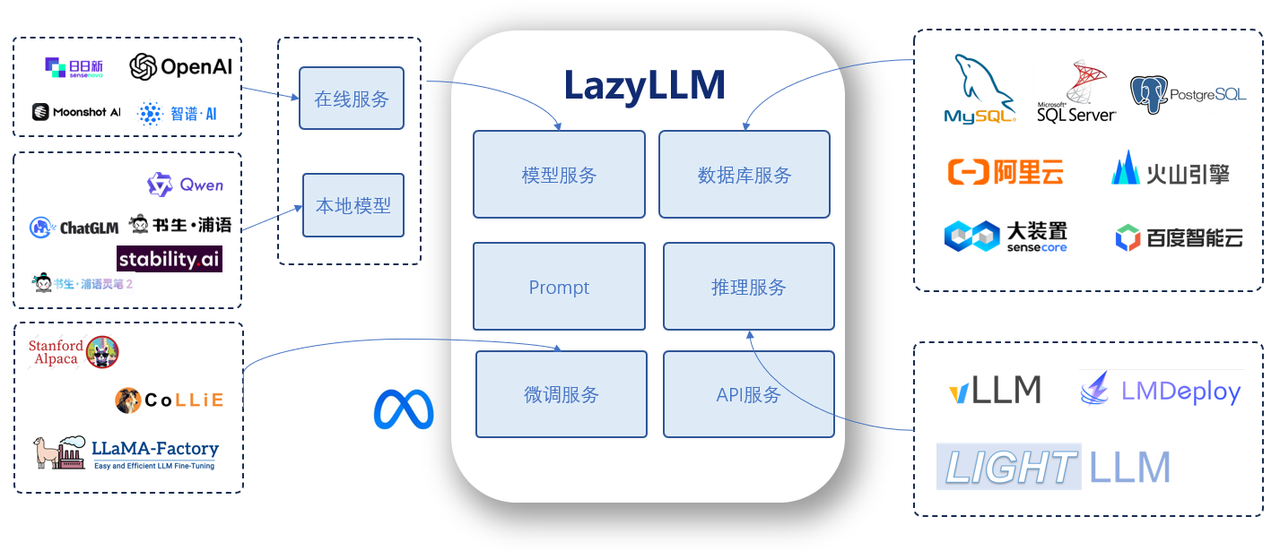
For newcomers, LazyLLM dramatically simplifies LLM application development. You don't need to learn how to host different APIs, pick fine-tuning frameworks, split models, or build a web UI. With prebuilt components and lightweight composition you can ship production-grade tools quickly.
For experts, LazyLLM is extremely flexible. Its modular design lets you integrate proprietary algorithms, industry tooling, and the latest research ideas to build powerful applications tailored to any scenario.
This tutorial focuses on the core usage patterns. After going through it you will understand the main design concepts and be able to build a role-playing chatbot from scratch.
For more tutorials and API references, see the LazyLLM documentation or check out our Bilibili series:
Environment Setup ✈
If Python is already installed on your machine, run the following commands to install the base lazyllm package and its dependencies. For additional installation options, refer to Chapter 2.
Install with pip
Install from source
git clone https://github.com/LazyAGI/LazyLLM.git
cd LazyLLM
pip3 install -r requirements.txt
export PYTHONPATH=$PWD:$PYTHONPATH
Call LLMs 🤖
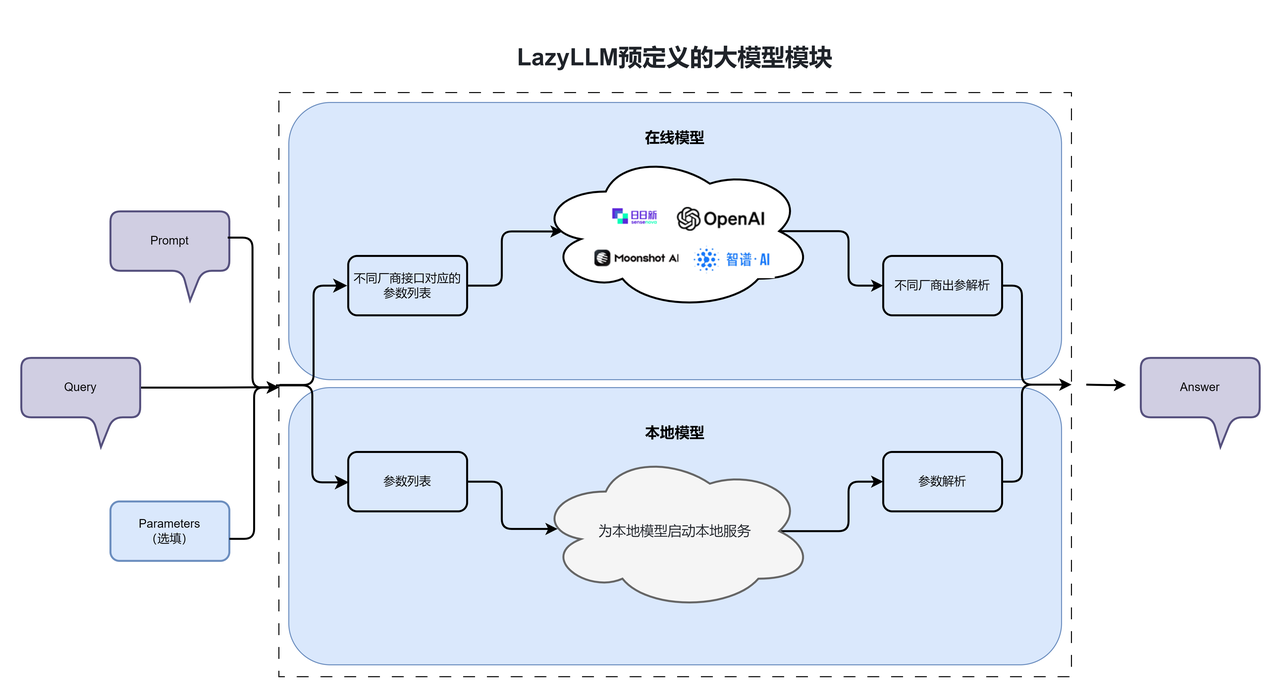
LazyLLM exposes hosted and local models through a unified interface, so each LLM can act like a black box. Focus on the inputs, outputs, and parameter choices instead of the subtle differences between providers.
1. Call hosted LLMs 🌏
OnlineChatModule is the entry point for hosted APIs such as OpenAI, SenseNova, and any other provider. Pass the provider/model configuration you need and LazyLLM will normalize the rest.
❗❗❗ Before you start debugging, export your API key as an environment variable. LazyLLM raises an error when it cannot find the required variables. See Chapter 2 for a full walkthrough. To access SenseNova, configure the variables below:
If you only set one platform key, you can instantiate OnlineChatModule without specifying source. When multiple keys are available, LazyLLM tries openai > sensenova > glm > kimi > qwen in that order. To explicitly select a provider or model, pass source and model to OnlineChatModule.
llm = lazyllm.OnlineChatModule(source="sensenova")

# Specify an explicit model
sensechat = lazyllm.OnlineChatModule("sensenova", model="SenseChat-5")
The snippet below calls an online model (the SenseNova keys are already configured in the environment).
import lazyllm

online_model = lazyllm.OnlineChatModule()
print(online_model("Hello there, who are you?"))
If the default model is unavailable, set the model argument explicitly, for example:
import lazyllm

online_model = lazyllm.OnlineChatModule(source="sensenova", model="DeepSeek-V3")
print(online_model("Hello, are you DeepSeek?"))
2. Call local LLMs 💻
TrainableModule exposes every local resource (LLMs, embedding models, multimodal checkpoints, etc.) and can train, fine-tune, or serve them. Local inference follows two steps:
- Start the model service with an inference runtime.
- Call the service from Python.
LazyLLM offers a truly lazy experience: pass the absolute model path to TrainableModule and call start(), or define LAZYLLM_MODEL_PATH to point to the directory that holds your checkpoints and only pass the model name. If the checkpoint is missing, LazyLLM downloads it automatically to ~/.lazyllm/model (override via LAZYLLM_MODEL_CACHE_DIR).
LazyLLM supports multiple inference frameworks such as LightLLM and vLLM. If you do not specify one, LazyLLM picks the best option based on model size and the provided data. To lock the backend, configure it as shown below.
import lazyllm
from lazyllm import deploy

llm = lazyllm.TrainableModule('internlm2-chat-7b').\
        deploy_method((deploy.Vllm, {
            'port': 8081,
            'host': '0.0.0.0',
        })).start()
res = llm('hi')
print("LLM output:", res)
This example configures the inference backend through deploy_method:
deploy.Vllmpins vLLM as the runtime.hostandportset the address where the service is exposed.
3. Using Prompts 💭
A prompt is the text or instruction provided to an NLP or AI system. It is the primary way users interact with a model. A prompt is not only the user’s input—it often defines the task itself. With well-designed prompts, we can guide a model to produce responses in a specific style or direction.
Prompts supply essential contextual information. In a dialogue system, for example, the model generates responses based on predefined system instructions together with user input. Different prompts lead to different outputs, which means prompt design directly affects the quality, accuracy, and relevance of the generated content. When using large models in a question-answering system, we can use prompts to specify the model’s role, tone, and style of response.
Basic prompts
LazyLLM provides prompt templates that you can configure when initializing a model. After defining the prompt, you simply pass user input at inference time. The example below defines two online models: llm1, which uses the default settings, and llm2, which uses a custom prompt.
import lazyllm

llm1 = lazyllm.OnlineChatModule()
llm2 = lazyllm.OnlineChatModule().prompt("You are a kitten. After every answer, add 'Meow meow meow'.")

print('Default output:   ', llm1('Hello'))
print('Custom prompt:    ', llm2('Hello'))
Console output:
Default prompt:    Hello! How can I assist you today?
Custom prompt:     Hello, how can I help you? Meow meow meow
Dynamic prompts
In many cases, a prompt needs to include additional information at runtime. To support this, we can add variables as placeholders inside the prompt and replace them with the desired content during inference. This allows us to create dynamic prompts that adapt to different inputs. The following example illustrates how this works:
import lazyllm

llm2 = lazyllm.OnlineChatModule().prompt("Answer the question using the passage: {content}")

passage = ('Sun Wukong is the first disciple of Tang Sanzang in Journey to the West and is also known as '
           'Sun Xingzhe and the Monkey King. He crowned himself the Handsome Monkey King and the Great Sage '
           'Equal to Heaven. Because he once managed the heavenly stables he was given the title Bimawen, '
           'and after completing the pilgrimage he was granted the title Victorious Fighting Buddha by the Tathagata.')

# Print prompt_content for illustration only
prompt_content = llm2._prompt.generate_prompt({'input': 'What other names does Sun Wukong have?', 'content': passage}, return_dict=True)
print(prompt_content)

# Model inference
print(llm2({'input': 'What other names does Sun Wukong have?', 'content': passage}))
In the following example we add a {content} placeholder to the prompt so the passage can be injected at inference time. Call generate_prompt to assemble the full payload. return_dict=True formats the prompt as the JSON message structure required by hosted models (QWen in this case); without it the output is a single string optimized for local runtimes. We print the prompt only for demonstration purposes.
{'messages': [{'role': 'system', 'content': 'You are a large-scale language model from Alibaba Cloud, your name is Tongyi Qianwen, and you are a helpful assistant.
Answer the question based on the passage: Sun Wukong is the first disciple of Tang Sanzang in Journey to the West. He is also known as Sun Xingzhe and the Monkey King. He crowned himself the Handsome Monkey King and the Great Sage Equal to Heaven. Because he once managed the heavenly stables he was called Bimawen, and after completing the pilgrimage he earned the title Victorious Fighting Buddha.\n\n'}, {'role': 'user', 'content': 'What other names does Sun Wukong have?'}]}
Without return_dict the prompt looks like this:
'You are a large-scale language model from Alibaba Cloud, your name is Tongyi Qianwen, and you are a helpful assistant.Answer the question based on the passage: Sun Wukong is the first disciple of Tang Sanzang in Journey to the West. He is also known as Sun Xingzhe and the Monkey King. He crowned himself the Handsome Monkey King and the Great Sage Equal to Heaven. Because he once managed the heavenly stables he was called Bimawen, and after completing the pilgrimage he earned the title Victorious Fighting Buddha.\n\n\n\n
What other names does Sun Wukong have?\n\n'
Once we send the prompt to the model we get the following answer:
Sun Wukong is also known as:

1. Sun Xingzhe
2. The Monkey King
3. The Handsome Monkey King (self-proclaimed)
4. The Great Sage Equal to Heaven (self-proclaimed)
5. Bimawen (for managing the heavenly stables)

After completing the pilgrimage he was granted the title Victorious Fighting Buddha.
Standalone prompts
So far we attached prompts directly to an LLM. Sometimes it is more convenient to define a prompt template first and then assign it to different models. LazyLLM ships two prompt helpers: AlpacaPrompter and ChatPrompter (the previous sections used ChatPrompter). They mainly differ in format:
AlpacaPrompter:
ChatPrompter:
The fields are defined as follows:
instruction: The task instruction. This is the main part of the prompt that we configure earlier.history: Conversation history derived from previous user interactions. The format can be[[a, b], [c, d]]or[{"role": "user", "content": ""}, {"role": "assistant", "content": ""}].tools: A list of tools available to the model. Tools can be provided when creating theprompteror passed in by the user.If tools are defined during prompter construction, they cannot be overridden at runtime. The expected format is:[{"type": "function", "function": {"name": "", "description": "", "parameters": {}, "required": []}}]user: Optional user-level instructions. This is specified through theinstructioninput. Ifinstructionis a string, it is treated as a system instruction. If it is a dictionary, its keys must be eithersystemoruser.systemdefines system-level instructions, anduserdefines user-level instructions.
The following fields are filled automatically based on the model configuration (users and developers do not need to provide them; LazyLLM handles this internally):
system: The system prompt. It is automatically set based on model metadata. If not specified, the default is:You are an AI-Agent developed by LazyLLM.- sos:
start of system, marks the beginning of the system prompt. - eos:
end of system, marks the end of the system prompt. - soh:
start of human, marks the beginning of the user input. - eoh:
end of human, marks the end of the user input. - soa:
start of assistant, marks the beginning of the model output. - eoa:
end of assistant, marks the end of the model output.
Let’s first look at how these two independent prompts are combined.
Suppose the text passage and user question are as follows:
import lazyllm

passage = ('Sun Wukong is the first disciple of Tang Sanzang in Journey to the West and is also known as '
           'Sun Xingzhe and the Monkey King. He crowned himself the Handsome Monkey King and the Great Sage '
           'Equal to Heaven. Because he once managed the heavenly stables he was given the title Bimawen, '
           'and after completing the pilgrimage he was granted the title Victorious Fighting Buddha by the Tathagata.')
query = 'What other names does Sun Wukong have?'
Output:
Independent Prompt (Alpaca):
'You are an AI-Agent developed by LazyLLM.\nBelow is an instruction that describes a task, paired with additional messages that provide context when available. Write a response that appropriately completes the request.\n
### Instruction:\nSystem instruction\n\nUser instruction.
### Passage:\nSun Wukong is one of Tang Sanzang\''s four disciples in the novel *Journey to the West*, ranked first among them. He is also known as Sun Xingzhe and Monkey King. He proclaimed himself the Handsome Monkey King and the Great Sage Equal to Heaven. Because he once served in Heaven as the Keeper of the Heavenly Horses, he was also called Bimawen. After completing the pilgrimage, he was granted the title "Fighting-Victorious Buddha" by the Tathagata.
### Question:
What are the names of Sun Wukong?
### Response:'
AlpacaPrompter (Independent)
prompter1 = lazyllm.AlpacaPrompter({
    'system': 'System instruction',
    'user': 'User instruction.\n### Passage: {content}\n### Question: {input}\n'
    })
content = prompter1.generate_prompt({'input': query, 'content': passage})
print("\nStandalone prompt (Alpaca):\n", repr(content))
Output:
Standalone prompt (Alpaca):
 'You are an AI-Agent developed by LazyLLM.
Below is an instruction that describes a task, paired with extra messages such as input that provides further context if possible. Write a response that appropriately completes the request.

### Instruction:
System instruction

User instruction.
### Passage: Sun Wukong is the first disciple of Tang Sanzang in Journey to the West. He is also known as Sun Xingzhe and the Monkey King. He crowned himself the Handsome Monkey King and the Great Sage Equal to Heaven. Because he once managed the heavenly stables he was called Bimawen, and after completing the pilgrimage he earned the title Victorious Fighting Buddha.
### Question: What other names does Sun Wukong have?
### Response:\n'
ChatPrompter (standalone)
prompter2 = lazyllm.ChatPrompter({
    'system': 'System instruction',
    'user': 'User instruction.\n### Passage: {content}\n### Question: {input}\n'
    })
content = prompter2.generate_prompt({'input': query, 'content': passage})
print("\nStandalone prompt (Chat):\n", repr(content))
Output:
Standalone prompt (Chat):
 'You are an AI-Agent developed by LazyLLM.System instruction\n\n\n\nUser instruction.
### Passage: Sun Wukong is the first disciple of Tang Sanzang in Journey to the West. He is also known as Sun Xingzhe and the Monkey King. He crowned himself the Handsome Monkey King and the Great Sage Equal to Heaven. Because he once managed the heavenly stables he was called Bimawen, and after completing the pilgrimage he earned the title Victorious Fighting Buddha.
### Question: What other names does Sun Wukong have?\n\n\n'
Now attach the prompts to an actual LLM (InternLM2-Chat-7B in this case).
AlpacaPrompter + LLM
m1 = lazyllm.TrainableModule("internlm2-chat-7b").prompt(prompter1)
res = m1._prompt.generate_prompt({'input': query, 'content': passage})
print("\nPrompt + LLM (Alpaca):\n", repr(res))
Output:
Prompt + LLM (Alpaca):
 'You are an AI assistant whose name is InternLM.
- InternLM is a conversational language model that is developed by Shanghai AI Laboratory. It is designed to be helpful, honest, and harmless.
- InternLM can understand and communicate fluently in the language chosen by the user such as English and Chinese.
Below is an instruction that describes a task, paired with extra messages such as input that provides further context if possible. Write a response that appropriately completes the request.

### Instruction:
System instruction

User instruction.
### Passage: Sun Wukong is the first disciple of Tang Sanzang in Journey to the West. He is also known as Sun Xingzhe and the Monkey King. He crowned himself the Handsome Monkey King and the Great Sage Equal to Heaven. Because he once managed the heavenly stables he was called Bimawen, and after completing the pilgrimage he earned the title Victorious Fighting Buddha.
### Question: What other names does Sun Wukong have?
### Response:\n'
ChatPrompter + LLM
m2 = lazyllm.TrainableModule("internlm2-chat-7b").prompt(prompter2)
res = m2._prompt.generate_prompt({'input': query, 'content': passage})
print("\nPrompt + LLM (Chat):\n", repr(res))
Output:
Prompt + LLM (Chat):
 '<|im_start|>system
You are an AI assistant whose name is InternLM.
- InternLM is a conversational language model that is developed by Shanghai AI Laboratory. It is designed to be helpful, honest, and harmless.
- InternLM can understand and communicate fluently in the language chosen by the user such as English and 中文.System instruction<|im_end|>\n\n\n\n<|im_start|>user\n\nUser instruction.
### Passage: Sun Wukong is the first disciple of Tang Sanzang in Journey to the West. He is also known as Sun Xingzhe and the Monkey King. He crowned himself the Handsome Monkey King and the Great Sage Equal to Heaven. Because he once managed the heavenly stables he was called Bimawen, and after completing the pilgrimage he earned the title Victorious Fighting Buddha.
### Question: What other names does Sun Wukong have?\n\n<|im_end|>\n<|im_start|>assistant\n\n'
Format comparison:
| Alpaca format | Chat format | |
|---|---|---|
| Best for | Single-turn Q&A / instruction tuning | Multi-turn conversations and complex tasks |
| Context | No conversation memory | Conversation history is preserved |
| Structure | Simple | Flexible |
| Roles | Single role | Multiple roles (system, user, assistant) |
| Hosted format | Local format | |
|---|---|---|
| Best for | Calling hosted models | Self-hosted inference |
| Structure | JSON | String |
| Notes | Includes explicit roles | Contains special markers such as <|im_start|> |
4. Reusing a single model multiple times 🧤
In the previous section, we showed how to configure separate prompts for different models. But can we attach different prompts while sharing the same underlying model? In LazyLLM, the answer is yes. This is especially useful for local models, since you do not need to deploy multiple copies of the same model just to support different roles. This can significantly reduce GPU memory usage.
Usage 1: In the same process, use share to let multiple prompts share a single model instance.
import lazyllm

prompt1 = "Role-play as a kitten and append 'Meow meow meow' to every answer."
prompt2 = "Role-play as a chick and append 'Cluck cluck' to every answer."

llm = lazyllm.TrainableModule("internlm2-chat-7b")
llm1 = llm.share(prompt=prompt1)
llm2 = llm.share(prompt=prompt2)

# Deploy the LLM
llm.start()

# Show:
inputs = 'Hello'
print('Base LLM:        ', llm(inputs))
print('Prompt #1 LLM:   ', llm1(inputs))
print('Prompt #2 LLM:   ', llm2(inputs))
In this example we deploy a single InternLM2-Chat-7B checkpoint and call share with two different prompts, effectively creating two personas on top of the same model. Output:
Base LLM output:      Hello! I'm InternLM and I'm happy to help. What can I do for you?
Prompt #1 persona:    Meow meow meow, hello! How can I help?
Prompt #2 persona:    Cluck cluck, hello! I'm InternLM, nice to meet you.
Usage 2: run the inference service in a separate process and share the LLM by configuring the inference backend and the service URL.
import lazyllm
m = lazyllm.TrainableModule('internlm2-chat-7b').deploy_method(
    lazyllm.deploy.lightllm, url='http://10.119.17.169:36846/generate')
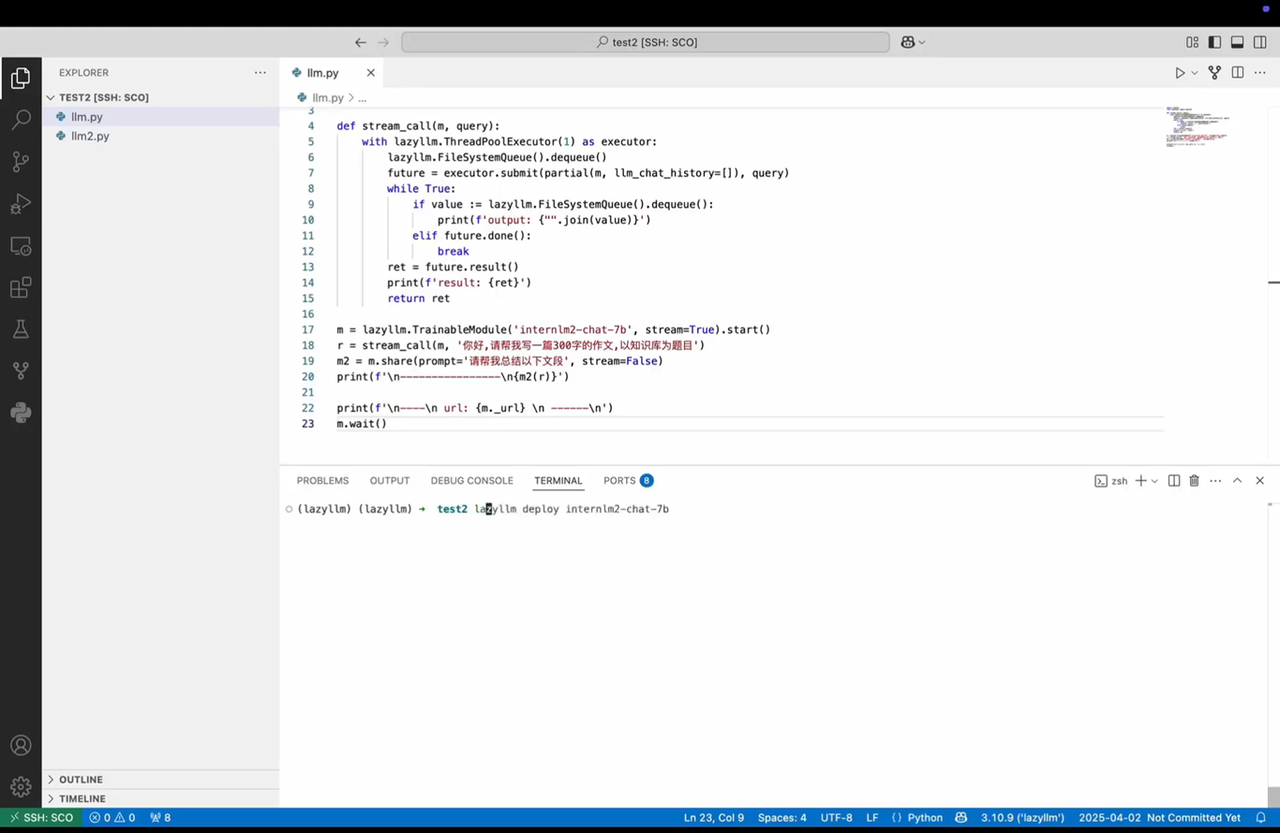
Tip: In addition to running inference directly in code as shown in Usage 1, LazyLLM also provides a command-line tool.
5. Three-line chatbot 🤖
You only need three lines of LazyLLM code to create a chatbot. lazyllm.WebModule wraps any data flow in a web service so you can debug it through a UI.
import lazyllm
llm = lazyllm.TrainableModule("internlm2-chat-7b").prompt("Role-play as a kitten and append 'Meow meow meow' to every answer.")
webpage = lazyllm.WebModule(llm, port=23466, history=[llm], stream=True).start().wait()
WebModule details:
- Use
llmas the chat backend. portsets the port for the chat UI.history=[llm]feeds the model output back as context, giving the bot conversation memory.stream=Trueenables streaming responses.start()launches the chatbot.wait()keeps the service alive; without it the deployment would stop immediately.
Data Flow Overview 🔀
LazyLLM is built around data flows, so it ships many flow components that can be composed like building blocks. Instead of wiring every connection manually, each data-flow stage receives the output of the previous stage and dispatches it to the next consumer automatically. Available components include Pipeline, Parallel, Switch, If, Loop, Diverter, Warp, Graph, and more.
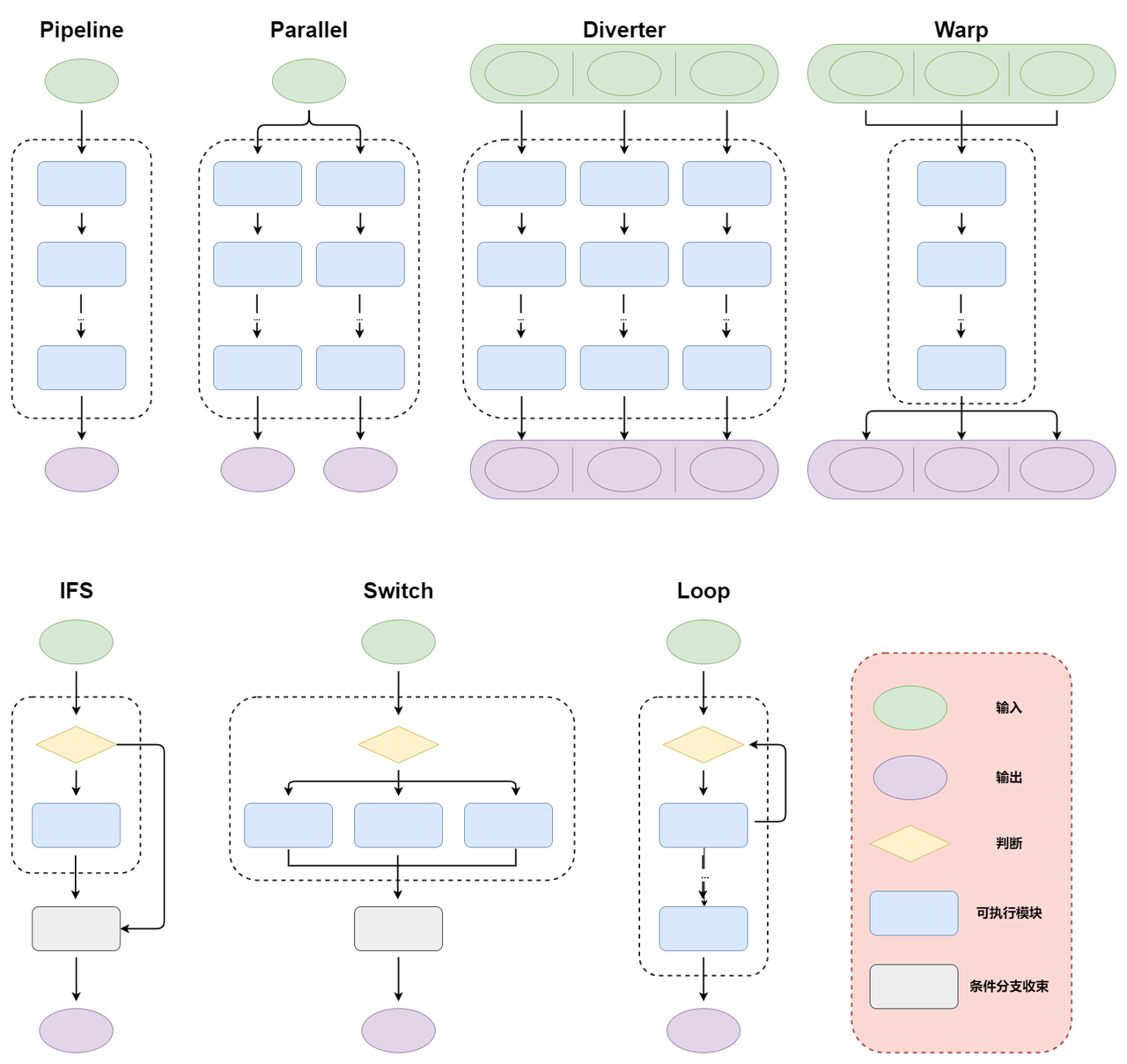
This section introduces every data-flow primitive so you can understand them before we refactor the RAG example.
Note
All data flows support Python's
withstatement, which keeps the definitions clean and mirrors the flow structure via indentation. Each example below shows both the functional and thewith-style definitions.
1. Pipeline
A pipeline runs sequentially: each stage consumes the previous output and emits the next input. Pipelines accept functions, lambda expressions, or callable objects. The structure looks like this:
The example below runs sequential logic with a pipeline. Functions, lambdas, and callable classes (objects that implement __call__) can all participate.
Functional style:
import lazyllm

f1 = lambda x: x * 2

def f2(input):
  return input - 1

class AddOneFunctor(object):
  def __call__(self, x): return x + 1

f3 = AddOneFunctor()

# Manual execution
inp = 2
x1 = f1(inp)
x2 = f2(x1)
x3 = f3(x2)
out_normal = AddOneFunctor()(x3)

# Use a pipeline
ppl = lazyllm.pipeline(f1, f2, f3, AddOneFunctor)
out_ppl1 = ppl(inp)

print(f"Input {inp}, manual output:", out_normal)
print(f"Input {inp}, pipeline output:", out_ppl1)
Output:
With-style:
import lazyllm

f1 = lambda x: x * 2

def f2(input):
  return input - 1

class AddOneFunctor(object):
  def __call__(self, x): return x + 1

f3 = AddOneFunctor()

# Build the pipeline with a context manager
with lazyllm.pipeline() as ppl:
    ppl.func1 = f1
    ppl.func2 = f2
    ppl.func3 = f3
    ppl.func4 = AddOneFunctor

inp = 2
out_ppl1 = ppl(inp)

print(f"Input {inp}, pipeline output:", out_ppl1)
Output:
2. Parallel
Parallel runs multiple pipelines side by side. The structure looks like this:
      /> module11 -> ... -> module1N -> out1 \
input ->  module21 -> ... -> module2N -> out2 -> (out1, out2, out3)
      \> module31 -> ... -> module3N -> out3 /
Parallel can format its output so downstream components can consume it more easily. It currently supports dict, tuple, list, and string outputs. Examples:
Functional style:
import lazyllm

test1 = lambda a: a + 1
test2 = lambda a: a * 4
test3 = lambda a: a / 2

prl1 = lazyllm.parallel(test1, test2, test3)
prl2 = lazyllm.parallel(path1=test1, path2=test2, path3=test3).asdict
prl3 = lazyllm.parallel(test1, test2, test3).astuple
prl4 = lazyllm.parallel(test1, test2, test3).aslist
prl5 = lazyllm.parallel(test1, test2, test3).join(', ')

print("Default output: prl1(1) -> ", prl1(1), type(prl1(1)))
print("Dict output:    prl2(1) -> ", prl2(1), type(prl2(1)))
print("Tuple output:   prl3(1) -> ", prl3(1), type(prl3(1)))
print("List output:    prl4(1) -> ", prl4(1), type(prl4(1)))
print("String output:  prl5(1) -> ", prl5(1), type(prl5(1)))
Output:
Default output: prl1(1) ->  (2, 4, 0.5) <class 'lazyllm.common.common.package'>
Dict output:    prl2(1) ->  {'path1': 2, 'path2': 4, 'path3': 0.5} <class 'dict'>
Tuple output:   prl3(1) ->  (2, 4, 0.5) <class 'tuple'>
List output:    prl4(1) ->  [2, 4, 0.5] <class 'list'>
String output:  prl5(1) ->  2, 4, 0.5 <class 'str'>
With-style (GitHub code link):
import lazyllm

test1 = lambda a: a + 1
test2 = lambda a: a * 4
test3 = lambda a: a / 2

with lazyllm.parallel() as prl1:
    prl1.func1 = test1
    prl1.func2 = test2
    prl1.func3 = test3

with lazyllm.parallel().asdict as prl2:
    prl2.path1 = test1
    prl2.path2 = test2
    prl2.path3 = test3

with lazyllm.parallel().astuple as prl3:
    prl3.func1 = test1
    prl3.func2 = test2
    prl3.func3 = test3

with lazyllm.parallel().aslist as prl4:
    prl4.func1 = test1
    prl4.func2 = test2
    prl4.func3 = test3

with lazyllm.parallel().join(', ') as prl5:
    prl5.func1 = test1
    prl5.func2 = test2
    prl5.func3 = test3

print("Default output: prl1(1) -> ", prl1(1), type(prl1(1)))
print("Dict output:    prl2(1) -> ", prl2(1), type(prl2(1)))
print("Tuple output:   prl3(1) -> ", prl3(1), type(prl3(1)))
print("List output:    prl4(1) -> ", prl4(1), type(prl4(1)))
print("String output:  prl5(1) -> ", prl5(1), type(prl5(1)))
Output:
Default output: prl1(1) ->  (2, 4, 0.5) <class 'lazyllm.common.common.package'>
Dict output:    prl2(1) ->  {'path1': 2, 'path2': 4, 'path3': 0.5} <class 'dict'>
Tuple output:   prl3(1) ->  (2, 4, 0.5) <class 'tuple'>
List output:    prl4(1) ->  [2, 4, 0.5] <class 'list'>
String output:  prl5(1) ->  2, 4, 0.5 <class 'str'>
3. Diverter
Diverter is a specialized parallel tool where each input follows its own branch and the outputs are aggregated at the end.
#                 /> in1 -> module11 -> ... -> module1N -> out1 \
# (in1, in2, in3) -> in2 -> module21 -> ... -> module2N -> out2 -> (out1, out2, out3)
#                 \> in3 -> module31 -> ... -> module3N -> out3 /
Use Diverter when you need to manage multiple independent processing pipelines inside a single flow. Output formatting is similar to Parallel—dict, tuple, list, and string outputs are available.
Functional style (GitHub code link):
import lazyllm

test1 = lambda a: a + 1
test2 = lambda a: a * 4
test3 = lambda a: a / 2

prl1 = lazyllm.diverter(test1, test2, test3)
prl2 = lazyllm.diverter(path1=test1, path2=test2, path3=test3).asdict
prl3 = lazyllm.diverter(test1, test2, test3).astuple
prl4 = lazyllm.diverter(test1, test2, test3).aslist
prl5 = lazyllm.diverter(test1, test2, test3).join(', ')

inputs = [1, 2, 3]

print("Default output: prl1(inputs) -> ", prl1(inputs), type(prl1(inputs)))
print("Dict output:    prl2(inputs) -> ", prl2(inputs), type(prl2(inputs)))
print("Tuple output:   prl3(inputs) -> ", prl3(inputs), type(prl3(inputs)))
print("List output:    prl4(inputs) -> ", prl4(inputs), type(prl4(inputs)))
print("String output:  prl5(inputs) -> ", prl5(inputs), type(prl5(inputs)))
Output:
Default output: prl1(inputs) ->  (2, 8, 1.5) <class 'lazyllm.common.common.package'>
Dict output:    prl2(inputs) ->  {'path1': 2, 'path2': 8, 'path3': 1.5} <class 'dict'>
Tuple output:   prl3(inputs) ->  (2, 8, 1.5) <class 'tuple'>
List output:    prl4(inputs) ->  [2, 8, 1.5] <class 'list'>
String output:  prl5(inputs) ->  2, 8, 1.5 <class 'str'>
With-style (GitHub code link):
import lazyllm

test1 = lambda a: a + 1
test2 = lambda a: a * 4
test3 = lambda a: a / 2

with lazyllm.diverter() as prl1:
    prl1.func1 = test1
    prl1.func2 = test2
    prl1.func3 = test3

with lazyllm.diverter().asdict as prl2:
    prl2.func1 = test1
    prl2.func2 = test2
    prl2.func3 = test3

with lazyllm.diverter().astuple as prl3:
    prl3.func1 = test1
    prl3.func2 = test2
    prl3.func3 = test3

with lazyllm.diverter().aslist as prl4:
    prl4.func1 = test1
    prl4.func2 = test2
    prl4.func3 = test3

with lazyllm.diverter().join(', ') as prl5:
    prl5.func1 = test1
    prl5.func2 = test2
    prl5.func3 = test3

inputs = [1, 2, 3]

print("Default output: prl1(inputs) -> ", prl1(inputs), type(prl1(inputs)))
print("Dict output:    prl2(inputs) -> ", prl2(inputs), type(prl2(inputs)))
print("Tuple output:   prl3(inputs) -> ", prl3(inputs), type(prl3(inputs)))
print("List output:    prl4(inputs) -> ", prl4(inputs), type(prl4(inputs)))
print("String output:  prl5(inputs) -> ", prl5(inputs), type(prl5(inputs)))
Output:
Default output: prl1(inputs) ->  (2, 8, 1.5) <class 'lazyllm.common.common.package'>
Dict output:    prl2(inputs) ->  {'func1': 2, 'func2': 8, 'func3': 1.5} <class 'dict'>
Tuple output:   prl3(inputs) ->  (2, 8, 1.5) <class 'tuple'>
List output:    prl4(inputs) ->  [2, 8, 1.5] <class 'list'>
String output:  prl5(inputs) ->  2, 8, 1.5 <class 'str'>
4. Warp
Warp applies the same processing module to multiple inputs in parallel. It "warps" a single module over many inputs so each element is processed independently, boosting throughput.
#                 /> in1 \                            /> out1 \
# (in1, in2, in3) -> in2 -> module1 -> ... -> moduleN -> out2 -> (out1, out2, out3)
#                 \> in3 /                            \> out3 /
Notes
- Do not use Warp for asynchronous tasks such as training or deployment.
- Warp does not support dict outputs.
Like Parallel, Warp can format its output as tuples, lists, or strings (no dict support yet).
Functional style (GitHub code link):
import lazyllm

test1 = lambda a: a + 1
test2 = lambda a: a * 4
test3 = lambda a: a / 2

prl1 = lazyllm.warp(test1, test2, test3)
# prl2 = lazyllm.warp(path1=test1, path2=test2, path3=test3).asdict # Not Implemented
prl3 = lazyllm.warp(test1, test2, test3).astuple
prl4 = lazyllm.warp(test1, test2, test3).aslist
prl5 = lazyllm.warp(test1, test2, test3).join(', ')

inputs = [1, 2, 3]

print("Default output: prl1(inputs) -> ", prl1(inputs), type(prl1(inputs)))
print("Tuple output:   prl3(inputs) -> ", prl3(inputs), type(prl3(inputs)))
print("List output:    prl4(inputs) -> ", prl4(inputs), type(prl4(inputs)))
print("String output:  prl5(inputs) -> ", prl5(inputs), type(prl5(inputs)))
Output:
Default output: prl1(inputs) ->  (4.0, 6.0, 8.0) <class 'lazyllm.common.common.package'>
Tuple output:   prl3(inputs) ->  (4.0, 6.0, 8.0) <class 'tuple'>
List output:    prl4(inputs) ->  [4.0, 6.0, 8.0] <class 'list'>
String output:  prl5(inputs) ->  4.0, 6.0, 8.0 <class 'str'>
With-style (GitHub code link):
import lazyllm

test1 = lambda a: a + 1
test2 = lambda a: a * 4
test3 = lambda a: a / 2

with lazyllm.warp() as prl1:
    prl1.func1 = test1
    prl1.func2 = test2
    prl1.func3 = test3

with lazyllm.warp().astuple as prl3:
    prl3.func1 = test1
    prl3.func2 = test2
    prl3.func3 = test3

with lazyllm.warp().aslist as prl4:
    prl4.func1 = test1
    prl4.func2 = test2
    prl4.func3 = test3

with lazyllm.warp().join(', ') as prl5:
    prl5.func1 = test1
    prl5.func2 = test2
    prl5.func3 = test3

inputs = [1, 2, 3]

print("Default output: prl1(inputs) -> ", prl1(inputs), type(prl1(inputs)))
print("Tuple output:   prl3(inputs) -> ", prl3(inputs), type(prl3(inputs)))
print("List output:    prl4(inputs) -> ", prl4(inputs), type(prl4(inputs)))
print("String output:  prl5(inputs) -> ", prl5(inputs), type(prl5(inputs)))
Output:
Default output: prl1(inputs) ->  (4.0, 6.0, 8.0) <class 'lazyllm.common.common.package'>
Tuple output:   prl3(inputs) ->  (4.0, 6.0, 8.0) <class 'tuple'>
List output:    prl4(inputs) ->  [4.0, 6.0, 8.0] <class 'list'>
String output:  prl5(inputs) ->  4.0, 6.0, 8.0 <class 'str'>
5. IFS
IFS implements the classic if-else pattern. It evaluates a condition and routes the input to the "true" or "false" branch accordingly. The with syntax does not add much value here, so we only show the functional style:
import lazyllm

cond = lambda x: x > 0
true_path = lambda x: x * 2
false_path = lambda x: -x

ifs_flow = lazyllm.ifs(cond, true_path, false_path)

res1 = ifs_flow(10)
print('Input: 10, output:', res1)
res2 = ifs_flow(-5)
print('Input: -5, output:', res2)
Output:
6. Switch
Switch provides a way to route data through different flows based on the value of an expression or the truth value of a condition. Its behavior is similar to a switch–case statement in traditional programming languages.
When using this control-flow tool, you need to define a condition function cond and the corresponding branch functions moduleX (these can also be other control-flow components such as Pipeline). One special case is the string default, which can be used as a fallback branch when no other condition matches.
Illustration of the workflow:
# switch(exp):
#     case cond1: input -> module11 -> ... -> module1N -> out; break
#     case cond2: input -> module21 -> ... -> module2N -> out; break
#     case cond3: input -> module31 -> ... -> module3N -> out; break
Switch exposes a judge_on_full_input flag. When set to True (default), the same input is fed to both the condition and the branch. When set to False, the first argument goes to the condition and the remaining arguments go to the branch, so make sure you supply at least two inputs. Example:
Functional style (GitHub code link):
import lazyllm

# Condition functions
is_positive = lambda x: x > 0
is_negative = lambda x: x < 0

# Each condition corresponds to a branch function
positive_path = lambda x: 2 * x
negative_path = lambda x: -x
default_path = lambda x: '000'

# Switch #1 (the same value is passed to the condition and branch function)
switch1 = lazyllm.switch(
    is_positive, positive_path,
    is_negative, negative_path,
    'default', default_path)

print('\nInput x is shared by the condition and branch:')
print("1Path Positive: ", switch1(2))
print("1Path Default:  ", switch1(0))
print("1Path Negative: ", switch1(-5))

# Switch #2 (separate inputs for the condition and branch)
switch2 = lazyllm.switch(
    is_positive, positive_path,
    is_negative, negative_path,
    'default', default_path,
    judge_on_full_input=False)

print('\nInputs x and y go to the condition and branch respectively:')
print("2Path Positive: ", switch2(-1, 2))
print("2Path Default:  ", switch2(1, 2))
print("2Path Negative: ", switch2(0, 2))
Output:
Input x shared by condition and branch:
1Path Positive:  4
1Path Default:   000
1Path Negative:  5

Inputs x,y routed separately:
2Path Positive:  -2
2Path Default:   4
2Path Negative:  000
With-style (GitHub code link):
import lazyllm

# Condition functions
is_positive = lambda x: x > 0
is_negative = lambda x: x < 0

# Each condition corresponds to a branch function
positive_path = lambda x: 2 * x
negative_path = lambda x: -x
default_path = lambda x: '000'

# Switch #1 (the same value is passed to the condition and branch)
with lazyllm.switch() as sw1:
    sw1.case(is_positive, positive_path)
    sw1.case(is_negative, negative_path)
    sw1.case('default', default_path)

print('\nInput x is shared by the condition and branch:')
print("1Path Positive: ", sw1(2))
print("1Path Default:  ", sw1(0))
print("1Path Negative: ", sw1(-5))

# Switch #2 (separate inputs for the condition and branch)
with lazyllm.switch(judge_on_full_input=False) as sw2:
    sw2.case(is_positive, positive_path)
    sw2.case(is_negative, negative_path)
    sw2.case('default', default_path)

print('\nInputs x and y go to the condition and branch respectively:')
print("2Path Positive: ", sw2(-1, 2))
print("2Path Default:  ", sw2(1, 2))
print("2Path Negative: ", sw2(0, 2))
Output:
Input x shared by condition and branch:
1Path Positive:  4
1Path Default:   000
1Path Negative:  5

Inputs x,y routed separately:
2Path Positive:  -2
2Path Default:   4
2Path Negative:  000
7. Loop
Loop repeatedly applies a set of steps until a stop condition is met or a maximum number of iterations is reached. The optional judge_on_full_input flag determines how outputs are fed back:
True(default): the entire output is passed to both the condition and the next iteration.False: the first value goes to the condition and the remaining values become the next iteration's input, so the branch must return at least two values.
Functional style (GitHub code link):
import lazyllm

# Stop condition
stop_func = lambda x: x > 10

# Branch function
module_func = lambda x: x * 2

# Loop #1
loop1 = lazyllm.loop(
    module_func,
    stop_condition=stop_func)

print('Loop #1 output:', loop1(1))

#==========================
# Branch function #2
def module_func2(x):
    print(" loop: ", x)
    return lazyllm.package(x + 1, x * 2)

# Loop #2
loop2 = lazyllm.loop(
    module_func2,
    stop_condition=stop_func,
    judge_on_full_input=False)

print('Loop #2 output:', loop2(1))
Output:
With-style (GitHub code link):
import lazyllm

# Stop condition
stop_func = lambda x: x > 10

# Branch functions
module_func = lambda x: x
modele_func2 = lambda x: x * 2

# Loop #1
with lazyllm.loop(stop_condition=stop_func) as loop1:
    loop1.func1 = module_func
    loop1.func2 = modele_func2

print('Loop #1 output:', loop1(1))

#==========================
# Branch function #2
def module_funcn2(x):
    print(" loop: ", x)
    return lazyllm.package(x + 1, x * 2)

# Loop #2
with lazyllm.loop(stop_condition=stop_func, judge_on_full_input=False) as loop2:
    loop2.func1 = module_func
    loop2.func2 = module_funcn2

print('Loop #2 output:', loop2(1))
Output:
8. Bind
All the flows above pass data along predefined paths, so injecting upstream values into deeper nodes can be tricky. bind solves this by letting data "jump" across a flow.
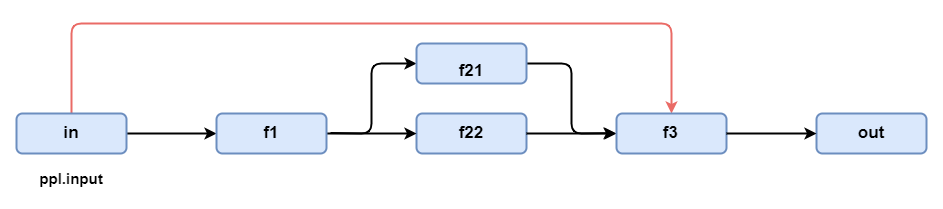
We'll first define the functions f1, f21, f22, and f3 shown above.
def f1(input): return input ** 2
def f21(input1, input2=0): return input1 + input2 + 1
def f22(input1, input2=0): return input1 + input2 - 1
def f3(in1='placeholder1', in2='placeholder2', in3='placeholder3'):
    return f'get [input:{in1}], [f21:{in2}], [f23: {in3}]]'
LazyLLM exposes lazyllm.bind for parameter binding:
Where:
-
funcis the target function. -
param1is the first argument passed tofunc. In the diagram it equals the pipeline input (ppl.input). -
param2,param3, ... refer to upstream outputs. LazyLLM provides placeholders_0,_1,_2, etc._0is the output of the previous node;_1is the second output, and so on. In the example we bind_0and_1because the upstream stage emits two values.
With binding we can recreate the shortcut shown above:
from lazyllm import pipeline, parallel, bind, _0, _1

with pipeline() as ppl1:
  ppl1.f1 = f1
  with parallel() as ppl1.subprl2:
    ppl1.subprl2.path1 = f21
    ppl1.subprl2.path2 = f22
  ppl1.f3 = bind(f3, ppl1.input, _0, _1)

print("ppl1 out: ", ppl1(2))
Output:
Note: bindings only work inside the current data flow. You cannot bind external variables or cross-flow data.
bind also overloads the | operator, so you can separate the function from its bound parameters. Sub-flows accept bindings as well. In the diagram below we bind the flow input to the first parameter of subprl2 (red arrow) and feed f1's output into the second parameter.
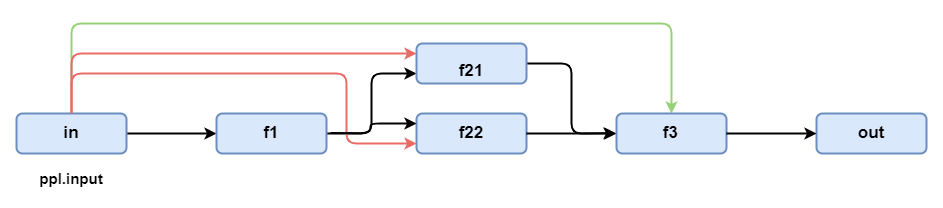
from lazyllm import pipeline, parallel, bind, _0, _1

with pipeline() as ppl1:
  ppl1.f1 = f1
  with parallel().bind(ppl1.input, _0) as ppl1.subprl2:
    ppl1.subprl2.path1 = f21
    ppl1.subprl2.path2 = f22
  ppl1.f3 = f3 | bind(ppl1.input, _0, _1)

print("ppl1 out: ", ppl1(2))
Output:
Build RAG with LazyLLM
Back in Chapter 2 we implemented a basic RAG pipeline with three steps: retrieval, augmentation, and generation. Using the flows above we can rebuild the same system with cleaner code. Full source:
import lazyllm
from lazyllm import bind

# Document loader
documents = lazyllm.Document(dataset_path="/mnt/lustre/share_data/dist/cmrc2018/data_kb")
prompt = 'You are an AI question-answering assistant. Provide answers based on the given context and question.'

with lazyllm.pipeline() as ppl:
    # Retriever
    ppl.retriever = lazyllm.Retriever(doc=documents, group_name="CoarseChunk", similarity="bm25_chinese", topk=3)
    ppl.formatter = (lambda nodes, query: {"query": query, "context_str": "".join([node.get_content() for node in nodes])}) | bind(query=ppl.input)
    # Generator
    ppl.llm = lazyllm.OnlineChatModule().prompt(lazyllm.ChatPrompter(instruction=prompt, extra_keys=['context_str']))

lazyllm.WebModule(ppl, port=23466).start().wait()
Let's refactor last chapter's RAG step by step and wire it up with data flows: