Multi-Source Data Loading and Intelligent SQL Query Processing
LazyLLM not only handles natural language and image data but also provides powerful structured data processing capabilities. With built-in tools such as SimpleDirectoryReader, SqlManager, and SqlCall, developers can easily build an end-to-end workflow that connects multi-source data files (e.g., CSV, Excel) to database querying and intelligent Q&A.
This tutorial demonstrates how to implement a complete “file-to-database” pipeline using LazyLLM: the system first automatically loads and parses local multi-source data files, then initializes the database and writes the data into it; finally, it combines a large language model (LLM) to execute intelligent SQL queries, achieving automatic mapping from natural language to database queries.
Such capabilities enable LazyLLM to handle a wide range of structured data scenarios — from business report analysis and academic data management to enterprise knowledge graph construction.
In this section, you will learn the following key aspects of LazyLLM:
- How to use SimpleDirectoryReader to automatically load multi-source data files (CSV, Excel).
- How to customize file parsing formats with PandasCSVReader.
- How to quickly initialize and manage an SQLite database using SqlManager.
- How to execute LLM-driven SQL queries with SqlCall.
- How to integrate data loading and intelligent querying into a reusable automated workflow.
Design Concept
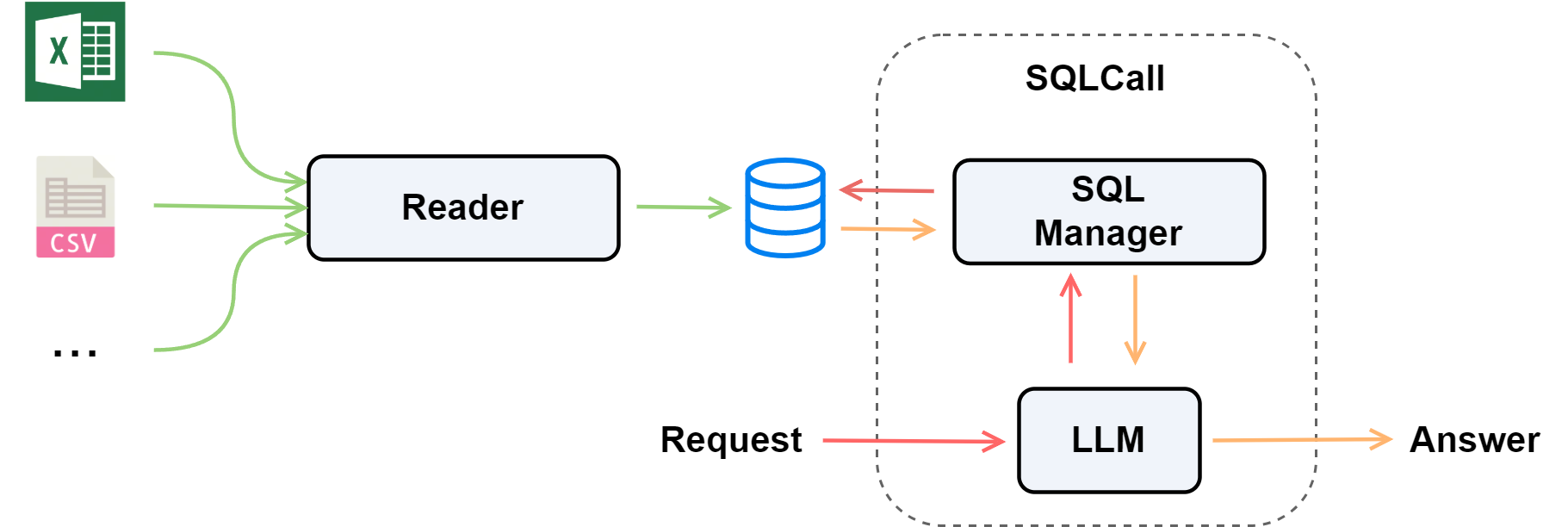
To enable multi-source data loading, we first need a “data entry” module that can automatically recognize file types and read structured content. Here, we use SimpleDirectoryReader as a universal file loader capable of handling multiple formats such as CSV and Excel.
Next, to allow these files to be uniformly managed and queried, we designed an automatic table creation and data insertion module. This module matches target tables (e.g., students, employees) based on file names and uses an SQLite database to build a local structured data warehouse.
In the querying stage, we introduce the SqlManager module to describe and manage table structures, supporting standard SQL statements for unified data querying and visualization.
Finally, to make the database “understand questions” and automatically generate query statements, we combine OnlineChatModule with SqlCall, enabling the language model to intelligently generate SQL queries and interpret results — achieving automatic transformation from natural language questions to structured outputs.
The overall workflow is illustrated below:
Environment Setup
Install Dependencies
Before use, please execute the following command to install the required libraries:
Environment Variables
The workflow will use an online large language model. You need to set the API key (Qwen as an example):
❗ Note: Refer to the official documentation for the platform's API_KEY application process.
Import Dependencies
import os
import chardet
import sqlite3
from lazyllm import OnlineChatModule
from lazyllm.tools import SqlManager, SqlCall
from lazyllm.tools.rag.dataReader import SimpleDirectoryReader
from lazyllm.tools.rag.readers import PandasCSVReader
Code Implementation
Prepare Data
Define the data file paths and database name:
❗ Note: The simulated data files can be created based on the table structure and the subsequent execution results.
File Encoding Detection
Before processing CSV/Excel files, you can first detect the file encoding:
def detect_file_encoding(file_path):
    with open(file_path, 'rb') as f:
        return chardet.detect(f.read())

# Example
encoding_info = detect_file_encoding(csv_path)
print('File Encoding Info:', encoding_info)
Multi-Source Data Loading
Load CSV + Excel at Once
You can use SimpleDirectoryReader to load multiple files at once:
loader = SimpleDirectoryReader(
    input_files=[csv_path, xlsx_path],
    exclude_hidden=True,
    recursive=False
)

# Example
for doc in loader():
    print(doc.text)
Example output:
1001, Linda Zhang, 20, Female, Computer Science, 2022/9/1, 3.85, 60, Active
1002, Kevin Lee, 21, Male, Mechanical Engineering, 2021/9/1, 3.6, 90, Active
1003, Sophia Wang, 19, Female, Economics, 2023/9/1, 3.92, 30, Active
1004, Jason Chen, 22, Male, Electrical Engineering, 2020/9/1, 3.45, 110, Graduated
1005, Emily Liu, 20, Female, Design, 2022/9/1, 3.78, 58, Active
1006, Tom Davis, 23, Male, Business Administration, 2019/9/1, 3.25, 120, Graduated
1 John Doe Engineer
2 Jane Smith Analyst
3 Alice Johnson Manager
4 Bob Lee Engineer
Custom CSV Loading
You can customize CSV parsing behavior using file_extractor, such as row-column concatenation:
loader = SimpleDirectoryReader(
    input_files=[csv_path],
    recursive=True,
    exclude_hidden=True,
    num_files_limit=10,
    required_exts=['.csv'],
    file_extractor={
        '*.csv': PandasCSVReader(
            concat_rows=False,
            col_joiner=' | ',
            row_joiner='\n\n',
            pandas_config={'sep': None, 'engine': 'python', 'header': None}
        )
    }
)

# Example
for doc in loader():
    print(doc.text)
Example output:
StudentID | Name | Age | Gender | Major | Enrollment Date | GPA | Credits | Status
1001 | Linda Zhang | 20 | Female | Computer Science | 2022/9/1 | 3.85 | 60 | Active
1002 | Kevin Lee | 21 | Male | Mechanical Engineering | 2021/9/1 | 3.6 | 90 | Active
1003 | Sophia Wang | 19 | Female | Economics | 2023/9/1 | 3.92 | 30 | Active
1004 | Jason Chen | 22 | Male | Electrical Engineering | 2020/9/1 | 3.45 | 110 | Graduated
1005 | Emily Liu | 20 | Female | Design | 2022/9/1 | 3.78 | 58 | Active
1006 | Tom Davis | 23 | Male | Business Administration | 2019/9/1 | 3.25 | 120 | Graduated
Parameter Explanation
input_files: Specify the list of file paths to read.recursive: Whether to recursively traverse files in subdirectories.exclude_hidden: Whether to exclude hidden files.num_files_limit: Limit the maximum number of files to read.required_exts: Specify the file types allowed to load.file_extractor: Define the parsing method for different file types.
💡 Tip: Here,
PandasCSVReaderis used to read*.csvfiles. For more details, please refer to the official API documentation.
Database Initialization
Create a database and table structure, then batch insert example CSV and Excel data read by SimpleDirectoryReader:
def init_example_db(db_path=db_path, file_paths=[csv_path, xlsx_path]):
    '''Read data from multiple file paths (supports CSV, Excel, etc.),
    create database tables using predefined schemas, and insert the data.
    '''
    if file_paths is None:
        raise ValueError('Please provide the file_paths parameter (a list of file paths).')

    os.makedirs(os.path.dirname(db_path), exist_ok=True)
    conn = sqlite3.connect(db_path)
    cur = conn.cursor()

    # === Create Tables ===
    cur.execute('''
        CREATE TABLE IF NOT EXISTS employees (
            EmployeeId INTEGER PRIMARY KEY,
            FirstName TEXT,
            LastName TEXT,
            Title TEXT
        );
    ''')

    cur.execute('''
        CREATE TABLE IF NOT EXISTS students (
            StudentID INTEGER PRIMARY KEY,
            Name TEXT,
            Age INTEGER,
            Gender TEXT,
            Major TEXT,
            EnrollmentDate TEXT,
            GPA REAL,
            Credits INTEGER,
            Status TEXT
        );
    ''')

    # === Iterate Over Files and Insert Data ===
    for file_path in file_paths:
        table_name = os.path.splitext(os.path.basename(file_path))[0].lower()
        loader = SimpleDirectoryReader(
            input_files=[file_path],
            recursive=False,
            exclude_hidden=True,
            required_exts=['.csv', '.xlsx']
        )
        docs = loader()

        all_rows = []
        for doc in docs:
            lines = [line.strip() for line in doc.text.strip().split('\n') if line.strip()]
            if not lines:
                continue

            for row in lines:
                # Support both comma-separated and space-separated data
                if ',' in row:
                    values = [v.strip() for v in row.split(',')]
                else:
                    values = [v.strip() for v in row.split()]
                all_rows.append(values)

        if not all_rows:
            continue

        # === Match Table Names and Insert Data ===
        if table_name == 'students':
            insert_sql = '''
                INSERT OR REPLACE INTO students
                (StudentID, Name, Age, Gender, Major, EnrollmentDate, GPA, Credits, Status)
                VALUES (?, ?, ?, ?, ?, ?, ?, ?, ?);
            '''
        elif table_name == 'employees':
            insert_sql = '''
                INSERT OR REPLACE INTO employees
                (EmployeeId, FirstName, LastName, Title)
                VALUES (?, ?, ?, ?);
            '''
        else:
            print(f'⚠️ Unrecognized table name: {table_name}, skipping file {file_path}')
            continue

        cur.executemany(insert_sql, all_rows)
        print(f'✅ Inserted into table {table_name}, total {len(all_rows)} rows.')

    conn.commit()
    conn.close()
    print(f'🎉 Database initialization completed: {db_path}')
SQL Query and Table Structure Management
Use SqlManager to manage database table schemas and execute queries:
def query_database(db_name):
    tables_info = {
        'tables': [
            {
                'name': 'employees',
                'comment': 'Employee information',
                'columns': [
                    {'name': 'EmployeeId', 'data_type': 'Integer', 'is_primary_key': True},
                    {'name': 'FirstName', 'data_type': 'String'},
                    {'name': 'LastName', 'data_type': 'String'},
                    {'name': 'Title', 'data_type': 'String'}
                ]
            },
            {
                'name': 'students',
                'comment': 'Student records',
                'columns': [
                    {'name': 'StudentID', 'data_type': 'Integer', 'is_primary_key': True},
                    {'name': 'Name', 'data_type': 'String'},
                    {'name': 'Age', 'data_type': 'Integer'},
                    {'name': 'Gender', 'data_type': 'String'},
                    {'name': 'Major', 'data_type': 'String'},
                    {'name': 'EnrollmentDate', 'data_type': 'String'},
                    {'name': 'GPA', 'data_type': 'Float'},
                    {'name': 'Credits', 'data_type': 'Integer'},
                    {'name': 'Status', 'data_type': 'String'}
                ]
            }
        ]
    }

    sql_manager = SqlManager(
        'sqlite', None, None, None, None,
        db_name=db_name, tables_info_dict=tables_info
    )

    print('=== Schema Description ===')
    print(sql_manager.desc)
    print('=== employees ===')
    print(sql_manager.execute_query('SELECT * FROM employees;'))
    print('=== students ===')
    print(sql_manager.execute_query('SELECT * FROM students;'))
    return sql_manager
💡 Note:
SqlManagermanages database and table information. For remote databases such as PostgreSQL or MySQL, you need to specifyuser,password,host, andport. In this example, since a local SQLite database is used, these fields can be set toNone.
If you run the above code, the output will look like this:
=== Schema Description ===
The tables description is as follows
Table employees
(
 EmployeeId INTEGER,
 FirstName TEXT,
 LastName TEXT,
 Title TEXT
);
COMMENT ON TABLE "employees": Employee information
COMMENT ON COLUMN "employees.EmployeeId":
COMMENT ON COLUMN "employees.FirstName":
COMMENT ON COLUMN "employees.LastName":
COMMENT ON COLUMN "employees.Title":


Table students
(
 StudentID INTEGER,
 Name TEXT,
 Age INTEGER,
 Gender TEXT,
 Major TEXT,
 EnrollmentDate TEXT,
 GPA REAL,
 Credits INTEGER,
 Status TEXT
);
COMMENT ON TABLE "students": Student records
COMMENT ON COLUMN "students.StudentID":
COMMENT ON COLUMN "students.Name":
COMMENT ON COLUMN "students.Age":
COMMENT ON COLUMN "students.Gender":
COMMENT ON COLUMN "students.Major":
COMMENT ON COLUMN "students.EnrollmentDate":
COMMENT ON COLUMN "students.GPA":
COMMENT ON COLUMN "students.Credits":
COMMENT ON COLUMN "students.Status":


=== employees ===
[{"EmployeeId": 1, "FirstName": "John", "LastName": "Doe", "Title": "Engineer"}, {"EmployeeId": 2, "FirstName": "Jane", "LastName": "Smith", "Title": "Analyst"}, {"EmployeeId": 3, "FirstName": "Alice", "LastName": "Johnson", "Title": "Manager"}, {"EmployeeId": 4, "FirstName": "Bob", "LastName": "Lee", "Title": "Engineer"}]
=== students ===
[{"StudentID": 1001, "Name": "Linda Zhang", "Age": 20, "Gender": "Female", "Major": "Computer Science", "EnrollmentDate": "2022/9/1", "GPA": 3.85, "Credits": 60, "Status": "Active"}, {"StudentID": 1002, "Name": "Kevin Lee", "Age": 21, "Gender": "Male", "Major": "Mechanical Engineering", "EnrollmentDate": "2021/9/1", "GPA": 3.6, "Credits": 90, "Status": "Active"}, {"StudentID": 1003, "Name": "Sophia Wang", "Age": 19, "Gender": "Female", "Major": "Economics", "EnrollmentDate": "2023/9/1", "GPA": 3.92, "Credits": 30, "Status": "Active"}, {"StudentID": 1004, "Name": "Jason Chen", "Age": 22, "Gender": "Male", "Major": "Electrical Engineering", "EnrollmentDate": "2020/9/1", "GPA": 3.45, "Credits": 110, "Status": "Graduated"}, {"StudentID": 1005, "Name": "Emily Liu", "Age": 20, "Gender": "Female", "Major": "Design", "EnrollmentDate": "2022/9/1", "GPA": 3.78, "Credits": 58, "Status": "Active"}, {"StudentID": 1006, "Name": "Tom Davis", "Age": 23, "Gender": "Male", "Major": "Business Administration", "EnrollmentDate": "2019/9/1", "GPA": 3.25, "Credits": 120, "Status": "Graduated"}]
Intelligent Q&A with LLM
By combining SqlCall and OnlineChatModule, you can query the database directly using natural language:
# Initialize the database
init_example_db()

# SQL query
sql_manager = query_database(db_path)
llm = OnlineChatModule()
sql_call = SqlCall(llm=llm, sql_manager=sql_manager, use_llm_for_sql_result=True)

question = 'List all students who have a GPA greater than 3.8.'
answer = sql_call(question)
print('Question:', question)
print('Answer:', answer)
The output will be as follows:
Question: List all students who have a GPA greater than 3.8.
Answer: The students who have a GPA greater than 3.8 are:

1. Linda Zhang, Majoring in Computer Science, with a GPA of 3.85.
2. Sophia Wang, Majoring in Economics, with a GPA of 3.92.
Full Code
The complete code is shown below:
Click to expand full code
import os
import chardet
import sqlite3
from lazyllm import OnlineChatModule
from lazyllm.tools import SqlManager, SqlCall
from lazyllm.tools.rag.dataReader import SimpleDirectoryReader
from lazyllm.tools.rag.readers import PandasCSVReader

csv_path = 'data/students.csv'
xlsx_path = 'data/employees.xlsx'
db_path = 'data/example.db'


def detect_file_encoding(file_path):
    with open(file_path, 'rb') as f:
        return chardet.detect(f.read())

loader = SimpleDirectoryReader(
    input_files=[csv_path, xlsx_path],
    exclude_hidden=True,
    recursive=False
)

for doc in loader():
    print(doc.text)

loader = SimpleDirectoryReader(
    input_files=[csv_path],
    recursive=True,
    exclude_hidden=True,
    num_files_limit=10,
    required_exts=['.csv'],
    file_extractor={
        '*.csv': PandasCSVReader(
            concat_rows=False,
            col_joiner=' | ',
            row_joiner='\n\n',
            pandas_config={'sep': None, 'engine': 'python', 'header': None}
        )
    }
)

for doc in loader():
    print(doc.text)

def init_example_db(db_path=db_path, file_paths=[csv_path, xlsx_path]):
    '''Read data from multiple file paths (supports CSV, Excel, etc.),
    create database tables using predefined schemas, and insert the data.
    '''
    if file_paths is None:
        raise ValueError('Please provide the file_paths parameter (a list of file paths).')

    os.makedirs(os.path.dirname(db_path), exist_ok=True)
    conn = sqlite3.connect(db_path)
    cur = conn.cursor()

    # === Create Tables ===
    cur.execute('''
        CREATE TABLE IF NOT EXISTS employees (
            EmployeeId INTEGER PRIMARY KEY,
            FirstName TEXT,
            LastName TEXT,
            Title TEXT
        );
    ''')

    cur.execute('''
        CREATE TABLE IF NOT EXISTS students (
            StudentID INTEGER PRIMARY KEY,
            Name TEXT,
            Age INTEGER,
            Gender TEXT,
            Major TEXT,
            EnrollmentDate TEXT,
            GPA REAL,
            Credits INTEGER,
            Status TEXT
        );
    ''')

    # === Iterate Over Files and Insert Data ===
    for file_path in file_paths:
        table_name = os.path.splitext(os.path.basename(file_path))[0].lower()
        loader = SimpleDirectoryReader(
            input_files=[file_path],
            recursive=False,
            exclude_hidden=True,
            required_exts=['.csv', '.xlsx']
        )
        docs = loader()

        all_rows = []
        for doc in docs:
            lines = [line.strip() for line in doc.text.strip().split('\n') if line.strip()]
            if not lines:
                continue

            for row in lines:
                # Support both comma-separated and space-separated data
                if ',' in row:
                    values = [v.strip() for v in row.split(',')]
                else:
                    values = [v.strip() for v in row.split()]
                all_rows.append(values)

        if not all_rows:
            continue

        # === Match Table Names and Insert Data ===
        if table_name == 'students':
            insert_sql = '''
                INSERT OR REPLACE INTO students
                (StudentID, Name, Age, Gender, Major, EnrollmentDate, GPA, Credits, Status)
                VALUES (?, ?, ?, ?, ?, ?, ?, ?, ?);
            '''
        elif table_name == 'employees':
            insert_sql = '''
                INSERT OR REPLACE INTO employees
                (EmployeeId, FirstName, LastName, Title)
                VALUES (?, ?, ?, ?);
            '''
        else:
            print(f'⚠️ Unrecognized table name: {table_name}, skipping file {file_path}')
            continue

        cur.executemany(insert_sql, all_rows)
        print(f'✅ Inserted into table {table_name}, total {len(all_rows)} rows.')

    conn.commit()
    conn.close()
    print(f'🎉 Database initialization completed: {db_path}')

def query_database(db_name):
    tables_info = {
        'tables': [
            {
                'name': 'employees',
                'comment': 'Employee information',
                'columns': [
                    {'name': 'EmployeeId', 'data_type': 'Integer', 'is_primary_key': True},
                    {'name': 'FirstName', 'data_type': 'String'},
                    {'name': 'LastName', 'data_type': 'String'},
                    {'name': 'Title', 'data_type': 'String'}
                ]
            },
            {
                'name': 'students',
                'comment': 'Student records',
                'columns': [
                    {'name': 'StudentID', 'data_type': 'Integer', 'is_primary_key': True},
                    {'name': 'Name', 'data_type': 'String'},
                    {'name': 'Age', 'data_type': 'Integer'},
                    {'name': 'Gender', 'data_type': 'String'},
                    {'name': 'Major', 'data_type': 'String'},
                    {'name': 'EnrollmentDate', 'data_type': 'String'},
                    {'name': 'GPA', 'data_type': 'Float'},
                    {'name': 'Credits', 'data_type': 'Integer'},
                    {'name': 'Status', 'data_type': 'String'}
                ]
            }
        ]
    }

    sql_manager = SqlManager(
        'sqlite', None, None, None, None,
        db_name=db_name, tables_info_dict=tables_info
    )

    print('=== Schema Description ===')
    print(sql_manager.desc)
    print('=== employees ===')
    print(sql_manager.execute_query('SELECT * FROM employees;'))
    print('=== students ===')
    print(sql_manager.execute_query('SELECT * FROM students;'))
    return sql_manager

def ask_llm_question(sql_manager):
    llm = OnlineChatModule()
    sql_call = SqlCall(llm=llm, sql_manager=sql_manager, use_llm_for_sql_result=True)
    question = 'List all students who have a GPA greater than 3.8.'
    answer = sql_call(question)
    print('Question:', question)
    print('Answer:', answer)

if __name__ == '__main__':
    init_example_db()
    sql_manager = query_database(db_path)
    ask_llm_question(sql_manager)
Summary
Through this example, we demonstrated how to use LazyLLM to build a system capable of multi-source data loading and intelligent SQL querying.
The entire process—from data reading and database initialization to natural language–driven query execution—can be completed with only a few lines of code.
In this workflow:
SimpleDirectoryReaderis responsible for reading data from multiple sources (such as CSV and Excel);SqlManagermanages the database schema and executes SQL statements;SqlCallconnects the language model to the database, enabling the LLM to understand questions and automatically generate SQL queries;OnlineChatModuleprovides intelligent conversion from natural language to SQL and interprets the results.
This design allows developers to easily achieve a complete pipeline from files → database → intelligent querying, building an AI data assistant that understands natural language and can directly interact with databases.
For more advanced features and use cases of LazyLLM, please refer to the official documentation.