基于 SQL 查询的智能 Agent
本项目展示了如何使用 LazyLLM 构建一个 通用 SQL 查询 Agent,支持基于自然语言的问题自动执行数据库查询,并返回结果。
通过本节您将学习到 LazyLLM 的以下要点
- 如何初始化 SQLite 数据库并插入样例数据。
- 如何通过 @fc_register 注册 SQL 查询工具。
- 如何使用 SqlManager 和
SqlCall执行 SQL 查询。 - 如何结合 ReactAgent 构建智能交互式查询 Agent。
功能简介
- 自动初始化示例数据库
ecommerce.db并创建orders表。 - 注册 SQL 查询工具
query_db,支持自然语言查询。 - 使用
ReactAgent循环交互,智能调用 SQL 工具完成查询。
设计思路
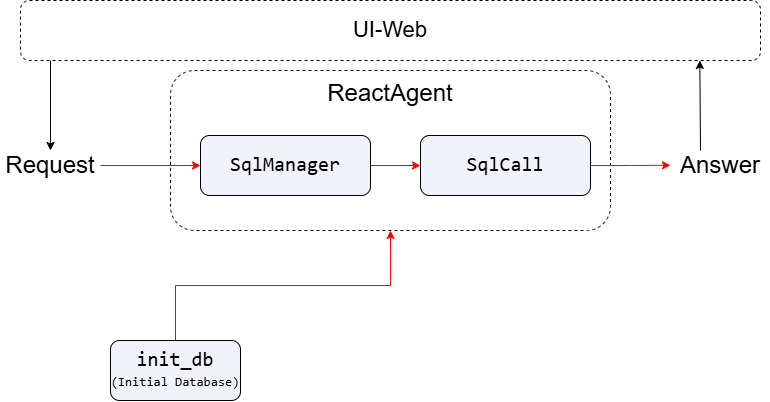
基于自然语言查询的电商数据库智能问答系统。系统通过将自然语言问题自动转换为SQL查询,并执行获取结果。
首先,初始化SQLite数据库。接着,构建SqlManager和SqlCall组件,将LLM与数据库结构信息(TABLE_INFO)绑定,使LLM能够理解表结构并生成准确的SQL查询语句。然后,创建ReactAgent智能体,注册query_db工具,该工具接收用户的自然语言查询,通过SqlCall调用LLM生成SQL,执行查询并返回结果。
代码实现
项目依赖
确保你已安装以下依赖:
导入相关包:
import os
import sqlite3
from lazyllm import OnlineChatModule
from lazyllm.tools import fc_register, SqlManager, SqlCall, ReactAgent
步骤详解
Step 1: 初始化数据库
定义数据库名称、表结构和示例数据。 TABLE_INFO:定义了名为 orders 的数据表结构,包含订单ID、产品ID、类别、价格、数量、成本价和订单日期等7个字段,其中订单ID为主键,数据类型明确。 SAMPLE_DATA:提供了 orders 表的真实示例记录,覆盖了智能手机、笔记本和电视三类商品,展示了具体的数值与日期样本。
DB_NAME = 'ecommerce.db'

TABLE_INFO = {
    'tables': [{
        'name': 'orders',
        'comment': 'Order data',
        'columns': [
            {'name': 'order_id', 'data_type': 'Integer', 'comment': 'Order ID', 'is_primary_key': True},
            ...
        ]
    }]
}

SAMPLE_DATA = {
    'orders': [
        [1, 101, 'Smartphone', 1000, 2, 600, '2025-01-01'],
        ...
    ]
}
创建示例数据库初始化函数 init_db,初始化一个名为 orders 的 SQLite 数据库表,并插入预定义的示例订单数据。若数据库文件已存在,则跳过创建,避免重复操作,确保数据安全。
def init_db(db_name: str = DB_NAME, data: dict = SAMPLE_DATA) -> None:
        '''
    Initialize the SQLite database.

    This function creates a database with a single table 'orders',
    and populates it with predefined sample data. If the database already exists,
    no changes are made.
    '''
    if os.path.exists(db_name):
        return

    conn = sqlite3.connect(db_name)
    cursor = conn.cursor()

    cursor.execute('''
    CREATE TABLE IF NOT EXISTS orders (
        order_id INT PRIMARY KEY,
        product_id INT,
        product_category TEXT,
        product_price DECIMAL(10, 2),
        quantity INT,
        cost_price DECIMAL(10, 2),
        order_date DATE
    )
    ''')

    sample_orders = data.get('orders', [])
    if sample_orders:
        cursor.executemany('''
        INSERT INTO orders (order_id, product_id, product_category, product_price, quantity, cost_price, order_date)
        VALUES (?, ?, ?, ?, ?, ?, ?)
        ''', sample_orders)

    conn.commit()
    conn.close()
Step 2: 注册 SQL 查询工具
使用 @fc_register("tool") 注册 query_db 工具,实现自然语言到 SQL 的查询功能。
sql_llm = OnlineChatModule()

@fc_register('tool')
def query_db(user_query: str, db_name: str = DB_NAME, tables_info: dict = TABLE_INFO) -> str:
    '''
    General SQL Query Tool for any database and tables.

    Args:
        user_query (str): User's natural language query.
        db_name (str, optional): SQLite database file. Defaults to DB_NAME.
        tables_info (dict, optional): Table structure info. Defaults to TABLE_INFO.

    Returns:
        str: SQL query result.
    '''
    sql_manager = SqlManager(
        'sqlite', None, None, None, None,
        db_name=db_name, tables_info_dict=tables_info
    )
    sql_call = SqlCall(sql_llm, sql_manager, use_llm_for_sql_result=False)

    return sql_call(user_query)
-
说明:
SqlManager管理数据库和表信息。对于远程数据库,如 PostgreSQL/MySQL,需要填写 user、password、host 和 port。此处示例为本地数据库,填 None 即可。SqlCall执行用户查询。use_llm_for_sql_result=False表示直接返回 SQL 执行结果,不用 LLM 二次加工。
Step 3: 构建 ReactAgent 并循环交互
使用ReactAgent调用我们定义好的llm以及tools。
llm = OnlineChatModule()
tools = ['query_db']

if __name__ == '__main__':
    init_db(DB_NAME, SAMPLE_DATA)

    user_input = 'Show the total profit for each product category, sorted from highest to lowest.'
    agent = ReactAgent(llm, tools)
    answer = agent(user_input)
    print('Answer:\n', answer)
完整代码
点击展开/折叠 Python代码
import os
import sqlite3
from lazyllm import OnlineChatModule
from lazyllm.tools import fc_register, SqlManager, SqlCall, ReactAgent

DB_NAME = 'ecommerce.db'

TABLE_INFO = {
    'tables': [{
        'name': 'orders',
        'comment': 'Order data',
        'columns': [
            {'name': 'order_id', 'data_type': 'Integer', 'comment': 'Order ID', 'is_primary_key': True},
            {'name': 'product_id', 'data_type': 'Integer', 'comment': 'Product ID'},
            {'name': 'product_category', 'data_type': 'String', 'comment': 'Product category'},
            {'name': 'product_price', 'data_type': 'Decimal', 'comment': 'Product price'},
            {'name': 'quantity', 'data_type': 'Integer', 'comment': 'Quantity purchased'},
            {'name': 'cost_price', 'data_type': 'Decimal', 'comment': 'Cost price'},
            {'name': 'order_date', 'data_type': 'Date', 'comment': 'Order date'},
        ]
    }]
}

SAMPLE_DATA = {
    'orders': [
        [1, 101, 'Smartphone', 1000, 2, 600, '2025-01-01'],
        [2, 102, 'Smartphone', 1200, 1, 700, '2025-01-02'],
        [3, 103, 'Laptop', 5000, 1, 3500, '2025-01-03'],
        [4, 104, 'Laptop', 4500, 3, 3000, '2025-01-04'],
        [5, 105, 'TV', 3000, 1, 1800, '2025-01-05'],
        [6, 106, 'TV', 3500, 2, 2000, '2025-01-06']
    ]
}

def init_db(db_name: str = DB_NAME, data: dict = SAMPLE_DATA) -> None:
    '''
    Initialize the SQLite database.

    This function creates a database with a single table 'orders',
    and populates it with predefined sample data. If the database already exists,
    no changes are made.
    '''
    if os.path.exists(db_name):
        return

    conn = sqlite3.connect(db_name)
    cursor = conn.cursor()

    cursor.execute('''
    CREATE TABLE IF NOT EXISTS orders (
        order_id INT PRIMARY KEY,
        product_id INT,
        product_category TEXT,
        product_price DECIMAL(10, 2),
        quantity INT,
        cost_price DECIMAL(10, 2),
        order_date DATE
    )
    ''')

    sample_orders = data.get('orders', [])
    if sample_orders:
        cursor.executemany('''
        INSERT INTO orders (order_id, product_id, product_category, product_price, quantity, cost_price, order_date)
        VALUES (?, ?, ?, ?, ?, ?, ?)
        ''', sample_orders)

    conn.commit()
    conn.close()

sql_llm = OnlineChatModule()

@fc_register('tool')
def query_db(user_query: str, db_name: str = DB_NAME, tables_info: dict = TABLE_INFO) -> str:
    '''
    General SQL Query Tool for any database and tables.

    Args:
        user_query (str): User's natural language query.
        db_name (str, optional): SQLite database file. Defaults to DB_NAME.
        tables_info (dict, optional): Table structure info. Defaults to TABLE_INFO.

    Returns:
        str: SQL query result.
    '''
    sql_manager = SqlManager(
        'sqlite', None, None, None, None,
        db_name=db_name, tables_info_dict=tables_info
    )
    sql_call = SqlCall(sql_llm, sql_manager, use_llm_for_sql_result=False)

    return sql_call(user_query)

llm = OnlineChatModule()
tools = ['query_db']

if __name__ == '__main__':
    init_db(DB_NAME, SAMPLE_DATA)

    user_input = 'Show the total profit for each product category, sorted from highest to lowest.'
    agent = ReactAgent(llm, tools)
    answer = agent(user_input)
    print('Answer:\n', answer)
示例查询(英文)
How many total orders are there?
Which product category has the highest sales?
What is the average revenue per order?
What is the total profit for laptops in January?
Show the total profit for each product category, sorted from highest to lowest.
示例运行结果
Please enter your query: Show the total profit for each product category, sorted from highest to lowest.
Answer: The total profit for each product category, sorted from highest to lowest, is as follows:
- Laptop: $6000
- TV: $4200
- Smartphone: $1300
注意:实际结果会根据你数据库中的数据返回。
小贴士
- 可以根据实际场景修改
TABLE_INFO和SAMPLE_DATA,快速扩展数据库表。 - 可以注册更多 SQL 工具,实现针对不同表的查询。
ReactAgent支持多轮交互,自动选择最合适的工具执行查询。- 可结合 embedding 或自然语言理解模块,实现更智能的查询解析。
结语
本教程展示了如何使用 LazyLLM 构建一个 动态 SQL 查询 Agent,适用于电商订单分析、财务统计、数据可视化等场景。通过组合 SqlManager、SqlCall 与 ReactAgent,你可以快速搭建智能数据查询系统。