自适应工具调用智能 Agent
本项目展示了如何使用 LazyLLM 构建一个智能 Agent,自动筛选匹配的工具函数,并基于自然语言查询选择最合适的工具完成回答。
通过本节您将学习到 LazyLLM 的以下要点
- 如何通过工具函数的 Docstring 和 Query 的相似度筛选合适的工具。
- 如何使用 ToolManager 获取注册工具的名称与描述。
- 如何结合 TrainableModule 实现向量表示与余弦相似度计算。
- 如何使用 ReactAgent 自动选择和调用工具来完成复杂任务。
设计思路
为了能实现智能工具调用与多步推理,我们打算使用语义筛选 + ReactAgent 协同机制。第一个阶段通过嵌入模型计算用户问题与工具描述的相似度,动态选择相关工具;第二个阶段由 ReactAgent 驱动 LLM 调用所选工具完成分步计算或任务拆解。最后将执行结果返回给用户。
综合以上想法, 我们进行如下设计:
LLM接收用户请求 → 交由嵌入模型(bge-m3)匹配高相关性工具 → 依据文本相似度确定需求工具,启动 ReactAgent(LLM + 工具链)执行推理 → 最终输出整合结果返回客户端。
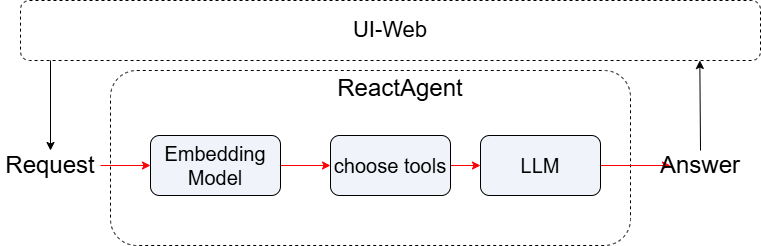
代码实现
项目依赖
确保你已安装以下依赖:
导入相关包:
import json
import numpy as np
from lazyllm import OnlineChatModule,TrainableModule
from lazyllm.tools import fc_register, ToolManager, ReactAgent
功能简介
- 支持使用 向量相似度 自动筛选与用户
query最相关的工具函数。 - 基于函数的 docstring 自动判断工具是否相关。
- 调用匹配的工具由
ReactAgent进行自动执行。
步骤详解
Step 1: 相似度计算
定义余弦相似度函数与基于 bge-m3 的向量编码方式:
def cosine(x, y):
    """Calculate cosine similarity between two vectors"""
    product = np.dot(x, y)
    norm = np.linalg.norm(x) * np.linalg.norm(y)
    return product / norm if norm != 0 else 0.0
def calculate_similarity(query, docstring, embed=None):
    """Embed query and docstring, then compute similarity"""
    if embed is None:
        embed = TrainableModule('bge-m3').start()

    embs = json.loads(embed([query, docstring]))
    return cosine(embs[0], embs[1])
-
参数说明:
-
query:用户输入的问题。 docstring:每个工具函数的注释文本。embed:用于编码文本的TrainableModule(可复用避免重复初始化)。
Step 2: 工具函数注册
使用 @fc_register("tool") 注册多个工具函数,并通过 docstring 提供函数描述(后续用于相似度匹配和作为Agent工具调用的基础):
@fc_register("tool")
def multiply(a: int, b: int) -> int:
    '''
    Multiply two integers.

    Args:
        a (int): The first number.
        b (int): The second number.

    Returns:
        int: The product of a and b.
    '''
    return a * b
@fc_register("tool")
def add(a: int, b: int) -> int:
    '''
    Add two integers.

    Args:
        a (int): The first number.
        b (int): The second number.

    Returns:
        int: The sum of a and b.
    '''
    return a + b
@fc_register("tool")
def generate_random_animal_name():
    '''
    Generates a random fictional animal name by combining a color and an animal.

    Args:
        None

    Returns:
        str: A fictional animal name like "Blue Lizard" or "Golden Ferret".
    '''
    import random

    colors = ['Crimson', 'Azure', 'Golden', 'Emerald', 'Ivory']
    animals = ['Owl', 'Ferret', 'Lizard', 'Panther', 'Koala']
    return f"{random.choice(colors)} {random.choice(animals)}"
Step 3: 获取工具与描述映射
使用 ToolManager 加载注册的工具,并构建工具名与其 docstring 的映射:
manager = ToolManager(tools=["add", "multiply", "generate_random_animal_name"])

tool_doc_map = {
    tool.name: tool.description.strip() if tool.description else ""
    for tool in manager.all_tools
}
Step 4: 相似度筛选工具
定义一个过滤函数,只保留相似度大于阈值(默认 0.4)的工具:
def filter_tools_by_similarity(query, embed, threshold=0.4):
    selected = []
    for name, doc in tool_doc_ma    p.items():
        score = calculate_similarity(query, doc, embed)
        print(f"[DEBUG] Tool: {name} | Similarity: {score:.3f}")
        if score >= threshold:
            selected.append(name)
    return selected
示例输出:
-
参数说明:
-
threshold:最低相似度阈值,避免误调用无关工具。 - 返回:可调用的工具名称列表。
Step 5: 构建 Agent 并执行
在主流程中,结合 LLM 与筛选出的工具,执行推理任务:
if __name__ == "__main__":
    embed = TrainableModule('bge-m3').start()
    llm = OnlineChatModule(source="sensenova", model="DeepSeek-V3")

    query = "What is 20+(2*4)? Calculate step by step."
    tools = filter_tools_by_similarity(query, embed)

    if tools:
        agent = ReactAgent(llm, tools)
        res = agent(query)
    else:
        res = llm(query)

    print(res)
注意:当没有满足条件的工具时,会默认调用大模型。
完整代码
点击展开完整代码
import json
import numpy as np
from lazyllm import OnlineChatModule,TrainableModule
from lazyllm.tools import fc_register, ToolManager, ReactAgent

def cosine(x, y):
    """Calculate cosine similarity between two vectors"""
    product = np.dot(x, y)
    norm = np.linalg.norm(x) * np.linalg.norm(y)
    return product / norm if norm != 0 else 0.0
def calculate_similarity(query, docstring, embed=None):
    """Embed query and docstring, then compute similarity"""
    if embed is None:
        embed = TrainableModule('bge-m3').start()

    embs = json.loads(embed([query, docstring]))
    return cosine(embs[0], embs[1])
@fc_register("tool")
def multiply(a: int, b: int) -> int:
    '''
    Multiply two integers.

    Args:
        a (int): The first number.
        b (int): The second number.

    Returns:
        int: The product of a and b.
    '''
    return a * b
@fc_register("tool")
def add(a: int, b: int) -> int:
    '''
    Add two integers.

    Args:
        a (int): The first number.
        b (int): The second number.

    Returns:
        int: The sum of a and b.
    '''
    return a + b
@fc_register("tool")
def generate_random_animal_name():
    '''
    Generates a random fictional animal name by combining a color and an animal.

    Args:
        None

    Returns:
        str: A fictional animal name like "Blue Lizard" or "Golden Ferret".
    '''
    import random

    colors = ['Crimson', 'Azure', 'Golden', 'Emerald', 'Ivory']
    animals = ['Owl', 'Ferret', 'Lizard', 'Panther', 'Koala']
    return f"{random.choice(colors)} {random.choice(animals)}"
manager = ToolManager(tools=["add", "multiply"])

tool_doc_map = {
    tool.name: tool.description.strip() if tool.description else ""
    for tool in manager.all_tools
}
def filter_tools_by_similarity(query, embed, threshold=0.4):
    selected = []
    for name, doc in tool_doc_map.items():
        score = calculate_similarity(query, doc, embed)
        print(f"[DEBUG] Tool: {name} | Similarity: {score:.3f}")
        if score >= threshold:
            selected.append(name)
    return selected
if __name__ == "__main__":
    embed = TrainableModule('bge-m3').start()
    llm = OnlineChatModule(source="sensenova", model="DeepSeek-V3")

    query = "What is 20+(2*4)? Calculate step by step."
    tools = filter_tools_by_similarity(query, embed)

    if tools:
        agent = ReactAgent(llm, tools)
        res = agent(query)
    else:
        res = llm(query)

    print(res)
示例运行结果
示例输入:
示例输出:
Thought: The current language of the user is: English. I need to calculate the expression step by step.

Answer:
Let's calculate \(20 + (2 \times 4)\) step by step:
1. First, perform the multiplication inside the parentheses: \(2 \times 4 = 8\).
2. Then, add the result to 20: \(20 + 8 = 28\).

So, the final answer is **28**.
输出 debug 日志:
[DEBUG] Tool: add | Similarity: 0.478
[DEBUG] Tool: multiply | Similarity: 0.453
[DEBUG] Tool: generate_random_animal_name | Similarity: 0.361
调用了前两个相关工具并完成回答。
小贴士
- 可以添加更多工具函数,只要有合理的 docstring 即可参与筛选。
- 你可以使用自己的 embedding 模型替换
bge-m3。 threshold可以根据实际需求微调,值越高则匹配越严格。
结语
该项目展示了如何使用 LazyLLM 构建一个动态选择工具、智能调用的 Agent,适用于多种场景如自动计算、知识问答、RAG 推理等。欢迎继续扩展你的工具集,构建强大的 AI 助手。