多模态输出Agent:图像与文本
本项目展示了如何使用 LazyLLM 构建一个使用不直接生成文本的工具来构建多模态智能体。
通过本节您将学习到 LazyLLM 的以下要点
- 如何结合 TrainableModule 调用不同模态模型。
- 如何使用 ReactAgent 自动选择和调用工具来完成复杂任务。
设计思路
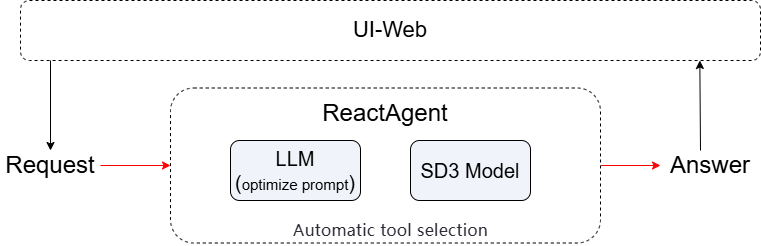
为了能实现高质量图像生成,我们打算使用“提示词优化 + 图像生成”双工具链协同机制。第一个工具负责将用户自然语言输入翻译并重写为符合 Stable Diffusion 3 Medium 要求的英文描述;第二个工具接收优化后的提示词并调用 SD3 模型生成图像。最后由 ReactAgent 自主规划执行流程。
综合以上想法,我们进行如下设计:
接收用户请求 → 发送给LLM工具生成标准英文提示词 → 将提示词传给sd3工具生成图像 → ReactAgent 自动调度两步流程 → 最终返回图像路径或结果给客户端。
代码实现
项目依赖
确保你已安装以下依赖:
功能简介
- 对用户输入进行翻译并优化,调用sd3模型生成相应图片
- 调用匹配的工具由
ReactAgent进行自动执行。
步骤详解
Step 1: 初始化图像生成模型
全局缓存 SD3 模型(避免重复加载)
Step 2: 优化用户问题,构建提示词
@fc_register("tool")
def optimize_prompt(query: str) -> str:
    """
    Translate input to English if needed, then optimize it into a high-quality,
    detailed English prompt specifically for Stable Diffusion 3 Medium (SD3-Medium).

    Args:
        query (str): User's input
    """
    system_prompt = (
        "You are an expert prompt engineer for Stable Diffusion 3 Medium (SD3-Medium). "
        "The user may give input in any language. First, translate it accurately into English if needed. "
        "Then, rewrite it as a single, fluent, natural-language English sentence or paragraph that describes the desired image in rich detail. "
        "Include: main subject, artistic style, lighting, composition, color palette, mood, and key visual elements. "
        "DO NOT use comma-separated tags, keywords, or phrases like 'masterpiece', '4k', 'best quality'. "
        "DO NOT add any prefixes, explanations, or markdown. Output ONLY the final prompt as plain text."
    )

    full_prompt = f"{system_prompt}\n\nUser input: {query}"
    llm1 = lazyllm.OnlineChatModule()
    result = llm1(full_prompt)
    return result
Step 3: 使用 Stable Diffusion 生成图像
@fc_register("tool")
def generate_image(context: str) -> str:
    """
    Generate an image using Stable Diffusion 3 Medium based on an English prompt.
    Args:
        context (str): A detailed, natural-language English prompt optimized for SD3-Medium, describing the image to generate.
    """
    global _sd3_model
    if _sd3_model is None:
        _sd3_model = lazyllm.TrainableModule("stable-diffusion-3-medium").start()
    return _sd3_model(context)
Step 4: 使用Agent
显式注册工具,并使用ReactAgent构建智能体
llm = lazyllm.TrainableModule("Qwen3-32B").start()
tools = ["optimize_prompt",  "generate_image"]
agent = lazyllm.ReactAgent(llm=llm, tools=tools)
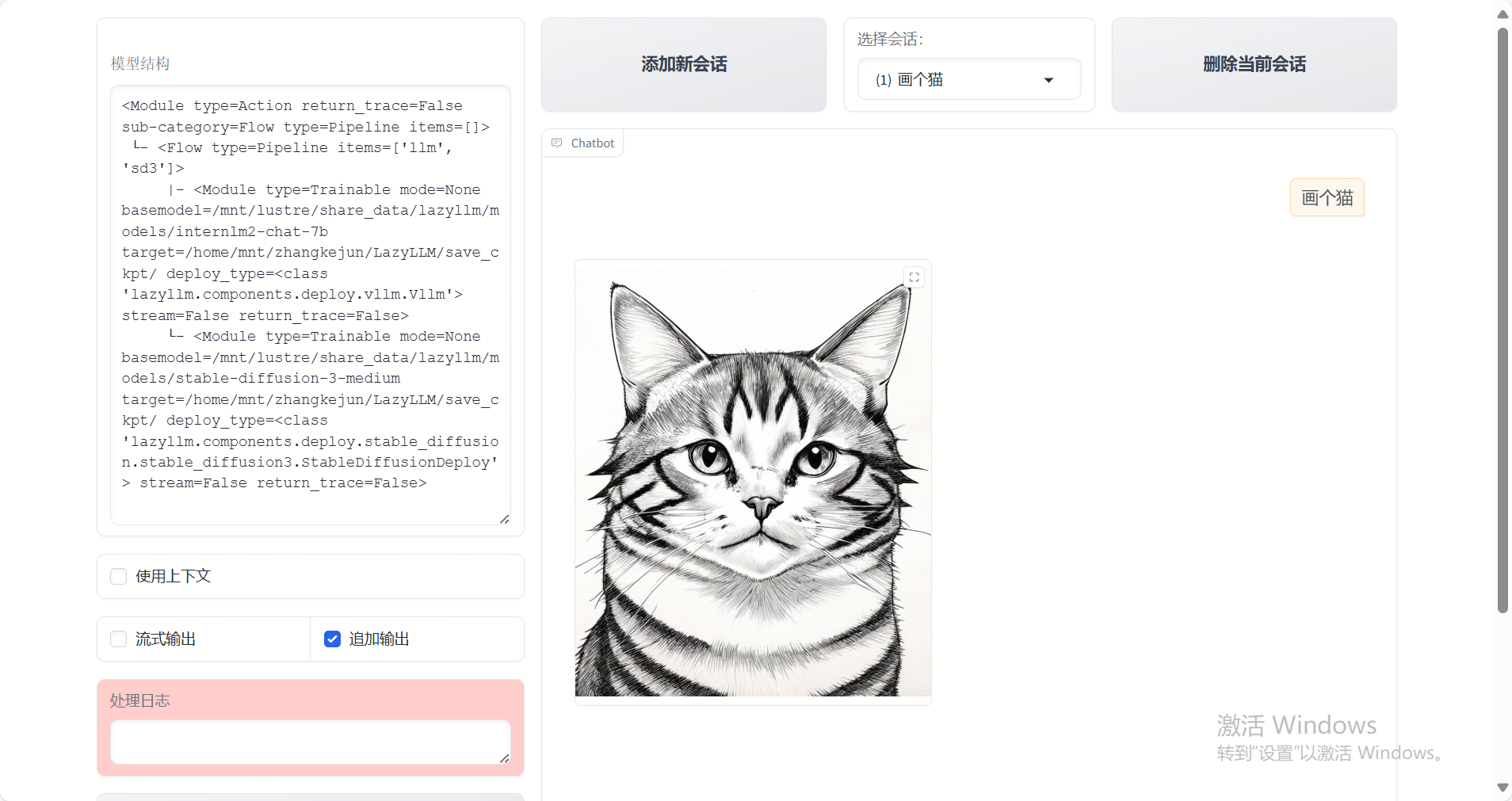
print(agent("画个猫"))
完整代码
点击展开完整代码
import lazyllm
from lazyllm import fc_register
# 全局缓存 SD3 模型(避免重复加载)
_sd3_model = None

@fc_register("tool")
def generate_image(context: str) -> str:
    """
    Generate an image using Stable Diffusion 3 Medium based on an English prompt.
    Args:
        context (str): A detailed, natural-language English prompt optimized for SD3-Medium, describing the image to generate.
    """
    global _sd3_model
    if _sd3_model is None:
        _sd3_model = lazyllm.TrainableModule("stable-diffusion-3-medium").start()
    return _sd3_model(context)
@fc_register("tool")
def optimize_prompt(query: str) -> str:
    """
    Translate input to English if needed, then optimize it into a high-quality,
    detailed English prompt specifically for Stable Diffusion 3 Medium (SD3-Medium).

    Args:
        query (str): User's input
    """
    system_prompt = (
        "You are an expert prompt engineer for Stable Diffusion 3 Medium (SD3-Medium). "
        "The user may give input in any language. First, translate it accurately into English if needed. "
        "Then, rewrite it as a single, fluent, natural-language English sentence or paragraph that describes the desired image in rich detail. "
        "Include: main subject, artistic style, lighting, composition, color palette, mood, and key visual elements. "
        "DO NOT use comma-separated tags, keywords, or phrases like 'masterpiece', '4k', 'best quality'. "
        "DO NOT add any prefixes, explanations, or markdown. Output ONLY the final prompt as plain text."
    )
    # 使用 OnlineChatModule 并强制返回纯文本
    full_prompt = f"{system_prompt}\n\nUser input: {query}"
    llm1 = lazyllm.OnlineChatModule()
    result = llm1(full_prompt)
    print(result)
    return result

llm = lazyllm.TrainableModule("Qwen3-32B").start()
tools = ["optimize_prompt",  "generate_image"]
agent = lazyllm.ReactAgent(llm=llm, tools=tools)
print(agent("画个猫"))
示例运行结果
结语
该项目展示了如何使用 LazyLLM 构建一个多模态输出的 Agent。欢迎继续扩展你的工具集,构建强大的 AI 助手。